spare wheel JAGUAR XFR 2010 1.G User Guide
[x] Cancel search | Manufacturer: JAGUAR, Model Year: 2010, Model line: XFR, Model: JAGUAR XFR 2010 1.GPages: 3039, PDF Size: 58.49 MB
Page 1786 of 3039
6. Adaptive Speed Control Indicator
The adaptive speed control system is controlled by the adaptive speed control module. Operation of the SET +/- switches on
the steering wheel will activate the system. Operation of the switches is detected by the adaptive speed control module. The
module issues a high speed CAN message to the instrument cluster which illuminates the adaptive speed control indicator, when the system is in 'follow mode', in an amber color and displays a 'SETSPEED XXX MPH / KM/H' message in the message
center. The indicator is illuminated in an amber color for a 3 second indicator check when the ignition is switched on.
7. Anti-lock Braking System (ABS) Warning Indicator
The ABS warning indicator is controlled by the ABS module. If a fault in the ABS system is detected by the ABS module, the module issues a high speed CAN message to the instrument cluster to illuminate the ABS warning indicator in an amber color and display the message 'ABS FAULT' in the instrument cluster. The indicator is illuminated in an amber color for a 3 second
indicator check when the ignition is switched on. If a fault is present when the ignition is on, the bulb will remain illuminated
after the 3 second indicator check period.
NOTES:
The 'ABS FAULT' message is not displayed in NAS markets).
If both the ABS warning indicator and the brake warning indicator illuminate simultaneously, a major fault in the brake system will have occurred.
On NAS vehicles, the ABS warning indicator is also used for parking brake operation. The NAS warning indicator does not have 'ABS' on the icon and will function as described previously for the parking brake operation of the brake warning indicator.
8. Engine Malfunction Indicator Lamp (MIL)
The MIL warning indicator is controlled by the ECM and illuminated by the instrument cluster on receipt of a message on the high speed CAN bus from the ECM. The indicator is illuminated in an amber color for a 3 second indicator check when the ignition is switched on.
If the MIL remains illuminated after the engine is started or illuminates when driving, a fault is present and must be
investigated at the earliest opportunity. Illumination of the MIL warning indicator alerts the driver to an OBD (on-board
diagnostic) fault which will cause excessive emissions output. This may relate to either an engine management system fault or
a transmission.
9. Tire Pressure Monitoring System (TPMS) Warning Indicator
The TPMS warning indicator is illuminated by the instrument cluster on receipt of a medium speed CAN message from the TPMS module. The indicator is illuminated in an amber color for a 3 second indicator check when the ignition is switched on.
If the indicator illuminates and is accompanied by the message 'TYRE PRESSURE SYSTEM FAULT' in the message center, then a
TPMS fault has occurred. If the indicator illuminates and accompanied by a different message, then a low tire pressure has
been detected, a spare wheel has been fitted or a TPMS sensor has failed.
10. Airbag Warning Indicator
The airbag warning indicator is controlled by the instrument cluster. The indicator is illuminated in an amber color for the 3
second indicator check when the ignition is switched on. The indicator remains illuminated after the 3 second period has
expired until the instrument cluster receives a turn off message on the high speed CAN bus from the RCM (restraints control module).
11. Front Fog Lamp Indicator
The green colored front fog lamp indicator is controlled by the CJB and illuminated by the instrument cluster on receipt of a front fog lamp on message on the medium speed CAN bus from the CJB. The indicator is illuminated for as long as the front fog lamps are active. The front fog lamp indicator is not subject to the 3 second indicator check when the ignition is switched
on.
12. Dynamic Stability Control (DSC) Indicator
The DSC warning lamp is controlled by the ABS module and illuminated by the instrument cluster in response to messages received on the high speed CAN bus. The indicator is illuminated in an amber color for the 3 second indicator check when the ignition is switched on. The DSC warning indicator, are permanently illuminated in an amber color if the instrument cluster
receives a high speed CAN message from the ABS module relating to one of the following faults:
Traction control fault
Yaw control fault
Engine drag torque control fault
Panic Brake Assist (PBA) fault
Signal missing relating to either traction control active, yaw control active or DSC switch input.
The above faults will also generate an applicable DSC and ABS warning message in the message center. The DSC warning
indicator will flash at 2 Hz for if the traction control or yaw control is active when the DSC system is enabled. If the DSC
system is switched off, the warning indicator will be permanently illuminated until the DSC system is subsequently
re-activated.
13. Safety Belt Warning Indicator
The safety belt warning indicator operates for both the driver and passenger safety belts. The warning indicator is controlled by
Page 1824 of 3039

Message Other Warnings Reason Action APPLY FOOT AND
PARK BRAKE Amber warning triangle
illuminated in LCD. The battery has been disconnected or
power supply interrupted to the parking
brake module. Apply foot brake and parking brake to
reset the parking brake module. CANNOT APPLY
PARK BRAKE
Brake warning
indicator flashing.
Red warning triangle
illuminated in LCD. NOTE: In certain
markets the brake
warning indicator
does not flash. A fault is present in the parking brake
system and the parking brake cannot be
applied. A fault has occurred in the parking
brake system. Interrogate the parking
brake module for faults and diagnose
using an approved Jaguar Diagnostic
System. CHECK TYRE
PRESSURE
Tire Pressure
Monitoring System
(TPMS) warning
indicator
illuminated.
Vehicle graphic
displaying tire
location. A tire pressure has decreased to below
the warning threshold. Check tires for punctures and re-inflate
to correct pressures. TYRE NOT
MONITORED
Tire Pressure
Monitoring System
(TPMS) warning
indicator
illuminated.
Vehicle graphic
displaying tire
location.
One or more tire pressure
sensors have developed a fault.
A temporary spare wheel or a
wheel without a sensor has been
fitted at the displayed position.
An unapproved accessory may be
interfering with the TPMS.
Check for local RF interference.
A wheel has been fitted without
a TPMS sensor fitted (space
saver spare wheel).
TPMS sensor has developed a
fault or the battery voltage is
low.
A fault has occurred in the
TPMS. Interrogate the TPMS
module for faults and diagnose
using an approved Jaguar
Diagnostic System. CHECK ALL TYRE
PRESSURES
Tire Pressure
Monitoring System
(TPMS) warning
indicator
illuminated.
Amber warning
triangle illuminated
in LCD. Vehicle graphic
displaying tire
location. One or more tire pressures have
decreased to below the warning
threshold.
Check tires for punctures and
re-inflate to correct pressures.
Message may be displayed
when TPMS is learning position
of a new sensor. TYRE PRESSURE
SYSTEM FAULT
Tire Pressure
Monitoring System
(TPMS) warning
indicator
illuminated.
Amber warning
triangle illuminated
in LCD.
Wheels and tires without sensors
have been fitted to the vehicle.
TPMS sensors have become
defective.
An unapproved accessory may be
interfering with the TPMS.
A fault is present in the TPMS
system and the tire pressures
cannot be monitored. A fault has occurred in the TPMS.
Interrogate the TPMS module for faults
and diagnose using an approved Jaguar
Diagnostic System. TYRE PRESSURE
LOW FOR SPEED
Tire Pressure
Monitoring System
(TPMS) warning
indicator
illuminated.
Amber warning
triangle illuminated
in LCD. TPMS has detected current tire
pressures are too low for sustained high
speed driving Check tire pressures and inflate to the
correct pressures if necessary. TYRE PRESSURE
SYSTEM FAULT
Tire Pressure
Monitoring System
(TPMS) warning
indicator
illuminated.
Amber warning
triangle illuminated
Wheels and tires without sensors
have been fitted to the vehicle.
TPMS sensors have become
defective.
An unapproved accessory may be
interfering with the TPMS.
A fault is present in the TPMS A fault has occurred in the TPMS.
Interrogate the TPMS module for faults
and diagnose using an approved Jaguar
Diagnostic System.
Page 1851 of 3039
Mechanical Electrical Parking aid control module
Parking aid sounder
Audio system
4. If an obvious cause for an observed or reported concern is found, correct the cause (if possible) before proceeding to
the next step
5. If the cause is not visually evident, check for diagnostic trouble codes (DTCs) and refer to the DTC index
Symptom Chart
CAUTION: Do not apply any grease based products to any parking aid system connector or pins
NOTES:
Please note if this diagnosis is being carried out on a vehicle without a hard wired parking aid speaker, ensure the in car
infotainment system is fully functional and configured correctly
Parking aid sensors that are painted incorrectly and not to the manufacturer standards, will not be considered in any
warranty claim
Symptom Possible Causes Action
NOTE:
Permanent/Intermittent fault
Parking aid system not
functioning correctly. (No
DTCs displayed)
Front or rear parking aid
sensors dirty
Front or rear parking aid
sensor position incorrect
Front or rear parking aid
sensor incorrectly installed
Front or rear parking aid
sensor coupling rings not
installed/incorrectly installed
Parking aid control module or
parking aid sensor connector
not fully latched
Parking aid sensors painted
without being removed from
the bumper assembly or not
painted to the manufacturer
specification
Clean front or rear parking aid sensors
Check the front or parking aid rear sensor position
Check the front or rear parking aid sensor are
correctly installed
Check front or rear parking aid sensor coupling
rings are installed/installed correctly
Ensure all parking aid system connectors are
correctly latched
Remove parking aid sensor and ensure correctly
painted parking aid sensor is installed
- Parking aid sensors that are painted
incorrectly and not to the manufacturer
standards, will not be considered in any
warranty claim
NOTE:
Permanent/Intermittent fault
Parking aid system not
functioning correctly. (No
DTCs displayed). System
characteristics or
environmental effects
Parking aid sensors incorrectly
mounted
Incorrect vehicle ride height
Dirty parking aid sensor face.
Ice/snow covered sensor.
Debris trapped between
parking aid sensor and
parking aid sensor body.
Heavy rain or water splash
from the ground
Non standard, bumper,
exhausts/tailpipes, tow bar or
external spare wheel
mounting
Area around vehicle is not
clear of obstacles such as
channels, gutters or other
items on the ground
Exhaust gas and warm air
clouds creating ghost echoes
Vehicle not on level ground or
next to a gradient
Parking aid sensors painted
without being removed from
the bumper assembly or not
painted to the manufacturer
specification
Ensure the sensors are a tight fit in the holder and
locked. Ensure the sensors are central in the holder
and bumper and at the correct angle
Ensure vehicle ride height is within the specified
limits. Rectify as required
Clean the sensor face as required. Defrost the
sensor and dry as required. Clear any debris from
the sensor and holder as required. Water flowing
over the sensor is a system limitation. (no action
required)
Check for non standard, bumper, exhausts/tailpipe,
tow bar or external spare wheel mounting that may
be being detected by the parking aid system.
Rectify as required
Ensure the area around the vehicle is clear of any
obstacles, move the vehicle to a suitable area
before continuing diagnosis
Ensure no exhaust gas or warm area clouds are in
the area around the parking aid sensor detection
range
Ensure the vehicle is on level ground and clear of
any ramps, potholes or speed bumps, move the
vehicle to a suitable area before continuing
diagnosis
Remove parking aid sensor and ensure correctly
painted parking aid sensor is installed
- Parking aid sensors that are painted
incorrectly and not to the manufacturer
standards, will not be considered in any
warranty claim
Page 1885 of 3039

is operated to crank the engine. The GWM is connected to the ABS (Anti-lock Brake System) control module via the high speed
CAN bus. With the vehicle stationary and the engine off after an ECO engine stop, when the driver releases the brake pedal
the ABS control module senses the reduction in brake pressure. This change of brake pressure state is sent as a high speed
CAN message which is received by the GWM and the ECM. The GWM reacts within 105ms to instruct the DBM via the LIN bus
to operate the two contactors in the DBJB to supply the sensitive loads from the secondary battery and supply the TSS motor
direct from the primary battery.
When the engine is running and the generator is supplying power to the vehicle systems, the GWM again instructs the DBM to
operate the two contactors in the DBJB to supply all vehicle systems from the primary battery and the generator and to isolate
the secondary battery.
Secondary Battery Charging
The DBM also controls the charging of the secondary battery. The GWM contains electrical load management software and
monitors both batteries for their state of charge. The primary battery is monitored by the BMS control module which is
connected to the DBM via the LIN bus. The DBM communicates the primary battery condition to the GWM via a LIN bus
connection. The GWM sends a signal to the DBM via the LIN bus to instruct it to apply charging from the generator to the
secondary battery when required. The contactor 2 is closed by the DBJB to complete the secondary battery circuit, and the
generator output is applied to the secondary battery to charge it.
The generator output is controlled by the GWM which monitors and controls the electrical load management system. The
generator is connected to the GWM by a LIN bus allowing the GWM to control the output of the generator to maintain electrical
system load requirements and battery charging.
Electrical Load Management
The electrical load management is controlled by the GWM and the BMS control module.
The GWM will monitor the vehicle system power loads before and during an ECO engine stop.
Before an ECO engine stop, the GWM will transmit a signal to system control modules on the CAN bus to request a power save
on all electrical loads and set a minimum electrical value override. The GWM monitors the vehicle electrical loads and will
inhibit a ECO engine stop until the load current is at a value low enough to be supported by the secondary battery.
If the electrical loads cannot be reduced sufficiently, the GWM will inhibit the ECO engine stop.
When the engine is stopped after an ECO engine stop, the GWM will continue to monitor the primary battery state of charge.
If the primary or secondary battery voltage falls below 11.0V, a level which will result in degraded starting performance or
possible primary battery damage, the GWM will initiate an engine start.
System Inhibits
The ECO stop/start system is inhibited if the dual battery system is not be capable of preventing electrical loads on the
vehicle being subject to unacceptably low voltage levels during ECO stop/start operations due to a fault.
ECO stop/start inhibit monitoring of the primary battery is performed by the BMS control module. If the primary battery voltage
is too low to support an ECO stop/start, then the BMS control module will send a message to the GWM on the LIN bus to
suspend ECO stop/start.
The GWM monitors the secondary battery and the dual battery system components. Any fault found will cause the GWM to
inhibit ECO stop/start and the GWM will record a DTC (diagnostic trouble code).
Fault Diagnosis
The GWM performs passive and active diagnostics on the dual battery system to determine the status of the system
components.
Passive diagnostics can detect faults in the DBJB and can check for stuck open or closed contactors and failure of DBM
contactor command signals.
Active diagnostics is a routine to test the capability of the contactors to respond to open or close command signals sent from
the GWM to the DBM. This routine also checks the FET's (Field Effect Transistors) activate as required. (Refer to Dual Battery
Junction Box below for description of FET operation)
The GWM will also check the dual battery system components for faults in a controlled environment when the generator is
providing a charging output. This will ensure that the detection of a fault will not result in sensitive electrical loads being
subjected to low voltage which may occur during an ECO stop/start with a fault present.
The GWM will illuminate the charge warning indicator in the instrument cluster if fault is detected in the dual battery system
which will result in a degraded power supply.
If a fault is detected the GWM transmits a CAN message to inhibit ECO stop/start operation. In some cases it will record a
DTC, display a warning message in instrument cluster and also illuminate charge warning indicator.
PRIMARY BATTERY - ALL VEHICLES Component Description
The primary battery is located in a plastic tray under the luggage compartment floor in the right side of the luggage
compartment, adjacent to the spare wheel. The battery is vented via a tube which is connected with a T piece to the vent from
Page 1960 of 3039

Publi s hed: 11-May-2011
Information and Entertainment System - Speakers - Overview
Des cript ion and Operat ion
Overview
The vehi cl e has t hree l evels of audio s ys t em availabl e:
Jaguar Sound Sys temJaguar Premi um Sound Syst emBowers & W i lkins Surround Sound Sys temThe Jaguar Sound Sys tem has 8 s peakers, compri s ing an i dent ical mid-bas s and t weeter combinati on in each door. Al l
s peaker domes in this sys tem are of st andard t ext il e cons t ructi on. The s peakers are driven direct ly by the IAM (i nt egrat ed
audi o module) i nternal ampli fi er.
The Jaguar 320W Premium Sound Sys tem has 9 s peakers including mid-bas s and t weet ers in t he doors , addi ng a
s ub-woofer in the spare wheel wel l. The s peakers are driven by an Al pi ne AUD 8 ampli fier l ocat ed in t he LH (left-hand)
s ide of t he luggage compartment .
The Bowers & W i lkins 440W Surround Sound Syst em us es an Al pi ne AUD 12 amplifier, a Dolby Pro-Logi c 2 7.1 Surround
Sound Sys t em and has 14 s peakers. This layout adds a mid-range s peaker to each front door whi le ret ai ning a mid-bas s
and t weet er in each rear door. It als o adds an i ns t rument panel center s peaker, 2 s urround-effect speakers i n t he rear
parcel shelf, and has the luggage compart ment-mounted sub-woofer as the Jaguar 320W Premi um Sound Sys t em. The
s peakers are driven by an AUD 12 power ampl ifier located i n t he luggage compartment .
The main s peakers on the Jaguar 320W Premium Sound Sys t em and t he Bowers & W i lkins 440W Surround Sound Syst em
are identi fied by the bright yellow Kevl ar cons truct ed domes which are vis ibl e through the s peaker grill es. The t weeter
s peaker domes are an al uminum cons truct ion. The s ub-woofer s peakers are a text ile dome cons t ructi on.
www.JagDocs.com
Page 1964 of 3039

System Operation
The Jaguar Sound Sys tem has 8 s peakers, compri s ing an i dent ical mid-bas s and t weeter combinati on in each door. Al l
s peaker domes in this sys tem are of st andard t ext il e cons t ructi on. The s peakers are driven direct ly by the IAM (i nt egrat ed
audi o module) i nternal ampli fi er.
The Jaguar 320W Premium Sound Sys tem has 9 s peakers including mid-bas s and t weet ers in t he doors , addi ng a
s ub-woofer in the spare wheel wel l. The s peakers are driven by an Al pi ne AUD 8 ampli fier l ocat ed in t he LH s i de of the
luggage compartment .
The Bowers & W i lkins 440W Surround Sound Syst em us es an Al pi ne AUD 12 amplifier, a Dolby Pro-Logi c 2 7.1 Surround
Sound Sys t em and has 14 s peakers. This layout adds a mid-range s peaker to each front door whi le ret ai ning a mid-bas s
and t weet er in each rear door. It als o adds an i ns t rument panel center s peaker, 2 s urround-effect speakers i n t he rear
parcel shelf, and has the luggage compart ment-mounted sub-woofer as the Jaguar 320W Premi um Sound Sys t em. The
s peakers are driven by an AUD 12 power ampl ifier located i n t he luggage compartment .
The main s peakers on the Jaguar 320W Premium Sound Sys t em and t he Bowers & W i lkins 440W Surround Sound Syst em
are identi fied by the bright yellow Kevl ar cons truct ed domes which are vis ibl e through the s peaker grill es. The t weeter
s peaker domes are an al uminum cons truct ion. The s ub-woofer s peakers are a text ile dome cons t ructi on.
Page 2724 of 3039

Cooper Pegler
Burgess Hill
Sussex
RH 15 9LA
Telephone (014446) 42526
Sika Ltd
Watchmead
Welwyn Garden City
Hertfordshire
AL7 1BQ
Telephone (01707) 394444
www.sika.co.uk
SATA Spray Equipment
Minden Industrial equipment
16 Greyfriars Road
Moreton Hall
Bury St Edmunds
Suffolk
IP32 7DX
Telephone (01284) 760791
www.sata.com
Henkel Loctite Adhesives Limited
Technologies House
Wood Lane End
Hemel Hempstead
Hertfordshire
HP2 4RQ
Telephone (01442) 278000
www.loctite.co.uk
Teroson
Henkel Ltd
Apollo Court
2 Bishops Square Business Park
Hatfield
Hertfordshire
AL10 9EY
Telephone (01707) 635000
www.henkel.co.uk
Underbody sealer
Under floor areas and the front part of the spare wheel well are treated with a plastisol PVC underbody sealer. This material is
not suitable for re-treatment. When repairing areas of underbody sealer, strip the factory-applied underbody sealer back to a
suitable break point. Ensure that a clean metal surface is exposed and that the edge of the existing adheres soundly to the
panel.
Apply new underbody sealer between primer and surface paint operations. Apply seam sealer as necessary before application
of underbody sealer. Ensure that blanking plugs and grommets in the floor pan (except those used for wax injection) are fitted
before underbody sealer application. Refit any heat-fusible plugs which have been disturbed in repair with the aid of a hot air
blower, or replace with rubber grommets
CAUTION: Ensure that suspension units, wheels, tires, power unit, drive shafts, exhaust and brakes, (including all
mounting points), are shielded prior to application of fresh underbody sealer. www.JagDocs.com
Page 2941 of 3039

NOTE: The illustration may indicate either hand of the service panel, the opposite hand will be similar.
Item Description 1 Luggage compartment lid 2 Rear bumper cover 3 Rear bumper 4 Back panel 5 Rear bumper mounting L/H 6 Rear bumper mounting R/H 7 Quarter panel 8 Quarter panel lower extension 9 Rear wheelhouse outer 10 Spare wheel well 11 Rear floor side extension 12 Rear side member section 13 Rear side member closing panel section Time schedules, rear end
The following information shows the total time taken to replace single panels and complete assemblies. This time includes
removal of Mechanical, Electrical and Trim, (MET), items, plus paint times based on Metallic Clear Over Base Paint, (blends to
adjacent panels are not included)
The times shown were generated by Thatcham, (the Motor Insurance Repair Research Centre), and are to be used as a guide
only.
Single panel times
Panel Description Hours Luggage compartment lid 7.5 Rear bumper cover 6.6 Back panel 9.4 Quarter panel L/H 23.2 Quarter panel R/H 24.2 Headliner remove and install 3.3 Rear window glass remove and install 1.7 Rear subframe and rear suspension remove and install 5.2 Combination panel replacement times
The following panel combination times show the total time to remove/install body panels, MET items and paint times based on
Metallic Clear Over Base Paint process, (blends to adjacent panels are not included).
Combination panel times
Panel Description Hours Luggage compartment lid Rear bumper cover Rear bumper Quarter panel Back panel Headliner remove and install Rear window glass remove and install Total Time L/H 35.2
R/H 35.9 Combination panel times
Panel Description Hours Luggage compartment lid Rear bumper cover Rear bumper Quarter panel L/H and R/H Back panel Headliner remove and install Rear window glass remove and install Total Time 44.7 Combination panel times
Panel Description Hours Luggage compartment lid Rear bumper cover Rear bumper Quarter panel Back panel Rear wheelhouse outer Rear side member section
Page 2942 of 3039

Rear side member closing panel section Spare wheel well Rear floor side extension Rear subframe and rear suspension remove and install Headliner remove and install Rear window glass remove and install Total Time L/H 54.0
R/H 54.5 Combination panel times
Panel Description Hours Luggage compartment lid Rear bumper cover Rear bumper Quarter panel L/H and R/H Back panel Rear wheelhouse outer L/H and R/H Rear side member section L/H and R/H Rear side member closing panel section L/H and R/H Spare wheel well Rear floor side extension L/H and R/H Rear subframe and rear suspension remove and install Headliner remove and install Rear window glass remove and install Total Time 70.5 Combination panel times
Panel Description Hours Luggage compartment lid Rear bumper cover Rear bumper Quarter panel Back panel Rear side member section Rear side member closing panel section Spare wheel well Rear floor side extension Rear subframe and rear suspension remove and install Headliner remove and install Rear window glass remove and install Total Time L/H 50.1
R/H 50.2 Combination panel times
Panel Description Hours Rear bumper cover Rear bumper Back panel Spare wheel well Rear subframe and rear suspension remove and install Total Time 26.8
Page 2944 of 3039
Interior Trim and Ornamentation, Removal and Installation).
14.
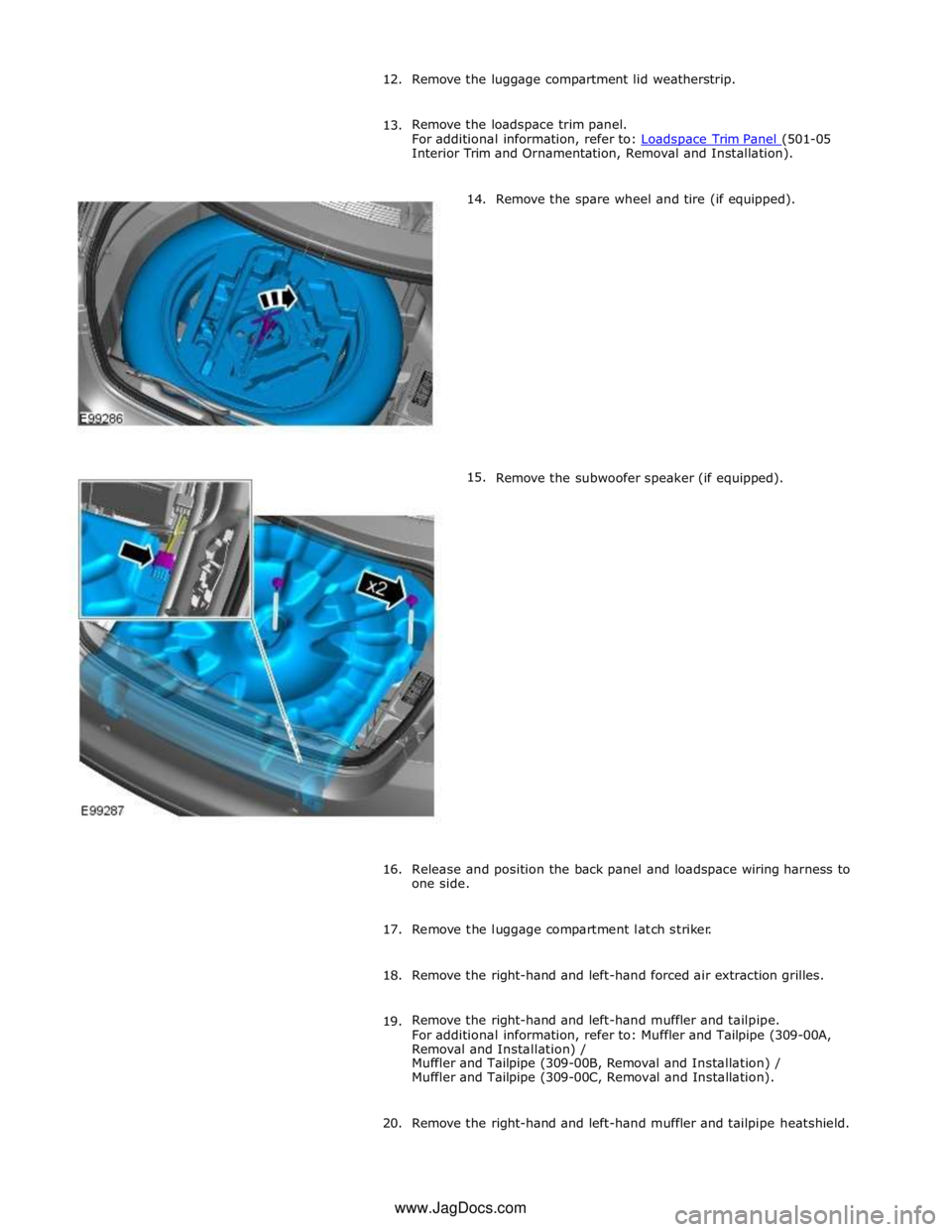
15. Remove the spare wheel and tire (if equipped).
Remove the subwoofer speaker (if equipped).
16.
Release and position the back panel and loadspace wiring harness to
one side.
17. Remove the luggage compartment latch striker.
18. Remove the right-hand and left-hand forced air extraction grilles.
19. Remove the right-hand and left-hand muffler and tailpipe.
For additional information, refer to: Muffler and Tailpipe (309-00A,
Removal and Installation) /
Muffler and Tailpipe (309-00B, Removal and Installation) /
Muffler and Tailpipe (309-00C, Removal and Installation).
20. Remove the right-hand and left-hand muffler and tailpipe heatshield. www.JagDocs.com