steering wheel JAGUAR XFR 2010 1.G Service Manual
[x] Cancel search | Manufacturer: JAGUAR, Model Year: 2010, Model line: XFR, Model: JAGUAR XFR 2010 1.GPages: 3039, PDF Size: 58.49 MB
Page 699 of 3039
beams change state. The LEDs and detectors are mounted in such a way that only one beam will change state, either to broken or restored, at any one time.
The center (straight ahead) position of the steering wheel has to be learned by the ABS module every time the ignition is switched ON. The steering angle sensor is unable to determine the center position so inputs from the yaw rate and lateral
acceleration sensor and wheel speed signals are also used by the ABS module to help it perform this process. If extreme weather conditions are present, for example ice causing extreme wheel spin or understeer/oversteer, the ABS module may not be able to determine the center position of the steering wheel. In this situation 'DSC NOT AVAILABLE' will be displayed in the
instrument cluster message center and the amber warning indicator will illuminate.
Refer to: Information and Message Center (413-08 Information and Message Center, Description and Operation).
'DSC NOT AVAILABLE' will also be displayed if the ABS module detects a steering angle sensor fault. The amber warning indicator will illuminate until the fault is rectified.
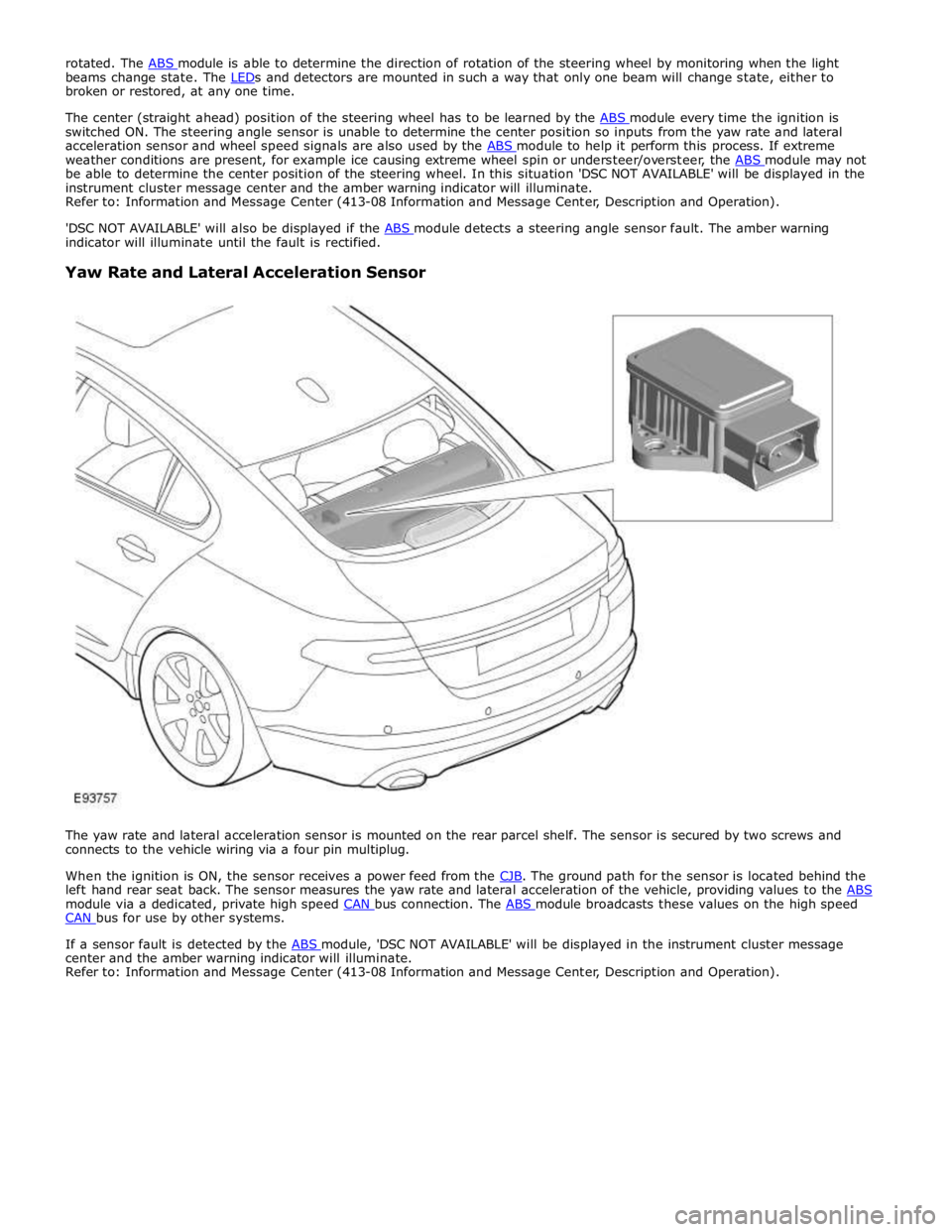
Yaw Rate and Lateral Acceleration Sensor
The yaw rate and lateral acceleration sensor is mounted on the rear parcel shelf. The sensor is secured by two screws and
connects to the vehicle wiring via a four pin multiplug.
When the ignition is ON, the sensor receives a power feed from the CJB. The ground path for the sensor is located behind the left hand rear seat back. The sensor measures the yaw rate and lateral acceleration of the vehicle, providing values to the ABS module via a dedicated, private high speed CAN bus connection. The ABS module broadcasts these values on the high speed CAN bus for use by other systems.
If a sensor fault is detected by the ABS module, 'DSC NOT AVAILABLE' will be displayed in the instrument cluster message center and the amber warning indicator will illuminate.
Refer to: Information and Message Center (413-08 Information and Message Center, Description and Operation).
Page 703 of 3039
Published: 09-Jul-2014
Anti-Lock Control - Stability Assist - Anti-Lock Control - Stability Assist
Diagnosis and Testing
Principle of Operation
For a detailed description of the Anti-Lock Control - Stability Assist system, refer to the relevant Description and Operation
sections in the workshop manual. REFER to: (206-09 Anti-Lock Control - Stability Assist)
Anti-Lock Control - Stability Assist (Description and Operation), Anti-Lock Control - Stability Assist (Description and Operation), Anti-Lock Control - Stability Assist (Description and Operation).
Inspection and Verification
CAUTION: Diagnosis by substitution from a donor vehicle is NOT acceptable. Substitution of control modules does not
guarantee confirmation of a fault, and may also cause additional faults in the vehicle being tested and/or the donor vehicle.
1. Verify the customer concern.
2. Confirm if the Anti-Lock Brake System (ABS) warning light was illuminated, or still is.
NOTE: An intermittent fault may allow the warning light to go off. This does not necessarily mean the fault is not
present. Some warnings will appear to clear when the ignition is cycled. This is often because the warning has flagged as a
result of one of the vehicle's on-board diagnostic routines having run to detect the fault. If the same routine is not run when
the ignition status is set to ON, the warning will not re-flag until the routine does run.
3. Visually inspect for obvious signs of damage and system integrity.
Visual Inspection
Mechanical Electrical
Brake fluid level
Vacuum system
Wheel speed sensor installation
Wheel speed sensor air gap
Magnetic pulse wheel(s) (damaged/contaminated)
Steering angle sensor
Yaw rate sensor and accelerometer cluster installation
Incorrect wheel or tire size
Warning light operation
Fuses
Wheel speed sensors
Connectors/Pins
Harnesses
Steering wheel rotation sensor
Yaw rate sensor and accelerometer cluster
Booster pressure sensor
Hydraulic Control Unit (HCU)
4. If an obvious cause for an observed or reported concern is found, correct the cause (if possible) before proceeding to
the next step.
5. If the cause is not visually evident check for Diagnostic Trouble Codes (DTCs) and refer to the DTC Index.
DTC Index
For a list of Diagnostic Trouble Codes (DTCs) that could be logged on this vehicle, please refer to Section 100-00.
REFER to: Diagnostic Trouble Code (DTC) Index - DTC: Anti-Lock Braking System (ABS) (100-00 General Information, Description and Operation).
Page 715 of 3039
Published: 11-May-2011
Anti-Lock Control - Stability Assist - Steering Wheel Rotation Sensor
Removal and Installation
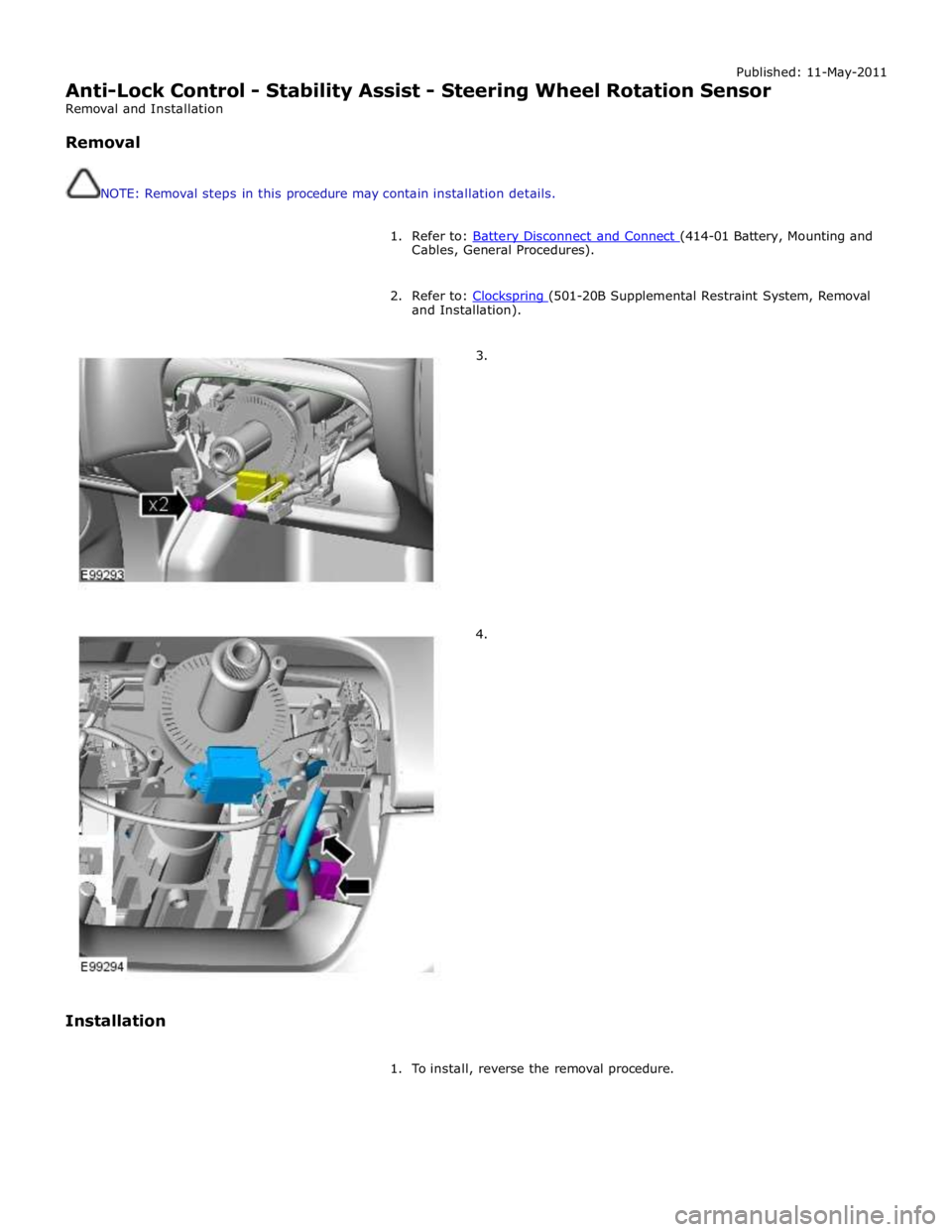
Removal
NOTE: Removal steps in this procedure may contain installation details.
1. Refer to: Battery Disconnect and Connect (414-01 Battery, Mounting and Cables, General Procedures).
2. Refer to: Clockspring (501-20B Supplemental Restraint System, Removal and Installation).
3.
4.
Installation
1. To install, reverse the removal procedure.
Page 717 of 3039

Free play (measured at the steering wheel rim) 0-6 0-0.24 Power Steering Pump Specifications
Item Specification Power steering pump relief pressure 106-114 bar Lubricants, Fluids, Sealers and Adhesives
Item Specification Power steering fluid Dexron 3
Page 719 of 3039
Symptom Possible Causes Action
Damaged fluid
cap/reservoir
Check and install a new fluid cap/reservoir as required
Loose or damaged
hoses and fittings
O-ring or Dowty seals
Tighten the hose connection or latch plate fixing to the
recommended torque.
REFER to: Specifications (211-00 Steering System - General Information, Specifications).
Check and install new components as required
Install new O-ring or Dowty seals as required
Fluid cooler
Check and install a new fluid cooler as required, refer to the new
module/component installation note at the top of the Symptom
Charts
Power steering pump
Check and install a new power steering pump as required, refer to
the new module/component installation note at the top of the
Symptom Charts Functional
Symptom Possible Causes Action
Steering wheel
misalignment
Steering not correctly centred
Check the steering alignment.
REFER to: Specifications (204-00 Suspension System - General
Information, Specifications).
Excessive free play at
steering wheel (refer to
the Steering Linkage
Inspection and Backlash
(Free play) Check in this
section)
Steering wheel loose
Check and tighten the steering
wheel retaining bolt as required.
REFER to: Specifications (211-00 Steering System - General
Information, Specifications).
Excess play in the steering linkage
Check and install new
components as required
Steering gear not correctly adjusted (causing
excessive backlash)
CAUTION: DO NOT attempt to
adjust the steering gear yoke. Failure to
follow this instruction will invalidate the
steering gear warranty
Check and install a new steering
gear as required, refer to the
new module/component
installation note at the top of
the Symptom Charts
Lower steering column universal joint pinch
bolts loose
Check and tighten the lower
steering column pinch bolts as
required.
REFER to: Specifications (211-00 Steering System - General
Information, Specifications).
Excessive wear in steering column universal
joints
Check and install a new steering
column or steering column lower
shaft as required, refer to the
new module/component
installation note at the top of
the Symptom Charts
Steering gear mounting bolts loose or
damaged
Check/tighten and install new
steering gear mounting bolts as
required.
REFER to: Specifications (211-00 Steering System - General
Information, Specifications). www.JagDocs.com
Page 720 of 3039
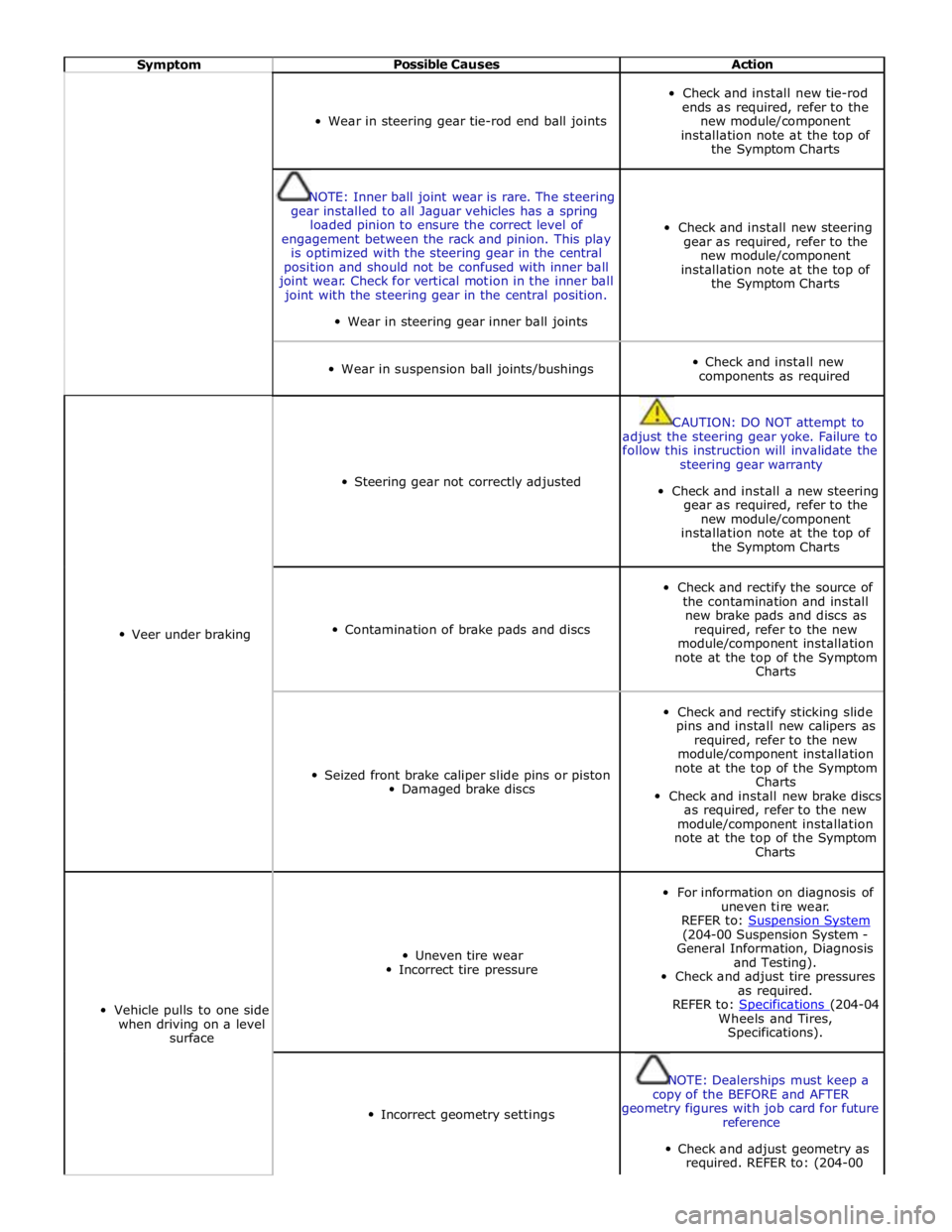
Symptom Possible Causes Action
Wear in steering gear tie-rod end ball joints
Check and install new tie-rod
ends as required, refer to the
new module/component
installation note at the top of
the Symptom Charts
NOTE: Inner ball joint wear is rare. The steering
gear installed to all Jaguar vehicles has a spring
loaded pinion to ensure the correct level of
engagement between the rack and pinion. This play
is optimized with the steering gear in the central
position and should not be confused with inner ball
joint wear. Check for vertical motion in the inner ball
joint with the steering gear in the central position.
Wear in steering gear inner ball joints
Check and install new steering
gear as required, refer to the
new module/component
installation note at the top of
the Symptom Charts
Wear in suspension ball joints/bushings
Check and install new
components as required
Veer under braking
Steering gear not correctly adjusted
CAUTION: DO NOT attempt to
adjust the steering gear yoke. Failure to
follow this instruction will invalidate the
steering gear warranty
Check and install a new steering
gear as required, refer to the
new module/component
installation note at the top of
the Symptom Charts
Contamination of brake pads and discs
Check and rectify the source of
the contamination and install
new brake pads and discs as
required, refer to the new
module/component installation
note at the top of the Symptom
Charts
Seized front brake caliper slide pins or piston
Damaged brake discs
Check and rectify sticking slide
pins and install new calipers as
required, refer to the new
module/component installation
note at the top of the Symptom
Charts
Check and install new brake discs
as required, refer to the new
module/component installation
note at the top of the Symptom
Charts
Vehicle pulls to one side
when driving on a level
surface
Uneven tire wear
Incorrect tire pressure
For information on diagnosis of
uneven tire wear.
REFER to: Suspension System (204-00 Suspension System -
General Information, Diagnosis
and Testing).
Check and adjust tire pressures
as required.
REFER to: Specifications (204-04 Wheels and Tires,
Specifications).
Incorrect geometry settings
NOTE: Dealerships must keep a
copy of the BEFORE and AFTER
geometry figures with job card for future
reference
Check and adjust geometry as
required. REFER to: (204-00
Page 721 of 3039
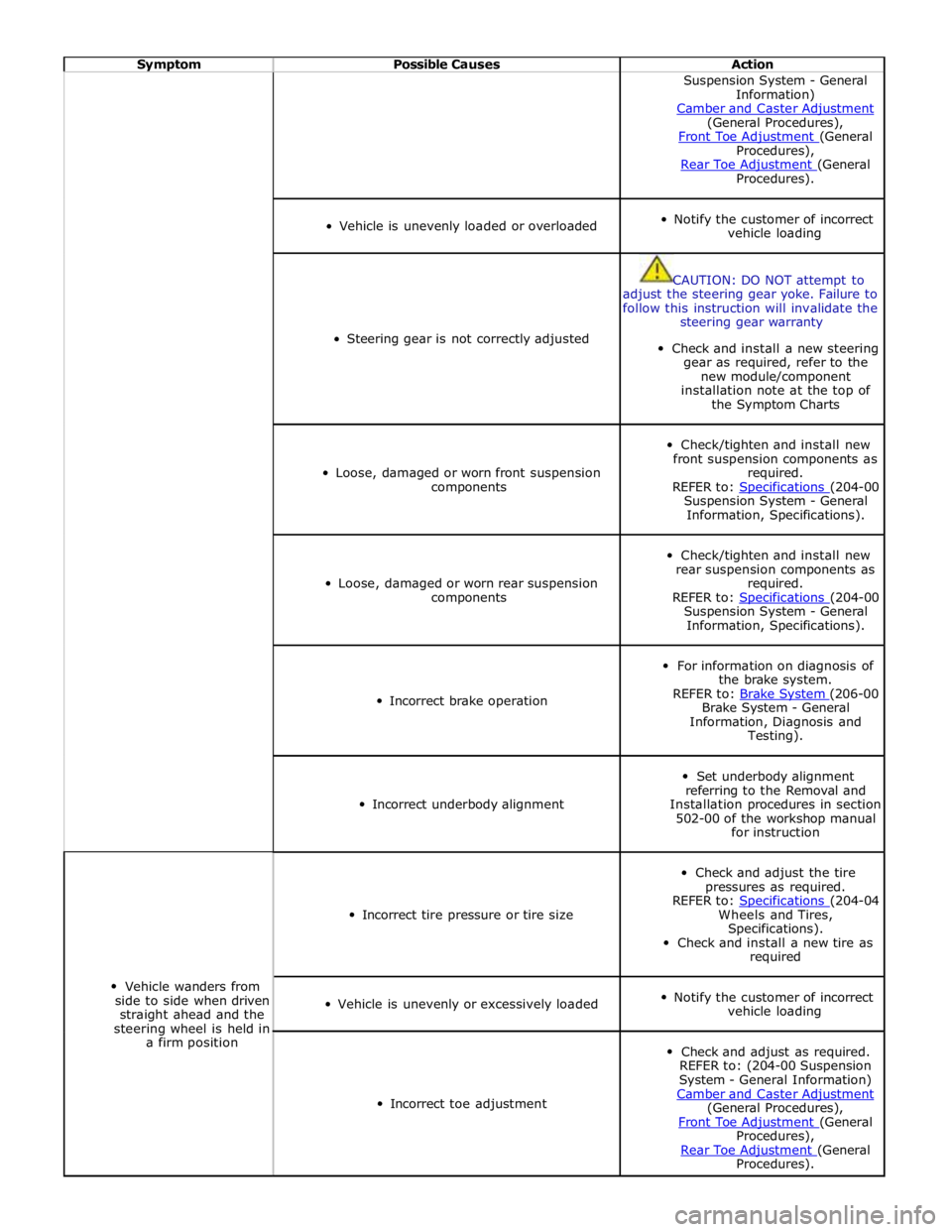
Symptom Possible Causes Action Suspension System - General
Information)
Camber and Caster Adjustment (General Procedures),
Front Toe Adjustment (General Procedures),
Rear Toe Adjustment (General Procedures).
Vehicle is unevenly loaded or overloaded
Notify the customer of incorrect
vehicle loading
Steering gear is not correctly adjusted
CAUTION: DO NOT attempt to
adjust the steering gear yoke. Failure to
follow this instruction will invalidate the
steering gear warranty
Check and install a new steering
gear as required, refer to the
new module/component
installation note at the top of
the Symptom Charts
Loose, damaged or worn front suspension
components
Check/tighten and install new
front suspension components as
required.
REFER to: Specifications (204-00 Suspension System - General
Information, Specifications).
Loose, damaged or worn rear suspension
components
Check/tighten and install new
rear suspension components as
required.
REFER to: Specifications (204-00 Suspension System - General
Information, Specifications).
Incorrect brake operation
For information on diagnosis of
the brake system.
REFER to: Brake System (206-00 Brake System - General
Information, Diagnosis and
Testing).
Incorrect underbody alignment
Set underbody alignment
referring to the Removal and
Installation procedures in section
502-00 of the workshop manual
for instruction
Vehicle wanders from
side to side when driven
straight ahead and the
steering wheel is held in
a firm position
Incorrect tire pressure or tire size
Check and adjust the tire
pressures as required.
REFER to: Specifications (204-04 Wheels and Tires,
Specifications).
Check and install a new tire as
required
Vehicle is unevenly or excessively loaded
Notify the customer of incorrect
vehicle loading
Incorrect toe adjustment
Check and adjust as required.
REFER to: (204-00 Suspension
System - General Information)
Camber and Caster Adjustment (General Procedures),
Front Toe Adjustment (General Procedures),
Rear Toe Adjustment (General Procedures).
Page 722 of 3039
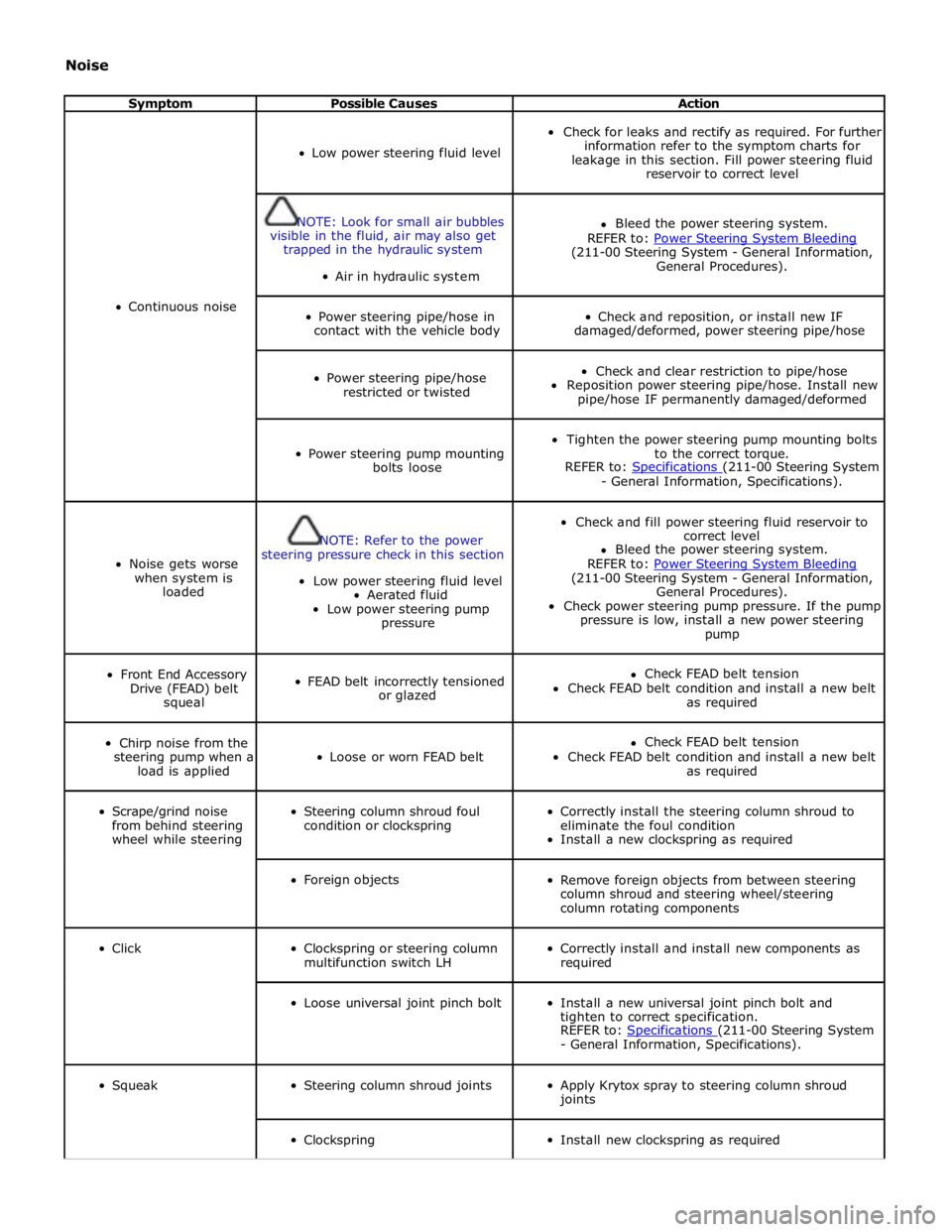
Noise
Symptom Possible Causes Action
Continuous noise
Low power steering fluid level
Check for leaks and rectify as required. For further
information refer to the symptom charts for
leakage in this section. Fill power steering fluid
reservoir to correct level
NOTE: Look for small air bubbles
visible in the fluid, air may also get
trapped in the hydraulic system
Air in hydraulic system
Bleed the power steering system.
REFER to: Power Steering System Bleeding (211-00 Steering System - General Information,
General Procedures).
Power steering pipe/hose in
contact with the vehicle body
Check and reposition, or install new IF
damaged/deformed, power steering pipe/hose
Power steering pipe/hose
restricted or twisted
Check and clear restriction to pipe/hose
Reposition power steering pipe/hose. Install new
pipe/hose IF permanently damaged/deformed
Power steering pump mounting
bolts loose
Tighten the power steering pump mounting bolts
to the correct torque.
REFER to: Specifications (211-00 Steering System - General Information, Specifications).
Noise gets worse
when system is
loaded
NOTE: Refer to the power
steering pressure check in this section
Low power steering fluid level
Aerated fluid
Low power steering pump
pressure
Check and fill power steering fluid reservoir to
correct level
Bleed the power steering system.
REFER to: Power Steering System Bleeding (211-00 Steering System - General Information,
General Procedures).
Check power steering pump pressure. If the pump
pressure is low, install a new power steering
pump
Front End Accessory
Drive (FEAD) belt
squeal
FEAD belt incorrectly tensioned
or glazed
Check FEAD belt tension
Check FEAD belt condition and install a new belt
as required
Chirp noise from the
steering pump when a
load is applied
Loose or worn FEAD belt
Check FEAD belt tension
Check FEAD belt condition and install a new belt
as required
Scrape/grind noise
from behind steering
wheel while steering
Steering column shroud foul
condition or clockspring
Correctly install the steering column shroud to
eliminate the foul condition
Install a new clockspring as required
Foreign objects
Remove foreign objects from between steering
column shroud and steering wheel/steering
column rotating components
Click
Clockspring or steering column
multifunction switch LH
Correctly install and install new components as
required
Loose universal joint pinch bolt
Install a new universal joint pinch bolt and
tighten to correct specification.
REFER to: Specifications (211-00 Steering System - General Information, Specifications).
Squeak
Steering column shroud joints
Apply Krytox spray to steering column shroud
joints
Clockspring
Install new clockspring as required
Page 723 of 3039
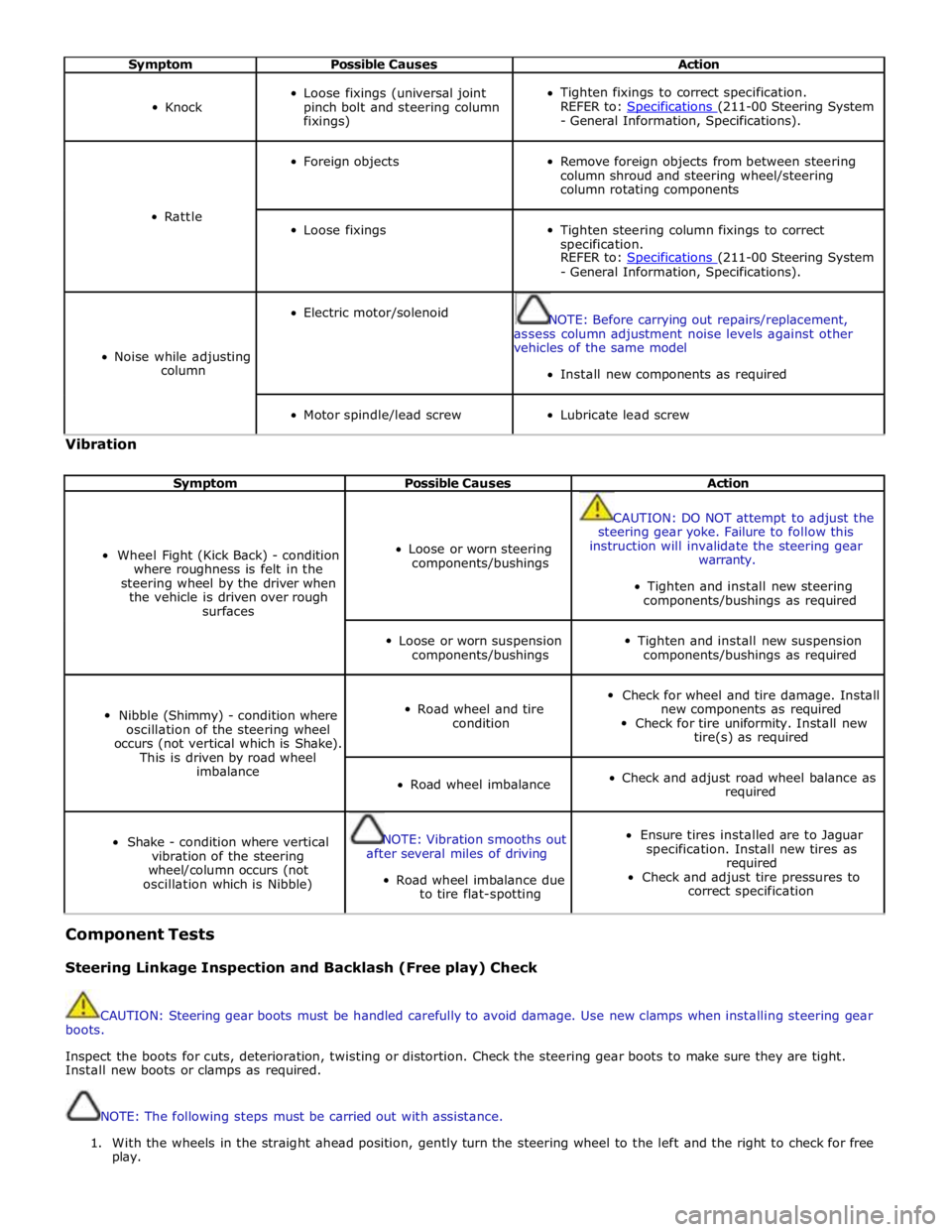
Symptom Possible Causes Action
Knock
Loose fixings (universal joint
pinch bolt and steering column
fixings)
Tighten fixings to correct specification.
REFER to: Specifications (211-00 Steering System - General Information, Specifications).
Rattle
Foreign objects
Remove foreign objects from between steering
column shroud and steering wheel/steering
column rotating components
Loose fixings
Tighten steering column fixings to correct
specification.
REFER to: Specifications (211-00 Steering System - General Information, Specifications).
Noise while adjusting
column
Electric motor/solenoid
NOTE: Before carrying out repairs/replacement,
assess column adjustment noise levels against other
vehicles of the same model
Install new components as required
Motor spindle/lead screw
Lubricate lead screw Vibration
Symptom Possible Causes Action
Wheel Fight (Kick Back) - condition
where roughness is felt in the
steering wheel by the driver when
the vehicle is driven over rough
surfaces
Loose or worn steering
components/bushings
CAUTION: DO NOT attempt to adjust the
steering gear yoke. Failure to follow this
instruction will invalidate the steering gear
warranty.
Tighten and install new steering
components/bushings as required
Loose or worn suspension
components/bushings
Tighten and install new suspension
components/bushings as required
Nibble (Shimmy) - condition where
oscillation of the steering wheel
occurs (not vertical which is Shake).
This is driven by road wheel
imbalance
Road wheel and tire
condition
Check for wheel and tire damage. Install
new components as required
Check for tire uniformity. Install new
tire(s) as required
Road wheel imbalance
Check and adjust road wheel balance as
required
Shake - condition where vertical
vibration of the steering
wheel/column occurs (not
oscillation which is Nibble)
NOTE: Vibration smooths out
after several miles of driving
Road wheel imbalance due
to tire flat-spotting
Ensure tires installed are to Jaguar
specification. Install new tires as
required
Check and adjust tire pressures to
correct specification Component Tests
Steering Linkage Inspection and Backlash (Free play) Check
CAUTION: Steering gear boots must be handled carefully to avoid damage. Use new clamps when installing steering gear
boots.
Inspect the boots for cuts, deterioration, twisting or distortion. Check the steering gear boots to make sure they are tight.
Install new boots or clamps as required.
NOTE: The following steps must be carried out with assistance.
1. With the wheels in the straight ahead position, gently turn the steering wheel to the left and the right to check for free
play.
Page 724 of 3039
2. Free play should be between 0 and 6 mm (0 and 0.24 in) at the steering wheel rim. If the free play exceeds this limit,
either the ball joints are worn, the lower steering column joints are worn or the backlash of the steering gear is
excessive.
CAUTION: DO NOT attempt to adjust the steering gear yoke. Failure to follow this instruction will invalidate the steering
gear warranty.
3. The backlash of the steering gear cannot be adjusted, install a new steering gear if excessive backlash is diagnosed.
4. Grasp the steering wheel firmly and move it up and down and to the left and right without turning the wheel to check
for column bearing wear, steering wheel or steering column.
Power Steering Fluid Condition Check
1. Run the engine for 2 minutes.
2. Check the power steering fluid system level.
3. Observe the color and the odor. The color under normal circumstances should be dark reddish, not brown or black.
4. Using a suitable clean syringe extract a suitable amount of fluid from the reservoir.
5. Allow the fluid to drip onto a facial tissue and examine the stain.
6. If evidence of solid material is found, the power steering fluid system should be drained for further inspection.
7. If fluid contamination or steering component failure is confirmed by the sediment in the power steering fluid system,
refer to Steering Fault Diagnosis by Symptom Charts in this section.
Power Steering Pressure Test
Test Equipment
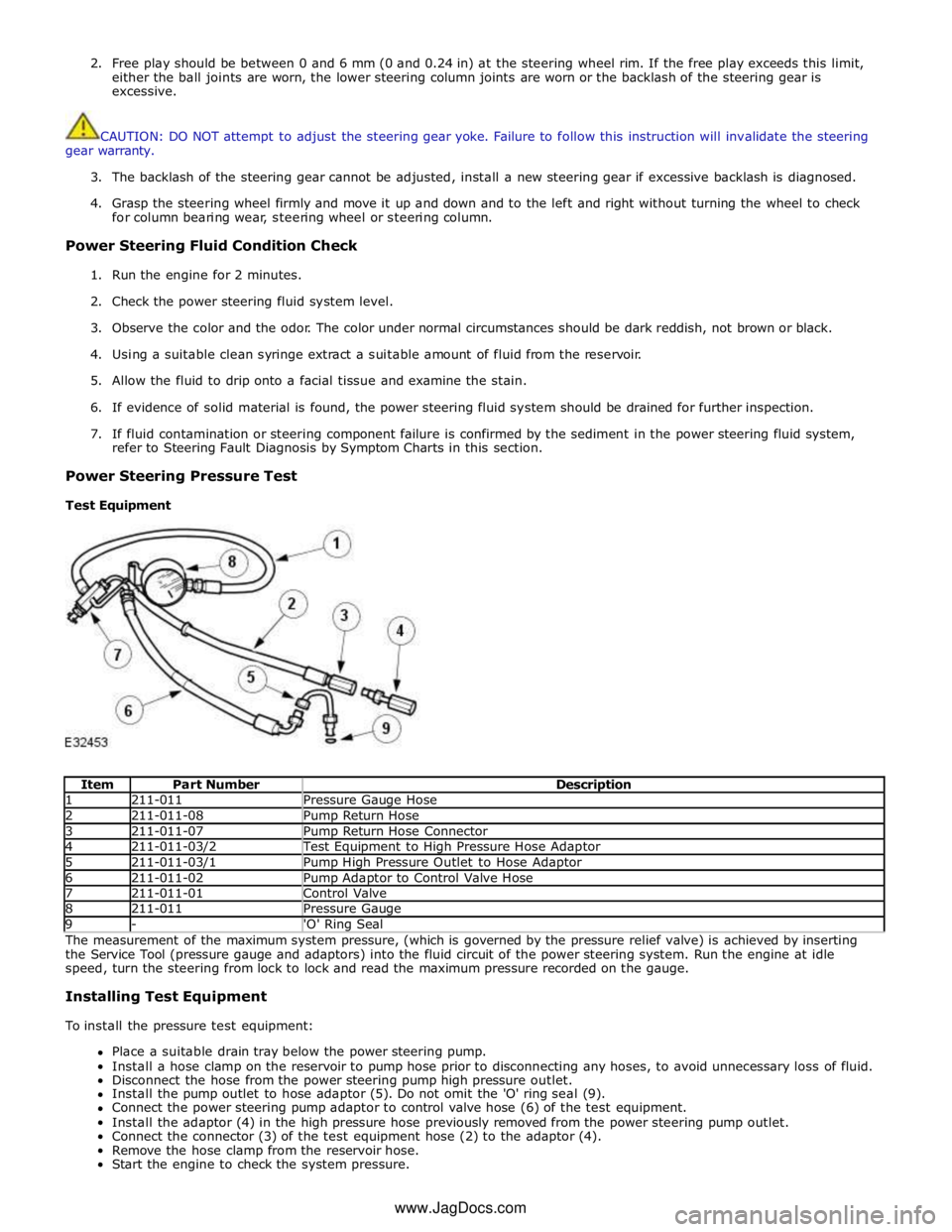
Item Part Number Description 1 211-011 Pressure Gauge Hose 2 211-011-08 Pump Return Hose 3 211-011-07 Pump Return Hose Connector 4 211-011-03/2 Test Equipment to High Pressure Hose Adaptor 5 211-011-03/1 Pump High Pressure Outlet to Hose Adaptor 6 211-011-02 Pump Adaptor to Control Valve Hose 7 211-011-01 Control Valve 8 211-011 Pressure Gauge 9 - 'O' Ring Seal The measurement of the maximum system pressure, (which is governed by the pressure relief valve) is achieved by inserting
the Service Tool (pressure gauge and adaptors) into the fluid circuit of the power steering system. Run the engine at idle
speed, turn the steering from lock to lock and read the maximum pressure recorded on the gauge.
Installing Test Equipment
To install the pressure test equipment:
Place a suitable drain tray below the power steering pump.
Install a hose clamp on the reservoir to pump hose prior to disconnecting any hoses, to avoid unnecessary loss of fluid.
Disconnect the hose from the power steering pump high pressure outlet.
Install the pump outlet to hose adaptor (5). Do not omit the 'O' ring seal (9).
Connect the power steering pump adaptor to control valve hose (6) of the test equipment.
Install the adaptor (4) in the high pressure hose previously removed from the power steering pump outlet.
Connect the connector (3) of the test equipment hose (2) to the adaptor (4).
Remove the hose clamp from the reservoir hose.
Start the engine to check the system pressure. www.JagDocs.com