tires JAGUAR XFR 2010 1.G Manual Online
[x] Cancel search | Manufacturer: JAGUAR, Model Year: 2010, Model line: XFR, Model: JAGUAR XFR 2010 1.GPages: 3039, PDF Size: 58.49 MB
Page 723 of 3039
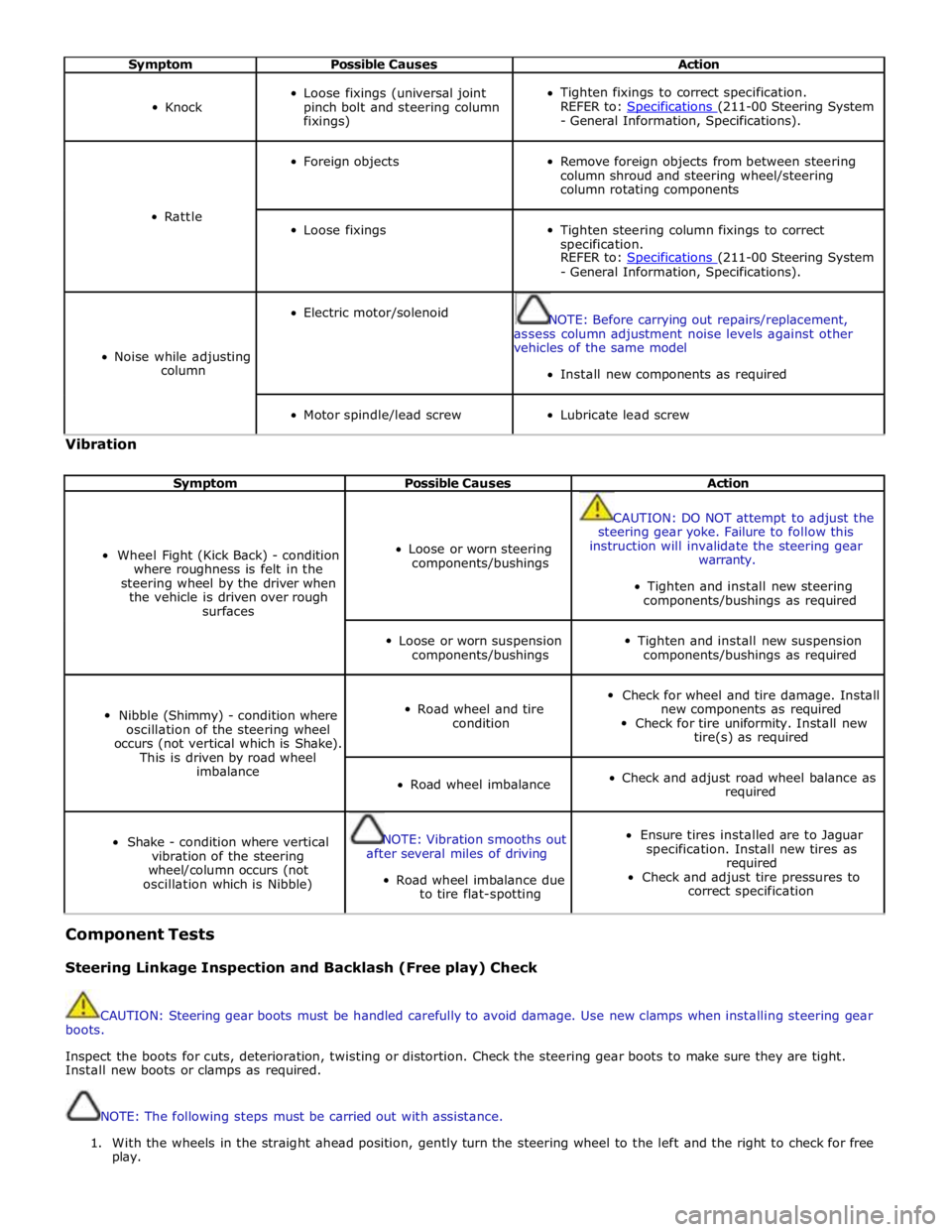
Symptom Possible Causes Action
Knock
Loose fixings (universal joint
pinch bolt and steering column
fixings)
Tighten fixings to correct specification.
REFER to: Specifications (211-00 Steering System - General Information, Specifications).
Rattle
Foreign objects
Remove foreign objects from between steering
column shroud and steering wheel/steering
column rotating components
Loose fixings
Tighten steering column fixings to correct
specification.
REFER to: Specifications (211-00 Steering System - General Information, Specifications).
Noise while adjusting
column
Electric motor/solenoid
NOTE: Before carrying out repairs/replacement,
assess column adjustment noise levels against other
vehicles of the same model
Install new components as required
Motor spindle/lead screw
Lubricate lead screw Vibration
Symptom Possible Causes Action
Wheel Fight (Kick Back) - condition
where roughness is felt in the
steering wheel by the driver when
the vehicle is driven over rough
surfaces
Loose or worn steering
components/bushings
CAUTION: DO NOT attempt to adjust the
steering gear yoke. Failure to follow this
instruction will invalidate the steering gear
warranty.
Tighten and install new steering
components/bushings as required
Loose or worn suspension
components/bushings
Tighten and install new suspension
components/bushings as required
Nibble (Shimmy) - condition where
oscillation of the steering wheel
occurs (not vertical which is Shake).
This is driven by road wheel
imbalance
Road wheel and tire
condition
Check for wheel and tire damage. Install
new components as required
Check for tire uniformity. Install new
tire(s) as required
Road wheel imbalance
Check and adjust road wheel balance as
required
Shake - condition where vertical
vibration of the steering
wheel/column occurs (not
oscillation which is Nibble)
NOTE: Vibration smooths out
after several miles of driving
Road wheel imbalance due
to tire flat-spotting
Ensure tires installed are to Jaguar
specification. Install new tires as
required
Check and adjust tire pressures to
correct specification Component Tests
Steering Linkage Inspection and Backlash (Free play) Check
CAUTION: Steering gear boots must be handled carefully to avoid damage. Use new clamps when installing steering gear
boots.
Inspect the boots for cuts, deterioration, twisting or distortion. Check the steering gear boots to make sure they are tight.
Install new boots or clamps as required.
NOTE: The following steps must be carried out with assistance.
1. With the wheels in the straight ahead position, gently turn the steering wheel to the left and the right to check for free
play.
Page 728 of 3039

Steering nibble is a rotary oscillation or vibration of the steering wheel, which can be excited at a specific vehicle speed.
Nibble is driven by wheel and tire imbalance exciting a suspension recession mode, which then translates into steering gear
travel and finally steering wheel nibble.
Shudder (Judder)
Shudder is a low frequency oscillation of the entire steering system (tire, wheels, steering gear and linkage, etc.) when the
vehicle is steered during static-park or at low speeds. Shudder is very dependent on road surface.
Torque/Velocity Variation (Phasing/Effort Cycling)
Steering wheel torque variation occurring twice in one revolution is normally as a result of problems with the lower steering
column (intermediate shaft), but foul conditions generally result in either constant stiffness or single point stiffness.
Depending upon the orientation of the joints, the steering can feel asymmetric (torque falling off in one direction and rising in
the other) or else it can simply have pronounced peaks and troughs as the steering moves from lock to lock.
Wheel Fight (Kick Back)
Wheel fight is excess feedback of sudden road forces through the steering system and back to the driver. It is evaluated at all
vehicle speeds over cobblestones, rough roads, and potholes. The tires, wheels, and suspension generate forces into the
steering systems. Steering friction, hydraulic damping, hydraulic compliance, mechanical compliance, steering ratio, and assist
gain all affect how much is transmitted to the driver.
Page 753 of 3039

Power Steering - Steering Gear
Removal and Installation Published: 04-Jul-2013
CAUTIONS: Removal
Make sure that only the manufacturers' recommended four wheel alignment equipment is used.
Do not turn the steering wheel with the steering column lower shaft disconnected as damage to the clockspring and
steering wheel switches may occur.
NOTES:
Make sure the steering is in the straight ahead position.
RHD illustration shown, LHD is similar.
Some variation in the illustrations may occur, but the essential information is always correct.
1. Raise and support the vehicle.
2. Center the steering wheel.
Lock in position and remove the ignition key.
3. Remove the front wheels and tires.
For additional information, refer to: Wheel and Tire (204-04 Wheels and Tires, Removal and Installation).
4. Remove the air deflector.
For additional information, refer to: Air Deflector (501-02 Front End Body Panels, Removal and Installation).
Page 773 of 3039
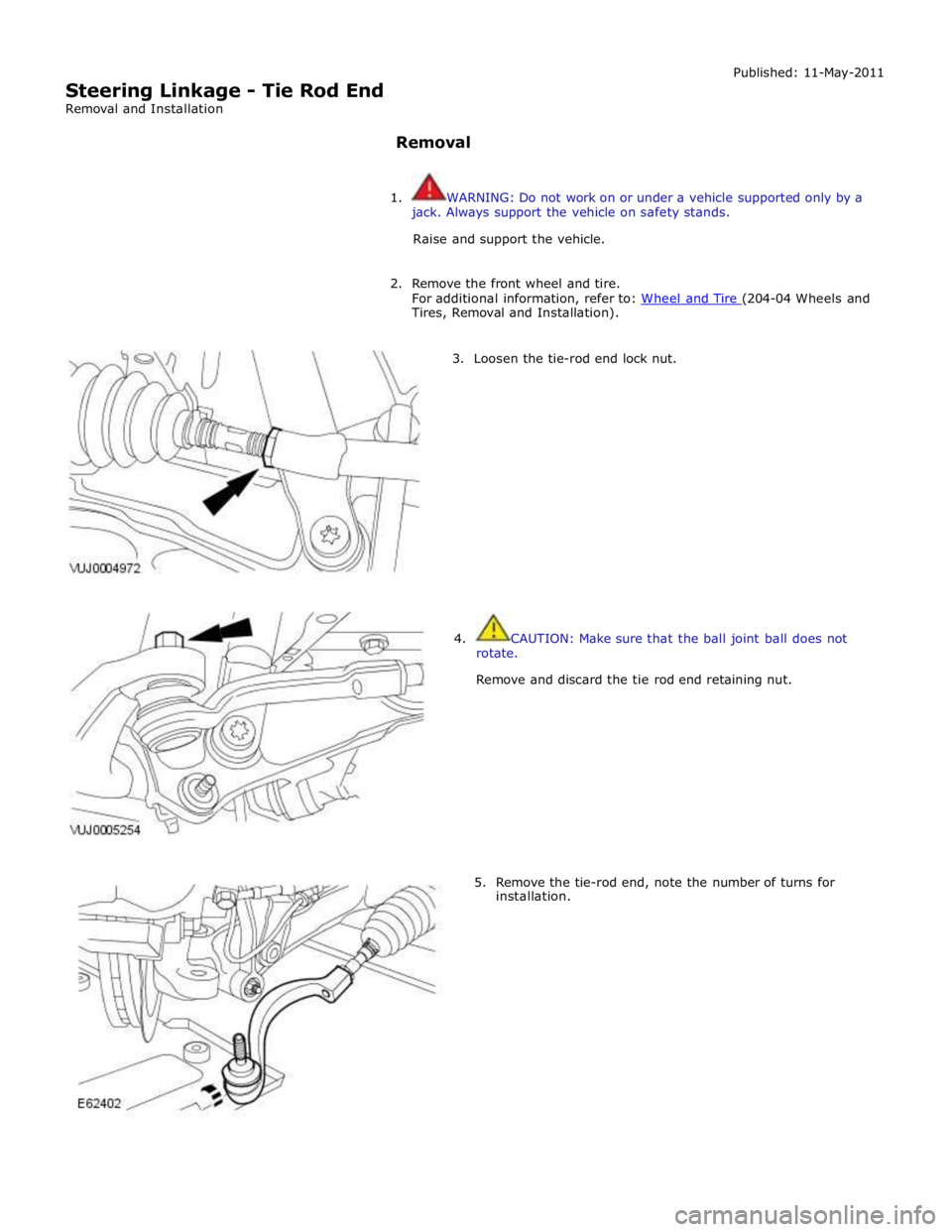
Tires, Removal and Installation).
3. Loosen the tie-rod end lock nut.
4. CAUTION: Make sure that the ball joint ball does not
rotate.
Remove and discard the tie rod end retaining nut.
5. Remove the tie-rod end, note the number of turns for
installation.
Page 774 of 3039

Installation
1. Install the tie rod end, note the number of turns until adjacent to the
locknut.
2. CAUTION: Make sure that the ball joint ball does not rotate.
Connect the tie-rod end ball joint.
Clean the component mating faces.
Install a new nut and tighten to 133 Nm.
3. Tighten the tie-rod locking nut.
Clean the component mating faces.
Tighten the nut to 55 Nm.
4. Install the front wheel.
For additional information, refer to: Wheel and Tire (204-04 Wheels and Tires, Removal and Installation).
5. Using only four-wheel alignment equipment approved by Jaguar, check
and adjust the wheel alignment.
For additional information, refer to: Four-Wheel Alignment (204-00 Suspension System - General Information, General Procedures).
Page 1609 of 3039
Published: 18-Jun-2014
Fuel Tank and Lines - V8 5.0L Petrol/V8 S/C 5.0L Petrol - Fuel Tank Filler
Pipe
Removal and Installation
Removal
NOTE: Removal steps in this procedure may contain installation details.
1. Refer to: Diesel Fuel System Health and Safety Precautions (100-00 General Information, Description and Operation).
Refer to: Petrol and Petrol-Ethanol Fuel Systems Health and Safety Precautions (100-00 General Information, Description and Operation).
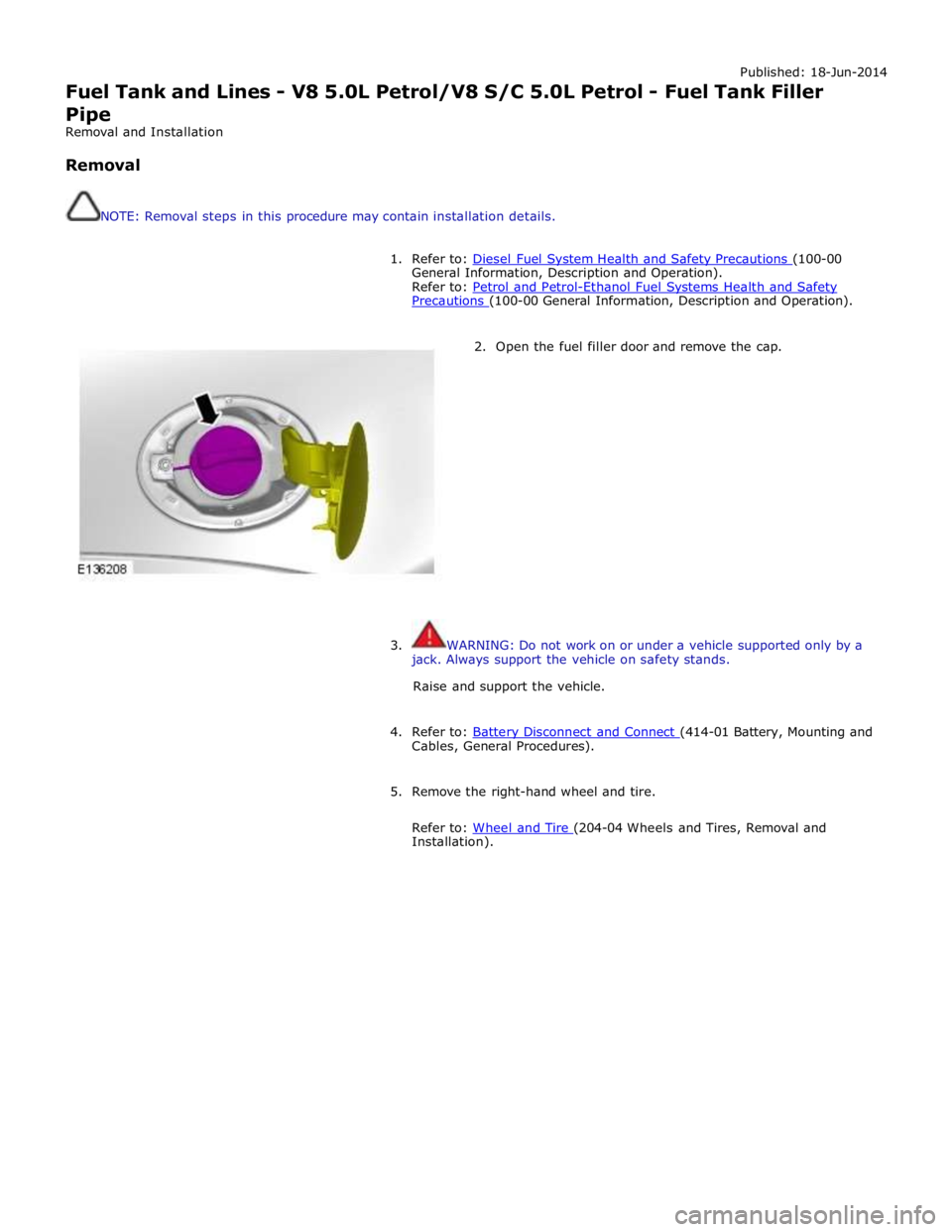
2. Open the fuel filler door and remove the cap.
3. WARNING: Do not work on or under a vehicle supported only by a
jack. Always support the vehicle on safety stands.
Raise and support the vehicle.
4. Refer to: Battery Disconnect and Connect (414-01 Battery, Mounting and Cables, General Procedures).
5. Remove the right-hand wheel and tire.
Refer to: Wheel and Tire (204-04 Wheels and Tires, Removal and Installation).
Page 1643 of 3039
Automatic braking is limited to approximately 30% of full pressure (0.3G deceleration) and is intended to provide a
smooth, gradual deceleration in follow mode conditions. Harsh braking by the target vehicle or following the target
vehicle down to very low speeds or to a halt will require driver override of the brakes.
While the radar sensor detects moving and stationary targets for assessment of the environment ahead, the system
does not react to or provide any control in situations other than follow mode conditions. Stationary or slow moving
vehicles (below 10 km/h), pedestrians, objects on the road and oncoming vehicles in the same lane are not recognized.
WARNING: The adaptive speed control system is not a collision warning or avoidance system and that, other than the
limited conditions of follow mode, driver intervention will be necessary to control the vehicle speed.
In follow mode, some situations may cause target ambiguities for the detection system. These situations include:
The nearby presence of a third vehicle when driving on a line slightly offset to the target vehicle.
Vehicles edging into the lane ahead which are not detected by the system until they have moved into the radar beam.
On the approach to, or exit from a bend, a target vehicle may be lost or a new target acquired as vehicles ahead change their
angular position with respect to the radar sensor. On a straight road, if the sensing vehicle is in follow mode below its selected
set speed, losing the target vehicle will cause the sensing vehicle to accelerate to this set speed. This acceleration is
undesirable either on, or entering a bend when the target is suddenly lost, and in this situation the system inhibits the
resumption of the set speed.
The speed control system compares vehicle speed data from the ABS system with the relative speed of an external object as
detected by the radar sensor to ascertain whether the object is stationary or not.
NOTE: If tires are fitted which are different in diameter from those specified for the vehicle, the vehicle speed calculated
by the ABS will not be the true road speed. This situation may cause stationary objects to be falsely identified as moving
vehicles and result in automatic deceleration on a clear road.
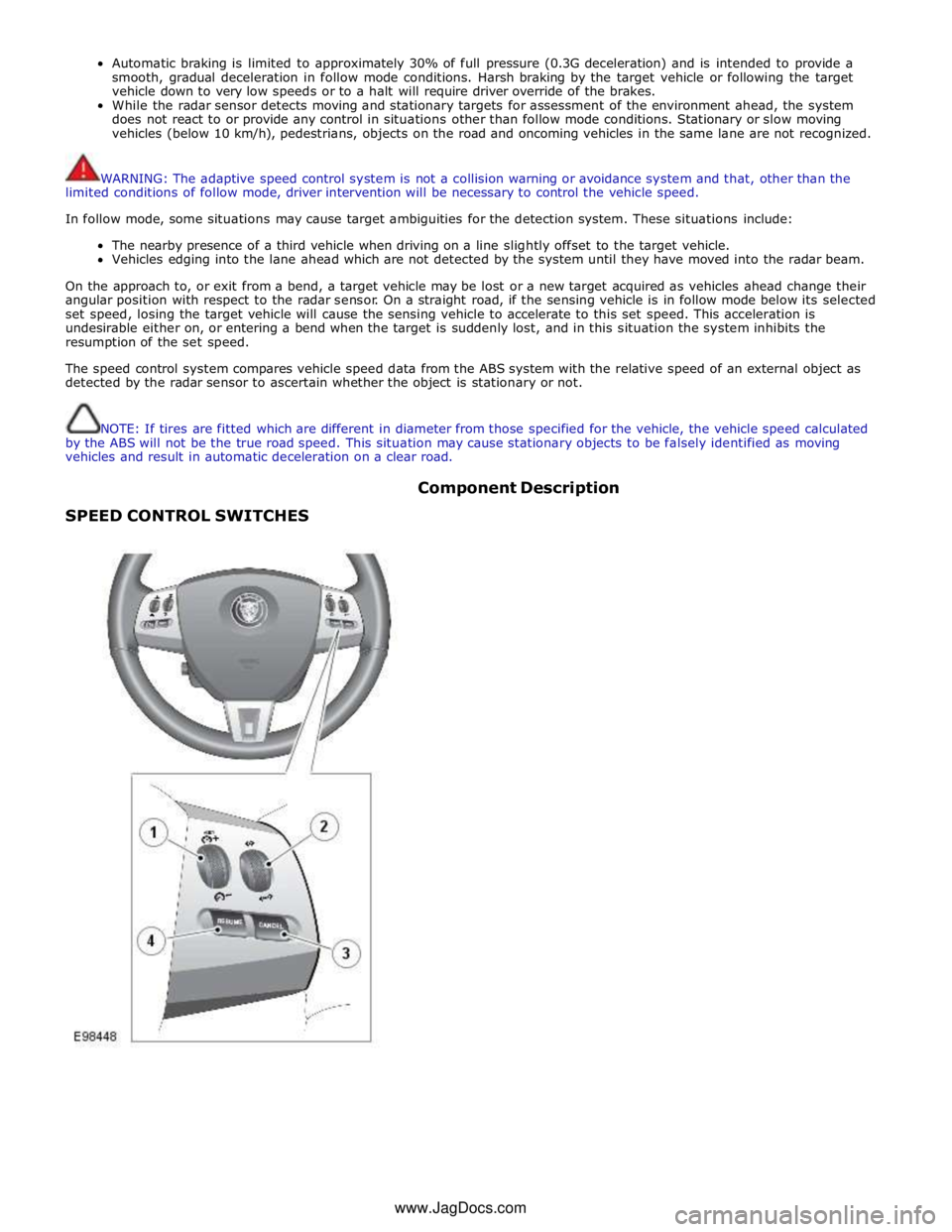
SPEED CONTROL SWITCHES Component Description
www.JagDocs.com
Page 1775 of 3039
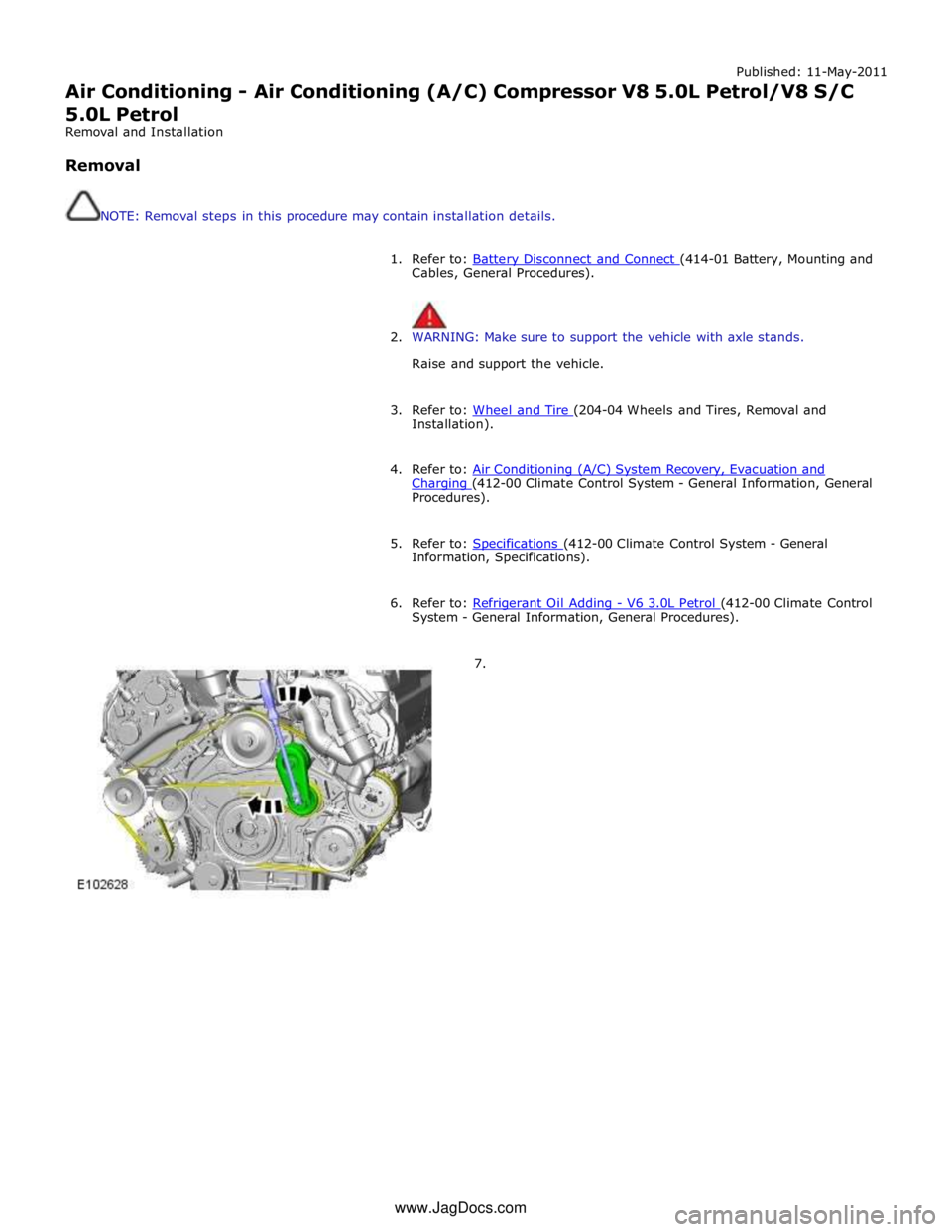
Published: 11-May-2011
Air Conditioning - Air Conditioning (A/C) Compressor V8 5.0L Petrol/V8 S/C 5.0L Petrol
Removal and Installation
Removal
NOTE: Removal steps in this procedure may contain installation details.
1. Refer to: Battery Disconnect and Connect (414-01 Battery, Mounting and Cables, General Procedures).
2. WARNING: Make sure to support the vehicle with axle stands.
Raise and support the vehicle.
3. Refer to: Wheel and Tire (204-04 Wheels and Tires, Removal and Installation).
4. Refer to: Air Conditioning (A/C) System Recovery, Evacuation and Charging (412-00 Climate Control System - General Information, General Procedures).
5. Refer to: Specifications (412-00 Climate Control System - General Information, Specifications).
6. Refer to: Refrigerant Oil Adding - V6 3.0L Petrol (412-00 Climate Control System - General Information, General Procedures).
7. www.JagDocs.com
Page 1792 of 3039

Specific warning lamp
'ON' C–1
Check with IDS for DTCs related to
identified vehicle system. . . C–2
Check for open circuit/shorts in wiring
related to warning lamp circuit (module,
sensor, switch) where appropriate. . . C–3
Perform cluster Self-Diagnostic Mode/ETM
test 3. Frost/ice warning illuminated in mixed red and
amber; therefore colour differs from other
warning lamps. When this test is ended,
warning lamps currently required to be 'ON' will
remain illuminated. . C–4
Check the specific vehicle system
indicated by the warning lamp
illuminated? What is the warning lamp telling me? Does this
check out with the DTC logged by the system indicating the fault? Fuel gauge operation D–1
Perform Self-Diagnostic Mode/ETM test 21
to establish if fuel level input to cluster is
out of range or invalid. 0 - 9 = short circuit; gauge will show empty. 10
– 254 = normal range. 255 = open circuit;
gauge will show empty. --- = missing signal; gauge will show empty. . D–2
Check gauge function versus
Self-Diagnostic Mode/ETM test 21. 0 = empty, 254 = full. 255 = invalid; gauge will
show empty. . D–3
Check for open circuit/shorts in wiring
between the Fuel Delivery Module, Jet
Pump Module and Rear Electronic Module (REM). . Fuel gauge reading E–1
Check gauge position versus
Self-Diagnostic Mode/ETM test 21. 0 = empty to 254 = full (255 invalid; gauge will
show empty). Other values percentage of above range e.g. 127 = half. . E–2
Calculate percentage fuel level from figure
obtained from Self-Diagnostic Mode/ETM
test 21 and compare to IDS vehicle fuel percentage test. Self-Diagnostic Mode fuel level percentage can
be calculated as follows: Value from
Self-Diagnostic Mode test 26 ÷ 254 x 100 = %
shown on gauge. . E–3
Monitor value of Self-Diagnostic Mode
test/ETM test 21 (during test drive) to
establish if input drops out of range. 0 - 9 = short circuit; gauge will show empty. 10
– 254 = normal range. 255 = open circuit;
gauge will show empty. --- = missing signal; gauge will show empty. . E–4
Monitor 'FUEL LEVEL' in IDS data logger
(during test drive) to correlate gauge position to vehicle reported fuel level. Gauge function is damped so will not follow
rapidly changing Fuel Delivery Module values. Speedometer
operation H–1
Monitor Self-Diagnostic Mode/ETM test 19
(during test drive) check to establish if
vehicle speed input to cluster is out of range or invalid. Display speed input in 1/10 mile/h, no decimal
point shown, and is compensated for tire size
etc. Displays ---- or INV if message is not
received or if received data is invalid. Speedometer reading I–1
During test drive compare speedometer
position to Self-Diagnostic Mode/ETM test
19, displayed value. Self-Diagnostic Mode displayed speed figure will
be approx 3% higher than speed indicated by
speedometer. Allowed tolerance – minus nothing/+ 10% + 2.5 mile/h. . I–2
Monitor Self-Diagnostic Mode/ETM test 19
(during test drive) to establish if vehicle
speed input to cluster drops out of range
or is invalid. Displays ---- if message is not received or if
received data is invalid for two seconds or more. . I–3
Check that installed wheels and tires are
standard Jaguar fitment. Confirm wheel
size in IDS, 'ADD REMOVE ACCESSORY'
section. Non standard wheels and tires may lead to
speed indication inaccuracies. Incorrectly set
wheel size will result in speed indication
inaccuracies. Trip and odometer distance
accumulation will also be incorrect. Tachometer operation J–1
Perform Self-Diagnostic Mode/ETM test 20
to establish if vehicle rpm input to cluster
out of range or invalid. Displays ---- or INV if message is not received
or if received data is invalid. Tachometer reading K–1
Check tachometer position versus
Self-Diagnostic Mode/ETM test 20, displayed value. Tachometer accuracy +/- 100 rpm. . K–2
Monitor 'ENGINE RPM' in IDS data logger
at constant engine rpm to compare
tachometer indicated engine rpm to
engine rpm reported by Engine Control
Module (ECM). Tachometer accuracy +/- 100 rpm. . K–3
Monitor Self-Diagnostic Mode test/ETM
test 20, (during test drive) to establish if
input to cluster drops out of range or is
invalid. Displays ---- or INV if message is not received
or if received data is invalid. Gauge judder L–1
Perform Self-Diagnostic Mode test/ETM
test 2, to prove out smooth gauge operation. . Gauge noise M–1
Perform vehicle road test. Gauges should
not be audible during operation in drive cycle. . www.JagDocs.com
Page 1793 of 3039

. M–2
Benchmark noise against non-complaint
vehicle. . Trip (fuel) computer N–1
Check for consistent display (during test
drive) of valid 'Rolling Odometer' count in
Self-Diagnostic Mode/ETM test 24. Displays ---- , INV or 255 if message is not
received, or if received data is invalid. . N–2
Check that installed wheels and tires are
standard Jaguar fit. Confirm fitted wheel
size in IDS, 'ADD REMOVE ACCESSORY'
section. Non standard wheels and tires or incorrectly set
wheel size may lead to Odometer increment
inaccuracies. This will impact the distance
accumulators, which in turn affects the rolling
average, fuel economy and range values. Trip
distance accumulation will also be incorrect. . N–3
Consider noting odometer value and
resetting fuel computer system. Advise
customer to conduct brim-to-brim fuel
tank test. Use collected information to
determine if system accurate. . Column adjust O-1
Check with IDS for DTCs related to powered column system. . O-2
Check cluster battery supply voltage and
ground resistance. Check for loose
connections. . O-3
Check power column motors supply voltage. . O-4
Check power column switch for physical damage. . Passive Anti-Theft
System (PATS)
indicator P–1
Check for three second prove out when
vehicle start button is pressed. . . P–2
Check for loose connections/wiring continuity. . . P–3 Check ignition switch for physical damage. . Cluster illumination Q–1
Check for loose connections/wiring continuity. . . Q–2 Check dimmer switch operation. . Cluster backlight operation R–1
Is the backlight on other components inoperative. . . R–2 Check dimmer switch operation. . . R–3
Check for loose connections/wiring continuity. . Chime/tone operation S–1 Check vehicle configuration. . . S–2
Utilize lights ON, ignition OFF, door open warning to verify chime operation. . . S–3 Check appropriate sensing circuit. . Continuous chime/tone T–1 Check appropriate sensing circuit. . Unexpected chime operation U–1 Check vehicle configuration. . Message centre display illumination V–1
Is the backlight 'ON' and other components dim? . . V–2
Does the lighting level of other
components change when dimmer adjusted? . Message centre
display issue W–1
Perform Self-Diagnostic Mode test/ETM
tests 5 to 9, to prove out LCD display
function. . Message centre
missing lines X–1
Perform Self-Diagnostic Mode test/ETM
tests 5 to 9, to prove out LCD display
function. . Message centre
incorrect message Y–1 What is the message? . . Y–2
Check for open circuit/shorts in wiring to
related warning light trigger (module,
sensor, switch). . Cluster/connectivity Z–1 Check cluster battery and ignition wiring. . . Z–2 Check cluster grounds. . . Z–3 Disconnect/reconnect cluster. . . Z–4
Attempt to enter Self-Diagnostic
Mode/ETM to prove cluster response to inputs. . No crank AA–1
Check with IDS for presence of related
DTCs. . . AA–2
Is there a Passive Anti-Theft System (PATS) flash code? . . AA–3
Does the vehicle crank with the other passive key? .