air conditioning JAGUAR XJ6 1994 2.G User Guide
[x] Cancel search | Manufacturer: JAGUAR, Model Year: 1994, Model line: XJ6, Model: JAGUAR XJ6 1994 2.GPages: 521, PDF Size: 17.35 MB
Page 310 of 521
Climate Control Systems
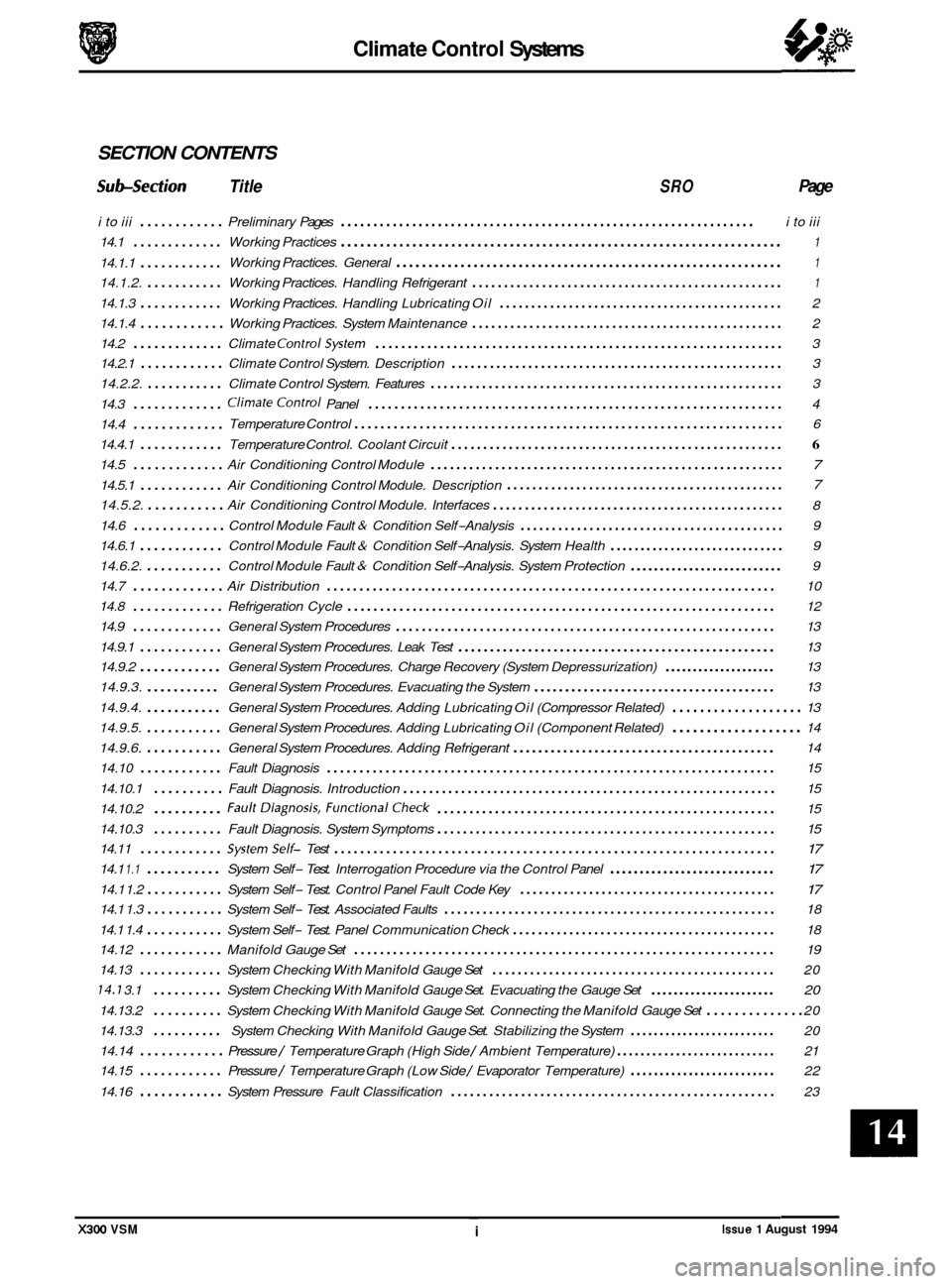
SECTION CONTENTS
Subsection Title SRO Page
i to iii ............ Preliminary Pages ................................................................ i to iii
14.1
............. Working Practices .................................................................... 1
Working Practices. General ............................................................ 1 14.1.1 ............
14.1.2. ........... Working Practices. Handling Refrigerant ................................................. 1
14.1.3 ............ Working Practices. Handling Lubricating Oil ............................................. 2
14.1.4
............ Working Practices. System Maintenance ................................................. 2
14.2
............. Climate ControlSystem ............................................................... 3
14.2.1
............ Climate Control System. Description .................................................... 3
14.2.2.
........... Climate Control System. Features ....................................................... 3
14.3
............. ClimateControl Panel ................................................................ 4
14.4
.............
14.4.1 ............ Temperature Control. Coolant Circuit .................................................... 6
14.5 ............. Air Conditioning Control Module ....................................................... 7
14.5.1 ............ Air Conditioning Control Module. Description 7
14.5.2. ........... Air Conditioning Control Module. Interfaces .............................................. 8
14.6
............. Control Module Fault & Condition Self-Analysis .......................................... 9
14.6.1
............ Control Module Fault & Condition Self-Analysis. System Health ............................. 9
14.6.2.
........... Control Module Fault & Condition Self-Analysis. System Protection .......................... 9
14.7
............. Air Distribution ..................................................................... 10
14.8
............. Refrigeration Cycle .................................................................. 12
14.9
............. General System Procedures ........................................................... 13
14.9.1
............ General System Procedures. Leak Test .................................................. 13
14.9.2
............ General System Procedures. Charge Recovery (System Depressurization) .................... 13
14.9.3.
........... General System Procedures. Evacuating the System ....................................... 13
14.9.4.
........... General System Procedures. Adding Lubricating Oil (Compressor Related) ................... 13
14.9.5.
........... General System Procedures. Adding Lubricating Oil (Component Related) ................... 14
14.9.6.
........... General System Procedures. Adding Refrigerant .......................................... 14
14.10
............ Fault Diagnosis ..................................................................... 15
14.10.1
.......... Fault Diagnosis. Introduction .......................................................... 15
14.10.2
.......... FaultDiagnosis. FunctionalCheck ..................................................... 15
14.10.3
14.11
............ Systemself- Test .................................................................... 17
14.1 1.1 ........... System Self- Test. Interrogation Procedure via the Control Panel ............................ 17
14.1 1.2 ........... System Self- Test. Control Panel Fault Code Key ......................................... 17
14.1 1.4 ........... System Self- Test. Panel Communication Check .......................................... 18
14.13
............ System Checking With Manifold Gauge Set ............................................. 20
14.7 3.1 .......... System Checking With Manifold Gauge Set. Evacuating the Gauge Set ...................... 20
14.13.2 .......... System Checking With Manifold Gauge Set. Connecting the Manifold Gauge Set .............. 20
14.13.3
.......... System Checking With Manifold Gauge Set. Stabilizing the System ......................... 20
14.14
............ Pressure / Temperature Graph (High Side / Ambient Temperature) ........................... 21
14.15
............ Pressure / Temperature Graph (Low Side / Evaporator Temperature) ......................... 22
14.16
............ System Pressure Fault Classification ................................................... 23
Temperature
Control
.................................................................. 6
............................................ a
.......... Fault Diagnosis. System Symptoms ..................................................... 15 a
14.1 1.3 ........... System Self- Test. Associated Faults .................................................... 18
14.12
............ Manifold Gauge Set ................................................................. 19
X300 VSM ~ i Issue 1 August 1994
Page 316 of 521
Climate Control Systems
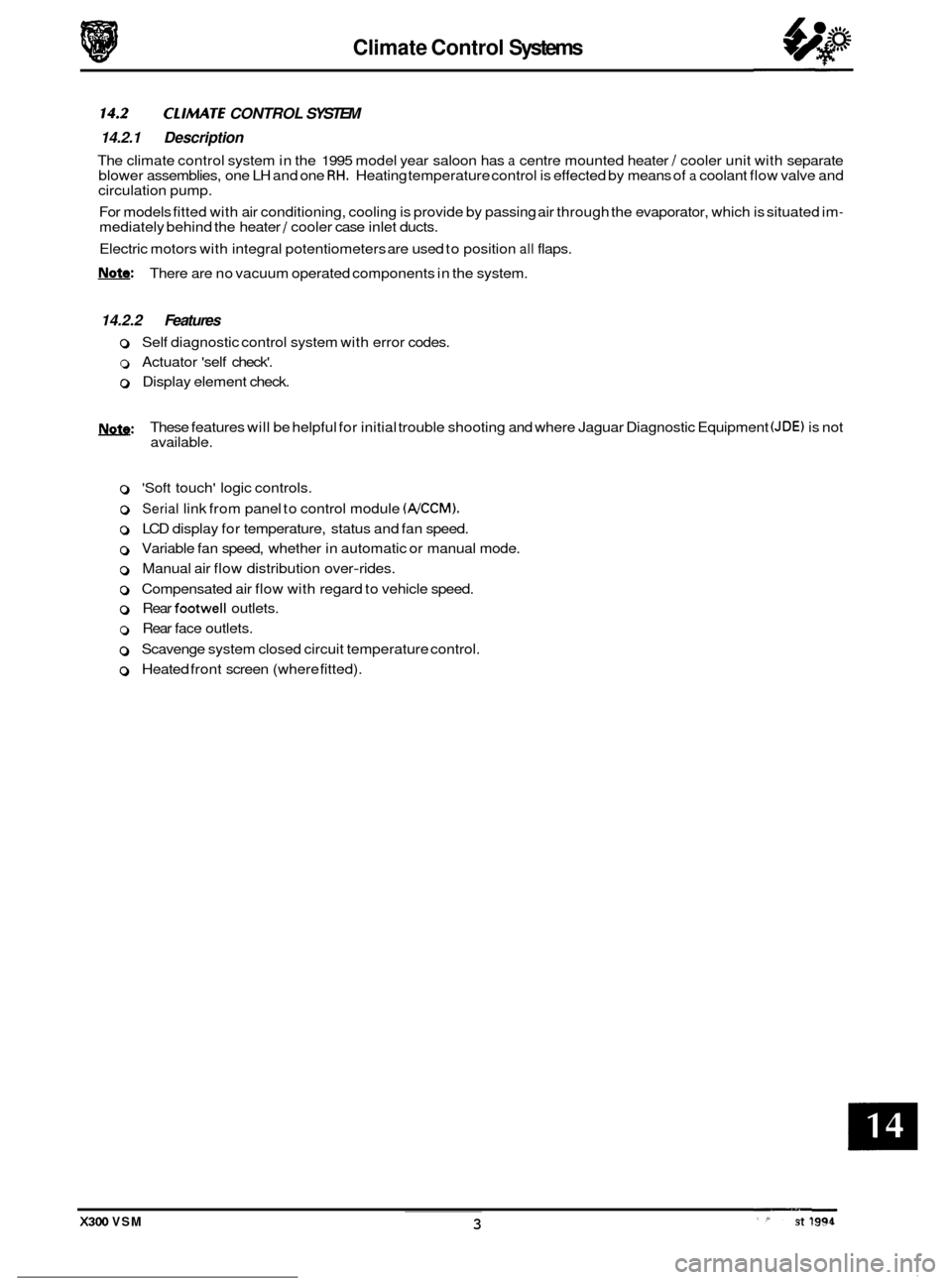
CL /MATE CONTROL SYSTEM 0 14*2 14.2.1 Description
The climate control system in the 1995 model year saloon has a centre mounted heater / cooler unit with separate
blower assemblies, one LH and one RH. Heating temperature control is effected by means of a coolant flow valve and
circulation pump.
For models fitted with air conditioning, cooling is provide by passing air through the evaporator, which is situated im
- mediately behind the heater / cooler case inlet ducts.
Electric motors with integral potentiometers are used to position
all flaps.
W: There are no vacuum operated components in the system.
14.2.2 Features
o Self diagnostic control system with error codes.
0 Actuator 'self check'.
0 Display element check.
m: These features will be helpful for initial trouble shooting and where Jaguar Diagnostic Equipment (JDE) is not
available.
0 'Soft touch' logic controls. 0
0 Serial link from panel to control module (NCCM).
0 LCD display for temperature, status and fan speed.
0 Variable fan speed, whether in automatic or manual mode.
0 Manual air flow distribution over-rides.
0 Compensated air flow with regard to vehicle speed.
0 Rear footwell outlets.
0 Rear face outlets.
0 Scavenge system closed circuit temperature control.
0 Heated front screen (where fitted).
x300 VSM 3
Page 320 of 521
Climate Control Systems
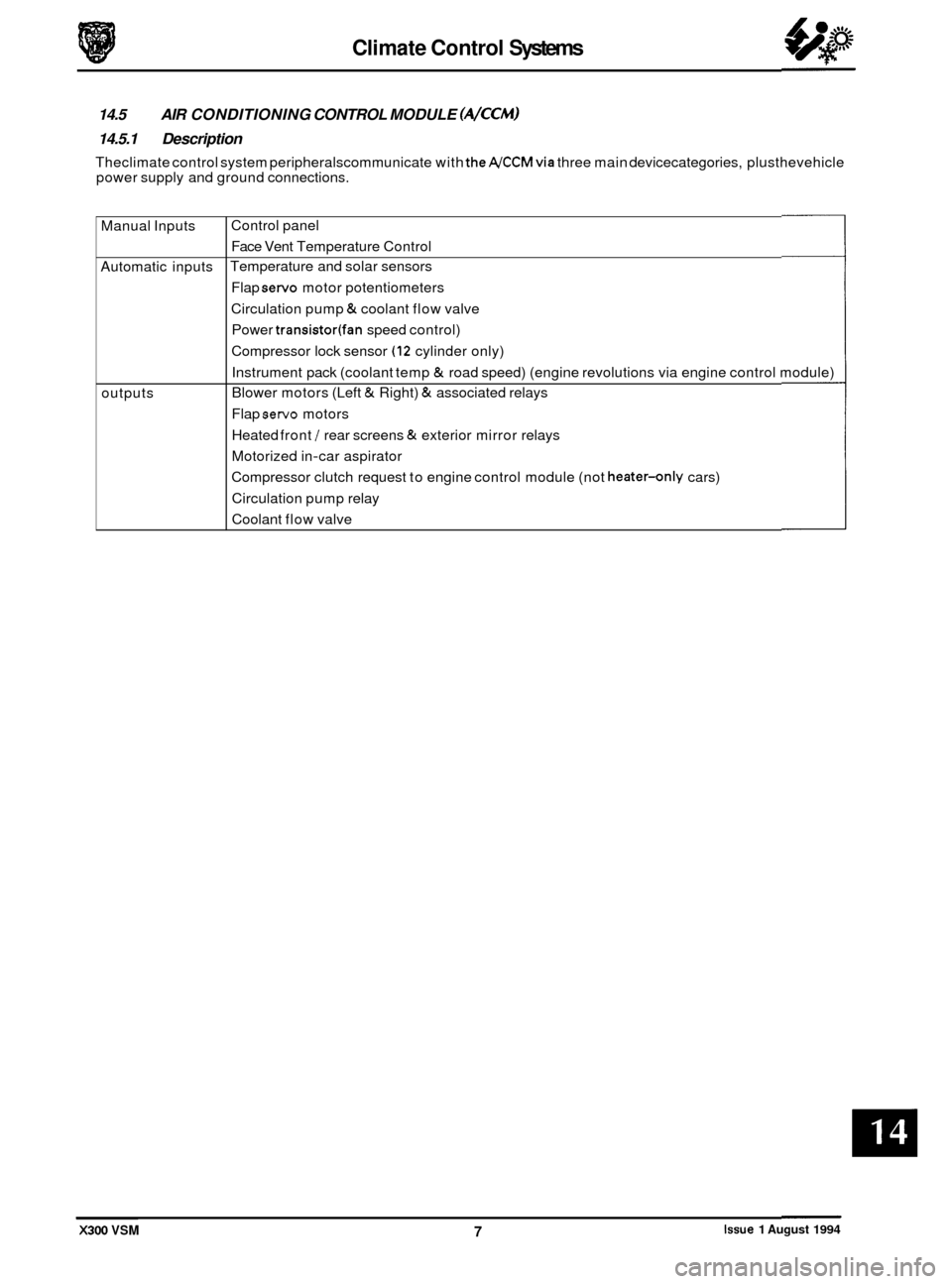
Manual Inputs
Automatic inputs
outputs
14.5 AIR CONDITIONING CONTROL MODULE (A/CCM)
14.5.1 Description
Theclimate control system peripheralscommunicate with theA/CCMvia three main devicecategories, plusthevehicle
power supply and ground connections.
Control panel Face Vent Temperature Control
Temperature and solar sensors
Flap
servo motor potentiometers
Circulation pump
& coolant flow valve
Power
transistor(fan speed control)
Compressor lock sensor
(12 cylinder only)
Instrument pack (coolant temp
& road speed) (engine revolutions via engine control module)
Blower motors (Left
& Right) & associated relays
Flap
servo motors
Heated front
/ rear screens & exterior mirror relays
Motorized in
-car aspirator
Compressor clutch request to engine control module (not
heater-only cars)
Circulation pump relay
Coolant flow valve
X300 VSM Issue 1 August 1994 7
Page 322 of 521
Climate Control Systems
CONTROL MODULE FAULT & CONDITION SELF-ANALYSIS
0 14.6 14.6.1 System Health
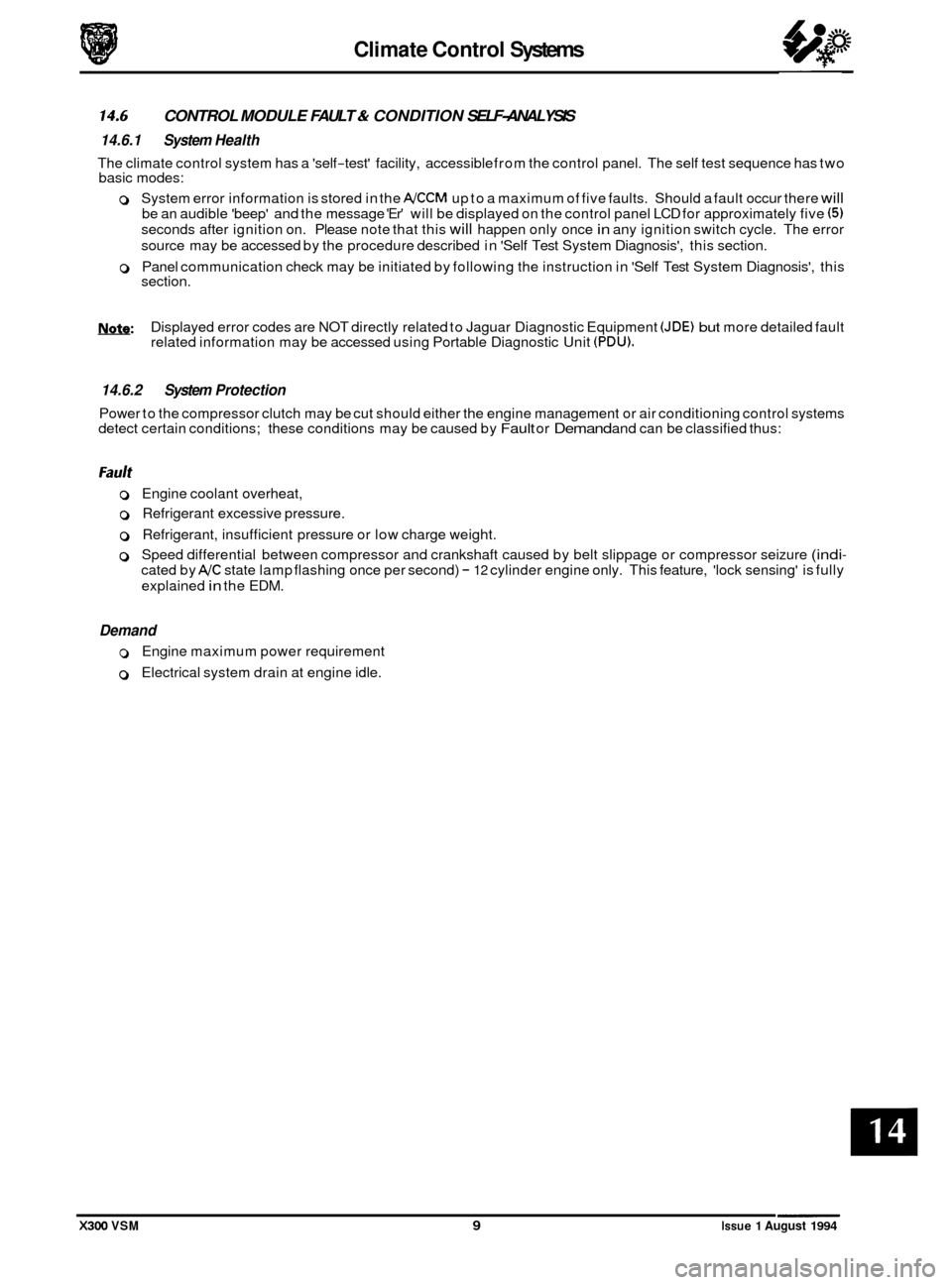
The climate control system has a 'self-test' facility, accessible from the control panel. The self test sequence has two
basic modes:
0 System error information is stored in the A/CCM up to a maximum of five faults. Should a fault occur there will
be an audible 'beep' and the message 'Er' will be displayed on the control panel LCD for approximately five (5)
seconds after ignition on. Please note that this will happen only once in any ignition switch cycle. The error
source may be accessed by the procedure described in 'Self Test System Diagnosis', this section.
0 Panel communication check may be initiated by following the instruction in 'Self Test System Diagnosis', this
section.
Nsfe: Displayed error codes are NOT directly related to Jaguar Diagnostic Equipment (JDE) but more detailed fault
related information may be accessed using Portable Diagnostic Unit (PDU).
14.6.2 System Protection
Power to the compressor clutch may be cut should either the engine management or air conditioning control systems
detect certain conditions; these conditions may be caused by Fault or Demand and can be classified thus:
0 Engine coolant overheat,
0 Refrigerant excessive pressure.
0 Refrigerant, insufficient pressure or low charge weight.
0 Speed differential between compressor and crankshaft caused by belt slippage or compressor seizure (indi-
cated by A/C state lamp flashing once per second) - 12 cylinder engine only. This feature, 'lock sensing' is fully
explained
in the EDM.
Demand
0 Engine maximum power requirement
0 Electrical system drain at engine idle.
X300 VSM 9 Issue 1 August 1994
Page 326 of 521
Climate Control Systems
0 14.9 GENERAL SYSTEM PROCEDURES
14.9.1 Leak Test
Faults associated with low refrigerant charge weight and low pressure may be caused by leakage. Leaks traced to
mechanical connections may be caused by torque relaxation or joint face contamination. Evidence of oil around such
areas is an indicator of leakage. When checking for non visible leaks use only
a dedicated HFC 134A electronic analyzer
and apply the probe all round the joint / connection.
Should a leak betraced to a joint,checkthatthefixing issecuredtothecorrecttightening torque before any other action
is taken.
Do not forget to check the compressor shaft seal and evaporator.
CAUTION : Never use a dedicated CFC 12 or naked flame type analyzer.
14.9.2 Charge Recovery (System depressurization)
The process of HFC 134A recovery will depend on the basic characteristics of your chosen recovery/ recycle I recharge
equipment, therefore, follow the manufacturer's instructions carefully.
Remember that compressor oil may be drawn
out of the system by this process, take note of the quantity recovered
so that it may be replaced.
CAUTION: Observe all relevant safety requirements.
Wear suitable eye and skin protection
Do not mix HFC 134A with CFC 12. Do not vent refrigerant directly to atmosphere and always use Jaguar approved recovery I recycle I re- charge equipment.
Take note of the amount of recovered refrigerant, it will indicate the state of the system. 0
14.9.3 Evacuating the System
This process, the removal of unwanted air and moisture, is critical to the correct operation of the air conditioning sys-
tem. The specific procedures will vary depending on the individual characteristics of your chosen recovery I recycle / recharge equipment and must be carried out exactly in accordance with the manufacturers instructions. However,
it is recommended that the initially only the HIGH side valve be opened at the start of the procedure. After a short time a small depression should be seen on the LOW side, at which point the LOW side valve may be opened and the evacu- ation process completed. If a vacuum is not registered on the LOW side it may indicate that the expansion valve is
jammed closed or that the system is blocked. This simple check may save time and effort when the system is re- charged.
Moisture can be highly destructive and may cause internal blockages due to freezing, but more importantly, water sus- pended in the PAG oil will damage the compressor. Once the system has been opened for repairs, or the refrigerant
charge recovered, all traces of moisture MUST be removed before recharging.
14.9.4
The amount of oil drawn out during a recovery procedure will be dependent on the state of the system and the rate
of recovery. The quantity will be approximately 30 to 40 ml; this may vary, and the figure is given only for guidance.
The oil separator vessel in the recovery equipment must be clean and empty
at the start of the process so that the quan- tity of oil which is drawn out may be accurately measured.
Oil may be added by three methods,
1 and 2 being direct into the system and 3 with the compressor off the vehicle;
1. Via the recovery I recycle 1 recharge station.
2. Proprietary oil injector.
Adding Lubricating Oil - Compressor Related
1ynfa: Equipment manufacturer's instructions must be adhered to when using direct oil introduction.
3. Directly into the original, or new unit, because of rectification work to the existing compressor, or the need to fit a new compressor.
Original
From an existing compressor, drain the oil into a measuring cylinder and record the amount. Flush the unit out
with fresh PAG oil and drain thoroughly, Replenish the compressor with the same amount of PAG oil that was
originally drained out and immediately plug all orifices ready for refitting to the vehicle.
X300 VSM 13 Issue 1 August 1994
Page 327 of 521
Climate Control Systems
New
Drain and discard the transit lubricating oil from a new compressor before it is be fitted. An adjustment must
then be made to avoid over-filling the system, by taking into account;
a) the quantity found in the original compressor.
b) the quantity deposited in the recovery equipment oil separator from the charge recovery operation.
Drained from original compressor
50 ml
Recovered from oil separator 40 ml
Quantity to be put in new compressor 50 + 40 = 90 ml
Typical example:
Please note that the discrepancy between the cumulative figure of recovered and drained oil and the nominal capacity
of
180 ml is caused by normally unrecoverable oil being trapped in components such as the condenser, receiver/ drier
or evaporator.
The previous statements apply even
if a problem has occurred due to oil leakage. The amount of oil lost due to leakage
is generally small, so to avoid over-filling please follow the example.
If however the recovery process has not been necessary because refrigerant has also been lost, then ONLY replace the
quantity drained from the original compressor.
14.9.5
Should a major component such as condenser, receiver / drier or evaporator be renewed then an adjustment to the
system oil level must be made. This may be carried out in the same way as the examples for the compressor except
for the fact that trapped oil within any one of these components cannot normally be drained. Therefore, a nominal
amount of oil should be substituted
in addition to that recovered from the recovery station separator.
Adding Lubricating Oil - Component Related
Condenser Add 40 ml
Evaporator Add 40 ml
Receiver / drier NO adjustment
CAUTION: Always decant fresh oil from a sealed container and do not leave oil exposed to the atmosphere. PAG
oil is very hygroscopic (absoh water) and will rapidly attract atmospheric moisture.
PAG oil must NEVER be mixed with mineral based oils.
Do not re-use oil following a recovery cycle, dispose of it safely.
14.9.6 Adding Refrigerant
In order that the air conditioning system may operate efficiently it must contain a full refrigerant charge. The indica- tions of some system defects, and the results of certain tests, will show that a low charge is the most probable cause
of the fault. In such cases the charge should be recovered from the system, the weight noted, and the correct amount
installed.
Should refrigerant be added in liquid form, initial engine start
-up revolutions must NOT exceed 2000 RPM for a period
of (2) two minutes. If the engine speed is excessive, compressor damage may occur due to the lubricating oil and the
liquid refrigerant being initiallyforced around the system as a 'slug', thus taking oil awayfrom the compressor. These
marginal lubrication conditions in the compressor will cease as the refrigerant becomes gaseous.
Never attempt to 'guess' the amount of refrigerant in a system, always recover and recharge with the correct charge
weight; this is the only accurate method.
CAUTION: If oil was drawn out during the recovery process, the corM amount may be added directly from your
recovery / recycle /recharge station (if so equipped) prior to the 'charging process'. It must be stressed that the need to protect compressor oil from moisture is vital, observe the procedures
in HANDLING LUBRICATING OIL and those concerning excessive engine revolutions.
Issue 1 August 1994 14 X300 VSM
Page 328 of 521
Climate Control Systems
14.10 FAULT DIAGNOSIS
14.10.1 Introduction
It is very important to positively identifythe area of concern before starting a rectification procedure. A little time spent
with your customer to identify the conditions under which a problem occurs will be beneficial. Relevant criteria are:
Weather conditions, ambient temperature, intermittent or continuous fault, airflow fault, temperature control fault, dis
- tribution fault and air inlet problem.
14.10.2 Functional Check
This simple 'first line check' will allow you to ascertain whether the system is operating within its design parameters,
without recourse to (JDE). Please carry out the following, in order.
0 Start engine and attain normal running temperature.
0 Presss AUTO to display selected temperature and illuminate AUTO & AJC state lamps.
0 Rotate FAN to increase or decrease lower speed, verify bar graph representation.
0 Operate AJC to toggle on or off. Because the compressor can be inhibited by the engine management system,
ensure that the engine temperature is normal and that the ambient is above 5O C.
0 Operate RECIRC, state lamp should be lit and the flap behind the blower grille open.
0 Operate distribution buttons in turn, verify correct air distribution and relevant state lamp.
0 Operate DEFROST, check max fans and air to front screen.
0 Cycle TEMPERATURE to 'Hi' and 'Lo' to verify demanded variations and display operation. Note that extremes
will provide max heat or cold independent of in-car temperature.
0 Operate EX to toggle between ambient and control temperatures.
0 Operate HFS and HRW to note timer and mirror operation.
0 Initiate System Self Test to check for, and extract, stored faults should any of the above not perform as stated.
14.10.3 System symptoms
There are five basic symptoms associated with air conditioning fault diagnosis. The following conditions are not in order of priority.
No Cooling
0 Is the electrical circuit to the compressor clutch functional?
0 Is the electrical circuit to the blower motor(s) functional?
0 Slack or broken compressor drive belt.
0 Compressor partially or completely seized.
0 Compressor shaft seal leak.
0 Compressor valve or piston damage (may be indicated by small variation between HIGH &LOW side pressures
relative to engine speed).
0 Broken refrigerant pipe (causing total loss of refrigerant).
0 Leak in system (causing total loss of refrigerant) - possible code 23.
0 Blocked filter in the receiver drier.
0 Evaporator sensor disconnected - possible code 13.
0 Pressure switch faulty - possible code 23.
X300 VSM Issue 1 August 1994
Page 333 of 521
Climate Control Systems
14.13 SYSTEM CHECKING WITH MANIFOLD GAUGE Sm
14.13.1 Evacuating the Manifold Gauge Set
Attach the centre (service) hose to a vacuum pump and start the pump. Open fully both high anddow valves and allow
the vacuum to remove air and moisture from the manifold set for at least five minutes.
Turn the vacuum pump off and isolate it from the centre service hose but do not open the hose to atmosphere.
CAUTION: It is imperative that the vacuum pump is not subjected to a positive pressure of any degree. Therefore
the pump must be frtted with an isolation valve at the centre (service hose) connection and this valve
must be closed before the pump is switched off. This operation replaces the 'purge' procedure used on
previous systems. Observe the manufacturefs recommendation with regard to vacuum pump oil
changes.
14.13.2 Connecting the Manifold Gauge Set
CAUTION: Only use hoses with connectors which are dedicated to HFC 134A charge ports.
Attachment of the hose quick release connectors to the high and low side system ports is straightfotward, provided
that the high and low valves are closed and the system is NOT operational.
Assessment of system operating efficiency and fault classification may be achieved by using the facilities on your
Re- covery / Recharging / Recycling station, follow the manufacturers instructions implicitly and observe all safety con- siderations.
WARNING: UNDER NO CIRCUMSTANCES SHOULD THE CONNECTIONS BE MADE WITH THE SYSTEM IN
OPERATION OR THE VALVES OPEN. SHOULD THE VALVES BE OPEN AND A VACUUM PUMP OR
REFRIGERANT CONTAINER ATTACHED, AN EXPLOSION COULD OCCUR AS A RESULT OF HIGH
PRESSURE REFRIGERANT BEING FORCED BACK INTO THE VACUUM PUMP
OR CONTAINER.
14.13.3 Stabilizing the System
Accurate test gauge data will only be attained if the system temperatures and pressures are stabilized.
Ensure that equipment and hoses cannot come into contact with engine moving parts or sources of heat.
It is recommended that a free standing air mover is placed in front of the vehicle to provide air flow through the con- denser / cooling system, see illustration below.
Start the engine, allow
it to attain normal working temperature and set at fast idle (typically 1200 to 1500 rpm). Select full air conditioning performance.
With all temperatures and pressures stable, or displaying symptoms of faults; begin relevant test procedures.
Fig.
1
Issue 1 August 1994 20 X300 VSM
Page 340 of 521
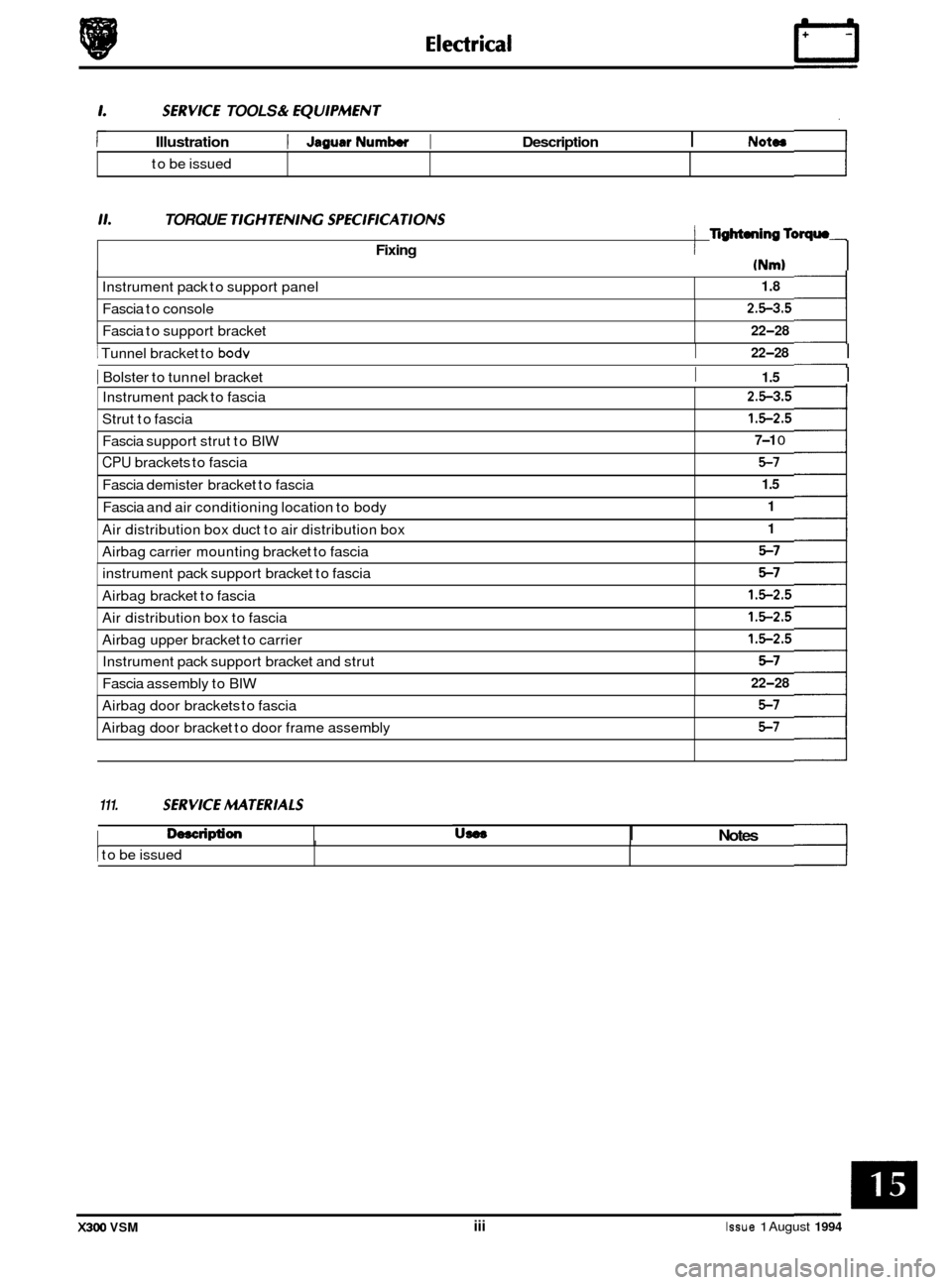
SERVKE TOOLS & EQU1PMENT
Illustration I JagusrNumbw I Description I NOtOS
Instrument pack to support panel
to
be issued
11. TORQUE TlGHTENlNG SPEC1FKATIONS
1.8
Fixing
Fascia to console
Fascia to support bracket
(Nm)
I TigM.ningToqrn
I
2.5-3.5
22-28
Instrument pack to fascia
Strut to fascia 2.5-3.5
1.5-2.5
I I 22-28 1 Tunnel bracket to bodv
I Bolster to tunnel bracket I 1.5 I
Fascia support strut to BIW 7-1 0
CPU brackets to fascia 5-7
Fascia demister bracket to fascia 1.5
Fascia and air conditioning location to body 1
Air distribution box duct to air distribution box
Airbag carrier mounting bracket to fascia 1
5-7
instrument pack support bracket to fascia
Airbag bracket to fascia 5-7
1.5-2.5
Air distribution box to fascia
Airbag upper bracket to carrier 1.5-2.5
1.5-2.5
Instrument pack support bracket and strut
Fascia assembly to BIW 5-7
22-28
111. SERVKE MTERlALS
0, Description
Airbag door brackets to fascia
Airbag door bracket to door frame assembly 5-7
5-7
US08 Notes I I
1 to be issued I I
X300 VSM iii Issue 1 August 1994
Page 374 of 521
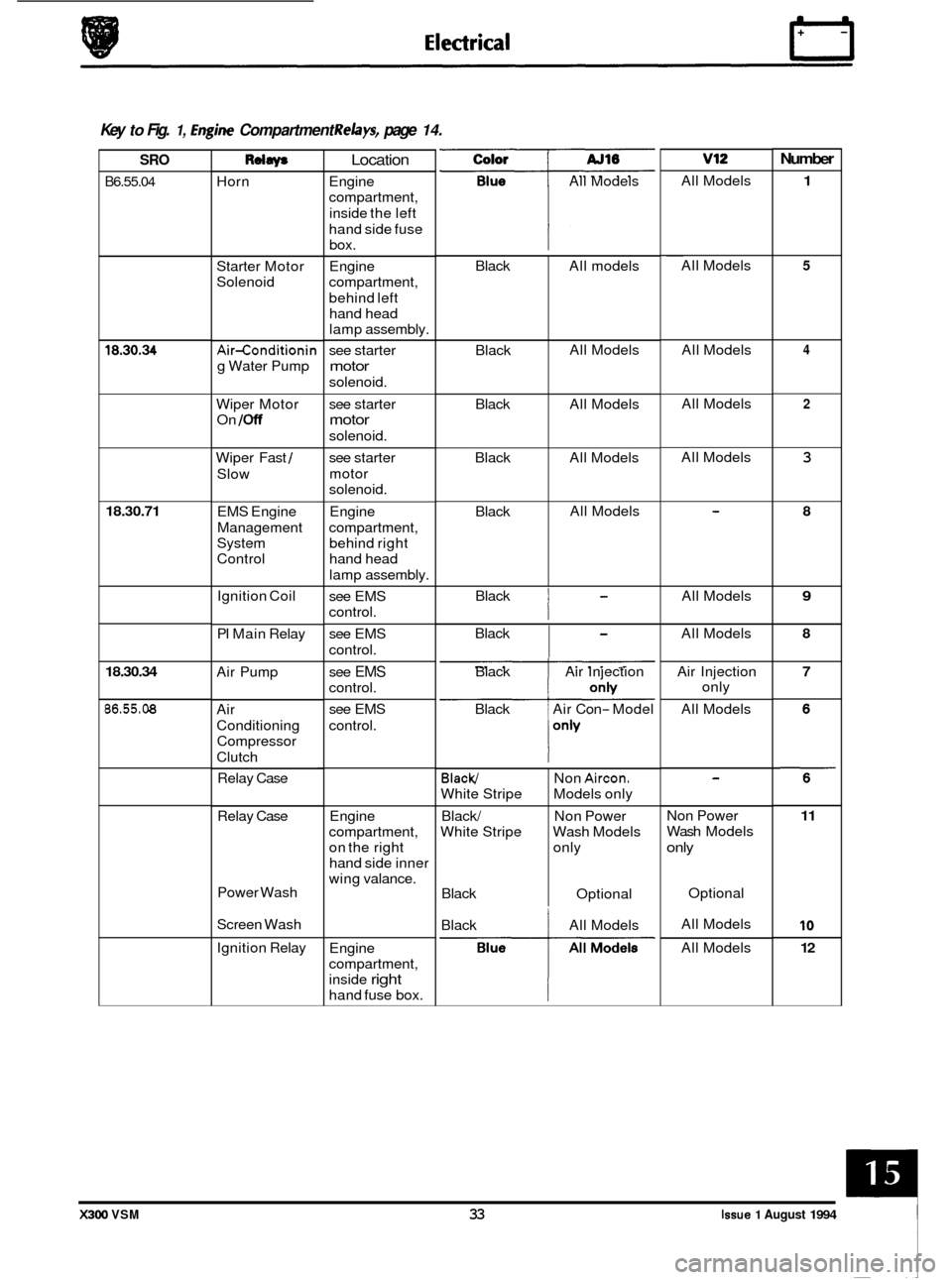
Black
Black
Black All
models
All Models
All Models
Black
Black All
Models
All Models
Black/
White Stripe
Black/
White Stripe
Black Non
Aircon.
Models
only
Non Power
Wash Models
only
Optional
0 Key to Fig. 1, hgine Compartment Relays, page 14.
Number v12 Color
All Models
SRO
B6.55.04
Rdaw
Horn
Location
Engine
compartment,
inside the left
hand side fuse box.
Engine
compartment,
behind left hand head
lamp assembly.
see starter
motor
solenoid. All
Models
1 ~~
All
Models 5 Starter Motor
Solenoid
4 All Models
All Models 18.30.34 Air-conditionin
g Water Pump
Wiper Motor
On
/Off
2 see starter
motor
solenoid.
see starter
motor
solenoid. All
Models
3 Wiper Fast /
Slow
18.30.71 Engine
compartment, behind right
hand head
lamp assembly. 8 EMS Engine
Management
System
Control
Black
I
All Models 9 Ignition Coil
PI Main Relay see
EMS
control.
see EMS
control. Black
I
All
Models 8
Air Pump 7 see EMS
control.
see EMS
control. Black
Air Injection
Black Air Con
- Model Air
Injection
only
All Models
18.30.34
86.55.08 Air
Conditioning
Compressor
Clutch
Relay Case
Engine
compartment,
on the right
hand side inner
wing valance.
Relay
Case Non Power
Wash
Models
only
11
10
12
Power Wash
Screen Wash Optional
All Models
All Models
Black
All Models
Ignition Relay
Engine
compartment,
inside
right
hand fuse box.
X300 VSM 33 Issue 1 August 1994