battery JAGUAR XJ6 1997 2.G Repair Manual
[x] Cancel search | Manufacturer: JAGUAR, Model Year: 1997, Model line: XJ6, Model: JAGUAR XJ6 1997 2.GPages: 227, PDF Size: 7.2 MB
Page 159 of 227
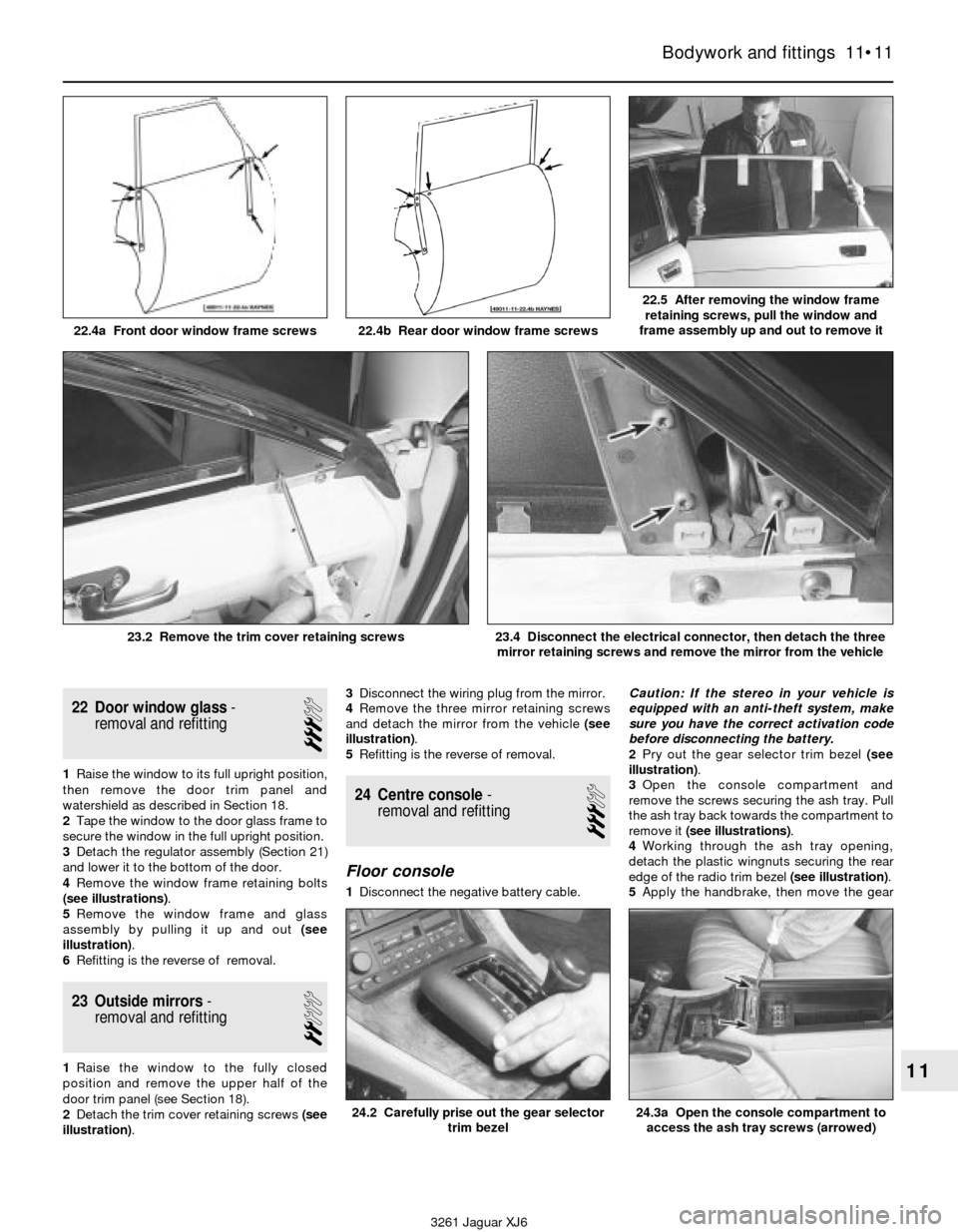
22 Door window glass-
removal and refitting
3
1Raise the window to its full upright position,
then remove the door trim panel and
watershield as described in Section 18.
2Tape the window to the door glass frame to
secure the window in the full upright position.
3Detach the regulator assembly (Section 21)
and lower it to the bottom of the door.
4Remove the window frame retaining bolts
(see illustrations).
5Remove the window frame and glass
assembly by pulling it up and out (see
illustration).
6Refitting is the reverse of removal.
23 Outside mirrors-
removal and refitting
2
1Raise the window to the fully closed
position and remove the upper half of the
door trim panel (see Section 18).
2Detach the trim cover retaining screws (see
illustration).3Disconnect the wiring plug from the mirror.
4Remove the three mirror retaining screws
and detach the mirror from the vehicle (see
illustration).
5Refitting is the reverse of removal.
24 Centre console-
removal and refitting
3
Floor console
1Disconnect the negative battery cable.Caution: If the stereo in your vehicle is
equipped with an anti-theft system, make
sure you have the correct activation code
before disconnecting the battery.
2Pry out the gear selector trim bezel (see
illustration).
3Open the console compartment and
remove the screws securing the ash tray. Pull
the ash tray back towards the compartment to
remove it (see illustrations).
4Working through the ash tray opening,
detach the plastic wingnuts securing the rear
edge of the radio trim bezel (see illustration).
5Apply the handbrake, then move the gear
Bodywork and fittings 11•11
11
22.4a Front door window frame screws 22.4b Rear door window frame screws
22.5 After removing the window frame
retaining screws, pull the window and
frame assembly up and out to remove it
3261 Jaguar XJ6 23.2 Remove the trim cover retaining screws
23.4 Disconnect the electrical connector, then detach the three
mirror retaining screws and remove the mirror from the vehicle
24.3a Open the console compartment to
access the ash tray screws (arrowed)24.2 Carefully prise out the gear selector
trim bezel
Page 160 of 227
selector towards the rear of the vehicle. Pull
up on the rear half of the radio trim bezel while
gently detaching the clips securing the front,
then remove the bezel from the vehicle.
6Remove the radio and heater control
assembly (see Chapter 12).
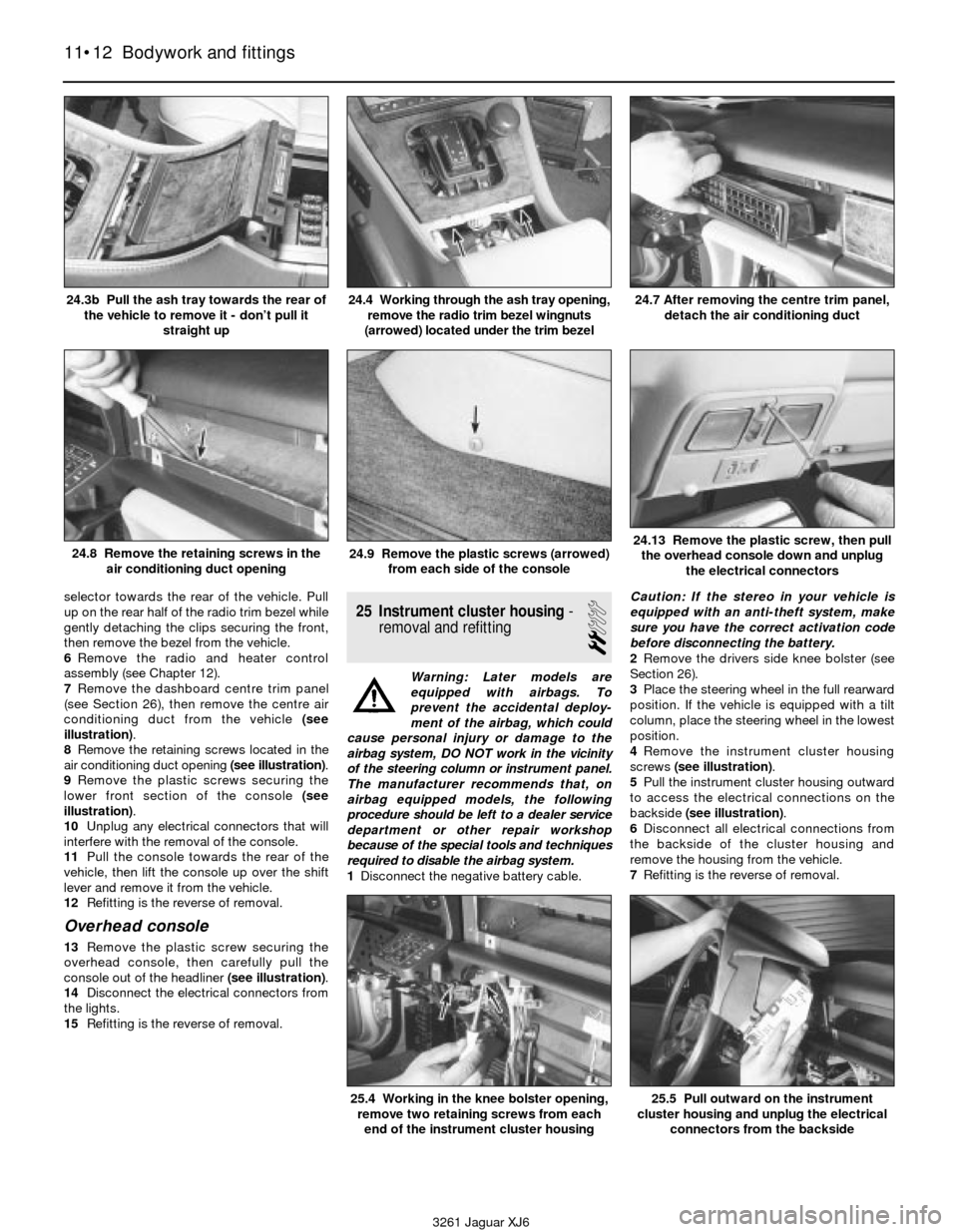
7Remove the dashboard centre trim panel
(see Section 26), then remove the centre air
conditioning duct from the vehicle (see
illustration).
8Remove the retaining screws located in the
air conditioning duct opening (see illustration).
9Remove the plastic screws securing the
lower front section of the console (see
illustration).
10Unplug any electrical connectors that will
interfere with the removal of the console.
11Pull the console towards the rear of the
vehicle, then lift the console up over the shift
lever and remove it from the vehicle.
12Refitting is the reverse of removal.
Overhead console
13Remove the plastic screw securing the
overhead console, then carefully pull the
console out of the headliner (see illustration).
14Disconnect the electrical connectors from
the lights.
15Refitting is the reverse of removal.
25 Instrument cluster housing-
removal and refitting
2
Warning: Later models are
equipped with airbags. To
prevent the accidental deploy-
ment of the airbag, which could
cause personal injury or damage to the
airbag system, DO NOT work in the vicinity
of the steering column or instrument panel.
The manufacturer recommends that, on
airbag equipped models, the following
procedure should be left to a dealer service
department or other repair workshop
because of the special tools and techniques
required to disable the airbag system.
1Disconnect the negative battery cable. Caution: If the stereo in your vehicle is
equipped with an anti-theft system, make
sure you have the correct activation code
before disconnecting the battery.
2Remove the drivers side knee bolster (see
Section 26).
3Place the steering wheel in the full rearward
position. If the vehicle is equipped with a tilt
column, place the steering wheel in the lowest
position.
4Remove the instrument cluster housing
screws (see illustration).
5Pull the instrument cluster housing outward
to access the electrical connections on the
backside (see illustration).
6Disconnect all electrical connections from
the backside of the cluster housing and
remove the housing from the vehicle.
7Refitting is the reverse of removal.
11•12 Bodywork and fittings
24.3b Pull the ash tray towards the rear of
the vehicle to remove it - don’t pull it
straight up24.4 Working through the ash tray opening,
remove the radio trim bezel wingnuts
(arrowed) located under the trim bezel24.7 After removing the centre trim panel,
detach the air conditioning duct
24.8 Remove the retaining screws in the
air conditioning duct opening24.9 Remove the plastic screws (arrowed)
from each side of the console24.13 Remove the plastic screw, then pull
the overhead console down and unplug
the electrical connectors
3261 Jaguar XJ6
25.4 Working in the knee bolster opening,
remove two retaining screws from each
end of the instrument cluster housing25.5 Pull outward on the instrument
cluster housing and unplug the electrical
connectors from the backside
Page 161 of 227
26 Dashboard trim panels-
removal and refitting
2
Warning: Later models are
equipped with airbags. To
prevent the accidental deploy-
ment of the airbag, which could
cause personal injury or damage to the
airbag system, DO NOT work in the vicinity
of the steering column or instrument panel.
The manufacturer recommends that, on
airbag equipped models, the following
procedure should be left to a dealer service
department or other repair workshop
because of the special tools and techniques
required to disable the airbag system.
Caution: If the stereo in your vehicle is
equipped with an anti-theft system, make
sure you have the correct activation code
before disconnecting the battery
Knee bolster
1Knee bolsters are located on the lower half
of the instrument panel on the driver and
passenger sides of the vehicle. The removal of
these covers will allow access to a variety of
electrical, heating and air conditioning
components.
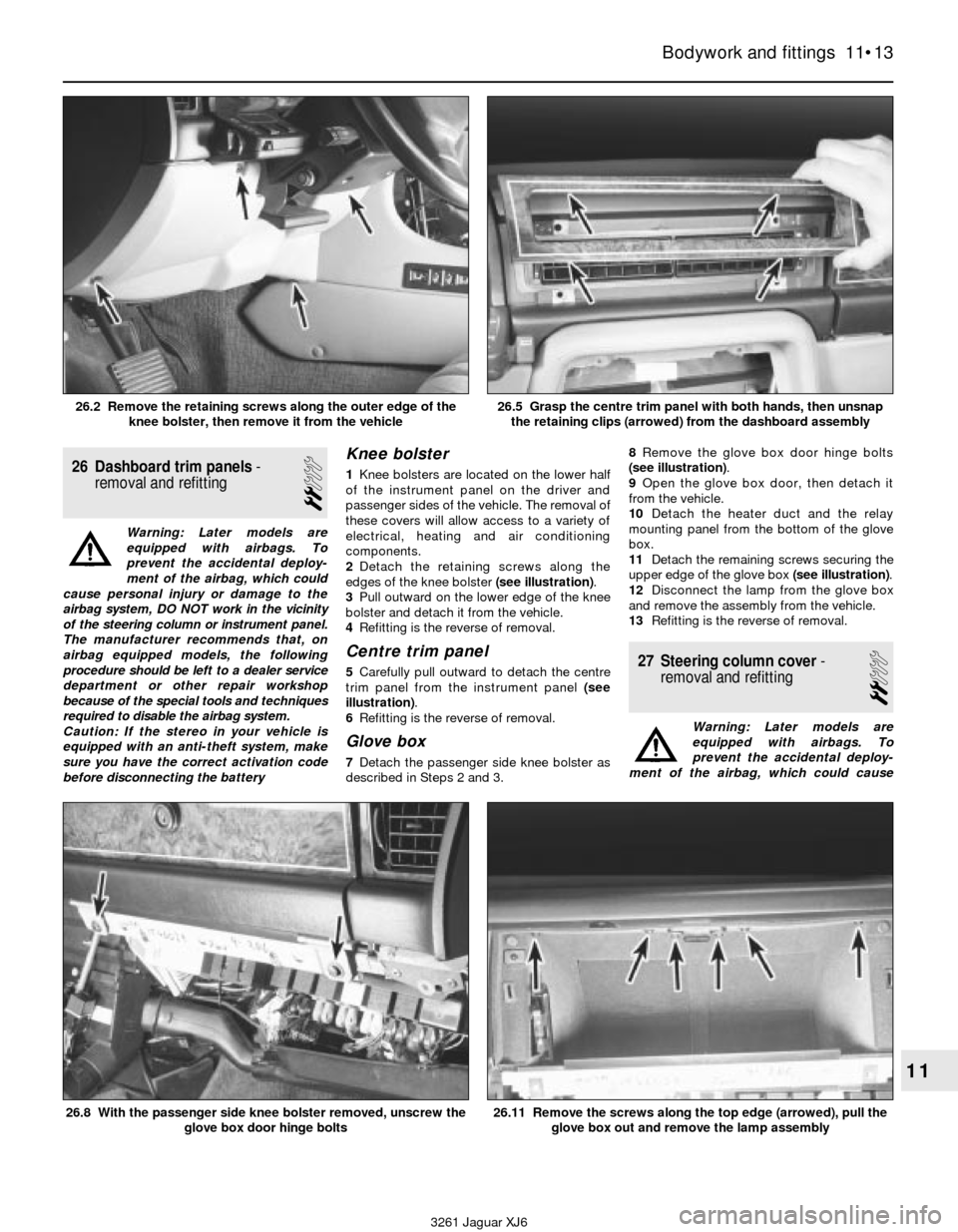
2Detach the retaining screws along the
edges of the knee bolster (see illustration).
3Pull outward on the lower edge of the knee
bolster and detach it from the vehicle.
4Refitting is the reverse of removal.
Centre trim panel
5Carefully pull outward to detach the centre
trim panel from the instrument panel (see
illustration).
6Refitting is the reverse of removal.
Glove box
7Detach the passenger side knee bolster as
described in Steps 2 and 3.8Remove the glove box door hinge bolts
(see illustration).
9Open the glove box door, then detach it
from the vehicle.
10Detach the heater duct and the relay
mounting panel from the bottom of the glove
box.
11Detach the remaining screws securing the
upper edge of the glove box (see illustration).
12Disconnect the lamp from the glove box
and remove the assembly from the vehicle.
13Refitting is the reverse of removal.
27 Steering column cover-
removal and refitting
2
Warning: Later models are
equipped with airbags. To
prevent the accidental deploy-
ment of the airbag, which could cause
Bodywork and fittings 11•13
11
3261 Jaguar XJ6 26.2 Remove the retaining screws along the outer edge of the
knee bolster, then remove it from the vehicle
26.5 Grasp the centre trim panel with both hands, then unsnap
the retaining clips (arrowed) from the dashboard assembly
26.8 With the passenger side knee bolster removed, unscrew the
glove box door hinge bolts26.11 Remove the screws along the top edge (arrowed), pull the
glove box out and remove the lamp assembly
Page 163 of 227
3261 Jaguar XJ6
12
Chapter 12
Body electrical system
1 General information
The electrical system is a 12-volt, negative
earth type. Power for the lights and all
electrical accessories is supplied by a
lead/acid-type battery which is charged by
the alternator.
This Chapter covers repair and service
procedures for the various electrical
components not associated with the engine.
Information on the battery, alternator,
distributor and starter motor will be found in
Chapter 5.
It should be noted that when portions of the
electrical system are serviced, the cable
should be disconnected from the negative
battery terminal to prevent electrical shorts
and/or fires.
2 Electrical fault finding-
general information
A typical electrical circuit consists of an
electrical component, any switches, relays,
motors, fuses, fusible links, in-line fuses or
circuit breakers related to that component
and the wiring and electrical connectors that
link the component to both the battery andthe chassis. To help you pinpoint an electrical
circuit problem, wiring diagrams are included
at the end of this Chapter.
Before tackling any troublesome electrical
circuit, first study the appropriate wiring
diagrams to get a complete understanding of
what makes up that individual circuit. Trouble
spots, for instance, can often be narrowed
down by noting if other components related to
the circuit are operating properly. If several
components or circuits fail at one time,
chances are the problem is in a fuse or earth
connection, because several circuits are often
routed through the same fuse and earth
connections.
Electrical problems usually stem from
simple causes, such as loose or corroded
connections, a blown fuse, a melted fusible
link or a bad relay. Visually inspect the
condition of all fuses, wires and connections
in a problem circuit before diagnosing it.
If testing instruments are going to be
utilised, use the diagrams to plan ahead of
time where you will make the necessary
connections in order to accurately pinpoint
the trouble spot.
The basic tools needed for electrical fault
finding include a circuit tester or voltmeter (a
12-volt bulb with a set of test leads can also
be used), a continuity tester, which includes a
bulb, battery and set of test leads, and a
jumper wire, preferably with a circuit breaker
incorporated, which can be used to bypasselectrical components. Before attempting to
locate a problem with test instruments,
use the wiring diagram(s) to decide where to
make the connections.
Voltage checks
Voltage checks should be performed if a
circuit is not functioning properly. Connect
one lead of a circuit tester to either the
negative battery terminal or a known good
earth. Connect the other lead to a electrical
connector in the circuit being tested,
preferably nearest to the battery or fuse. If the
bulb of the tester lights, voltage is present,
which means that the part of the circuit
between the electrical connector and the
battery is problem free. Continue checking the
rest of the circuit in the same fashion. When
you reach a point at which no voltage is
present, the problem lies between that point
and the last test point with voltage. Most of
the time the problem can be traced to a loose
connection. Note:Keep in mind that some
circuits receive voltage only when the ignition
key is in the Accessory or Run position.
Finding a short
One method of finding shorts in a circuit is
to remove the fuse and connect a test light or
voltmeter in its place. There should be no
voltage present in the circuit. Move the wiring
harness from side to side while watching the
test light. If the bulb goes on, there is a short Airbag system - general information . . . . . . . . . . . . . . . . . . . . . . . . . 28
Bulb renewal . . . . . . . . . . . . . . . . . . . . . . . . . . . . . . . . . . . . . . . . . . . 21
Central locking system - description and check . . . . . . . . . . . . . . . . 25
Circuit breakers - general information . . . . . . . . . . . . . . . . . . . . . . . . 5
Cruise control system - description and check . . . . . . . . . . . . . . . . . 23
Direction indicators/hazard flashers - general information . . . . . . . . 7
Electric aerial - removal and refitting . . . . . . . . . . . . . . . . . . . . . . . . . 14
Electric side view mirrors - description and check . . . . . . . . . . . . . . 26
Electric sunroof - description and check . . . . . . . . . . . . . . . . . . . . . . 27
Electric window system - description and check . . . . . . . . . . . . . . . 24
Electrical fault finding - general information . . . . . . . . . . . . . . . . . . . 2
Fuel, oil and temperature gauges - check . . . . . . . . . . . . . . . . . . . . . 11
Fuses - general information . . . . . . . . . . . . . . . . . . . . . . . . . . . . . . . . 3
General information . . . . . . . . . . . . . . . . . . . . . . . . . . . . . . . . . . . . . . 1
Headlight housing (1992 to 1994 models) - removal and refitting . . . 19Headlights - adjustment . . . . . . . . . . . . . . . . . . . . . . . . . . . . . . . . . . 18
Headlights - renewal . . . . . . . . . . . . . . . . . . . . . . . . . . . . . . . . . . . . . 17
Heated rear window - check and repair . . . . . . . . . . . . . . . . . . . . . . 16
Horn - check and renewal . . . . . . . . . . . . . . . . . . . . . . . . . . . . . . . . . 20
Ignition switch and key lock cylinder - removal and refitting . . . . . . 9
Inertia switch - description and check . . . . . . . . . . . . . . . . . . . . . . . . 22
In-line fuses - general information . . . . . . . . . . . . . . . . . . . . . . . . . . . 4
Instrument cluster - removal and refitting . . . . . . . . . . . . . . . . . . . . . 12
Instrument panel switches - removal and refitting . . . . . . . . . . . . . . 10
Radio and speakers - removal and refitting . . . . . . . . . . . . . . . . . . . 13
Relays - general information and testing . . . . . . . . . . . . . . . . . . . . . . 6
Steering column switches - removal and refitting . . . . . . . . . . . . . . . 8
Windscreen wiper motor - removal and refitting . . . . . . . . . . . . . . . . 15
Wiring diagrams - general information . . . . . . . . . . . . . . . . . . . . . . . 29
12•1
Contents
Easy,suitable for
novice with little
experienceFairly easy,suitable
for beginner with
some experienceFairly difficult,
suitable for competent
DIY mechanic
Difficult,suitable for
experienced DIY
mechanicVery difficult,
suitable for expert DIY
or professional
Degrees of difficulty
54321
Page 164 of 227

to earth somewhere in that area, probably
where the insulation has rubbed through. The
same test can be performed on each
component in the circuit, even a switch.
Earth check
Perform an earth test to check whether a
component is properly earthed. Disconnect
the battery and connect one lead of a self-
powered test light, known as a continuity
tester, to a known good earth. Connect the
other lead to the wire or earth connection
being tested. If the bulb goes on, the earth is
good. If the bulb does not go on, the earth is
not good.
Continuity check
A continuity check is done to determine if
there are any breaks in a circuit - if it is
passing electricity properly. With the circuit off
(no power in the circuit), a self-powered
continuity tester can be used to check the
circuit. Connect the test leads to both ends of
the circuit (or to the “power” end and a good
earth), and if the test light comes on the circuit
is passing current properly. If the light doesn’t
come on, there is a break somewhere in the
circuit. The same procedure can be used
to test a switch, by connecting the continuity
tester to the power in and power out sides of
the switch. With the switch turned On, the test
light should come on.
Finding an open circuit
When diagnosing for possible open circuits,
it is often difficult to locate them by sight
because oxidation or terminal misalignment
are hidden by the electrical connectors.
Merely wiggling an electrical connector on a
sensor or in the wiring harness may correct
the open circuit condition. Remember this
when an open circuit is indicated when
diagnosing a circuit. Intermittent problems
may also be caused by oxidised or loose
connections.Electrical fault finding is simple if you keep
in mind that all electrical circuits are basically
electricity running from the battery, through
the wires, switches, relays, fuses and fusible
links to each electrical component (light bulb,
motor, etc.) and to earth, from which it is
passed back to the battery. Any electrical
problem is an interruption in the flow of
electricity to and from the battery.
3 Fuses- general information
The electrical circuits of the vehicle are
protected by a combination of fuses, circuit
breakers and In-line fuses. The fuse blocks
are located in the left and right side kick
panels and in the centre console glove box
(see illustrations).
Each of the fuses is designed to protect a
specific circuit, and the various circuits are
identified on the fuse panel cover.
Miniaturised fuses are employed in the fuse
blocks. These compact fuses, with blade
terminal design, allow fingertip removal and
renewal. If an electrical component fails,
always check the fuse first. The best way tocheck the fuses is with a test light. Check for
power at the exposed terminal tips of each
fuse. If power is present on one side of the
fuse but not the other, the fuse is blown. A
blown fuse can be confirmed by visual
inspection (see illustration).
Be sure to renew blown fuses with the
correct type. Fuses of different ratings are
physically interchangeable, but only fuses of
the proper rating should be used. Replacing a
fuse with one of a higher or lower value than
specified is not recommended. Each electrical
circuit needs a specific amount of protection.
The amperage value of each fuse is moulded
into the fuse body.
If the renewal fuse immediately fails, don’t
renew it again until the cause of the problem
is isolated and corrected. In most cases, this
will be a short circuit in the wiring caused by a
broken or deteriorated wire.
4 In-line fuses-
general information
Some circuits are protected by in-line
fuses. In-line fuses are used in such circuits
as the windscreen wiper system, headlight
12•2 Body electrical system
3261 Jaguar XJ6 3.1a The left side fusebox is located in the passenger’s side kick
panel, behind the fuse panel cover
3.1b The right side fusebox is located in the driver’s side kick
panel, behind the fuse panel cover
3.1c A third fusebox is located in the
centre console glove box3.3 When a fuse blows, the metal element
between the terminals melts - the fuse on
the left is blown, the one on the right is ok
Page 166 of 227

can be removed and tested using the
procedure below or by a dealer service
department or a repair workshop. Defective
relays must be replaced as a unit.
Testing
1It’s best to refer to the wiring diagram for
the circuit to determine the proper
connections for the relay you’re testing.
However, if you’re not able to determine the
correct connection from the wiring diagrams,
you may be able to determine the test
connections from the information that follows.
2On most relays, two of the terminals are the
relay’s control circuit (they connect to the
relay coil which, when energised, closes the
large contacts to complete the circuit). The
other terminals are the power circuit (they are
connected together within the relay when the
control-circuit coil is energised).
3Relays are sometimes marked as an aid to
help you determine which terminals are the
control circuit and which are the powercircuit (see illustration). As a general rule,
the two thicker wires connected to the relay
are the power circuit; the thinner wires are
the control circuit.
4Remove the relay from the vehicle and check
for continuity between the relay power circuit
terminals. There should be no continuity.5Connect a fused jumper wire between one
of the two control circuit terminals and the
positive battery terminal. Connect another
jumper wire between the other control circuit
terminal and earth. When the connections are
made, the relay should click. On some relays,
polarity may be critical, so, if the relay doesn’t
click, try swapping the jumper wires on the
control circuit terminals.
6With the jumper wires connected, check for
continuity between the power circuit
terminals. Now, there should be continuity.
8If the relay fails any of the above tests,
renew it.
7 Direction indicator/hazard
flasher- general information
Warning: Later model vehicles
are equipped with airbags. To
prevent accidental deployment6.3 Most relays are marked on the outside
to easily identify the control circuit and
power circuits
12•4 Body electrical system
3261 Jaguar XJ6 1990 to 1992 relay location details
Page 167 of 227

of the airbag, which could cause personal
injury or damage to the airbag system, DO
NOT work in the vicinity of the steering
column or instrument panel. The
manufacturer recommends that, on airbag
equipped models, the following procedure
be performed at a dealer service
department or other properly equipped
repair facility because of the special tools
and techniques required to disable the
airbag system.
The direction indicator and hazard flasher
systems are governed by the central
processing unit. The central processing unit
requires special testers and diagnostic
procedures which are beyond the scope of
this manual.
If the direction indicator/hazard flasher
system fails and the indicator bulbs are in
working condition take the vehicle to a dealer
service department or an automotive
electrical specialist for further diagnosis and
repair.8 Steering column switches-
removal and refitting
1
Warning: Later models are
equipped with airbags. To
prevent accidental deployment
of the airbag, which could cause
personal injury or damage to the airbag
system, DO NOT work in the vicinity of the
steering column or instrument panel. The
manufacturer recommends that, on airbag
equipped models, the following procedure
be performed at a dealer service
department or other properly equipped
repair facility because of the special tools
and techniques required to disable the
airbag system.
Caution: If the stereo in your vehicle is
equipped with an anti-theft system, make
sure you have the correct activation code
before disconnecting the battery.1Disconnect the negative battery cable.
2Remove the steering wheel (Chapter 10).
3Remove the lower steering column cover
(see Chapter 11).
4Remove the switch retaining screw(s) (see
illustration).
Body electrical system 12•5
12
3261 Jaguar XJ6 1993 to 1994 relay location details
8.4 Remove the switch retaining screws,
disconnect the electrical connectors and
pull the switches outward (arrowed)
Page 168 of 227
5Disconnect the electrical connectors from
underneath the steering column and remove
the switch or switches from the vehicle.
6Refitting is the reverse of removal.
9 Ignition switch
and key lock cylinder-
removal and refitting
2
Warning: Later models are
equipped with airbags. To
prevent accidental deployment
of the airbag, which could cause
personal injury or damage to the airbag
system, DO NOT work in the vicinity of the
steering column or instrument panel. The
manufacturer recommends that, on airbag
equipped models, the following procedure
be performed at a dealer service
department or other properly equipped
repair facility because of the special tools
and techniques required to disable the
airbag system.
Caution: If the stereo in your vehicle is
equipped with an anti-theft system, make
sure you have the correct activation code
before disconnecting the battery.1Disconnect the negative battery cable.
2Remove the steering wheel (Chapter 10).
3Remove the steering column trim covers
(see Chapter 11).
4Remove the steering column switch
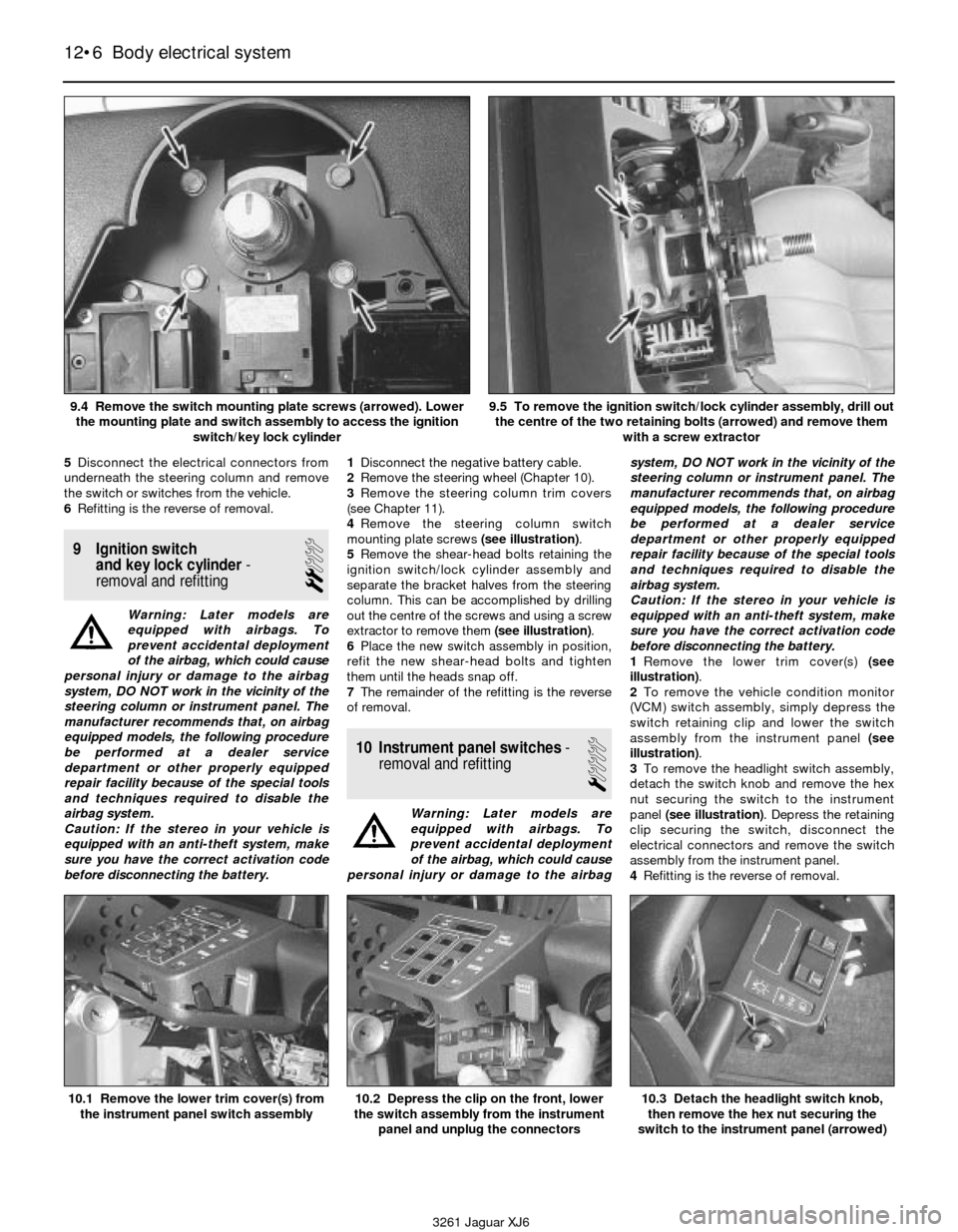
mounting plate screws (see illustration).
5Remove the shear-head bolts retaining the
ignition switch/lock cylinder assembly and
separate the bracket halves from the steering
column. This can be accomplished by drilling
out the centre of the screws and using a screw
extractor to remove them (see illustration).
6Place the new switch assembly in position,
refit the new shear-head bolts and tighten
them until the heads snap off.
7The remainder of the refitting is the reverse
of removal.
10 Instrument panel switches-
removal and refitting
1
Warning: Later models are
equipped with airbags. To
prevent accidental deployment
of the airbag, which could cause
personal injury or damage to the airbagsystem, DO NOT work in the vicinity of the
steering column or instrument panel. The
manufacturer recommends that, on airbag
equipped models, the following procedure
be performed at a dealer service
department or other properly equipped
repair facility because of the special tools
and techniques required to disable the
airbag system.
Caution: If the stereo in your vehicle is
equipped with an anti-theft system, make
sure you have the correct activation code
before disconnecting the battery.
1Remove the lower trim cover(s) (see
illustration).
2To remove the vehicle condition monitor
(VCM) switch assembly, simply depress the
switch retaining clip and lower the switch
assembly from the instrument panel (see
illustration).
3To remove the headlight switch assembly,
detach the switch knob and remove the hex
nut securing the switch to the instrument
panel (see illustration). Depress the retaining
clip securing the switch, disconnect the
electrical connectors and remove the switch
assembly from the instrument panel.
4Refitting is the reverse of removal.
12•6 Body electrical system
10.1 Remove the lower trim cover(s) from
the instrument panel switch assembly10.2 Depress the clip on the front, lower
the switch assembly from the instrument
panel and unplug the connectors10.3 Detach the headlight switch knob,
then remove the hex nut securing the
switch to the instrument panel (arrowed)
3261 Jaguar XJ6 9.4 Remove the switch mounting plate screws (arrowed). Lower
the mounting plate and switch assembly to access the ignition
switch/key lock cylinder
9.5 To remove the ignition switch/lock cylinder assembly, drill out
the centre of the two retaining bolts (arrowed) and remove them
with a screw extractor
Page 169 of 227

11 Fuel, oil and temperature
gauges- check
1
Warning: Later models are
equipped with airbags. To
prevent accidental deployment
of the airbag, which could cause
personal injury or damage to the airbag
system, DO NOT work in the vicinity of the
steering column or instrument panel. The
manufacturer recommends that, on airbag
equipped models, the following procedure
be performed at a dealer service
department or other properly equipped
repair facility because of the special tools
and techniques required to disable the
airbag system.
1All tests below require the ignition switch to
be turned to ON position when testing.
2Check the fuse if the gauge pointer does
not move from the empty, low or cold
positions. If the fuse is OK, locate the
particular sender unit for the circuit you’re
working on (see Chapter 4 for fuel sender unit
location, Chapter 2 for oil sender unit location,
or Chapter 3 for temperature sender unit
location). Connect the sender unit connector
to earth If the pointer goes to the full, high or
hot position renew the sender unit. If the
pointer stays in same position use a jumper
wire to earth the terminal on the back of the
gauge. If the pointer moves with the back of
the gauge earthed the problem lies in the wire
between the gauge and the sender unit. If the
pointer does not moves with the back of the
gauge earthed check for voltage at the other
terminal of the gauge. If voltage is present
renew the gauge.
12 Instrument cluster-
removal and refitting
1
Warning: Later models are
equipped with airbags. To
prevent accidental deployment
of the airbag, which could cause
personal injury or damage to the airbag
system, DO NOT work in the vicinity of the
steering column or instrument panel. The
manufacturer recommends that, on airbag
equipped models, the following procedure
be performed at a dealer service
department or other properly equipped
repair facility because of the special tools
and techniques required to disable the
airbag system.
Caution: If the stereo in your vehicle is
equipped with an anti-theft system, make
sure you have the correct activation code
before disconnecting the battery.
1Disconnect the negative battery cable.
2Remove the instrument cluster housing (see
Chapter 11).
3Remove the instrument cluster mounting
screws (see illustration). Separate the
instrument cluster from the cluster housing.
4Refitting is the reverse of removal.
13 Radio and speakers-
removal and refitting
2
Warning: Later models are
equipped with airbags. To
prevent accidental deployment
of the airbag, which could cause
personal injury or damage to the airbag
system, DO NOT work in the vicinity of the
steering column or instrument panel. The
manufacturer recommends that, on airbagequipped models, the following procedure
be performed at a dealer service
department or other properly equipped
repair facility because of the special tools
and techniques required to disable the
airbag system.
Caution: If the stereo in your vehicle is
equipped with an anti-theft system, make
sure you have the correct activation code
before disconnecting the battery.
1Disconnect the negative battery cable.
Radio
2Remove the radio trim bezel (Chapter 11).
3Remove the retaining screws (see
illustration), pull the radio/control panel
outward to access the backside and
disconnect the electrical connectors and
aerial lead. Detach the retaining clips and
separate the radio from the control panel.
4Refitting is the reverse of removal.
Speakers
5Remove the door trim panel (Chapter 11).
6Remove the nuts from the speaker
mounting studs (see illustration). Disconnect
the electrical connector and remove the
speaker from the vehicle.
7Refitting is the reverse of removal.
Body electrical system 12•7
12
3261 Jaguar XJ6 12.3 Remove the instrument cluster retaining screws (arrowed)
then separate the instrument cluster from the cluster housing
13.3 Remove the retaining screws (arrowed) and pull the
radio/control panel out enough to unplug the connectors
13.6 Remove the nuts from the retaining
studs (arrowed) to remove the speaker
Page 173 of 227
8Adjustment should be made with the
vehicle parked 25 feet from the wall, sitting
level, the petrol tank half-full and no unusually
heavy load in the vehicle.
9Starting with the low beam adjustment,
position the high intensity zone so it is two
inches below the horizontal line and two
inches to the right of the headlight vertical
line. Adjustments are made by turning the
knobs located behind the headlight housings
(see illustration 18.2).
10With the high beams on, the high intensity
zone should be vertically centred with the
exact centre just below the horizontal line.
Note:It may not be possible to position the
headlight aim exactly for both high and low
beams. If a compromise must be made, keep
in mind that the low beams are the most used
and have the greatest effect on safety.
11Have the headlights adjusted by a dealer
service department or service station at the
earliest opportunity.
19 Headlight housing
(1992 to 1994 models)-
removal and refitting
1
Warning: These vehicles are
equipped with halogen gas-filled
headlight bulbs which are under
pressure and may shatter if the
surface is damaged or the bulb is dropped.
Wear eye protection and handle the bulbs
carefully, grasping only the base whenever
possible. Do not touch the surface of the
bulb with your fingers because the oil from
your skin could cause it to overheat and
fail prematurely. If you do touch the bulb
surface, clean it with rubbing alcohol.
1Remove the headlight bulb (Section 17).
2Remove the retaining nuts, detach the
housing and withdraw it from the vehicle (see
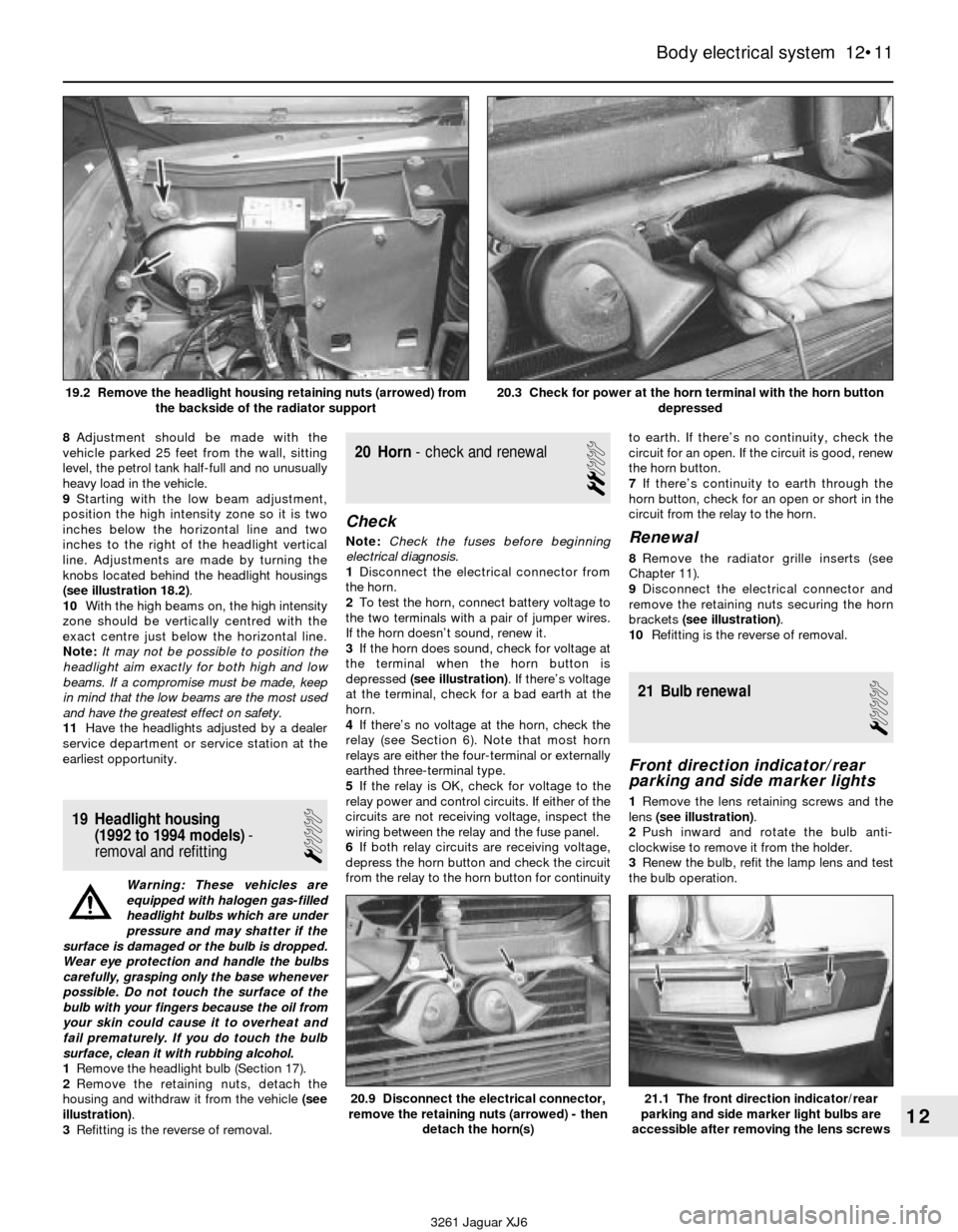
illustration).
3Refitting is the reverse of removal.
20 Horn- check and renewal
2
Check
Note:Check the fuses before beginning
electrical diagnosis.
1Disconnect the electrical connector from
the horn.
2To test the horn, connect battery voltage to
the two terminals with a pair of jumper wires.
If the horn doesn’t sound, renew it.
3If the horn does sound, check for voltage at
the terminal when the horn button is
depressed (see illustration). If there’s voltage
at the terminal, check for a bad earth at the
horn.
4If there’s no voltage at the horn, check the
relay (see Section 6). Note that most horn
relays are either the four-terminal or externally
earthed three-terminal type.
5If the relay is OK, check for voltage to the
relay power and control circuits. If either of the
circuits are not receiving voltage, inspect the
wiring between the relay and the fuse panel.
6If both relay circuits are receiving voltage,
depress the horn button and check the circuit
from the relay to the horn button for continuityto earth. If there’s no continuity, check the
circuit for an open. If the circuit is good, renew
the horn button.
7If there’s continuity to earth through the
horn button, check for an open or short in the
circuit from the relay to the horn.Renewal
8Remove the radiator grille inserts (see
Chapter 11).
9Disconnect the electrical connector and
remove the retaining nuts securing the horn
brackets (see illustration).
10Refitting is the reverse of removal.
21 Bulb renewal
1
Front direction indicator/rear
parking and side marker lights
1Remove the lens retaining screws and the
lens (see illustration).
2Push inward and rotate the bulb anti-
clockwise to remove it from the holder.
3Renew the bulb, refit the lamp lens and test
the bulb operation.
Body electrical system 12•11
12
20.9 Disconnect the electrical connector,
remove the retaining nuts (arrowed) - then
detach the horn(s)21.1 The front direction indicator/rear
parking and side marker light bulbs are
accessible after removing the lens screws
3261 Jaguar XJ6 19.2 Remove the headlight housing retaining nuts (arrowed) from
the backside of the radiator support
20.3 Check for power at the horn terminal with the horn button
depressed