ad blue JEEP CHEROKEE 2015 KL / 5.G Owner's Manual
[x] Cancel search | Manufacturer: JEEP, Model Year: 2015, Model line: CHEROKEE, Model: JEEP CHEROKEE 2015 KL / 5.GPages: 244, PDF Size: 30.6 MB
Page 114 of 244
Go Home
A Home location must be saved in the system. From the Main Navigation menu, press
the “Where To?” button on the touchscreen, then press the “Go Home” button on the
touchscreen.
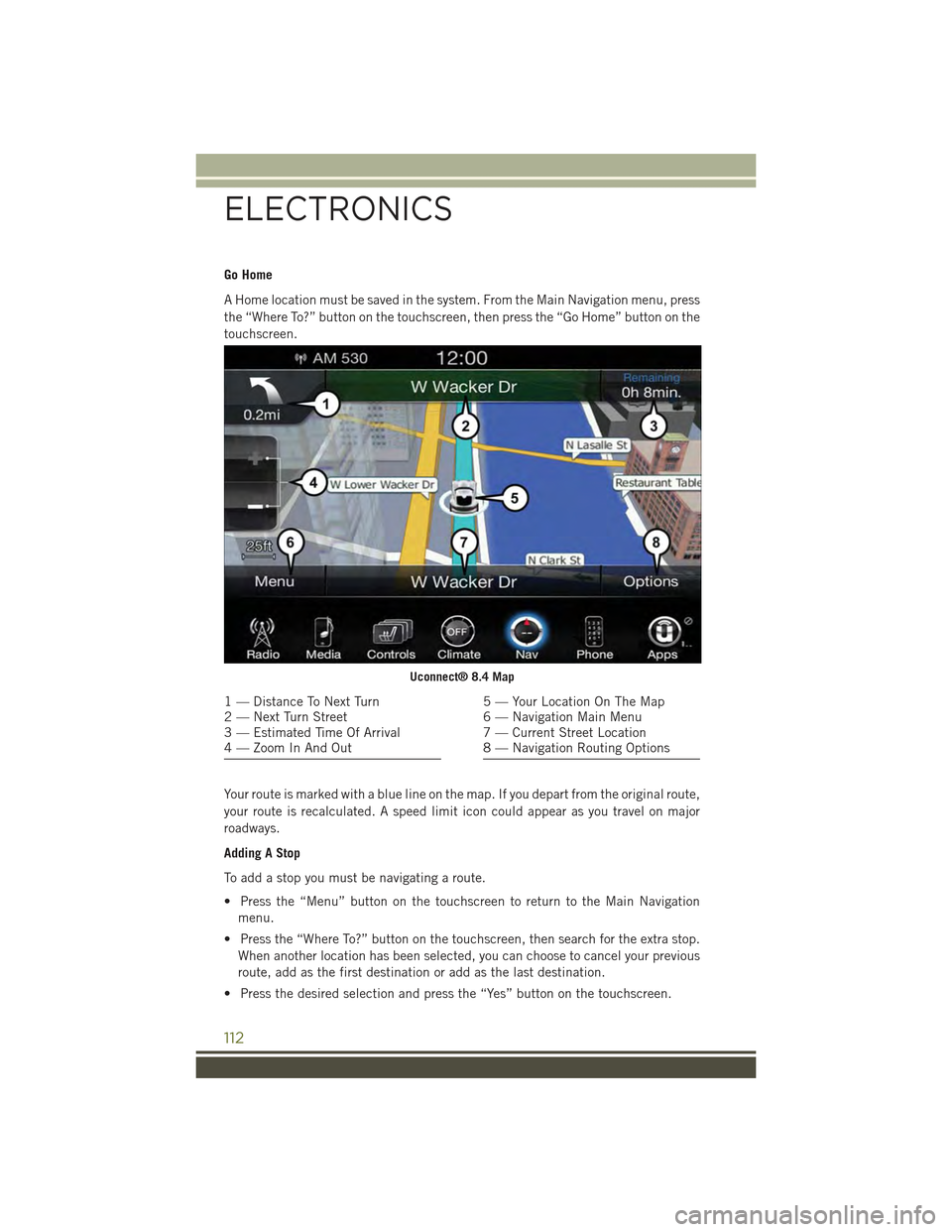
Your route is marked with a blue line on the map. If you depart from the original route,
your route is recalculated. A speed limit icon could appear as you travel on major
roadways.
Adding A Stop
To add a stop you must be navigating a route.
• Press the “Menu” button on the touchscreen to return to the Main Navigation
menu.
• Press the “Where To?” button on the touchscreen, then search for the extra stop.
When another location has been selected, you can choose to cancel your previous
route, add as the first destination or add as the last destination.
• Press the desired selection and press the “Yes” button on the touchscreen.
Uconnect® 8.4 Map
1 — Distance To Next Turn2 — Next Turn Street3 — Estimated Time Of Arrival4 — Zoom In And Out
5 — Your Location On The Map6 — Navigation Main Menu7 — Current Street Location8 — Navigation Routing Options
ELECTRONICS
112
Page 115 of 244
Taking A Detour
To take a detour you must be navigating a route.
• Press the “Detour” button on the touchscreen.
NOTE:
If the route you are currently taking is the only reasonable option, the device might
not calculate a detour.
For more information, see your Uconnect®Supplement Manual.
Uconnect® Phone (Bluetooth® Hands Free Calling)
• If the Uconnect®Phone buttonexists on your steering wheel, then you have
the Uconnect®Phone features.
• The Uconnect®Phone is a voice-activated, hands-free, in-vehicle communica-
tions system with Voice Command Capability (see Voice Command section).
• The Uconnect®Phone allows you to dial a phone number with your mobile phone
using simple voice commands or using screen button on the touchscreens.
• Refer to the Understand The Features Of Your Vehicle section of your vehicle's
Owner's Manual on the DVD for further details.
NOTE:
The Uconnect®Phone requires a mobile phone equipped with the Bluetooth®
Hands-Free Profile, Version 1.0 or higher. For Uconnect®Customer Support:
• U.S. residents visit UconnectPhone.com or call 1-877-855-8400.
•Canadian Residents visitUconnectPhone.com or call, 1-800-465–2001 (English)
or 1-800-387-9983 (French).
Pairing A Phone
• To use the Uconnect®Phone feature, you must first pair your Bluetooth®phone
with the Uconnect®system.
Start Pairing Procedure On The Radio
• Press the “Phone” button on the touchscreen, then press the “Settings” button on
the touchscreen. Next, press “Add Device.”
• Uconnect®Phone will display an “In progress” screen while the system is
connecting.
Start Pairing Procedure On Mobile Phone
• Search for available devices on your Bluetooth®enabled mobile phone. This is
usually within Settings or Options under “Bluetooth.” See your mobile phone’s
manual for details.
• When your phone finds the system, select “Uconnect” as the paired device. You
may be prompted by your phone to download the phonebook. This is so you can
make calls by saying the name of your contact (PBAP-Phone Book Access Profile).
ELECTRONICS
113
Page 118 of 244
Voice Text Reply (Not Compatible With iPhone®)
Once your Uconnect®system is paired with a compatible mobile device, the system
can announce a new incoming text message, and read it to your over the vehicle audio
system. You can reply to the message using Voice Recognition by selecting, or saying,
one of the 18 pre-defined messages.
•Here’s How:Push the Uconnect®Phone buttonand wait for the beep, then
say “reply.” Uconnect®will give the following prompt: “ Please say the message
you would like to send.” Wait for the beep and say one of the pre-defined
messages. (If you are not sure, you can say “help”). Uconnect®will then read the
pre-defined messages allowed. As soon as you hear the message you would like to
send, you can interrupt the list of prompts by pushing the Uconnect®phone button
and saying the phrase. Uconnect®will confirm the message by reading it back to
you. Push the Phone button and say “Send.”
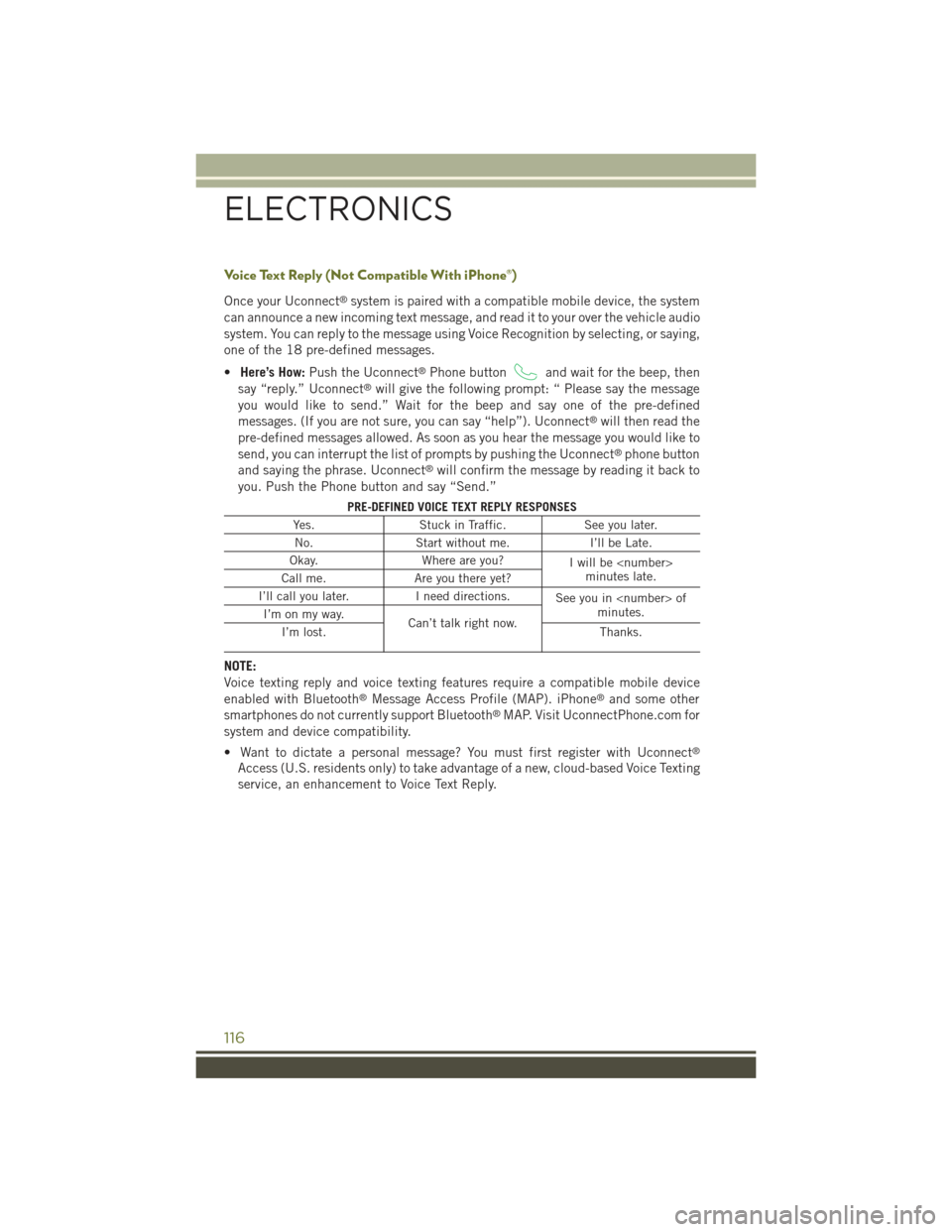
PRE-DEFINED VOICE TEXT REPLY RESPONSES
Yes.Stuck in Traffic.See you later.
No.Start without me.I’ll be Late.
Okay.Where are you?Iwillbe
I’ll call you later.I need directions.See you in
NOTE:
Voice texting reply and voice texting features require a compatible mobile device
enabled with Bluetooth®Message Access Profile (MAP). iPhone®and some other
smartphones do not currently support Bluetooth®MAP. Visit UconnectPhone.com for
system and device compatibility.
• Want to dictate a personal message? You must first register with Uconnect®
Access (U.S. residents only) to take advantage of a new, cloud-based Voice Texting
service, an enhancement to Voice Text Reply.
ELECTRONICS
116
Page 123 of 244
Media
Uconnect®offers connections via USB, SD, Bluetooth®and auxiliary ports
(If Equipped). Voice operation is only available for connected USB and iPod®
devices. (Remote CD player optional and not available on all vehicles.)
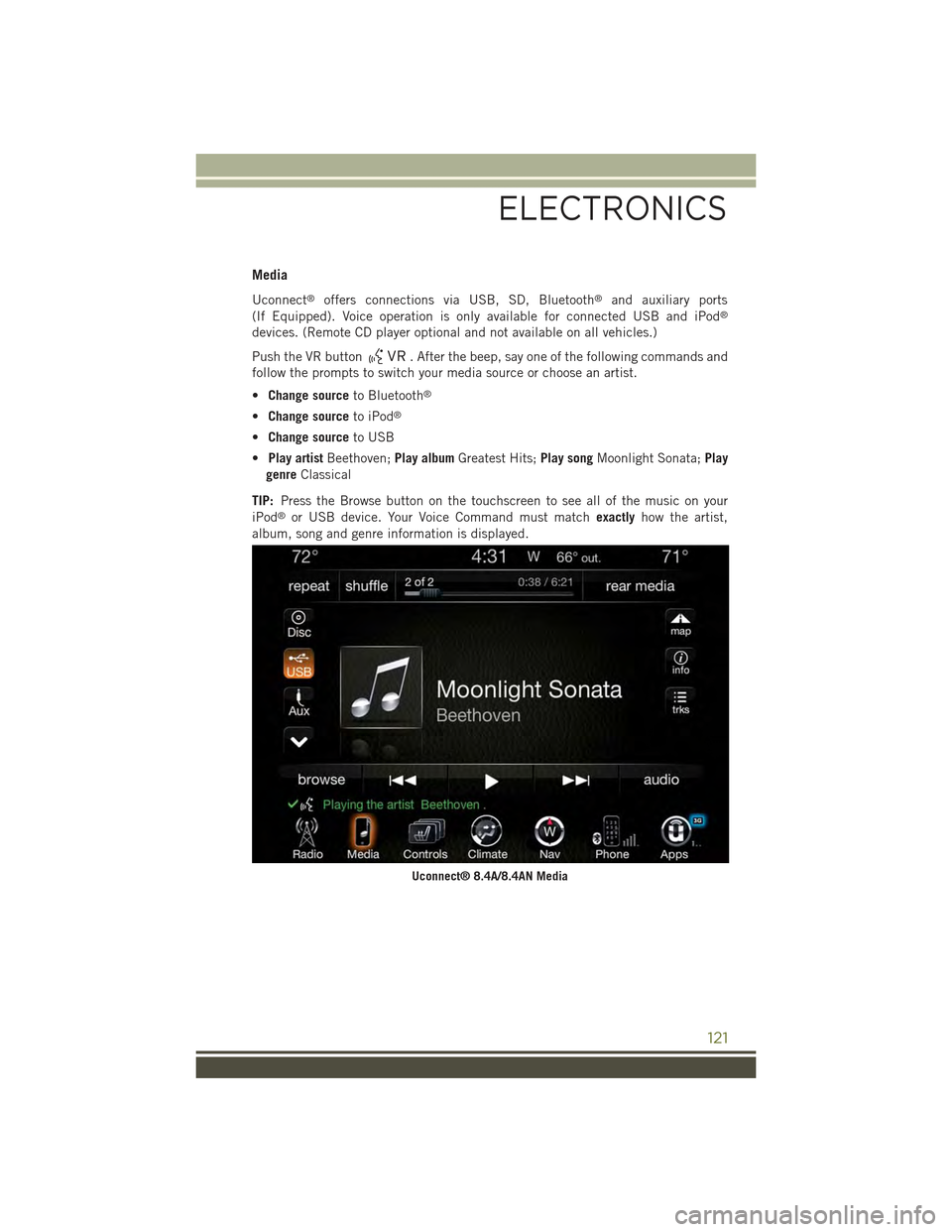
Push the VR button. After the beep, say one of the following commands and
follow the prompts to switch your media source or choose an artist.
•Change sourceto Bluetooth®
•Change sourceto iPod®
•Change sourceto USB
•Play artistBeethoven;Play albumGreatest Hits;Play songMoonlight Sonata;Play
genreClassical
TIP:Press the Browse button on the touchscreen to see all of the music on your
iPod®or USB device. Your Voice Command must matchexactlyhow the artist,
album, song and genre information is displayed.
Uconnect® 8.4A/8.4AN Media
ELECTRONICS
121
Page 143 of 244
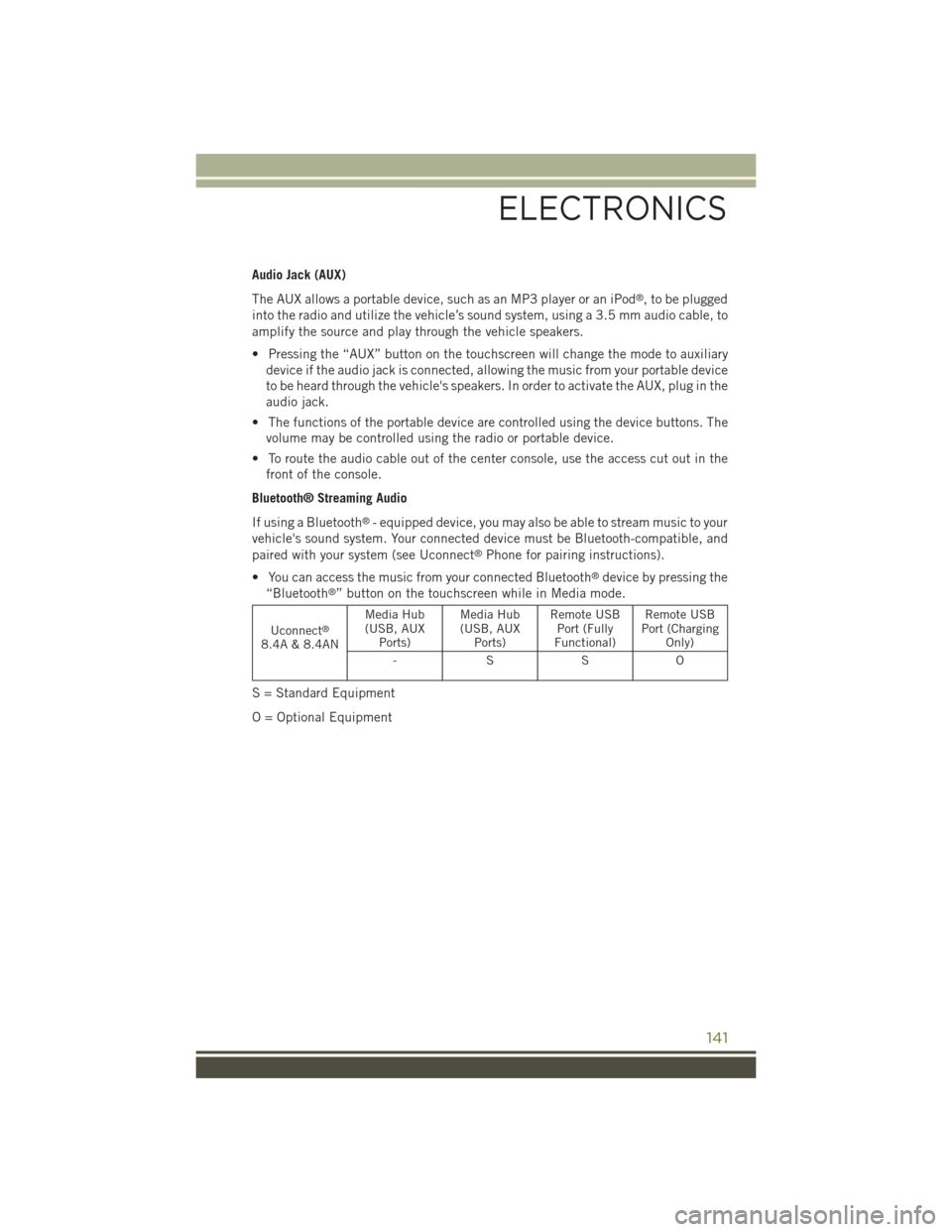
Audio Jack (AUX)
The AUX allows a portable device, such as an MP3 player or an iPod®, to be plugged
into the radio and utilize the vehicle’s sound system, using a 3.5 mm audio cable, to
amplify the source and play through the vehicle speakers.
• Pressing the “AUX” button on the touchscreen will change the mode to auxiliary
device if the audio jack is connected, allowing the music from your portable device
to be heard through the vehicle's speakers. In order to activate the AUX, plug in the
audio jack.
• The functions of the portable device are controlled using the device buttons. The
volume may be controlled using the radio or portable device.
• To route the audio cable out of the center console, use the access cut out in the
front of the console.
Bluetooth® Streaming Audio
If using a Bluetooth®- equipped device, you may also be able to stream music to your
vehicle's sound system. Your connected device must be Bluetooth-compatible, and
paired with your system (see Uconnect®Phone for pairing instructions).
• You can access the music from your connected Bluetooth®device by pressing the
“Bluetooth®” button on the touchscreen while in Media mode.
Uconnect®
8.4A & 8.4AN
Media Hub(USB, AUXPorts)
Media Hub(USB, AUXPorts)
Remote USBPort (FullyFunctional)
Remote USBPort (ChargingOnly)
-SSO
S = Standard Equipment
O = Optional Equipment
ELECTRONICS
141
Page 144 of 244
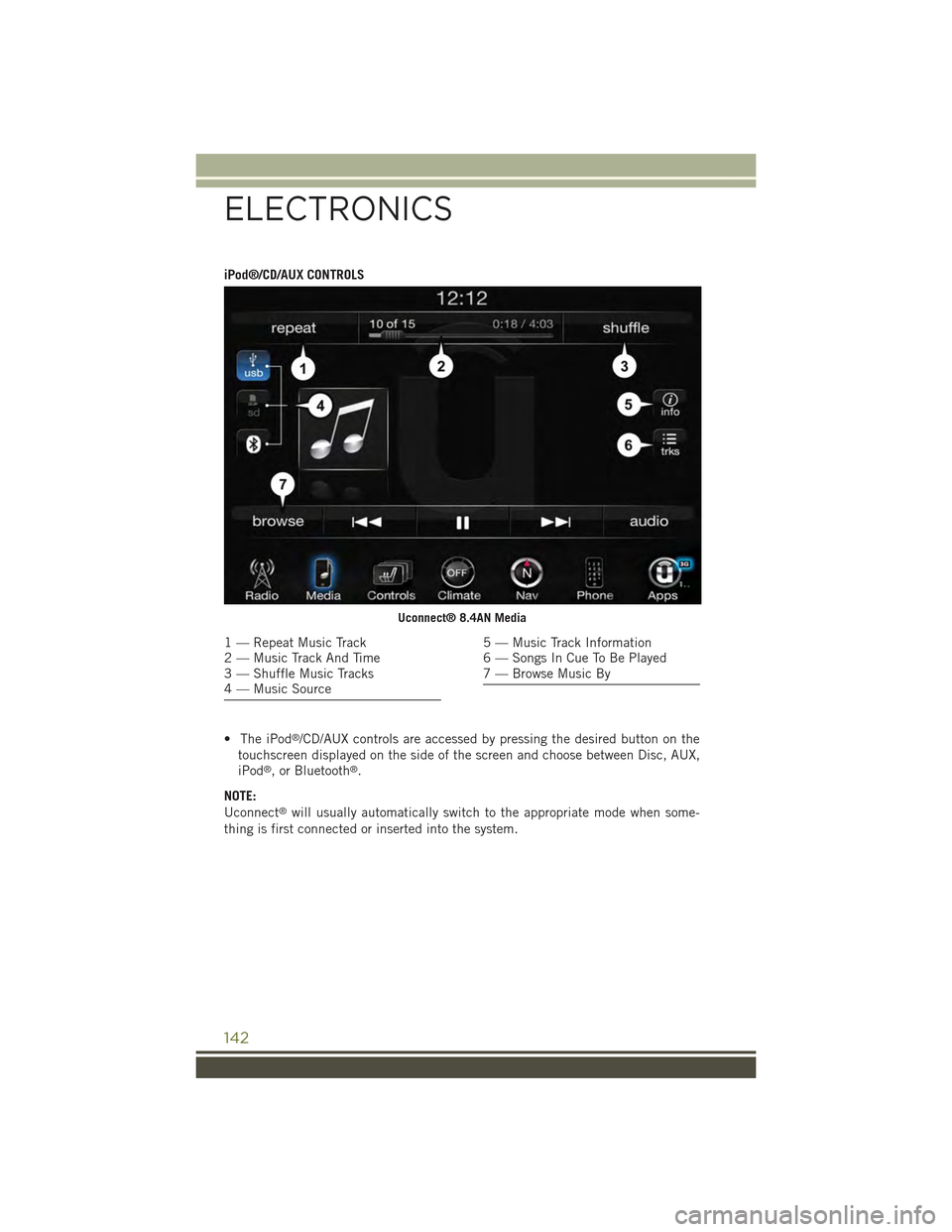
iPod®/CD/AUX CONTROLS
• The iPod®/CD/AUX controls are accessed by pressing the desired button on the
touchscreen displayed on the side of the screen and choose between Disc, AUX,
iPod®, or Bluetooth®.
NOTE:
Uconnect®will usually automatically switch to the appropriate mode when some-
thing is first connected or inserted into the system.
Uconnect® 8.4AN Media
1 — Repeat Music Track2 — Music Track And Time3 — Shuffle Music Tracks4 — Music Source
5 — Music Track Information6 — Songs In Cue To Be Played7 — Browse Music By
ELECTRONICS
142
Page 147 of 244
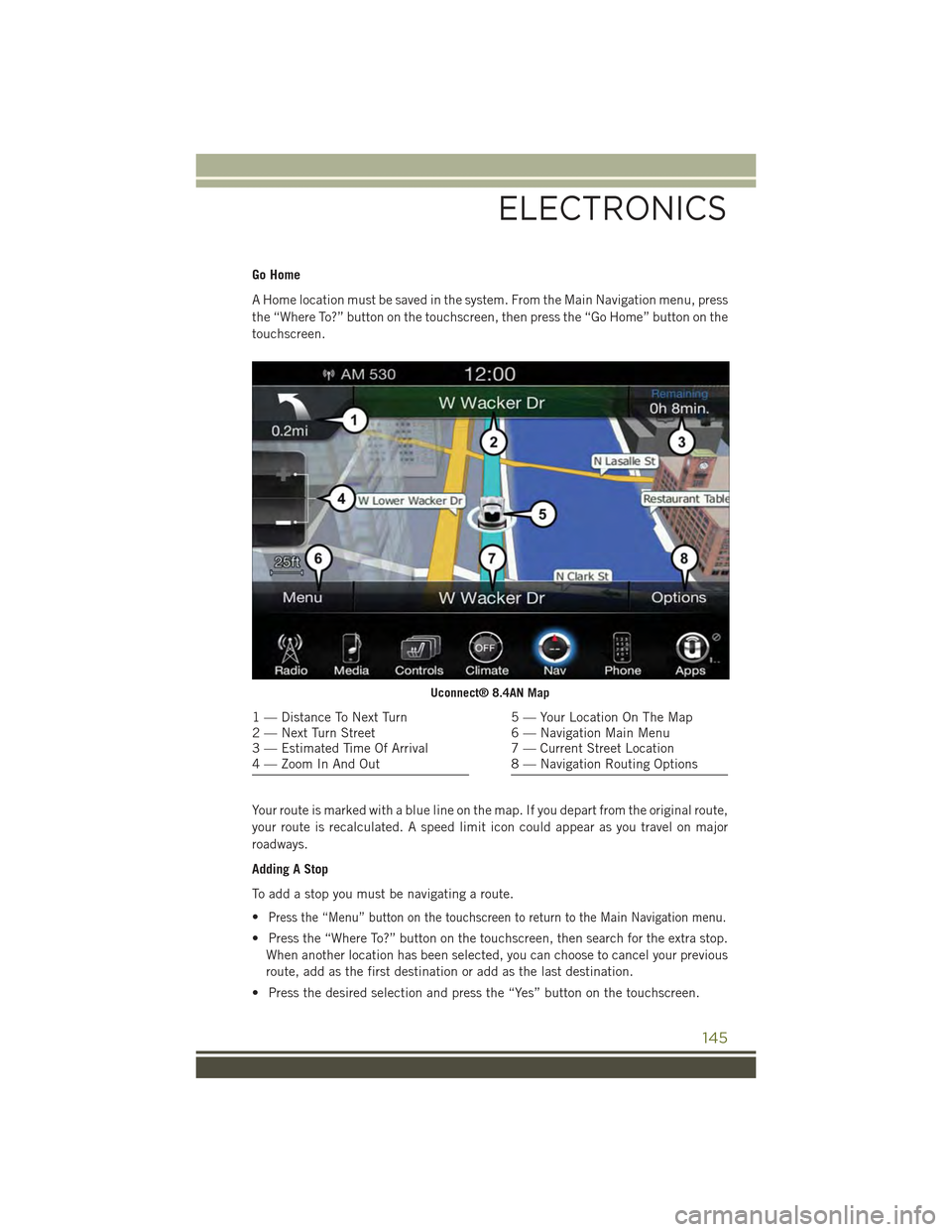
Go Home
A Home location must be saved in the system. From the Main Navigation menu, press
the “Where To?” button on the touchscreen, then press the “Go Home” button on the
touchscreen.
Your route is marked with a blue line on the map. If you depart from the original route,
your route is recalculated. A speed limit icon could appear as you travel on major
roadways.
Adding A Stop
To add a stop you must be navigating a route.
•Press the “Menu” button on the touchscreen to return to the Main Navigation menu.
• Press the “Where To?” button on the touchscreen, then search for the extra stop.
When another location has been selected, you can choose to cancel your previous
route, add as the first destination or add as the last destination.
• Press the desired selection and press the “Yes” button on the touchscreen.
Uconnect® 8.4AN Map
1 — Distance To Next Turn2 — Next Turn Street3 — Estimated Time Of Arrival4 — Zoom In And Out
5 — Your Location On The Map6 — Navigation Main Menu7 — Current Street Location8 — Navigation Routing Options
ELECTRONICS
145
Page 149 of 244
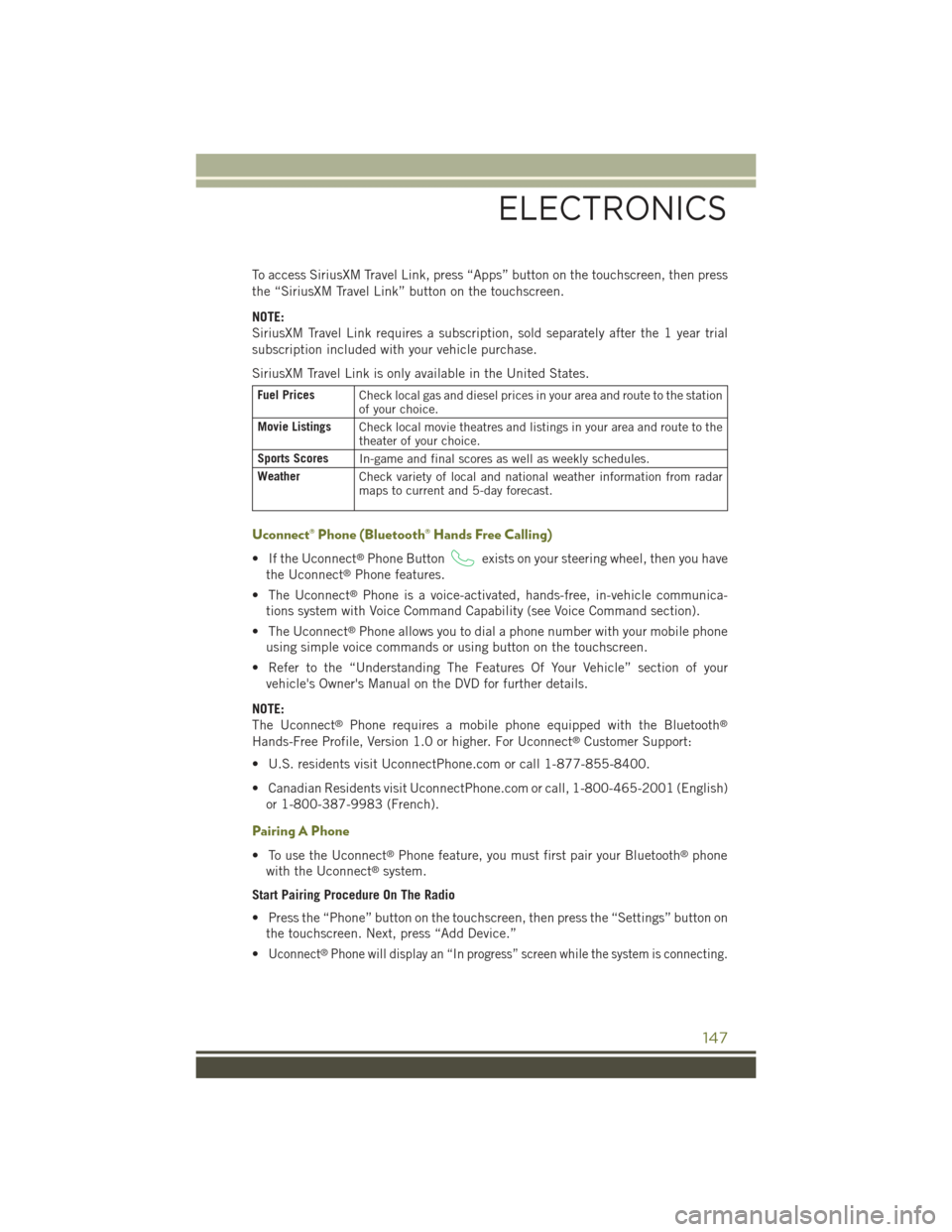
To access SiriusXM Travel Link, press “Apps” button on the touchscreen, then press
the “SiriusXM Travel Link” button on the touchscreen.
NOTE:
SiriusXM Travel Link requires a subscription, sold separately after the 1 year trial
subscription included with your vehicle purchase.
SiriusXM Travel Link is only available in the United States.
Fuel PricesCheck local gas and diesel prices in your area and route to the stationof your choice.
Movie ListingsCheck local movie theatres and listings in your area and route to thetheater of your choice.
Sports ScoresIn-game and final scores as well as weekly schedules.
WeatherCheck variety of local and national weather information from radarmaps to current and 5-day forecast.
Uconnect® Phone (Bluetooth® Hands Free Calling)
• If the Uconnect®Phone Buttonexists on your steering wheel, then you have
the Uconnect®Phone features.
• The Uconnect®Phone is a voice-activated, hands-free, in-vehicle communica-
tions system with Voice Command Capability (see Voice Command section).
• The Uconnect®Phone allows you to dial a phone number with your mobile phone
using simple voice commands or using button on the touchscreen.
• Refer to the “Understanding The Features Of Your Vehicle” section of your
vehicle's Owner's Manual on the DVD for further details.
NOTE:
The Uconnect®Phone requires a mobile phone equipped with the Bluetooth®
Hands-Free Profile, Version 1.0 or higher. For Uconnect®Customer Support:
• U.S. residents visit UconnectPhone.com or call 1-877-855-8400.
• Canadian Residents visit UconnectPhone.com or call, 1-800-465-2001 (English)
or 1-800-387-9983 (French).
Pairing A Phone
• To use the Uconnect®Phone feature, you must first pair your Bluetooth®phone
with the Uconnect®system.
Start Pairing Procedure On The Radio
• Press the “Phone” button on the touchscreen, then press the “Settings” button on
the touchscreen. Next, press “Add Device.”
•Uconnect®Phone will display an “In progress” screen while the system is connecting.
ELECTRONICS
147
Page 150 of 244
Start Pairing Procedure On Mobile Phone
• Search for available devices on your Bluetooth®enabled mobile phone. This is
usually within Settings or Options under “Bluetooth.” See your mobile phone’s
manual for details.
• When your phone finds the system, select “Uconnect” as the paired device. You
may be prompted by your phone to download the phonebook. This is so you can
make calls by saying the name of your contact (PBAP-Phone Book Access Profile).
Complete The Pairing Procedure
• When prompted on the phone, verify with radio password shown on the Uconnect®
Screen.
• If your phone asks you to accept a connection request from Uconnect®, select
“Yes.” If available, check the box telling it not to ask again – that way your phone
will automatically connect each time you start the vehicle.
Select The Mobile Phone's Priority Level
• When the pairing process has successfully completed, the system will prompt you
to choose whether or not this is your favorite phone. Selecting “Yes” will make this
phone the highest priority. This phone will take precedence over other paired
phones within range. Only one phone can be paired at a time.
• You are now ready to make hands-free calls. Push the “Uconnect®Phone” button
on your steering wheel to begin.
Making A Phone Call
• Push the Uconnect®Phone button.
• After the BEEP, say “dial” then the number (or “call” then the name as listed in
your phone; see Phonebook).
NOTE:
You can also initiate a call by using the touchscreen on the Phone main screen.
Receiving A Call – Accept (And End)
• When an incoming call rings/is announced on Uconnect®, push the Phone button
.
• To end a call, push the Hang Up or Phone button.
Mute (Or Unmute) Microphone During Call
To mute the Uconnect®Phone microphone during a call:
• Press the “Mute” button on the main Phone screen to mute and unmute the call.
ELECTRONICS
148
Page 152 of 244
Voice Text Reply (Not Compatible With iPhone®)
Once your Uconnect®system is paired with a compatible mobile device, the system
can announce a new incoming text message, and read it to your over the vehicle audio
system. You can reply to the message using Voice Recognition by selecting, or saying,
one of the 18 pre-defined messages.
•Here’s How:Push the Uconnect®Phone buttonand wait for the beep, then
say “reply.” Uconnect®will give the following prompt: “ Please say the message
you would like to send.” Wait for the beep and say one of the pre-defined
messages. (If you are not sure, you can say “help”). Uconnect®will then read the
pre-defined messages allowed. As soon as you hear the message you would like to
send, you can interrupt the list of prompts by pushing the Uconnect®phone button
and saying the phrase. Uconnect®will confirm the message by reading it back to
you. Push the Phone button and say “Send.”
PRE-DEFINED VOICE TEXT REPLY RESPONSES
Yes.Stuck in Traffic.See you later.
No.Start without me.I’ll be Late.
Okay.Where are you?Iwillbe
I’ll call you later.I need directions.See you in
NOTE:
Voice texting reply and voice texting features require a compatible mobile device
enabled with Bluetooth®Message Access Profile (MAP). iPhone®and some other
smartphones do not currently support Bluetooth®MAP. Visit UconnectPhone.com for
system and device compatibility.
• Want to dictate a personal message? You must first register with Uconnect®
Access (U.S. residents only) to take advantage of a new, cloud-based Voice Texting
service, an enhancement to Voice Text Reply.
ELECTRONICS
150