Front JEEP COMPASS 2023 Workshop Manual
[x] Cancel search | Manufacturer: JEEP, Model Year: 2023, Model line: COMPASS, Model: JEEP COMPASS 2023Pages: 344, PDF Size: 18.8 MB
Page 127 of 344
STARTING AND OPERATING125
“CLEAN FRONT WINDSHIELD” WARNING
The “ACC Limited Functionality Clean Front
Windshield” warning will display and a chime will
sound when conditions temporarily limit system
performance. This most often occurs at times of
poor visibility, such as in snow or heavy rain and
fog. The ACC system may also become temporarily
blinded due to obstructions, such as mud, dirt, or
ice on windshield and fog on the inside of glass. In
these cases, the instrument cluster display will
read “ACC Limited Functionality Clean Front
Windshield” and the system will have degraded
performance.
This message can sometimes be displayed while
driving in adverse weather conditions. The ACC
system will recover after the vehicle has left these
areas. Under rare conditions, when the camera is
not tracking any vehicles or objects in its path this
warning may temporarily occur.
If weather conditions are not a factor, the driver
should examine the windshield and the camera
located on the back side of the inside rearview
mirror. They may require cleaning or removal of an
obstruction. When the condition that created limited
functionality is no longer present, the system will
return to full functionality.
NOTE:If the “ACC Limited Functionality Clean Front Wind
-
shield” message occurs frequently (e.g. more than
once on every trip) without any snow, rain, mud, or
other obstruction, have the windshield and forward
facing camera inspected at an authorized dealer.
SERVICE ACC WARNING
If the system turns off, and the instrument cluster
display reads “ACC Unavailable Service Required”
or “Cruise Unavailable Service Required”, there
may be an internal system fault or a temporary
malfunction that limits ACC functionality. Although
the vehicle is still drivable under normal
conditions, ACC will be temporarily unavailable. If
this occurs, try activating ACC again later, following
an ignition cycle. If the problem persists, see an
authorized dealer.
Precautions While Driving With ACC
In certain driving situations, ACC may have
detection issues. In these cases, ACC may brake
late or unexpectedly. The driver needs to stay alert
and may need to intervene. The following are
examples of these types of situations:
TOWING A TRAILER
Towing a trailer is not recommended when
using ACC.
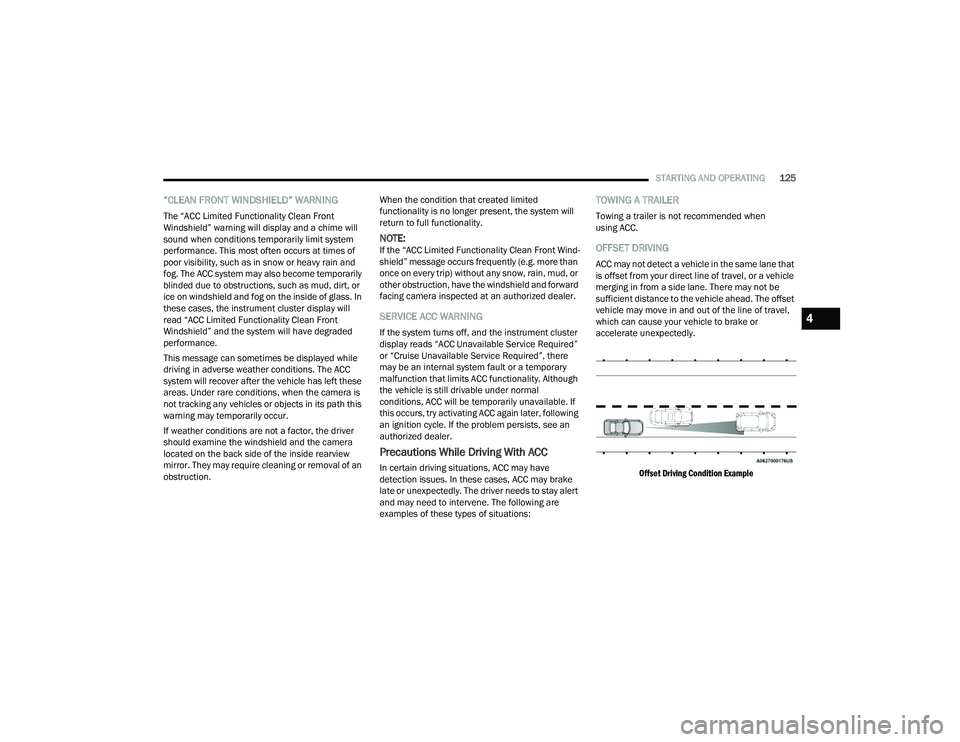
OFFSET DRIVING
ACC may not detect a vehicle in the same lane that
is offset from your direct line of travel, or a vehicle
merging in from a side lane. There may not be
sufficient distance to the vehicle ahead. The offset
vehicle may move in and out of the line of travel,
which can cause your vehicle to brake or
accelerate unexpectedly.
Offset Driving Condition Example
4
22_MP_OM_EN_USC_t.book Page 125
Page 131 of 344
STARTING AND OPERATING129
(Continued)
HIGHWAY ASSIST SYSTEM — IF EQUIPPED
OPERATION
The Highway Assist system (HAS) is combined with
the Adaptive Cruise Control (ACC) system, and
centers the vehicle in the driving lane while
traveling on controlled access highways at speeds
up to 90 mph (145 km/h).
For ACC system operating instructions and system
limitations, see Ú page 118.
NOTE:
The driver should always obey traffic laws and
speed limits. Never drive above applicable
speed limit restrictions.
The driver can override HAS at any time by
braking, accelerating, or steering the vehicle.
Just like ACC, HAS will maintain a set speed as long
as the set distance between your vehicle and the
vehicle in front is maintained. HAS will also keep
your vehicle centered between the lane lines, and
monitor for other vehicles in adjacent lanes by
utilizing the Blind Spot Monitoring sensors. HAS uses sensors within the steering wheel to
measure driver attentiveness. HAS requires the
driver’s hands on the steering wheel at all times.
The system will generally aim to keep the vehicle
centered in the lane, but when the driver turns the
steering wheel (e.g. to move further away from a
large vehicle in the next lane) the system will
reduce its control and enter "co-steering" mode.
While in co-steering mode, the system will provide
reduced assistance and allow the driver to control
the path of the vehicle. Once the driver stops
providing input to the steering wheel, the system
will require a few seconds to fully resume lane
centering assistance, especially during curves.
WARNING!
The Highway Assist system is a convenience
system. It is not a substitute for active driver
involvement. It is always the driver’s
responsibility to be attentive of road traffic,
weather conditions, vehicle speed, distance to
the vehicle ahead, position in the lane compared
to other vehicles, and brake operation to ensure
safe operation of the vehicle under all road
conditions. Your complete attention is always
required while driving to maintain safe control of
your vehicle. Failure to follow these warnings can
result in a collision and death or serious
personal injury.
You should turn off the Highway Assist system:
When driving in complex driving situations
(e.g. urban environments, construction zones,
etc.), adverse weather (e.g. rain, snow, fog,
sleet, dust), or adverse road conditions
(e.g. heavy traffic, worn or missing lane
markings, etc.).
When entering a highway off ramp, when
driving on roads that are, icy, snow covered, or
slippery.
When circumstances do not allow safe driving
at a constant speed.
WARNING!
4
22_MP_OM_EN_USC_t.book Page 129
Page 135 of 344
STARTING AND OPERATING133
The Highway Assist system may have limited or
reduced functionality when one of the following
conditions occur:
The vehicle’s radar sensors and/or forward
facing camera is damaged, covered, misaligned,
or obstructed (e.g. by mud, ice, snow, etc.)
Driving near highway toll booths
NOTE:If damage to the windshield occurs, have the
windshield replaced by an authorized dealer as
soon as possible.
PARKSENSE FRONT/REAR PARK ASSIST
SYSTEM — IF EQUIPPED
The ParkSense Park Assist system provides visual
and audible indications of the distance between
the rear, and if equipped, the front fascia/bumper
and a detected obstacle when backing up or
moving forward (e.g. during a parking maneuver).
NOTE:
The system is provided to assist the driver and
not to substitute the driver.
The driver must stay in full control of the
vehicle's acceleration and braking and is
responsible for controlling the vehicle's move -
ments Ú page 137. ParkSense will retain the last system state
(enabled or disabled) from the last ignition cycle
when the ignition is changed to the ON/RUN
position.
ParkSense is active in DRIVE or REVERSE, as long
as the system is on. The system will remain active
until the vehicle speed is increased to
approximately 7 mph (11 km/h) or above. While in
REVERSE and above the system's operating speed,
a warning will appear in the instrument cluster
display indicating the vehicle speed is too fast. The
system will become active again if the vehicle
speed is decreased to speeds less than
approximately 6 mph (9 km/h).
PARKSENSE SENSORS
The six ParkSense sensors (four when vehicle is
not equipped with front sensors), located in the
rear fascia/bumper, and the six ParkSense
sensors located in the front fascia/bumper,
monitor the area in front and behind the vehicle
that is within the sensors’ field of view. The front
sensors detect obstacles from approximately
12 inches (30 cm) up to 47 inches (120 cm) from
the front fascia/bumper. The rear sensors can
detect obstacles from approximately 12 inches
(30 cm) up to 79 inches (200 cm) from the rear
fascia/bumper. These distances depend on the
location, type and orientation of the obstacle in the
horizontal direction.
PARKSENSE WARNING DISPLAY
The ParkSense Warning screen will only be
displayed if “Sound and Display” is selected from
the Customer - Programmable Features section of
the Uconnect system Ú
page 165.
The ParkSense Warning screen is located within
the instrument cluster display Ú page 77. It
provides visual warnings to indicate the distance
between the rear fascia/bumper and/or front
fascia/bumper and the detected obstacle.
PARKSENSE DISPLAY
The warning display will turn on indicating the
system status when the vehicle is in REVERSE or
when the vehicle is in DRIVE and an obstacle has
been detected.
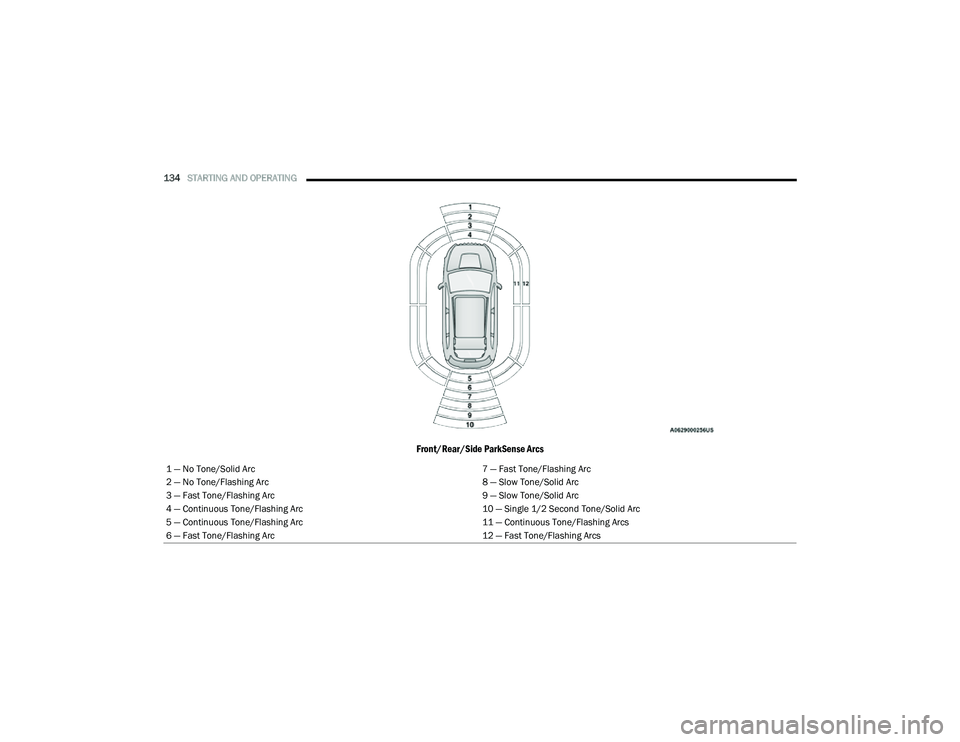
The system will indicate a detected obstacle by
showing a single arc in the left and/or right front or
rear regions based on the object’s distance and
location relative to the vehicle.
If an object is detected in the left and/or right rear
region, the display will show a single arc in the
left and/or right rear region and the system will
produce a tone. As the vehicle moves closer to the
object, the display will show the single arc moving
closer to the vehicle and the tone will change from
a single 1/2 second tone to slow, to fast, to
continuous.
4
22_MP_OM_EN_USC_t.book Page 133
Page 136 of 344
134STARTING AND OPERATING
Front/Rear/Side ParkSense Arcs
1 — No Tone/Solid Arc 7 — Fast Tone/Flashing Arc
2 — No Tone/Flashing Arc 8 — Slow Tone/Solid Arc
3 — Fast Tone/Flashing Arc 9 — Slow Tone/Solid Arc
4 — Continuous Tone/Flashing Arc 10 — Single 1/2 Second Tone/Solid Arc
5 — Continuous Tone/Flashing Arc 11 — Continuous Tone/Flashing Arcs
6 — Fast Tone/Flashing Arc 12 — Fast Tone/Flashing Arcs
22_MP_OM_EN_USC_t.book Page 134
Page 138 of 344
136STARTING AND OPERATING
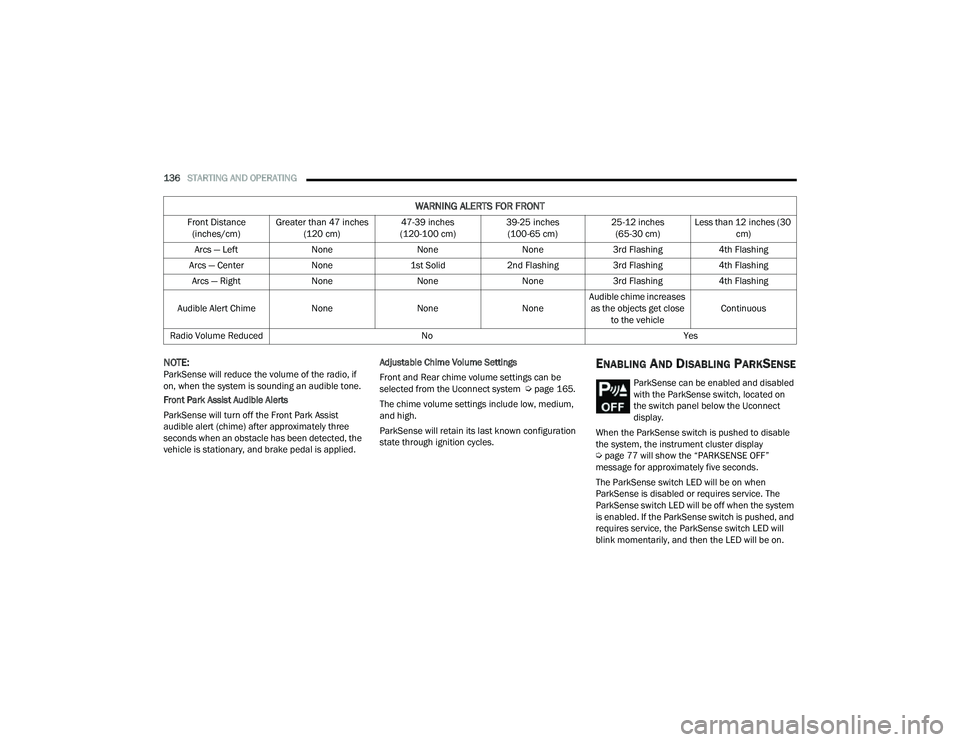
NOTE:ParkSense will reduce the volume of the radio, if
on, when the system is sounding an audible tone.
Front Park Assist Audible Alerts
ParkSense will turn off the Front Park Assist
audible alert (chime) after approximately three
seconds when an obstacle has been detected, the
vehicle is stationary, and brake pedal is applied. Adjustable Chime Volume Settings
Front and Rear chime volume settings can be
selected from the Uconnect system Ú
page 165.
The chime volume settings include low, medium,
and high.
ParkSense will retain its last known configuration
state through ignition cycles.ENABLING AND DISABLING PARKSENSE
ParkSense can be enabled and disabled
with the ParkSense switch, located on
the switch panel below the Uconnect
display.
When the ParkSense switch is pushed to disable
the system, the instrument cluster display
Ú page 77 will show the “PARKSENSE OFF”
message for approximately five seconds.
The ParkSense switch LED will be on when
ParkSense is disabled or requires service. The
ParkSense switch LED will be off when the system
is enabled. If the ParkSense switch is pushed, and
requires service, the ParkSense switch LED will
blink momentarily, and then the LED will be on.
WARNING ALERTS FOR FRONT
Front Distance (inches/cm) Greater than 47 inches
(120 cm) 47-39 inches
(120-100 cm) 39-25 inches
(100-65 cm) 25-12 inches
(65-30 cm) Less than 12 inches (30
cm)
Arcs — Left NoneNoneNone3rd Flashing 4th Flashing
Arcs — Center None1st Solid2nd Flashing 3rd Flashing4th Flashing
Arcs — Right NoneNoneNone3rd Flashing 4th Flashing
Audible Alert Chime NoneNoneNoneAudible chime increases
as the objects get close to the vehicle Continuous
Radio Volume Reduced No Yes
22_MP_OM_EN_USC_t.book Page 136
Page 139 of 344
STARTING AND OPERATING137
(Continued)
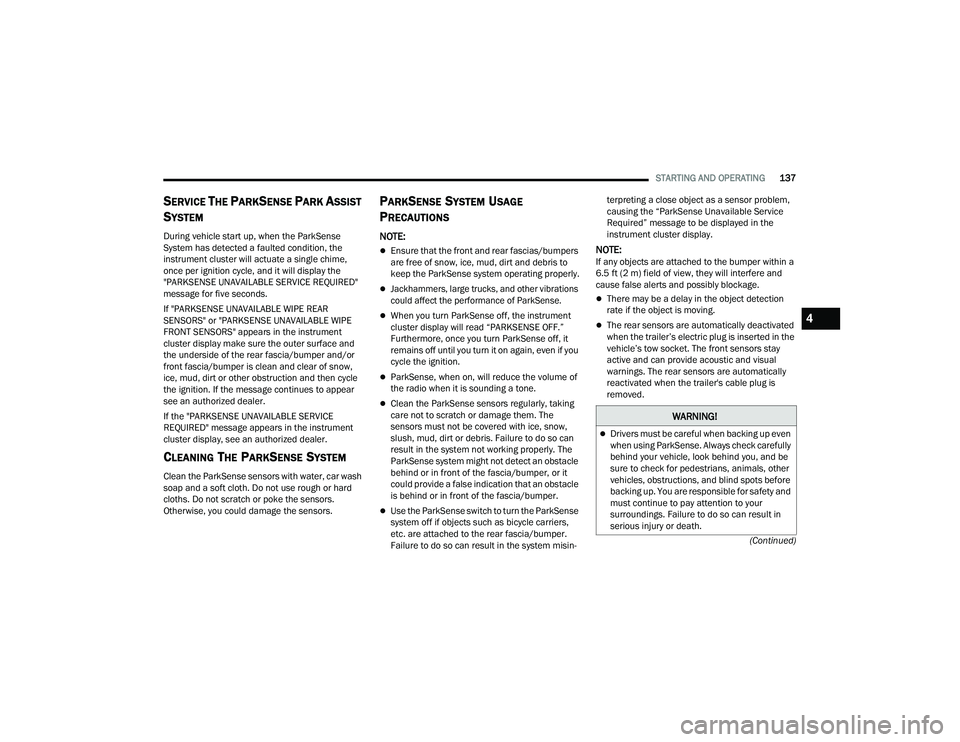
SERVICE THE PARKSENSE PARK ASSIST
S
YSTEM
During vehicle start up, when the ParkSense
System has detected a faulted condition, the
instrument cluster will actuate a single chime,
once per ignition cycle, and it will display the
"PARKSENSE UNAVAILABLE SERVICE REQUIRED"
message for five seconds.
If "PARKSENSE UNAVAILABLE WIPE REAR
SENSORS" or "PARKSENSE UNAVAILABLE WIPE
FRONT SENSORS" appears in the instrument
cluster display make sure the outer surface and
the underside of the rear fascia/bumper and/or
front fascia/bumper is clean and clear of snow,
ice, mud, dirt or other obstruction and then cycle
the ignition. If the message continues to appear
see an authorized dealer.
If the "PARKSENSE UNAVAILABLE SERVICE
REQUIRED" message appears in the instrument
cluster display, see an authorized dealer.
CLEANING THE PARKSENSE SYSTEM
Clean the ParkSense sensors with water, car wash
soap and a soft cloth. Do not use rough or hard
cloths. Do not scratch or poke the sensors.
Otherwise, you could damage the sensors.
PARKSENSE SYSTEM USAGE
P
RECAUTIONS
NOTE:
Ensure that the front and rear fascias/bumpers
are free of snow, ice, mud, dirt and debris to
keep the ParkSense system operating properly.
Jackhammers, large trucks, and other vibrations
could affect the performance of ParkSense.
When you turn ParkSense off, the instrument
cluster display will read “PARKSENSE OFF.”
Furthermore, once you turn ParkSense off, it
remains off until you turn it on again, even if you
cycle the ignition.
ParkSense, when on, will reduce the volume of
the radio when it is sounding a tone.
Clean the ParkSense sensors regularly, taking
care not to scratch or damage them. The
sensors must not be covered with ice, snow,
slush, mud, dirt or debris. Failure to do so can
result in the system not working properly. The
ParkSense system might not detect an obstacle
behind or in front of the fascia/bumper, or it
could provide a false indication that an obstacle
is behind or in front of the fascia/bumper.
Use the ParkSense switch to turn the ParkSense
system off if objects such as bicycle carriers,
etc. are attached to the rear fascia/bumper.
Failure to do so can result in the system misin -terpreting a close object as a sensor problem,
causing the “ParkSense Unavailable Service
Required” message to be displayed in the
instrument cluster display.
NOTE:If any objects are attached to the bumper within a
6.5 ft (2 m) field of view, they will interfere and
cause false alerts and possibly blockage.
There may be a delay in the object detection
rate if the object is moving.
The rear sensors are automatically deactivated
when the trailer’s electric plug is inserted in the
vehicle’s tow socket. The front sensors stay
active and can provide acoustic and visual
warnings. The rear sensors are automatically
reactivated when the trailer's cable plug is
removed.
WARNING!
Drivers must be careful when backing up even
when using ParkSense. Always check carefully
behind your vehicle, look behind you, and be
sure to check for pedestrians, animals, other
vehicles, obstructions, and blind spots before
backing up. You are responsible for safety and
must continue to pay attention to your
surroundings. Failure to do so can result in
serious injury or death.
4
22_MP_OM_EN_USC_t.book Page 137
Page 140 of 344
138STARTING AND OPERATING
SIDE DISTANCE WARNING (SDW)
S
YSTEM
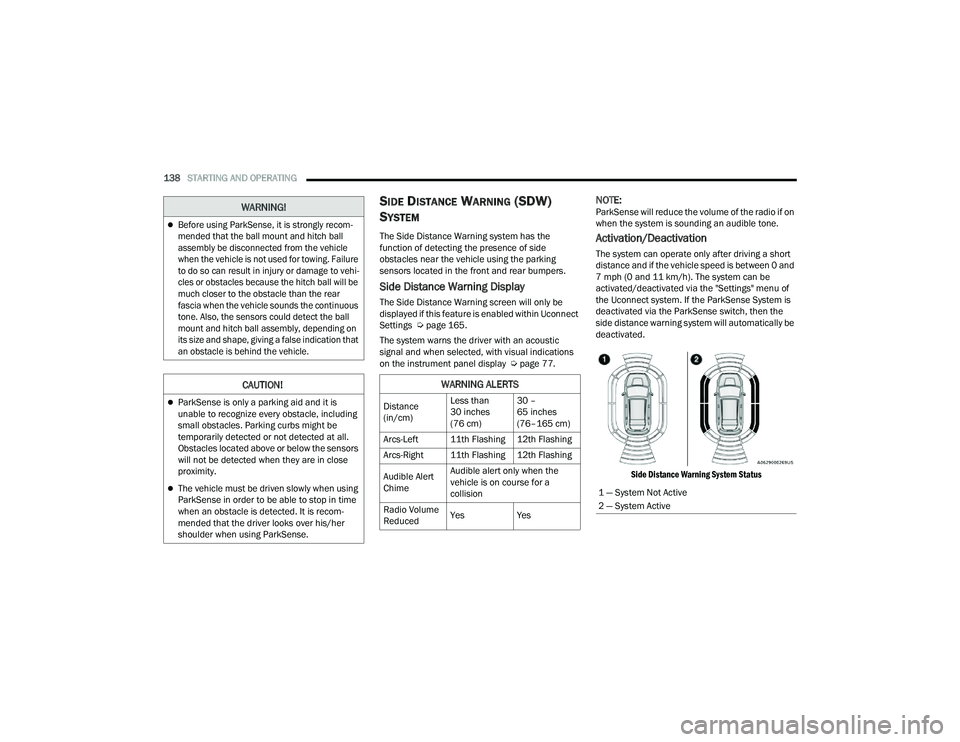
The Side Distance Warning system has the
function of detecting the presence of side
obstacles near the vehicle using the parking
sensors located in the front and rear bumpers.
Side Distance Warning Display
The Side Distance Warning screen will only be
displayed if this feature is enabled within Uconnect
Settings Ú page 165.
The system warns the driver with an acoustic
signal and when selected, with visual indications
on the instrument panel display Ú page 77.
NOTE:ParkSense will reduce the volume of the radio if on
when the system is sounding an audible tone.
Activation/Deactivation
The system can operate only after driving a short
distance and if the vehicle speed is between 0 and
7 mph (0 and 11 km/h). The system can be
activated/deactivated via the "Settings" menu of
the Uconnect system. If the ParkSense System is
deactivated via the ParkSense switch, then the
side distance warning system will automatically be
deactivated.
Side Distance Warning System Status
Before using ParkSense, it is strongly recom -
mended that the ball mount and hitch ball
assembly be disconnected from the vehicle
when the vehicle is not used for towing. Failure
to do so can result in injury or damage to vehi -
cles or obstacles because the hitch ball will be
much closer to the obstacle than the rear
fascia when the vehicle sounds the continuous
tone. Also, the sensors could detect the ball
mount and hitch ball assembly, depending on
its size and shape, giving a false indication that
an obstacle is behind the vehicle.
CAUTION!
ParkSense is only a parking aid and it is
unable to recognize every obstacle, including
small obstacles. Parking curbs might be
temporarily detected or not detected at all.
Obstacles located above or below the sensors
will not be detected when they are in close
proximity.
The vehicle must be driven slowly when using
ParkSense in order to be able to stop in time
when an obstacle is detected. It is recom -
mended that the driver looks over his/her
shoulder when using ParkSense.
WARNING!
WARNING ALERTS
Distance
(in/cm) Less than
30 inches
(76 cm)30 –
65 inches
(76–165 cm)
Arcs-Left 11th Flashing 12th Flashing
Arcs-Right 11th Flashing 12th Flashing
Audible Alert
Chime Audible alert only when the
vehicle is on course for a
collision
Radio Volume
Reduced Yes
Yes
1 — System Not Active
2 — System Active
22_MP_OM_EN_USC_t.book Page 138
Page 141 of 344
STARTING AND OPERATING139
NOTE:The vehicle needs to be driven approximately one
car length in order for the Side Distance Warning
system to activate.
Operation With A Trailer
The system is automatically deactivated when the
trailer's electric plug is inserted in the vehicle's tow
hook socket. The rear sensors are automatically
reactivated when the trailer's cable plug is
removed.
ParkSense Usage Precautions
Some conditions may influence the performance
of the Side Distance Warning system:
NOTE:
Ensure that the front and rear bumper are free
of snow, ice, mud, dirt and debris to keep the
ParkSense system operating properly.
Construction equipment, large trucks, and
other vibrations could affect the performance
of ParkSense.
When you turn ParkSense off, the message
in the instrument cluster display will read
“PARKSENSE OFF.” Furthermore, once you turn
ParkSense off, it remains off until you turn it on
again, even if you cycle the ignition key.
ParkSense, when on, will reduce the volume of
the radio when it is sounding a tone.
Clean the ParkSense sensors regularly, taking
care not to scratch or damage them. The
sensors must not be covered with ice, snow,
slush, mud, dirt or debris. Failure to do so can
result in the system not working properly. The
ParkSense system might not detect an obstacle
behind or in front of the fascia/bumper, or it
could provide a false indication that an obstacle
is behind or in front of the fascia/bumper.
The presence of a tow hook without a trailer may
interfere with the correct operation of the
parking sensors. Before using the ParkSense
system, it is recommended to remove the
removable tow hook ball assembly and any
attachments from the vehicle when it is not
used for towing operations. If you leave the tow
hook fitted when not towing a trailer, the tow
hook could be detected as an obstacle by the
sensors. Contact your authorized dealer to
update the ParkSense system operations.
WARNING!
Drivers must be careful when backing up even
when using ParkSense. Always check carefully
behind your vehicle, look behind you, and be
sure to check for pedestrians, animals, other
vehicles, obstructions, and blind spots before
backing up. You are responsible for safety and
must continue to pay attention to your
surroundings. Failure to do so can result in
serious injury or death.
Before using ParkSense, it is strongly recom -
mended that the ball mount and hitch ball
assembly be disconnected from the vehicle
when the vehicle is not used for towing. Failure
to do so can result in injury or damage to vehi -
cles or obstacles because the hitch ball will be
much closer to the obstacle than the rear
fascia when the vehicle sounds the continuous
tone. Also, the sensors could detect the ball
mount and hitch ball assembly, depending on
its size and shape, giving a false indication that
an obstacle is behind the vehicle.
4
22_MP_OM_EN_USC_t.book Page 139
Page 143 of 344
STARTING AND OPERATING141
Driver's door is opened.
Rear liftgate is opened.
Electronic Stability Control/Anti-lock Braking
System intervention.
The ParkSense Active Park Assist system will allow
a maximum number of shifts between DRIVE and
REVERSE. If the maneuver cannot be completed
within the maximum amount of shifts, the system
will cancel and the instrument cluster display will
instruct the driver to complete the maneuver
manually.
The ParkSense Active Park Assist system will only
operate and search for a parking space when the
following conditions are present:
Gear selector is in DRIVE.
Ignition is in the RUN position.
ParkSense Active Park Assist switch is acti -
vated.
Driver's door is closed.
Rear liftgate is closed.
The outer surface and the underside of the front
and rear fascias/bumpers are clean and clear
of snow, ice, mud, dirt or other obstruction.
Vehicle speed is less than 15 mph (25 km/h).
NOTE:If the vehicle is driven above approximately
15 mph (25 km/h), the instrument cluster display
will instruct the driver to slow down. If the vehicle
is driven above approximately 18 mph (30 km/h),
the system will cancel. The driver must then reac -
tivate the system by pushing the ParkSense Active
Park Assist switch.
When pushed, the LED on the ParkSense Active
Park Assist switch will blink momentarily, and then
the LED will turn off if any of the above conditions
are not present.
PARALLEL/PERPENDICULAR PARKING
S
PACE ASSISTANCE OPERATION
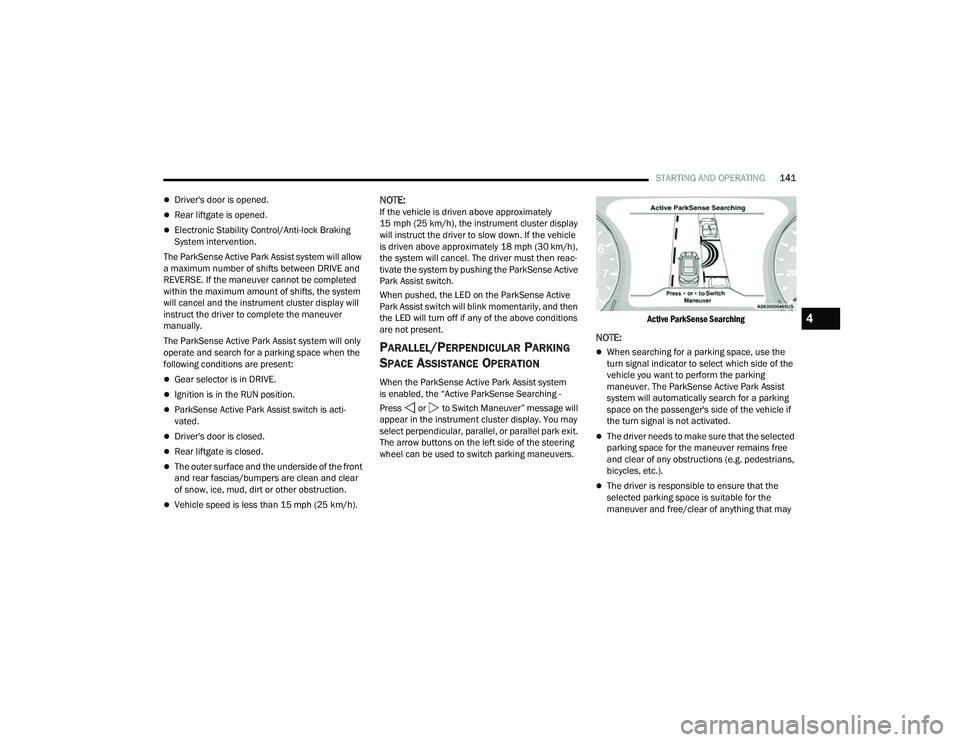
When the ParkSense Active Park Assist system
is enabled, the “Active ParkSense Searching -
Press or to Switch Maneuver” message will
appear in the instrument cluster display. You may
select perpendicular, parallel, or parallel park exit.
The arrow buttons on the left side of the steering
wheel can be used to switch parking maneuvers.
Active ParkSense Searching
NOTE:
When searching for a parking space, use the
turn signal indicator to select which side of the
vehicle you want to perform the parking
maneuver. The ParkSense Active Park Assist
system will automatically search for a parking
space on the passenger's side of the vehicle if
the turn signal is not activated.
The driver needs to make sure that the selected
parking space for the maneuver remains free
and clear of any obstructions (e.g. pedestrians,
bicycles, etc.).
The driver is responsible to ensure that the
selected parking space is suitable for the
maneuver and free/clear of anything that may
4
22_MP_OM_EN_USC_t.book Page 141
Page 145 of 344
STARTING AND OPERATING143
(Continued)
(Continued)
NOTE:
It is the driver's responsibility to use the brake
and accelerator during the semi-automatic
parking maneuver.
It is the driver's responsibility to use the brake
and stop the vehicle. The driver should check
their surroundings and be prepared to stop the
vehicle either when instructed to, or when driver
intervention is required.
When the system instructs the driver to remove
their hands from the steering wheel, the driver
should check their surroundings and begin to
back up slowly.
The ParkSense Active Park Assist system will
allow a maximum of six shifts between DRIVE
and REVERSE. If the maneuver cannot be
completed within six shifts, the system will
cancel and the instrument cluster display will
instruct the driver to complete the maneuver
manually.
The system will cancel the maneuver if the
vehicle speed exceeds 5 mph (7 km/h) during
active steering guidance into the parking space.
The system will provide a warning to the driver
at 3 mph (5 km/h) that tells them to slow down.
The driver is then responsible for completing the
maneuver if the system is canceled.
If the system is canceled during the maneuver
for any reason, the driver must take control of
the vehicle.
WARNING!
Drivers must be careful when performing
parallel or perpendicular parking maneuvers
even when using the ParkSense Active Park
Assist system. Always check carefully behind
and in front of your vehicle, look behind and in
front of you, and be sure to check for pedes
-
trians, animals, other vehicles, obstructions,
and blind spots before backing up and moving
forward. You are responsible for safety and
must continue to pay attention to your
surroundings. Failure to do so can result in
serious injury or death.
Before using the ParkSense Active Park Assist
system, it is strongly recommended that the
ball mount and hitch ball assembly be discon -
nected from the vehicle when the vehicle is
not used for towing. Failure to do so can result
in injury or damage to vehicles or obstacles
because the hitch ball will be much closer to
the obstacle than the rear fascia when the
vehicle sounds the continuous tone. Also, the
sensors could detect the ball mount and hitch
ball assembly, depending on its size and
shape, giving a false indication that an
obstacle is behind the vehicle.
CAUTION!
The ParkSense Active Park Assist system is
only a parking aid and it is unable to recognize
every obstacle, including small obstacles.
Parking curbs might be temporarily detected
or not detected at all. Obstacles located above
or below the sensors will not be detected
when they are in close proximity.
WARNING!
4
22_MP_OM_EN_USC_t.book Page 143