ECU JEEP GLADIATOR 2023 Owner's Manual
[x] Cancel search | Manufacturer: JEEP, Model Year: 2023, Model line: GLADIATOR, Model: JEEP GLADIATOR 2023Pages: 448, PDF Size: 17.37 MB
Page 51 of 448
GETTING TO KNOW YOUR VEHICLE49
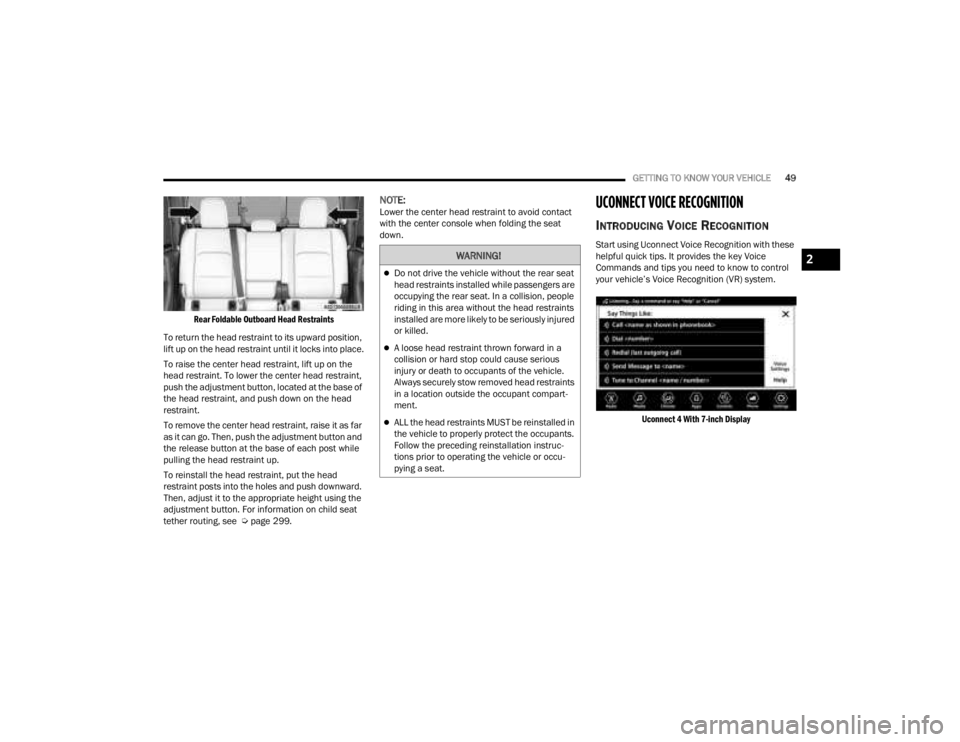
Rear Foldable Outboard Head Restraints
To return the head restraint to its upward position,
lift up on the head restraint until it locks into place.
To raise the center head restraint, lift up on the
head restraint. To lower the center head restraint,
push the adjustment button, located at the base of
the head restraint, and push down on the head
restraint.
To remove the center head restraint, raise it as far
as it can go. Then, push the adjustment button and
the release button at the base of each post while
pulling the head restraint up.
To reinstall the head restraint, put the head
restraint posts into the holes and push downward.
Then, adjust it to the appropriate height using the
adjustment button. For information on child seat
tether routing, see Ú page 299.
NOTE:Lower the center head restraint to avoid contact
with the center console when folding the seat
down.UCONNECT VOICE RECOGNITION
INTRODUCING VOICE RECOGNITION
Start using Uconnect Voice Recognition with these
helpful quick tips. It provides the key Voice
Commands and tips you need to know to control
your vehicle’s Voice Recognition (VR) system.
Uconnect 4 With 7-inch Display
WARNING!
Do not drive the vehicle without the rear seat
head restraints installed while passengers are
occupying the rear seat. In a collision, people
riding in this area without the head restraints
installed are more likely to be seriously injured
or killed.
A loose head restraint thrown forward in a
collision or hard stop could cause serious
injury or death to occupants of the vehicle.
Always securely stow removed head restraints
in a location outside the occupant compart -
ment.
ALL the head restraints MUST be reinstalled in
the vehicle to properly protect the occupants.
Follow the preceding reinstallation instruc -
tions prior to operating the vehicle or occu -
pying a seat.
2
23_JT_OM_EN_USC_t.book Page 49
Page 54 of 448
52GETTING TO KNOW YOUR VEHICLE
POWER MIRRORS — IF EQUIPPED
The power mirror controls are located on the door
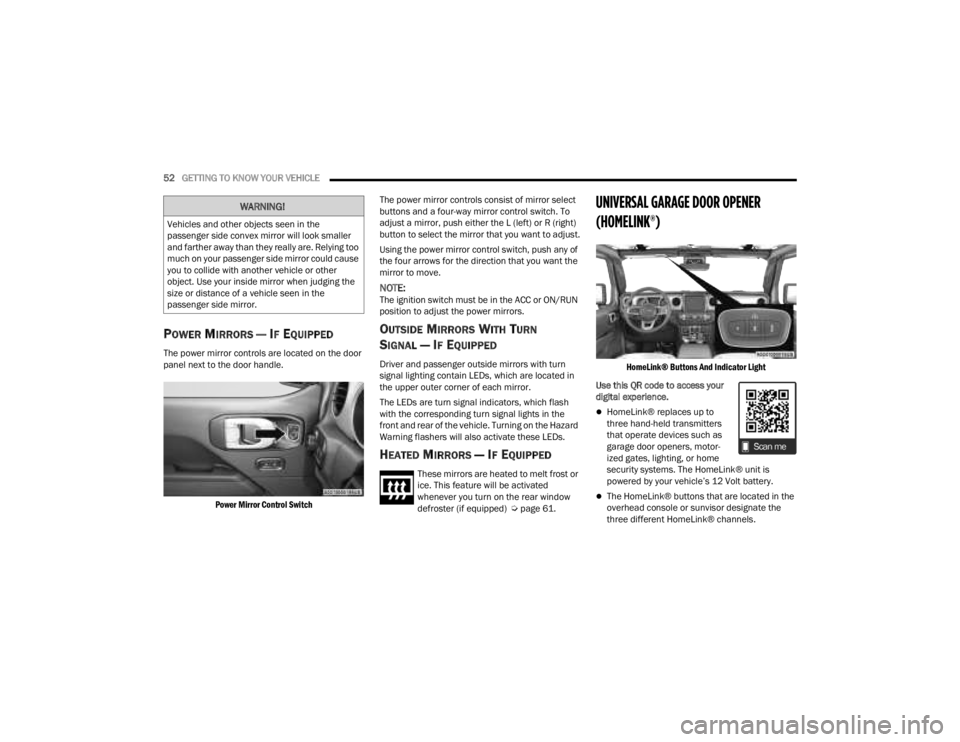
panel next to the door handle.
Power Mirror Control Switch
The power mirror controls consist of mirror select
buttons and a four-way mirror control switch. To
adjust a mirror, push either the L (left) or R (right)
button to select the mirror that you want to adjust.
Using the power mirror control switch, push any of
the four arrows for the direction that you want the
mirror to move.
NOTE:The ignition switch must be in the ACC or ON/RUN
position to adjust the power mirrors.
OUTSIDE MIRRORS WITH TURN
SIGNAL — IF EQUIPPED
Driver and passenger outside mirrors with turn
signal lighting contain LEDs, which are located in
the upper outer corner of each mirror.
The LEDs are turn signal indicators, which flash
with the corresponding turn signal lights in the
front and rear of the vehicle. Turning on the Hazard
Warning flashers will also activate these LEDs.
HEATED MIRRORS — IF EQUIPPED
These mirrors are heated to melt frost or
ice. This feature will be activated
whenever you turn on the rear window
defroster (if equipped) Ú
page 61.
UNIVERSAL GARAGE DOOR OPENER
(HOMELINK®)
HomeLink® Buttons And Indicator Light
Use this QR code to access your
digital experience.
HomeLink® replaces up to
three hand-held transmitters
that operate devices such as
garage door openers, motor -
ized gates, lighting, or home
security systems. The HomeLink® unit is
powered by your vehicle’s 12 Volt battery.
The HomeLink® buttons that are located in the
overhead console or sunvisor designate the
three different HomeLink® channels.
WARNING!
Vehicles and other objects seen in the
passenger side convex mirror will look smaller
and farther away than they really are. Relying too
much on your passenger side mirror could cause
you to collide with another vehicle or other
object. Use your inside mirror when judging the
size or distance of a vehicle seen in the
passenger side mirror.
23_JT_OM_EN_USC_t.book Page 52
Page 55 of 448

GETTING TO KNOW YOUR VEHICLE53
To operate HomeLink®, push and release any
of the programmed HomeLink® buttons. These
buttons will activate the devices they are
programmed to with each press of the corre -
sponding HomeLink® button.
The HomeLink® indicator light is located above
the center button.
NOTE:HomeLink® is disabled when the Vehicle Security
system is active Ú page 432.
BEFORE YOU BEGIN PROGRAMMING
H
OMELINK®
For efficient programming and accurate
transmission of the radio-frequency signal, it is
recommended that a new battery be placed in the
hand-held transmitter of the device that is being
programmed to the HomeLink® system. Make
sure your hand-held transmitter is programmed to
activate the device you are trying to program your
HomeLink® button to.
Ensure that your vehicle is parked outside of the
garage before you begin programming.
It is recommended that you erase all the channels
of your HomeLink® before you use it for the first
time.
ERASING ALL THE HOMELINK®
C
HANNELS
To erase the channels, follow this procedure:
1. Place the ignition switch into the ON/RUN
position.
2. Push and hold the two outside HomeLink® buttons (I and III) for up to 20 seconds, or until
the HomeLink® indicator light flashes.
NOTE:Erasing all channels should only be performed
when programming HomeLink® for the first time.
Do not erase channels when programming addi -
tional buttons.
IDENTIFYING WHETHER YOU HAVE A
R
OLLING CODE OR NON-ROLLING CODE
D
EVICE
Before programming a device to one of your
HomeLink® buttons, you must determine whether
the device has a rolling code or non-rolling code.
Rolling Code Devices
To determine if your device has a rolling code, a
good indicator is its manufacturing date. Typically,
devices manufactured after 1995 have rolling
codes. A device with a rolling code will also have a
“LEARN” or “TRAIN” button located where the antenna is attached to the device. The button may
not be immediately visible when looking at the
device. The name and color of the button may vary
slightly by manufacturer.
NOTE:The “LEARN” or “TRAIN” button is not the button
you normally use to operate the device.
Non-rolling Code Devices
Most devices manufactured before 1995 will not
have a rolling code. These devices will also not
have a “LEARN” or “TRAIN” button.
PROGRAMMING HOMELINK® TO A
G
ARAGE DOOR OPENER
To program any of the HomeLink® buttons to
activate your garage door opener motor, proceed
as follows:
NOTE:All HomeLink® buttons are programmed using this
procedure. You do not need to erase all channels
when programming additional buttons.
1. Place the ignition switch into the ON/RUN
position.
2. Place the garage door opener transmitter 1 to 3 inches (3 to 8 cm) away from the
HomeLink® button you wish to program, while
keeping the HomeLink® indicator light in view.
2
23_JT_OM_EN_USC_t.book Page 53
Page 58 of 448
56GETTING TO KNOW YOUR VEHICLE
SECURITY
It is advised to erase all channels before you sell or
turn in your vehicle.
To do this, push and hold the two outside buttons
for 20 seconds until the indicator flashes. Note
that all channels will be erased. Individual
channels cannot be erased.
The HomeLink® Universal Transceiver is disabled
when the Vehicle Security system is active.
NOTE:The universal garage door opener only operates
when the engine is running for security reasons
associated with removable tops and doors.
TROUBLESHOOTING TIPS
If you are having trouble programming
HomeLink®, here are some of the most common
solutions:
Replace the battery in the garage door opener
hand-held transmitter.
Push the LEARN button on the garage door
opener to complete the training for a rolling code.
Did you unplug the device for programming and
remember to plug it back in? If you have any problems, or require assistance,
please call toll-free 1-800-355-3515 or, on the
Internet at HomeLink.com for information or
assistance.
EXTERIOR LIGHTS
HEADLIGHT SWITCH
The headlight switch is located on the left side of
the instrument panel. This switch controls the
operation of the headlights, parking lights,
automatic headlights (if equipped), instrument
panel lights, instrument panel light dimming,
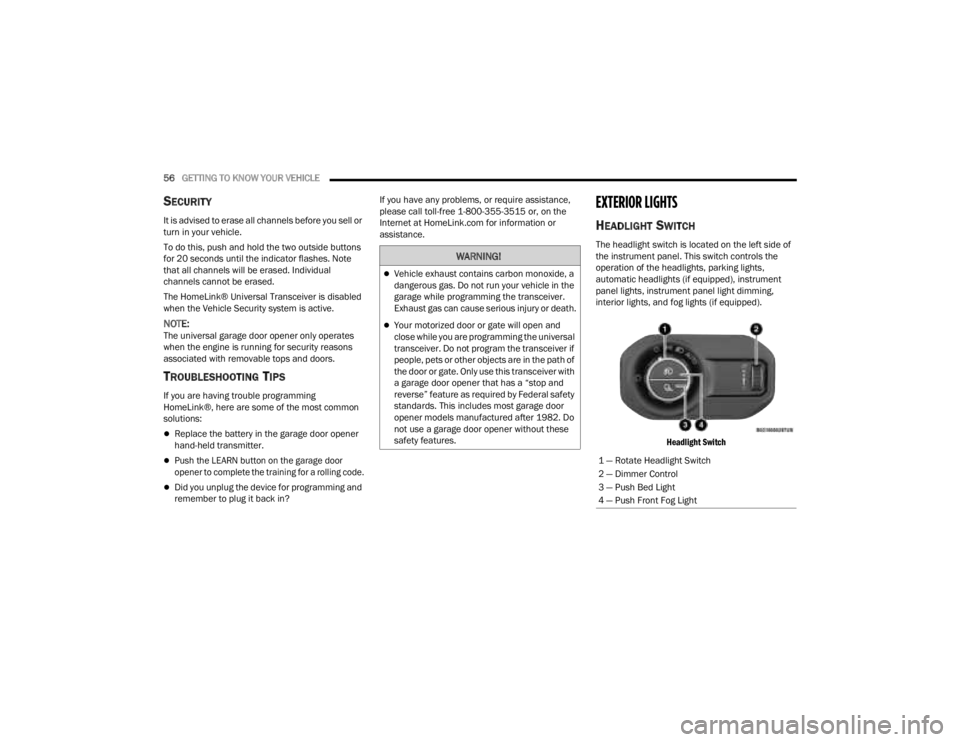
interior lights, and fog lights (if equipped).
Headlight Switch
WARNING!
Vehicle exhaust contains carbon monoxide, a
dangerous gas. Do not run your vehicle in the
garage while programming the transceiver.
Exhaust gas can cause serious injury or death.
Your motorized door or gate will open and
close while you are programming the universal
transceiver. Do not program the transceiver if
people, pets or other objects are in the path of
the door or gate. Only use this transceiver with
a garage door opener that has a “stop and
reverse” feature as required by Federal safety
standards. This includes most garage door
opener models manufactured after 1982. Do
not use a garage door opener without these
safety features.
1 — Rotate Headlight Switch
2 — Dimmer Control
3 — Push Bed Light
4 — Push Front Fog Light
23_JT_OM_EN_USC_t.book Page 56
Page 72 of 448
70GETTING TO KNOW YOUR VEHICLE
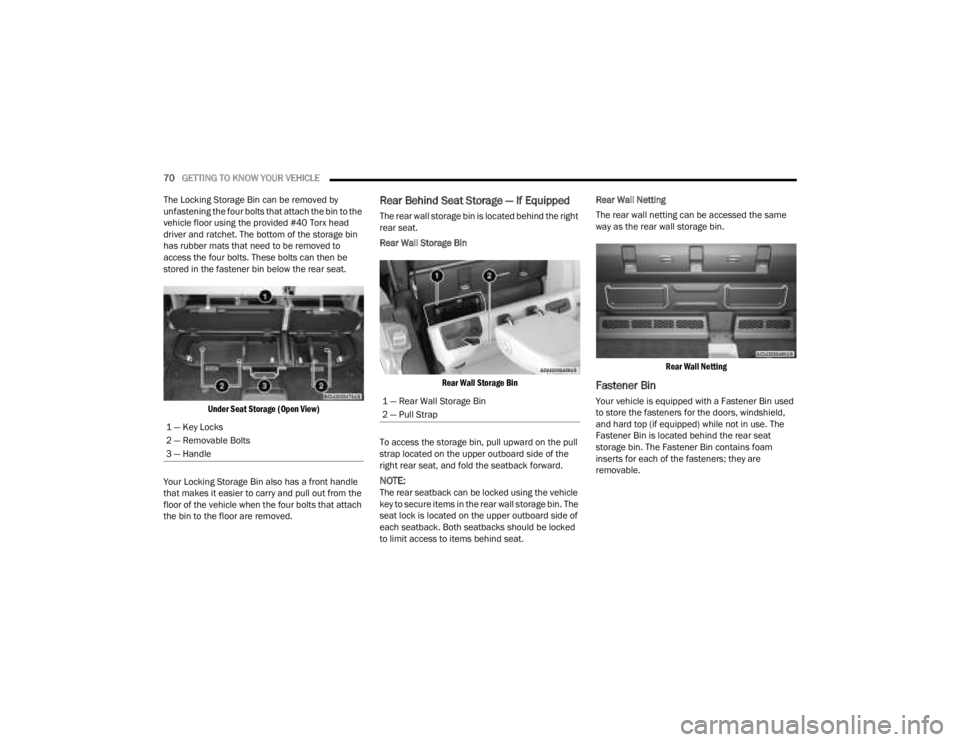
The Locking Storage Bin can be removed by
unfastening the four bolts that attach the bin to the
vehicle floor using the provided #40 Torx head
driver and ratchet. The bottom of the storage bin
has rubber mats that need to be removed to
access the four bolts. These bolts can then be
stored in the fastener bin below the rear seat.
Under Seat Storage (Open View)
Your Locking Storage Bin also has a front handle
that makes it easier to carry and pull out from the
floor of the vehicle when the four bolts that attach
the bin to the floor are removed.
Rear Behind Seat Storage — If Equipped
The rear wall storage bin is located behind the right
rear seat.
Rear Wall Storage Bin
Rear Wall Storage Bin
To access the storage bin, pull upward on the pull
strap located on the upper outboard side of the
right rear seat, and fold the seatback forward.
NOTE:The rear seatback can be locked using the vehicle
key to secure items in the rear wall storage bin. The
seat lock is located on the upper outboard side of
each seatback. Both seatbacks should be locked
to limit access to items behind seat. Rear Wall Netting
The rear wall netting can be accessed the same
way as the rear wall storage bin.
Rear Wall Netting
Fastener Bin
Your vehicle is equipped with a Fastener Bin used
to store the fasteners for the doors, windshield,
and hard top (if equipped) while not in use. The
Fastener Bin is located behind the rear seat
storage bin. The Fastener Bin contains foam
inserts for each of the fasteners; they are
removable.
1 — Key Locks
2 — Removable Bolts
3 — Handle1 — Rear Wall Storage Bin
2 — Pull Strap
23_JT_OM_EN_USC_t.book Page 70
Page 85 of 448
GETTING TO KNOW YOUR VEHICLE83
(Continued)
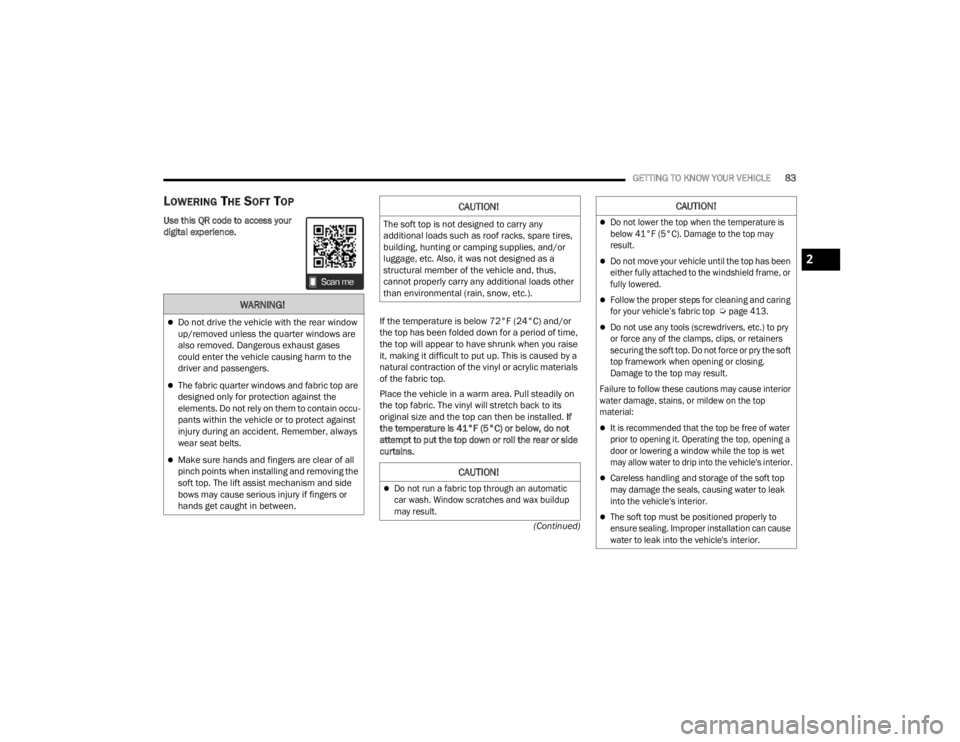
LOWERING THE SOFT TOP
Use this QR code to access your
digital experience. If the temperature is below 72°F (24°C) and/or
the top has been folded down for a period of time,
the top will appear to have shrunk when you raise
it, making it difficult to put up. This is caused by a
natural contraction of the vinyl or acrylic materials
of the fabric top.
Place the vehicle in a warm area. Pull steadily on
the top fabric. The vinyl will stretch back to its
original size and the top can then be installed. If
the temperature is 41°F (5°C) or below, do not
attempt to put the top down or roll the rear or side
curtains.
WARNING!
Do not drive the vehicle with the rear window
up/removed unless the quarter windows are
also removed. Dangerous exhaust gases
could enter the vehicle causing harm to the
driver and passengers.
The fabric quarter windows and fabric top are
designed only for protection against the
elements. Do not rely on them to contain occu -
pants within the vehicle or to protect against
injury during an accident. Remember, always
wear seat belts.
Make sure hands and fingers are clear of all
pinch points when installing and removing the
soft top. The lift assist mechanism and side
bows may cause serious injury if fingers or
hands get caught in between.
CAUTION!
The soft top is not designed to carry any
additional loads such as roof racks, spare tires,
building, hunting or camping supplies, and/or
luggage, etc. Also, it was not designed as a
structural member of the vehicle and, thus,
cannot properly carry any additional loads other
than environmental (rain, snow, etc.).
CAUTION!
Do not run a fabric top through an automatic
car wash. Window scratches and wax buildup
may result.
Do not lower the top when the temperature is
below 41°F (5°C). Damage to the top may
result.
Do not move your vehicle until the top has been
either fully attached to the windshield frame, or
fully lowered.
Follow the proper steps for cleaning and caring
for your vehicle’s fabric top
Ú
page 413.
Do not use any tools (screwdrivers, etc.) to pry
or force any of the clamps, clips, or retainers
securing the soft top. Do not force or pry the soft
top framework when opening or closing.
Damage to the top may result.
Failure to follow these cautions may cause interior
water damage, stains, or mildew on the top
material:
It is recommended that the top be free of water
prior to opening it. Operating the top, opening a
door or lowering a window while the top is wet
may allow water to drip into the vehicle's interior.
Careless handling and storage of the soft top
may damage the seals, causing water to leak
into the vehicle's interior.
The soft top must be positioned properly to
ensure sealing. Improper installation can cause
water to leak into the vehicle's interior.
CAUTION!
2
23_JT_OM_EN_USC_t.book Page 83
Page 88 of 448
86GETTING TO KNOW YOUR VEHICLE
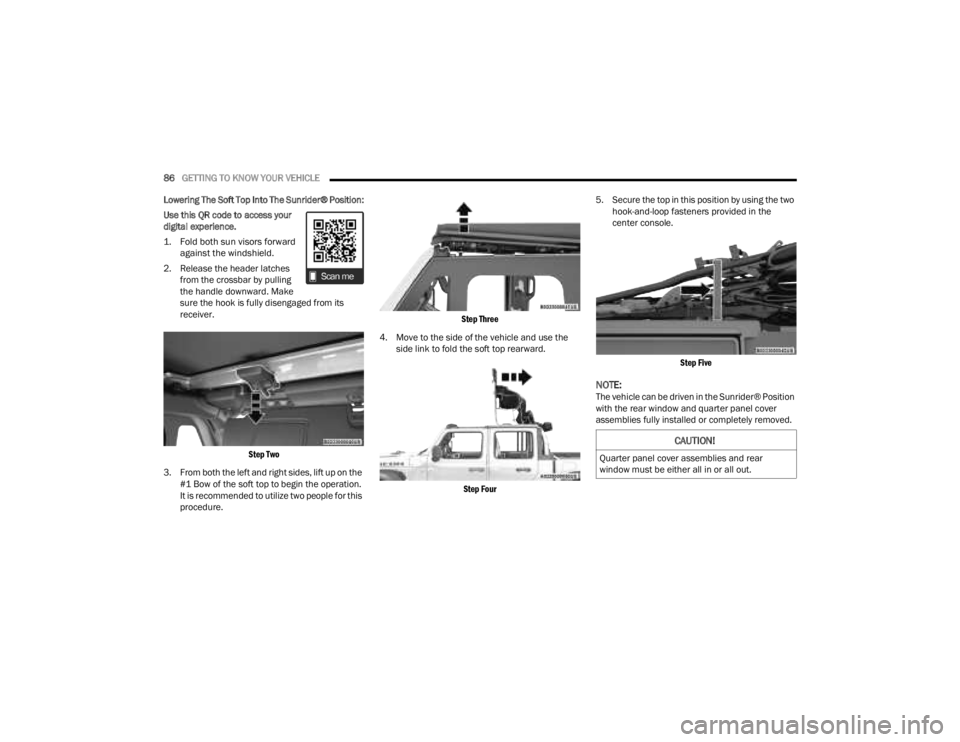
Lowering The Soft Top Into The Sunrider® Position:
Use this QR code to access your
digital experience.
1. Fold both sun visors forward against the windshield.
2. Release the header latches from the crossbar by pulling
the handle downward. Make
sure the hook is fully disengaged from its
receiver.
Step Two
3. From both the left and right sides, lift up on the #1 Bow of the soft top to begin the operation.
It is recommended to utilize two people for this
procedure.
Step Three
4. Move to the side of the vehicle and use the side link to fold the soft top rearward.
Step Four
5. Secure the top in this position by using the two
hook-and-loop fasteners provided in the
center console.
Step Five
NOTE:The vehicle can be driven in the Sunrider® Position
with the rear window and quarter panel cover
assemblies fully installed or completely removed.
CAUTION!
Quarter panel cover assemblies and rear
window must be either all in or all out.
23_JT_OM_EN_USC_t.book Page 86
Page 91 of 448
GETTING TO KNOW YOUR VEHICLE89
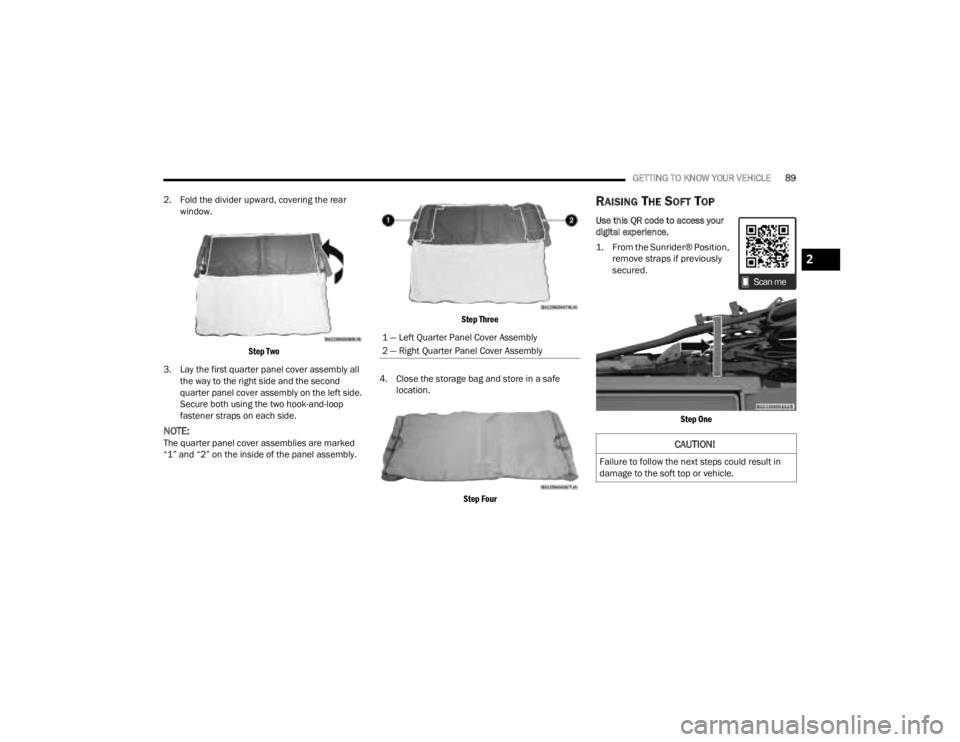
2. Fold the divider upward, covering the rear window.
Step Two
3. Lay the first quarter panel cover assembly all the way to the right side and the second
quarter panel cover assembly on the left side.
Secure both using the two hook-and-loop
fastener straps on each side.
NOTE:The quarter panel cover assemblies are marked
“1” and “2” on the inside of the panel assembly.
Step Three
4. Close the storage bag and store in a safe location.
Step Four
RAISING THE SOFT TOP
Use this QR code to access your
digital experience.
1. From the Sunrider® Position, remove straps if previously
secured.
Step One
1 — Left Quarter Panel Cover Assembly
2 — Right Quarter Panel Cover Assembly
CAUTION!
Failure to follow the next steps could result in
damage to the soft top or vehicle.
2
23_JT_OM_EN_USC_t.book Page 89
Page 93 of 448
GETTING TO KNOW YOUR VEHICLE91
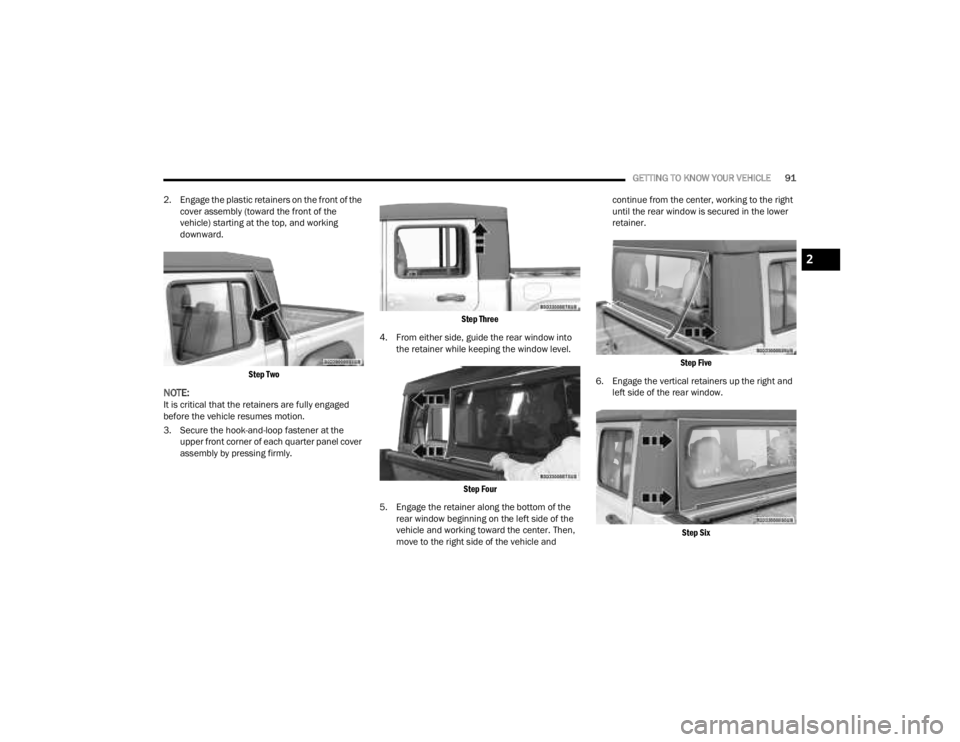
2. Engage the plastic retainers on the front of the cover assembly (toward the front of the
vehicle) starting at the top, and working
downward.
Step Two
NOTE:It is critical that the retainers are fully engaged
before the vehicle resumes motion.
3. Secure the hook-and-loop fastener at the upper front corner of each quarter panel cover
assembly by pressing firmly.
Step Three
4. From either side, guide the rear window into the retainer while keeping the window level.
Step Four
5. Engage the retainer along the bottom of the rear window beginning on the left side of the
vehicle and working toward the center. Then,
move to the right side of the vehicle and continue from the center, working to the right
until the rear window is secured in the lower
retainer.
Step Five
6. Engage the vertical retainers up the right and left side of the rear window.
Step Six
2
23_JT_OM_EN_USC_t.book Page 91
Page 95 of 448
GETTING TO KNOW YOUR VEHICLE93
INSTALLING THE SOFT TOP
NOTE:If installing the soft top immediately after removing
the hard top, ensure the wire harness is stored
properly, and not tucked under the belt rail
Úpage 98.
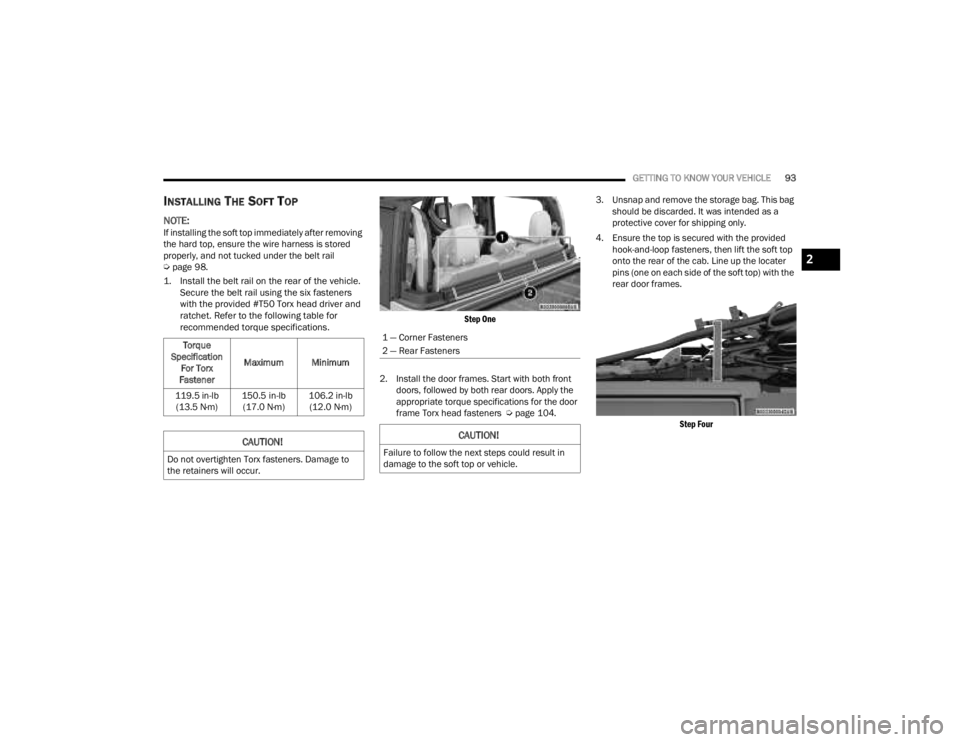
1. Install the belt rail on the rear of the vehicle. Secure the belt rail using the six fasteners
with the provided #T50 Torx head driver and
ratchet. Refer to the following table for
recommended torque specifications.
Step One
2. Install the door frames. Start with both front doors, followed by both rear doors. Apply the
appropriate torque specifications for the door
frame Torx head fasteners Ú page 104.3. Unsnap and remove the storage bag. This bag
should be discarded. It was intended as a
protective cover for shipping only.
4. Ensure the top is secured with the provided hook-and-loop fasteners, then lift the soft top
onto the rear of the cab. Line up the locater
pins (one on each side of the soft top) with the
rear door frames.
Step Four
Torque
Specification For Torx
Fastener Maximum Minimum
119.5 in-lb (13.5 N·m) 150.5 in-lb
(17.0 N·m) 106.2 in-lb
(12.0 N·m)
CAUTION!
Do not overtighten Torx fasteners. Damage to
the retainers will occur.
1 — Corner Fasteners
2 — Rear Fasteners
CAUTION!
Failure to follow the next steps could result in
damage to the soft top or vehicle.
2
23_JT_OM_EN_USC_t.book Page 93