phone JEEP GLADIATOR 2023 Service Manual
[x] Cancel search | Manufacturer: JEEP, Model Year: 2023, Model line: GLADIATOR, Model: JEEP GLADIATOR 2023Pages: 448, PDF Size: 17.37 MB
Page 278 of 448

276MULTIMEDIA
14. Can I get a refund if I have not used the entire
subscription? Prorated refunds are provided
from the date of cancellation for annual plans
or longer. Please see the Uconnect and
SiriusXM Guardian™ Terms & Conditions for
refunds related to billing plans of other lengths
and other circumstances.
15. Can I cancel a subscription before it expires?
Yes. If you have an annual subscription, your
subscription will be canceled the day you
cancel. If you have a monthly subscription,
your subscription will be canceled on the last
day of the month in which you choose to
cancel.
16. What should I do if I want to sell my vehicle?
Before your vehicle is sold to a new owner,
you’ll want to remove your account
information. This process removes all personal
information, returns the Uconnect system to
its original factory settings, removes all
SiriusXM Guardian™ connected services and
account information. To remove your account
information from the Uconnect system,
contact SiriusXM Guardian™ Customer Care.
17. What if I forgot to remove my account
information before I returned my lease vehicle
or sold it? Contact SiriusXM Guardian™
Customer Care. 18.
What will happen if an operable LTE (voice/
data), 4G (data), or 5G (data) network
connection compatible with my device is
temporarily unavailable? The SOS Call and
ASSIST buttons will NOT function if you are not
connected to an operable LTE (voice/data) or
4G (data), 5G (data) network. Services that
required your smartphone only direct calls to
Roadside Assistance Call may be functioning if
you have an operable network.
DATA COLLECTION & PRIVACY
The Uconnect system collects and transmits data
which may include information about your vehicle,
your vehicle’s health and performance, your
vehicle’s location, your utilization of the features in
your vehicle, and other data. The collection, use
and sharing of this information is required to
provide the SiriusXM Guardian™ connected
services and is further described by the Uconnect
Privacy Policy, which can be found at
www.driveuconnect.com/connectedservices/
privacy.html (US Residents) or
www.driveuconnect.ca (Canadian Residents). This
information may be collected by SiriusXM®
Connected Vehicle Services Inc. and shared with
FCA US LLC for the purposes stated in the
Uconnect Privacy Policy. Vehicle health and diagnostic information including location data may
be used by Uconnect to provide a Vehicle Health
Report to you.
Even if you cancel your SiriusXM Guardian™
subscription, this vehicle diagnostic health
information, including location data, may still be
transmitted from your vehicle and you may still
have a Vehicle Health Report sent to you.
Use of any of the connected services including
SiriusXM Guardian™ is deemed to be your consent
to the collection, use and disclosure of this
information in accordance with the Uconnect
Privacy Policy. If you do not want this information to
be collected, used, or shared, you must cancel your
Uconnect services in their entirety by contacting us
as referenced in the Uconnect Privacy Policy.
RADIO OPERATION AND MOBILE PHONES
Under certain conditions, the mobile phone being
on in your vehicle can cause erratic or noisy
performance from your radio. This condition may
be lessened or eliminated by repositioning the
mobile phone within the vehicle. This condition is
not harmful to the radio. If your radio performance
does not satisfactorily improve from repositioning
the mobile phone, it is recommended that the
volume be turned down or off during mobile phone
operation when not using the Uconnect system.
23_JT_OM_EN_USC_t.book Page 276
Page 279 of 448
MULTIMEDIA277
REGULATORY AND SAFETY
I
NFORMATION
US/CANADA
Exposure to Radio Frequency Radiation
The radiated output power of the internal wireless
radio is far below the FCC and IC radio frequency
exposure limits. Nevertheless, the wireless radio
will be used in such a manner that the radio is
8 inches (20 cm) or further from the human body.
The internal wireless radio operates within
guidelines found in radio frequency safety
standards and recommendations, which reflect
the consensus of the scientific community.
The radio manufacturer believes the internal
wireless radio is safe for use by consumers. The
level of energy emitted is far less than the
electromagnetic energy emitted by wireless
devices such as mobile phones. However, the use
of wireless radios may be restricted in some
situations or environments, such as aboard
airplanes. If you are unsure of restrictions, you are
encouraged to ask for authorization before turning
on the wireless radio Ú page 432.
OFF-ROAD PAGES — IF EQUIPPED
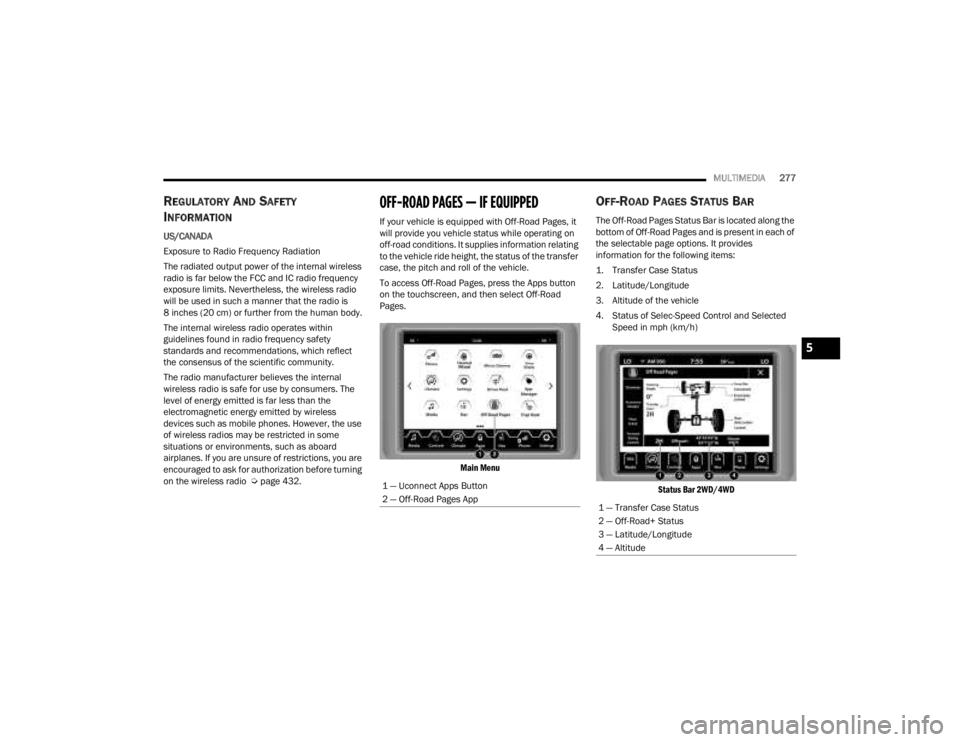
If your vehicle is equipped with Off-Road Pages, it
will provide you vehicle status while operating on
off-road conditions. It supplies information relating
to the vehicle ride height, the status of the transfer
case, the pitch and roll of the vehicle.
To access Off-Road Pages, press the Apps button
on the touchscreen, and then select Off-Road
Pages.
Main Menu
OFF-ROAD PAGES STATUS BAR
The Off-Road Pages Status Bar is located along the
bottom of Off-Road Pages and is present in each of
the selectable page options. It provides
information for the following items:
1. Transfer Case Status
2. Latitude/Longitude
3. Altitude of the vehicle
4. Status of Selec-Speed Control and Selected Speed in mph (km/h)
Status Bar 2WD/4WD
1 — Uconnect Apps Button
2 — Off-Road Pages App
1 — Transfer Case Status
2 — Off-Road+ Status
3 — Latitude/Longitude
4 — Altitude
5
23_JT_OM_EN_USC_t.book Page 277
Page 335 of 448
IN CASE OF EMERGENCY333
(Continued)
ASSIST Call
The ASSIST button is used to automatically
connect you to any one of the following support
centers:
Roadside Assistance – If you get a flat tire, or
need a tow, just push the ASSIST button and
you’ll be connected to someone who can help.
Roadside Assistance will know what vehicle
you’re driving and its location. Additional fees
may apply for roadside assistance.
SiriusXM Guardian™ Customer Care – In-vehicle
support for SiriusXM Guardian™.
Vehicle Customer Care – Total support for all
other vehicle issues.
Uconnect Customer Care - Total support for
Radio, Phone and NAV issues.
SOS Call
1. Push the SOS Call button on the overhead console.
NOTE:In case the SOS Call button is pushed in error,
there will be a 10 second delay before the SOS Call
system initiates a call to an SOS operator. To
cancel the SOS Call connection, push the SOS call
button on the overhead console or press the
cancellation button on the Device Screen. Termi -
nation of the SOS Call will turn off the green LED
light on the overhead console. 2. The LED light located within the ASSIST and
SOS buttons on the overhead console will turn
green once a connection to an SOS operator
has been made.
3. Once a connection between the vehicle and an SOS operator is made, the SOS Call system
may transmit the following important vehicle
information to an SOS operator:
Indication that the occupant placed an SOS
Call.
The vehicle brand.
The last known GPS coordinates of the
vehicle.
4. You should be able to speak with the SOS operator through the vehicle audio system to
determine if additional help is needed.
NOTE:
Your vehicle may be transmitting data as
authorized by the subscriber.
Once a connection is made between the
vehicle’s SOS Call system and the SOS oper -
ator, the SOS operator may be able to open
a voice connection with the vehicle to deter -
mine if additional help is needed. Once the
SOS operator opens a voice connection with
the vehicle’s SOS Call system, the operator
should be able to speak with the vehicle
occupants, and hear sounds occurring in
the vehicle. The vehicle’s SOS Call system
will attempt to remain connected with the
SOS operator until the SOS operator termi-
nates the connection.
5. The SOS operator may attempt to contact appropriate emergency responders and
provide them with important vehicle
information and GPS coordinates.
WARNING!
ALWAYS obey traffic laws and pay attention to
the road. ALWAYS drive safely with your hands on
the steering wheel. You have full responsibility
and assume all risks related to the use of the
features and applications in this vehicle. Only
use the features and applications when it is safe
to do so. Failure to do so may result in an
accident involving serious injury or death.
WARNING!
If anyone in the vehicle could be in danger
(e.g., fire or smoke is visible, dangerous road
conditions or location), do not wait for voice
contact from an Emergency Services Agent. All
occupants should exit the vehicle immediately
and move to a safe location.
7
23_JT_OM_EN_USC_t.book Page 333
Page 430 of 448
428
CUSTOMER ASSISTANCE
SUGGESTIONS FOR OBTAINING SERVICE
FOR YOUR VEHICLE
PREPARE FOR THE APPOINTMENT
All work to be performed may not be covered by the
warranty. Discuss additional charges with the
service manager. Keep a maintenance log of your
vehicle's service history.
PREPARE A LIST
Make a written list of your vehicle's problems or the
specific work you want done. If you've had an
accident or work done that is not on your
maintenance log, let the service advisor know.
BE REASONABLE WITH REQUESTS
If you list a number of items and you must have
your vehicle by the end of the day, discuss the
situation with the service advisor and list the items
in order of priority. At many authorized dealers, you
may obtain a rental vehicle (additional charges
may apply). If you need a rental, it is advisable to
make these arrangements when you call for an
appointment.
IF YOU NEED ASSISTANCE
FCA US LLC and its authorized dealers are vitally
interested in your satisfaction. We want you to be
happy with our products and services.
Warranty service must be done by an authorized
dealer. We strongly recommend that you take the
vehicle to an authorized dealer. They know your
vehicle the best, and are most concerned that you
get prompt and high quality service. FCA US LLC's
authorized dealers have the facilities,
factory-trained technicians, special tools, and the
latest information to ensure the vehicle is fixed
correctly and in a timely manner.
This is why you should always talk to an authorized
dealer’s service manager first. If for some reason
you are still not satisfied, talk to the general
manager or owner of the authorized dealer. They
want to know if you need assistance. If an
authorized dealer is unable to resolve the concern,
you may contact FCA US LLC's Customer
Assistance center.
Any communication to FCA US LLC's customer
center should include the following information:
Owner's name and address
Owner's telephone number (home, mobile, and
office)
Authorized dealer name
Vehicle Identification Number (VIN)
Vehicle delivery date and mileage
ROADSIDE ASSISTANCE
Available 24 hours, 7 days a week.
Call 1-800-521-2779 or visit
chrysler.rsahelp.com(USA)
Call 1-800-363-4869 or visit fca.roadsideaid.com
(Canada)
Who is Covered
You are covered by Roadside Assistance services if
you are a purchaser for use of the vehicle.
Roadside Assistance services last for five years or
60,000 miles on the odometer, whichever occurs
first, calculated from the start date of the Basic
Limited Warranty, as set forth in “section 2.1 E”.
1
1. Towing services provided through Cross Country Motor
Club, Inc. Medford, MA 02155, except in AK,CA, HI, OR, WI,
and WY, where services are provided by Cross Country
Motor Club of California, Inc., Thousand Oaks, CA 91360.
23_JT_OM_EN_USC_t.book Page 428
Page 431 of 448

CUSTOMER ASSISTANCE429
What to Do
If your vehicle requires jump start assistance, out
of gas/fuel delivery, tire service, lockout service or
towing as a result of a mechanical breakdown, dial
toll-free: U.S.A.: 1-800-521-2779/Canada:
1-800-363-4869. Provide your name, Vehicle
Identification Number (VIN) required for covered
services, license plate number, and your location,
including the telephone number from which you
are calling. Briefly describe the nature of the
problem and answer a few simple questions. You
will be given the name of the service provider and
an estimated time of arrival. If you feel you are in
an unsafe situation, please let us know. With your
consent, we will contact local police or safety
authorities.
If Unable to Contact Roadside Assistance
If you are unable to contact Roadside Assistance or
unable to provide a valid Vehicle Identification
Number (VIN), and you obtain towing services on
your own, you may submit your original receipts
from the licensed towing or service facility, for
services rendered within30 days of the
occurrence. Be sure to include your VIN, odometer
mileage at the time of service, and current mailing
address. We will process the claim based on
vehicle and service eligibility. If eligible, we will
reimburse you for the reasonable amount actually
paid, based on the usual and customary charges
for that service in the area where they were provided. FCA US LLC’s determination relating to
reimbursement is final. Correspondence should be
mailed to:
FCA US LLC Customer Assistance
P.O. Box 9145
Medford, MA 02155
Attention Claims Department
FCA US LLC reserves the right to modify the terms
or discontinue the Roadside Assistance Program
at any time. The Roadside Assistance program is
subject to restrictions and conditions of use, which
are determined solely by FCA US LLC.
Flat Tire Service
If you are inconvenienced by a flat tire, we will
dispatch a service provider to use your vehicle’s
temporary spare tire (if equipped) as
recommended in your Owner’s Manual. This is not
a permanent flat tire repair.
Out of Gas/Fuel Delivery
Drivers cannot always count on a gas station being
nearby, especially when traveling away from home.
We will dispatch a service provider to deliver a
small amount of fuel (maximum two gallons) to get
you to a nearby station. This service is limited to
two occurrences in a 12-month period.
Battery Jump Assistance
No time is a good time for a depleted battery. With
Roadside Assistance, you do not have to worry
about being stranded. We will dispatch a service
provider to provide you with a battery jump
anytime, day or night.
Lockout Service
Whether the keys are locked in your vehicle or
frozen locks are keeping you from getting on your
way, help is just a phone call away. This service is
limited to providing access to the vehicle’s seating
area. It does not cover the cost of replacement
keys.
Towing Service
Our towing service gives you peace of mind and
confidence. If your vehicle becomes disabled as a
result of a mechanical breakdown, Roadside
Assistance will dispatch a towing service to
transport your vehicle to the closest authorized
Chrysler, Dodge, Jeep®, or Ram dealer. If you
choose to go to another dealer, you will be
responsible for the cost if the extra distance
exceeds 10 miles.
10
23_JT_OM_EN_USC_t.book Page 429
Page 432 of 448
430CUSTOMER ASSISTANCE
FCA US LLC CUSTOMER CENTER
P.O. Box 21–8004
Auburn Hills, MI 48321–8004
Phone: (877) 426-5337
FCA CANADA INC. CUSTOMER CENTER
P.O. Box 1621
Windsor, Ontario N9A 4H6
Phone: (800) 465-2001 English / (800) 387-9983
French
MEXICO
Av. Prolongacion Paseo de la Reforma, 1240
Sante Fe C.P. 05109
Mexico, D.F.
In Mexico City: 800-505-1300
Outside Mexico City: +(52)55 50817568
PUERTO RICO AND U.S. VIRGIN
I
SLANDS
FCA Caribbean LLC
P.O. Box 191857
San Juan 00919-1857
Phone: (877) 426-5337
Fax: (787) 782-3345
CUSTOMER ASSISTANCE FOR THE
H
EARING OR SPEECH IMPAIRED
(TDD/TTY)
To assist customers who have hearing difficulties,
FCA US LLC has installed special TDD (Telecommu -
nication Devices for the Deaf) equipment at its
customer center. Any hearing or speech impaired
customer, who has access to a TDD or a
conventional teletypewriter (TTY) in the United
States, can communicate with FCA US LLC by
dialing 1-800-380-2479.
Canadian residents with hearing difficulties that
require assistance can use the special needs relay
service offered by Bell Canada. For TTY
teletypewriter users, dial 711 and for Voice callers,
dial 1-800-855-0511 to connect with a Bell Relay
Service operator.
SERVICE CONTRACT
You may have purchased a service contract for a
vehicle to help protect you from the high cost of
unexpected repairs after FCA US LLC’s New Vehicle
Limited Warranty expires. The Mopar® Vehicle
Protection plans are the ONLY vehicle extended
protection plans authorized, endorsed and backed
by FCA US LLC to provide additional protection
beyond your vehicle’s warranty. If you purchased a
Mopar® Vehicle Protection Plan, you will receive
Plan Provisions and an Owner Identification Card in the mail within three weeks of the vehicle delivery
date. If you have any questions about the service
contract, call the manufacturer's Service Contract
National Customer Hotline at 1-800-521-9922
(Canadian residents, call (800) 465-2001 English /
(800) 387-9983 French).
FCA US LLC is not responsible for any service
contract you may have purchased from another
manufacturer. If you require service after the FCA
US LLC New Vehicle Limited Warranty expires,
please refer to the contract documents, and
contact the person listed in those documents.
We appreciate that you have made a major
investment when you purchased the vehicle. An
authorized dealer has also made a major
investment in facilities, tools, and training to
assure that you are absolutely delighted with the
ownership experience.
WARNING!
Engine exhaust (internal combustion engines
only), some of its constituents, and certain
vehicle components contain, or emit, chemicals
known to the State of California to cause cancer
and birth defects, or other reproductive harm. In
addition, certain fluids contained in vehicles and
certain products of component wear contain, or
emit, chemicals known to the State of California
to cause cancer and birth defects, or other
reproductive harm.
23_JT_OM_EN_USC_t.book Page 430
Page 433 of 448
CUSTOMER ASSISTANCE431
WARRANTY INFORMATION
See the Warranty Information for the terms and
provisions of FCA US LLC warranties applicable to
this vehicle and market. Refer to www.mopar.com/
om for further information.
See the Warranty Information for the terms and
provisions of FCA Canada Inc. warranties
applicable to this vehicle and market. Refer to
www.owners.mopar.ca/en for further information.
Use this QR code to access your
digital experience.
MOPAR® PARTS
Mopar® original equipment parts and accessories
and factory filled fluids are available from an
authorized dealer. They are recommended for your
vehicle to keep it operating at its best and maintain
its original condition.
REPORTING SAFETY DEFECTS
IN THE 50 UNITED STATES AND
W
ASHINGTON, D.C.
If you believe that your vehicle has a
defect that could cause a crash or cause
injury or death, you should immediately
inform the National Highway Traffic
Safety Administration (NHTSA) in
addition to notifying FCA US LLC.
If NHTSA receives similar complaints, it
may open an investigation, and if it finds
that a safety defect exists in a group of
vehicles, it may order a recall and
remedy campaign. However, NHTSA
cannot become involved in individual
problems between you, an authorized
dealer or FCA US LLC.
To contact NHTSA, you may call the
Vehicle Safety Hotline toll free at
1-888-327-4236 (TTY: 1-800-424-9153);
or go to
http://www.safercar.gov
; or write
to: Administrator, NHTSA, 1200 New
Jersey Avenue, SE., West Building,
Washington, D.C. 20590. You can also obtain other information about motor
vehicle safety from
http://
www.safercar.gov
.
IN CANADA
If you believe that your vehicle has a
safety defect, you should contact the
Customer Service Department
immediately. Canadian customers who
wish to report a safety defect to the
Canadian government should contact
Transport Canada, Motor Vehicle Defect
Investigations and Recalls at
1-800-333-0510 or go to
wwwapps.tc.gc.ca/Saf-Sec-Sur/7/
PCDB-BDPP.
PUBLICATION ORDER FORMS
To order the following manuals, you may use either
the website or the phone numbers listed below.
Service Manuals
These comprehensive Service Manuals provide a
complete working knowledge of the vehicle,
system, and/or components and is written in
straightforward language with illustrations,
diagrams, and charts.
10
23_JT_OM_EN_USC_t.book Page 431
Page 434 of 448

432CUSTOMER ASSISTANCE
Diagnostic Procedure Manuals
Diagnostic Procedure Manuals are filled with
diagrams, charts and detailed illustrations. These
manuals make it easy to find and fix problems on
computer-controlled vehicle systems and features.
They show exactly how to find and correct
problems, using step-by-step troubleshooting and
drivability procedures, proven diagnostic tests and
a complete list of all tools and equipment.
To order a hard copy of your Service or Diagnostic
Procedure manuals, visit:
www.techauthority.com (US and Canada).
Owner's Manuals
These Owner's Manuals have been prepared with
the assistance of service and engineering
specialists to acquaint you with specific FCA
vehicles.
To access your Owner's Information online, visit
www.mopar.com/om (US) or
www.owners.mopar.ca (Canada).
Or
Call Tech Authority toll free at:
1-800-890-4038 (US)
Owner's Manuals, Radio Manuals and Warranty
Information Books can be ordered through
Archway at:
1-800-387-1143 (Canada)
CHANGE OF OWNERSHIP OR ADDRESS
*If you have purchased this vehicle used or have
changed your address, please provide the
following information and mail to:
FCA US LLC
P.O. Box 21–8008
Auburn Hills, MI 48321–8004
Make sure to include the following:
Date of Sale (mm/dd/yy)
Vehicle Indentification Number (17 Character ID
located on top left of the instrument panel)
Exact Odometer Reading
First and Last Name
Phone Number
Street Address, City, State and Zip Code
Email Address
*Applies to US residents only.
GENERAL INFORMATION
The following regulatory statement applies to all
Radio Frequency (RF) devices equipped in this
vehicle:
This device complies with Part 15 of the FCC Rules
and with Innovation, Science and Economic
Development Canada license-exempt RSS
standard(s). Operation is subject to the following
two conditions:
1. This device may not cause harmful
interference, and
2. This device must accept any interference received, including interference that may
cause undesired operation.
Le présent appareil est conforme aux CNR
d`Innovation, Science and Economic Development
applicables aux appareils radio exempts de
licence. L'exploitation est autorisée aux deux
conditions suivantes:
1. l'appareil ne doit pas produire de brouillage, et
2. l'utilisateur de l'appareil doit accepter tout brouillage radioélectrique subi, même si le
brouillage est susceptible d'en compromettre
le fonctionnement.
La operación de este equipo está sujeta a las
siguientes dos condiciones:
1. es posible que este equipo o dispositivo no cause interferencia perjudicial y
2. este equipo o dispositivo debe aceptar cualquier interferencia, incluyendo la que
pueda causar su operación no deseada.
NOTE:Changes or modifications not expressly approved
by the party responsible for compliance could void
the user’s authority to operate the equipment.
23_JT_OM_EN_USC_t.book Page 432
Page 435 of 448

433
INDEX
A
About Your Brakes......................................... 418Accessory Drive Belt Inspection..................... 372Adaptive Cruise Control (ACC)
(Cruise Control).............................................. 173Adding Engine Coolant (Antifreeze)............... 378Adding Fuel.......................................... 191, 192Additives, Fuel............................................... 419Advance Phone Connectivity......................... 252Air BagAir Bag Operation...................................... 308Air Bag Warning Light............. 132, 306, 309Enhanced Accident Response......... 317, 352Event Data Recorder (EDR)....................... 352Front Air Bag................................... 307, 309If Deployment Occurs................................ 316Knee Impact Bolsters................................ 314Maintaining Your Air Bag System.............. 317Maintenance............................................. 317Redundant Air Bag Warning Light.............307Transporting Pets...................................... 329Air Bag Light........................................ 306, 329Air Cleaner, Engine (Engine Air Cleaner
Filter)............................................................. 366Air Conditioner Maintenance......................... 372Air Conditioner Refrigerant.................. 372, 373
Air Conditioner System................................. 372Air Conditioning Filter..............................68, 373Air Conditioning System................................... 67Air Conditioning, Operating Tips....................... 67Air Filter........................................................ 366Air PressureTires......................................................... 402AlarmArm The System.......................................... 23Disarm The System..................................... 23Security Alarm............................................. 23Alterations/ModificationsVehicle......................................................... 11Android Auto........................................ 254, 255Android Auto™
S
........................................ 254Antifreeze (Engine Coolant)................. 377, 423Disposal................................................... 378Anti-Lock Brake System (ABS)............. 135, 279Apple CarPlay....................................... 254, 257Apple CarPlay®
S
...................................... 256Assist, Hill Start............................................. 283Audio Settings............................................... 240Audio Systems (Radio).................................. 214Auto Down Power Windows............................. 81Automatic Dimming Mirror............................... 51Automatic Door Locks...................................... 27
Automatic Headlights.......................................58Automatic High Beams.....................................58Automatic Temperature Control (ATC)..............67Automatic Transmission................................ 157Adding Fluid.............................................. 382Autostick................................................... 160Fluid And Filter Change............................. 382Fluid Change............................................. 382Fluid Level Check............................. 381, 382Fluid Type........................................ 382, 426Gear Ranges............................................. 157Special Additives...................................... 381Automatic Transmission Limp Home Mode... 159AutoPark....................................................... 145AUX..................................................................71Auxiliary Electrical Outlet (Power Outlet)..........77Auxiliary Power Outlet......................................77Auxiliary Switches............................................79Axle Fluid....................................................... 426Axle Lock.............................................. 165, 166
B
Battery.......................................................... 364Charging System Light.............................. 133Keyless Key Fob Replacement....................16Bed Lights........................................................59
11
23_JT_OM_EN_USC_t.book Page 433
Page 436 of 448

434
Belts, Seat
..................................................... 329Blind Spot Monitoring.................................... 287Bluetooth Connecting To A Particular Mobile Phone Or Audio Device After Pairing
................248Body Mechanism Lubrication........................ 374B-Pillar Location............................................. 400Brake Assist System...................................... 280Brake Control System.................................... 280Brake Fluid.......................................... 380, 426Brake System...................................... 380, 418Anti-Lock (ABS).......................................... 418Fluid Check............................................... 380Master Cylinder......................................... 380Parking...................................................... 152Warning Light............................................ 132Brake/Transmission Interlock....................... 157Bulb Replacement............................... 392, 393Bulbs, Light.......................................... 330, 392Bumper End Cap Removal............................. 208
C
Camera, Rear................................................ 189Capacities, Fluid............................................ 423Caps, FillerFuel........................................................... 191Oil (Engine)................................................ 362Radiator (Coolant Pressure)...................... 378Car Washes................................................... 412Carbon Monoxide Warning............................ 331
Carpet Safety Information............................. 414Carpeting...................................................... 415CD................................................................. 242Cellular Phone.............................................. 276Center High Mounted Stop Light................... 395Certification Label......................................... 195Chains, Tire................................................... 408Charge Air Cooler.......................................... 379Chart, Tire Sizing........................................... 397Checking Your Vehicle For Safety................. 328Checks, Safety.............................................. 328Child Restraint.............................................. 318Child RestraintsBooster Seats........................................... 321Child Seat Installation.............................. 327How To Stow An unused ALR Seat Belt.... 325Infant And Child Restraints....................... 320Locating The LATCH Anchorages.............. 324Lower Anchors And Tethers For Children.. 322Older Children And Child Restraints......... 320Seating Positions...................................... 321Clean Air Gasoline......................................... 419CleaningWheels..................................................... 407Climate Control................................................ 61Automatic.................................................... 62Manual........................................................ 64CNG And LP Fuel System Modifications........ 420Cold Weather Operation............................... 146Compact Spare Tire...................................... 406
Connected Services...................................... 258Connected Services FAQ............................... 272Connected Services Features....................... 261Connected Services, Getting Started............ 260Connected Services, Introduction................. 258ConnectorUCI...............................................................71Universal Consumer Interface (UCI).............71Console............................................................69Floor............................................................69Contract, Service........................................... 430Controls........................................................ 234Cooling Pressure Cap (Radiator Cap)............ 378Cooling System............................................. 377Adding Coolant (Antifreeze)...................... 378Coolant Level............................................ 379Cooling Capacity....................................... 423Disposal Of Used Coolant......................... 378Drain, Flush, And Refill............................. 377Inspection........................................ 377, 379Points To Remember................................ 379Pressure Cap............................................ 378Radiator Cap............................................. 378Selection Of Coolant (Antifreeze)......................... 377, 423, 424Corrosion Protection..................................... 411Cruise Control (Speed
Control)............................. 139, 140, 141, 173Customer Assistance.................................... 428Cybersecurity................................................ 214
23_JT_OM_EN_USC_t.book Page 434