ECU JEEP LIBERTY 2002 KJ / 1.G Owner's Manual
[x] Cancel search | Manufacturer: JEEP, Model Year: 2002, Model line: LIBERTY, Model: JEEP LIBERTY 2002 KJ / 1.GPages: 1803, PDF Size: 62.3 MB
Page 142 of 1803
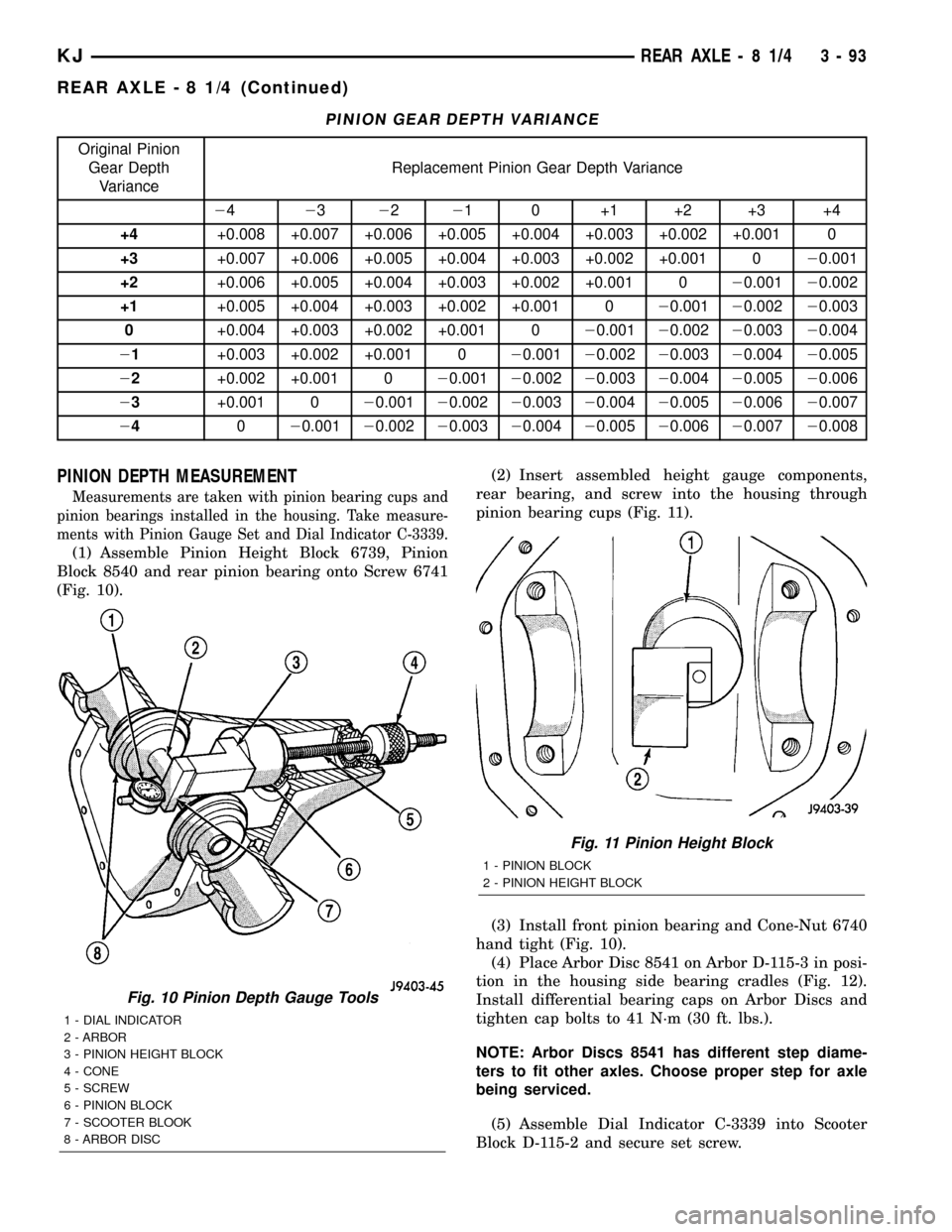
PINION GEAR DEPTH VARIANCE
Original Pinion
Gear Depth
VarianceReplacement Pinion Gear Depth Variance
24232221 0 +1 +2 +3 +4
+4+0.008 +0.007 +0.006 +0.005 +0.004 +0.003 +0.002 +0.001 0
+3+0.007 +0.006 +0.005 +0.004 +0.003 +0.002 +0.001 020.001
+2+0.006 +0.005 +0.004 +0.003 +0.002 +0.001 020.00120.002
+1+0.005 +0.004 +0.003 +0.002 +0.001 020.00120.00220.003
0+0.004 +0.003 +0.002 +0.001 020.00120.00220.00320.004
21+0.003 +0.002 +0.001 020.00120.00220.00320.00420.005
22+0.002 +0.001 020.00120.00220.00320.00420.00520.006
23+0.001 020.00120.00220.00320.00420.00520.00620.007
24020.00120.00220.00320.00420.00520.00620.00720.008
PINION DEPTH MEASUREMENT
Measurements are taken with pinion bearing cups and
pinion bearings installed in the housing. Take measure-
ments with Pinion Gauge Set and Dial Indicator C-3339.
(1) Assemble Pinion Height Block 6739, Pinion
Block 8540 and rear pinion bearing onto Screw 6741
(Fig. 10).(2) Insert assembled height gauge components,
rear bearing, and screw into the housing through
pinion bearing cups (Fig. 11).
(3) Install front pinion bearing and Cone-Nut 6740
hand tight (Fig. 10).
(4) Place Arbor Disc 8541 on Arbor D-115-3 in posi-
tion in the housing side bearing cradles (Fig. 12).
Install differential bearing caps on Arbor Discs and
tighten cap bolts to 41 N´m (30 ft. lbs.).
NOTE: Arbor Discs 8541 has different step diame-
ters to fit other axles. Choose proper step for axle
being serviced.
(5) Assemble Dial Indicator C-3339 into Scooter
Block D-115-2 and secure set screw.
Fig. 10 Pinion Depth Gauge Tools
1 - DIAL INDICATOR
2 - ARBOR
3 - PINION HEIGHT BLOCK
4 - CONE
5 - SCREW
6 - PINION BLOCK
7 - SCOOTER BLOOK
8 - ARBOR DISC
Fig. 11 Pinion Height Block
1 - PINION BLOCK
2 - PINION HEIGHT BLOCK
KJREAR AXLE - 8 1/4 3 - 93
REAR AXLE - 8 1/4 (Continued)
Page 158 of 1803

(16) Remove differential case from the fixture.
Remove side gear, clutch pack retainer and clutch
pack. Keep plates in order during removal.
CLEANING
Clean all components in cleaning solvent and dry
components with compressed air.
INSPECTION
Inspect clutch pack plates for wear, scoring or dam-
age. Replace both clutch packs if any one component
in either pack is damaged. Inspect side and pinion
gears for cracks chips or damage and replace as nec-
essary. Inspect differential case and pinion shaft and
replace if worn or damaged.
ASSEMBLY
Lubricate each component with gear lubricant
before assembly.
NOTE: New Plates and discs with fiber coating (no
grooves or lines) must be presoaked in Friction
Modifier before assembly. Soak plates and discs for
a minimum of 20 minutes.
(1) Assemble the clutch discs into packs and
secure disc packs with retaining clips (Fig. 42).
(2) Install assembled clutch disc packs on the side
gear hubs.(3) Install clutch pack and side gear in the ring
gear side of the differential case (Fig. 43).Verify
clutch pack retaining clips are in position and
seated in the case pockets.
(4) Set differential case on Fixture 8138.
(5) Install lubricated Disc 8140 without the hole in
lower side gear (Fig. 44).
(6) Install the upper side gear and clutch disc pack
(Fig. 44).
(7) Hold assembly in position. Insert Disc 8140
with threaded hole into top side gear.
(8) Install Forcing Screw 6960-4 and tighten screw
to slightly compress clutch disc.
(9) Place pinion gears in position in side gears and
verify that the pinion mate shaft hole is aligned.
(10) Rotate case with Turning Bar 6960-2 until the
pinion mate shaft holes in pinion gears align with
holes in case. It may be necessary to slightly tighten
the forcing screw in order to install the pinion gears.
(11) Tighten forcing screw to 122 N´m (90 ft. lbs.)
maximum to compress the Belleville springs.
(12) Lubricate and install thrust washers behind
pinion gears and align washers with a small screw
driver. Insert mate shaft into each pinion gear to ver-
ify alignment.
(13) Remove forcing screw and discs.
Fig. 42 CLUTCH DISC PACK
1 - CLUTCH PACK
2 - RETAINER
3 - SIDE GEAR
4 - RETAINER
Fig. 43 CLUTCH PACK AND LOWER SIDE GEAR
1 - DIFFERENTIAL CASE
2 - LOWER SIDE GEAR AND CLUTCH PACK
KJREAR AXLE - 8 1/4 3 - 109
DIFFERENTIAL - TRAC-LOK (Continued)
Page 169 of 1803

BRAKES DO NOT HOLD AFTER DRIVING THROUGH DEEP
WATER PUDDLES
This condition is generally caused by water soaked
lining. If the lining is only wet, it can be dried by
driving with the brakes very lightly applied for a
mile or two. However, if the lining is both soaked and
dirt contaminated, cleaning and/or replacement will
be necessary.
BRAKE LINING CONTAMINATION
Brake lining contamination is mostly a product of
leaking calipers or wheel cylinders, worn seals, driv-
ing through deep water puddles, or lining that has
become covered with grease and grit during repair.
Contaminated lining should be replaced to avoid fur-
ther brake problems.
WHEEL AND TIRE PROBLEMS
Some conditions attributed to brake components
may actually be caused by a wheel or tire problem.
A damaged wheel can cause shudder, vibration and
pull. A worn or damaged tire can also cause pull.
Severely worn tires with very little tread left can
produce a grab-like condition as the tire loses and
recovers traction. Flat-spotted tires can cause vibra-
tion and generate shudder during brake operation. A
tire with internal damage such as a severe bruise,
cut, or ply separation can cause pull and vibration.
BRAKE NOISES
Some brake noise is common with rear drum
brakes and on some disc brakes during the first few
stops after a vehicle has been parked overnight or
stored. This is primarily due to the formation of trace
corrosion (light rust) on metal surfaces. This light
corrosion is typically cleared from the metal surfaces
after a few brake applications causing the noise to
subside.
BRAKE SQUEAK/SQUEAL
Brake squeak or squeal may be due to linings that
are wet or contaminated with brake fluid, grease, or
oil. Glazed linings and rotors with hard spots can
also contribute to squeak. Dirt and foreign material
embedded in the brake lining will also cause squeak/
squeal.
A very loud squeak or squeal is frequently a sign of
severely worn brake lining. If the lining has worn
through to the brake shoes in spots, metal-to-metal
contact occurs. If the condition is allowed to continue,
rotors and drums can become so scored that replace-
ment is necessary.
BRAKE CHATTER
Brake chatter is usually caused by loose or worn
components, or glazed/burnt lining. Rotors with hard
spots can also contribute to chatter. Additional causesof chatter are out-of-tolerance rotors, brake lining not
securely attached to the shoes, loose wheel bearings
and contaminated brake lining.
THUMP/CLUNK NOISE
Thumping or clunk noises during braking are fre-
quentlynotcaused by brake components. In many
cases, such noises are caused by loose or damaged
steering, suspension, or engine components. However,
calipers that bind on the slide surfaces can generate
a thump or clunk noise. In addition, worn out,
improperly adjusted, or improperly assembled rear
brake shoes can also produce a thump noise.
STANDARD PROCEDURE
STANDARD PROCEDURE - PRESSURE
BLEEDING
Use Mopar brake fluid, or an equivalent quality
fluid meeting SAE J1703-F and DOT 3 standards
only. Use fresh, clean fluid from a sealed container at
all times.
Do not pump the brake pedal at any time while
bleeding. Air in the system will be compressed into
small bubbles that are distributed throughout the
hydraulic system. This will make additional bleeding
operations necessary.
Do not allow the master cylinder to run out of fluid
during bleed operations. An empty cylinder will allow
additional air to be drawn into the system. Check the
cylinder fluid level frequently and add fluid as
needed.
Bleed only one brake component at a time in the
following sequence:
²Master Cylinder
²Combination Valve
²Right Rear Wheel
²Left Rear Wheel
²Right Front Wheel
²Left Front Wheel
Follow the manufacturers instructions carefully
when using pressure equipment. Do not exceed the
tank manufacturers pressure recommendations. Gen-
erally, a tank pressure of 15-20 psi is sufficient for
bleeding.
Fill the bleeder tank with recommended fluid and
purge air from the tank lines before bleeding.
Do not pressure bleed without a proper master cyl-
inder adapter. The wrong adapter can lead to leak-
age, or drawing air back into the system. Use
adapter provided with the equipment or Adapter
6921.
KJBRAKES - BASE 5 - 5
BRAKES - BASE (Continued)
Page 175 of 1803

OPERATION - REAR DRUM BRAKE
When the brake pedal is depressed hydraulic pres-
sure pushes the rear brake wheel cylinder pistons
outward. The wheel cylinder push rods then push the
brake shoes outward against the brake drum. When
the brake pedal is released return springs attached
to the brake shoes pull the shoes back to there orig-
inal position (Fig. 9).
REMOVAL
REMOVAL - FRONT BRAKE PADS
(1) Raise and support the vehicle.
(2) Remove the front wheel and tire assembly.
(3) Drain a small amount of fluid from the master
cylinder brake reservoir with acleansuction gun.(4) Bottom the caliper pistons into the caliper by
prying the caliper over.
(5) Remove the caliper mounting bolts.
(6) Remove the disc brake caliper from the mount.
CAUTION: Never allow the disc brake caliper to
hang from the brake hose. Damage to the brake
hose will result. Provide a suitable support to hang
the caliper securely.
(7) Remove the inboard and outboard pads.
REMOVAL - DRUM BRAKE SHOES
(1) Raise the vehicle and remove the rear wheels.
(2) Remove and discard the spring nuts securing
drums to wheel studs.
(3) Remove the brake drums. If drums prove diffi-
cult to remove, retract brake shoes. Remove the
access hole plug at the rear of backing plate and
back off adjuster screw with brake tool and screw-
driver.
(4) Clean the individual brake components, includ-
ing the support plate and wheel cylinder exterior,
with a find mist of water. Then wipe the brake com-
ponents clean with a dampened cloth.
(5) Remove the primary and secondary return
springs from anchor pin with the brake spring pliers.
(6) Remove the U-clip and washer securing
adjuster cable to the parking brake lever.
(7) Remove the hold-down springs, retainers and
pins with standard retaining spring tool.
(8) Remove the parking brake strut and cable
guide.
(9) Remove the adjuster lever, adjuster screw and
spring.
(10) Remove the adjuster cable.
(11) Remove the brake shoes.
(12) Disconnect the cable from the parking brake
lever and remove the lever ( if needed).
INSTALLATION
INSTALLATION - FRONT BRAKE PADS
(1) Install the inboard and outboard pads.
(2) Install the caliper (Refer to 5 - BRAKES/HY-
DRAULIC/MECHANICAL/DISC BRAKE CALIPERS
- INSTALLATION).
(3) Install the tire and wheel assembly. (Refer to
22 - TIRES/WHEELS/WHEELS - STANDARD PRO-
CEDURE).
INSTALLATION - DRUM BRAKE SHOES
Bonded linings should be replaced when worn to a
thickness of 1.6 mm (1/16 in.).
Fig. 9 BRAKE COMPONENTS
1 - SECONDARY SHOE
2 - SHOE GUIDE PLATE
3 - PRIMARY SHOE
4 - HORSE SHOE RETAINING CLIP
5 - PRIMARY RETURN SPRING
6 - PARK BRAKE STRUT
7 - HOLD DOWN SPRING AND RETAINERS
8 - SHOE RETURN SPRING
9 - ADJUSTER SCREW ASSEMBLY
10 - ADJUSTER LEVER
11 - ADJUSTER CABLE
12 - SECONDARY RETURN SPRING
13 - CABLE GUIDE
14 - WHEEL CYLINDER
15 - PARK BRAKE STRUT AND SPRING
16 - SUPPORT PLATE
KJBRAKES - BASE 5 - 11
BRAKE PADS / SHOES (Continued)
Page 176 of 1803

Examine the lining contact pattern to determine if
the shoes are bent or the drum is tapered. The lining
should exhibit contact across its entire width. Shoes
exhibiting contact only on one side should be
replaced and the drum checked for runout or taper.
Inspect the adjuster screw assembly. Replace the
assembly if the star wheel or threads are damaged,
or the components are severely rusted or corroded.
Discard the brake springs and retainer components
if worn, distorted or collapsed. Also replace the
springs if a brake drag condition had occurred. Over-
heating will distort and weaken the springs.
Inspect the brake shoe contact pads on the support
plate, replace the support plate if any of the pads are
worn or rusted through. Also replace the plate if it is
bent or distorted.
(1) Clean support plate with brake cleaner.
(2) If new drums are being installed, remove pro-
tective coating with carburetor cleaner followed by
final rinse with brake cleaner.
(3) Clean and lubricate anchor pin with light coat
of Mopar multi-mileage grease.
(4) Apply Mopar multi-mileage grease to brake
shoe contact surfaces of support plate (Fig. 10).
(5) Lubricate the adjuster screw threads and pivot
with spray lube.
(6) Attach parking brake lever to secondary brake
shoe. Use new washer and U-clip to secure lever.
(7) Attach the parking brake cable to lever (if
removed).
(8) Install the brake shoes on support plate.
Secure shoes with new hold-down springs, pins and
retainers.
(9) Install the parking brake strut and spring.(10) Install the guide plate and adjuster cable on
anchor pin.
(11) Install the adjuster cable guide on the shoe.
(12) Install the primary and secondary return
springs.
(13) Lubricate and assemble adjuster screw.
(14) Install the adjuster screw, spring and lever
and connect to adjuster cable.
(15) Adjust the shoes to the drum (Refer to 5 -
BRAKES/HYDRAULIC/MECHANICAL/BRAKE
PADS/SHOES - ADJUSTMENTS).
(16) Install the brake drum.
(17) Install the wheel/tire assemblies and lower
vehicle (Refer to 22 - TIRES/WHEELS/WHEELS -
STANDARD PROCEDURE).
(18) Verify firm brake pedal before moving vehicle.
ADJUSTMENTS
ADJUSTMENT - REAR DRUM BRAKE
The rear drum brakes are equipped with a self-ad-
justing mechanism. Under normal circumstances, the
only time adjustment is required is when the shoes
are replaced, removed for access to other parts, or
when one or both drums are replaced.
Adjustment can be made with a standard brake
gauge or with adjusting tool. Adjustment is per-
formed with the complete brake assembly installed
on the backing plate.
ADJUSTMENT WITH BRAKE GAUGE
(1) Be sure parking brakes are fully released.
(2) Raise rear of vehicle and remove wheels and
brake drums.
(3) Verify that left and right automatic adjuster
levers and cables are properly connected.
(4) Insert brake gauge in drum. Expand gauge
until gauge inner legs contact drum braking surface.
Then lock gauge in position (Fig. 11).
(5) Reverse gauge and install it on brake shoes.
Position gauge legs at shoe centers as shown (Fig.
12). If gauge does not fit (too loose/too tight), adjust
shoes.
(6) Pull shoe adjuster lever away from adjuster
screw star wheel.
(7) Turn adjuster screw star wheel (by hand) to
expand or retract brake shoes. Continue adjustment
until gauge outside legs are light drag-fit or 30 thou-
sands of an inch clearence on the shoes.
(8) Install brake drums and wheels and lower
vehicle.
(9) Drive vehicle and make one forward stop fol-
lowed by one reverse stop. Repeat procedure 8-10
times to operate automatic adjusters and equalize
adjustment.
Fig. 10 Shoe Contact Surfaces
1 - ANCHOR PIN
2 - SUPPORT PLATE
3 - SHOE CONTACT SURFACES
5 - 12 BRAKES - BASEKJ
BRAKE PADS / SHOES (Continued)
Page 182 of 1803

(4) Install the brake hose to the caliper withnew
seal washersand tighten fitting bolt to 31 N´m (23
ft. lbs.).
CAUTION: Verify brake hose is not twisted or
kinked before tightening fitting bolt.
(5) Remove the prop rod from the vehicle.
(6) Bleed the base brake system,(Refer to 5 -
BRAKES - STANDARD PROCEDURE) OR (Refer to
5 - BRAKES - STANDARD PROCEDURE).
(7) Install the wheel and tire assemblies (Refer to
22 - TIRES/WHEELS/WHEELS - STANDARD PRO-
CEDURE).
(8) Remove the supports and lower the vehicle.
(9) Verify a firm pedal before moving the vehicle.
DISC BRAKE CALIPER
ADAPTER
REMOVAL
(1) Raise and support the vehicle.
(2) Remove the front wheel and tire assembly.
(3) Drain a small amount of fluid from master cyl-
inder brake reservoir with acleansuction gun.
(4) Bottom the caliper pistons into the caliper by
prying the caliper over.
(5) Remove the caliper mounting bolts (Fig. 16).
(6) Remove the disc brake caliper from the mount.
CAUTION: Never allow the disc brake caliper to
hang from the brake hose. Damage to the brake
hose will result. Provide a suitable support to hang
the caliper securely.
(7) Remove the inboard and outboard brake pads.
(Refer to 5 - BRAKES/HYDRAULIC/MECHANICAL/
BRAKE PADS/SHOES - REMOVAL).
(8) Remove the caliper adapter mounting bolts
(Fig. 16).
INSTALLATION
(1) Install the caliper adapter mounting bolts.
Tighten the mounting bolts to 135 N´m (100 ft.lbs).
(2) Install the inboard and outboard pads. (Refer
to 5 - BRAKES/HYDRAULIC/MECHANICAL/
BRAKE PADS/SHOES - INSTALLATION).
(3) Install the caliper mounting bolts.
(4) Install the tire and wheel assembly. (Refer to
22 - TIRES/WHEELS/WHEELS - STANDARD PRO-
CEDURE).
ROTORS
DIAGNOSIS AND TESTING - DISC BRAKE
ROTOR
The rotor braking surfaces should not be refinished
unless necessary.
Light surface rust and scale can be removed with a
lathe equipped with dual sanding discs. The rotor
surfaces can be restored by machining in a disc brake
lathe if surface scoring and wear are light.
Replace the rotor under the following conditions:
²severely scored
²tapered
²hard spots
²cracked
²below minimum thickness
ROTOR MINIMUM THICKNESS
Measure rotor thickness at the center of the brake
shoe contact surface. Replace the rotor if worn below
minimum thickness, or if machining would reduce
thickness below the allowable minimum.
Rotor minimum thickness is usually specified on
the rotor hub. The specification is either stamped or
cast into the hub surface.
ROTOR RUNOUT
Check rotor lateral runout with dial indicator
C-3339 (Fig. 28). Excessive lateral runout will cause
brake pedal pulsation and rapid, uneven wear of the
brake shoes. Position the dial indicator plunger
approximately 25.4 mm (1 in.) inward from the rotor
edge. The dial indicator should be positioned in the
center of the rotor surface. Maximum allowable rotor
runout is 0.102 mm (0.004 in.).
ROTOR THICKNESS VARIATION
Variations in rotor thickness will cause pedal pul-
sation, noise and shudder.
Measure rotor thickness at 6 to 12 points around
the rotor face (Fig. 29).
Position the micrometer approximately 25.4 mm (1
in.) from the rotor outer circumference for each mea-
surement.
Thickness should notvaryby more than 0.013 mm
(0.0005 in.) from point-to-point on the rotor. Machine
or replace the rotor if necessary.
5 - 18 BRAKES - BASEKJ
DISC BRAKE CALIPERS (Continued)
Page 183 of 1803

STANDARD PROCEDURE - DISC BRAKE
ROTOR
The disc brake rotor can be machined if scored or
worn. The lathe must machine both sides of the rotor
simultaneously with dual cutter heads. The rotor
mounting surface must be clean before placing on the
lathe. Equipment capable of machining only one side
at a time may produce a tapered rotor. A hub
mounted on-vehicle lathe is recommended. This type
of lathe trues the rotor to the vehicles hub/bearing.CAUTION: Brake rotors that do not meet minimum
thickness specifications before or after machining
must be replaced.
REMOVAL
(1) Raise and support the vehicle.
(2) Remove the tire and wheel assembly.
(3) Remove the caliper adapter (Fig. 30). (Refer to
5 - BRAKES/HYDRAULIC/MECHANICAL/DISC
BRAKE CALIPER ADAPTER - REMOVAL).
CAUTION: Never allow the disc brake caliper to
hang from the brake hose. Damage to the brake
hose will result. Provide a suitable support to hang
the caliper securely.
(4) Remove the disc brake rotor.
INSTALLATION
(1) Install the disc brake rotor to the hub.
(2) Install the caliper mounting adapter. (Refer to
5 - BRAKES/HYDRAULIC/MECHANICAL/DISC
BRAKE CALIPER ADAPTER - INSTALLATION).
(3) Install the tire and wheel assembly. (Refer to
22 - TIRES/WHEELS/WHEELS - STANDARD PRO-
CEDURE).
Fig. 28 Checking Rotor Runout And Thickness
Variation
1 - DIAL INDICATOR
Fig. 29 Measuring Rotor Thickness
1 - MICROMETER
2 - ROTOR
Fig. 30 DISC BRAKE ROTOR
1 - DISC BRAKE ROTOR
2 - CALIPER ADAPTER
3 - DISC BRAKE CALIPER
4 - SHOES
KJBRAKES - BASE 5 - 19
ROTORS (Continued)
Page 184 of 1803

JUNCTION BLOCK
DESCRIPTION
The junction block and a rear brake proportioning
valve. The valve is not repairable and must be
replaced as an assembly if diagnosis indicates this is
necessary.
OPERATION
PROPORTIONING VALVE
The proportioning valve is used to balance front-
rear brake action at high decelerations. The valve
allows normal fluid flow during moderate braking.
The valve only controls fluid flow during high decel-
erations brake stops. If the primary brake hydraulic
circuit cannot build pressure a by-pass feature is
activated allowing full flow and pressure to the rear
brakes.
DIAGNOSIS AND TESTING - PROPORTIONING
VALVE
The valve controls fluid flow. If fluid enters the
valve and does not exit the valve the combination
valve must be replaced.
REMOVAL
(1) Install prop rod on the brake pedal to keep
pressure on the brake system.
(2) Remove the brake lines from the junction
block.
(3) Remove mounting nuts and bolt and remove
the junction block (Fig. 31).
INSTALLATION
(1) Install the junction block on the mounting
studs.
(2) Install mounting nuts and bolt. Tighten to 14
N´m (125 in. lbs.).
(3) Install brake lines to the junction block and
tighten to 20 N´m (180 in. lbs.).
(4) Bleed ABS brake system (Refer to 5 - BRAKES
- STANDARD PROCEDURE).
PEDAL
DESCRIPTION
A suspended-type brake pedal is used, the pedal
pivots on a shaft mounted in the steering coloumn
support bracket. The bracket is attached to the dash
panel. The unit is serviced as an assembly, except for
the pedal pad.
OPERATION
The brake pedal is attached to the booster push
rod. When the pedal is depressed, the primary
booster push rod is depressed which move the booster
secondary rod. The booster secondary rod depress the
master cylinder piston.
REMOVAL
(1) Remove the knee blocker under the steering
column,(Refer to 23 - BODY/INSTRUMENT PANEL/
KNEE BLOCKER - REMOVAL).
(2) Remove the retainer clip securing the booster
push rod to pedal (Fig. 32).
(3) Remove the brake lamp switch,(Refer to 8 -
ELECTRICAL/LAMPS/LIGHTING - EXTERIOR/
BRAKE LAMP SWITCH - REMOVAL).
(4) Remove the nuts securing the pedal to the col-
umn bracket.
(5) Remove the pedal from the vehicle.
INSTALLATION
(1) Install the pedal into the vehicle.
(2) Install the nuts securing the pedal to the col-
umn bracket.
(3) Tighten the nuts to 22.6 N´m (200 in. lbs.).
(4) Lubricate the brake pedal pin and bushings
with Mopar multi-mileage grease.
(5) Install the booster push rod on the pedal pin
and install a new retainer clip (Fig. 32).
(6) Install the brake lamp switch,(Refer to 8 -
ELECTRICAL/LAMPS/LIGHTING - EXTERIOR/
BRAKE LAMP SWITCH - INSTALLATION).
(7) Install the knee blocker,(Refer to 23 - BODY/
INSTRUMENT PANEL/KNEE BLOCKER - INSTAL-
LATION).
Fig. 31 JUNCTION BLOCK
1 - JUNCTION BLOCK
2 - MOUNTING NUT
5 - 20 BRAKES - BASEKJ
Page 187 of 1803

(6) Remove knee blocker under the steering colum-
n,(Refer to 23 - BODY/INSTRUMENT PANEL/KNEE
BLOCKER - REMOVAL).
(7) Remove retaining clip that secures booster
push rod to brake pedal (Fig. 36).(8) Remove nuts attaching booster to the dash
panel (Fig. 37).
(9) In engine compartment, slide booster studs out
of dash panel, tilt booster upward, and remove
booster from engine compartment.
INSTALLATION
(1) Align and position booster on the dash panel.
(2) Install booster mounting nuts. Tighten nuts
just enough to hold booster in place.
(3) Slide booster push rod onto the brake pedal.
Then secure push rod to pedal pin with retaining
clip.
NOTE: Lubricate the pedal pin and bushing with
Mopar multi-mileage grease before installation.
Fig. 34 Typical Booster Vacuum Test Connections
1 - TEE FITTING
2 - SHORT CONNECTING HOSE
3 - CHECK VALVE
4 - CHECK VALVE HOSE
5 - CLAMP TOOL
6 - INTAKE MANIFOLD
7 - VACUUM GAUGE
Fig. 35 TYPICAL - VACUUM CHECK VALVE AND
SEAL
1 - BOOSTER CHECK VALVE
2 - APPLY TEST VACUUM HERE
3 - VALVE SEAL
Fig. 36 BOOSTER PUSH ROD
1 - BRAKE PEDAL
2 - BOOSTER ROD
Fig. 37 BOOSTER MOUNTING
1 - BRAKE BOOSTER
KJBRAKES - BASE 5 - 23
POWER BRAKE BOOSTER (Continued)
Page 188 of 1803

(4) Tighten booster mounting nuts to 22.6 N´m
(200 ft. lbs.).
(5) Install the knee blocker,(Refer to 23 - BODY/
INSTRUMENT PANEL/KNEE BLOCKER - INSTAL-
LATION).
(6) If original master cylinder is being installed,
check condition of seal at rear of master cylinder.
Replace seal if cut, or torn.
(7) Clean cylinder mounting surface of brake
booster. Use shop towel wetted with brake cleaner for
this purpose. Dirt, grease, or similar materials will
prevent proper cylinder seating and could result in
vacuum leak.
(8) Align and install master cylinder on the
booster studs. Install mounting nuts and tighten to
22.6 N´m (200 in. lbs.).
(9) Connect vacuum hose to booster check valve.
(10) Remount the HCU. Tighten bracket mounting
nuts to 22.6 N´m (200 in. lbs.).
(11) Connect and secure the brake lines to HCU or
junction block and master cylinder. Start all brake
line fittings by hand to avoid cross threading.
(12) Connect the wire to fluid level switch at the
bottom of the reservoir.
(13) Fill and bleed base brake system,(Refer to 5 -
BRAKES - STANDARD PROCEDURE).
(14) Verify proper brake operation before moving
vehicle.
MASTER CYLINDER
DESCRIPTION
The master cylinder has a removable nylon reser-
voir. The cylinder body is made of aluminum and
contains a primary and secondary piston assembly.
The cylinder body including the piston assemblies
are not serviceable. If diagnosis indicates an internal
problem with the cylinder body, it must be replaced
as an assembly. The reservoir and grommets are the
only replaceable parts on the master cylinder.
OPERATION
The master cylinder bore contains a primary and
secondary piston. The primary piston supplies
hydraulic pressure to the front brakes. The secondary
piston supplies hydraulic pressure to the rear brakes.
The master cylinder reservoir stores reserve brake
fluid for the hydraulic brake circuits.
DIAGNOSIS AND TESTING - MASTER
CYLINDER/POWER BOOSTER
(1) Start engine and check booster vacuum hose
connections. A hissing noise indicates vacuum leak.
Correct any vacuum leak before proceeding.(2) Stop engine and shift transmission into Neu-
tral.
(3) Pump brake pedal until all vacuum reserve in
booster is depleted.
(4) Press and hold brake pedal under light foot
pressure. The pedal should hold firm, if the pedal
falls away master cylinder is faulty (internal leak-
age).
(5) Start engine and note pedal action. It should
fall away slightly under light foot pressure then hold
firm. If no pedal action is discernible, power booster,
vacuum supply, or vacuum check valve is faulty. Pro-
ceed to the POWER BOOSTER VACUUM TEST.
(6) If the POWER BOOSTER VACUUM TEST
passes, rebuild booster vacuum reserve as follows:
Release brake pedal. Increase engine speed to 1500
rpm, close the throttle and immediately turn off igni-
tion to stop engine.
(7) Wait a minimum of 90 seconds and try brake
action again. Booster should provide two or more vac-
uum assisted pedal applications. If vacuum assist is
not provided, booster is faulty.
POWER BOOSTER VACUUM TEST
(1) Connect vacuum gauge to booster check valve
with short length of hose and T-fitting (Fig. 38).
(2) Start and run engine at curb idle speed for one
minute.
(3) Observe the vacuum supply. If vacuum supply
is not adequate, repair vacuum supply.
(4) Clamp hose shut between vacuum source and
check valve.
(5) Stop engine and observe vacuum gauge.
(6) If vacuum drops more than one inch HG (33
millibars) within 15 seconds, booster diaphragm or
check valve is faulty.
POWER BOOSTER CHECK VALVE TEST
(1) Disconnect vacuum hose from check valve.
(2) Remove check valve and valve seal from
booster.
(3) Use a hand operated vacuum pump for test.
(4) Apply 15-20 inches vacuum at large end of
check valve (Fig. 39).
(5) Vacuum should hold steady. If gauge on pump
indicates vacuum loss, check valve is faulty and
should be replaced.
STANDARD PROCEDURE - MASTER CYLINDER
BLEEDING
A new master cylinder should be bled before instal-
lation on the vehicle. Required bleeding tools include
bleed tubes and a wood dowel to stroke the pistons.
Bleed tubes can be fabricated from brake line.
(1) Mount master cylinder in vise.
5 - 24 BRAKES - BASEKJ
POWER BRAKE BOOSTER (Continued)