motor JEEP LIBERTY 2002 KJ / 1.G Repair Manual
[x] Cancel search | Manufacturer: JEEP, Model Year: 2002, Model line: LIBERTY, Model: JEEP LIBERTY 2002 KJ / 1.GPages: 1803, PDF Size: 62.3 MB
Page 567 of 1803

(4) Pull the inboard side of the headlamp unit
away from the grille opening reinforcement far
enough to disengage the locator tab on the outboard
side of the unit (Fig. 41) or (Fig. 42) from the engage-
ment slot in the outboard edge of the reinforcement.(5) Pull the headlamp unit away from the grille
opening reinforcement far enough to disconnect the
wire harness connectors from the headlamp bulb
socket (North America), the headlamp bulb base
(Rest-Of-World), the front position lamp socket (if
equipped), and the headlamp leveling motor (if
equipped).
(6) Remove the headlamp unit from the grille
opening reinforcement.
INSTALLATION
(1) Position the headlamp unit to the grille open-
ing reinforcement.
(2) Reconnect the wire harness connectors to the
headlamp bulb socket (North America), the headlamp
bulb base (Rest-Of-World), the front position lamp
socket (if equipped), and the headlamp leveling motor
(if equipped) (Fig. 41) or (Fig. 42).
(3) Engage the locator tab on the outboard side of
the headlamp unit into the engagement slot in the
outboard edge of the grille opening reinforcement.
(4) Align the two mounting tabs on the inboard
side of the headlamp unit housing to the mounting
holes in the grille opening reinforcement (Fig. 40).
(5) Install and tighten the two screws that secure
the mounting tabs on the inboard side of the head-
lamp unit housing to the grille opening reinforce-
ment. Tighten the screws to 3 N´m (30 in. lbs.).
(6) Reinstall the grille panel onto the grille open-
ing reinforcement. (Refer to 23 - BODY/EXTERIOR/
GRILLE - INSTALLATION).
(7) Reconnect the battery negative cable.
(8) Confirm proper headlamp unit alignment.
(Refer to 8 - ELECTRICAL/LAMPS/LIGHTING -
EXTERIOR/HEADLAMP UNIT - ADJUSTMENTS).
ADJUSTMENTS
ADJUSTMENT - HEADLAMP UNIT
VEHICLE PREPARATION FOR HEADLAMP ALIGNMENT
(1) Verify headlamp dimmer (multi-function)
switch and high beam indicator operation.
(2) If the vehicle is equipped with headlamp level-
ing, be certain that the headlamp leveling switch is
in the ª0º position.
(3) Repair or replace any faulty or damaged com-
ponents that could hinder proper lamp alignment.
(4) Verify proper tire inflation.
(5) Clean headlamp lenses.
(6) Verify that cargo area is not heavily loaded.
(7) The fuel tank should be Full. Add 2.94 kilo-
grams (6.5 pounds) of weight over the fuel tank for
each estimated gallon of missing fuel.
Fig. 41 Headlamp Unit - North America
1 - MOUNTING TAB (2)
2 - ADJUSTING SCREW
3 - LOCK RING
4 - HOUSING
5 - LOCATOR TAB
6 - SOCKET & BULB
Fig. 42 Headlamp Unit - Rest-Of-World
1 - LEVELING MOTOR (IF EQUIPPED)
2 - BOOT SEAL
3 - ADJUSTING SCREW
4 - LOCATOR TAB
5 - HOUSING
6 - FRONT POSITION LAMP SOCKET & BULB
7 - HEADLAMP BULB
8 - MOUNTING TAB (2)
8Ls - 42 LAMPSKJ
HEADLAMP UNIT (Continued)
Page 575 of 1803

the cancel actuator when the steering wheel is
rotated to the left, but will unlatch the cancel actua-
tor as the steering wheel rotates to the right and
returns to center, which will cancel the turn signal
event and release the control stalk from the detent so
it returns to the neutral Off position. When a turn
signal is activated, the multi-function switch provides
a ground output on a right or left turn switch sense
circuit to the combination flasher circuitry within the
hazard switch, and the combination flasher flashes
the turn signal lamps.
RIGHT CONTROL STALK The right (wiper) con-
trol stalk of the multi-function switch operates as fol-
lows:
²Continuous Front Wipe Modes- The control
knob on the end of the multi-function switch right
(wiper) control stalk is rotated to an intermediate
detent that is one detent rearward (counterclockwise)
from the full forward (clockwise) detent to select the
low speed continuous front wiper mode, or to its full
forward (clockwise) detent to select the high speed
continuous front wiper mode. The multi-function
switch provides a resistor multiplexed output to the
Body Control Module (BCM) on a front wiper switch
mux circuit, and the BCM responds by energizing the
wiper on/off relay in the Power Distribution Center
(PDC) for the front low speed continuous wipe mode,
or the wiper on/off relay and the wiper high/low relay
in the PDC for the front high speed continuous wipe
mode as required.
²Continuous Rear Wipe Mode- The control
ring on the multi-function switch right (wiper) con-
trol stalk is rotated to the most forward (clockwise)
detent to select the continuous rear wiper mode. The
multi-function switch provides a battery current out-
put to the rear wiper motor on a rear wiper on driver
circuit to signal the rear wiper motor to operate in
the continuous wipe mode.
²Front Washer Mode- The right (wiper) control
stalk of the multi-function switch is pulled towards
the steering wheel to momentarily activate the
washer pump in the front washer mode. The washer
pump will continue to operate in the front washer
mode until the control stalk is released. The multi-
function switch provides a ground output on a
washer pump sense circuit, and battery current on a
washer pump driver circuit to energize the washer
pump in the front washer mode.
²Front Wiper Mist Mode- The right (wiper)
control stalk of the multi-function switch is pushed
towards the floor to momentarily activate the front
wiper motor in the mist mode. The front wiper motor
will continue to operate in the mist mode until the
control stalk is released. The multi-function switch
provides a resistor multiplexed output to the Body
Control Module (BCM) on a front wiper switch muxcircuit, and the BCM responds by energizing the
wiper on/off relay in the Power Distribution Center
(PDC) to operate the front wiper motor momentarily
at low speed to provide the front wiper mist mode.
²Intermittent Front Wipe Mode- The control
knob on the end of the multi-function switch right
(wiper) control stalk is rotated to one of five minor
intermediate detents to select the desired intermit-
tent front wipe delay interval. The control knob is
rotated rearward (counterclockwise) to increase the
delay, or forward (clockwise) to decrease the delay.
The multi-function switch provides a resistor multi-
plexed output to the Body Control Module (BCM) on
a front wiper switch mux circuit, and the BCM
responds by energizing the wiper on/off relay in the
Power Distribution Center (PDC) to operate the front
wiper motor at the selected delay intervals.
²Intermittent Rear Wipe Mode- The control
ring on the multi-function switch right (wiper) con-
trol stalk is rotated to the center detent to select the
intermittent rear wiper mode. The multi-function
switch provides a battery current output to the rear
wiper motor on a rear wiper intermittent driver cir-
cuit to signal the rear wiper motor to operate in the
intermittent wipe mode.
²Rear Washer Mode- The control ring on the
multi-function switch right (wiper) control stalk is
rotated to either the full forward (clockwise) or full
rearward (counterclockwise) momentary positions to
activate the washer pump in the rear washer mode.
The washer pump will continue to operate in the rear
washer mode until the control ring is released. The
multi-function switch provides a ground output on a
washer pump driver circuit, and battery current on a
washer pump sense circuit to energize the washer
pump in the rear washer mode.
DIAGNOSIS AND TESTING - MULTI-FUNCTION
SWITCH
Refer to the appropriate wiring information. The
wiring information includes wiring diagrams, proper
wire and connector repair procedures, details of wire
harness routing and retention, connector pin-out
information and location views for the various wire
harness connectors, splices and grounds.
8Ls - 50 LAMPSKJ
MULTI-FUNCTION SWITCH (Continued)
Page 601 of 1803

(3) Remove the compass mini-trip computer from
the overhead console.
INSTALLATION
(1) Install the compass mini-trip computer in the
overhead console. Align the compass mini-trip com-
puter guides on the housing with the grooves of the
console.
(2) Install the mounting screws and install the
map lamp wire connector on the compass mini-trip
computer. Make sure the LOOP of wire that was
clipped into the compass mini-trip computer module
housing is properly clipped into the new module
before the console is placed back into the headliner.
(3) Install the overhead console, refer to Console
Installation in this section.
UNIVERSAL TRANSMITTER
DESCRIPTION
On some KJ models a Universal Transmitter trans-
ceiver is standard factory-installed equipment. The
universal transmitter transceiver is integral to the
Compass Mini-Trip Computer (CMTC), which is
located in the overhead console. The only visible com-
ponent of the universal transmitter are the three
transmitter push buttons (Fig. 7) centered between
the four CMTC push buttons located just rearward of
the CMTC display screen in the overhead console.
The three universal transmitter push buttons are
identified with one, two or three light indicators so
that they be easily identified by sight or by feel.
Each of the three universal transmitter push but-
tons controls an independent radio transmitter chan-
nel. Each of these three channels can be trained totransmit a different radio frequency signal for the
remote operation of garage door openers, motorized
gate openers, home or office lighting, security sys-
tems or just about any other device that can be
equipped with a radio receiver in the 286 to 399
MegaHertz (MHz) frequency range for remote opera-
tion. The universal transmitter is capable of operat-
ing systems using either rolling code or non-rolling
code technology.
The CMTC module displays messages and a small
house-shaped icon with one, two or three dots corre-
sponding to the three transmitter buttons to indicate
the status of the Universal Transmitter.
The Universal Transmitter cannot be repaired, and
is available for service only as a unit with the CMTC
module. This unit includes the push button switches
and the plastic module and display lens. If any of
these components is faulty or damaged, the complete
CMTC module must be replaced.
OPERATION
The universal transmitter operates on a non-
switched source of battery current so the unit will
remain functional, regardless of the ignition switch
position. For more information on the features, pro-
gramming procedures and operation of the universal
transmitter, see the owner's manual in the vehicle
glove box.
DIAGNOSIS AND TESTING - UNIVERSAL
TRANSMITTER
If the Universal Transmitter is inoperative, but the
Compass Mini-Trip Computer (CMTC) is operating
normally, see the owner's manual in the vehicle glove
box for instructions on training the universal trans-
mitter. Retrain the universal transmitter with a
known good transmitter as instructed in the owner's
manual and test the universal transmitter operation
again. If the unit is still inoperative, replace the
faulty universal transmitter and CMTC module as a
unit. If both the universal transmitter and the CMTC
module are inoperative, refer toDiagnosis and
Testing the Compass Mini-Trip Computerin this
section for further diagnosis. For complete circuit
diagrams, refer toOverhead Consolein Wiring
Diagrams.
STANDARD PROCEDURE
STANDARD PROCEDURE - ERASING
TRANSMITTER CODES
To erase the universal transmitter codes, simply
hold down buttons 1 and 3 until the two green dots
below the house symbol begin to flash.
Fig. 7 Overhead Console With Universal Transmitter
8M - 8 MESSAGE SYSTEMSKJ
COMPASS/MINI-TRIP COMPUTER (Continued)
Page 604 of 1803

POWER SYSTEMS
TABLE OF CONTENTS
page page
POWER LOCKS............................ 1
POWER MIRRORS........................ 11POWER SEATS........................... 14
POWER WINDOWS........................ 21
POWER LOCKS
TABLE OF CONTENTS
page page
POWER LOCKS
DESCRIPTION..........................1
OPERATION............................3
DIAGNOSIS AND TESTING - POWER LOCKS . . 3
DOOR LOCK / UNLOCK SWITCH
DIAGNOSIS AND TESTING - DOOR LOCK/
UNLOCK SWITCH......................4
REMOVAL.............................4
INSTALLATION..........................5
DOOR LOCK MOTOR
DESCRIPTION..........................5
OPERATION............................5
DIAGNOSIS AND TESTING - DOOR LOCK
MOTOR ..............................5
FLIP-UP GLASS RELEASE SWITCH
DIAGNOSIS AND TESTING - FLIP-UP GLASS
RELEASE SWITCH.....................5
DOOR LOCK RELAY
DESCRIPTION..........................6
OPERATION............................6
DIAGNOSIS AND TESTING - DOOR LOCK
RELAY...............................6
REMOVAL.............................6
INSTALLATION..........................7
REMOTE KEYLESS ENTRY MODULE
DESCRIPTION..........................7OPERATION............................7
DIAGNOSIS AND TESTING - REMOTE
KEYLESS ENTRY MODULE...............7
REMOVAL.............................7
INSTALLATION..........................7
REMOTE KEYLESS ENTRY TRANSMITTER
DIAGNOSIS AND TESTING - REMOTE
KEYLESS ENTRY TRANSMITTER..........8
STANDARD PROCEDURE
STANDARD PROCEDURE - RKE
TRANSMITTER BATTERIES..............8
STANDARD PROCEDURE - RKE
TRANSMITTER CUSTOMER
PREFERENCES.......................8
STANDARD PROCEDURE - RKE
TRANSMITTER PROGRAMING............9
SPECIFICATIONS - REMOTE KEYLESS
ENTRY TRANSMITTER..................9
TAILGATE CYLINDER LOCK SWITCH
DESCRIPTION..........................9
OPERATION............................9
DIAGNOSIS AND TESTING - TAILGATE
CYLINDER LOCK SWITCH...............9
REMOVAL.............................10
INSTALLATION.........................10
POWER LOCKS
DESCRIPTION
POWER LOCKS
A power operated door and tailgate lock system is
available factory-installed equipment on this model.
The power lock system allows all of the doors and thetailgate to be locked or unlocked electrically by oper-
ating a switch on either front door trim panel. The
power lock system receives non-switched battery cur-
rent through a fuse in the Junction Block (JB), so
that the power locks remain operational, regardless
of the ignition switch position.
The Body Control Module (BCM) locks the doors
and tailgate automatically when the vehicle is driven
beyond the speed of 25.7 Km/h (15 mph), all doors
KJPOWER SYSTEMS 8N - 1
Page 606 of 1803

The tailgate will lock and can not be unlocked if
the rear wiper switch is activated. The tailgate will
also lock if battery power is lost and then restored.
The tailgate/flip-up glass will not function with the
battery discharged or disconnected.
COMBINATION FLASHER
This flasher can be energized by the BCM to flash
all of the park/turn signal lamps as a optical alert for
the RKE panic function and, if the Flash Lights with
Lock programmable feature is enabled, as an optical
verification for the RKE lock event.
HORN RELAY
This relay can be energized by the BCM to sound
the horns as an audible alert for the RKE panic func-
tion and, if the Sound Horn on Lock programmable
feature is enabled, as an audible verification for the
RKE lock event.
LOW BEAM HEADLAMP RELAY
This relay can be energized by the BCM to flash
the headlamp low beams as an optical alert for the
RKE panic function.
OPERATION
POWER LOCKS
The Body Control Module (BCM) locks or unlocks
the doors when an actuation input signal from a door
lock switch or Remote Keyless Entry Module (RKE)
is received. The BCM turns on the output drivers
and provides a voltage level to the door lock motor
for a specified time. All passenger doors can be
locked or unlocked using a mechanical button
mounted on the door trim panel. The front passenger
doors and tailgate can be locked or unlocked by using
the key cylinder (tailgate cylinder does not lock/un-
lock vehicle. It only unlocks the tailgate). The tail-
gate will lock and can not be unlocked if the rear
wiper switch is activated (this prevents the wiper
from operating when the tailgate is ajar). The tail-
gate will also lock if battery power is lost and then
restored.
AUTOMATIC DOOR LOCKS
When the automatic door locks are ENABLED the
door locks will lock when the vehicle is moving at
about 25.7 Km/h (15 mph), all doors are closed and
the accelerator pedal is depressed. This feature can
be switched ON or OFF as desired. When the system
is DISABLED the door locks will operate normally,
but will not lock automatically when the vehicle is
rolling. Once the automatic door locks have been
actuated, they will not try to lock the doors again
until a door is opened.
DOOR LOCK INHIBIT
If the key is in the ignition, in any position, and
either front door is ajar, the doors can not be locked,
but the unlock function still operates. Pressing the
RKE lock/unlock button under these conditions will
result in a normal lock/unlock activation.
After the key is removed from the Ignition Switch,
or the doors are closed, the power door locks will
operate normally.
DOOR LOCK CIRCUIT PROTECTION
The BCM controls the door lock relays. If the door
lock switch is actuated continuously for more than
five seconds the BCM will turn the output driver
OFF (the BCM would consider the switch stuck).
Each lock motor is protected with a Positive Temper-
ature Coefficient device that prevents motor burn
out.
REMOTE KEYLESS ENTRY
²LOCK: Pressing the LOCK button locks all
doors, sounds horn (chirp) if enabled, and arms the
Vehicle Theft Security System, if enabled. The chirp
verifies that the RKE receiver has sent a message to
the BCM for door lock operation. If a door has not
been closed before pressing the LOCK button, the
vehicle may not be secured and the VTSS (if
equipped) will not arm until the door is closed.
²UNLOCK: Pressing the UNLOCK button once
will unlock the driver's door and activate the illumi-
nated entry system and disarm Vehicle Theft Secu-
rity System, if equipped. Pressing the UNLOCK
button twice within five seconds will unlock all doors.
²TAILGATE: Pressing the TAILGATE BUTTON
unlocks the tailgate remotely and opens the flip-up
glass.
²PANIC: Pressing the PANIC button sounds the
horns at half second intervals, flashes the exterior
lamps, and turns ON the interior lamps. The panic
alarm will remain on for three minutes, or until the
PANIC button is actuated again or the ignition
switch is turned to the RUN position.
The Remote Keyless Entry Module is capable of
retaining the transmitter Vehicle Access Code(s) in
its memory even after vehicle power has been inter-
rupted.
DIAGNOSIS AND TESTING - POWER LOCKS
The Body Control Module (BCM) enters a
reduced power mode after the key is turned
OFF. All diagnosis and testing of the power lock
system must be done with the key in the ON
position unless otherwise stated.
The most reliable, efficient, and accurate
means to diagnose the power lock system
requires the use of a DRBIIItscan tool and the
KJPOWER LOCKS 8N - 3
POWER LOCKS (Continued)
Page 607 of 1803
proper Diagnostic Procedures manual. The
DRBIIItscan tool can provide confirmation
that the PCI data bus is functional, that all of
the electronic modules are sending and receiv-
ing the proper messages on the PCI data bus,
and that the power lock motors are being sent
the proper hard wired outputs by the relays for
them to perform their power lock system func-
tions.
Following are tests that will help to diagnose the
hard wired components and circuits of the power lock
system. However, these tests may not prove conclu-
sive in the diagnosis of this system. In order to
obtain conclusive testing of the power lock system,
the Programmable Communications Interface (PCI)
data bus network and all of the electronic modules
that provide inputs to, or receive outputs from the
power lock system components must be checked.
The Body Control Module (BCM) will set Diagnos-
tic Trouble Codes (DTC) for the power lock system.
Refer to the appropriate wiring information. The
wiring information includes wiring diagrams, proper
wire and connector repair procedures, details of wire
harness routing and retention, connector pin-out
information and location views for the various wire
harness connectors, splices and grounds.
PRELIMINARY DIAGNOSIS
As a preliminary diagnosis for the power lock sys-
tem, note the system operation while you actuate
both the Lock and Unlock functions with the power
lock switches and with the Remote Keyless Entry
(RKE) transmitter. Then, proceed as follows:
²If the entire power lock system fails to function
with either the power lock switches or the RKE
transmitter, check the fused B(+) fuse in the junction
Block (JB).
²If the power lock system functions with both
power lock switches, but not with the RKE transmit-
ter, proceed to diagnosis of the Remote Keyless Entry
(RKE) system. (Refer to 8 - ELECTRICAL/POWER
LOCKS/KEYLESS ENTRY TRANSMITTER - DIAG-
NOSIS AND TESTING) or (Refer to 8 - ELECTRI-
CAL/POWER LOCKS/REMOTE KEYLESS ENTRY
MODULE - DIAGNOSIS AND TESTING).
²If the power lock system functions with the RKE
transmitter, but not with one or both power lock
switches, proceed to diagnosis of the door lock
switches. (Refer to 8 - ELECTRICAL/POWER
LOCKS/POWER LOCK SWITCH - DIAGNOSIS AND
TESTING).
²If the driver side power lock switch operates
only the driver side front door power lock motor, but
all other power lock motors operate with the passen-
ger side power lock switch or the RKE transmitter,
use a DRBIIItscan tool and the appropriate diagnos-tic information to diagnose the Programmable Com-
munications Interface (PCI) data bus.
²If only one power lock motor fails to operate
with both power lock switches and the RKE trans-
mitter, proceed to diagnosis of the power lock motor.
(Refer to 8 - ELECTRICAL/POWER LOCKS/POWER
LOCK MOTOR - DIAGNOSIS AND TESTING).
DOOR LOCK / UNLOCK
SWITCH
DIAGNOSIS AND TESTING - DOOR LOCK/
UNLOCK SWITCH
(1) Remove the switch to be tested (Refer to 8 -
ELECTRICAL/POWER LOCKS/POWER LOCK
SWITCH - REMOVAL).
(2) Using an ohmmeter, Test switch for resistance
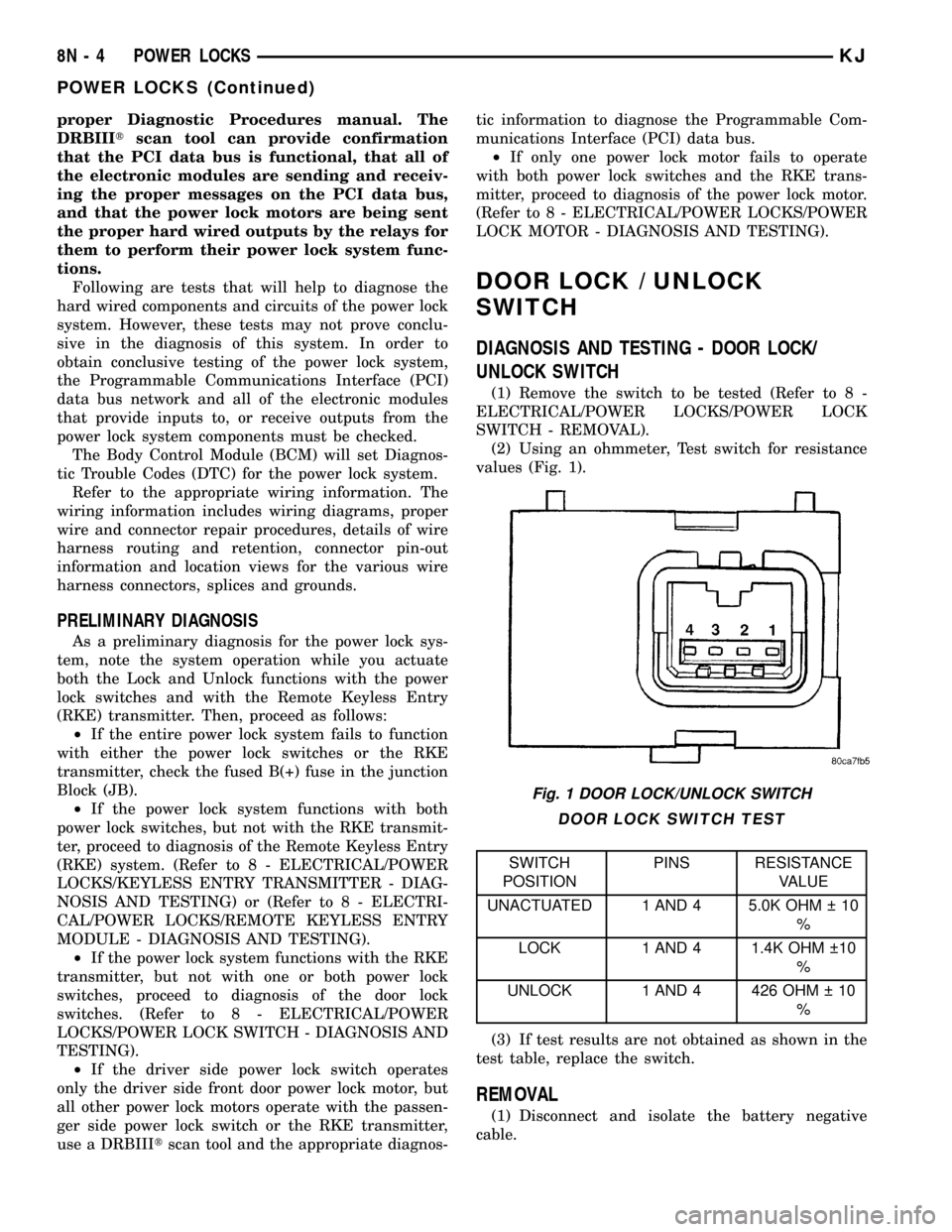
values (Fig. 1).
DOOR LOCK SWITCH TEST
SWITCH
POSITIONPINS RESISTANCE
VALUE
UNACTUATED 1 AND 4 5.0K OHM 10
%
LOCK 1 AND 4 1.4K OHM 10
%
UNLOCK 1 AND 4 426 OHM 10
%
(3) If test results are not obtained as shown in the
test table, replace the switch.
REMOVAL
(1) Disconnect and isolate the battery negative
cable.
Fig. 1 DOOR LOCK/UNLOCK SWITCH
8N - 4 POWER LOCKSKJ
POWER LOCKS (Continued)
Page 608 of 1803

(2) Remove the door trim panel (Fig. 2) (Refer to
23 - BODY/DOOR - FRONT/TRIM PANEL - REMOV-
AL).
(3) Disconnect electrical harness connector from
switch.
(4) From behind the door trim panel, gently pry
the switch from the door trim panel (Fig. 3).
INSTALLATION
(1) Press the switch into place.
(2) Connect the electrical harness connector to the
switch.(3) Install the door trim panel (Refer to 23 -
BODY/DOOR - FRONT/TRIM PANEL - INSTALLA-
TION).
(4) Connect the battery negative cable.
DOOR LOCK MOTOR
DESCRIPTION
The lock mechanisms are actuated by a reversible
electric motor mounted within each door and tailgate.
The power lock motors are integral to the door latch
units.
The power lock motors cannot be adjusted or
repaired and, if faulty or damaged, the door latch
unit must be replaced.
OPERATION
The door lock motors are controlled by relays. A
positive and negative battery connection to the two
motor terminals will cause the motor to move in one
direction. Reversing the current will cause the motor
to move in the opposite direction.
DIAGNOSIS AND TESTING - DOOR LOCK
MOTOR
The most reliable, efficient, and accurate means to
diagnose the power lock system requires the use of a
DRBIIItscan tool and the proper Diagnostic Proce-
dures manual. The DRBIIItscan tool can provide
confirmation that the PCI data bus is functional, that
all of the electronic modules are sending and receiv-
ing the proper messages on the PCI data bus, and
that the power lock motors are being sent the proper
hard wired outputs by the door modules for them to
perform their power lock system functions.
Refer to the appropriate wiring information. The
wiring information includes wiring diagrams, proper
wire and connector repair procedures, details of wire
harness routing and retention, connector pin-out
information and location views for the various wire
harness connectors, splices and grounds.
FLIP-UP GLASS RELEASE
SWITCH
DIAGNOSIS AND TESTING - FLIP-UP GLASS
RELEASE SWITCH
(1) Disconnect and isolate the battery negative
cable.
(2) Remove the tailgate trim panel (Refer to 23 -
BODY/DECKLID/HATCH/LIFTGATE/TAILGATE/
TRIM PANEL - REMOVAL).
(3) Disconnect the wire harness connector.
Fig. 2 DOOR LOCK SWITCH
1 - DOOR TRIM PANEL
2 - DOOR LOCK SWITCH
3 - POWER MIRROR SWITCH
Fig. 3 DOOR LOCK/MIRROR SWITCH
1 - DOOR TRIM PANEL
2 - DOOR LOCK SWITCH
3 - POWER MIRROR SWITCH
KJPOWER LOCKS 8N - 5
DOOR LOCK / UNLOCK SWITCH (Continued)
Page 614 of 1803

POWER MIRRORS
TABLE OF CONTENTS
page page
POWER MIRRORS
DESCRIPTION.........................11
OPERATION...........................11
DIAGNOSIS AND TESTING - POWER
MIRRORS...........................11
POWER MIRROR SWITCH
DIAGNOSIS AND TESTING - POWER MIRROR
SWITCH............................12REMOVAL.............................13
INSTALLATION.........................13
SIDEVIEW MIRROR
REMOVAL.............................13
POWER MIRRORS
DESCRIPTION
The available power operated sideview mirrors
allow the driver to adjust both outside mirrors elec-
trically from the drivers seat by operating a switch
on the driver side front door trim panel (Fig. 1).
OPERATION
The power mirrors receive ignition current through
a fuse in the junction block, and will only operate
when the ignition switch is in the Run position.
DIAGNOSIS AND TESTING - POWER MIRRORS
WIRING VOLTAGE TEST
The following wiring test determines whether or
not voltage is continuous through the body harness
to switch.
(1) Remove the power mirror switch (Refer to 8 -
ELECTRICAL/POWER MIRRORS/POWER MIRROR
SWITCH - REMOVAL).
(2) Disconnect wire connector from back of power
mirror switch.
(3) Switch ignition to the RUN position.
(4) Connect the clip end of a 12 volt test light to
Pin 5 in the harness connector at the mirror switch.
Touch the test light probe to Pin 3.
If the test light illuminates, the wiring circuit
between the battery and switch is OK.
If the lamp does not illuminate, first check fuse 25
in the Junction Block (JB). If fuse 25 is OK, then
check for a broken wire.
Refer to the appropriate wiring information. The
wiring information includes wiring diagrams, proper
wire and connector repair procedures, details of wire
harness routing and retention, connector pin-out
information and location views for the various wire
harness connectors, splices and grounds.
POWER MIRROR MOTOR TEST
If the power mirror switch is receiving proper cur-
rent and ground and mirrors do not operate, proceed
with power mirror motor test. Refer to the appropri-
ate wiring information. The wiring information
includes wiring diagrams, proper wire and connector
repair procedures, details of wire harness routing
and retention, connector pin-out information and
location views for the various wire harness connec-
tors, splices and grounds.
Fig. 1 POWER MIRROR SWITCH
1 - DOOR TRIM PANEL
2 - DOOR LOCK SWITCH
3 - POWER MIRROR SWITCH
KJPOWER MIRRORS 8N - 11
Page 615 of 1803
(1) Remove front door trim panel to gain access to
power mirror wire connector (Refer to 23 - BODY/
DOOR - FRONT/TRIM PANEL - REMOVAL).
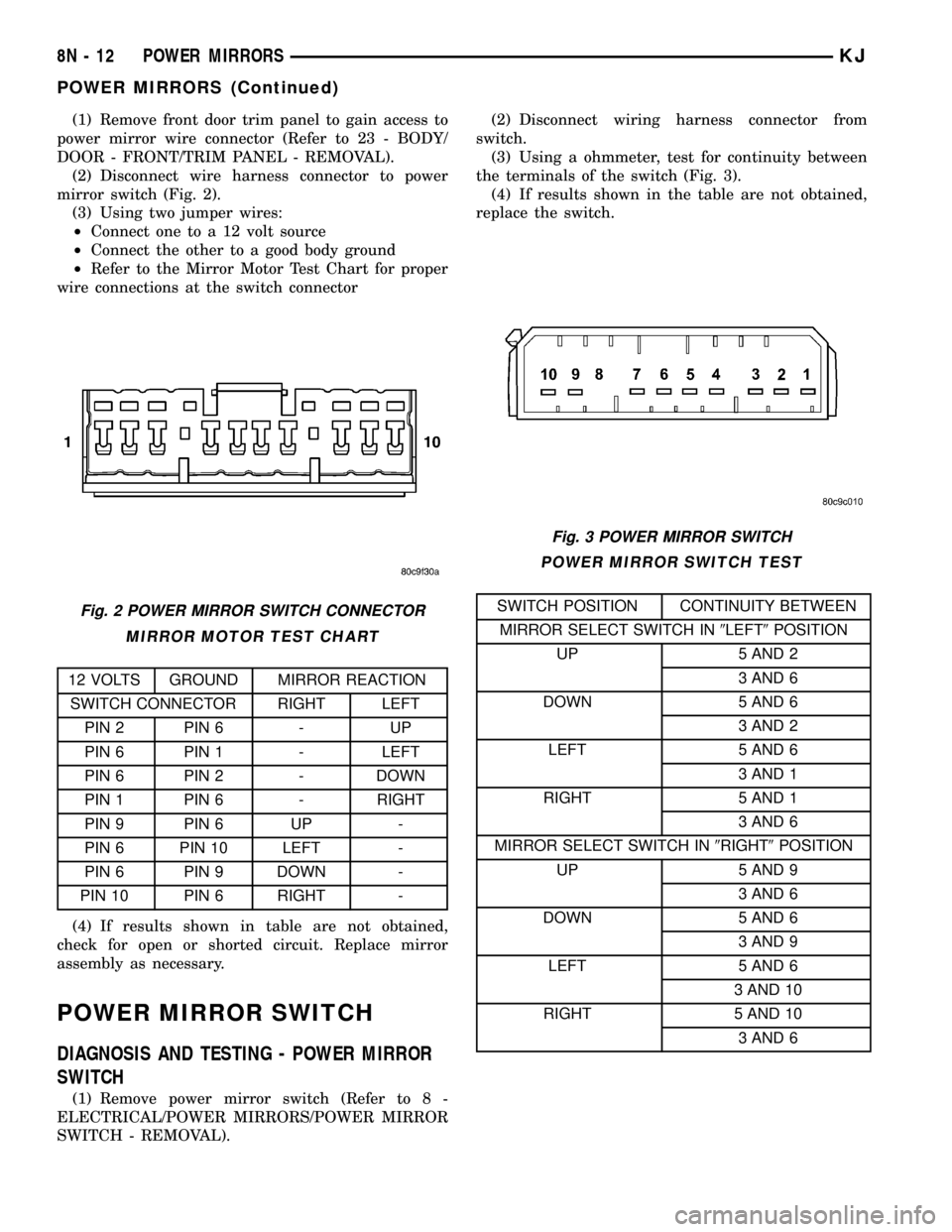
(2) Disconnect wire harness connector to power
mirror switch (Fig. 2).
(3) Using two jumper wires:
²Connect one to a 12 volt source
²Connect the other to a good body ground
²Refer to the Mirror Motor Test Chart for proper
wire connections at the switch connector
MIRROR MOTOR TEST CHART
12 VOLTS GROUND MIRROR REACTION
SWITCH CONNECTOR RIGHT LEFT
PIN 2 PIN 6 - UP
PIN 6 PIN 1 - LEFT
PIN 6 PIN 2 - DOWN
PIN 1 PIN 6 - RIGHT
PIN 9 PIN 6 UP -
PIN 6 PIN 10 LEFT -
PIN 6 PIN 9 DOWN -
PIN 10 PIN 6 RIGHT -
(4) If results shown in table are not obtained,
check for open or shorted circuit. Replace mirror
assembly as necessary.
POWER MIRROR SWITCH
DIAGNOSIS AND TESTING - POWER MIRROR
SWITCH
(1) Remove power mirror switch (Refer to 8 -
ELECTRICAL/POWER MIRRORS/POWER MIRROR
SWITCH - REMOVAL).(2) Disconnect wiring harness connector from
switch.
(3) Using a ohmmeter, test for continuity between
the terminals of the switch (Fig. 3).
(4) If results shown in the table are not obtained,
replace the switch.
POWER MIRROR SWITCH TEST
SWITCH POSITION CONTINUITY BETWEEN
MIRROR SELECT SWITCH IN9LEFT9POSITION
UP 5 AND 2
3 AND 6
DOWN 5 AND 6
3 AND 2
LEFT 5 AND 6
3 AND 1
RIGHT 5 AND 1
3 AND 6
MIRROR SELECT SWITCH IN9RIGHT9POSITION
UP 5 AND 9
3 AND 6
DOWN 5 AND 6
3 AND 9
LEFT 5 AND 6
3 AND 10
RIGHT 5 AND 10
3 AND 6Fig. 2 POWER MIRROR SWITCH CONNECTOR
Fig. 3 POWER MIRROR SWITCH
8N - 12 POWER MIRRORSKJ
POWER MIRRORS (Continued)
Page 618 of 1803

OPERATION
The power seat system receives battery current
through a fuse in the Power Distribution Center
(PDC) and a circuit breaker in the Junction Block,
regardless of the ignition switch position.
When a power seat switch control knob or knobs
are actuated, a battery feed and a ground path are
applied through the switch contacts to the appropri-
ate power seat track adjuster motor. The selected
adjuster motor operates to move the seat track
through its drive unit in the selected direction until
the switch is released, or until the travel limit of the
seat track is reached. When the switch is moved in
the opposite direction, the battery feed and ground
path to the motor are reversed through the switch
contacts. This causes the adjuster motor to run in the
opposite direction.
Refer to the owner's manual in the vehicle glove
box for more information on the features, use and
operation of the power seat system.
DIAGNOSIS AND TESTING - POWER SEATS
Before any testing of the power seat system is
attempted, the battery should be fully-charged and
all wire harness connections and pins cleaned and
tightened to ensure proper continuity and grounds.
Refer to the appropriate wiring information. The wir-
ing information includes wiring diagrams, proper
wire and connector repair procedures, further details
on wire harness routing and retention, as well as
pin-out and joint connector location views for the var-
ious wire harness connectors, splices and grounds.
(1) If all power seats are inoperative, check the
automatic resetting circuit breaker in the Junction
Block. (Refer to 8 - ELECTRICAL/POWER DISTRI-
BUTION/CIRCUIT BREAKER - DIAGNOSIS AND
TESTING).
(2) With the dome lamp on, apply the power seat
switch in the direction of the failure.
(3) If the dome lamp dims, the seat or the power
seat track may be jammed. Check under and behind
the seat for binding or obstructions.
(4) If the dome lamp does not dim, proceed with
testing of the individual power seat system compo-
nents and circuits.
SEAT TRACK
DESCRIPTION
The six-way power seat option includes a power
seat track assembly located under each front seat
(Fig. 2). The power seat track assembly replaces the
standard manually operated seat tracks. The lower
half of the power seat track is secured at the frontwith two bolts to the floor panel seat cross member,
and at the rear with one bolt and one nut to the floor
panel. Four bolts secure the bottom of the seat cush-
ion frame to the upper half of the power seat track
unit.
The power seat track assembly cannot be repaired,
and is serviced only as a complete assembly. If any
component in this assembly is faulty or damaged, the
entire power seat track must be replaced.
OPERATION
The power seat track unit includes three reversible
electric motors that are secured to the upper half of
the track unit. Each motor moves the seat adjuster
through a combination of worm-drive gearboxes and
screw-type drive units. Each of the three driver side
power seat track motors also has a position potenti-
ometer integral to the motor assembly, which elec-
tronically monitors the motor position.
The front and rear of the seat are operated by two
separate vertical adjustment motors. These motors
can be operated independently of each other, tilting
the entire seat assembly forward or rearward; or,
they can be operated in unison by selecting the
proper power seat switch functions, which will raise
or lower the entire seat assembly. The third motor is
the horizontal adjustment motor, which moves the
seat track in the forward and rearward directions.
Fig. 2 Power Seat Track - Typical
1 - POWER SEAT ADJUSTER AND MOTORS
2 - SEAT CUSHION FRAME
3 - POWER SEAT TRACK ASSEMBLY
KJPOWER SEATS 8N - 15
POWER SEATS (Continued)