light JEEP PATRIOT 2007 1.G Owner's Guide
[x] Cancel search | Manufacturer: JEEP, Model Year: 2007, Model line: PATRIOT, Model: JEEP PATRIOT 2007 1.GPages: 440, PDF Size: 7.26 MB
Page 130 of 440
Tapping ªRESUME ACCELº once will result ina1mph
(1.6 km/h) speed increase. Each time the lever is tapped,
speed increases so that tapping the lever three times will
increase speed by 3 mph (4.8 km/h), etc.
To decrease speed while speed control is ON, push down
and hold ªSET DECELº. Release the lever when the
desired speed is reached, and the new speed will be set.
Tapping the ªSET DECELº button once will result in a 1
mph (1.6 km/h) speed decrease. Each time the button is
tapped, speed decreases.
Manual Transaxle:
Depressing the clutch pedal will disengage the speed
control. A slight increase in engine RPM before the speed
control disengages is normal.
Vehicles equipped with manual transaxles may need to
be shifted into a lower gear to climb hills without speed
loss.
WARNING!
Speed Control can be dangerous where the system
can't maintain a constant speed. Your vehicle could
go too fast for the conditions, and you could lose
control. An accident could be the result. Don't use
Speed Control in heavy traffic or on roads that are
winding, icy, snow-covered, or slippery.
To Accelerate For Passing:
Depress the accelerator as you would normally. When the
pedal is released, the vehicle will return to the set speed.
Using Speed Control On Hills
NOTE:The speed control system maintains speed up
and down hills. A slight speed change on moderate hills
is normal.
UNDERSTANDING THE FEATURES OF YOUR VEHICLE 129
3
Page 131 of 440
On steep hills a greater speed loss or gain may occur so
it may be preferable to drive without speed control.
GARAGE DOOR OPENER Ð IF EQUIPPED
NOTE:The HomeLinktsystem will be disabled if the
Vehicle Theft Alarm (if equipped) is in the Armed or
Alarming state. The HomeLinktsystem will only operate
when the Vehicle Theft Alarm (if equipped) is in the
Disarmed mode.
The HomeLinktUniversal Transceiver replaces up to
three remote controls (hand held transmitters) that oper-
ate devices such as garage door openers, motorized
gates, or home lighting. It triggers these devices at the
push of a button. The Universal Transceiver operates off
your vehicle's battery and charging system; no batteries
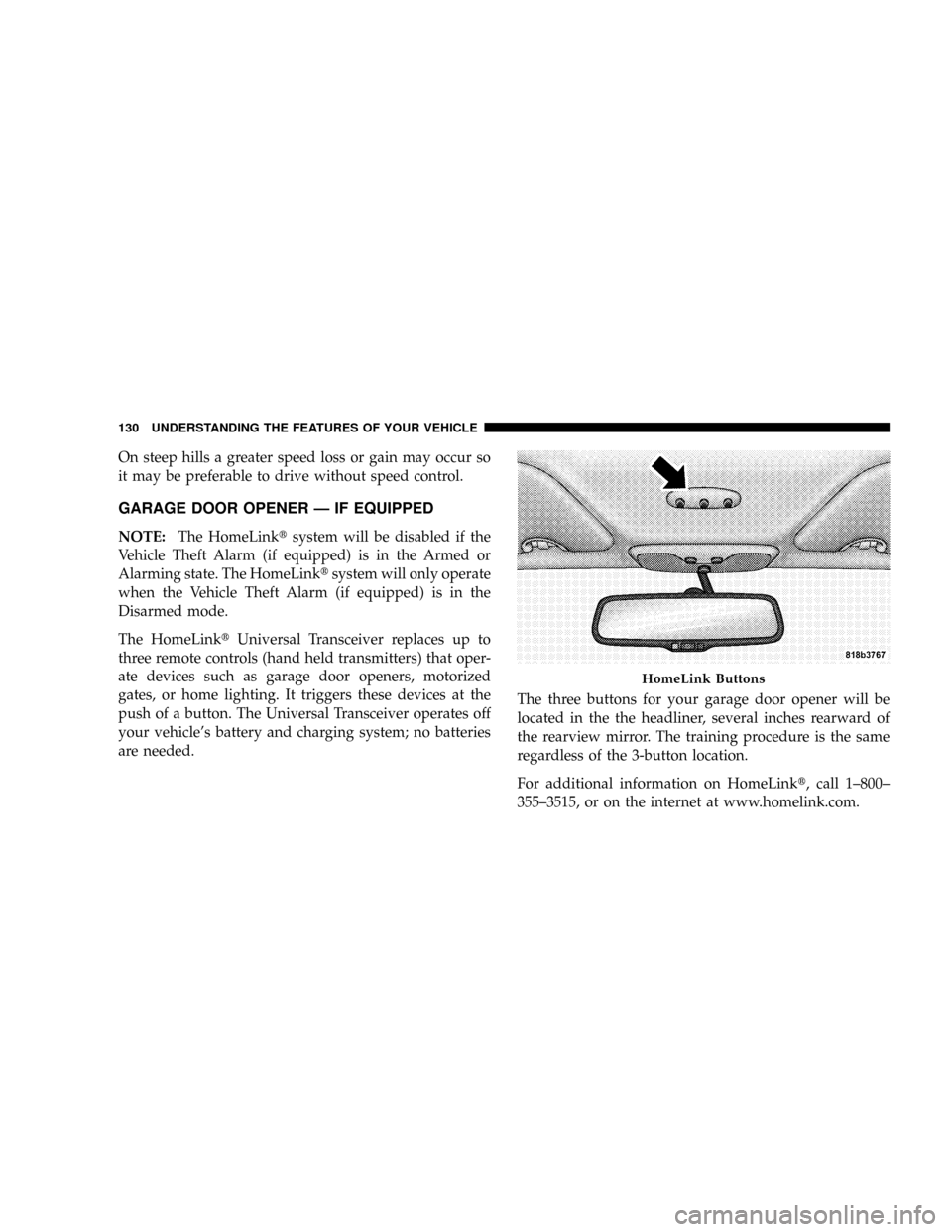
are needed.The three buttons for your garage door opener will be
located in the the headliner, several inches rearward of
the rearview mirror. The training procedure is the same
regardless of the 3-button location.
For additional information on HomeLinkt, call 1±800±
355±3515, or on the internet at www.homelink.com.
HomeLink Buttons
130 UNDERSTANDING THE FEATURES OF YOUR VEHICLE
Page 133 of 440
WARNING!
Your motorized door or gate will open and close
while you are training the Universal Transceiver. Do
not train the transceiver if people or pets are in the
path of the door or gate. A moving door or gate can
cause serious injury or death to people and pets or
damage to objects.
2. Erase the factory test codes by pressing the two
outside buttons. Release the buttons when the light in the
Universal Transceiver begins to flash (about 20 seconds).
NOTE:Step 2 does not have to be followed to program
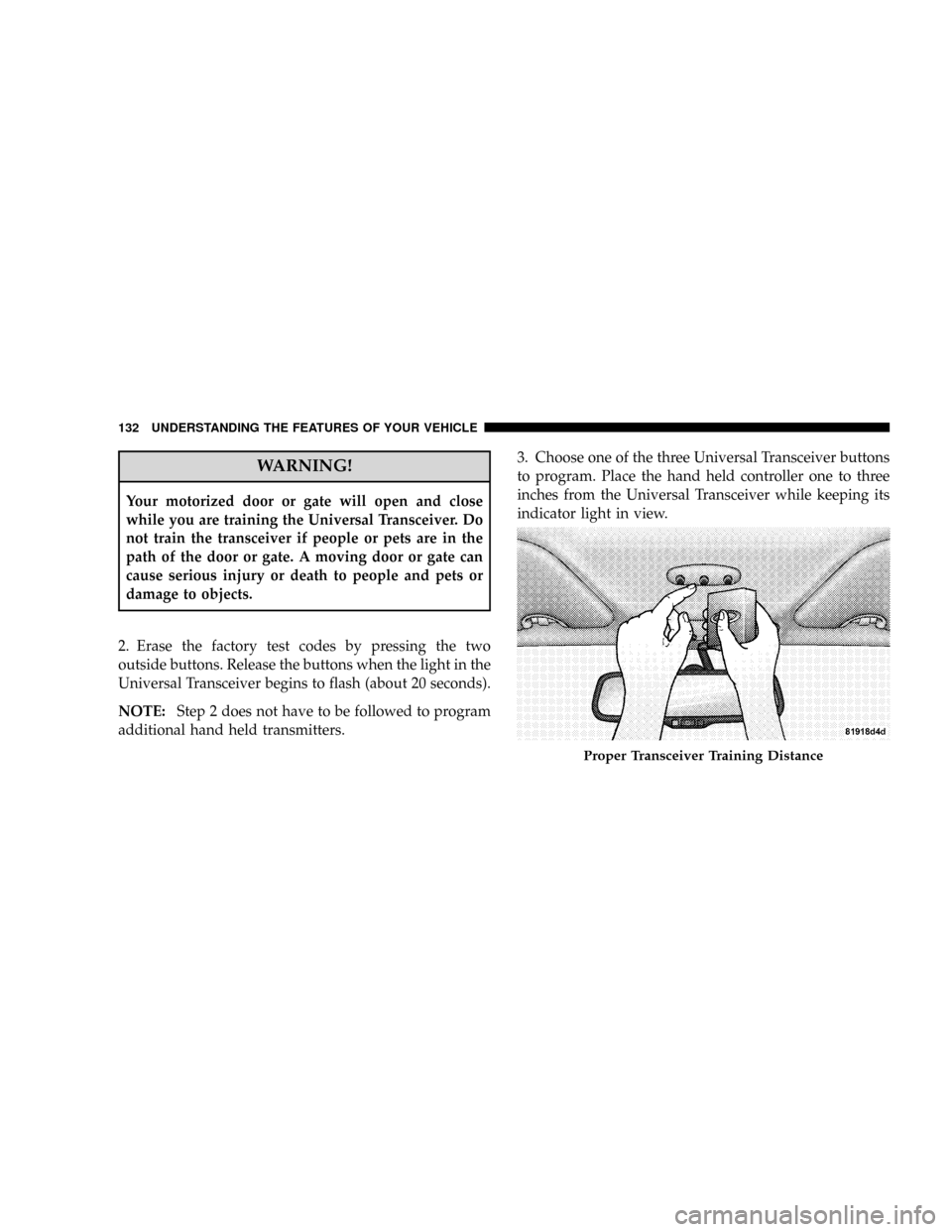
additional hand held transmitters.3. Choose one of the three Universal Transceiver buttons
to program. Place the hand held controller one to three
inches from the Universal Transceiver while keeping its
indicator light in view.
Proper Transceiver Training Distance
132 UNDERSTANDING THE FEATURES OF YOUR VEHICLE
Page 134 of 440
4. Using both hands, press the hand held transmitter
button and the desired Universal Transceiver button. Do
not release the buttons until step 5 has been completed.
NOTE:Some entry gates and garage door openers may
require you to replace step 4 with the procedures listed
under Canadian Programming.
5. The indicator light in the Universal Transceiver will
begin to flash, first slowly and then rapidly. The rapid
flashing indicates successful programming. If after 90
seconds the indicator light does not flash rapidly or goes
out, return to step 1 and repeat the procedure. To train the
other buttons, repeat steps 3 and 4. Be sure to keep your
hand held transmitters in case you need to retrain the
Universal Transceiver.
NOTE: If you do not successfully program the Uni-
versal Transceiver to learn the signal of your hand heldtransmitter, refer to the Rolling Code Paragraph, or call
toll free for customer assistance at 1±800±355±3515, or
on the internet at www.homelink.com.
ªRolling Codeº Programming
NOTE:If your hand held transmitter appears to pro-
gram the Universal Transceiver, but your garage door or
other device does not operate, and your device was
manufactured after 1996, your garage door opener or
other device may have a ªRolling Codeº system.
On garage door openers with the ªRolling Codeº feature,
the transmitter code changes after each use to prevent the
copying of your code.
To check if your device is protected by a ªRolling Codeº
system:
²Check the owner's manual for the device for mention
of ªRolling Codesº.
UNDERSTANDING THE FEATURES OF YOUR VEHICLE 133
3
Page 135 of 440
²Press and hold the programmed button on the Univer-
sal Transceiver. If the Universal Transceiver indicator
light flashes rapidly and then stays on after 2 seconds,
the device has the ªRolling Codeº feature.
To train a garage door opener (or other rolling code
equipped devices) with the rolling code feature, follow
these instructionsaftercompleting theProgramming
portion of this text:
NOTE:The assistance of a second person may make the
following programming procedure quicker and easier.
1. Locate the training button on the garage door motor
head unit. The exact location and color of the button may
vary by garage door opener manufacturer. If you have
difficulty in locating the training button, check your
garage door opener manual, or call 1-800-355-3515 or, on
the Internet, at www.homelink.com.2. Press and hold the training button on the garage door
opener head unit. This will activate the ªtrainingº light.
NOTE:After completing step 2, you have 30 seconds to
start step 3.
3. Return to the Universal Transceiver in the vehicle and
firmly press and release the garage door button. Press
and release the button a second time to complete the
training process. Some garage door openers may require
you to do this procedure a third time to complete the
training.
Your garage door opener should now recognize your
Universal Transceiver. The remaining two buttons may
now be programmed if this has not previously been
done. Refer to the Programming instructions. You may
use either your Universal Transceiver or your original
hand-held transmitter to open you garage door.
134 UNDERSTANDING THE FEATURES OF YOUR VEHICLE
Page 136 of 440
Canadian Programming/Gate Programming
Canadian frequency laws, and the technology of some
entry gates, require you to press and release the hand
held transmitter button every two seconds during pro-
gramming.
Continue to press and hold the Universal Transceiver
button while you press and release the hand held trans-
mitter button until the frequency signal has been learned.
The Universal Transceiver light will flash slowly and
then rapidly when the programming is successful.
NOTE:When programming such a garage door opener
or gate, unplug the device to prevent possible damage to
the garage door or gate motor.
Operation
Press and hold the desired button on the Universal
Transceiver until the garage door or other device begins
to operate. The light in the display shows that the signal
is being transmitted. The hand held transmitter may also
be used at any time.
Reprogramming A Single Button
1. Press and hold the Universal Transceiver button to be
reprogrammed. Do not release until step 4 has been
completed.
2. When the indicator light begins to flash slowly (after
20 seconds) position the hand held transmitter one to
three inches away from the button to be trained.
3. Press and hold the hand held transmitter button.
4. The Universal Transceiver indicator light will begin to
flash, first slowly, then rapidly. When the indicator lights
begin to flash rapidly, release both buttons.
UNDERSTANDING THE FEATURES OF YOUR VEHICLE 135
3
Page 137 of 440
Security
If you sell your vehicle, be sure to erase the frequencies.
To erase all of the previously trained frequencies, hold
down both outside buttons until the indicator light
begins to flash.
This device complies with part 15 of FCC rules and with
RS-210 of Industry Canada. Operation is subject to the
following conditions:
1. This device may not cause harmful interference.
2. This device must accept any interference that may be
received including interference that may cause undesired
operation.
NOTE:Changes or modifications not expressly ap-
proved by the party responsible for compliance could
void the user's authority to operate the equipment.HomeLinktis a trademark owned by Johnson Controls,
Inc.
ANTI-LOCK BRAKE SYSTEM (ABS) ± IF
EQUIPPED
This system aids the driver in maintaining vehicle control
under adverse braking conditions. The system controls
hydraulic brake pressure to prevent wheel lockup and
help avoid skidding on slippery surfaces during braking.
NOTE:ABS improves steering control of the vehicle
during hard braking maneuvers.
136 UNDERSTANDING THE FEATURES OF YOUR VEHICLE
Page 142 of 440
the accelerator pedal will increase vehicle speed like
normal. When either the brake or the accelerator is
released, HDC will control the vehicle back to the origi-
nal set speed.
HDC is only intended for low speed off-road driving. At
vehicle speeds above 31 mph (50 km/h) HDC will no
longer function. If the HDC indicator lamp begins to
flash it means that the brakes are getting too hot and the
vehicle should be stopped to allow the brakes to cool.
ESP (Electronic Stability Program)
This system enhances directional control and stability of
the vehicle under various driving conditions. ESP cor-
rects for over/under steering of the vehicle by applying
the brake of the appropriate wheel to assist in counter-
acting the over/under steer condition. Engine power
may also be reduced to help the vehicle maintain the
desired path. ESP uses sensors in the vehicle to determine
the vehicle path intended by the driver and compares itto the actual path of the vehicle. When the actual path
does not match the intended path, ESP applies the brake
of the appropriate wheel to assist in counteracting the
oversteer or understeer condition
²Oversteer - when the vehicle is turning more than
appropriate for the steering wheel position.
²Understeer - when the vehicle is turning less than
appropriate for the steering wheel position.
ESP/TCS Indicator Light
The ªESP/TCS Indicator Lightº located in the instrument
cluster, starts to flash as soon as the tires lose traction and
the ESP system becomes active. The ªESP/TCS Indicator
Lightº also flashes when TCS is active. If the ªESP/TCS
Indicator Lightº begins to flash during acceleration, ease
up on the accelerator and apply as little throttle as
possible. Be sure to adapt your speed and driving to the
prevailing road conditions.
UNDERSTANDING THE FEATURES OF YOUR VEHICLE 141
3
Page 143 of 440
WARNING!
²Electronic Stability Program (ESP) cannot prevent
the natural laws of physics from acting on the
vehicle, nor can it increase the traction afforded by
prevailing road conditions.
²ESP cannot prevent accidents, including those
resulting from excessive speed in turns, driving on
very slippery surfaces, or hydroplaning. Only a
safe, attentive, and skillful driver can prevent
accidents.
²The capabilities of an ESP-equipped vehicle must
never be exploited in a reckless or dangerous
manner which could jeopardize the user's safety
or the safety of others.
ESP 2WD Operating Modes
All 2WD vehicles can choose the following ESP operating
modes:
ESP ON
This is the normal operating mode for ESP. Whenever the
vehicle is started the ESP system will be in this mode.
This mode should be used for almost all driving situa-
tions. ESP should only be turned to ªPartial Offº or ªESP
Offº for specific reasons as noted below.
PARTIAL ESP
This mode is entered by momentarily depressing the
ªESP Control Switchº. When in ªPartial Offº mode, the
TCS portion of ESP, except for the ªlimited slipº feature
described in the TCS section, has been disabled and the
ªESP/TCS Indicator Lightº will be illuminated. All other
stability features of ESP function normally, with the
exception of engine power reduction. This mode is
intended to be used if the vehicle is in deep snow, sand or
142 UNDERSTANDING THE FEATURES OF YOUR VEHICLE
Page 144 of 440
gravel conditions and more wheel spin than ESP would
normally allow is required to gain traction.
To turn ESP on again, momentarily depress the ªESP
Control Switchº. This will restore the normal ªESP Onº
mode of operation.
WARNING!
In the Partial ESP mode, the engine torque reduction
and stability features are desensitized. Therefore, the
enhanced vehicle stability offered by ESP is
unavailable.
NOTE:To improve the vehicle's traction when driving
with snow chains, or starting off in deep snow, sand or
gravel, it may be desirable to switch to the ªPartial Offº
mode by pressing the ESP switch. Once the situation
requiring ESP to be switched to the ªPartial Offº mode isovercome, turn ESP back on by momentarily depressing
the ªESP Control Switchº. This may be done while the
vehicle is in motion.
ESP 4WD Operating Modes
In addition to ESP ON and Partial ESP (described above
in ªESP 2WD Operating Modesº), all 4WD equipped
vehicles can also choose the following ESP operating
mode:
ESP OFF
This mode is intended for off-highway or off-road use
when ESP stability features could inhibit vehicle maneu-
verability due to trail conditions. This mode is entered by
depressing and holding the ªESP Control Switchº for 5
seconds when the vehicle is stopped and the engine is
running. After 5 seconds, the ªESP/TCS Indicator Lightº
will illuminate and the ªESP Offº message will appear in
the odometer. Press and release the trip odometer button
located on the instrument cluster to clear this message.
UNDERSTANDING THE FEATURES OF YOUR VEHICLE 143
3