ECO mode JEEP RENEGADE 2023 Owner's Manual
[x] Cancel search | Manufacturer: JEEP, Model Year: 2023, Model line: RENEGADE, Model: JEEP RENEGADE 2023Pages: 364, PDF Size: 18.65 MB
Page 88 of 364
86 STARTING AND OPERATING
GEAR SELECTOR
The transmission gear selector has PARK,
REVERSE, NEUTRAL, DRIVE, and AutoStick (+/-)
shift positions. Manual shifts can be made using
the AutoStick shift control. Toggling the gear
selector forward (-) or rearward (+) while in the
AutoStick position (beside the DRIVE position) will
manually select the transmission gear, and will
display the current gear in the instrument cluster
as 1, 2, 3, etc.
NOTE:
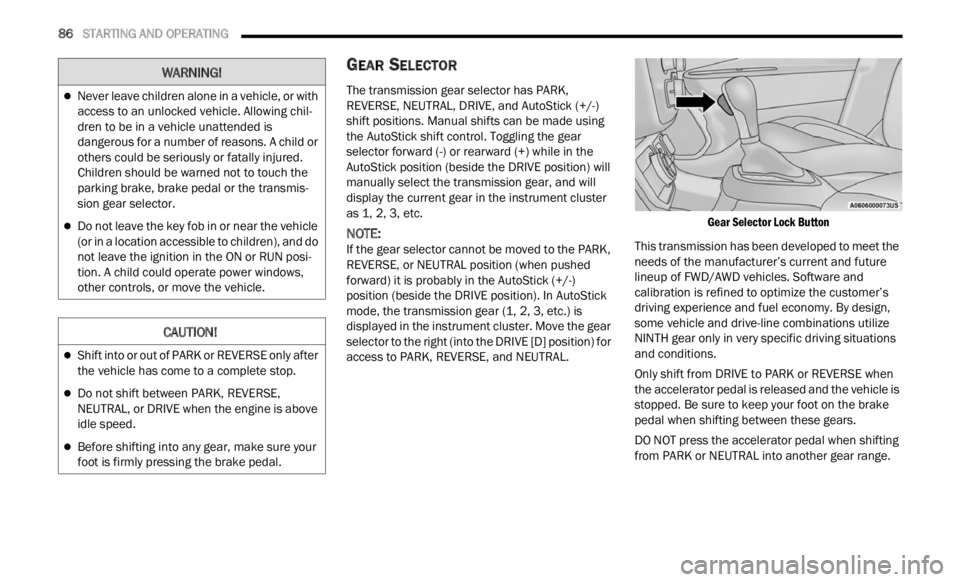
If the gear selector cannot be moved to the PARK,
REVER S
E, or NEUTRAL position (when pushed
forward) it is probably in the AutoStick (+/-)
position (beside the DRIVE position). In AutoStick
mode, the transmission gear (1, 2, 3, etc.) is
displayed in the instrument cluster. Move the gear
selector to the right (into the DRIVE [D] position) for
access to PARK, REVERSE, and NEUTRAL.
Gear Selector Lock Button
This transmission has been developed to meet the
needs
of the manufacturer’s current and future
lineup of FWD/AWD vehicles. Software and
calibration is refined to optimize the customer’s
driving experience and fuel economy. By design,
some vehicle and drive-line combinations utilize
NINTH gear only in very specific driving situations
and conditions.
Only shift from DRIVE to PARK or REVERSE when
the a c
celerator pedal is released and the vehicle is
stopped. Be sure to keep your foot on the brake
pedal when shifting between these gears.
DO NOT press the accelerator pedal when shifting
from PA
RK or NEUTRAL into another gear range.
Never leave children alone in a vehicle, or with
access to an unlocked vehicle. Allowing chil -
dren to be in a vehicle unattended is
d anger
ous for a number of reasons. A child or
others could be seriously or fatally injured.
Children should be warned not to touch the
parking brake, brake pedal or the transmis -
sion gear selector.
Do not leave the key fob in or near the vehicle
(or in a location accessible to children), and do
not leave the ignition in the ON or RUN posi -
tion. A child could operate power windows,
other c
ontrols, or move the vehicle.
CAUTION!
Shift into or out of PARK or REVERSE only after
the vehicle has come to a complete stop.
Do not shift between PARK, REVERSE,
NEUTRAL, or DRIVE when the engine is above
idle speed.
Before shifting into any gear, make sure your
foot is firmly pressing the brake pedal.
WARNING!
Page 91 of 364

STARTING AND OPERATING 89
these conditions, using a lower gear will improve
performance and extend transmission life by
reducing excessive shifting and heat buildup.
If the transmission temperature exceeds normal
operat i
ng limits, the transmission controller may
modify the transmission shift schedule, reduce
engine torque, and/or expand the range of torque
converter clutch engagement. This is done to
prevent transmission damage due to overheating.
If the transmission becomes extremely hot, the
Trans m
ission Temperature Warning Light may
illuminate and the transmission may operate
differently until the transmission cools down.
During cold temperatures, transmission operation
may be
modified depending on engine and
transmission temperature as well as vehicle
speed. This feature improves warm up time of the
engine and transmission to achieve maximum
efficiency. Engagement of the torque converter
clutch, and shifts into EIGHTH or NINTH gear, are
inhibited until the transmission fluid is warm.
Normal operation will resume once the
transmission temperature has risen to a suitable
level.
AutoStick
AutoStick is a driver-interactive transmission
f eatu r
e providing manual shift control, giving you
more control of the vehicle. AutoStick allows you to
maximize engine braking, eliminate undesirable
upshifts and downshifts, and improve overall vehicle performance. This system can also provide
you with more control during passing, city driving,
cold slippery conditions, mountain driving, trailer
towing and many other situations.
Operation
When the gear selector is in the AutoStick position
(besi
d
e the DRIVE position), it can be moved
forward and rearward. This allows the driver to
manually select the transmission gear being used.
Moving the gear selector forward (-) triggers a
downshift, and rearward (+) an upshift. The current
gear is displayed in the instrument cluster.
NOTE:
In AutoStick mode, the transmission will only shift
up or d
own when the driver moves the gear
selector rearward (+) or forward (-), except as
described below:
The transmission will automatically upshift
when necessary to prevent engine overspeed.
The transmission will automatically downshift
as the vehicle slows (to prevent engine lugging)
and will display the current gear.
The transmission will automatically downshift to
FIRST or SECOND gear (depending on model)
when coming to a stop. After a stop, the driver
should manually upshift (+) the transmission as
the vehicle is accelerated.
You can start out (from a stop) in FIRST or
SECOND gear. Starting out in SECOND gear can
be helpful in snow or icy conditions. Tap the gear
selector forward or rearward to select the
desired gear after the vehicle is brought to a
stop.
If a requested downshift would cause the
engine to overspeed, that shift will not occur.
The system will ignore attempts to upshift at too
low of a vehicle speed.
Avoid using Cruise Control when AutoStick is
engaged because the transmission will not shift
automatically.
Transmission shifting will be more noticeable
when AutoStick is enabled.
The system may revert to automatic shift mode
if a fault or overheat condition is detected.
To disengage AutoStick mode, return the gear
select
or to the DRIVE position. You can shift in or
out of the AutoStick position at any time without
taking your foot off the accelerator pedal.
WARNING!
Do not downshift for additional engine braking
on a slippery surface. The drive wheels could
lose their grip and the vehicle could skid,
causing a collision or personal injury.
4
Page 92 of 364

90 STARTING AND OPERATING
TRANSMISSION LIMP HOME MODE
Transmission function is electronically monitored
for abnormal conditions. If a condition is detected
that could result in transmission damage,
Transmission Limp Home Mode is activated. In this
mode, the transmission may operate only in a fixed
gear, or may remain in neutral. The Malfunction
Indicator Light (MIL) may be illuminated. Limp
Home Mode may allow the vehicle to be driven to
an authorized dealer for service without damaging
the transmission.
In the event of a momentary problem, the
trans m
ission can be reset to regain all forward
gears by performing the following steps:
1. Stop the vehicle.
2. S hif
t the transmission into PARK, if possible. If
n ot
,
s
hift the transmission to NEUTRAL.
3. Push and hold the ignition switch until the engin
e turns off.
4. Wait approximately 30 seconds.
5. Res
tart the engine.
6. S hif
t into the desired gear range. If the
p r
ob l
e
m is no longer detected, the
transmission will return to normal operation.
NOTE:
Even if the transmission can be reset, we
recomm e
nd that you visit an authorized dealer at your earliest possible convenience. An authorized
dealer has diagnostic equipment to determine if
the problem could recur. If the transmission
cannot be reset, authorized dealer service is
required.
IGNITION PARK INTERLOCK
(K
EYLESS VEHICLE)
This vehicle is equipped with an Ignition Park
Interlock, which requires the transmission to be in
PARK before the ignition can be turned to the OFF
position. Also, the transmission is locked in PARK
whenever the ignition is in the OFF position.
BRAKE TRANSMISSION SHIFT
I
NTERLOCK (BTSI) SYSTEM
This vehicle is equipped with a BTSI that holds the
transmission gear selector in PARK unless the
brakes are applied. To shift the transmission out of
PARK, the ignition must be in the RUN position
(engine running or not) and the brake pedal must
be pressed.
The brake pedal must also be pressed before
pushi n
g the button on the gear selector to shift
from NEUTRAL into DRIVE or REVERSE when the
vehicle is stopped or moving at low speeds.
FOUR-WHEEL DRIVE
Active Drive (4WD) And Active Drive Low (4WD
LOW)
Your vehicle may be equipped with a Power
Transf
er Unit (PTU). This system is automatic with
no driver inputs or additional driving skills
required. Under normal driving conditions, the
front wheels provide most of the traction. If the
front wheels begin to lose traction, power is shifted
automatically to the rear wheels. The greater the
front wheel traction loss, the greater the power
transfer to the rear wheels.
Additionally, on dry pavement under heavy throttle
input
(where one may have no wheel spin), torque
will be sent to the rear in a preemptive effort to
improve vehicle launch and performance
characteristics.
CAUTION!
All wheels must have the same size and type
tires. Unequal tire sizes must not be used.
Unequal tire size may cause failure of the power
transfer unit.
Page 93 of 364
STARTING AND OPERATING 91
FOUR-WHEEL DRIVE (4WD)
The four-wheel drive (4WD) is fully automatic in
normal driving mode.
NOTE:
It is not possible to carry out the change of mode
when t
he vehicle exceeds the speed of 75 mph
( 1
2 0
k m
/h).
Enabling Four-Wheel Drive (4WD)
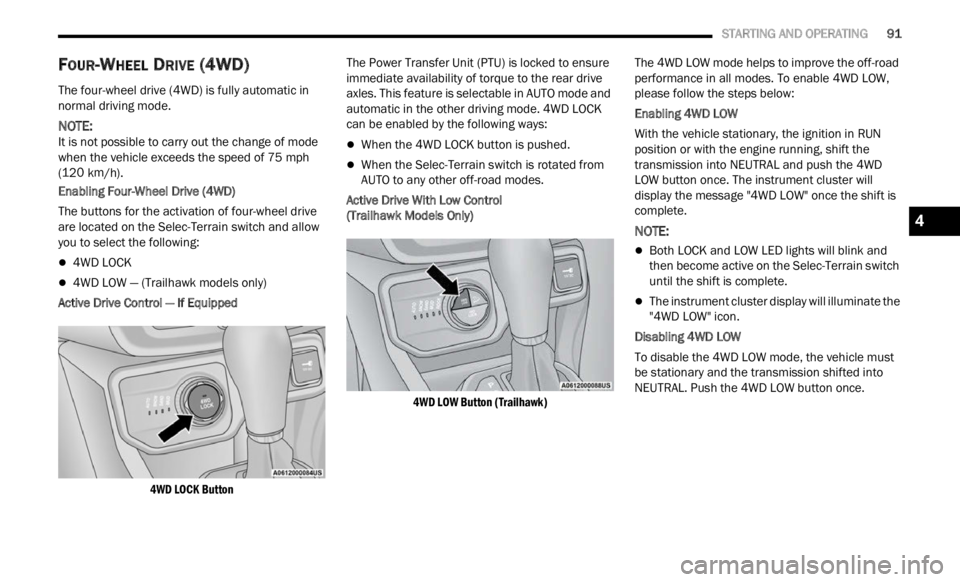
The buttons for the activation of four-wheel drive
a re l oc
ated on the Selec-Terrain switch and allow
you to select the following:
4WD LOCK
4WD LOW — (Trailhawk models only)
Active Drive Control — If Equipped
4WD LOCK Button
The Power Transfer Unit (PTU) is locked to ensure
immed
i
ate availability of torque to the rear drive
axles. This feature is selectable in AUTO mode and
automatic in the other driving mode. 4WD LOCK
can be enabled by the following ways:
When the 4WD LOCK button is pushed.
When the Selec-Terrain switch is rotated from
AUTO to any other off-road modes.
Active Drive With Low Control
(Trailhawk Models Only)
4WD LOW Button (Trailhawk)
The 4WD LOW mode helps to improve the off-road
perform
ance in all modes. To enable 4WD LOW,
please follow the steps below:
Enabling 4WD LOW
With the vehicle stationary, the ignition in RUN
p osition
or with the engine running, shift the
transmission into NEUTRAL and push the 4WD
LOW button once. The instrument cluster will
display the message "4WD LOW" once the shift is
complete.
NOTE:
Both LOCK and LOW LED lights will blink and
then become active on the Selec-Terrain switch
until the shift is complete.
The instrument cluster display will illuminate the
"4WD LOW" icon.
Disabling 4WD LOW
To disable the 4WD LOW mode, the vehicle must
be st a
tionary and the transmission shifted into
NEUTRAL. Push the 4WD LOW button once.
4
Page 94 of 364
92 STARTING AND OPERATING
SELEC-TERRAIN
Selec-Terrain combines the capabilities of the
vehicle control systems, along with driver input, to
provide the best performance for all terrains.
MODE SELECTION GUIDE
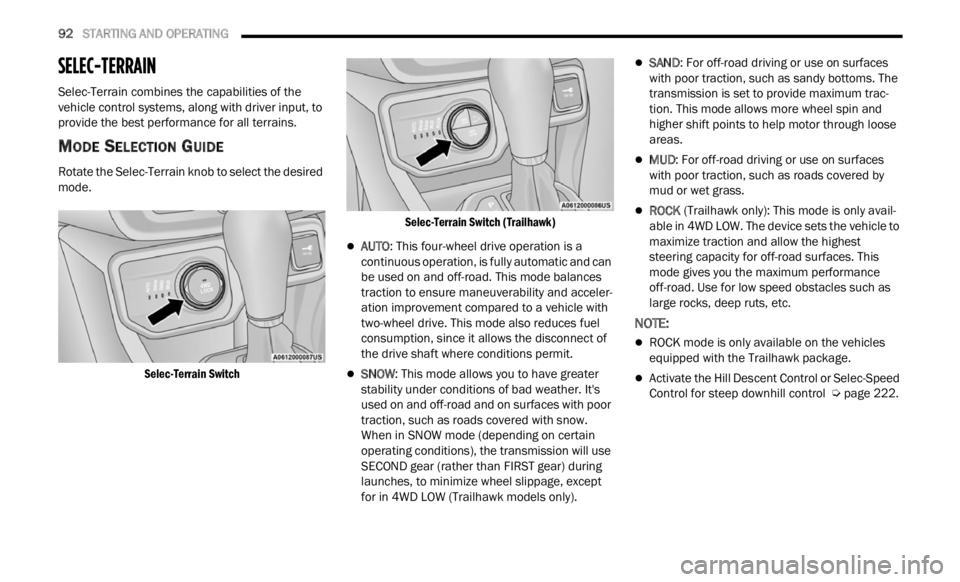
Rotate the Selec-Terrain knob to select the desired
mode.
Selec-Terrain Switch Selec-Terrain Switch (Trailhawk)
AUTO
: This four-wheel drive operation is a
continuous operation, is fully automatic and can
be used on and off-road. This mode balances
traction to ensure maneuverability and acceler -
ation improvement compared to a vehicle with
t wo-whe
el drive. This mode also reduces fuel
consumption, since it allows the disconnect of
the drive shaft where conditions permit.
SNOW : This mode allows you to have greater
stability under conditions of bad weather. It's
used on and off-road and on surfaces with poor
traction, such as roads covered with snow.
When in SNOW mode (depending on certain
operating conditions), the transmission will use
SECOND gear (rather than FIRST gear) during
launches, to minimize wheel slippage, except
for in 4WD LOW (Trailhawk models only).
SAND : For off-road driving or use on surfaces
with poor traction, such as sandy bottoms. The
transmission is set to provide maximum trac -
tion. This mode allows more wheel spin and
highe r
shift points to help motor through loose
areas.
MUD : For off-road driving or use on surfaces
with poor traction, such as roads covered by
mud or wet grass.
ROCK (Trailhawk only): This mode is only avail -
able in 4WD LOW. The device sets the vehicle to
m ax
im
i
ze traction and allow the highest
steering capacity for off-road surfaces. This
mode gives you the maximum performance
off-road. Use for low speed obstacles such as
large rocks, deep ruts, etc.
NOTE:
ROCK mode is only available on the vehicles
equipped with the Trailhawk package.
Activate the Hill Descent Control or Selec-Speed
Control for steep downhill control Ú page 222.
Page 98 of 364
96 STARTING AND OPERATING
NOTE:
The Cruise Control function will not work in 4WD
Low.
Activation
Push the on/off button to activate the Cruise
Control. The Cruise Indicator Light in the
instrument cluster display will illuminate. To turn
the system off, push the on/off button a second
time. The Cruise Indicator Light will turn off. The
system should be turned off when not in use.
Setting A Desired Speed
Turn the Cruise Control on. When the vehicle has
reached the desired speed, push and release the
SET (+) or SET (-) button. Release the accelerator
and the vehicle will operate at the selected speed.
The Cruise Indicator Light, along with set speed will
also appear and stay on in the instrument cluster
when the speed is set.
To Vary The Speed Setting
To Increase Or Decrease The Set Speed
When the Cruise Control is set, you can increase
s p e
ed
by pushing the SET (+) button, or decrease
speed by pushing the SET (-) button.
U.S. Speed (mph)
Pushing the SET (+) , or SET (-) button once will
result in a 1 mph speed adjustment. Each
s u
bs
e q
uent tap of the button results in an
adjustment of 1 mph.
If the button is continually pushed, the set
speed will continue to adjust until the button is
released, then the new set speed will be estab -
lished.
Metric Speed (km/h)
Pushing the SET (+), or SET (-) button once will
result in a 1 km/h speed adjustment. Each
subse q
uent tap of the button results in an
adjustment of 1 km/h.
If the button is continually pushed, the set
speed will continue to adjust until the button is
released, then the new set speed will be estab -
lished.
Accelerating For Passing
While the Cruise Control is set, press the
accelerator to pass as you would normally. When
the pedal is released, the vehicle will return to the
set speed.
USING CRUISE CONTROL ON HILLS
The transmission may downshift on hills to
maintain the vehicle set speed.
The Cruise Control system maintains speed up and
down hi
lls. A slight speed change on moderate hills
is normal. On steep hills, a greater speed loss or
gain may occur so it may be preferable to drive
without Cruise Control.
WARNING!
Cruise Control can be dangerous where the
system cannot maintain a constant speed. Your
vehicle could go too fast for the conditions, and
you could lose control and have an accident. Do
not use Cruise Control in heavy traffic or on
roads that are winding, icy, snow-covered or
slippery.
WARNING!
Leaving the Cruise Control system on when not
in use is dangerous. You could accidentally set
the system or cause it to go faster than you
want. You could lose control and have an
accident. Always leave the system OFF when you
are not using it.
WARNING!
Cruise Control can be dangerous where the
system cannot maintain a constant speed. Your
vehicle could go too fast for the conditions, and
you could lose control and have an accident. Do
not use Cruise Control in heavy traffic or on
roads that are winding, icy, snow-covered or
slippery.
Page 99 of 364

STARTING AND OPERATING 97
(Continued)
Resume Speed
To resume a previously set speed, push the RES
button and release. Resume can be used at any
speed above 20 mph (32 km/h).
Deactivation
A soft tap on the brake pedal, pushing the CANC
button, or normal brake pressure while slowing the
vehicle will deactivate the Cruise Control without
erasing the set speed from memory.
Pushing the on/off button or placing the ignition in
the OF
F position erases the set speed from
memory.
ADAPTIVE CRUISE CONTROL (ACC)
Adaptive Cruise Control (ACC) increases the driving
convenience provided by Cruise Control while
traveling on highways and major roadways.
However, it is not a safety system and not designed
to prevent collisions. The Cruise Control function
performs differently if your vehicle is not equipped
with ACC Ú page 95.
ACC will allow you to keep Cruise Control engaged
in li g
ht to moderate traffic conditions without the
constant need to reset your speed. ACC utilizes a
radar sensor and a forward facing camera
designed to detect a vehicle directly ahead of you
to maintain a set speed.
NOTE:
If the ACC sensor detects a vehicle ahead, ACC
will apply limited braking or accelerate (not to
exceed the original set speed) automatically to
maintain a preset following distance, while
matching the speed of the vehicle ahead.
Any chassis/suspension or tire size modifica -
tions to the vehicle will affect the performance
of t
h e
Adaptive Cruise Control and Forward Colli -
sion Warning system.
Fixed Speed Cruise Control (ACC not enabled)
will not detect vehicles directly ahead of you.
Always be aware of the feature selected
Ú page 349.
WARNING!
Adaptive Cruise Control (ACC) is a convenience
system. It is not a substitute for active driver
involvement. It is always the driver’s responsi
-
bility to be attentive of road, traffic, and weather
condi t
ions, vehicle speed, distance to the
vehicle ahead and, most importantly, brake
operation to ensure safe operation of the
vehicle under all road conditions. Your
complete attention is always required while
driving to maintain safe control of your vehicle.
Failure to follow these warnings can result in a
collision and death or serious personal injury.
The ACC system:
Does not react to pedestrians, oncoming
vehicles, and stationary objects (e.g., a
stopped vehicle in a traffic jam or a
disabled vehicle).
Cannot take street, traffic, and weather
conditions into account, and may be
limited upon adverse sight distance condi -
tions.
Does not always fully recognize complex
driving conditions, which can result in
wrong or missing distance warnings.
You should turn the ACC system off:
When driving in fog, heavy rain, heavy snow,
sleet, heavy traffic, and complex driving situa -
tions (i.e., in highway construction zones).
When entering a turn lane or highway
off-ramp; when driving on roads that are
winding, icy, snow-covered, slippery, or have
steep uphill or downhill slopes.
When towing a trailer up or down steep slopes.
When circumstances do not allow safe driving
at a constant speed.
WARNING!
4
Page 100 of 364
98 STARTING AND OPERATING
Adaptive Cruise Control (ACC) Operation
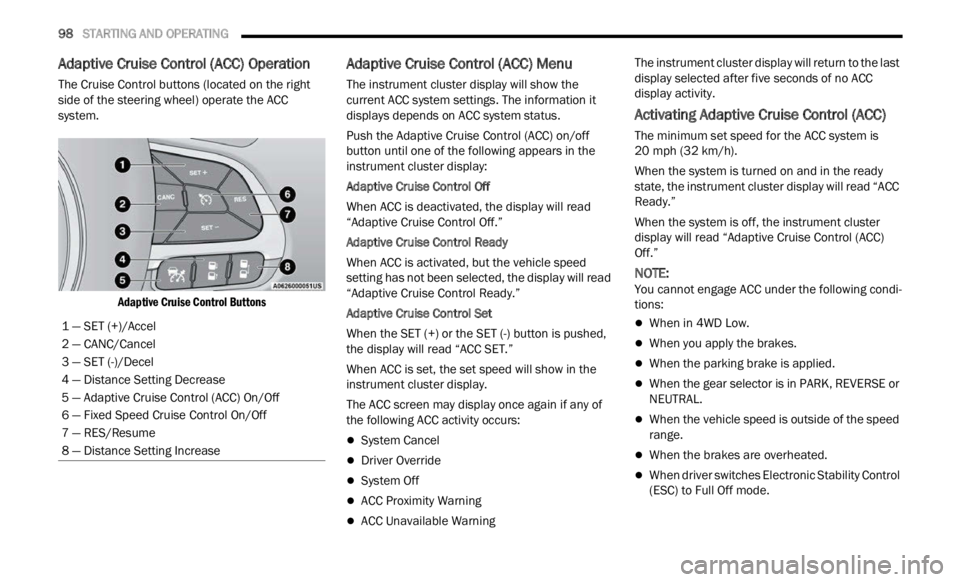
The Cruise Control buttons (located on the right
side of the steering wheel) operate the ACC
system.
Adaptive Cruise Control Buttons
Adaptive Cruise Control (ACC) Menu
The instrument cluster display will show the
current ACC system settings. The information it
displays depends on ACC system status.
Push the Adaptive Cruise Control (ACC) on/off
button
until one of the following appears in the
instrument cluster display:
Adaptive Cruise Control Off
When ACC is deactivated, the display will read
“ Adapt
ive Cruise Control Off.”
Adaptive Cruise Control Ready
When ACC is activated, but the vehicle speed
setti n
g has not been selected, the display will read
“Adaptive Cruise Control Ready.”
Adaptive Cruise Control Set
When the SET (+) or the SET (-) button is pushed,
t he di
splay will read “ACC SET.”
When ACC is set, the set speed will show in the
instru
ment cluster display.
The ACC screen may display once again if any of
the fol
lowing ACC activity occurs:
System Cancel
Driver Override
System Off
ACC Proximity Warning
ACC Unavailable Warning The instrument cluster display will return to the last
displ
a
y selected after five seconds of no ACC
display activity.
Activating Adaptive Cruise Control (ACC)
The minimum set speed for the ACC system is
20 mph (32 km/h).
When the system is turned on and in the ready
state,
the instrument cluster display will read “ACC
Ready.”
When the system is off, the instrument cluster
displ a
y will read “Adaptive Cruise Control (ACC)
Off.”
NOTE:
You cannot engage ACC under the following condi -
tions:
When in 4WD Low.
When you apply the brakes.
When the parking brake is applied.
When the gear selector is in PARK, REVERSE or
NEUTRAL.
When the vehicle speed is outside of the speed
range.
When the brakes are overheated.
When driver switches Electronic Stability Control
(ESC) to Full Off mode.
1 — SET (+)/Accel
2 — CANC/Cancel
3 — SET (-)/Decel
4 — Distance Setting Decrease
5 — Adaptive Cruise Control (ACC) On/Off
6 — Fixed Speed Cruise Control On/Off
7 — RES/Resume
8 — Distance Setting Increase
Page 104 of 364

102 STARTING AND OPERATING
areas. Under rare conditions, when the radar is not
tracking any vehicles or objects in its path this
warning may temporarily occur.
NOTE:
If the “ACC Front Radar Sensor Temporarily
Blocke d
” warning is active, Fixed Speed Cruise
Control is still available.
If weather conditions are not a factor, the driver
shoul d
examine the sensor. It may require cleaning
or removal of an obstruction. The sensor is located
in the center of the fascia/bumper.
To keep the ACC System operating properly, it is
importa
nt to note the following maintenance
items:
Always keep the sensor clean. Carefully wipe the
sensor lens with a soft cloth. Be cautious not to
damage the sensor lens.
Do not use solvents or abrasive pastes. The
radar is equipped with a defrost system, so in
some climatic conditions it could reach high
temperatures. Wait at least 30 seconds after
the engine has been placed in the OFF mode
before touching the sensor.
Do not remove any screws from the sensor.
Doing so could cause an ACC system malfunc -
tion or failure and require a sensor realignment.
If the sensor or front end of the vehicle is
damaged due to a collision, see your authorized
dealer for service.
Do not attach or install any accessories near the
sensor, including transparent material. Doing so
could cause an ACC system failure or malfunc -
tion.
When the condition that deactivated the system is
n o longe
r present, the system will return to the
“Adaptive Cruise Control Off” state and will resume
function when reactivated.
NOTE:
If the “ACC Front Radar Sensor Temporarily
Blocked” message occurs frequently (e.g. more
than once on every trip) without any snow, rain,
mud, or other obstruction, have the radar
sensor realigned at your authorized dealer.
Installing a snow plow or front-end protector is
not recommended. Doing so may block the
sensor and inhibit ACC/FCW operation.
“CLEAN FRONT WINDSHIELD” WARNING
The “ACC/FCW Limited Functionality Wipe Front
Windshield” warning will display to indicate when
conditions temporarily limit system performance.
This most often occurs at times of poor visibility,
such as in snow or heavy rain and fog. The ACC
system may also become temporarily blinded due
to obstructions, such as mud, dirt, or ice on
windshield and fog on the inside of glass. In these
cases, the instrument cluster display will read “ACC/FCW Limited Functionality Wipe Front
Windshield” and the system will have degraded
performance.
The “ACC/FCW Limited Functionality Wipe Front
Winds
h
ield” message can sometimes be displayed
while driving in adverse weather conditions. The
ACC/FCW system will recover after the vehicle has
left these areas. Under rare conditions, when the
camera is not tracking any vehicles or objects in its
path this warning may temporarily occur.
If weather conditions are not a factor, the driver
should
examine the windshield and the camera
located on the back side of the inside rearview
mirror. They may require cleaning or removal of an
obstruction.
When the condition that created limited
funct i
onality is no longer present, the system will
return to full functionality.
NOTE:
If the “ACC/FCW Limited Functionality Wipe Front
Winds h
ield” message occurs frequently (e.g. more
than once on every trip) without any snow, rain,
mud, or other obstruction, have the windshield and
forward facing camera inspected at an authorized
dealer.
Page 117 of 364
STARTING AND OPERATING 115
(Continued)
EXITING THE PARKING SPACE
NOTE:
The function does not work for exiting a perpen -
dicular parking space, but only exiting parallel
p arki n
g spaces.
Activation
To activate this function, push the ParkSense
Activ e
Park Assist switch and then use the steering
wheel arrow buttons to select the Parallel Park Exit
feature. After the selection, the system activates
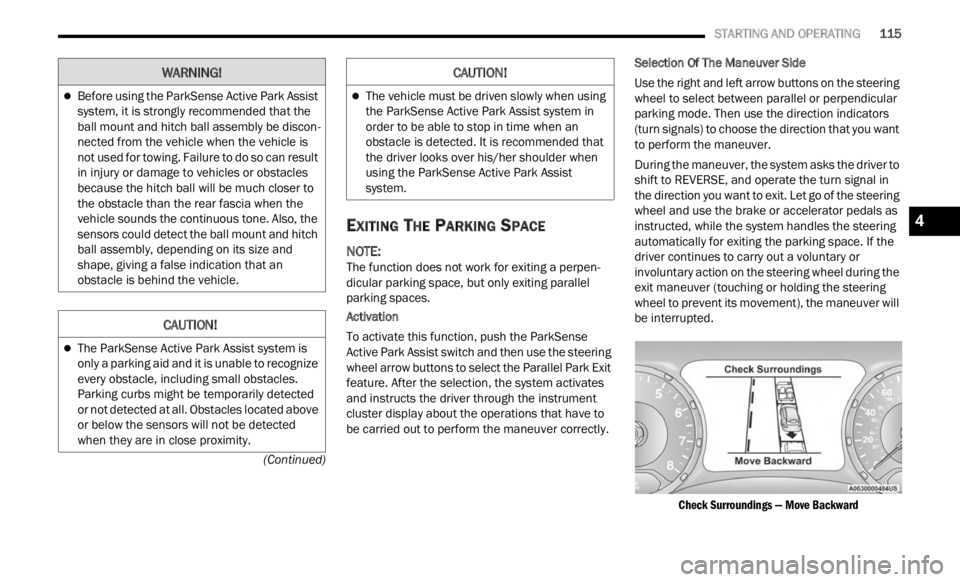
and instructs the driver through the instrument
cluster display about the operations that have to
be carried out to perform the maneuver correctly. Selection Of The Maneuver Side
Use the right and left arrow buttons on the steering
wheel
to select between parallel or perpendicular
parking mode. Then use the direction indicators
(turn signals) to choose the direction that you want
to perform the maneuver.
During the maneuver, the system asks the driver to
shift
to REVERSE, and operate the turn signal in
the direction you want to exit. Let go of the steering
wheel and use the brake or accelerator pedals as
instructed, while the system handles the steering
automatically for exiting the parking space. If the
driver continues to carry out a voluntary or
involuntary action on the steering wheel during the
exit maneuver (touching or holding the steering
wheel to prevent its movement), the maneuver will
be interrupted.
Check Surroundings — Move Backward
Before using the ParkSense Active Park Assist
system, it is strongly recommended that the
ball mount and hitch ball assembly be discon -
nected from the vehicle when the vehicle is
not us e
d for towing. Failure to do so can result
in injury or damage to vehicles or obstacles
because the hitch ball will be much closer to
the obstacle than the rear fascia when the
vehicle sounds the continuous tone. Also, the
sensors could detect the ball mount and hitch
ball assembly, depending on its size and
shape, giving a false indication that an
obstacle is behind the vehicle.
CAUTION!
The ParkSense Active Park Assist system is
only a parking aid and it is unable to recognize
every obstacle, including small obstacles.
Parking curbs might be temporarily detected
or not detected at all. Obstacles located above
or below the sensors will not be detected
when they are in close proximity.
WARNING!
The vehicle must be driven slowly when using
the ParkSense Active Park Assist system in
order to be able to stop in time when an
obstacle is detected. It is recommended that
the driver looks over his/her shoulder when
using the ParkSense Active Park Assist
system.
CAUTION!
4