change time JEEP RENEGADE 2023 Service Manual
[x] Cancel search | Manufacturer: JEEP, Model Year: 2023, Model line: RENEGADE, Model: JEEP RENEGADE 2023Pages: 364, PDF Size: 18.65 MB
Page 195 of 364
MULTIMEDIA 193
Map Updates — Press the button to view map
updates for the Navigation system.
About — Press the button to view information
about the Navigation system.
SETTINGS — MAP SETUP
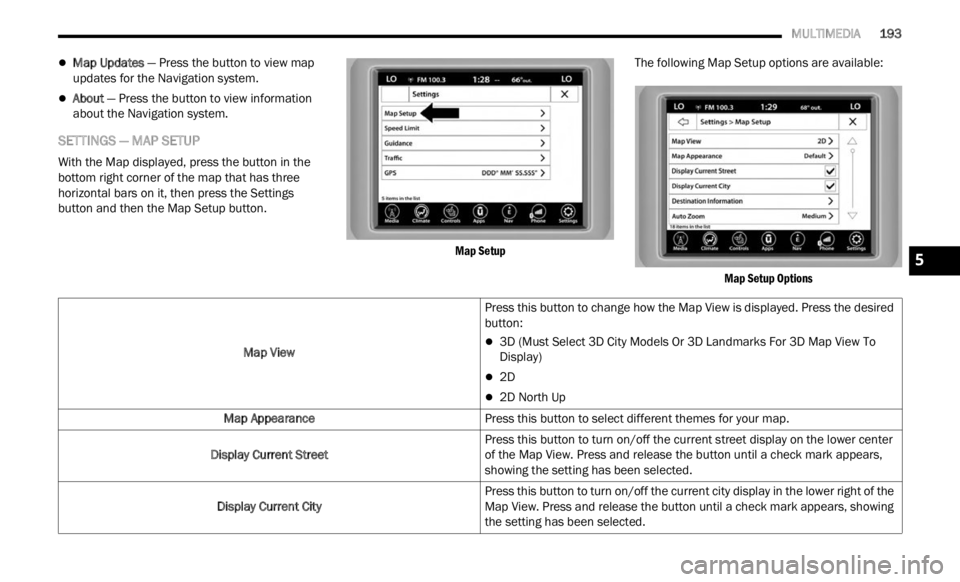
With the Map displayed, press the button in the
bottom right corner of the map that has three
horizontal bars on it, then press the Settings
button and then the Map Setup button.
Map Setup
The following Map Setup options are available:
Map Setup Options
Map View
Press this button to change how the Map View is displayed. Press the desired
button:
3D (Must Select 3D City Models Or 3D Landmarks For 3D Map View To
Display)
2D
2D North Up
Map Appearance Press this button to select different themes for your map.
Display Current Street Press this button to turn on/off the current street display on the lower center
of the
Map View. Press and release the button until a check mark appears,
showing the setting has been selected.
Display Current City Press this button to turn on/off the current city display in the lower right of the
Map Vi
ew. Press and release the button until a check mark appears, showing
the setting has been selected.
5
Page 196 of 364

194 MULTIMEDIA
Destination Information Press this button to change the Destination Information that is displayed in
the up
per right corner of the Map View. Press the desired button:
Time of Arrival
Time to Destination
Distance
Auto Zoom Press this button to change how the Auto Zoom feature adjusts the zoom level
during
guidance in Map View. Press the desired button:
Far
Medium
Low
Off
Vehicle Icon Press this button to change the Vehicle icon that is displayed while in Map
View.
Press “Previous” or “Next” to view the available icons. Press the Back
button when you've made your selection.
Show POI Icons Press this button within the Map Setup screen to show the selected Point of
Intere
st icons while in Map View. Press and release the button until a check
mark appears, showing the setting has been selected.
POI Categories Press this button within the Map Setup screen to display the available Point of
Intere
st icons you would like displayed while in Map View. Press and release
the desired selection until a check mark appears, showing the setting has
been selected.
Traffic Incidents — If Equipped Press the Traffic button within the Map Setup screen to show Traffic Message
C
hann
e
l (TMC) Incidents while in Map View. Press and release the button until
a check mark appears, showing the setting has been selected.
Page 199 of 364

MULTIMEDIA 197
Junction View Press this button to enable Junction View during route guidance. Press and
relea
s
e the button until a check mark appears, showing the setting has been
selected.
TMC Route Mode — If Equipped Press this button to change how the Traffic Message Channel (TMC) Route
Mode fu
nctions during route guidance. Select from:
Automatic
By Delay Time
Manual
Off
TMC Avoidance Types — If Equipped Press this button to display the available Traffic Message Channel (TMC)
Avoidan
ce Types you would like displayed while in route guidance. Press and
release the desired selection button until a check mark appears, showing the
setting has been selected.
Signposts Press this button to display the Signposts types you would like displayed while
i
n rou
t
e guidance. Press and release the desired selection button until a
check mark appears, showing the setting has been selected.
Route Progress Bar Press this button to display the Route Progress Bar while in route guidance.
Press
and release the selection button until a check mark appears, showing
the setting has been selected.
Route Options Press this button to determine which road types are OK to travel on while in
route g
uidance. Press and release the desired selection button until a check
mark appears, showing the setting has been selected.
5
Page 202 of 364
200 MULTIMEDIA
EMERGENCY
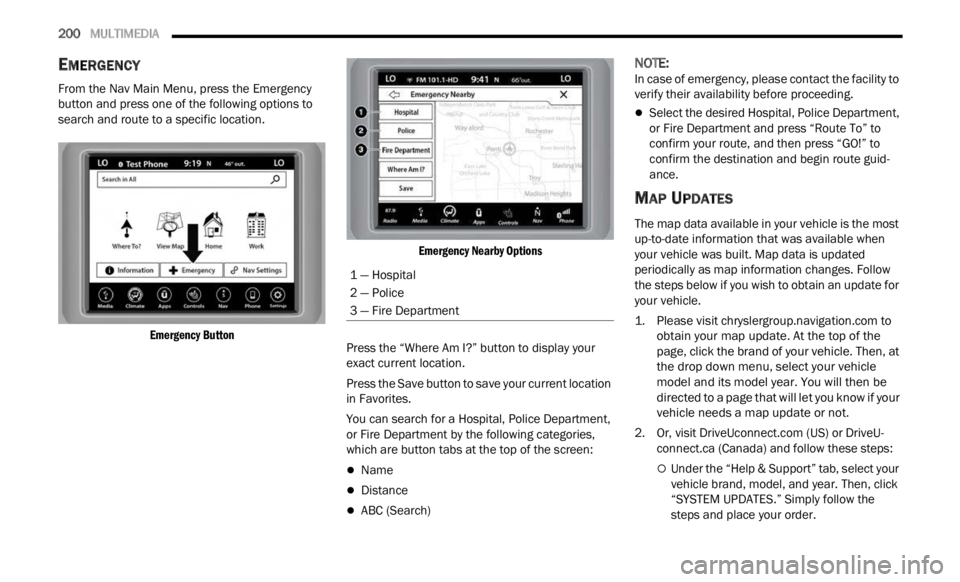
From the Nav Main Menu, press the Emergency
button and press one of the following options to
search and route to a specific location.
Emergency Button Emergency Nearby Options
Press the “Where Am I?” button to display your
exact
current location.
Press the Save button to save your current location
in Fav
orites.
You can search for a Hospital, Police Department,
or Fire
Department by the following categories,
which are button tabs at the top of the screen:
Name
Distance
ABC (Search)
NOTE:
In case of emergency, please contact the facility to
verif y
their availability before proceeding.
Select the desired Hospital, Police Department,
or Fire Department and press “Route To” to
confirm your route, and then press “GO!” to
confirm the destination and begin route guid -
ance.
MAP UPDATES
The map data available in your vehicle is the most
up-to-date information that was available when
your vehicle was built. Map data is updated
periodically as map information changes. Follow
the steps below if you wish to obtain an update for
your vehicle.
1. Please visit
chrys
lergroup.navigation.com
to
obtain your map update. At the top of the
page,
click the brand of your vehicle. Then, at
the drop down menu, select your vehicle
model and its model year. You will then be
directed to a page that will let you know if your
vehicle needs a map update or not.
2. Or, visit Drive
Uconnect.com (US) or DriveU-
connect.ca (Canada) and follow these steps:
Under the “Help & Support” tab, select your
vehicle brand, model, and year. Then, click
“SYSTEM UPDATES.” Simply follow the
steps and place your order.
1 — Hospital
2 — Police
3 — Fire Department
Page 224 of 364
222 SAFETY
If the ABS Warning Light is on, the brake system
should be serviced as soon as possible to restore
the benefits of Anti-Lock Brakes. If the ABS
Warning Light does not come on when the ignition
is placed in the ON/RUN mode, have the light
repaired as soon as possible.
ELECTRONIC BRAKE CONTROL (EBC)
S
YSTEM
Your vehicle is equipped with an advanced
Electronic Brake Control (EBC) system. This system
includes Anti-Lock Brake System (ABS), Brake
Assist System (BAS), Electronic Roll Mitigation
(ERM), Electronic Stability Control (ESC), Hill Start
Assist (HSA) and Traction Control System (TCS).
These systems work together to enhance both
vehicle stability and control in various driving
conditions.
Your vehicle may also be equipped with Dynamic
Steer i
ng Torque (DST), Hill Descent Control (HDC)
and Trailer Sway Control (TSC).
Brake Assist System (BAS)
The BAS is designed to optimize the vehicle’s
braking capability during emergency braking
maneuvers. The system detects an emergency
braking situation by sensing the rate and amount
of brake application and then applies optimum
pressure to the brakes. This can help reduce
braking distances. The BAS complements the Anti-Lock Brake System (ABS). Applying the brakes
very quickly results in the best BAS assistance. To
receive the benefit of the system, you must apply
continuous braking pressure during the stopping
sequence (do not “pump” the brakes). Do not
reduce brake pedal pressure unless braking is no
longer desired. Once the brake pedal is released,
the BAS is deactivated.Dynamic Steering Torque (DST)
DST uses the integration of the Electronic Stability
Control (ESC) system with the electric power
steering to increase the safety level of the whole
vehicle. In critical situations (understeering,
oversteering, braking with different grip
conditions), through the DST function the ESC
system controls the steering to implement an additional torque contribution on the steering
wheel, to suggest the most correct maneuver to
the driver. The coordinated action of brakes and
steering increases the safety and feeling of vehicle
control.
NOTE:
The DST is a driving aid system and does not
repla c
e the driver’s actions while driving the car.
Electronic Roll Mitigation (ERM)
ERM anticipates the potential for wheel lift by
monitoring the driver’s steering wheel input and
the speed of the vehicle. When Electronic Roll
Mitigation (ERM) determines that the rate of
change of the steering wheel angle and vehicle's
speed are sufficient to potentially cause wheel lift,
it then applies the appropriate brake and may also
reduce engine power to lessen the chance that
wheel lift will occur. ERM can only reduce the
chance of wheel lift occurring during severe or
evasive driving maneuvers, and it will only
intervene during these types of maneuvers. It
cannot prevent wheel lift due to other factors, such
as road conditions, leaving the roadway, or striking
objects or other vehicles.
NOTE:
ERM is disabled any time the ESC is in “Full Off”
mode. F
or a complete explanation of the available
ESC modes, see Ú page 223.
WARNING!
The Brake Assist System (BAS) cannot prevent
the natural laws of physics from acting on the
vehicle, nor can it increase the traction afforded
by prevailing road conditions. BAS cannot
prevent collisions, including those resulting from
excessive speed in turns, driving on very slippery
surfaces, or hydroplaning. The capabilities of a
BAS-equipped vehicle must never be exploited in
a reckless or dangerous manner, which could
jeopardize the user's safety or the safety of
others.
Page 235 of 364
SAFETY 233
If the vehicle enters 4WD Low, the FCW system
will be automatically deactivated.
The active braking is disabled when a trailer is
connected with a Mopar® Trailer Towing
system. If the vehicle is equipped with an after
-
market system, it is recommended that the
Activ e
Braking is turned off manually
Ú page 349.
Turning FCW On Or Off
The Forward Collision menu setting is located in
the Uconnect settings.
NOTE:
The default status of FCW is “Warning + Active
Braki n
g,” this allows the system to warn you of a
possible collision with the vehicle in front of you
and enable the active braking.
Changing the FCW status to “Off” deactivates
the system, so no warning or active braking will
be available in case of a possible collision.
Changing the FCW status to “Only warning”
prevents the system from providing limited
active braking, or additional brake support if the
driver is not braking adequately in the event of
a potential frontal collision, but maintains the
audible and visual warnings.
Changing the status of the system can be done at
any t i
me in the vehicle's head unit.
NOTE:
When the system is turned off, the FCW system
state
will reset.
Changing FCW Sensitivity
By changing the settings on the menu of the
Uconnect system, you can change the sensitivity of
the system by choosing one of the following three
options: "Near", "Medium" or "Far" Ú page 133.
The default option is "Medium". This setting allows
t he sy
stem to warn the driver of a possible collision
with the vehicle in front when it is at a standard
distance, intermediate between the “Near” and
“Far” settings.
By setting the sensitivity of the system to "Far", the
syste m
will warn the driver of a possible accident
with the vehicle in front when the latter is at a
greater distance, giving you the chance to act on
the brakes in a more limited and gradual way. This
setting gives the driver the maximum possible time
of reaction to prevent a possible accident.
NOTE:
The “Far” setting may result in a greater number of
FCW p os
sible collision warnings experienced.
By changing the option to "Near", the system will
warn t
he driver of a possible accident with the
vehicle ahead of it when the latter is a reduced
distance. This setting offers a reaction time to the
driver lower than the settings "Medium" and "Far",
in the case of a potential accident, providing a
more dynamic driving of the vehicle.
NOTE:
The “Near” setting may result in a lesser number of
FCW p os
sible collision warnings experienced.
The setting of the sensitivity of the system is
mainta
ined in memory when the engine is
switched off.
FCW Limited Warning
If the instrument cluster display reads “FCW
Limited Functionality” or “FCW Limited
Functionality Wipe Front Windshield” momentarily,
there may be a condition that limits FCW
functionality. Although the vehicle is still drivable
under normal conditions, the active braking may
not be fully available. Once the condition that
limited the system performance is no longer
present, the system will return to its full
performance state. If the problem persists, see an
authorized dealer.
WARNING!
Forward Collision Warning (FCW) is not intended
to avoid a collision on its own, nor can FCW
detect every type of potential collision. The driver
has the responsibility to avoid a collision by
controlling the vehicle via braking and steering.
Failure to follow this warning could lead to
serious injury or death.
6
Page 243 of 364

SAFETY 241
SEAT BELT SYSTEMS
Buckle up even though you are an excellent driver,
even on short trips. Someone on the road may be
a poor driver and could cause a collision that
includes you. This can happen far away from home
or on your own street.
Research has shown that seat belts save lives, and
they c
an reduce the seriousness of injuries in a
collision. Some of the worst injuries happen when
people are thrown from the vehicle. Seat belts
reduce the possibility of ejection and the risk of
injury caused by striking the inside of the vehicle.
Everyone in a motor vehicle should be belted at all
times.
Enhanced Seat Belt Use Reminder System
(BeltAlert)
Driver And Passenger BeltAlert — If Equipped
BeltAlert is a feature intended to remind the driver and outboard front seat
passenger to buckle their seat belts. The
BeltAlert feature is active whenever the
ignition switch is in the START or ON/RUN position.
Initial Indication
If the driver is unbuckled when the ignition switch
is fi r
st in the START or ON/RUN position a chime
will signal for a few seconds. If the driver or
outboard front seat passenger is unbuckled when
the ignition switch is first in the START or ON/RUN position the Seat Belt Reminder Light will turn solid
red and remain red until the seat belt is buckled.
After the driver and outboard front seat passenger
have buckled their seat belts all Seat Belt
Reminder Lights will turn off. The outboard front
passenger seat BeltAlert is not active when the
outboard front passenger seat is unoccupied. The
cluster display will inform the driver that you must
fasten the driver’s seat belt in order to release the
parking brake.
BeltAlert Warning Sequence
The BeltAlert warning sequence is activated when
t
he v e
hicle is moving above a specified vehicle
speed range and the driver or outboard front seat
passenger is unbuckled (the outboard front
passenger seat BeltAlert is not active when the
outboard front passenger seat is unoccupied). The
BeltAlert warning sequence starts by blinking the
Seat Belt Reminder Light and sounding an
intermittent chime. Once the BeltAlert warning
sequence has completed, the Seat Belt Reminder
Light will remain solid red until the driver and
outboard front seat passenger are buckled. The
BeltAlert warning sequence may repeat based on
vehicle speed until the driver and occupied
outboard front seat passenger seat belts are
buckled. The driver should instruct all occupants to
buckle their seat belts. Change Of Status
If the driver or outboard front seat passenger
unbuc
k
les their seat belt while the vehicle is
traveling, the BeltAlert warning sequence will begin
until the seat belts are buckled again.
The outboard front passenger seat BeltAlert is not
active
when the outboard front passenger seat is
unoccupied. BeltAlert may be triggered when an
animal or other items are placed on the outboard
front passenger seat or when the seat is folded flat
(if equipped). It is recommended that pets be
restrained in the rear seat (if equipped) in pet
harnesses or pet carriers that are secured by seat
belts, and cargo is properly stowed.
BeltAlert can be activated or deactivated by an
author i
zed dealer. FCA US LLC does not
recommend deactivating BeltAlert.
NOTE:
If BeltAlert has been deactivated, the Seat Belt
Remin d
er Light will turn on and remain on until the
driver and outboard front seat passenger seat
belts are buckled.
Lap/Shoulder Belts
All seating positions in your vehicle are equipped
with lap/shoulder belts.
The seat belt webbing retractor will lock only during
very s
udden stops or collisions. This feature allows
the shoulder part of the seat belt to move freely
with you under normal conditions. However, in a
6
Page 269 of 364
SAFETY 267
PERIODIC SAFETY CHECKS YOU SHOULD
M
AKE OUTSIDE THE VEHICLE
Tires
Examine tires for excessive tread wear and uneven
wear patterns. Check for stones, nails, glass, or
other objects lodged in the tread or sidewall.
Inspect the tread for cuts and cracks. Inspect
sidewalls for cuts, cracks, and bulges. Check the
lug nuts/bolt torque for tightness. Check the tires
(including spare) for proper cold inflation pressure.
Lights
Have someone observe the operation of brake
lights and exterior lights while you work the
controls. Check turn signal and high beam
indicator lights on the instrument panel.
Door Latches
Check for proper closing, latching, and locking.
Fluid Leaks
Check area under the vehicle after overnight
parking for fuel, coolant, oil, or other fluid leaks.
Also, if gasoline fumes are detected or if fuel or
brake fluid leaks are suspected, the cause should
be located and corrected immediately.
EXHAUST GAS
The best protection against carbon monoxide entry
into the vehicle body is a properly maintained
engine exhaust system.
Whenever a change is noticed in the sound of the
exhau s
t system, when exhaust fumes can be
detected inside the vehicle, or when the underside
or rear of the vehicle is damaged, have an
authorized dealer inspect the complete exhaust system and adjacent body areas for broken,
damaged, deteriorated, or mispositioned parts.
Open seams or loose connections could permit
exhaust fumes to seep into the passenger
compartment. In addition, inspect the exhaust
system each time the vehicle is raised for
lubrication or oil change. Replace as required.
CARBON MONOXIDE WARNINGS
WARNING!
Exhaust gases can injure or kill. They contain
carbon monoxide (CO), which is colorless and
odorless. Breathing it can make you
unconscious and can eventually poison you. To
avoid breathing (CO), follow these safety tips:
Do not run the engine in a closed garage or in
confined areas any longer than needed to
move your vehicle in or out of the area.
If you are required to drive with the trunk/lift
-
gate/rear doors open, make sure that all
window s
are closed and the climate control
BLOWER switch is set at high speed. DO NOT
use the recirculation mode.
If it is necessary to sit in a parked vehicle with
the engine running, adjust your heating or
cooling controls to force outside air into the
vehicle. Set the blower at high speed.
WARNING!
Carbon monoxide (CO) in exhaust gases is
deadly. Follow the precautions below to prevent
carbon monoxide poisoning:
Do not inhale exhaust gases. They contain
carbon monoxide, a colorless and odorless gas,
which can kill. Never run the engine in a closed
area, such as a garage, and never sit in a
parked vehicle with the engine running for an
extended period. If the vehicle is stopped in an
open area with the engine running for more
than a short period, adjust the ventilation
system to force fresh, outside air into the
vehicle.
Guard against carbon monoxide with proper
maintenance. Have the exhaust system
inspected every time the vehicle is raised.
Have any abnormal conditions repaired
promptly. Until repaired, drive with all side
windows fully open.
6
Page 288 of 364
286
SERVICING AND MAINTENANCE
SCHEDULED SERVICING
Your vehicle is equipped with an automatic oil
change indicator system. The oil change indicator
system will remind you that it is time to take your
vehicle in for scheduled maintenance.
Based on engine operation conditions, the oil
change
indicator message will illuminate in the
instrument cluster. This means that service is
required for your vehicle. Operating conditions
such as frequent short-trips, trailer tow and
extremely hot or cold ambient temperatures will
influence when the “Change Oil” or “Oil Change
Required” message is displayed. Have your vehicle
serviced as soon as possible, within the next
500 miles (805 km). An authorized dealer will reset the oil change
indica
tor message after completing the scheduled
oil change.
NOTE:
Under no circumstances should oil change
inter v
als exceed 10,000 miles (16,000 km),
1 year or 350 hours of engine run time, whichever
c omes f
irst. The 350 hours of engine run or idle
time is generally only a concern for fleet
customers.
NOTE:
The Oil Change Indicator will not illuminate under
these
conditions. Once A Month Or Before A Long Trip:
Check engine oil level.
Check windshield washer fluid level.
Check the tire inflation pressures and look for
unusual wear or damage.
Check the fluid levels of the coolant reservoir,
and brake master cylinder reservoir, and fill as
needed.
Check function of all interior and exterior lights.
Page 292 of 364

290 SERVICING AND MAINTENANCE
Check the tension of the accessory
drive belt. •
•
Inspect and replace, if required, front
e nd a
c
cessory drive belt, tensioner,
and, idler pulley.
3• •
Inspect and replace PCV valve if
neces s
ary. •
Change engine oil and replace oil
f ilte
r
.4 5 6
Inspect the PTU fluid level. •••
Inspect the rear differential fluid level. •••
Replace spark plugs (1.3L Turbo
Engine
).7• ••
Replace engine air cleaner filter.
8• ••••••
Replace brake fluid every two years.
9• ••••••
Replace cabin air filter. To be replaced every 12,000 mi (19,000 km).
Mileage or time passed
(whichever comes first)
10,000
20,000
30,000
40,000
50,000
60,000
70,000
80,000
90,000
100,000
110,000
120,000
130,000
140,000
150,000
Or Years: 1 2 3 4 5 6 7 8 9 10 11 12 13 14 15
Or Kilometers:
16,000
32,000
48,000
64,000
80,000
96,000
112,000
128,000
144,000
160,000
176,000
192,000
208,000
224,000
240,000