change time JEEP WAGONEER 2023 Owner's Manual
[x] Cancel search | Manufacturer: JEEP, Model Year: 2023, Model line: WAGONEER, Model: JEEP WAGONEER 2023Pages: 396, PDF Size: 15.17 MB
Page 135 of 396

STARTING AND OPERATING133
Normal Ride Height (NRH) – This is the standard posi -
tion of the suspension and is meant for normal driving.
Off-Road 1 (OR1) (Raises the vehicle approximately
1.2 inches [30 mm]) – This is the primary position for
all off-road driving until OR2 is needed. A smoother and
more comfortable ride will result. Push the toggle
switch forward once from the NRH position while the
vehicle speed is below 38 mph (61 km/h). When in the
OR1 position, if the vehicle speed remains between
40 mph (64 km/h) and 50 mph (80 km/h) for greater than 20 seconds or if the vehicle speed exceeds
50 mph (80 km/h), the vehicle will be automatically
lowered to NRH
Úpage 193. OR1 is unavailable on
4x2 air suspension vehicles.
Off-Road 2 (OR2) (Raises the vehicle approximately
2.0 inches [51 mm]) – This position is intended for
off-roading use only where maximum ground clearance
is required. To enter OR2, push the toggle switch
forward twice from the NRH position or once from the
OR1 position while vehicle speed is below 20 mph
(32 km/h). While in OR2, if the vehicle speed exceeds
25 mph (40 km/h) the vehicle height will be automati -
cally lowered to OR1
Úpage 193. OR2 is unavailable
on 4x2 air suspension vehicles.
Aero Height (Lowers the vehicle approximately
-0.6 inches [-15 mm]) – This position provides
improved aerodynamics by lowering the vehicle. The
vehicle will automatically enter Aero Height when the
vehicle speed remains between 62 mph (100 km/h)
and 66 mph (106 km/h) for greater than 20 seconds
or if the vehicle speed exceeds 66 mph (106 km/h). The vehicle will return to Default Ride Height from Aero
Height if the vehicle speed remains between 30 mph
(48 km/h) and 35 mph (56 km/h) for greater than
20 seconds or if the vehicle speed falls below 30 mph
(48 km/h). The vehicle will enter Aero Height, regard
-
less of vehicle speed if the vehicle is in “SPORT” mode.
Entry/Exit Height (Lowers the vehicle approximately
-1.6 inches [-40 mm]) – This position lowers the
vehicle for easier passenger entry and exit as well as
lowering the rear of the vehicle for easier loading and
unloading of cargo. To enter Entry/Exit Height, push the
toggle switch down twice from NRH while the vehicle
speed is below 6 mph (10 km/h). To exit Entry/Exit
Height, push the UP button once while in Entry/Exit
Height or drive the vehicle over 4 mph (6 km/h).
NOTE:Automatic lowering of the vehicle into Entry/Exit Height
can be enabled through the Uconnect Touchscreen Radio.
If this feature is enabled, the vehicle will only lower if the
gear selector is in PARK, the terrain switch is in AUTO, the
transfer case is in AUTO and the vehicle level is either in
Normal or Aero Height. The vehicle will not automatically
lower if the air suspension level is in OR2 or OR1. When
towing, the automatic Entry/Exit feature may be disabled
through the Uconnect Touchscreen Radio to prevent
vehicle and trailer movement when gear selector is moved
to PARK. The Selec-Terrain system will automatically change the
vehicle to the proper height based on the position of the
Selec-Terrain switch. The height can be changed from the
default Selec-Terrain setting by normal use of the air
suspension buttons
Úpage 131.
The system requires that the engine be running for all
changes. When lowering the vehicle all of the doors,
including the liftgate, must be closed. If a door is opened
at any time while the vehicle is lowering the change will not
be completed until the open door(s) is/are closed.
The Quadra-Lift Air Suspension system uses a lifting and
lowering pattern which keeps the headlights from
incorrectly shining into oncoming traffic. When raising the
vehicle, the rear of the vehicle will move up first and then
the front. When lowering the vehicle, the front will move
down first and then the rear.
After the engine is turned off, it may be noticed that the air
suspension system operates briefly; this is normal. The
system is correcting the position of the vehicle to ensure a
proper appearance.
To assist with changing a spare tire, the Quadra-Lift Air
Suspension system has a feature which allows the
automatic leveling to be disabled
Úpage 197.
4
23_WS_OM_EN_USC_t.book Page 133
Page 137 of 396

STARTING AND OPERATING135
OPERATION
The indicator lamps 1 through 5 will illuminate to show the
current position of the vehicle. Flashing indicator lamps
will show a position which the system is working to
achieve. When raising, if multiple indicator lamps are
flashing while raising, the highest flashing indicator lamp
is the position the system is working to achieve. When
lowering, if multiple indicators are flashing while lowering
the lowest solid indicator lamp is the position the system
is working to achieve.
Toggle up once moves the suspension one position higher
from the current position, assuming all conditions are met
(i.e., engine running, speed below threshold, etc.). Toggle
up can be pushed multiple times. Each toggle up will raise
the requested level by one position up to a maximum
position of OR2 or the highest position allowed based on
current conditions (i.e., vehicle speed, etc.).
Toggle down once moves the suspension one position
lower from the current level, assuming all conditions are
met (i.e., engine running, doors closed, speed below
threshold, etc.). Toggle down can be pushed multiple
times. Each toggle down will lower the requested level by
one position down to a minimum of Park mode or the
lowest position allowed based on current conditions (i.e.,
vehicle speed, etc.) Automatic height changes will occur based on vehicle
speed and the current vehicle height. The indicator lamps
and instrument cluster display messages will operate the
same for automatic changes and user requested changes.
Off-Road 2 (OR2) – Indicator lamps 1 through 5 will be
illuminated.
Off-Road 1 (OR1) – Indicator lamps 2 through 5 will be
illuminated.
Normal Ride Height (NRH) – Indicator lamps 3 through
5 will be illuminated.
Aero Height – Indicator lamps 4 and 5 will be illumi -
nated.
Entry/Exit Height – Indicator lamp 5 will be illuminated.
Transport Mode – No indicator lamps will be illumi -
nated. Driving or deselecting the mode in the Uconnect
system will disable Transport mode.
Tire/Jack Mode – Indicator lamps 1 and 5 will be illumi -
nated. Driving or deselecting the mode in the Uconnect
system will disable Tire/Jack mode.
Wheel Alignment Mode – Indicator lamps 4 and 5 will
be illuminated. Driving or deselecting the mode in the
Uconnect system will disable Wheel Alignment mode.
FUEL SAVER TECHNOLOGY 5.7L AND 6.4L
ONLY — IF EQUIPPED
This feature offers improved fuel economy by shutting off
four of the engine's eight cylinders during light load and
cruise conditions. The system is automatic with no driver
inputs or additional driving skills required.
NOTE:This system may take some time to return to full function -
ality after a battery disconnect.
POWER STEERING
The electric power steering system is designed to provide
increased vehicle response and ease of maneuverability
in tight spaces. The power steering system adapts to
different driving conditions. If the electric power steering
system experiences a fault that prevents it from providing
assist, you will still have the ability to steer the vehicle
manually.
NOTE:Alternate electric power steering efforts can be selected
through the Uconnect System Úpage 197.
If the Electric Power Steering warning icon is
displayed and the “SERVICE POWER
STEERING” or the “POWER STEERING ASSIST
OFF – SERVICE SYSTEM” message is displayed
within the instrument cluster display, this indicates the
vehicle needs to be taken to an authorized dealer for
service
Úpage 108.
WARNING!
Continued operation with reduced assist could pose a
safety risk to yourself and others. Service should be
obtained as soon as possible.
4
23_WS_OM_EN_USC_t.book Page 135
Page 143 of 396

STARTING AND OPERATING141
Activating Adaptive Cruise Control (ACC)
The minimum set speed for the ACC system is 20 mph
(32 km/h).
When the system is turned on and in the ready state, the
instrument cluster display will read “ACC Ready.”
When the system is off, the instrument cluster display will
read “Adaptive Cruise Control (ACC) Off.”
NOTE:You cannot engage ACC under the following conditions:
When in 4WD Low
When the brakes are applied
When the parking brake is applied
When the automatic transmission is in PARK, REVERSE
or NEUTRAL
When the brakes are overheated
When the driver’s door is open at low speeds
When the driver’s seat belt is unbuckled at low speeds
When there is a stationary vehicle in front of your
vehicle in close proximity
When ESC Full Off mode is active
To Activate/Deactivate
Push and release the Adaptive Cruise Control (ACC) on/off
button. The ACC menu in the instrument cluster displays
“ACC Ready.”
To turn the system off, push and release the Adaptive
Cruise Control (ACC) on/off button again. At this time, the
system will turn off and the instrument cluster displays
“Adaptive Cruise Control (ACC) Off.”
To Set A Desired Speed
When the vehicle reaches the speed desired, push the
SET (+) button or the SET (-) button and release. The
instrument cluster display will show the set speed.
NOTE:Fixed Speed Cruise Control (if equipped) can be used
without ACC enabled. To change between the different
modes, push the ACC on/off button which turns the ACC
and the Fixed Speed Cruise Control off. Pushing the Fixed
Speed Cruise Control on/off button will result in turning on
(changing to) Fixed Speed Cruise Control mode. If ACC is set when the vehicle speed is
below 20 mph
(32 km/h), the set speed will default to 20 mph
(32 km/h).
NOTE:Fixed Speed Cruise Control cannot be set below 20 mph
(32 km/h).
If either system is set when the vehicle speed is above
20 mph (32 km/h), the set speed shall be the current speed of the vehicle.
NOTE:
Keeping your foot on the accelerator pedal can cause
the vehicle to continue to accelerate beyond the set
speed. If this occurs, the message “DRIVER OVERRIDE”
will display in the instrument cluster display.
If you continue to accelerate beyond the set speed
while ACC is enabled, the system will not be controlling
the distance between your vehicle and the vehicle
ahead. The vehicle speed will only be determined by
the position of the accelerator pedal.
To Cancel
The following conditions cancel the ACC or Fixed Speed
Cruise Control systems:
The brake pedal is applied
The CANC (cancel) button is pushed
The Anti-Lock Brake System (ABS) activates
The gear selector is removed from the DRIVE position
WARNING!
Leaving the Adaptive Cruise Control (ACC) system on
when not in use is dangerous. You could accidentally
set the system or cause it to go faster than you want.
You could lose control and have a collision. Always leave
the system off when you are not using it.
WARNING!
In Fixed Speed Cruise Control mode, the system will not
react to vehicles ahead. In addition, the proximity
warning does not activate and no alarm will sound even
if you are too close to the vehicle ahead since neither
the presence of the vehicle ahead nor the
vehicle-to-vehicle distance is detected. Be sure to
maintain a safe distance between your vehicle and the
vehicle ahead. Always be aware which mode is
selected.
4
23_WS_OM_EN_USC_t.book Page 141
Page 145 of 396
STARTING AND OPERATING143
Setting The Following Distance In ACC
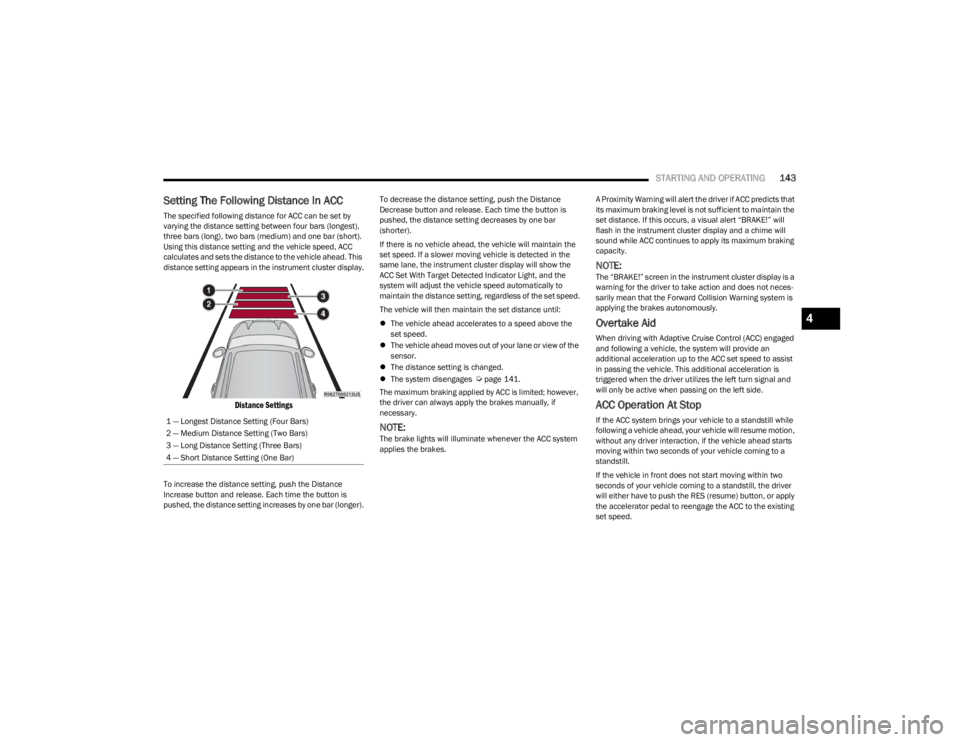
The specified following distance for ACC can be set by
varying the distance setting between four bars (longest),
three bars (long), two bars (medium) and one bar (short).
Using this distance setting and the vehicle speed, ACC
calculates and sets the distance to the vehicle ahead. This
distance setting appears in the instrument cluster display.
Distance Settings
To increase the distance setting, push the Distance
Increase button and release. Each time the button is
pushed, the distance setting increases by one bar (longer). To decrease the distance setting, push the Distance
Decrease button and release. Each time the button is
pushed, the distance setting decreases by one bar
(shorter).
If there is no vehicle ahead, the vehicle will maintain the
set speed. If a slower moving vehicle is detected in the
same lane, the instrument cluster display will show the
ACC Set With Target Detected Indicator Light, and the
system will adjust the vehicle speed automatically to
maintain the distance setting, regardless of the set speed.
The vehicle will then maintain the set distance until:
The vehicle ahead accelerates to a speed above the
set speed.
The vehicle ahead moves out of your lane or view of the
sensor.
The distance setting is changed.
The system disengages
Úpage 141.
The maximum braking applied by ACC is limited; however,
the driver can always apply the brakes manually, if
necessary.
NOTE:The brake lights will illuminate whenever the ACC system
applies the brakes. A Proximity Warning will alert the driver if ACC predicts that
its maximum braking level is not sufficient to maintain the
set distance. If this occurs, a visual alert “BRAKE!” will
flash in the instrument cluster display and a chime will
sound while ACC continues to apply its maximum braking
capacity.
NOTE:The “BRAKE!” screen in the instrument cluster display is a
warning for the driver to take action and does not neces
-
sarily mean that the Forward Collision Warning system is
applying the brakes autonomously.
Overtake Aid
When driving with Adaptive Cruise Control (ACC) engaged
and following a vehicle, the system will provide an
additional acceleration up to the ACC set speed to assist
in passing the vehicle. This additional acceleration is
triggered when the driver utilizes the left turn signal and
will only be active when passing on the left side.
ACC Operation At Stop
If the ACC system brings your vehicle to a standstill while
following a vehicle ahead, your vehicle will resume motion,
without any driver interaction, if the vehicle ahead starts
moving within two seconds of your vehicle coming to a
standstill.
If the vehicle in front does not start moving within two
seconds of your vehicle coming to a standstill, the driver
will either have to push the RES (resume) button, or apply
the accelerator pedal to reengage the ACC to the existing
set speed.
1 — Longest Distance Setting (Four Bars)
2 — Medium Distance Setting (Two Bars)
3 — Long Distance Setting (Three Bars)
4 — Short Distance Setting (One Bar)
4
23_WS_OM_EN_USC_t.book Page 143
Page 150 of 396

148STARTING AND OPERATING
Speed Limit Exceeded
When the vehicle’s speed exceeds the displayed speed
limit by 3 mph (5 km/h), the speed limit sign on the
instrument cluster display will show a red outline to alert
the driver.ACTIVE DRIVING ASSIST SYSTEM —
IF EQUIPPED
OPERATION
The Active Driving Assist (ADA) system is combined with
the Adaptive Cruise Control (ACC) system, and centers the
vehicle in the driving lane while traveling at speeds up to
90 mph (145 km/h).
For ACC system operating instructions and system
limitations, see
Úpage 139.
NOTE:
The driver should always obey traffic laws and speed
limits. Never drive above applicable speed limit restric -
tions.
The driver can override ADA at any time by braking,
accelerating, or steering the vehicle.
Just like ACC, ADA will maintain a set speed as long as the
set distance between your vehicle and the vehicle in front
is maintained. ADA will also keep your vehicle centered
between the lane lines, and monitor for other vehicles in
adjacent lanes by utilizing the Blind Spot Monitoring
sensors.
Two types of Active Driving Assist systems are available:
Base ADA system
Hands-Free ADA system
Base Active Driving Assist System — If Equipped
The Base ADA system uses sensors within the steering
wheel to measure driver attentiveness, and requires that
the driver have their hands on the steering wheel at all
times. The system will generally aim to keep the vehicle centered
in the lane, but when the driver turns the steering wheel
(e.g. to move farther away from a large vehicle in an
adjacent lane) the system will reduce its control and enter
"co-steering" mode. While in co-steering mode, the system
will provide reduced assistance and allow the driver to
control the path of the vehicle. Once the driver stops
providing input to the steering wheel, the system will
require a few seconds to fully resume lane centering
assistance, especially during curves.
Hands-Free Active Driving Assist System — If Equipped
The Hands-Free ADA system uses sensors within the
steering wheel and a driver monitoring camera located on
top of the steering column to monitor driver attentiveness.
The Hands-Free ADA system allows the driver to remove
their hands from the steering wheel when engaged, but
requires that the driver continue to pay attention to the
road.
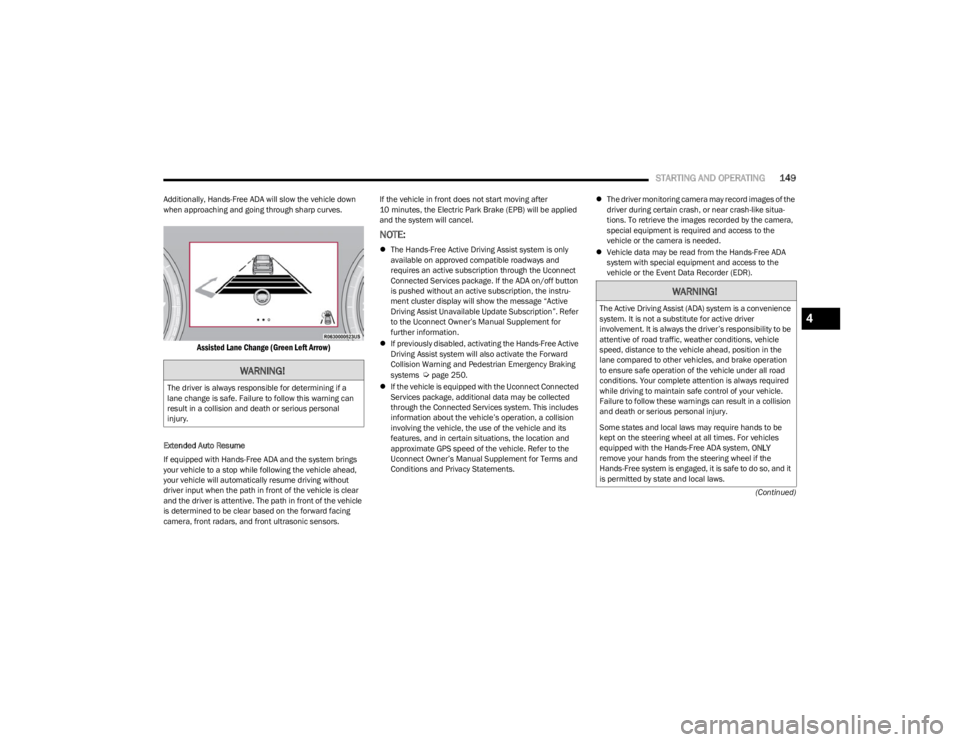
The Hands-Free ADA system will also change lanes when
a turn signal is activated if the adjacent lane in the
direction indicated is clear of another vehicle, and lane
markings are detected (noted by a dashed line in the
direction of the available lane change). The system uses
sensors, including Blind Spot Monitoring (BSM) sensors,
to determine if a lane change is possible. If the assisted
lane change is in progress, a green arrow will appear. If a
lane change is requested but the direction indicated is not
possible, a yellow arrow will appear. Once conditions are
clear, the arrow will turn green and the assisted lane
change will begin.
CAUTION!
Functionality may be limited or the system may not
work if the sensor is obstructed.
The system may have limited operation or not work at
all in weather conditions such as heavy rain, hail, and
thick fog. Strong light contrasts can influence the
recognition capability of the sensor.
The area surrounding the sensor must not be
covered with stickers or any other object.
Do not tamper or perform any operations in the area
of the windshield glass directly surrounding the
sensor.
Clean foreign matters such as bird droppings,
insects, snow or ice on the windshield. Use specific
detergents and clean cloths to avoid scratching the
windshield.
23_WS_OM_EN_USC_t.book Page 148
Page 151 of 396
STARTING AND OPERATING149
(Continued)
Additionally, Hands-Free ADA will slow the vehicle down
when approaching and going through sharp curves.
Assisted Lane Change (Green Left Arrow)
Extended Auto Resume
If equipped with Hands-Free ADA and the system brings
your vehicle to a stop while following the vehicle ahead,
your vehicle will automatically resume driving without
driver input when the path in front of the vehicle is clear
and the driver is attentive. The path in front of the vehicle
is determined to be clear based on the forward facing
camera, front radars, and front ultrasonic sensors. If the vehicle in front does not start moving after
10 minutes, the Electric Park Brake (EPB) will be applied
and the system will cancel.
NOTE:
The Hands-Free Active Driving Assist system is only
available on approved compatible roadways and
requires an active subscription through the Uconnect
Connected Services package. If the ADA on/off button
is pushed without an active subscription, the instru -
ment cluster display will show the message “Active
Driving Assist Unavailable Update Subscription”. Refer
to the Uconnect Owner’s Manual Supplement for
further information.
If previously disabled, activating the Hands-Free Active
Driving Assist system will also activate the Forward
Collision Warning and Pedestrian Emergency Braking
systems
Úpage 250.
If the vehicle is equipped with the Uconnect Connected
Services package, additional data may be collected
through the Connected Services system. This includes
information about the vehicle’s operation, a collision
involving the vehicle, the use of the vehicle and its
features, and in certain situations, the location and
approximate GPS speed of the vehicle. Refer to the
Uconnect Owner’s Manual Supplement for Terms and
Conditions and Privacy Statements.
The driver monitoring camera may record images of the
driver during certain crash, or near crash-like situa -
tions. To retrieve the images recorded by the camera,
special equipment is required and access to the
vehicle or the camera is needed.
Vehicle data may be read from the Hands-Free ADA
system with special equipment and access to the
vehicle or the Event Data Recorder (EDR).WARNING!
The driver is always responsible for determining if a
lane change is safe. Failure to follow this warning can
result in a collision and death or serious personal
injury.
WARNING!
The Active Driving Assist (ADA) system is a convenience
system. It is not a substitute for active driver
involvement. It is always the driver’s responsibility to be
attentive of road traffic, weather conditions, vehicle
speed, distance to the vehicle ahead, position in the
lane compared to other vehicles, and brake operation
to ensure safe operation of the vehicle under all road
conditions. Your complete attention is always required
while driving to maintain safe control of your vehicle.
Failure to follow these warnings can result in a collision
and death or serious personal injury.
Some states and local laws may require hands to be
kept on the steering wheel at all times. For vehicles
equipped with the Hands-Free ADA system, ONLY
remove your hands from the steering wheel if the
Hands-Free system is engaged, it is safe to do so, and it
is permitted by state and local laws.4
23_WS_OM_EN_USC_t.book Page 149
Page 154 of 396
152STARTING AND OPERATING
INDICATIONS ON THE DISPLAY
The Active Driving Assist system status can always be
viewed in the instrument cluster display, and status
changes are shown by changes in color of the system’s
indicator lights.
As the system detects driver inattentiveness as previously
described
Úpage 148, the system status indicator lights
will change from green, to yellow, to red. The following
indicators will change in color as warnings to the driver
escalate:
Active Driving Assist Indicator (steering wheel icon in
the instrument cluster display or Head Up Display
[if equipped])
Glow effect of the instrument cluster display
For Hands-Free ADA only, light strips in the driver and
front passenger’s door panels (red and green only)
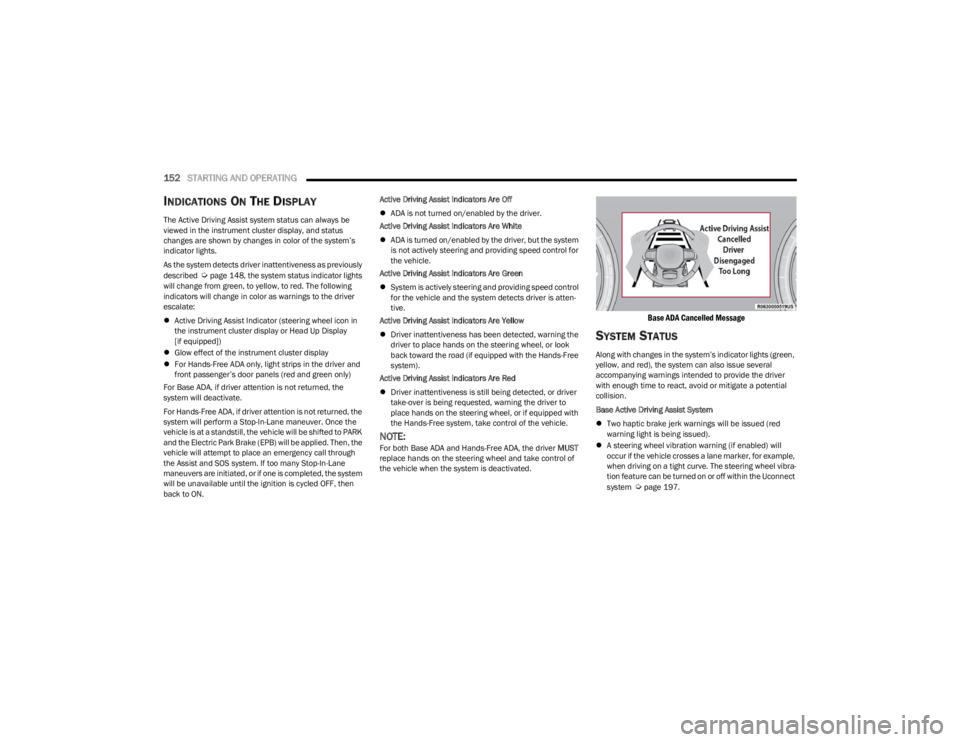
For Base ADA, if driver attention is not returned, the
system will deactivate.
For Hands-Free ADA, if driver attention is not returned, the
system will perform a Stop-In-Lane maneuver. Once the
vehicle is at a standstill, the vehicle will be shifted to PARK
and the Electric Park Brake (EPB) will be applied. Then, the
vehicle will attempt to place an emergency call through
the Assist and SOS system. If too many Stop-In-Lane
maneuvers are initiated, or if one is completed, the system
will be unavailable until the ignition is cycled OFF, then
back to ON. Active Driving Assist Indicators Are Off
ADA is not turned on/enabled by the driver.
Active Driving Assist Indicators Are White
ADA is turned on/enabled by the driver, but the system
is not actively steering and providing speed control for
the vehicle.
Active Driving Assist Indicators Are Green
System is actively steering and providing speed control
for the vehicle and the system detects driver is atten -
tive.
Active Driving Assist Indicators Are Yellow
Driver inattentiveness has been detected, warning the
driver to place hands on the steering wheel, or look
back toward the road (if equipped with the Hands-Free
system).
Active Driving Assist Indicators Are Red
Driver inattentiveness is still being detected, or driver
take-over is being requested, warning the driver to
place hands on the steering wheel, or if equipped with
the Hands-Free system, take control of the vehicle.
NOTE:For both Base ADA and Hands-Free ADA, the driver MUST
replace hands on the steering wheel and take control of
the vehicle when the system is deactivated.
Base ADA Cancelled Message
SYSTEM STATUS
Along with changes in the system’s indicator lights (green,
yellow, and red), the system can also issue several
accompanying warnings intended to provide the driver
with enough time to react, avoid or mitigate a potential
collision.
Base Active Driving Assist System
Two haptic brake jerk warnings will be issued (red
warning light is being issued).
A steering wheel vibration warning (if enabled) will
occur if the vehicle crosses a lane marker, for example,
when driving on a tight curve. The steering wheel vibra -
tion feature can be turned on or off within the Uconnect
system
Úpage 197.
23_WS_OM_EN_USC_t.book Page 152
Page 155 of 396

STARTING AND OPERATING153
(Continued)
Hands-Free Active Driving Assist System
Two haptic brake jerk warnings will be issued (red
warning light is being issued).
A seat vibration warning will occur (red warning light is
being issued).
The driver can take control of the vehicle at any time to
override the warnings by pressing the gas or brake pedal,
moving the steering wheel, and being attentive to the
road.
SYSTEM OPERATION/LIMITATIONS
The Base Active Driving Assist and Hands-Free Active
Driving Assist systems DO NOT:
Warn or prevent collisions with other vehicles
Steer your vehicle around stopped vehicles, slower
vehicles, construction zones or equipment, pedes -
trians, or animals
Respond to traffic lights or stop signs
Merge onto highways or exit off ramps
Change lanes (exception: Hands-Free, only when initi -
ated by the driver)
React to cross traffic
NOTE:Adaptive Cruise Control (ACC) is a core component of ADA.
For ACC system limitations Úpage 139.
The Active Driving Assist system may have limited or
reduced functionality when one of the following conditions
occur:
The vehicle’s radar sensors and/or forward facing
camera is damaged, covered, misaligned, or
obstructed (e.g. by mud, ice, snow, etc.)
If the suspension alignment is not correct, if the vehicle
is modified (e.g. lifting or lowering the suspension,
installing different sized wheels or tires) or if there has
been damage due to road hazards
Driving near highway toll booths
NOTE:If damage to the windshield occurs, have the windshield
replaced by an authorized dealer as soon as possible.
WARNING!
Active Driving Assist is an SAE Level 2 Driver Assist
feature, requiring driver attention at all times. To
prevent serious injury or death:
Always remember that the Active Driving Assist
system is a convenience system that cannot accu -
rately detect all situations. Complete attention is
always required while driving, even when using the
Active Driving Assist system.
Always remain alert and be ready to take control of
the vehicle in the event that the Active Driving Assist
system deactivates, or otherwise lacks full function -
ality as described further before and after this
statement.
Always keep your hands on the steering wheel when
the Base Active Driving Assist system is activated.
Always keep your eyes on the road when the
Hands-Free Active Driving Assist system is activated.
Maintain a safe distance from other vehicles and pay
attention to traffic conditions.
Do not use a hand held device when either Base or
Hands-Free Active Driving Assist system is engaged.
Always pay attention to the road when the
Hands-Free Active Driving Assist system is engaged.
The Active Driving Assist system will not steer to
avoid safety hazards, construction zones, objects, or
road impediments. You need to take control to steer
and brake the vehicle in such situations, and when
merging into traffic, exiting the highway, making a
turn for crossing traffic, or stopping for traffic control
devices.
Do not place any objects on the steering wheel (e.g.
steering wheel covers) which could interfere with the
hand detection sensors.
WARNING!
4
23_WS_OM_EN_USC_t.book Page 153
Page 165 of 396

STARTING AND OPERATING163
(Continued)
The system will then instruct the driver to remove hands
from the steering wheel and feet from the pedals. This
screen will be shown for a minimum of two seconds, or
until the driver releases the brake pedal.
When the parking sequence is initiated by the driver after
the previously described conditions are met, the Uconnect
system will display a Top View along with either a rear
camera view (if the vehicle is placed in REVERSE) or a
forward camera view (if the vehicle is placed in DRIVE).
The Top View will have integrated ParkSense arcs in the
image at the front and rear of the vehicle. The arcs will
change color from yellow to red corresponding the
distance zones to the oncoming object.
The system will then perform the parking maneuver. Once
the maneuver is complete, the vehicle will automatically
shift into PARK.
The system will display a “Complete!” message and
instruct the driver to release the Active Park Assist switch.
Once the Active Park Assist switch is released, a chime will
sound and the LED on the switch will turn off. After
approximately five seconds, the previous Uconnect screen
will display.
NOTE:
It is the driver's responsibility to use the brake and stop
the vehicle. The driver should check their surroundings
and be prepared to stop the vehicle either when
instructed to, or when driver intervention is required.
When the system instructs the driver to remove their
hands from the steering wheel, the driver should check
their surroundings and begin to back up slowly.
The system will cancel the maneuver if the vehicle
speed exceeds 28 mph (40 km/h) during active
steering guidance into the parking space. The system
will provide a warning to the driver at 28 mph
(40 km/h) that tells them to slow down. The driver is
then responsible for completing the maneuver if the
system is canceled.
If the system is canceled during the maneuver for any
reason, the driver must take control of the vehicle.
WARNING!
Drivers must be careful when performing parallel or
perpendicular parking maneuvers even when using
the ParkSense Active Park Assist system. Always
check carefully behind and in front of your vehicle,
look behind and in front of you, and be sure to check
for pedestrians, animals, other vehicles, obstruc -
tions, and blind spots before backing up and moving
forward. You are responsible for safety and must
continue to pay attention to your surroundings.
Failure to do so can result in serious injury or death.
Before using the ParkSense Active Park Assist
system, it is strongly recommended that the ball
mount and hitch ball assembly be disconnected from
the vehicle when the vehicle is not used for towing.
Failure to do so can result in injury or damage to vehi -
cles or obstacles because the hitch ball will be much
closer to the obstacle than the rear fascia/bumper
when the vehicle sounds the continuous tone. Also,
the sensors could detect the ball mount and hitch
ball assembly, depending on its size and shape,
giving a false indication that an obstacle is behind
the vehicle.
CAUTION!
The ParkSense Active Park Assist system is only a
parking aid and it is unable to recognize every
obstacle, including small obstacles. Parking curbs
might be temporarily detected or not detected at all.
Obstacles located above or below the sensors will
not be detected when they are in close proximity.
The vehicle must be driven slowly when using the
ParkSense Active Park Assist system in order to be
able to stop in time when an obstacle is detected. It
is recommended that the driver looks over his/her
shoulder when using the ParkSense Active Park
Assist system.
WARNING!
4
23_WS_OM_EN_USC_t.book Page 163
Page 169 of 396
STARTING AND OPERATING167
Parallel Park Exit
Enable the ParkSense Active Park Assist system by
pressing the ParkSense Active Park Assist switch. To
initiate a parking space exit maneuver, the vehicle must
be stopped, and the driver must press “Exit” on the
Uconnect display.
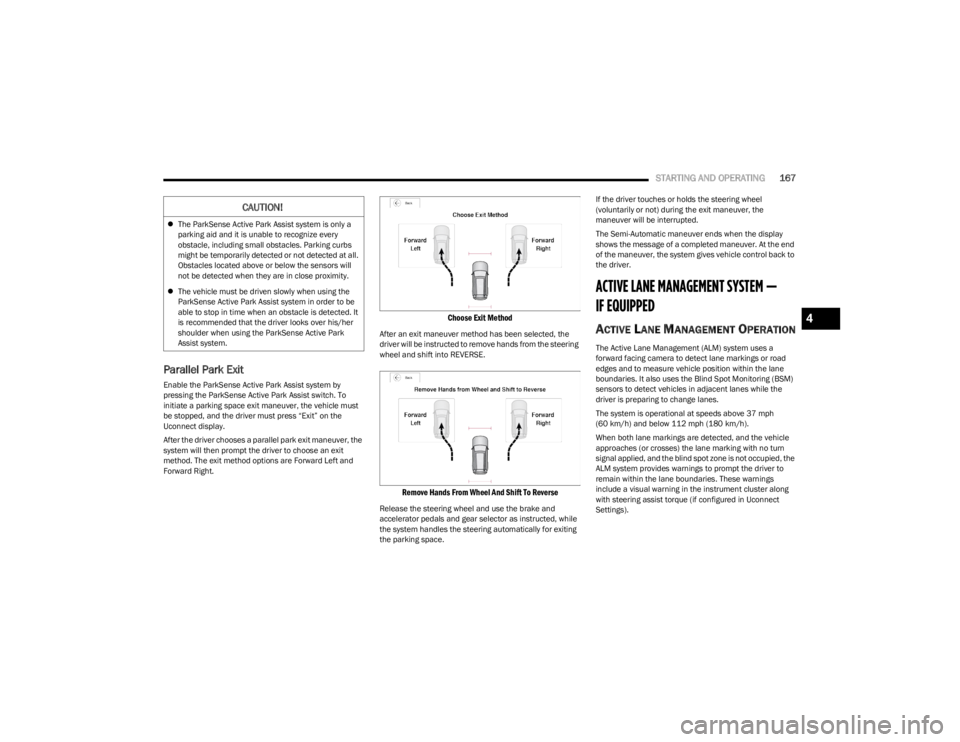
After the driver chooses a parallel park exit maneuver, the
system will then prompt the driver to choose an exit
method. The exit method options are Forward Left and
Forward Right.
Choose Exit Method
After an exit maneuver method has been selected, the
driver will be instructed to remove hands from the steering
wheel and shift into REVERSE.
Remove Hands From Wheel And Shift To Reverse
Release the steering wheel and use the brake and
accelerator pedals and gear selector as instructed, while
the system handles the steering automatically for exiting
the parking space. If the driver touches or holds the steering wheel
(voluntarily or not) during the exit maneuver, the
maneuver will be interrupted.
The Semi-Automatic maneuver ends when the display
shows the message of a completed maneuver. At the end
of the maneuver, the system gives vehicle control back to
the driver.
ACTIVE LANE MANAGEMENT SYSTEM —
IF EQUIPPED
ACTIVE LANE MANAGEMENT OPERATION
The Active Lane Management (ALM) system uses a
forward facing camera to detect lane markings or road
edges and to measure vehicle position within the lane
boundaries. It also uses the Blind Spot Monitoring (BSM)
sensors to detect vehicles in adjacent lanes while the
driver is preparing to change lanes.
The system is operational at speeds above 37 mph
(60 km/h) and below 112 mph (180 km/h).
When both lane markings are detected, and the vehicle
approaches (or crosses) the lane marking with no turn
signal applied, and the blind spot zone is not occupied, the
ALM system provides warnings to prompt the driver to
remain within the lane boundaries. These warnings
include a visual warning in the instrument cluster along
with steering assist torque (if configured in Uconnect
Settings).
CAUTION!
The ParkSense Active Park Assist system is only a
parking aid and it is unable to recognize every
obstacle, including small obstacles. Parking curbs
might be temporarily detected or not detected at all.
Obstacles located above or below the sensors will
not be detected when they are in close proximity.
The vehicle must be driven slowly when using the
ParkSense Active Park Assist system in order to be
able to stop in time when an obstacle is detected. It
is recommended that the driver looks over his/her
shoulder when using the ParkSense Active Park
Assist system.
4
23_WS_OM_EN_USC_t.book Page 167