service JEEP WAGONEER 2023 Owner's Guide
[x] Cancel search | Manufacturer: JEEP, Model Year: 2023, Model line: WAGONEER, Model: JEEP WAGONEER 2023Pages: 396, PDF Size: 15.17 MB
Page 137 of 396

STARTING AND OPERATING135
OPERATION
The indicator lamps 1 through 5 will illuminate to show the
current position of the vehicle. Flashing indicator lamps
will show a position which the system is working to
achieve. When raising, if multiple indicator lamps are
flashing while raising, the highest flashing indicator lamp
is the position the system is working to achieve. When
lowering, if multiple indicators are flashing while lowering
the lowest solid indicator lamp is the position the system
is working to achieve.
Toggle up once moves the suspension one position higher
from the current position, assuming all conditions are met
(i.e., engine running, speed below threshold, etc.). Toggle
up can be pushed multiple times. Each toggle up will raise
the requested level by one position up to a maximum
position of OR2 or the highest position allowed based on
current conditions (i.e., vehicle speed, etc.).
Toggle down once moves the suspension one position
lower from the current level, assuming all conditions are
met (i.e., engine running, doors closed, speed below
threshold, etc.). Toggle down can be pushed multiple
times. Each toggle down will lower the requested level by
one position down to a minimum of Park mode or the
lowest position allowed based on current conditions (i.e.,
vehicle speed, etc.) Automatic height changes will occur based on vehicle
speed and the current vehicle height. The indicator lamps
and instrument cluster display messages will operate the
same for automatic changes and user requested changes.
Off-Road 2 (OR2) – Indicator lamps 1 through 5 will be
illuminated.
Off-Road 1 (OR1) – Indicator lamps 2 through 5 will be
illuminated.
Normal Ride Height (NRH) – Indicator lamps 3 through
5 will be illuminated.
Aero Height – Indicator lamps 4 and 5 will be illumi -
nated.
Entry/Exit Height – Indicator lamp 5 will be illuminated.
Transport Mode – No indicator lamps will be illumi -
nated. Driving or deselecting the mode in the Uconnect
system will disable Transport mode.
Tire/Jack Mode – Indicator lamps 1 and 5 will be illumi -
nated. Driving or deselecting the mode in the Uconnect
system will disable Tire/Jack mode.
Wheel Alignment Mode – Indicator lamps 4 and 5 will
be illuminated. Driving or deselecting the mode in the
Uconnect system will disable Wheel Alignment mode.
FUEL SAVER TECHNOLOGY 5.7L AND 6.4L
ONLY — IF EQUIPPED
This feature offers improved fuel economy by shutting off
four of the engine's eight cylinders during light load and
cruise conditions. The system is automatic with no driver
inputs or additional driving skills required.
NOTE:This system may take some time to return to full function -
ality after a battery disconnect.
POWER STEERING
The electric power steering system is designed to provide
increased vehicle response and ease of maneuverability
in tight spaces. The power steering system adapts to
different driving conditions. If the electric power steering
system experiences a fault that prevents it from providing
assist, you will still have the ability to steer the vehicle
manually.
NOTE:Alternate electric power steering efforts can be selected
through the Uconnect System Úpage 197.
If the Electric Power Steering warning icon is
displayed and the “SERVICE POWER
STEERING” or the “POWER STEERING ASSIST
OFF – SERVICE SYSTEM” message is displayed
within the instrument cluster display, this indicates the
vehicle needs to be taken to an authorized dealer for
service
Úpage 108.
WARNING!
Continued operation with reduced assist could pose a
safety risk to yourself and others. Service should be
obtained as soon as possible.
4
23_WS_OM_EN_USC_t.book Page 135
Page 138 of 396

136STARTING AND OPERATING
NOTE:
Even if the power steering assistance is no longer oper -
ational, it is still possible to steer the vehicle. Under
these conditions there will be a substantial increase in
steering effort, especially at low speeds and during
parking maneuvers.
If the condition persists, see an authorized dealer for
service.
If the Steering icon is displayed and the “POWER
STEERING SYSTEM OVER TEMP” message is displayed on
the instrument cluster screen, they indicate that extreme
steering maneuvers may have occurred which caused an
over temperature condition in the electric power steering
system. Once driving conditions are safe, pull over and let
the vehicle idle for a few moments until the icon and
message turn off.
STOP/START SYSTEM — IF EQUIPPED
The Stop/Start function is developed to reduce fuel
consumption. The system will stop the engine
automatically during a vehicle stop if the required
conditions are met. Releasing the brake pedal or pressing
the accelerator pedal will automatically restart the engine
Úpage 136.
This vehicle has been upgraded with a heavy-duty starter,
enhanced battery, and other upgraded engine parts, to
handle the additional engine starts.
AUTOSTOP MODE
The Stop/Start feature is enabled after every normal
customer engine start. At that time, the system will go into
STOP/START READY and if all other conditions are met,
can go into a STOP/START AUTOSTOP ACTIVE Autostop
mode.
To Activate The Autostop Mode, The Following Must Occur:
The system must be in STOP/START READY state. A
“STOP/START READY” message will be displayed in the
instrument cluster display within the Stop/Start
section
Úpage 99.
The vehicle must be completely stopped.
The gear selector must be in a forward gear and the
brake pedal pressed.
The engine will shut down, the tachometer will move to the
zero position, and the Stop/Start telltale will illuminate
indicating you are in Autostop. Customer settings will be
maintained upon return to an engine-running condition.
POSSIBLE REASONS THE ENGINE DOES
N
OT AUTOSTOP
Prior to engine shut down, the system will check many
safety and comfort conditions to see if they are fulfilled.
Detailed information about the operation of the Stop/Start
system may be viewed in the instrument cluster display
Stop/Start Screen. In the following situations, the engine
will not stop:
Driver’s seat belt is not buckled.
Driver’s door is not closed.
Battery temperature is too warm or cold.
Battery charge is low.
The vehicle is on a steep grade.
Cabin heating or cooling is in process and an accept -
able cabin temperature has not been achieved.
HVAC is set to full defrost mode at a high blower speed.
HVAC is set to MAX A/C.
Engine has not reached normal operating temperature.
The transmission is not in a forward gear.
Hood is open.
Vehicle is in 4WD LOW, or an off-road
Selec-Terrain mode.
Brake pedal is not pressed with sufficient pressure.
Accelerator pedal input.
Engine temperature is too high.
5 mph (8 km/h) threshold has not been achieved from
previous Autostop.
Steering angle is beyond threshold.
It may be possible for the vehicle to be driven several
times without the Stop/Start system going into a
STOP/START READY state under more extreme conditions
of the items listed above.
TO START THE ENGINE WHILE IN
A
UTOSTOP MODE
While in a forward gear, the engine will start when the
brake pedal is released or the throttle pedal is pressed.
The transmission will automatically re-engage upon
engine restart.
23_WS_OM_EN_USC_t.book Page 136
Page 139 of 396
STARTING AND OPERATING137
Conditions That Will Cause The Engine To Start
Automatically While In Autostop Mode:
The transmission selector is moved out of DRIVE.
To maintain cabin temperature comfort.
HVAC is set to full defrost mode.
HVAC system temperature or fan speed is manually
adjusted.
Battery voltage drops too low.
Stop/Start OFF switch is pushed.
A Stop/Start system error occurs.
4WD LOW, or an off-road Selec-Terrain mode is
selected.
An off-road Selec-Terrain mode is selected.
Steering angle is beyond threshold.
TO MANUALLY TURN OFF THE
S
TOP/START SYSTEM
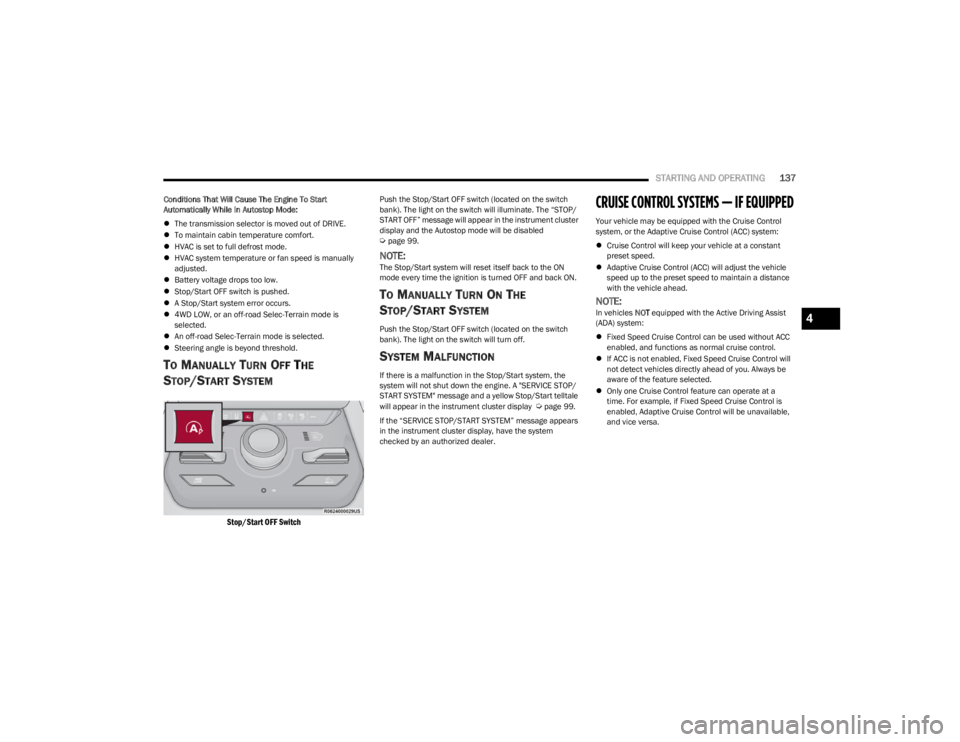
Stop/Start OFF Switch
Push the Stop/Start OFF switch (located on the switch
bank). The light on the switch will illuminate. The “STOP/
START OFF” message will appear in the instrument cluster
display and the Autostop mode will be disabled
Úpage 99.
NOTE:The Stop/Start system will reset itself back to the ON
mode every time the ignition is turned OFF and back ON.
TO MANUALLY TURN ON THE
S
TOP/START SYSTEM
Push the Stop/Start OFF switch (located on the switch
bank). The light on the switch will turn off.
SYSTEM MALFUNCTION
If there is a malfunction in the Stop/Start system, the
system will not shut down the engine. A "SERVICE STOP/
START SYSTEM" message and a yellow Stop/Start telltale
will appear in the instrument cluster display
Úpage 99.
If the “SERVICE STOP/START SYSTEM” message appears
in the instrument cluster display, have the system
checked by an authorized dealer.
CRUISE CONTROL SYSTEMS — IF EQUIPPED
Your vehicle may be equipped with the Cruise Control
system, or the Adaptive Cruise Control (ACC) system:
Cruise Control will keep your vehicle at a constant
preset speed.
Adaptive Cruise Control (ACC) will adjust the vehicle
speed up to the preset speed to maintain a distance
with the vehicle ahead.
NOTE:In vehicles NOT equipped with the Active Driving Assist
(ADA) system:
Fixed Speed Cruise Control can be used without ACC
enabled, and functions as normal cruise control.
If ACC is not enabled, Fixed Speed Cruise Control will
not detect vehicles directly ahead of you. Always be
aware of the feature selected.
Only one Cruise Control feature can operate at a
time. For example, if Fixed Speed Cruise Control is
enabled, Adaptive Cruise Control will be unavailable,
and vice versa.4
23_WS_OM_EN_USC_t.book Page 137
Page 146 of 396

144STARTING AND OPERATING
NOTE:
If your vehicle is at a standstill for longer than two
seconds, the system will hold brake pressure for up to
10 minutes. If no driver action is taken after the
10 minutes, the Electric Park Brake will be applied and
the ACC system will cancel.
While ACC is holding your vehicle at a standstill (or the
vehicle is traveling below 3 mph (5 km/h), and the
driver seat belt is unbuckled or the driver door is
opened, the Electric Park Brake will be applied and the
ACC system will cancel.
Display Warnings And Maintenance
“WIPE FRONT RADAR SENSOR IN FRONT OF
VEHICLE” WARNING
The “ACC Unavailable Wipe Front Radar Sensor” warning
will display and a chime will sound when conditions
temporarily limit system performance.
This most often occurs at times of poor visibility, such as
in snow or heavy rain. The ACC system may also become
temporarily blinded due to obstructions, such as mud, dirt
or ice. In these cases, the instrument cluster display will
display this message and the system will deactivate. This message can sometimes be displayed while driving in
highly reflective areas (i.e. ice and snow, or tunnels with
reflective tiles). The ACC system will recover after the
vehicle has left these areas. Under rare conditions, when
the radar is not tracking any vehicles or objects in its path
this warning may temporarily occur.
NOTE:If the “ACC Unavailable Wipe Front Radar Sensor” warning
is active, Fixed Speed Cruise Control is still available.
If weather conditions are not a factor, the driver should
examine the sensor. It may require cleaning or removal of
an obstruction. The sensor is located in the center of the
vehicle behind the lower grille.
To keep the ACC System operating properly, it is important
to note the following maintenance items:
Always keep the sensor clean. Carefully wipe the
sensor lens with a soft cloth. Be cautious not to
damage the sensor lens.
Do not remove any screws from the sensor. Doing so
could cause an ACC system malfunction or failure and
require a sensor realignment.
If the sensor or front end of the vehicle is damaged due
to a collision, see your authorized dealer for service.
Do not attach or install any accessories near the
sensor, including transparent material or aftermarket
grilles. Doing so could cause an ACC system failure or
malfunction. When the condition that deactivated the system is no
longer present, the system will return to the “Adaptive
Cruise Control Off” state and will resume function by
simply reactivating it.
NOTE:
If the “ACC Unavailable Wipe Front Radar Sensor”
message occurs frequently (e.g. more than once on
every trip) without any snow, rain, mud, or other
obstruction, have the radar sensor realigned at an
authorized dealer.
Installing a snowplow, front-end protector, an after -
market grille or modifying the grille is not recom -
mended. Doing so may block the sensor and inhibit
ACC operation.
“CLEAN FRONT WINDSHIELD” WARNING
The “ACC Limited Functionality Clean Front Windshield”
warning will display, and a chime will sound when
conditions temporarily limit system performance. This
most often occurs at times of poor visibility, such as in
snow or heavy rain and fog. The ACC system may also
become temporarily blinded due to obstructions, such as
mud, dirt, or ice on windshield and fog on the inside of
glass. In these cases, the instrument cluster display will
read “ACC Limited Functionality Clean Front Windshield”
and the system will have degraded performance.
This message can sometimes be displayed while driving in
adverse weather conditions. The ACC system will recover
after the vehicle has left these areas. Under rare
conditions, when the camera is not tracking any vehicles
or objects in its path this warning may temporarily occur.
WARNING!
When the ACC system is resumed, the driver must
ensure that there are no pedestrians, vehicles or
objects in the path of the vehicle. Failure to follow these
warnings can result in a collision and death or serious
personal injury.
23_WS_OM_EN_USC_t.book Page 144
Page 147 of 396
STARTING AND OPERATING145
If weather conditions are not a factor, the driver should
examine the windshield and the camera located on the
back side of the inside rearview mirror. They may require
cleaning or removal of an obstruction.
When the condition that created limited functionality is no
longer present, the system will return to full functionality.
NOTE:If the “ACC Limited Functionality Clean Front Windshield”
message occurs frequently (e.g. more than once on every
trip) without any snow, rain, mud, or other obstruction,
have the windshield and forward facing camera inspected
at an authorized dealer.
SERVICE ACC WARNING
If the system turns off, and the instrument cluster display
reads “ACC Unavailable Service Required” or “Cruise
Unavailable Service Required”, there may be an internal
system fault or a temporary malfunction that limits ACC
functionality. Although the vehicle is still drivable under
normal conditions, ACC will be temporarily unavailable.
If this occurs, try activating ACC again later, following an
ignition cycle. If the problem persists, see an authorized
dealer.
Precautions While Driving With ACC
In certain driving situations, ACC may have detection
issues. In these cases, ACC may brake late or
unexpectedly. The driver needs to stay alert and may need
to intervene. The following are examples of these types of
situations:
TOWING A TRAILER
ACC while towing a trailer is recommended only with an
Integrated Trailer Brake Controller. Aftermarket trailer
brake controllers will not activate the trailer brakes when
ACC is braking.
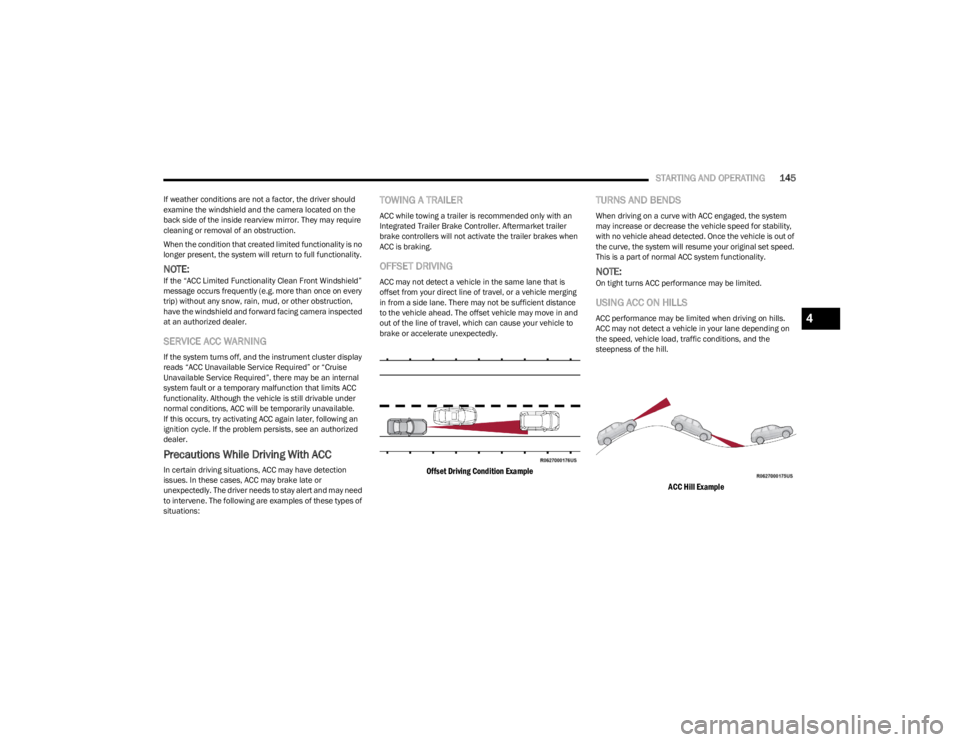
OFFSET DRIVING
ACC may not detect a vehicle in the same lane that is
offset from your direct line of travel, or a vehicle merging
in from a side lane. There may not be sufficient distance
to the vehicle ahead. The offset vehicle may move in and
out of the line of travel, which can cause your vehicle to
brake or accelerate unexpectedly.
Offset Driving Condition Example
TURNS AND BENDS
When driving on a curve with ACC engaged, the system
may increase or decrease the vehicle speed for stability,
with no vehicle ahead detected. Once the vehicle is out of
the curve, the system will resume your original set speed.
This is a part of normal ACC system functionality.
NOTE:On tight turns ACC performance may be limited.
USING ACC ON HILLS
ACC performance may be limited when driving on hills.
ACC may not detect a vehicle in your lane depending on
the speed, vehicle load, traffic conditions, and the
steepness of the hill.
ACC Hill Example
4
23_WS_OM_EN_USC_t.book Page 145
Page 151 of 396
STARTING AND OPERATING149
(Continued)
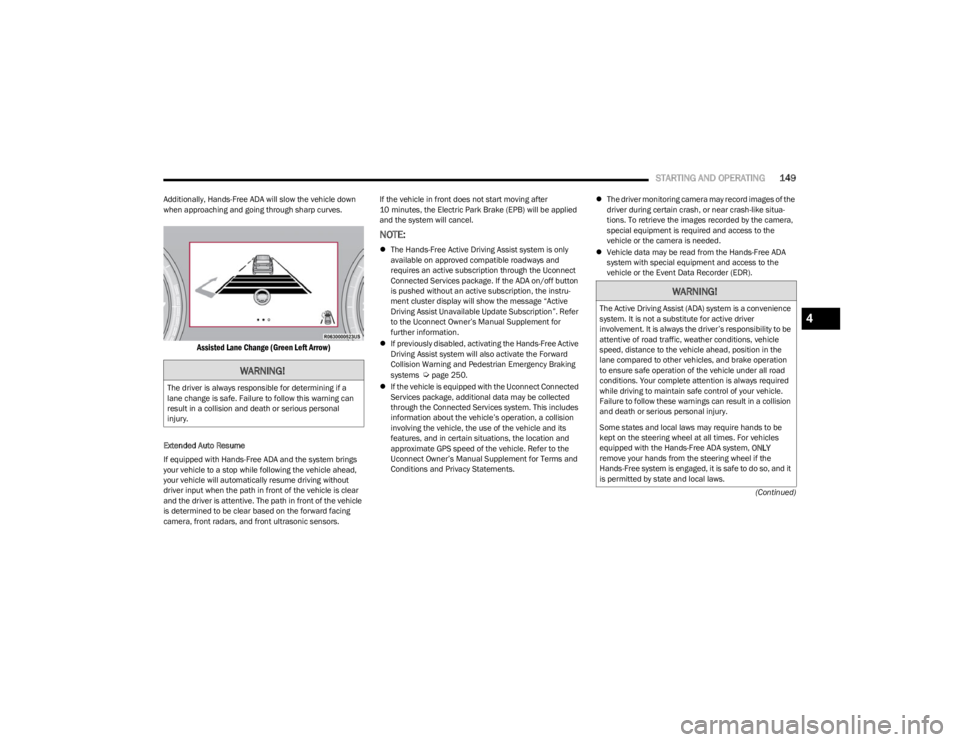
Additionally, Hands-Free ADA will slow the vehicle down
when approaching and going through sharp curves.
Assisted Lane Change (Green Left Arrow)
Extended Auto Resume
If equipped with Hands-Free ADA and the system brings
your vehicle to a stop while following the vehicle ahead,
your vehicle will automatically resume driving without
driver input when the path in front of the vehicle is clear
and the driver is attentive. The path in front of the vehicle
is determined to be clear based on the forward facing
camera, front radars, and front ultrasonic sensors. If the vehicle in front does not start moving after
10 minutes, the Electric Park Brake (EPB) will be applied
and the system will cancel.
NOTE:
The Hands-Free Active Driving Assist system is only
available on approved compatible roadways and
requires an active subscription through the Uconnect
Connected Services package. If the ADA on/off button
is pushed without an active subscription, the instru -
ment cluster display will show the message “Active
Driving Assist Unavailable Update Subscription”. Refer
to the Uconnect Owner’s Manual Supplement for
further information.
If previously disabled, activating the Hands-Free Active
Driving Assist system will also activate the Forward
Collision Warning and Pedestrian Emergency Braking
systems
Úpage 250.
If the vehicle is equipped with the Uconnect Connected
Services package, additional data may be collected
through the Connected Services system. This includes
information about the vehicle’s operation, a collision
involving the vehicle, the use of the vehicle and its
features, and in certain situations, the location and
approximate GPS speed of the vehicle. Refer to the
Uconnect Owner’s Manual Supplement for Terms and
Conditions and Privacy Statements.
The driver monitoring camera may record images of the
driver during certain crash, or near crash-like situa -
tions. To retrieve the images recorded by the camera,
special equipment is required and access to the
vehicle or the camera is needed.
Vehicle data may be read from the Hands-Free ADA
system with special equipment and access to the
vehicle or the Event Data Recorder (EDR).WARNING!
The driver is always responsible for determining if a
lane change is safe. Failure to follow this warning can
result in a collision and death or serious personal
injury.
WARNING!
The Active Driving Assist (ADA) system is a convenience
system. It is not a substitute for active driver
involvement. It is always the driver’s responsibility to be
attentive of road traffic, weather conditions, vehicle
speed, distance to the vehicle ahead, position in the
lane compared to other vehicles, and brake operation
to ensure safe operation of the vehicle under all road
conditions. Your complete attention is always required
while driving to maintain safe control of your vehicle.
Failure to follow these warnings can result in a collision
and death or serious personal injury.
Some states and local laws may require hands to be
kept on the steering wheel at all times. For vehicles
equipped with the Hands-Free ADA system, ONLY
remove your hands from the steering wheel if the
Hands-Free system is engaged, it is safe to do so, and it
is permitted by state and local laws.4
23_WS_OM_EN_USC_t.book Page 149
Page 159 of 396

STARTING AND OPERATING157
Front Park Assist Audible Alerts
ParkSense will turn off the Front Park Assist audible alert
(chime) after approximately three seconds when an
obstacle has been detected, and the vehicle is stationary.
Adjustable Chime Volume Settings
Front and rear chime volume settings can be selected
from the Uconnect system
Úpage 197.
The chime volume settings include low, medium, and high.
ParkSense will retain its last known configuration state
through ignition cycles.
PARKSENSE WARNING DISPLAY
The ParkSense Warning screen is located within the
instrument cluster display Úpage 99. It provides visual
warnings to indicate the distance between the rear fascia/
bumper and/or front fascia/bumper and the detected
obstacle.
ENABLING AND DISABLING PARKSENSE
ParkSense can be enabled and disabled with
the ParkSense switch located on the switch
panel on the forward part of the center console,
in front of the gear selector.
When the ParkSense switch is pushed to enable the
system, the instrument cluster will display the system
state. When the ParkSense switch is pushed to disable the
system, the instrument cluster will display the
“PARKSENSE OFF” message for approximately two
seconds. When the gear selector is moved to REVERSE
and the system is disabled, the instrument cluster display
will display the “PARKSENSE OFF” message for as long as
the vehicle is in REVERSE.
NOTE:When ParkSense is disabled and the gear selector is
moved to the DRIVE position, no warning message will be
displayed.
The ParkSense switch LED will be on when ParkSense is
disabled or requires service. The ParkSense switch LED
will be off when the system is enabled. If the ParkSense
switch is pushed, and the system requires service, the
ParkSense switch LED will blink momentarily, and then the
LED will be on.
SERVICE THE PARKSENSE PARK ASSIST
S
YSTEM
During vehicle start-up, when the ParkSense System has
detected a faulted condition, the instrument cluster will
actuate a single chime, once per ignition cycle, and it will
display a pop-up. The pop-up will include up to two faults.
Possible fault messages are "PARKSENSE UNAVAILABLE
WIPE REAR SENSORS", "PARKSENSE UNAVAILABLE WIPE
FRONT SENSORS", or "PARKSENSE UNAVAILABLE
SERVICE REQUIRED.” The pop-up message will display for
five seconds. When the gear selector is moved to REVERSE and the
system has detected a faulted condition, the instrument
cluster display will display a "PARKSENSE UNAVAILABLE
WIPE REAR SENSORS", "PARKSENSE UNAVAILABLE WIPE
FRONT SENSORS" or "PARKSENSE UNAVAILABLE SERVICE
REQUIRED" pop-up message for five seconds. After five
seconds, a vehicle graphic will be displayed with
"UNAVAILABLE" at either the front or rear sensor location
depending on where the fault is detected. The system will
continue to provide arc alerts for the side that is
functioning properly. These arc alerts will interrupt the
"PARKSENSE UNAVAILABLE WIPE REAR SENSORS",
"PARKSENSE UNAVAILABLE WIPE FRONT SENSORS", or
"PARKSENSE UNAVAILABLE SERVICE REQUIRED"
messages if an object is detected within the five second
pop-up duration. The vehicle graphic will remain displayed
for as long as the vehicle is in REVERSE.
If "PARKSENSE UNAVAILABLE WIPE REAR SENSORS" or
"PARKSENSE UNAVAILABLE WIPE FRONT SENSORS"
appears in the instrument cluster display make sure the
outer surface and the underside of the rear fascia/
bumper and/or front fascia/bumper is clean and clear of
snow, ice, mud, dirt or other obstruction and then cycle the
ignition. If the message continues to appear, see an
authorized dealer.
If the "PARKSENSE UNAVAILABLE SERVICE REQUIRED"
message appears in the instrument cluster display, see an
authorized dealer.
CLEANING THE PARKSENSE SYSTEM
Clean the ParkSense sensors with water, car wash soap
and a soft cloth. Do not use rough or hard cloths. Do not
scratch or poke the sensors.
4
23_WS_OM_EN_USC_t.book Page 157
Page 160 of 396

158STARTING AND OPERATING
PARKSENSE SYSTEM USAGE
P
RECAUTIONS
NOTE:
Ensure that the front and rear fascias/bumpers are
free of snow, ice, mud, dirt and debris to keep the
ParkSense system operating properly.
Jackhammers, large trucks, and other vibrations could
affect the performance of ParkSense.
When you turn ParkSense off, the instrument cluster
will display “PARKSENSE OFF.” Furthermore, once you
turn ParkSense off, it remains off until you turn it on
again, even if you cycle the ignition.
When you move the gear selector to the REVERSE posi -
tion and ParkSense is turned off, the instrument
cluster will display “PARKSENSE OFF” for as long as the
vehicle is in REVERSE.
ParkSense, when on, will reduce the volume of the
radio when it is sounding a tone.
Clean the ParkSense sensors regularly, taking care not
to scratch or damage them. The sensors must not be
covered with ice, snow, slush, mud, dirt or debris.
Failure to do so can result in the system not working
properly. The ParkSense system might not detect an
obstacle behind or in front of the fascia/bumper, or it
could provide a false indication that an obstacle is
behind or in front of the fascia/bumper.
Use the ParkSense switch to turn the ParkSense
system off if objects such as bicycle carriers, trailer
hitches, etc. are placed within 12 inches (30 cm) of the
rear fascia/bumper. Failure to do so can result in the
system misinterpreting a close object as a sensor
problem, causing the “PARKSENSE UNAVAILABLE
SERVICE REQUIRED” message to be displayed in the
instrument cluster.
ParkSense should be disabled when the liftgate is in
the open position. An opened liftgate could provide a
false indication that an obstacle is behind the vehicle.
SIDE DISTANCE WARNING SYSTEM —
I
F EQUIPPED
The Side Distance Warning system detects the presence
of side obstacles near the vehicle using the parking
sensors located in the front and rear fascia/bumpers.
Side Distance Warning Display
The Side Distance Warning screen will only be displayed if
this feature is enabled within Uconnect Settings
Úpage 197.
The system warns the driver with an acoustic signal and,
when enabled, with visual indications on the instrument
cluster display.
WARNING!
Drivers must be careful when backing up even when
using ParkSense. Always check carefully behind your
vehicle, look behind you, and be sure to check for
pedestrians, animals, other vehicles, obstructions,
and blind spots before backing up. You are respon -
sible for safety and must continue to pay attention to
your surroundings. Failure to do so can result in
serious injury or death.
Before using ParkSense, it is strongly recommended
that the ball mount and hitch ball assembly be
disconnected from the vehicle when the vehicle is
not used for towing. Failure to do so can result in
injury or damage to vehicles or obstacles because
the hitch ball will be much closer to the obstacle than
the rear fascia when the vehicle sounds the contin -
uous tone. Also, the sensors could detect the ball
mount and hitch ball assembly, depending on its size
and shape, giving a false indication that an obstacle
is behind the vehicle.
CAUTION!
ParkSense is only a parking aid and it is unable to
recognize every obstacle, including small obstacles.
Parking curbs might be temporarily detected or not
detected at all. Obstacles located above or below the
sensors will not be detected when they are in close
proximity.
The vehicle must be driven slowly when using Park -
Sense in order to be able to stop in time when an
obstacle is detected. It is recommended that the
driver looks over his/her shoulder when using
ParkSense.
23_WS_OM_EN_USC_t.book Page 158
Page 176 of 396

174STARTING AND OPERATING
(Continued)
The system may not be able to detect pedestrians or
animals in the following situations:
Pedestrian/animal is outside of the detection range
Pedestrian/animal is fully or partially covered
Pedestrian/animal does not reach the minimum detec -
tion height
NOTE:Other objects on the road that meet the height/shape/
temperature (e.g. sun exposure) of pedestrians/animals
may be detected and classified as targets.
SERVICE THE NIGHT VISION SYSTEM
When service conditions are present, the following fault
messages may appear in the instrument cluster display
when the vehicle is placed in the ON position.
If "Night Vision Unavailable Sensor Blocked" appears in
the instrument cluster display, make sure the camera is
clear of snow, ice, mud, dirt or other debris. The camera is
located in the upper fascia/bumper, inside the driver side
grille slot. Clean the camera using a soft wet cloth or by
pressing the Clean Camera button in the Uconnect
system. If the message continues to appear after cycling
the ignition, see an authorized dealer.
If “Night Vision Temporarily Unavailable” or “Night Vision
Unavailable Service Required" appears in the instrument
cluster display after cycling the ignition, see an authorized
dealer.
The camera must be properly aligned to work correctly.
If the camera needs adjustment, see an authorized
dealer. Do not attempt to adjust the camera yourself.
NOTE:Alignment and performance of the Night Vision may be
affected by aftermarket modifications. Mopar® parts
should be used to get the optimal performance of this
system.
NIGHT VISION SYSTEM LIMITATIONS
The Night Vision display is deactivated under the following
conditions:
Vehicle is shifted into REVERSE
The ignition is not in the ON/RUN position
The headlights are off and the vehicle speed is greater
than 8 mph (13 km/h)
The Night Vision display warnings are suppressed under
the following conditions:
Daylight hours
Temperatures above 86°F (30°C)
The system may not be fully functional in the following
situations:
On steep hills
On tight curves of the road
If the camera/sensor is damaged or blocked by dirt,
snow, ice, or other debris
In poor visibility conditions such as heavy fog, rain,
snow, or other weather conditions
If the vehicle has been modified with aftermarket parts
and/or accessories
NOTE:If any of these conditions are present, the system does not
need service.
WARNING!
Night Vision can only detect pedestrians and animals
located within the range of the infrared camera.
Night Vision may not detect pedestrians or animals
and highlight them if:
They are not in an upright position, for example
if they are sitting or lying down, or if the pedes -
trian is riding a bicycle
The figure in the display appears incomplete, for
example because the pedestrian or animal is
partially behind a vehicle
The pedestrian/animal is not directly ahead in
the coverage area
The pedestrian/animal is part of a group
The pedestrian is wearing certain types of
clothing
The pedestrian/animal is moving too quickly
through the field of view
The sensor is blocked by dirt, rain, snow, or ice
WARNING!
23_WS_OM_EN_USC_t.book Page 174
Page 197 of 396

STARTING AND OPERATING195
If you stall or begin to lose forward motion while climbing
a steep hill, allow your vehicle to come to a stop and
immediately apply the brakes. Restart the engine, and
shift into REVERSE (R). Back slowly down the hill, allowing
the compression braking of the engine to help regulate
your speed. If the brakes are required to control vehicle
speed, apply them lightly and avoid locking or skidding the
tires.
Remember, never drive diagonally across a hill. Always
drive straight up or down.
If the wheels start to slip as you approach the crest of a
hill, ease off the accelerator and maintain forward motion
by turning the front wheels slowly. This may provide a fresh
“bite” into the surface and will usually provide traction to
complete the climb.Traction Downhill
When descending mountains or hills, use Hill Descent
Control or Selec-Speed Control to avoid repeated heavy
braking.
If not equipped with Hill Descent Control or Selec-Speed
Control use the following procedure:
Shift the transmission into a low gear, and the transfer
case into 4WD LOW range. Let the vehicle go slowly down
the hill with all four wheels turning against engine
compression drag. This will permit you to control the
vehicle speed and direction.
When descending mountains or hills, repeated braking
can cause brake fade with loss of braking control. Avoid
repeated heavy braking by downshifting the transmission
whenever possible.
After Driving Off-Road
Off-road operation puts more stress on your vehicle than
does most on-road driving. After going off-road, it is always
a good idea to check for damage. That way you can get any
problems taken care of right away and have your vehicle
ready when you need it.
Completely inspect the underbody of your vehicle.
Check tires, body structure, steering, suspension, and
exhaust system for damage.
Inspect the radiator for mud and debris and clean as
required.
Check threaded fasteners for looseness, particularly
on the chassis, drivetrain components, steering, and
suspension. Retighten them, if required, and torque to
the values specified in the Service Manual.
Check for accumulations of plants or brush. These
things could be a fire hazard. They might hide damage
to fuel lines, brake hoses, axle pinion seals, and
propeller shafts.
After extended operation in mud, sand, water, or
similar dirty conditions, have the radiator, fan, brake
rotors, wheels, brake linings, and axle yokes inspected
and cleaned as soon as possible.
If you experience unusual vibration after driving in
mud, slush or similar conditions, check the wheels for
impacted material. Impacted material can cause a
wheel imbalance and freeing the wheels of it will
correct the situation.
WARNING!
If the engine stalls, you lose forward motion, or cannot
make it to the top of a steep hill or grade, never attempt
to turn around. To do so may result in tipping and rolling
the vehicle. Always back carefully straight down a hill in
REVERSE gear. Never back down a hill in NEUTRAL
using only the brake.
WARNING!
Abrasive material in any part of the brakes may cause
excessive wear or unpredictable braking. You might not
have full braking power when you need it to prevent a
collision. If you have been operating your vehicle in dirty
conditions, get your brakes checked and cleaned as
necessary.
4
23_WS_OM_EN_USC_t.book Page 195