clutch JEEP WRANGLER 2023 User Guide
[x] Cancel search | Manufacturer: JEEP, Model Year: 2023, Model line: WRANGLER, Model: JEEP WRANGLER 2023Pages: 396, PDF Size: 25.15 MB
Page 157 of 396

STARTING AND OPERATING155
If ACC is set when the vehicle speed is below 20 mph
(32 km/h), the set speed will default to 20 mph
(32 km/h).
NOTE:Fixed Speed Cruise Control cannot be set below 20 mph
(32 km/h).
If either system is set when the vehicle speed is above
20 mph (32 km/h), the set speed shall be the current speed of the vehicle.
On vehicles equipped with a manual transmission, the
ACC system cannot be set when the vehicle speed is below
20 mph (32 km/h) or when the vehicle is in FIRST gear.
NOTE:
Keeping your foot on the accelerator pedal can cause
the vehicle to continue to accelerate beyond the set
speed. If this occurs, the message “DRIVER OVERRIDE”
will display in the instrument cluster display.
If you continue to accelerate beyond the set speed
while ACC is enabled, the system will not be controlling
the distance between your vehicle and the vehicle
ahead. The vehicle speed will only be determined by
the position of the accelerator pedal.
To Cancel
The following conditions cancel the ACC or Fixed Speed
Cruise Control systems:
The brake pedal is applied
The CANC button is pushed
The Anti-Lock Brake System (ABS) activates
The gear selector is removed from the DRIVE position
The Electronic Stability Control/Traction Control
System (ESC/TCS) activates
The vehicle parking brake is applied
The braking temperature exceeds normal range (over -
heated)
The Trailer Sway Control (TSC) activates
The vehicle speed is less than 15 mph (24 km/h)
(manual transmission only)
The clutch is pressed for more than 10 seconds
(manual transmission only)
The vehicle is placed in NEUTRAL for more than
10 seconds (manual transmission only)
The driver shifts to FIRST gear (manual transmission
only)
The following conditions will only cancel the ACC system:
Driver seat belt is unbuckled at low speeds
Driver door is opened at low speeds
To Turn Off
The system will turn off and erase the set speed in
memory if:
The Adaptive Cruise Control (ACC) on/off button is
pushed
The Fixed Speed Cruise Control on/off button is pushed
The ignition is placed in the OFF position
4WD Low is engaged
To Resume
If there is a set speed in the memory, push the RES button
and then remove your foot from the accelerator pedal. The
instrument cluster display will show the last set speed. Resume can be used at any speed above 20 mph
(32 km/h) when only Fixed Speed Cruise Control is being
used.
Resume can be used at any speed above 0 mph (0 km/h)
when ACC is active.
NOTE:
While in ACC mode, when the vehicle comes to a
complete stop longer than two seconds, the system will
cancel. The driver will have to apply the brakes to keep
the vehicle at a standstill.
ACC cannot be resumed if there is a stationary vehicle
in front of your vehicle in close proximity.
To Vary The Speed Setting
To Increase Or Decrease The Set Speed
After setting a speed, you can increase the set speed by
pushing the SET (+) button, or decrease speed by pushing
the SET (-) button.
WARNING!
The Resume function should only be used if traffic and
road conditions permit. Resuming a set speed that is
too high or too low for prevailing traffic and road condi -
tions could cause the vehicle to accelerate or deceler -
ate too sharply for safe operation. Failure to follow
these warnings can result in a collision and death or
serious personal injury.
4
23_JL_OM_EN_USC_t.book Page 155
Page 177 of 396
STARTING AND OPERATING175
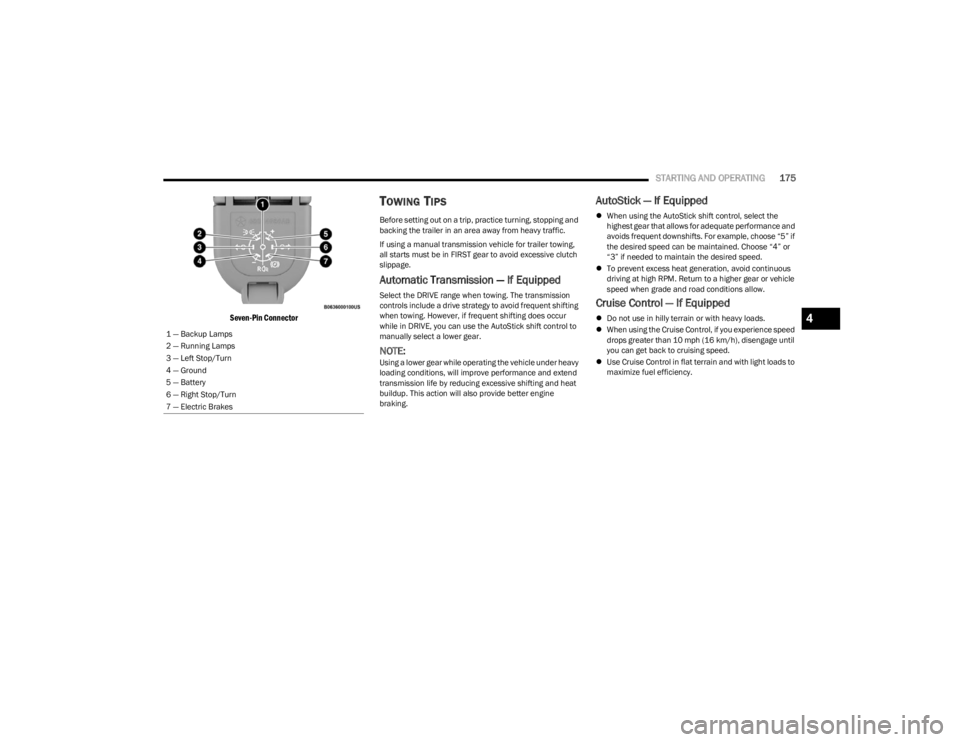
Seven-Pin Connector
TOWING TIPS
Before setting out on a trip, practice turning, stopping and
backing the trailer in an area away from heavy traffic.
If using a manual transmission vehicle for trailer towing,
all starts must be in FIRST gear to avoid excessive clutch
slippage.
Automatic Transmission — If Equipped
Select the DRIVE range when towing. The transmission
controls include a drive strategy to avoid frequent shifting
when towing. However, if frequent shifting does occur
while in DRIVE, you can use the AutoStick shift control to
manually select a lower gear.
NOTE:Using a lower gear while operating the vehicle under heavy
loading conditions, will improve performance and extend
transmission life by reducing excessive shifting and heat
buildup. This action will also provide better engine
braking.
AutoStick — If Equipped
When using the AutoStick shift control, select the
highest gear that allows for adequate performance and
avoids frequent downshifts. For example, choose “5” if
the desired speed can be maintained. Choose “4” or
“3” if needed to maintain the desired speed.
To prevent excess heat generation, avoid continuous
driving at high RPM. Return to a higher gear or vehicle
speed when grade and road conditions allow.
Cruise Control — If Equipped
Do not use in hilly terrain or with heavy loads.
When using the Cruise Control, if you experience speed
drops greater than 10 mph (16 km/h), disengage until
you can get back to cruising speed.
Use Cruise Control in flat terrain and with light loads to
maximize fuel efficiency.
1 — Backup Lamps
2 — Running Lamps
3 — Left Stop/Turn
4 — Ground
5 — Battery
6 — Right Stop/Turn
7 — Electric Brakes4
23_JL_OM_EN_USC_t.book Page 175
Page 179 of 396

STARTING AND OPERATING177
Shifting Into (N) Neutral
Use the following procedure to prepare your vehicle for
recreational towing:
1. Bring the vehicle to a complete stop on level ground.
2. Press and hold the brake pedal. 3. Shift the automatic transmission into NEUTRAL or
press the clutch pedal on a manual transmission.
4. Turn the engine off.
5. Shift the transfer case lever into (N) Neutral.
6. Start the engine.
7. Shift the transmission into REVERSE.
8. Release the brake pedal (and clutch pedal on manual transmissions) for five seconds and ensure that there
is no vehicle movement.
9. Repeat steps seven and eight with automatic transmission in DRIVE or manual transmission in
FIRST gear.
10. Turn the engine off.
11. Firmly apply the parking brake.
12. Shift the transmission into PARK or place manual transmission in gear (NOT in NEUTRAL).
13. Attach the vehicle to the tow vehicle using a suitable tow bar.
14. Release the parking brake.
Shifting Out of (N) Neutral
Use the following procedure to prepare your vehicle for
normal usage.
1. Bring the vehicle to a complete stop, leaving it connected to the tow vehicle.
2. Firmly apply the parking brake.
3. Start the engine.
4. Press and hold the brake pedal.
5. Shift the transmission into NEUTRAL.
6. Turn the engine off.
7. Shift the transfer case lever to the desired position.
NOTE:When shifting the transfer case out of (N) Neutral, the
engine should remain off to avoid gear clash.
8. Shift the automatic transmission into PARK, or place manual transmission in NEUTRAL.
9. Release the brake pedal.
10. Disconnect vehicle from the tow vehicle.
11. Start the engine.
12. Press and hold the brake pedal.
13. Release the parking brake.
14. Shift the transmission into gear, release the brake pedal (and clutch pedal on manual transmissions),
and check that the vehicle operates normally.
Do not use a fascia/bumper-mounted clamp-on tow
bar on your vehicle. The bumper face bar will be
damaged.
WARNING!
You or others could be injured or killed if you leave the
vehicle unattended with the transfer case in the (N)
Neutral position without first fully engaging the parking
brake. The transfer case (N) Neutral position
disengages both the front and rear driveshafts from the
powertrain, and will allow the vehicle to roll, even if the
automatic transmission is in PARK (or manual
transmission is in gear). The parking brake should
always be applied when the driver is not in the vehicle.
CAUTION!
It is necessary to follow these steps to be certain that
the transfer case is fully in (N) Neutral before
recreational towing to prevent damage to internal parts.
CAUTION!
CAUTION!
Damage to the transmission may occur if the
transmission is shifted into PARK with the transfer case
in (N) Neutral and the engine running. With the transfer
case in (N) Neutral ensure that the engine is OFF before
shifting the transmission into PARK.
4
23_JL_OM_EN_USC_t.book Page 177
Page 185 of 396

STARTING AND OPERATING183
CROSSING DITCHES, STREAMS, SHALLOW
RIVERS OR OTHER FLOWING WATER
Flowing water can be extremely dangerous. Never attempt
to cross a fast running stream or river even in shallow
water. Fast moving water can easily push your vehicle
downstream, sweeping it out of control. Even in very
shallow water, a high current can still wash the dirt out
from around your tires putting you and your vehicle in
jeopardy. There is still a high risk of personal injury and
vehicle damage with slower water currents in depths
greater than the vehicle's running ground clearance. You
should never attempt to cross flowing water which is
deeper than the vehicle's running ground clearance. Even
the slowest current can push the heaviest vehicle
downstream and out of control if the water is deep enough
to push on the large surface area of the vehicle's body.
Before you proceed, determine the speed of the current,
the water's depth, approach angle, bottom condition and
if there are any obstacles. Then cross at an angle heading
slightly upstream using the low and slow technique.
After Driving Off-Road
Off-road operation puts more stress on your vehicle than
does most on-road driving. After going off-road, it is always
a good idea to check for damage. That way you can get any
problems taken care of right away and have your vehicle
ready when you need it.
Completely inspect the underbody of your vehicle.
Check tires, body structure, steering, suspension, and
exhaust system for damage.
Inspect the radiator for mud and debris and clean as
required.
Check threaded fasteners for looseness, particularly
on the chassis, drivetrain components, steering, and
suspension. Retighten them, if required, and torque to
the values specified in the Service Manual.
Check for accumulations of plants or brush. These
things could be a fire hazard. They might hide damage
to fuel lines, brake hoses, axle pinion seals, and
propeller shafts.
After extended operation in mud, sand, water, or
similar dirty conditions, have the radiator, fan, brake
rotors, wheels, brake linings, and axle yokes inspected
and cleaned as soon as possible.
NOTE:Inspect the clutch vent holes in the manual transmission
bell housing for mud and debris and clean as required.
If you experience unusual vibration after driving in
mud, slush or similar conditions, check the wheels for
impacted material. Impacted material can cause a
wheel imbalance and freeing the wheels of it will
correct the situation.
WARNING!
Never drive through fast moving deep water. It can push
your vehicle downstream, sweeping it out of control.
This could put you and your passengers at risk of injury
or drowning.
WARNING!
Abrasive material in any part of the brakes may cause
excessive wear or unpredictable braking. You might not
have full braking power when you need it to prevent a
collision. If you have been operating your vehicle in dirty
conditions, get your brakes checked and cleaned as
necessary.
4
23_JL_OM_EN_USC_t.book Page 183
Page 251 of 396

SAFETY249
Feedback To The Driver
The instrument cluster has an HDC icon and the HDC
switch has an indicator light, which offers feedback to the
driver about the state HDC is in.
The cluster icon and switch indicator light will illumi -
nate and remain on solid when HDC is enabled or acti -
vated. This is the normal operating condition for HDC.
The cluster icon and switch indicator light will flash for
several seconds then extinguish when the driver pushes
the HDC switch but enable conditions are not met.
The cluster icon and switch indicator light will flash for
several seconds then extinguish when HDC disables
due to excess speed.
The cluster icon and switch indicator light will flash
when HDC deactivates due to overheated brakes. The
flashing will stop and HDC will activate again once the
brakes have cooled sufficiently.
Hill Start Assist (HSA)
The HSA system is designed to mitigate roll back from a
complete stop while on an incline. If the driver releases
the brake while stopped on an incline, HSA will continue to
hold the brake pressure for a short period. If the driver
does not apply the throttle before this time expires, the
system will release brake pressure and the vehicle will roll
down the hill as normal. The following conditions must be met in order for HSA to
activate:
The feature must be enabled.
The vehicle must be stopped.
The parking brake must be off.
The driver door must be closed. (If the doors are
attached, then the door must be closed. If the doors
are detached then the driver's seat belt must be
buckled.)
The vehicle must be on a sufficient grade.
The gear selection must match vehicle uphill direction
(i.e., vehicle facing uphill is in forward gear; vehicle
backing uphill is in REVERSE gear).
HSA will work in REVERSE gear and all forward gears.
The system will not activate if the transmission is in
PARK or NEUTRAL. For vehicles equipped with a
manual transmission, if the clutch is pressed, HSA will
remain active.
Disabling And Enabling HSA
This feature can be turned on or turned off. To change the
current setting, refer to
Ú
page 184 for further information.
Towing With HSA
HSA will also provide assistance to mitigate roll back while
towing a trailer.
Rain Brake Support (RBS)
RBS may improve braking performance in wet conditions.
It will periodically apply a small amount of brake pressure
to remove any water buildup on the front brake rotors. It
functions when the windshield wipers are in LO or HI
speed. When RBS is active, there is no notification to the
driver and no driver interaction is required.
WARNING!
HDC is only intended to assist the driver in controlling
vehicle speed when descending hills. The driver must
remain attentive to the driving conditions and is
responsible for maintaining a safe vehicle speed.WARNING!
There may be situations where the Hill Start Assist
(HSA) will not activate and slight rolling may occur, such
as on minor hills or with a loaded vehicle, or while pull -
ing a trailer. HSA is not a substitute for active driving
involvement. It is always the driver’s responsibility to be
attentive to distance to other vehicles, people, and
objects, and most importantly brake operation to
ensure safe operation of the vehicle under all road con -
ditions. Your complete attention is always required
while driving to maintain safe control of your vehicle.
Failure to follow these warnings can result in a collision
or serious personal injury.
WARNING!
If you use a trailer brake controller with your trailer,
the trailer brakes may be activated and deactivated
with the brake switch. If so, there may not be enough
brake pressure to hold both the vehicle and the
trailer on a hill when the brake pedal is released. In
order to avoid rolling down an incline while resuming
acceleration, manually activate the trailer brake or
apply more vehicle brake pressure prior to releasing
the brake pedal.
HSA is not a parking brake. Always apply the parking
brake fully when exiting your vehicle. Also, be certain
to place the transmission in PARK (P).
Failure to follow these warnings can result in a colli -
sion or serious personal injury.
6
23_JL_OM_EN_USC_t.book Page 249
Page 291 of 396
SAFETY289
(Continued)
Air Bag Warning Light
The Air Bag Warning Light will turn on for four to
eight seconds as a bulb check when the
ignition switch is first placed in the ON/RUN
position. If the light is either not on during
starting, stays on, or turns on while driving, have the
system inspected at an authorized dealer as soon as
possible. This light will illuminate with a single chime when
a fault with the Air Bag Warning Light has been detected,
it will stay on until the fault is removed. If the light comes
on intermittently or remains on while driving, have an
authorized dealer service the vehicle immediately. See
Úpage 261 for further information.
Defroster
Check operation by selecting the defrost mode and place
the blower control on high speed. You should be able to
feel the air directed against the windshield. See an
authorized dealer for service if your defroster is
inoperable.
Floor Mat Safety Information
Always use floor mats designed to fit your vehicle. Only use
a floor mat that does not interfere with the operation of the
pedal assemblies. Only use a floor mat that is securely
attached using the floor mat fasteners so it cannot slip out
of position and interfere with the pedal assemblies or
impair safe operation of your vehicle in other ways.
WARNING!
An improperly attached, damaged, folded, or stacked
floor mat, or damaged floor mat fasteners may cause
your floor mat to interfere with the accelerator, brake, or
clutch pedals and cause a loss of vehicle control. To
prevent SERIOUS INJURY or DEATH:
ALWAYS securely attach your floor mat
using the floor mat fasteners. DO NOT install
your floor mat upside down or turn your floor
mat over. Lightly pull to confirm mat is
secured using the floor mat fasteners on a regular basis.
ALWAYS REMOVE THE EXISTING FLOOR
MAT FROM THE VEHICLE before installing
any other floor mat. NEVER install or stack an
additional floor mat on top of an existing floor
mat.
ONLY install floor mats designed to fit your vehicle.
NEVER install a floor mat that cannot be properly
attached and secured to your vehicle. If a floor mat
needs to be replaced, only use a FCA approved floor
mat for the specific make, model, and year of your
vehicle.
ONLY use the driver’s side floor mat on the driver’s
side floor area. To check for interference, with the
vehicle properly parked with the engine off, fully
depress the accelerator, the brake, and the clutch
pedal (if present) to check for interference. If your
floor mat interferes with the operation of any pedal, or
is not secure to the floor, remove the floor mat from
the vehicle and place the floor mat in your trunk.
ONLY use the passenger’s side floor mat on the
passenger’s side floor area.
ALWAYS make sure objects cannot fall or slide into
the driver’s side floor area when the vehicle is
moving. Objects can become trapped under acceler -
ator, brake, or clutch pedals and could cause a loss
of vehicle control.
NEVER place any objects under the floor mat (e.g.,
towels, keys, etc.). These objects could change the
position of the floor mat and may cause interference
with the accelerator, brake, or clutch pedals.
If the vehicle carpet has been removed and
re-installed, always properly attach carpet to the floor
and check the floor mat fasteners are secure to the
vehicle carpet. Fully depress each pedal to check for
interference with the accelerator, brake, or clutch
pedals then re-install the floor mats.
It is recommended to only use mild soap and water
to clean your floor mats. After cleaning, always check
your floor mat has been properly installed and is
secured to your vehicle using the floor mat fasteners
by lightly pulling mat.
WARNING!
6
23_JL_OM_EN_USC_t.book Page 289
Page 304 of 396
302IN CASE OF EMERGENCY
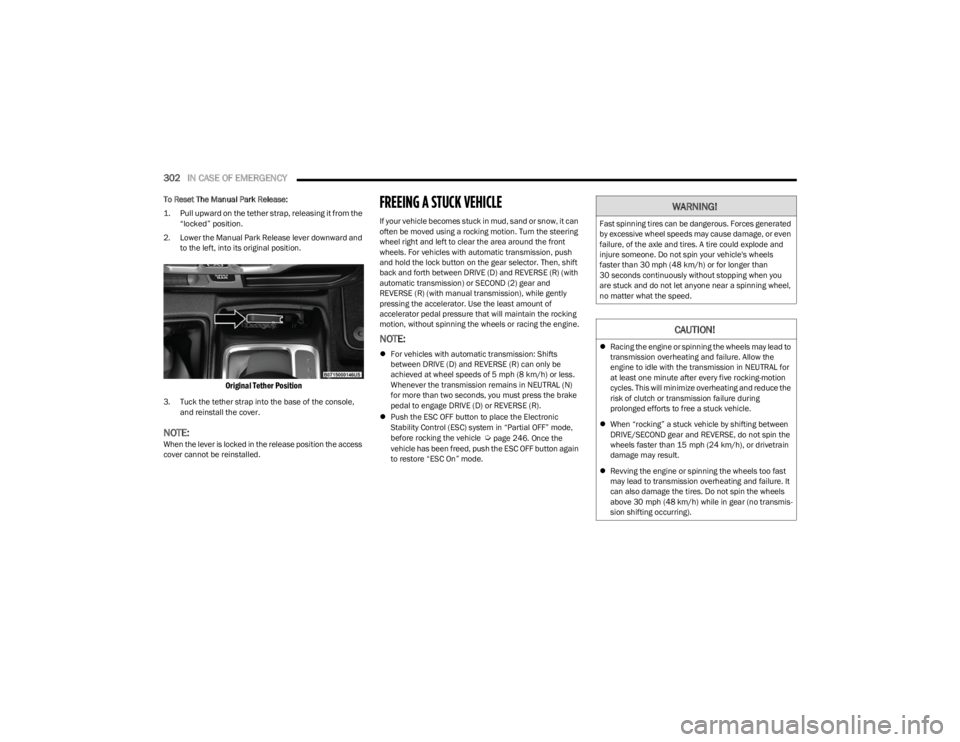
To Reset The Manual Park Release:
1. Pull upward on the tether strap, releasing it from the
“locked” position.
2. Lower the Manual Park Release lever downward and to the left, into its original position.
Original Tether Position
3. Tuck the tether strap into the base of the console, and reinstall the cover.
NOTE:When the lever is locked in the release position the access
cover cannot be reinstalled.
FREEING A STUCK VEHICLE
If your vehicle becomes stuck in mud, sand or snow, it can
often be moved using a rocking motion. Turn the steering
wheel right and left to clear the area around the front
wheels. For vehicles with automatic transmission, push
and hold the lock button on the gear selector. Then, shift
back and forth between DRIVE (D) and REVERSE (R) (with
automatic transmission) or SECOND (2) gear and
REVERSE (R) (with manual transmission), while gently
pressing the accelerator. Use the least amount of
accelerator pedal pressure that will maintain the rocking
motion, without spinning the wheels or racing the engine.
NOTE:
For vehicles with automatic transmission: Shifts
between DRIVE (D) and REVERSE (R) can only be
achieved at wheel speeds of 5 mph (8 km/h) or less.
Whenever the transmission remains in NEUTRAL (N)
for more than two seconds, you must press the brake
pedal to engage DRIVE (D) or REVERSE (R).
Push the ESC OFF button to place the Electronic
Stability Control (ESC) system in “Partial OFF” mode,
before rocking the vehicle
Úpage 246. Once the
vehicle has been freed, push the ESC OFF button again
to restore “ESC On” mode.
WARNING!
Fast spinning tires can be dangerous. Forces generated
by excessive wheel speeds may cause damage, or even
failure, of the axle and tires. A tire could explode and
injure someone. Do not spin your vehicle's wheels
faster than 30 mph (48 km/h) or for longer than
30 seconds continuously without stopping when you
are stuck and do not let anyone near a spinning wheel,
no matter what the speed.
CAUTION!
Racing the engine or spinning the wheels may lead to
transmission overheating and failure. Allow the
engine to idle with the transmission in NEUTRAL for
at least one minute after every five rocking-motion
cycles. This will minimize overheating and reduce the
risk of clutch or transmission failure during
prolonged efforts to free a stuck vehicle.
When “rocking” a stuck vehicle by shifting between
DRIVE/SECOND gear and REVERSE, do not spin the
wheels faster than 15 mph (24 km/h), or drivetrain
damage may result.
Revving the engine or spinning the wheels too fast
may lead to transmission overheating and failure. It
can also damage the tires. Do not spin the wheels
above 30 mph (48 km/h) while in gear (no transmis -
sion shifting occurring).
23_JL_OM_EN_USC_t.book Page 302
Page 339 of 396

SERVICING AND MAINTENANCE337
F03 –5 Amp TanIntelligent Battery Sensor (IBS)
F04 –20 Amp Yellow Fuel Pump MTR/FPCM
25 Amp Clear Fuel Pmp (6.4) *
F05 –5 Amp TanSecurity Gateway
F06 ––Spare *
F07 –15 Amp BlueLTR Coolant Pump *
F08 –15 Amp BlueTCM-8HP CYGNUS
F09 ––Spare *
F10 –15 Amp BlueKIN / RF HUB / ESCL
F11 –10 Amp RedUCI Port (USB & AUX)
F12 –25 Amp ClearHIFI Amplifier
F13 ––Spare *
F14 ––Spare *
F15 –15 Amp BlueIPC / Switch Bank-HD Elec
F16 ––Spare *
F17 ––Spare *
F18 –10 Amp RedAir Conditioning Clutch (AC CLUTCH)
F19 ––Spare *
F20 30 Amp Pink –Central Body Controller (CBC) 1-INTERIOR LIGHTS
F21 –20 Amp Yellow REAR WIPER
F22 –10 Amp RedEngine Control Module (ECM)/Powertrain Control Module (PCM)/Motor
Generator Unit (MGU) WAKE UP/Power Pack Unit (PPU) WAKE UP
F23 –10 Amp RedECM / PCM
F24 ––Spare *
Cavity Cartridge Fuse Micro Fuse Description
* If Equipped
8
23_JL_OM_EN_USC_t.book Page 337
Page 365 of 396
SERVICING AND MAINTENANCE363
CARPET REMOVAL
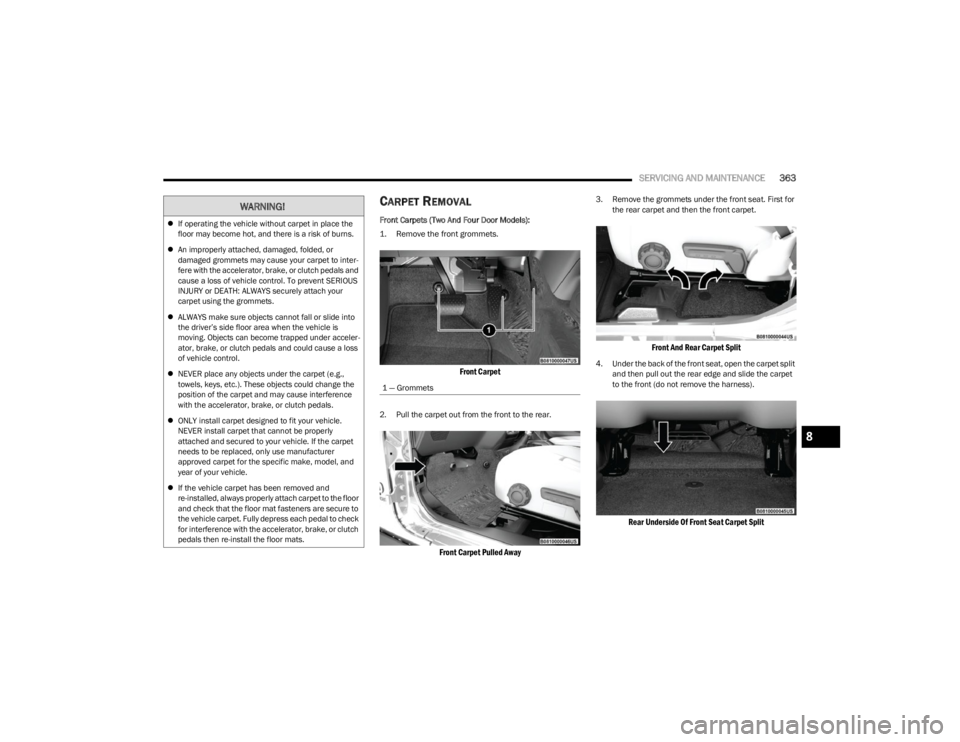
Front Carpets (Two And Four Door Models):
1. Remove the front grommets.
Front Carpet
2. Pull the carpet out from the front to the rear.
Front Carpet Pulled Away
3. Remove the grommets under the front seat. First for
the rear carpet and then the front carpet.
Front And Rear Carpet Split
4. Under the back of the front seat, open the carpet split and then pull out the rear edge and slide the carpet
to the front (do not remove the harness).
Rear Underside Of Front Seat Carpet Split
WARNING!
If operating the vehicle without carpet in place the
floor may become hot, and there is a risk of burns.
An improperly attached, damaged, folded, or
damaged grommets may cause your carpet to inter -
fere with the accelerator, brake, or clutch pedals and
cause a loss of vehicle control. To prevent SERIOUS
INJURY or DEATH: ALWAYS securely attach your
carpet using the grommets.
ALWAYS make sure objects cannot fall or slide into
the driver’s side floor area when the vehicle is
moving. Objects can become trapped under acceler -
ator, brake, or clutch pedals and could cause a loss
of vehicle control.
NEVER place any objects under the carpet (e.g.,
towels, keys, etc.). These objects could change the
position of the carpet and may cause interference
with the accelerator, brake, or clutch pedals.
ONLY install carpet designed to fit your vehicle.
NEVER install carpet that cannot be properly
attached and secured to your vehicle. If the carpet
needs to be replaced, only use manufacturer
approved carpet for the specific make, model, and
year of your vehicle.
If the vehicle carpet has been removed and
re-installed, always properly attach carpet to the floor
and check that the floor mat fasteners are secure to
the vehicle carpet. Fully depress each pedal to check
for interference with the accelerator, brake, or clutch
pedals then re-install the floor mats.
1 — Grommets
8
23_JL_OM_EN_USC_t.book Page 363