air condition KIA BORREGO 2017 Owner's Manual
[x] Cancel search | Manufacturer: KIA, Model Year: 2017, Model line: BORREGO, Model: KIA BORREGO 2017Pages: 548, PDF Size: 36.78 MB
Page 224 of 548
4135
Features of your vehicle
For maximum defrosting, set thetemperature control to the extreme
right/hot position and the fan speedcontrol to the highest speed.
If warm air to the floor is desired while defrosting or defogging, setthe mode to the floor-defrost posi-tion.
Before driving, clear all snow and ice from the windshield, rear win-
dow, outside rear view mirrors, and
all side windows.
Clear all snow and ice from the hood and air inlet in the cowl grill to
improve heater and defroster effi-ciency and to reduce the probabili-
ty of fogging up the inside of thewindshield. Automatic climate control system
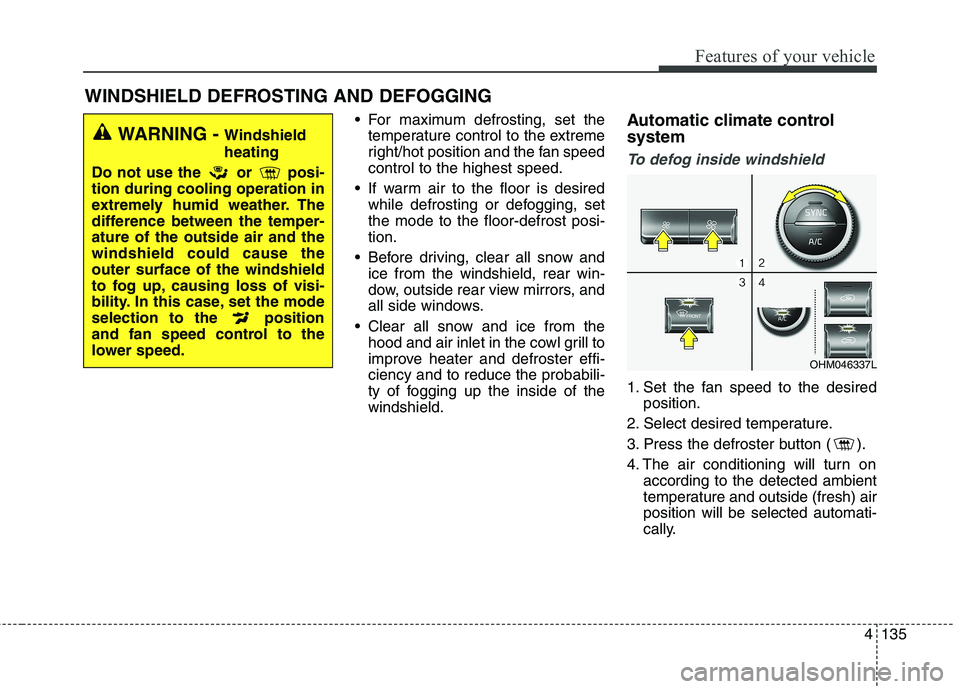
To defog inside windshield
1. Set the fan speed to the desired
position.
2. Select desired temperature.
3. Press the defroster button ( ).
4. The air conditioning will turn on according to the detected ambient
temperature and outside (fresh) airposition will be selected automati-
cally.
WINDSHIELD DEFROSTING AND DEFOGGING
WARNING - Windshield heating
Do not use the or posi- tion during cooling operation in
extremely humid weather. The
difference between the temper-ature of the outside air and thewindshield could cause theouter surface of the windshield
to fog up, causing loss of visi-
bility. In this case, set the mode
selection to the position
and fan speed control to the
lower speed.
OHM046337L
Page 225 of 548
Features of your vehicle
136
4
If the air conditioning and outside (fresh) air position are not selected
automatically, adjust the correspon-
ding button manually. If the posi-
tion is selected, lower fan speed is
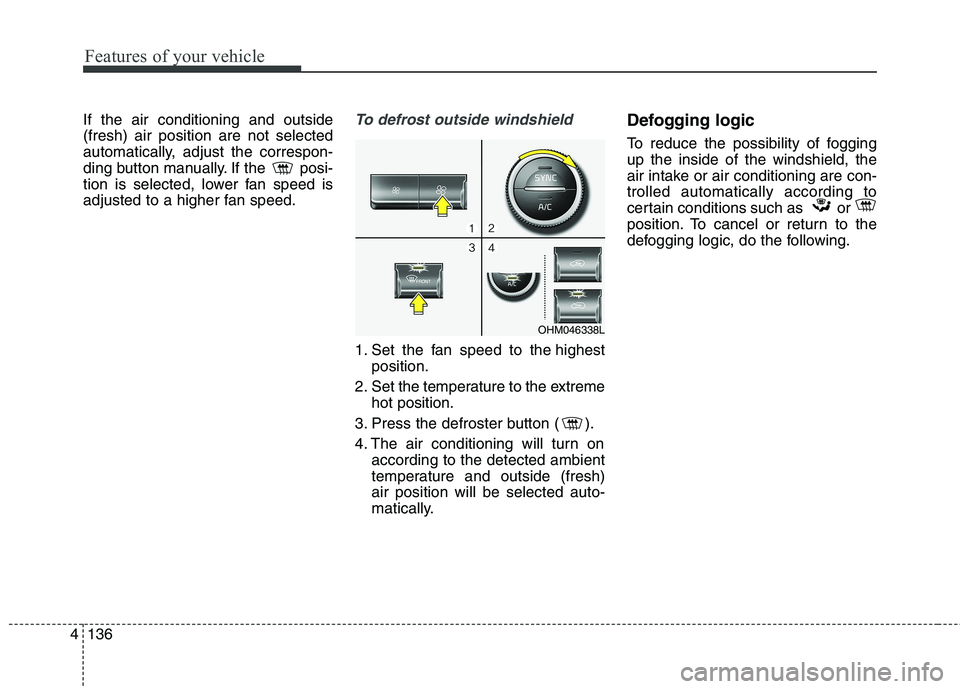
adjusted to a higher fan speed.To defrost outside windshield
1. Set the fan speed to the highest
position.
2. Set the temperature to the extreme hot position.
3. Press the defroster button ( ).
4. The air conditioning will turn on according to the detected ambient
temperature and outside (fresh)air position will be selected auto-
matically. Defogging logic
To reduce the possibility of fogging up the inside of the windshield, the
air intake or air conditioning are con-trolled automatically according to
certain conditions such as or
position. To cancel or return to the
defogging logic, do the following.
OHM046338L
Page 226 of 548
4137
Features of your vehicle
Automatic climate control system
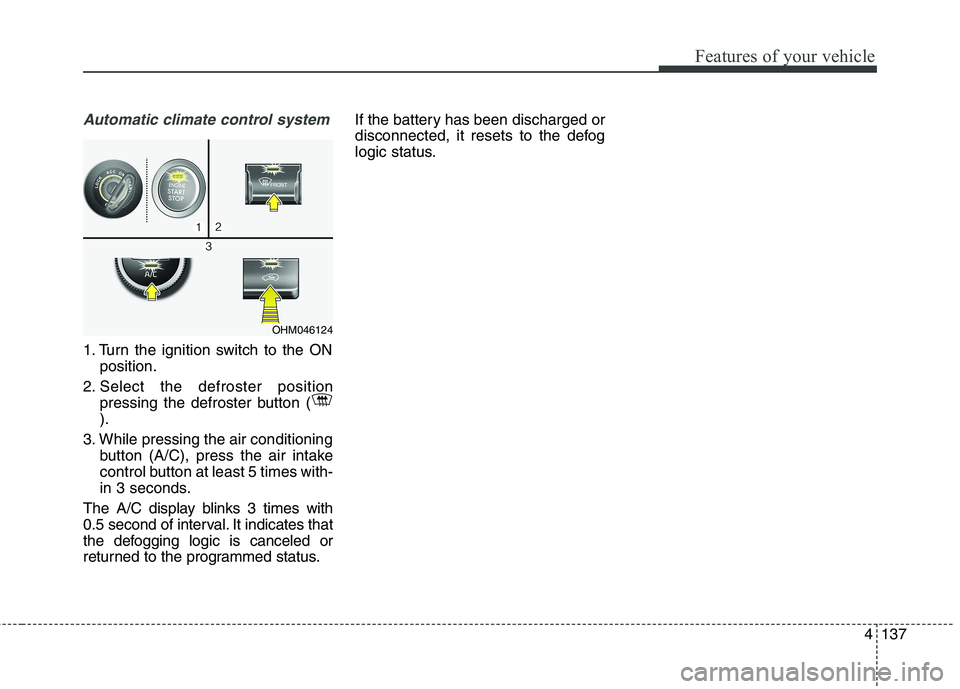
1. Turn the ignition switch to the ONposition.
2. Select the defroster position pressing the defroster button ( ).
3. While pressing the air conditioning button (A/C), press the air intake
control button at least 5 times with-
in 3 seconds.
The A/C display blinks 3 times with
0.5 second of interval. It indicates that
the defogging logic is canceled or
returned to the programmed status. If the battery has been discharged or
disconnected, it resets to the defog
logic status.
OHM046124
Page 228 of 548
4139
Features of your vehicle
For improving the effectiveness of
the cool box, do as follows;
1. Set the temperature to the hot(extreme right) position for warm
air or to the cold (extreme left)
position for cool air.
Turn on the air conditioning sys-tem for cooler air.
2. Set the fan speed to the highest (extreme right) position.
3. Set the mode to the face ( ) position.
✽✽ NOTICE
If some items in the cool box block
the vent, the warming or cooling
effectiveness of the cool box is
reduce
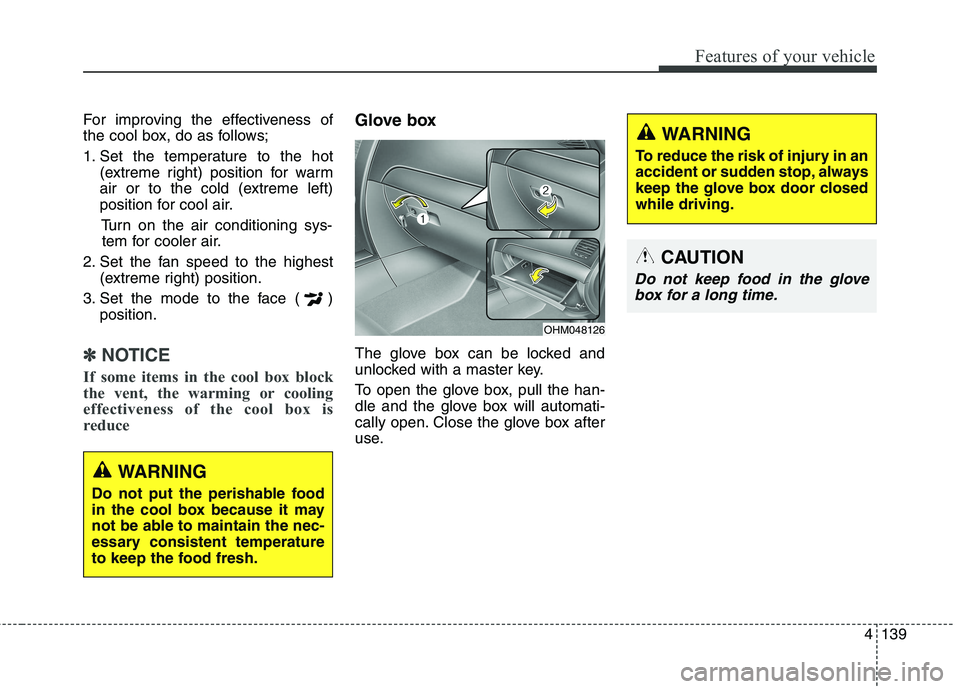
Glove box
The glove box can be locked and
unlocked with a master key.
To open the glove box, pull the han-
dle and the glove box will automati-
cally open. Close the glove box after
use.
WARNING
Do not put the perishable food
in the cool box because it may
not be able to maintain the nec-
essary consistent temperature
to keep the food fresh.
OHM048126
WARNING
To reduce the risk of injury in an
accident or sudden stop, always
keep the glove box door closedwhile driving.
CAUTION
Do not keep food in the glove box for a long time.
Page 236 of 548
4147
Features of your vehicle
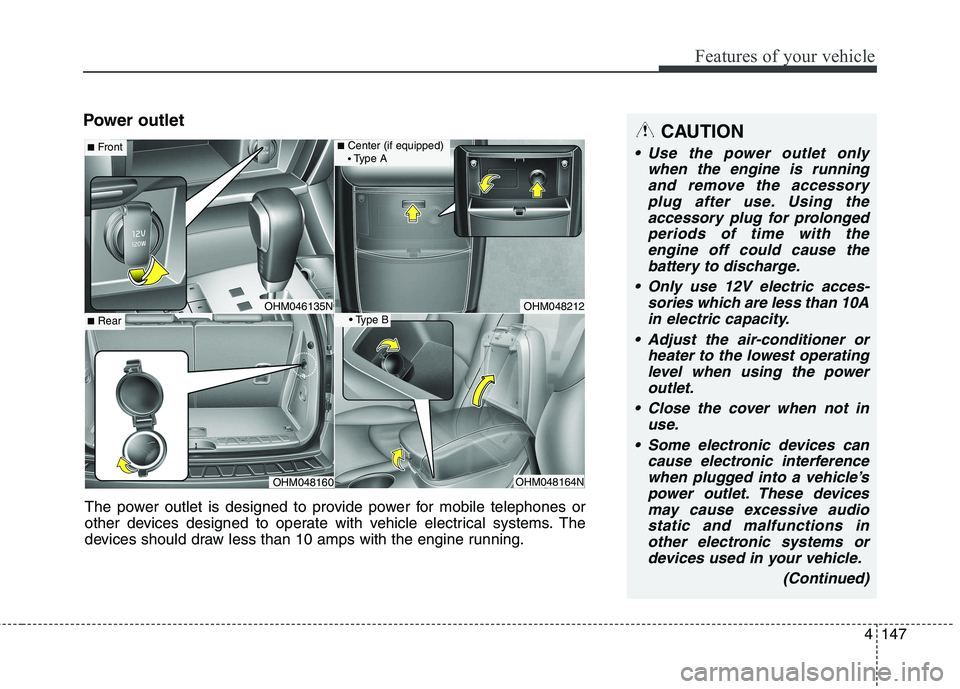
Power outletCAUTION
Use the power outlet onlywhen the engine is runningand remove the accessory plug after use. Using theaccessory plug for prolongedperiods of time with the engine off could cause thebattery to discharge.
Only use 12V electric acces- sories which are less than 10Ain electric capacity.
Adjust the air-conditioner or heater to the lowest operatinglevel when using the poweroutlet.
Close the cover when not in use.
Some electronic devices can cause electronic interferencewhen plugged into a vehicle’spower outlet. These devicesmay cause excessive audiostatic and malfunctions in other electronic systems ordevices used in your vehicle.
(Continued)
OHM048212OHM046135N
■Center (if equipped) Type A■ Front
OHM048164N
■Rear
OHM048160
The power outlet is designed to provide power for mobile telephones or
other devices designed to operate with vehicle electrical systems. The
devices should draw less than 10 amps with the engine running.
Page 259 of 548
Audio system
17
5
(Continued)
Bluetooth ®
Wireless Technology
features supported within the
vehicle are as follows. Some fea-
tures may not be supported
depending on your Bluetooth®
Wireless Technology device.
- Answering and placing Bluetooth ®
Wireless Technology
Handsfree calls
- Menu operation during call (Switch to Private, Switch to call
waiting, Outgoing volume)
- Download Call History
- Download Mobile Phone book
- Phone book/Call History Auto Download
- Bluetooth ®
Wireless Technology
device auto connection
- Bluetooth ®
Wireless Technology
Audio
Before using Bluetooth®
Wireless
Technology related features of the
audio system, refer your phone’s
User’s Manual for phone-side
Bluetooth ®
Wireless Technology
operations. (Continued)(Continued)
The phone must be paired to the
audio system to use Bluetooth®
Wireless Technology related fea-
tures.
Pairing and connecting a Bluetooth ®
Wireless Technology
enabled mobile phone will work
only when the Bluetooth®
Wireless
Technology option within your
mobile phone has been turned on.
(Methods of turning on the
Bluetooth ®
Wireless Technology
enabled feature may differ
depending on the mobile phone.)
Do not use a cellular phone or per- form Bluetooth ®
Wireless
Technology settings (e.g. pairing a
phone) while driving.
Even if the phone supports Bluetooth ®
Wireless Technology,
the phone will not be found during
device searches if the phone has
been set to hidden state or the
Bluetooth ®
Wireless Technology
has been deactivated. Disable the
hidden state or activate the
Bluetooth ®
Wireless Technology
prior to searching/connecting with
the car audio system. (Continued)(Continued)
You will not be able to use the
hands-free feature when your
phone (in the car) is outside of the
cellular service area. (e.g. in a tun-
nel, in an underground area, in a
mountainous area, etc.)
If the cellular phone signal is poor or the vehicles interior noise is too
loud, it may be difficult to hear the
other person’s voice during a call.
Do not place the phone near or inside metallic objects, otherwise
communications with Bluetooth®
Wireless Technology system or cel-
lular service stations can be dis-
turbed.
Placing the audio system within an electromagnetic environment may
result in noise interference.
Some cellular phones or other devices may cause interference
noise or malfunction to the audio
system. In this case, storing the
device in a different location may
resolve the condition. (Continued)
Page 359 of 548
635
Driving your vehicle
In the event of brake failure
If service brakes fail to operate while
the vehicle is in motion, you can
make an emergency stop with the
parking brake. The stopping dis-
tance, however, will be much greater
than normal.
Disc brakes wear indicator
When your brake pads are worn and
new pads are required, you will hear
a high-pitched warning sound from
your front brakes or rear brakes (if
equipped). You may hear this sound
come and go or it may occur when-
ever you depress the brake pedal.
Please remember that some driving
conditions or climates may cause a
brake squeal when you first apply (or
lightly apply) the brakes. This is nor-
mal and does not indicate a problem
with your brakes.
CAUTION
To avoid costly brake repairs,do not continue to drive withworn brake pads.
Always replace the front or rear brake pads as pairs.
WARNING - Parking brake
Applying the parking brake
while the vehicle is moving atnormal speeds can cause a
sudden loss of control of the
vehicle. If you must use theparking brake to stop the vehi-
cle, use great caution in apply-
ing the brake.
CAUTION
Do not operate the parking brake while the vehicle is mov-ing except in an emergency sit- uation. It could damage thevehicle system and makeendanger driving safety.
WARNING - Brake wear
This brake wear warning sound
means your vehicle needs serv-
ice. If you ignore this audible
warning, you will eventually
lose braking performance,
which could lead to a seriousaccident.
Page 391 of 548
667
Driving your vehicle
❈If your vehicle's left or right side
bumper is blinded by barrier or
vehicles, the system sensing abili-
ty may be deteriorated.
WARNING
The warning light on the out- side rearview mirror will illu-
minate whenever a vehicle is
detected at the rear side bythe system.
To avoid accidents, do not
focus only on the warninglight and neglect to see the
surrounding of the vehicle.
Drive safely even though the vehicle is equipped with aBSD (Blind spot detection)
system. Do not solely rely on
the system but check for your-
self before changing lanes.
The system may not alert the driver in some conditions so
always check the surround-ings while driving.CAUTION
The system may not work
properly if the bumper hasbeen replaced or if a repair work has been done near thesensor.
The detection area differs according to the roads width.If the road is narrow the sys- tem may detect other vehiclesin the next lane.
On the contrary, if the road is very wide the system may notdetect other vehicles.
The system may turn off due to strong electromagneticwaves.
Page 393 of 548
669
Driving your vehicle
Your vehicle's fuel economy depends
mainly on your style of driving, where
you drive and when you drive.
Each of these factors affects how
many kilometers (miles) you can get
from a liter (gallon) of fuel. To operate
your vehicle as economically as pos-
sible, use the following driving sug-
gestions to help save money in bothfuel and repairs:
Drive smoothly. Accelerate at amoderate rate. Do not make "jack-
rabbit" starts or full-throttle shifts
and maintain a steady cruising
speed. Do not race between stop-
lights. Try to adjust your speed to
the traffic so you do not have to
change speeds unnecessarily.
Avoid heavy traffic whenever pos-
sible. Always maintain a safe dis-
tance from other vehicles so you
can avoid unnecessary braking.
This also reduces brake wear.
Drive at a moderate speed. The faster you drive, the more fuel your
vehicle uses. Driving at a moderate
speed, especially on the highway,
is one of the most effective ways toreduce fuel consumption. Do not "ride" the brake pedal. This
can increase fuel consumption and
also increase wear on these com-
ponents. In addition, driving with
your foot resting on the brake pedal
may cause the brakes to overheat,
which reduces their effectiveness
and may lead to more serious con-
sequences.
Take care of your tires. Keep them inflated to the recommended pres-
sure. Incorrect inflation, either too
much or too little, results in unnec-
essary tire wear. Check the tirepressures at least once a month.
Be sure that the wheels are aligned correctly. Improper align-ment can result from hitting curbs
or driving too fast over irregular
surfaces. Poor alignment causes
faster tire wear and may also result
in other problems as well as
greater fuel consumption. Keep your vehicle in good condi-
tion. For better fuel economy and
reduced maintenance costs, main-
tain your vehicle in accordancewith the maintenance schedule in
chapter 8. If you drive your vehicle
in severe conditions, more frequentmaintenance is required (see
chapter 8 for details).
Keep your vehicle clean. For maxi- mum service, your vehicle should
be kept clean and free of corrosive
materials. It is especially important
that mud, dirt, ice, etc. not be
allowed to accumulate on the
underside of the vehicle. This extra
weight can result in increased fuel
consumption and also contribute tocorrosion.
Travel lightly. Do not carry unnec- essary weight in your vehicle.
Weight reduces fuel economy.
Do not let the engine idle longer than necessary. If you are waiting
(and not in traffic), turn off your
engine and restart only when
you're ready to go.
ECONOMICAL OPERATION
Page 394 of 548
Driving your vehicle
70
6
Remember, your vehicle does not
require extended warm-up. After
the engine has started, allow the
engine to run for 10 to 20 seconds
prior to placing the vehicle in gear.
In very cold weather, however, give
your engine a slightly longer warm-
up period.
Do not "lug" or "over-rev" the engine. Lugging is driving too
slowly in too high a gear resulting
engine bucking. If this happens,
shift to a lower gear. Over-revving
is racing the engine beyond its safe
limit. This can be avoided by shift-
ing at the recommended speeds.
Use your air conditioning sparingly. The air conditioning system is
operated by engine power so your
fuel economy is reduced when youuse it.
Open windows at high speeds can reduce fuel economy.
Fuel economy is less in crosswinds and headwinds. To help offset
some of this loss, slow down when
driving in these conditions. Keeping a vehicle in good operating
condition is important both for econ-
omy and safety. Therefore, we rec-
ommend that the system be serviced
by an authorized Kia dealer.
WARNING
- Engine off
during motion
Never turn the engine off to
coast down hills or anytime the
vehicle is in motion. The power
steering and power brakes will
not function properly without
the engine running. Instead,
keep the engine on and down-
shift to an appropriate gear for
engine braking effect. In addi-
tion, turning off the ignition
while driving could engage the
steering wheel lock (ifequipped) resulting in loss of
vehicle steering which could
cause serious injury or death.