warning KIA CADENZA 2020 Owners Manual
[x] Cancel search | Manufacturer: KIA, Model Year: 2020, Model line: CADENZA, Model: KIA CADENZA 2020Pages: 560, PDF Size: 11.37 MB
Page 374 of 560

5121
Driving your vehicle
LFA operation
With the ENGINE START/STOP but-
ton is
in the ON or START position, the
Lane Following Assist can be activat-
ed by pressing the button.
(Continued)
Keeping your hands off the
wheel while driving will trigger
the hands-off warning and
deactivate the steering-assist
system. Put your hands back
on the wheel, then the steer-
ing-assist system will be re-
activated.
When driving at a high speed,
the steering assist force can
become weak and the vehicle
can drive out of its lane. Extra
caution is required, and com-
ply with the speed limit.
Attaching an object to the
steering wheel could deter
steering assistance.
Attaching an object to the
steering wheel could deter the
hands-off alarming system.
OYG059312
CAUTION
Depending on your surround-
ings and road conditions, LFA
could fail to recognize the
lane and stop working. In turn,
extra caution is required
while driving with LFA on.
Be sure to check the non-
operating conditions and cau-
tions for the driver before
using LFA.
Do not place reflective materi-
als such as white paper or
mirror on the crash pad.
Sunlight reflections can cause
a malfunction in LFA.
Too big sound from the sound
system can interrupt the
alarming sound from LFA.
(Continued)
Page 375 of 560

Driving your vehicle
122 5
Operating conditions
When the system is activated, the
indicator ( ) on the cluster will illu-
minate.
While LFA is activated, if press the
button again, the system is
released and indicator ( ) light will
go off.
The color of the indicator will change
depending on the condition of LFA.
- Green : Steering assist mode is
ON
- White :Steering assist mode is
OFF
LFA activation
After LFA is activated, if the vehicle
is within the lane and both lane
markers are detected (lane color
changes grey to white) and there is
no abrupt steering by the driver,
indicator light will change from
white to green. This indicates that
the LFA is in the ENABLED state
and the steering wheel will be able
to be controlled.
The indicator light changes from
green to white when the control is
temporarily cancelled.
When the system does not recog-
nize the lane or depending on the
vehicle condition in front (presence
of the vehicle, driving status, etc.).
the steering wheel is controlled
restrictively.
When the control of the steering
wheel is stopped temporarily the
activation indicator blinks in green
and then changes to white.WARNING
LFA ensures the vehicle stays
in its lane. LFA does not guar-
antee 100% safety. Make sure
you make decisions on the road
after checking the road condi-
tions and safety matters while
driving. Never completely rely
on your LFA.
Page 376 of 560
5123
Driving your vehicle
Warning message
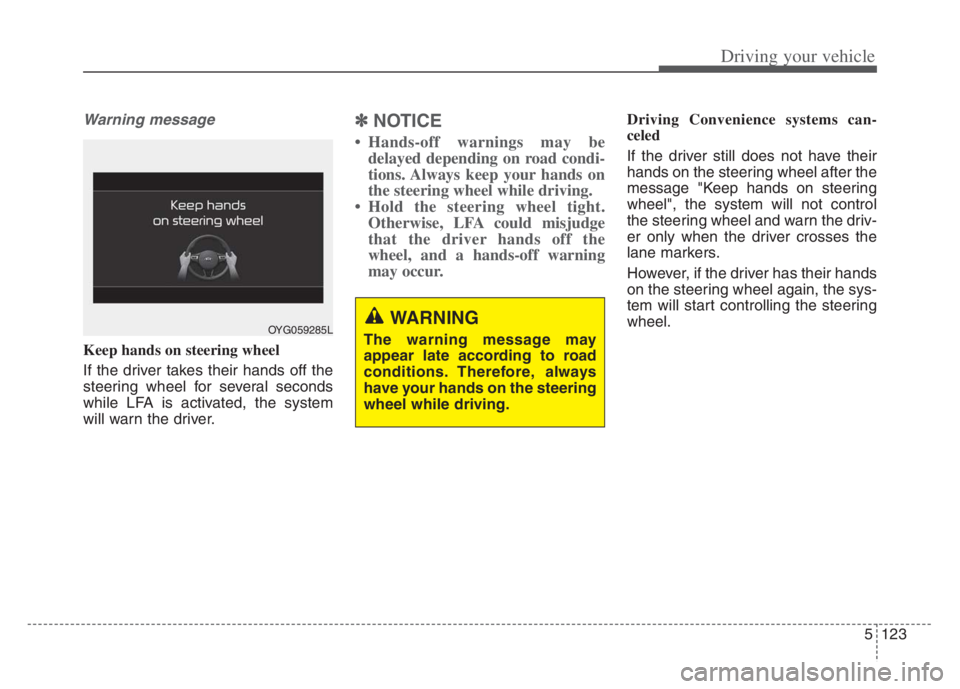
Keep hands on steering wheel
If the driver takes their hands off the
steering wheel for several seconds
while LFA is activated, the system
will warn the driver.
✽ ✽NOTICE
• Hands-off warnings may be
delayed depending on road condi-
tions. Always keep your hands on
the steering wheel while driving.
• Hold the steering wheel tight. Otherwise, LFA could misjudge
that the driver hands off the
wheel, and a hands-off warning
may occur.
Driving Convenience systems can-
celed
If the driver still does not have their
hands on the steering wheel after the
message "Keep hands on steering
wheel", the system will not control
the steering wheel and warn the driv-
er only when the driver crosses the
lane markers.
However, if the driver has their hands
on the steering wheel again, the sys-
tem will start controlling the steering
wheel.
OYG059285LWARNING
The warning message may
appear late according to road
conditions. Therefore, always
have your hands on the steering
wheel while driving.
Page 377 of 560
Driving your vehicle
124 5
✽
✽
NOTICE
• Even though the steering is assist-
ed by the system, the driver may
control the steering wheel.
• The steering wheel may feel heav-
ier when the steering wheel is
assisted by the system than when it
is not.
Check Lane Following Assist
If there is a problem with the system
a message will appear for a few sec-
onds. In this case, have the system
checked by an authorized Kia dealer.LFA will not be in the ENABLED
state and/or the steering wheel will not
be assisted when:
If the driver operate turn signal
lamp or Hazzard warning flasher to
change the lane,
- To change the driving lane, turn
on the turn signal lamp switch
and change the lanes.
- If change the driving lane to
another without operating turn
signal lamp switch, the repulsive
force may occur on the steering
wheel.
- After system operating or chang-
ing the lanes, you must move to
the center of the lane to switch the
system to LFA. If you continue to
drive close to the lane line instead
of in the middle of the lane, it does
not assist the steering.
WARNING
LFA is a supplemental system
only. It is the responsibility of
the driver to safely steer the
vehicle and to maintain it in its
lane.
Turn off LFA and drive without
using the system in the fol-
lowing situations:
- In bad weather
- In bad road conditions
- When the steering wheel
needs to be controlled by the
driver frequently.
- When towing a vehicle or
trailer
Page 381 of 560

Driving your vehicle
128 5
Highway Driving Assist helps keep
the vehicle between lanes, maintain
a distance with the vehicle ahead,
and automatically adjusts the vehicle
speed to the speed limit while driving
on the highway.✽ ✽
NOTICE
• HDA is available only on con-
trolled access road of certain high-
ways.
❈ ❈
Controlled access road indi-
cates roads with limited
entrances and exits that allow
uninterrupted high speed traf-
fic flow. Only passenger cars
and motorcycles are allowed on
controlled access roads.
• Additional highways may be
expanded by navigation updates.
HIGHWAY DRIVING ASSIST (HDA)
WARNING
HDA is not a substitute for
safe driving practices, but a
convenience function. It is the
responsibility of the driver to
always be aware of the sur-
roundings and drive safely.
HDA relies entirely on the
road information provided by
the navigation system. It is the
responsibility of the driver to
follow traffic laws and avoid
accidents.
Turn off Highway Driving
Assist when the vehicle is
being towed.
For your safety, please read
the owner's manual before
using the system.
Available highway
(Controlled access road)
USASelect Interstate Highway
and U.S. (Federal) and St
Page 384 of 560

5131
Driving your vehicle
Warning Message
Hands-off warning
Keep hands on steering wheel
If the driver takes their hands off the
steering wheel for several seconds
while HDA is activated, the system
will warn the driver.
✽ ✽
NOTICE
If the steering wheel is held with a
light grip, the message may appear
because HDA may not recognize
that the driver has their hands on
the steering wheel.
OJF058416L
WARNING
The warning message may
appear late according to road
conditions. Therefore, always
have your hands on the steering
wheel while driving.
Page 386 of 560

5133
Driving your vehicle
System malfunction
This message shows that there is a
problem with HDA, so have your
vehicle inspected by an authorized
Kia dealer.
✽ ✽
NOTICE
• High Driving Assist is limited in
other countries.
• High Driving Assist only operates
based on the speed limits of the
highway but it does not work with
the speed cameras.
• The time gap could occur between
the navigation speed warning and
system operation.
• The system is not designed to work
on highways other than mentioned
as a controlled access road. The
system automatically cancels
when you leave the highway.
• If there is a problem with
Highway Driving Assist, the sys-
tem cannot be activated in the
Infotainment System screen.
• If your vehicle is 1640 ft. (500 m)
ahead and behind of an open toll-
gate, the system is automatically
canceled. Also, it is converted to
Smart Cruise Control automati-
cally with a pop-up message on the
navigation.
(Continued)(Continued)
• In the automatic speed setting
mode, the vehicle automatically
accelerates or decelerates when
the highway speed limit changes.
• If your vehicle speed exceeds 95
mph (153 km/h), Highway Driving
Assist is automatically canceled.
Also, it is converted to Smart
Cruise Control automatically with
a pop-up message on the naviga-
tion.
• If you enter a rest area on the
highway or a IC/JC (intersec-
tion/junction) without a destina-
tion set, the system is canceled
later than when the vehicle actual-
ly leaves the highway.
ODEP059331N
Page 387 of 560
Driving your vehicle
134
5
Highway Driving Assist may not func-
tion properly in the following situa-
tions:
The navigation is not working prop-
erly.
The navigation is not updated.
The real-time GPS or map infor- mation provided has errors.
The navigation is overloaded by performing functions such as route
search, video playback, voice
recognition, etc. are performing
simultaneously.
The navigation is recalculating the route while driving.
GPS signals are blocked in areas such as a tunnel.
The driver goes off course or the route to the destination is changed
or canceled by resetting the navi-
gation.
The vehicle enters a service sta- tion or rest area
The speed limit of selected high- way section is changed due to road
conditions. Android Auto or Car Play is operat-
ing.
The navigation cannot detect the current vehicle position (ex: elevat-
ed roads including overpass adja-
cent to general roads or nearby
roads exist in a parallel way).
The navigation is being updated while driving.
The navigation is being reset while driving.
The road is slippery due to bad weather such as rain or snow.
If your vehicle tows a trailer or another vehicle, you should
release Highway Driving Assist.
Operating the brake system or
steering system while towing may
adversely affect the safety. * Refer to “Smart Cruise Control
(SCC)” in this chapter. for cautions
and warnings about headway con-
trol and front radar.
* Refer to “Lane Following Assist (LFA) “ in this chapter. for cautions
and warnings about steering con-
trol and front view camera.
Page 389 of 560

Driving your vehicle
136 5
System description
Rear Cross-Traffic Collision
Warning
Rear Cross-Traffic Collision Warning
uses rear corner radar sensors to
monitor the approaching cross traffic
from the left and right side of the
vehicle when your vehicle is in
reverse.
The warning distance varies relative
to the approaching vehicle speed.
Rear Cross-Traffic Collision-
Avoidance Assist
Rear Cross-Traffic Collision-
Avoidance Assist monitors
approaching cross traffic from the left
and right side of the vehicle when
your vehicle is in reverse.
Rear Cross-Traffic Collision-
Avoidance Assist may activate the
Electronic Stability Control (ESC) in
accordance with a colliding possibili-
ty with an approaching vehicle. It is to
lower the colliding risk or mitigate the
colliding damage.
REAR CROSS-TRAFFIC COLLISION WARNING (RCCW) /
REAR CROSS-TRAFFIC COLLISION-AVOIDANCE ASSIST (RCCA) (IF EQUIPPED)
OHM059363
WARNING
Always be aware of road con-
ditions while driving and be
alert for unexpected situa-
tions even though Rear
Cross-Traffic Collision
Warning and Rear Cross-
Traffic Collision-Avoidance
Assist are operating.
Rear Cross-Traffic Collision
Warning and Rear Cross-
Traffic Collision-Avoidance
Assist are supplemental sys-
tems to assist you. Do not
entirely rely on the systems.
Always pay attention, while
driving, for your safety.
Rear Cross-Traffic Collision
Warning and Rear Cross-
Traffic Collision-Avoidance
Assist are not substitutes for
proper and safe driving.
Always drive safely and use
caution when backing up the
vehicle.
Page 390 of 560

5137
Driving your vehicle
System setting and activation
System setting
The driver can activate the sys-
tems by placing the ENGINE
START/STOP button to the ON
position and by selecting "Settings
Vehicle Driver Assistance
Parking Safety Rear Cross-
Traffic Safety”. RCCA and RCCW
turn on and get ready to be activat-
ed when ‘Rear Cross-Traffic safety’
is selected. When the engine is turned off then
on again, the systems always get
ready to be activated.
When the system is initially turned
on and when the engine is turned
off then on again, the warning light
will illuminate for 3 seconds on the
outside rearview mirror.
Warning Timing
The driver can select the initial warn-
ing activation time select "Settings
Vehicle Driver Assistance
Warning Timing". The options for the
initial Rear Cross-Traffic Collision
Warning includes the following:
- Normal:
When this condition is selected, the
initial Rear Cross-Traffic Collision
Warning is activated normally. If this
setting feels too sensitive change the
option to ‘Later’.
The warning activation time may feel
late if the side/rear vehicle abruptly
accelerates.
OYG059344L