warning KIA CADENZA 2020 Owners Manual
[x] Cancel search | Manufacturer: KIA, Model Year: 2020, Model line: CADENZA, Model: KIA CADENZA 2020Pages: 560, PDF Size: 11.37 MB
Page 391 of 560
Driving your vehicle
138 5
- Later :
Select this warning activation time
when the traffic is light and you are
driving in a low speed.
✽ ✽
NOTICE
If you change the warning timing,
the warning time of other systems
may change. Always be aware
before changing the warning timing.
Warning Volume
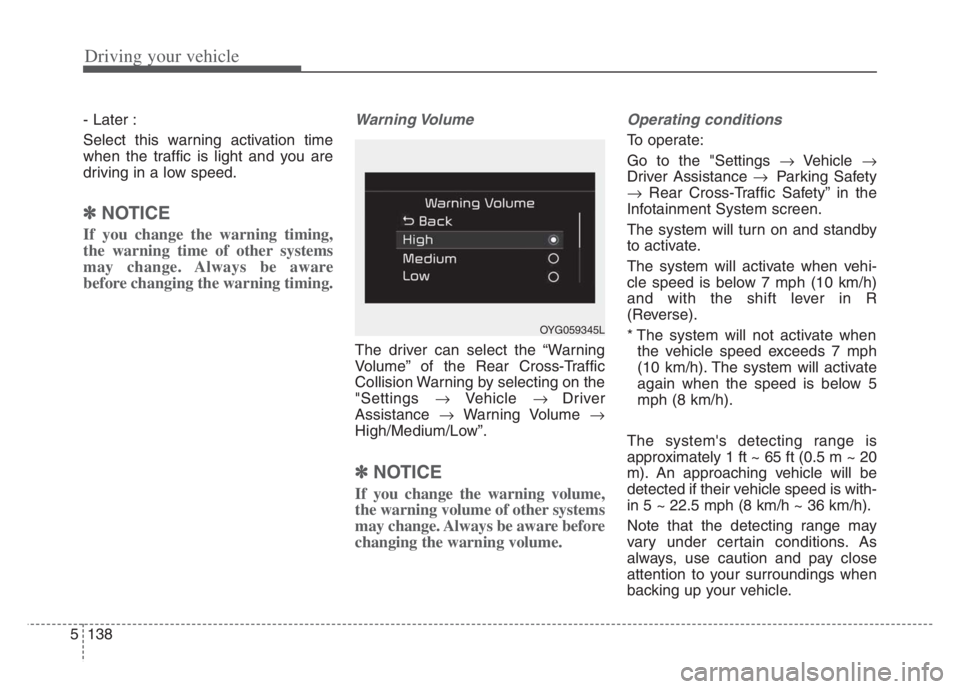
The driver can select the “Warning
Volume” of the Rear Cross-Traffic
Collision Warning by selecting on the
"Settings Vehicle Driver
Assistance Warning Volume
High/Medium/Low”.
✽ ✽
NOTICE
If you change the warning volume,
the warning volume of other systems
may change. Always be aware before
changing the warning volume.
Operating conditions
To operate:
Go to the "Settings Vehicle
Driver Assistance Parking Safety
Rear Cross-Traffic Safety” in the
Infotainment System screen.
The system will turn on and standby
to activate.
The system will activate when vehi-
cle speed is below 7 mph (10 km/h)
and with the shift lever in R
(Reverse).
* The system will not activate when
the vehicle speed exceeds 7 mph
(10 km/h). The system will activate
again when the speed is below 5
mph (8 km/h).
The system's detecting range is
approximately 1 ft ~ 65 ft (0.5 m ~ 20
m). An approaching vehicle will be
detected if their vehicle speed is with-
in 5 ~ 22.5 mph (8 km/h ~ 36 km/h).
Note that the detecting range may
vary under certain conditions. As
always, use caution and pay close
attention to your surroundings when
backing up your vehicle.
OYG059345L
Page 392 of 560
5139
Driving your vehicle
When the operation condition of
Rear Cross-Traffic Collision Warning
is satisfied the warning will occur
every time a vehicle approaches the
side/rear of your stopped vehicle.
The warning will stop when:
- The vehicle moving at the rear
left/right side of your vehicle is not
in the detection range.
- The vehicle is right behind your
vehicle.
- The vehicle is not driving towards
your vehicle.
- The vehicle’s approaching speed is
decreased.
OJF058351
OYG059297
OJF058352
OYG059298
■ Left
■ Left
■ Right
■ Right
Warning and control
Rear Cross-Traffic Collision Warning
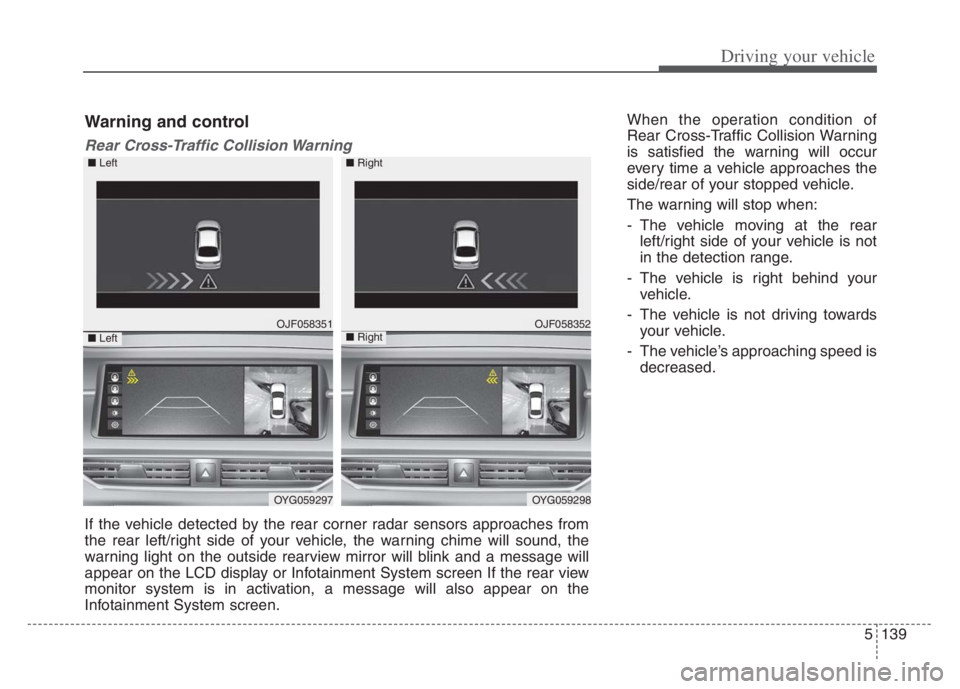
If the vehicle detected by the rear corner radar sensors approaches from
the rear left/right side of your vehicle, the warning chime will sound, the
warning light on the outside rearview mirror will blink and a message will
appear on the LCD display or Infotainment System screen If the rear view
monitor system is in activation, a message will also appear on the
Infotainment System screen.
Page 394 of 560
5141
Driving your vehicle
The brake control may not operate
properly according to the status of
the ESC (Electronic Stability
Control). The same warning mes-
sage is displayed on the instrument
cluster for this case also.
- When the ESC (Electronic Stability
Control) warning light is on.
- When the ESC (Electronic Stability
Control) is engaged in a different
function.
When the operation condition of
Rear Cross-Traffic Collision
Warning is satisfied, the warning
will occur every time a vehicle
approaches the side or rear of your
stopped (0 mph (0 km/h) vehicle
speed) vehicle.
The driver should always exercise
extreme caution while operating
the vehicle, whether or not the
warning light on the outside
rearview mirror illuminates or there
is a warning alarm.
Playing the vehicle audio system at
high volume may prevent you from
hearing the system's warning
sounds.CAUTION
The system's warning or
brake may not operate proper-
ly if the left/right of your vehi-
cle's rear bumper is obscured
by a vehicle or obstacle.
The warning of Rear Cross-
Traffic Collision Warning may
not sound while other sys-
tem's warning sounds.
If any other warning sound
such as seat belt warning
chime is already generated,
Rear Cross-Traffic Collision
Warning may not sound.
WARNING
Drive safely even though the
vehicle is equipped with a
Rear Cross-Traffic Collision
Warning and Rear Cross-
Traffic Collision-Avoidance
Assist. Do not solely rely on
the system but check your
surrounding when backing
the vehicle up.
The driver is responsible for
accurate brake control.
Always exercise extreme cau-
tion while driving. Rear Cross-
Traffic Collision Warning and
Rear Cross-Traffic Collision-
Avoidance Assist may not
operate properly or unneces-
sarily operate in accordance
with your driving situations.
(Continued)
Page 395 of 560
Driving your vehicle
142 5
Detecting Sensor
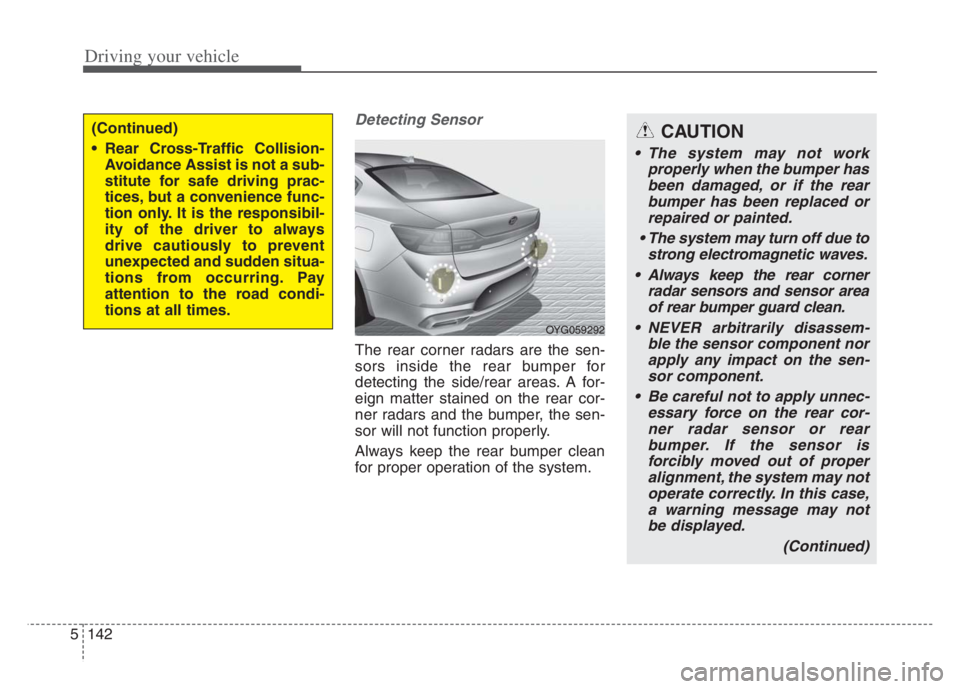
The rear corner radars are the sen-
sors inside the rear bumper for
detecting the side/rear areas. A for-
eign matter stained on the rear cor-
ner radars and the bumper, the sen-
sor will not function properly.
Always keep the rear bumper clean
for proper operation of the system.
(Continued)
Rear Cross-Traffic Collision-
Avoidance Assist is not a sub-
stitute for safe driving prac-
tices, but a convenience func-
tion only. It is the responsibil-
ity of the driver to always
drive cautiously to prevent
unexpected and sudden situa-
tions from occurring. Pay
attention to the road condi-
tions at all times.
OYG059292
CAUTION
The system may not work
properly when the bumper has
been damaged, or if the rear
bumper has been replaced or
repaired or painted.
The system may turn off due to
strong electromagnetic waves.
Always keep the rear corner
radar sensors and sensor area
of rear bumper guard clean.
NEVER arbitrarily disassem-
ble the sensor component nor
apply any impact on the sen-
sor component.
Be careful not to apply unnec-
essary force on the rear cor-
ner radar sensor or rear
bumper. If the sensor is
forcibly moved out of proper
alignment, the system may not
operate correctly. In this case,
a warning message may not
be displayed.
(Continued)
Page 396 of 560

5143
Driving your vehicle
Blind-Spot Collision Warning (BCW)
system disabled. Radar blocked
This warning message may appear
when:
- One or both of the rear corner
radar sensors on the rear bumper
is blocked by dirt or snow or a for-
eign object.
- Driving in rural areas where the
sensor does not detect another
vehicle for an extended period of
time.
- When there is inclement weather
such as heavy snow or rain.
- When a trailer or carrier is con-
nected to the rear corner radar
sensor area.If any of these conditions occur, the
system will turn off automatically.
✽ ✽
NOTICE
Turn off BCW, BCA and RCCA
when a trailer or carrier is installed.
• Press and turn off the Blind-Spot
Safety button (the indicator on the
switch will turn off)
• Deactivate BCW and BCA by
selecting “Settings
Driver
Assistance
Blind-Spot Safety
Off”
• Deactivate RCCW and RCCA by
deselecting “Settings
Driver
Assistance
Parking Safety
Rear Cross-Traffic Safety”.
(Continued)
Have the vehicle inspected by
an authorized Kia dealer.
Do not apply foreign objects
such as a bumper sticker or a
bumper guard near the rear
corner radar sensor or apply
paint to the sensor area.
Doing so may adversely affect
the performance of the sen-
sor.
OJF058433L
Page 397 of 560

Driving your vehicle
144 5
When BCW canceled warning mes-
sage is displayed in the cluster,
check to make sure that the rear
bumper is free from any dirt or snow
in the areas where the sensor is
located. Remove any dirt, snow, or
foreign material that could interfere
with the radar sensors.
After any dirt or debris is removed,
RCCA system should operate nor-
mally after about 10 minutes of driv-
ing the vehicle.
If the system does not work normally
even though the foreign substance,
trailer or carrier, or other equipment
is removed, have the system
checked by an authorized Kia dealer.Check Blind-Spot Collision Warning
system
If there is a problem with BCW sys-
tem, a warning message will appear.
The system will turn off automatical-
ly. RCCW and RCCA will not operate
also if BCW system turns off due to
malfunction. In this case, have the
system checked by an authorized
Kia dealer.Limitations of the system
The driver must be cautious in the
below situations, because the sys-
tem may not detect other vehicles
or objects in certain circum-
stances.
When a trailer or carrier is
installed.
The vehicle drives in inclement
weather such as heavy rain or
snow.
The rear corner radar sensors are
is polluted with rain, snow, mud,
etc.
The rear bumper where the sensor
is located is covered with a foreign
object such as a bumper sticker, a
bumper guard, a bike rack, etc.
The rear bumper is damaged, or
the sensor is out of the original
default position.
The vehicle height gets lower or
higher due to heavy loading in a
trunk (tailgate), abnormal tire pres-
sure, etc.
OJF058435L
Page 399 of 560
![KIA CADENZA 2020 Owners Manual Driving your vehicle
146 5
[A] : Structure
Driving where there is a vehicle or
structure near
The system may not operate proper-
ly when driving where there is a vehi-
cle or structure near.
In certa](/img/2/40377/w960_40377-398.png "KIA CADENZA 2020 Owners Manual Driving your vehicle
146 5
[A] : Structure
Driving where there is a vehicle or
structure near
The system may not operate proper-
ly when driving where there is a vehi-
cle or structure near.
In certa")
Driving your vehicle
146 5
[A] : Structure
Driving where there is a vehicle or
structure near
The system may not operate proper-
ly when driving where there is a vehi-
cle or structure near.
In certain instances, the system may
not detect the vehicle approaching
from behind and the warning or
brake may not operate properly.
Always pay attention to your sur-
rounding while driving. When the vehicle is in a complex
parking environment
The system may not operate prop-
erly when the vehicle is in a com-
plex parking environment.
In certain instances, the system
may not be able to exactly deter-
mine the risk of collision for the
vehicles which are parking or
pulling out near your vehicle (e.g. a
vehicle escaping beside your vehi-
cle, a vehicle parking or pulling out
in the rear area, a vehicle
approaching your vehicle making a
turn, etc.).
In this case, the warning or brake
may not operate properly.
[A] : Vehicle
When the vehicle is parked diago-
nally
The system may not operate proper-
ly when the vehicle is parked diago-
nally.
In certain instances, when the diago-
nally parked vehicle is pulled out of
the parking space, the system may
not detect the vehicle approaching
from the rear left/right of your vehi-
cle. In this case, the warning or brake
may not operate properly.
Always pay attention to your sur-
rounding while driving.
OON058060LOON058061LOON058062L
Page 400 of 560

5147
Driving your vehicle
When the vehicle is on/near a
slope
The system may not operate proper-
ly when the vehicle is on/near a
slope.
In certain instances, the system may
not detect the vehicle approaching
from the rear left/right and the warn-
ing or brake may not operate proper-
ly.
Always pay attention to your sur-
rounding while driving.[A] : Structure, [B] : Wall
Pulling into the parking space
where there is a structure
The system may not operate properly
when pulling in the vehicle to the park-
ing space where there is a structure at
the back or side of your vehicle.
In certain instances, when backing
into the parking space, the system
may false detect the vehicle moving
in front of your vehicle. In this case,
the warning may operate falsely.
Always pay attention to the parking
space while driving. When the vehicle is parked rear-
ward
If the vehicle is parked rearward and
the sensor detects the another vehi-
cle in the rear area of the parking
space, the system can warn or con-
trol braking. Always pay attention to
the parking space while driving.
OYG059301OON058064LOON058065L
Page 403 of 560

Driving your vehicle
150 5
Remember, your vehicle does not
require extended warm-up. After
the engine has started, allow the
engine to run for 10 to 20 seconds
prior to placing the vehicle in gear.
In very cold weather, however, give
your engine a slightly longer warm-
up period.
Don't "lug" or "over-rev" the engine.
Lugging is driving too slowly in a
very high gear resulting in engine
bucking. If this happens, shift to a
lower gear. Over-revving is racing
the engine beyond its safe limit.
This can be avoided by shifting at
the recommended speed. Use your air conditioning sparingly.
The air conditioning system is
operated by engine power so your
fuel economy is reduced when you
use it.
Open windows at high speeds can
reduce fuel economy.
Fuel economy is less in crosswinds
and headwinds. To help offset
some of this loss, slow down when
driving in these conditions.
Keeping a vehicle in good operating
condition is important both for econ-
omy and safety. Therefore, have an
authorized Kia dealer perform
scheduled inspections and mainte-
nance.
WARNING - Engine off
during motion
Never turn the engine off to
coast down hills or anytime the
vehicle is in motion. The power
steering and power brakes will
not function properly without the
engine running. In addition, turn-
ing off the ignition while driving
could lead to out of working
power driven steering wheel and
hard to control steering wheel.
Keep the engine on and down-
shift to an appropriate gear for
an engine braking effect.
Page 404 of 560
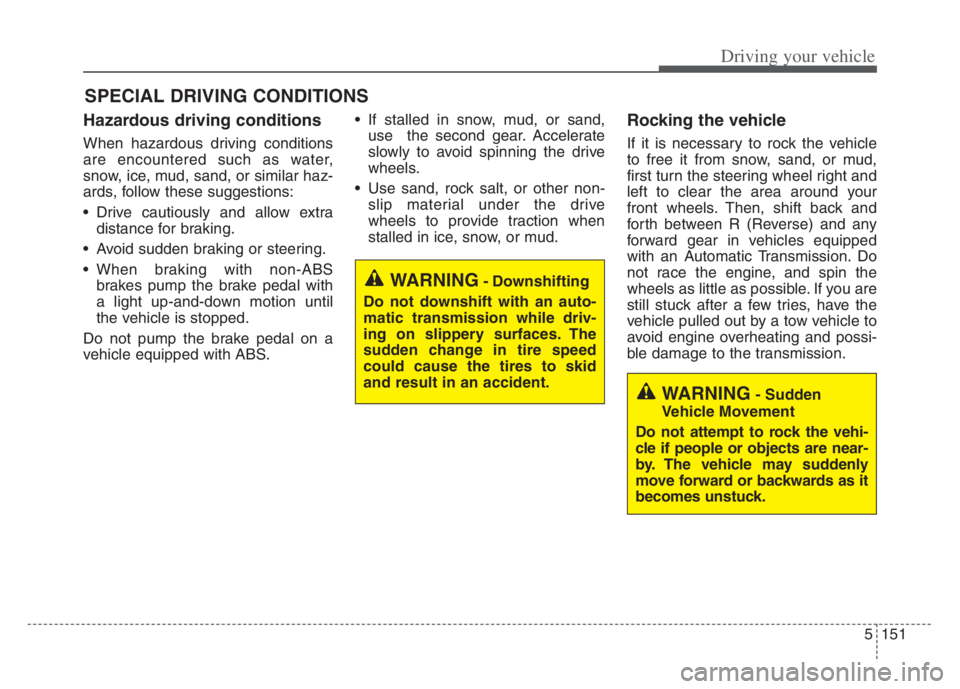
5151
Driving your vehicle
Hazardous driving conditions
When hazardous driving conditions
are encountered such as water,
snow, ice, mud, sand, or similar haz-
ards, follow these suggestions:
Drive cautiously and allow extra
distance for braking.
Avoid sudden braking or steering.
When braking with non-ABS
brakes pump the brake pedal with
a light up-and-down motion until
the vehicle is stopped.
Do not pump the brake pedal on a
vehicle equipped with ABS. If stalled in snow, mud, or sand,
use the second gear. Accelerate
slowly to avoid spinning the drive
wheels.
Use sand, rock salt, or other non-
slip material under the drive
wheels to provide traction when
stalled in ice, snow, or mud.
Rocking the vehicle
If it is necessary to rock the vehicle
to free it from snow, sand, or mud,
first turn the steering wheel right and
left to clear the area around your
front wheels. Then, shift back and
forth between R (Reverse) and any
forward gear in vehicles equipped
with an Automatic Transmission. Do
not race the engine, and spin the
wheels as little as possible. If you are
still stuck after a few tries, have the
vehicle pulled out by a tow vehicle to
avoid engine overheating and possi-
ble damage to the transmission.
SPECIAL DRIVING CONDITIONS
WARNING- Downshifting
Do not downshift with an auto-
matic transmission while driv-
ing on slippery surfaces. The
sudden change in tire speed
could cause the tires to skid
and result in an accident.
WARNING- Sudden
Vehicle Movement
Do not attempt to rock the vehi-
cle if people or objects are near-
by. The vehicle may suddenly
move forward or backwards as it
becomes unstuck.