light KIA CADENZA 2020 Manual PDF
[x] Cancel search | Manufacturer: KIA, Model Year: 2020, Model line: CADENZA, Model: KIA CADENZA 2020Pages: 560, PDF Size: 11.37 MB
Page 202 of 560
Features of your vehicle
120 4
The driver must be cautious in the
below situations may not work prop-
erly when recognition of light from
on-coming or front vehicle is poor or
limited :
When the light from on-coming or
front vehicle is poor
- When the light from the on-com-
ing or front vehicle is not detected
because of lamp damage, hidden
from sight, etc.
- When the lamp of the on-coming
or front vehicle is covered with
dust, snow or water.
- When the front vehicle’s head-
lamps are off but the fog lamps
on and etc.
When external condition is inter-
vened
- When there is a similar shape
lamp with the front vehicle’s
lamps.
- When the headlamp is not
repaired or replaced at an author-
ized dealer.- When headlamp aiming is not
properly adjusted.
- When driving on a narrow curved
road, rough road, downhill or
uphill.
- When only part of the vehicle in
front is visible on a crossroad or
curved road.
- When there is a traffic light,
reflecting sign, flashing sign or
mirror ahead.
- When there is a temporary reflec-
tor or flash ahead (construction
area).
- When the road conditions are bad
such as being wet, iced or cov-
ered with snow.
- When a vehicle suddenly
appears from a curve.
- When the vehicle is tilted from a
flat tire or being towed.
- When Lane Keeping Assist failure
indicator (yellow) illuminates (if
equipped) and etc.When front visibility is poor
- When the lamp of the on-coming
or front vehicle is covered with
dust, snow or water.
- When the light from the on-com-
ing or front vehicle is not detected
because of exhaust fume, smoke,
fog, snow, etc.
- When the front window is covered
with foreign matters.
- When it is hard to see because of
fog, heavy rain or snow and etc.
- The system may not work around
15 seconds after starting the
vehicle or the initialization or
rebooting of the front vehicle
camera.
- Do not disassemble a front view
camera temporarily for tinted win-
dow or attaching any types of
coatings and accessories. If you
disassemble the camera and
assemble it again, take your vehi-
cle to an authorized Kia dealer
and have the system checked to
need a calibration.
Page 203 of 560
4121
Features of your vehicle
- When you replace or reinstall the
windshield glass, front view cam-
era, take your vehicle to an
authorized Kia dealer and have
the system checked.
- Be careful that water doesn’t get
into the High Beam Assist unit
and do not remove or damage
related parts of High Beam
Assist.
- Do not place objects on the crash
pad that reflect light such as mir-
rors, white paper, etc. The system
may malfunction if sunlight is
reflected.
- At times, High Beam Assist may
not work properly. The system is
for your convenience only. It is the
responsibility of the driver for safe
driving practices and always
check the road conditions for your
safety.
- When the system does not oper-
ate normally, change the lamp
position manually between the
high beam and low beam.Turn signals and lane change
signals
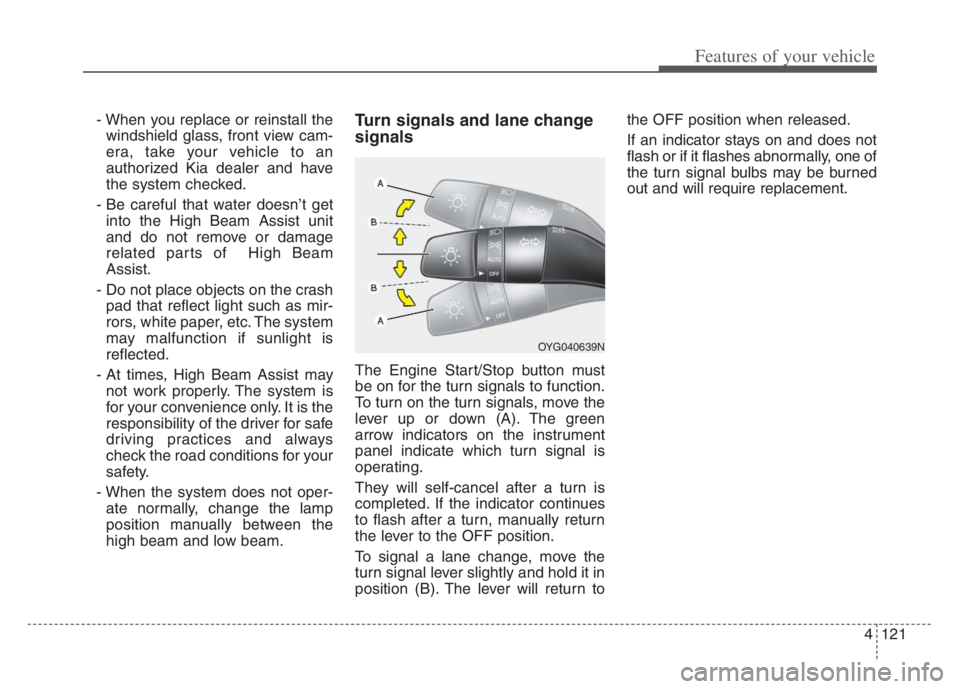
The Engine Start/Stop button must
be on for the turn signals to function.
To turn on the turn signals, move the
lever up or down (A). The green
arrow indicators on the instrument
panel indicate which turn signal is
operating.
They will self-cancel after a turn is
completed. If the indicator continues
to flash after a turn, manually return
the lever to the OFF position.
To signal a lane change, move the
turn signal lever slightly and hold it in
position (B). The lever will return tothe OFF position when released.
If an indicator stays on and does not
flash or if it flashes abnormally, one of
the turn signal bulbs may be burned
out and will require replacement.
OYG040639N
Page 204 of 560
Features of your vehicle
122 4
One-touch Turn signal lamp
When you change lanes, even if the
turn signal lamp lever returns to its
original position after move the turn
signal lever slightly to B position, the
turn signal lamp will blink 3 times
(or 5, 7 times).
This is a feature that helps you con-
tinue to operate even if you are not
holding the turn signal lever when
changing lanes. You may change the
number of blink (3, 5 or 7 times) or
deactivate the one touch turn signal
lamp function from the Infotainment
System as ‘Settings →Vehicle →
Lights →One Touch Turn Signal’.
For more details, please scan the
QR code in a separately supplied
Car Infotainment System Quick
Reference Guide.
✽ ✽
NOTICE
If an indicator flash is abnormally
quick or slow, a bulb may be burned
out or have a poor electrical connec-
tion in the circuit.
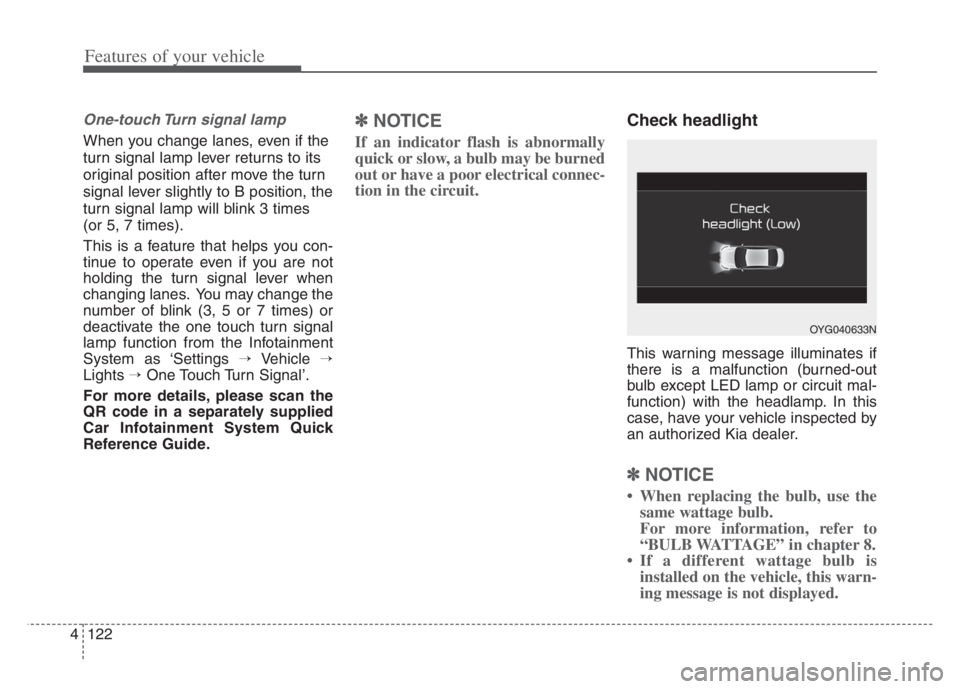
Check headlight
This warning message illuminates if
there is a malfunction (burned-out
bulb except LED lamp or circuit mal-
function) with the headlamp. In this
case, have your vehicle inspected by
an authorized Kia dealer.
✽ ✽
NOTICE
• When replacing the bulb, use the
same wattage bulb.
For more information, refer to
“BULB WATTAGE” in chapter 8.
• If a different wattage bulb is
installed on the vehicle, this warn-
ing message is not displayed.
OYG040633N
Page 205 of 560
4123
Features of your vehicle
Headlight leveling device
(if equipped)
Automatic type
To ensure the proper headlight beam
is used under various conditions, the
headlight beam levels are automati-
cally adjusted depending on the
number of passengers, the weight in
the trunk, and other driving condi-
tions.
✽ ✽
NOTICE
If it does not work properly even
though your car is inclined backward
according to passenger's posture, or
the headlight beam is irradiated to
the high or low position, have the sys-
tem be inspected by an authorized
Kia dealer.
Do not attempt to inspect or replace
the wiring yourself.
Page 206 of 560
Features of your vehicle
124 4
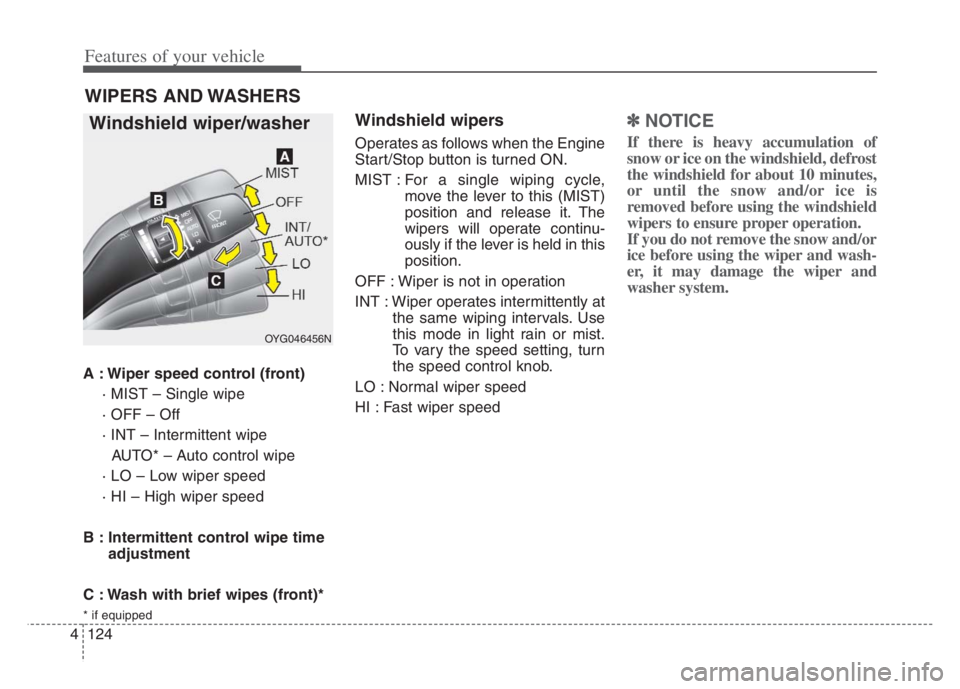
A : Wiper speed control (front)
· MIST – Single wipe
· OFF – Off
· INT – Intermittent wipe
AUTO* – Auto control wipe
· LO – Low wiper speed
· HI – High wiper speed
B : Intermittent control wipe time
adjustment
C : Wash with brief wipes (front)*
* if equipped
Windshield wipers
Operates as follows when the Engine
Start/Stop button is turned ON.
MIST : For a single wiping cycle,
move the lever to this (MIST)
position and release it. The
wipers will operate continu-
ously if the lever is held in this
position.
OFF : Wiper is not in operation
INT : Wiper operates intermittently at
the same wiping intervals. Use
this mode in light rain or mist.
To vary the speed setting, turn
the speed control knob.
LO : Normal wiper speed
HI : Fast wiper speed
✽ ✽
NOTICE
If there is heavy accumulation of
snow or ice on the windshield, defrost
the windshield for about 10 minutes,
or until the snow and/or ice is
removed before using the windshield
wipers to ensure proper operation.
If you do not remove the snow and/or
ice before using the wiper and wash-
er, it may damage the wiper and
washer system.
WIPERS AND WASHERS
Windshield wiper/washer
OYG046456N
Page 209 of 560
4127
Features of your vehicle
Do not use the interior lights for
extended periods when the engine is
not running.
It may cause battery discharge.Automatic turn off function
The interior lights automatically turn
off approximately 20 minutes after
the Engine Start/Stop button is
turned off, if the lights are in the ON
position.
If your vehicle is equipped with the
theft alarm system, the interior lights
automatically turn off approximately
5 seconds after the system is armed.
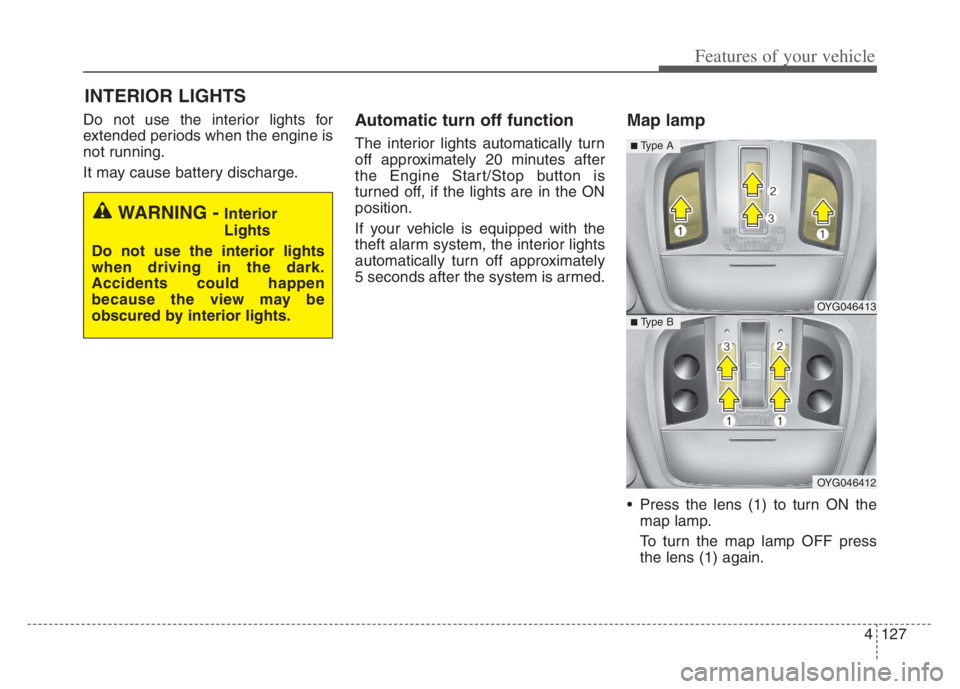
Map lamp
Press the lens (1) to turn ON the
map lamp.
To turn the map lamp OFF press
the lens (1) again.
INTERIOR LIGHTS
WARNING - Interior
Lights
Do not use the interior lights
when driving in the dark.
Accidents could happen
because the view may be
obscured by interior lights.
OYG046413
OYG046412
■ Type B
■ Type A
Page 210 of 560
Features of your vehicle
128 4
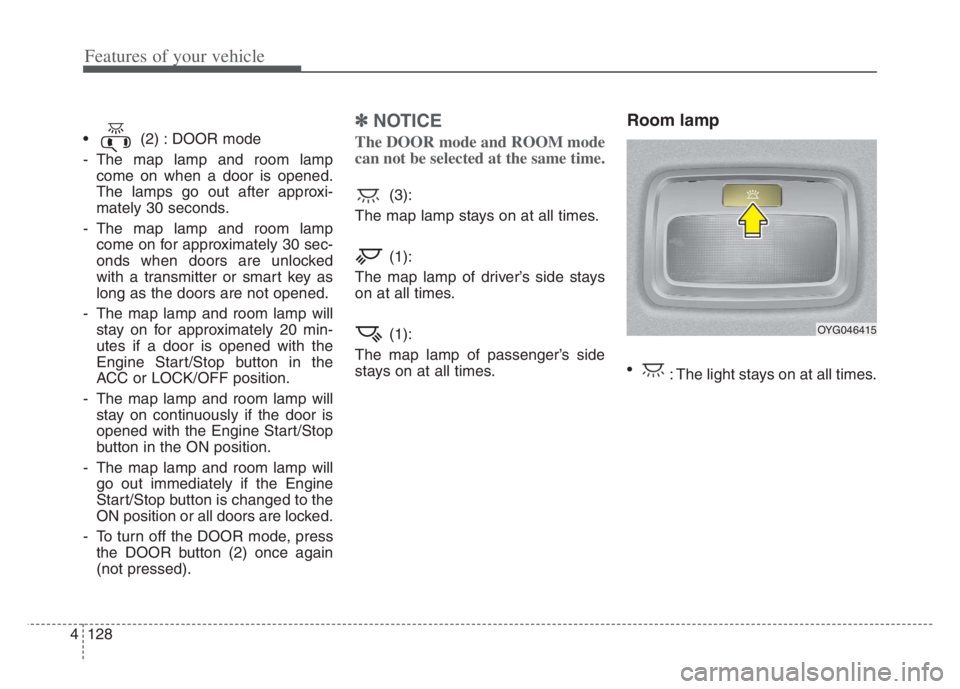
(2) : DOOR mode
- The map lamp and room lamp
come on when a door is opened.
The lamps go out after approxi-
mately 30 seconds.
- The map lamp and room lamp
come on for approximately 30 sec-
onds when doors are unlocked
with a transmitter or smart key as
long as the doors are not opened.
- The map lamp and room lamp will
stay on for approximately 20 min-
utes if a door is opened with the
Engine Start/Stop button in the
ACC or LOCK/OFF position.
- The map lamp and room lamp will
stay on continuously if the door is
opened with the Engine Start/Stop
button in the ON position.
- The map lamp and room lamp will
go out immediately if the Engine
Start/Stop button is changed to the
ON position or all doors are locked.
- To turn off the DOOR mode, press
the DOOR button (2) once again
(not pressed).
✽ ✽
NOTICE
The DOOR mode and ROOM mode
can not be selected at the same time.
(3):
The map lamp stays on at all times.
(1):
The map lamp of driver’s side stays
on at all times.
(1):
The map lamp of passenger’s side
stays on at all times.
Room lamp
: The light stays on at all times.
OYG046415
Page 211 of 560
4129
Features of your vehicle
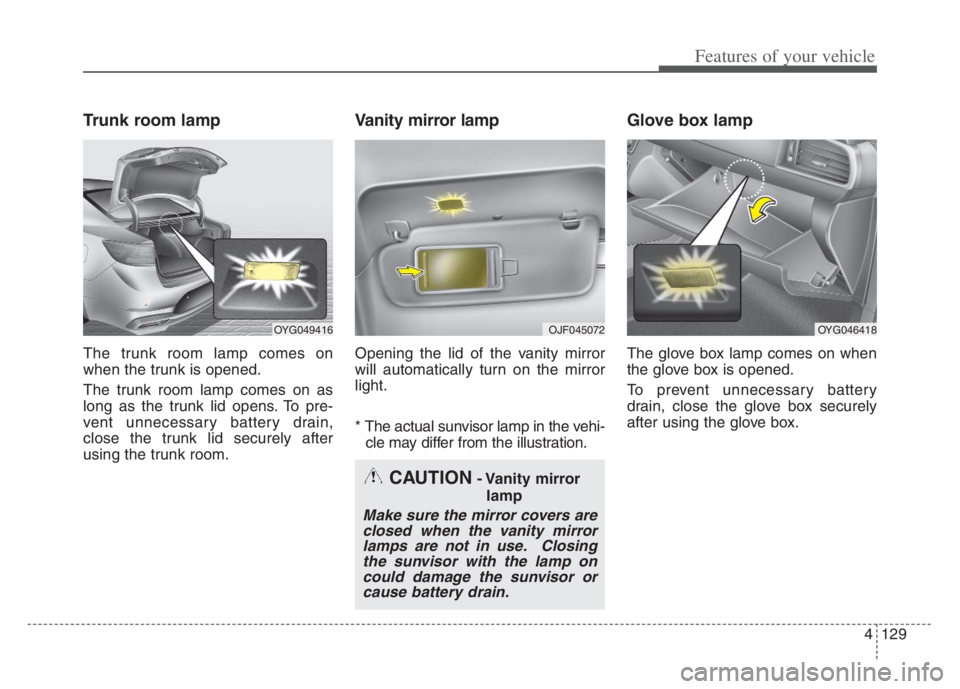
Trunk room lamp
The trunk room lamp comes on
when the trunk is opened.
The trunk room lamp comes on as
long as the trunk lid opens. To pre-
vent unnecessary battery drain,
close the trunk lid securely after
using the trunk room.
Vanity mirror lamp
Opening the lid of the vanity mirror
will automatically turn on the mirror
light.
* The actual sunvisor lamp in the vehi-
cle may differ from the illustration.
Glove box lamp
The glove box lamp comes on when
the glove box is opened.
To prevent unnecessary battery
drain, close the glove box securely
after using the glove box.
CAUTION- Vanity mirror
lamp
Make sure the mirror covers are
closed when the vanity mirror
lamps are not in use. Closing
the sunvisor with the lamp on
could damage the sunvisor or
cause battery drain.
OYG049416 OJF045072 OYG046418
Page 212 of 560

Features of your vehicle
130 4
WELCOME SYSTEM
Welcome light
When all the doors (and trunk) are
locked and closed, the pocket lamp
and puddle lamp will come on for
about 15 seconds if any of the below
is performed.
With the smart key system
- When the vehicle is approached
with the smart key in possession Welcome light is a device for improv-
ing night safety by illuminating the
vehicle and around.
Welcome light is activated or deacti-
vated when you select ‘‘Settings →
Vehicle →Convenience →Welcome
mirror/light’ from the Settings menu
in the Infotainment System screen.
For more details, please scan the
QR code in a separately supplied
Car Infotainment System Quick
Reference Guide.
Escort welcome
When the headlight(light switch in
the headlight or AUTO position) is on
and all doors (and trunk) are locked
and closed, the position light and
headlight will come on for 15 sec-
onds if any of the below is per-
formed.
Without smart key system
- When the door unlock button is
pressed on the transmitter.
With the smart key system
- When the door unlock button is
pressed on the smart key.
At this time, if you press the door lock
or unlock button, the position light
and headlight will turn off immediate-
ly.
OYG049420
Page 213 of 560

4131
Features of your vehicle
Interior light
When the interior light switch is in the
DOOR position and all doors (and
trunk) are locked and closed, the
room lamp will come on for 30 sec-
onds if any of the below is performed.
Without smart key system
- When the door unlock button is
pressed on the transmitter.
With the smart key system
- When the door unlock button is
pressed on the smart key.
- When the button of the outside
door handle is pressed.
At this time, if you press the door lock
button, the lamps will turn off imme-
diately.