display KIA CARENS RHD 2017 Owner's Guide
[x] Cancel search | Manufacturer: KIA, Model Year: 2017, Model line: CARENS RHD, Model: KIA CARENS RHD 2017Pages: 723, PDF Size: 40.8 MB
Page 299 of 723
Audio system
16
5
Features of your vehicle
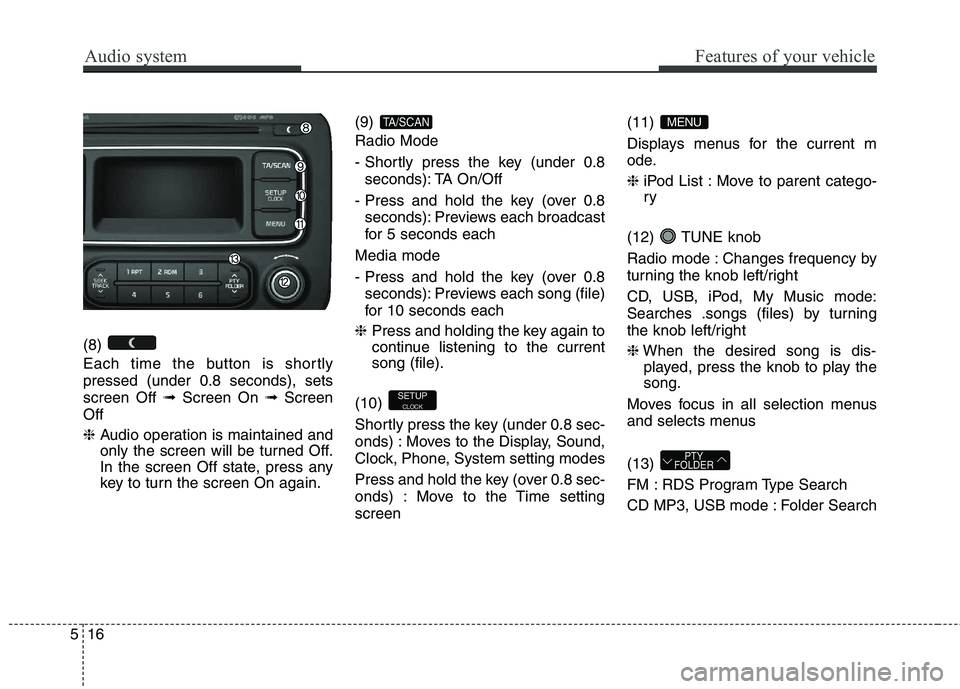
(8)
Each time the button is shortly pressed (under 0.8 seconds), setsscreen Off ➟Screen On ➟Screen
Off ❈ Audio operation is maintained and
only the screen will be turned Off.
In the screen Off state, press any
key to turn the screen On again. (9) Radio Mode
- Shortly press the key (under 0.8
seconds): TA On/Off
- Press and hold the key (over 0.8 seconds): Previews each broadcast
for 5 seconds each
Media mode
- Press and hold the key (over 0.8 seconds): Previews each song (file)
for 10 seconds each
❈ Press and holding the key again to
continue listening to the currentsong (file).
(10)
Shortly press the key (under 0.8 sec-
onds) : Moves to the Display, Sound,
Clock, Phone, System setting modes
Press and hold the key (over 0.8 sec-
onds) : Move to the Time settingscreen (11)
Displays menus for the current m
ode. ❈
iPod List : Move to parent catego- ry
(12) TUNE knob
Radio mode : Changes frequency by
turning the knob left/right
CD, USB, iPod, My Music mode:
Searches .songs (files) by turning
the knob left/right ❈ When the desired song is dis-
played, press the knob to play the song.
Moves focus in all selection menus
and selects menus (13)
FM : RDS Program Type Search
CD MP3, USB mode : Folder Search
PTY
FOLDER
MENU
SETUP
CLOCK
TA/SCAN
Page 302 of 723
519
Audio system
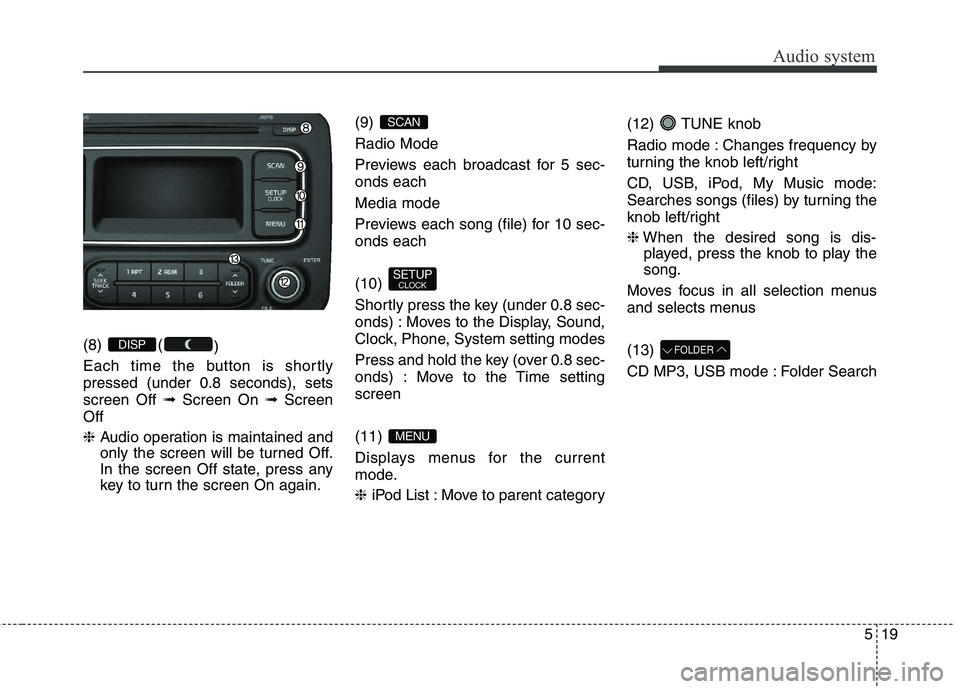
(8) ()
Each time the button is shortly pressed (under 0.8 seconds), setsscreen Off ➟Screen On ➟Screen
Off ❈ Audio operation is maintained and
only the screen will be turned Off.
In the screen Off state, press any
key to turn the screen On again. (9) Radio Mode
Previews each broadcast for 5 sec- onds each Media mode
Previews each song (file) for 10 sec- onds each (10)
Shortly press the key (under 0.8 sec-
onds) : Moves to the Display, Sound,
Clock, Phone, System setting modes
Press and hold the key (over 0.8 sec-
onds) : Move to the Time settingscreen (11)
Displays menus for the current
mode. ❈
iPod List : Move to parent category (12) TUNE knob
Radio mode : Changes frequency by
turning the knob left/right
CD, USB, iPod, My Music mode:
Searches songs (files) by turning the
knob left/right ❈
When the desired song is dis-
played, press the knob to play the song.
Moves focus in all selection menus
and selects menus (13)
CD MP3, USB mode : Folder SearchFOLDER
MENU
SETUP CLOCK
SCAN
DISP
Page 304 of 723
![KIA CARENS RHD 2017 Owners Guide 521
Audio system
SETUP (for RDS model)
AM100A4EE, AM110A4EE
Display Settings
Press the key Select [Display]
through TUNE knob or key
Select menu through TUNE knobMode Pop up
[Mode Pop up] Change](/img/2/57939/w960_57939-303.png "KIA CARENS RHD 2017 Owners Guide 521
Audio system
SETUP (for RDS model)
AM100A4EE, AM110A4EE
Display Settings
Press the key Select [Display]
through TUNE knob or key
Select menu through TUNE knobMode Pop up
[Mode Pop up] Change")
521
Audio system
SETUP (for RDS model)
AM100A4EE, AM110A4EE
Display Settings
Press the key Select [Display]
through TUNE knob or key
Select menu through TUNE knobMode Pop up
[Mode Pop up] Changes . selection mode
or key to display the mode change pop up screen.
Scroll text
[Scroll text] Set /
Maintains scroll
: Scrolls only one (1) time.
Song Info
When playing an MP3 file, select the
desired display info from ‘Folder/File’
or ‘Album/Artist/Song’. Sound Settings
Press the key Select [Sound]
through TUNE knob or key
Select menu through TUNE knob2
RDM
SETUP
OFF
ON
OFFON
MEDIA
RADIO
ON
1 RPT
SETUP
Page 306 of 723
![KIA CARENS RHD 2017 Owners Guide 523
Audio system
CLOCK SETTINGS
Press the key Select [Clock]
through TUNE knob or key
Select menu through TUNE knob
Clock Settings
This menu is used to set the time.
Select [Clock Settings] Set](/img/2/57939/w960_57939-305.png "KIA CARENS RHD 2017 Owners Guide 523
Audio system
CLOCK SETTINGS
Press the key Select [Clock]
through TUNE knob or key
Select menu through TUNE knob
Clock Settings
This menu is used to set the time.
Select [Clock Settings] Set")
523
Audio system
CLOCK SETTINGS
Press the key Select [Clock]
through TUNE knob or key
Select menu through TUNE knob
Clock Settings
This menu is used to set the time.
Select [Clock Settings] Set throughTUNE knob Press TUNE knob
❈ Adjust the number currently in
focus to set the [hour] and press
the tune knob to set the [minute].
Day Settings
This menu is used to set the date (DD/MM/YYYY).
Select [Day Settings] Set through
TUNE knob Press TUNE knob
❈ Adjust the number currently in
focus to make the settings and
press the tune knob to move to the
next setting. (Set in order of
Year/Month/Day)
Time Format This function is used to set the 12/24
hour time format of the audio system.
Select [Time Format] Set 12Hr /
24Hr through TUNE knob
Clock Display when Power is OFF
Select [Clock Disp.(Pwr Off)
Set
/ through TUNE knob
: Displays time/date on screen
Turn off.
Automatic RDS Time This option is used to automatically set
the time by synchronizing with RDS.
Select [Automatic RDS Time]
Set
/ through TUNE knob
: Turn on Automatic Time
Turn off.
Off
On
OffOn
Off
On
OffOn
3
SETUP
CLOCK
Page 307 of 723
![KIA CARENS RHD 2017 Owners Guide Audio system
24
5
Phone Setup (
Bluetooth®Wireless
Technology equipped model)
Press the key Select [Phone] Pair Phone
Select [Pair Phone] Set through TUNE knob ➀
Search for device names as di](/img/2/57939/w960_57939-306.png "KIA CARENS RHD 2017 Owners Guide Audio system
24
5
Phone Setup (
Bluetooth®Wireless
Technology equipped model)
Press the key Select [Phone] Pair Phone
Select [Pair Phone] Set through TUNE knob ➀
Search for device names as di")
Audio system
24
5
Phone Setup (
Bluetooth®Wireless
Technology equipped model)
Press the key Select [Phone] Pair Phone
Select [Pair Phone] Set through TUNE knob ➀
Search for device names as dis-
played on your mobile phone andconnect.
➁ Input the passkey displayed on the
screen. (Passkey : 0000)
❈ The device name and passkey will
be displayed on the screen for up
to 3 minutes. If pairing is not com-
pleted within the 3 minutes, the
mobile phone pairing process willautomatically be canceled. ➂
Pairing completion is displayed.
❈ In some mobile phones, pairing
will automatically be followed byconnection.
❈ It is possible to pair up to five
Bluetooth® Wireless Technology
enabled mobile phones.
SETUP
CAUTION
To pair a Bluetooth ®
Wireless
Technology enabled mobile phone, authentication and con- nection processes are firstrequired. As a result, you can-not pair your mobile phonewhilst driving the vehicle. First park your vehicle before use.
Page 308 of 723
![KIA CARENS RHD 2017 Owners Guide 525
Audio system
Phone List The names of up to 5 paired phones
will be displayed.
A [ ] is displayed in front of the cur-
rently connected phone. Select the desired name to setup the
selected phon](/img/2/57939/w960_57939-307.png "KIA CARENS RHD 2017 Owners Guide 525
Audio system
Phone List The names of up to 5 paired phones
will be displayed.
A [ ] is displayed in front of the cur-
rently connected phone. Select the desired name to setup the
selected phon")
525
Audio system
Phone List The names of up to 5 paired phones
will be displayed.
A [ ] is displayed in front of the cur-
rently connected phone. Select the desired name to setup the
selected phone.
Connecting a phone
Select [Phone List] Select mobile
phone through TUNE knobSelect [Connect Phone] ➀ Select a mobile phone that is not currently connected.
➁ Connect the selected mobile
phone.
➂ Connection completion is dis-
played.
❈ If a phone is already connected,disconnect the currently connect-
ed phone and select a new phoneto connect.
Disconnecting a connected phone
Select [Phone List] Select mobile
phone through TUNE knobSelect [Disconnect Phone] ➀ Select the currently connected
mobile phone.
➁ Disconnect the selected mobile
phone.
➂ Disconnection completion is dis-
played.
Page 309 of 723
![KIA CARENS RHD 2017 Owners Guide Audio system
26
5
Changing connection sequence
(Priority)
This is used to change the order (pri-
ority) of automatic connection for the
paired mobile phones.
Select [Phone List] Select [Priority]](/img/2/57939/w960_57939-308.png "KIA CARENS RHD 2017 Owners Guide Audio system
26
5
Changing connection sequence
(Priority)
This is used to change the order (pri-
ority) of automatic connection for the
paired mobile phones.
Select [Phone List] Select [Priority]")
Audio system
26
5
Changing connection sequence
(Priority)
This is used to change the order (pri-
ority) of automatic connection for the
paired mobile phones.
Select [Phone List] Select [Priority]
through TUNE knob Select No. 1
Priority mobile phone ➀ Select [Priority].
➁ From the paired phones, select
the phone desired for No.1 priority.
➂ The changed priority sequence is
displayed.
❈ Once the connection sequence
(priority) is changed, the new no. 1
priority mobile phone will be con-nected.
- when the no. 1 priority cannot be connected: Automatically attemptsto connect the most recently con-
nected phone.
- Cases when the most recently connected phone cannot be con-
nected: Attempts to connect in theorder in which paired phones arelisted. - The connected phone will auto-
matically be changed to No. 1 pri-
ority.
Delete
Select [Phone List] Select mobile
phone through TUNE knobSelect [Delete] ➀ Select the desired mobile phone.
➁ Delete the selected mobile phone.
➂ Deletion completion is displayed.
❈ When attempting to delete a cur-
rently connected phone, the phoneis first disconnected. Phone book Download
This feature is used to download
phone book and call histories intothe audio system.
Select [Phone book Download]
Select through TUNE knob
CAUTION
The download feature may not
be supported in some mobilephones.
If a different operation is per- formed whilst phone book isbeing downloaded, download-ing will be discontinued.Phone book already down- loaded will be saved.
When downloading new phone book, delete all previouslysaved phone book before start-ing download.
CAUTION
When you delete a mobile phone, the mobile phonephone book will also be erased.
For stable Bluetooth ®
Wireless
Technology communication, delete the mobile phone fromthe audio and also delete theaudio from your mobile phone.
Page 311 of 723
Audio system
28
5
Using the Bluetooth®Wireless
Technology System
To use
Bluetooth®Wireless
Technology when the system is cur-
rently off, follow these next steps.
On
Bluetooth®Wireless
Technology through the Key
Press the key Screen Guidance ❈ Moves to the screen where
Bluetooth®Wireless Technology
functions can be used and dis-
plays guidance. On
Bluetooth®Wireless
Technology through the
Key
Press the key Select [Phone] ➀ A screen asking whether to turn on
Bluetooth®Wireless Technology
will be displayed.
➁ On the screen, select to turn on
Bluetooth®Wireless Technology
and display guidance.
❈ If the
Bluetooth®Wireless
Technology system is turned on,
the system will automatically try toconnect the most recently connect-ed
Bluetooth®Wireless Technology
mobile phone. YES
SETUP
SETUP
PHONE
PHONE
CAUTION
Bluetooth
®
Wireless Technology
connection may become inter- mittently disconnected in somemobile phones. Follow thesenext steps to try again.
1) Turn the Bluetooth ®
Wireless
Technology function within the mobile phone ON/OFF and try to connect again.
2) Turn the mobile phone power ON/OFF and try to connectagain.
3) Completely remove the mobile phone battery, reboot,and then try to connect again.
4) Reboot the audio system and try to connect again
5) Delete all paired devices in your mobile phone and theaudio system and pair againfor use.
Page 312 of 723
![KIA CARENS RHD 2017 Owners Guide 529
Audio system
System Settings
Press the key Select [System] Memory Information (if equipped)
Displays currently used memory and
total system memory.
Select [Memory Information] OK
The current](/img/2/57939/w960_57939-311.png "KIA CARENS RHD 2017 Owners Guide 529
Audio system
System Settings
Press the key Select [System] Memory Information (if equipped)
Displays currently used memory and
total system memory.
Select [Memory Information] OK
The current")
529
Audio system
System Settings
Press the key Select [System] Memory Information (if equipped)
Displays currently used memory and
total system memory.
Select [Memory Information] OK
The currently used memory is dis-
played on the left side whilst the total
system memory is displayed on the
right side.VRS Mode
This feature is used to change voice
command feedback between Normal
and Expert modes.
Select [VRS Mode] Set through TUNE knob
This mode is for beginner
users and provides detailed
instructions during voice command
operation.
This mode is for expert users and omits some information
during voice command operation.
(When using Expert mode, guid-
ance instructions can be heard
through the [Help] or [Menu] com-
mands.
❈ May differ depending on the
selected audio.
SETUP
Page 313 of 723
![KIA CARENS RHD 2017 Owners Guide Audio system
30
5
Language
This menu is used to set the display
and voice recognition language.
Select [Language] Set through TUNE knob ❈ The system will reboot after the language is changed.
â](/img/2/57939/w960_57939-312.png "KIA CARENS RHD 2017 Owners Guide Audio system
30
5
Language
This menu is used to set the display
and voice recognition language.
Select [Language] Set through TUNE knob ❈ The system will reboot after the language is changed.
â")
Audio system
30
5
Language
This menu is used to set the display
and voice recognition language.
Select [Language] Set through TUNE knob ❈ The system will reboot after the language is changed.
❈ Language support by region
- SETUP
AM100A4GG, AM110A4GG
AM100A4GN, AM110A4GN
AM100A4GE, AM110A4GE
AM100A4GL, AM110A4GL
Display Settings
Press the key Select
[Display] through TUNE knob or
key Select menu through
TUNE knob Mode Pop up
[Mode Pop up] Changes . selection mode
or key to display the mode change pop up screen.
Text Scroll
[Text Scroll ] Set /
Maintains scroll
: Scrolls only one (1) time.
Media Display
When playing an MP3 file, select the
desired display info from ‘Folder/File’
or ‘Album/Artist/Song’.
OFF
ON
OFFON
MEDIA
RADIO
ON
1 RPT
SETUP