display KIA CARENS RHD 2017 Owner's Manual
[x] Cancel search | Manufacturer: KIA, Model Year: 2017, Model line: CARENS RHD, Model: KIA CARENS RHD 2017Pages: 723, PDF Size: 40.8 MB
Page 202 of 723
Features of your vehicle
106
4
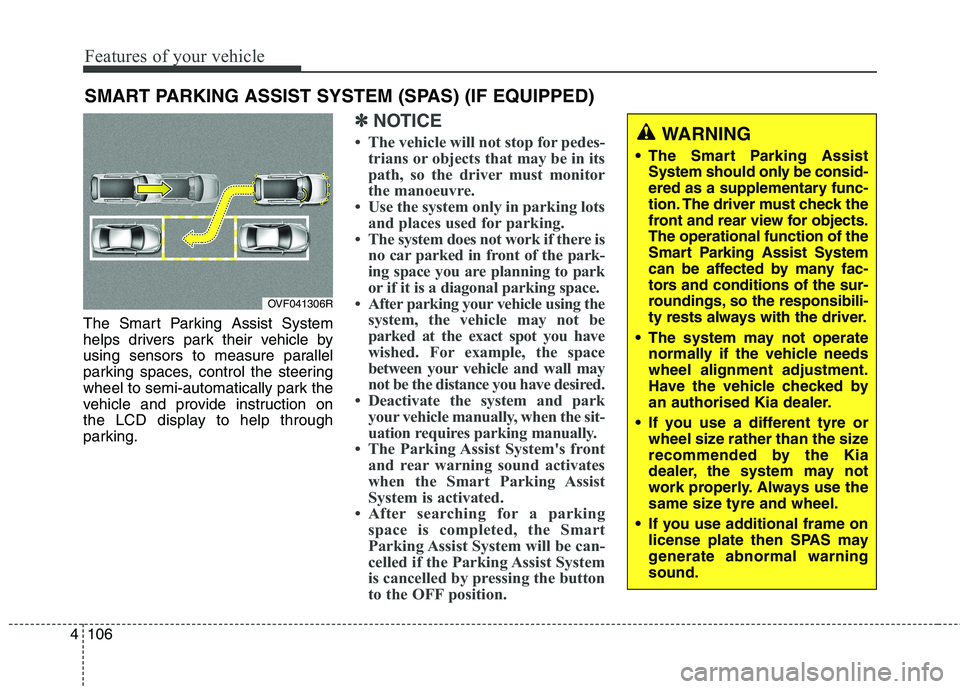
The Smart Parking Assist System
helps drivers park their vehicle by
using sensors to measure parallel
parking spaces, control the steering
wheel to semi-automatically park the
vehicle and provide instruction on
the LCD display to help through
parking.
✽✽
NOTICE
The vehicle will not stop for pedes- trians or objects that may be in its
path, so the driver must monitor
the manoeuvre.
Use the system only in parking lots and places used for parking.
The system does not work if there is no car parked in front of the park-
ing space you are planning to park
or if it is a diagonal parking space.
After parking your vehicle using the system, the vehicle may not be
parked at the exact spot you have
wished. For example, the space
between your vehicle and wall may
not be the distance you have desired.
Deactivate the system and park your vehicle manually, when the sit-
uation requires parking manually.
The Parking Assist System's front and rear warning sound activates
when the Smart Parking Assist
System is activated.
After searching for a parking space is completed, the Smart
Parking Assist System will be can-
celled if the Parking Assist System
is cancelled by pressing the button
to the OFF position.
SMART PARKING ASSIST SYSTEM (SPAS) (IF EQUIPPED)
OVF041306R
WARNING
The Smart Parking Assist System should only be consid-
ered as a supplementary func-
tion. The driver must check the
front and rear view for objects.The operational function of the
Smart Parking Assist System
can be affected by many fac-
tors and conditions of the sur-
roundings, so the responsibili-
ty rests always with the driver.
The system may not operate normally if the vehicle needswheel alignment adjustment.
Have the vehicle checked by
an authorised Kia dealer.
If you use a different tyre or wheel size rather than the size
recommended by the Kia
dealer, the system may not
work properly. Always use the
same size tyre and wheel.
If you use additional frame on license plate then SPAS may
generate abnormal warningsound.
Page 206 of 723
Features of your vehicle
110
4
How the system works
1. Activate the Smart Parking Assist
System
2. Select parking assist mode
3. Search for parking space (slowly move forward.)
4. Search complete (automatic search by sensor.)
5. Steering wheel control (1) Shift according to the instruc- tion on the LCD display.
(2) Drive slo wly with the brake
pedal applied.
6. Smart Parking Assist System complete
7. If necessary, manually adjust posi- tion of vehicle.✽✽ NOTICE
Before activating the system check if the conditions are possible to use
the system.
For your safety, always apply the brake pedal except for when driv-
ing.(Continued)
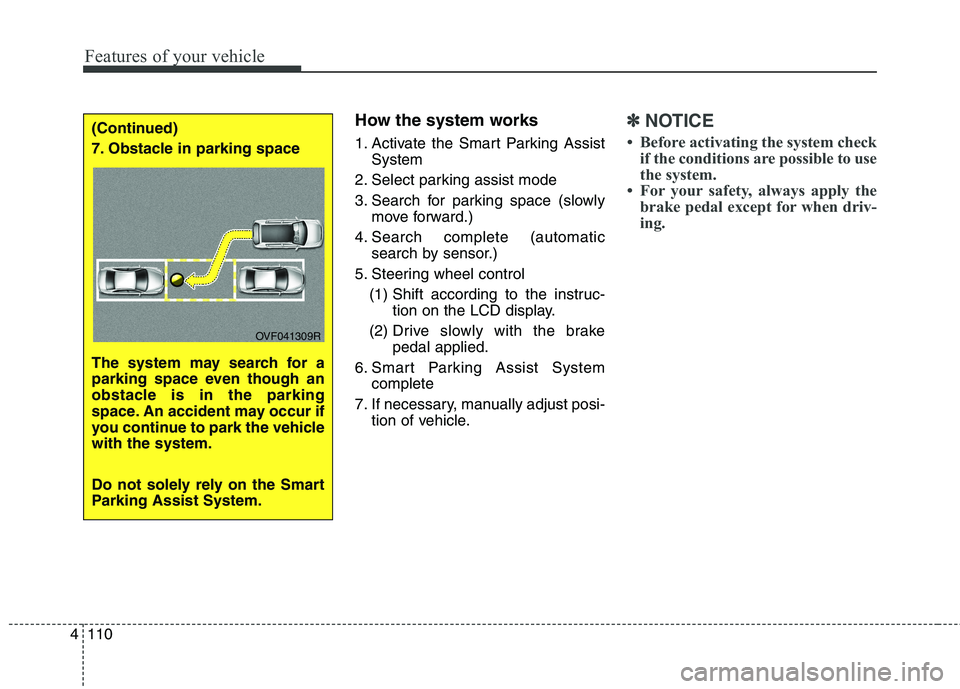
7. Obstacle in parking space
The system may search for a
parking space even though an
obstacle is in the parking
space. An accident may occur if
you continue to park the vehiclewith the system.
Do not solely rely on the Smart
Parking Assist System.
OVF041309R
Page 210 of 723
Features of your vehicle
114
4
Gear shift whilst steering wheel control When the message ("Shift to 1st gear", "Shift to R", "Shift to D")appears with a beep sound, shift the
gear and drive the vehicle with the
brake pedal depressed.6. Smart Parking Assist System
completed
Complete parking your vehicle
according to the instructions on the
LCD display. If required, manually
control the steering wheel and com-
plete parking your vehicle.
✽✽NOTICE
The brake pedal must be depressed
by the driver whilst parking your
vehicle.
The system may be cancelled in the
below conditions:
Ignoring the gear shift message and drive the vehicle approximate- ly 150cm (59in).
The front and rear Parking Assist System warning sound (distance
from object is within 30cm: contin-uous beep) is heard at the same
time.
6 minutes have passed since the vehicle has been controlled by the
Smart Parking Assist System.
The shift lever is changed to the P (Park) or R (Reverse) position
whilst searching for parking space.
WARNING
Always be careful whilst park-
ing for other vehicles or pedes-trians.
CAUTION
Always check the surrounding before releasing the brakepedal.
Page 212 of 723
Features of your vehicle
116
4
REARVIEW CAMERA (IF EQUIPPED)
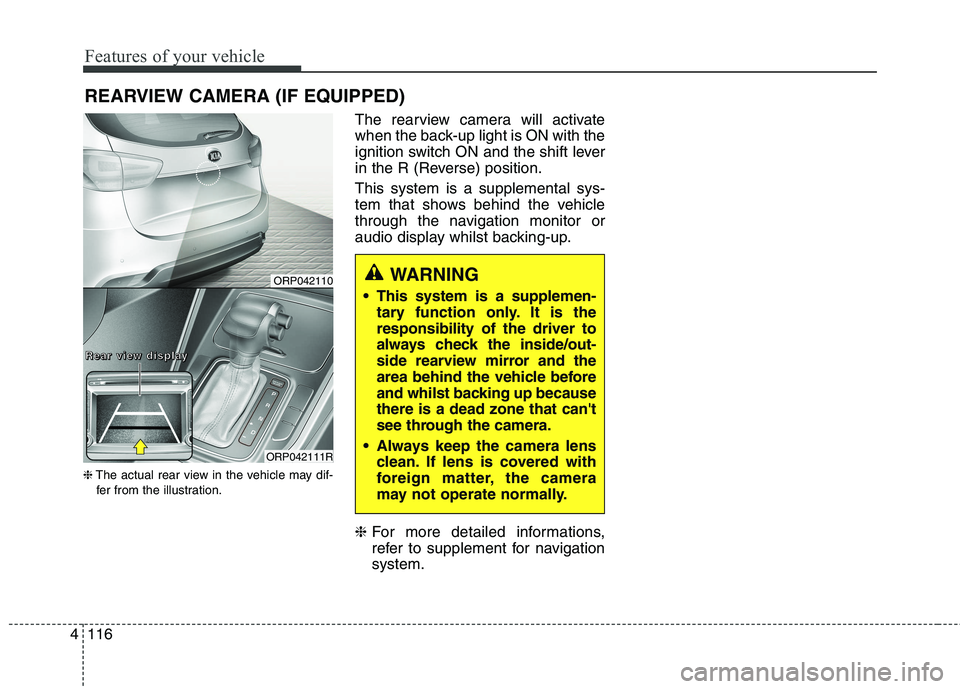
❈ The actual rear view in the vehicle may dif-
fer from the illustration. The rearview camera will activate
when the back-up light is ON with the
ignition switch ON and the shift lever
in the R (Reverse) position. This system is a supplemental sys-
tem that shows behind the vehicle
through the navigation monitor or
audio display whilst backing-up. ❈
For more detailed informations,
refer to supplement for navigationsystem.
WARNING
This system is a supplemen- tary function only. It is the responsibility of the driver to
always check the inside/out-
side rearview mirror and the
area behind the vehicle before
and whilst backing up becausethere is a dead zone that can't
see through the camera.
Always keep the camera lens clean. If lens is covered with
foreign matter, the camera
may not operate normally.ORP042110
ORP042111R
RRRReeeeaaaarrrr vvvviiiieeeewwww ddddiiiissssppppllllaaaayyyy
Page 246 of 723
Features of your vehicle
150
4
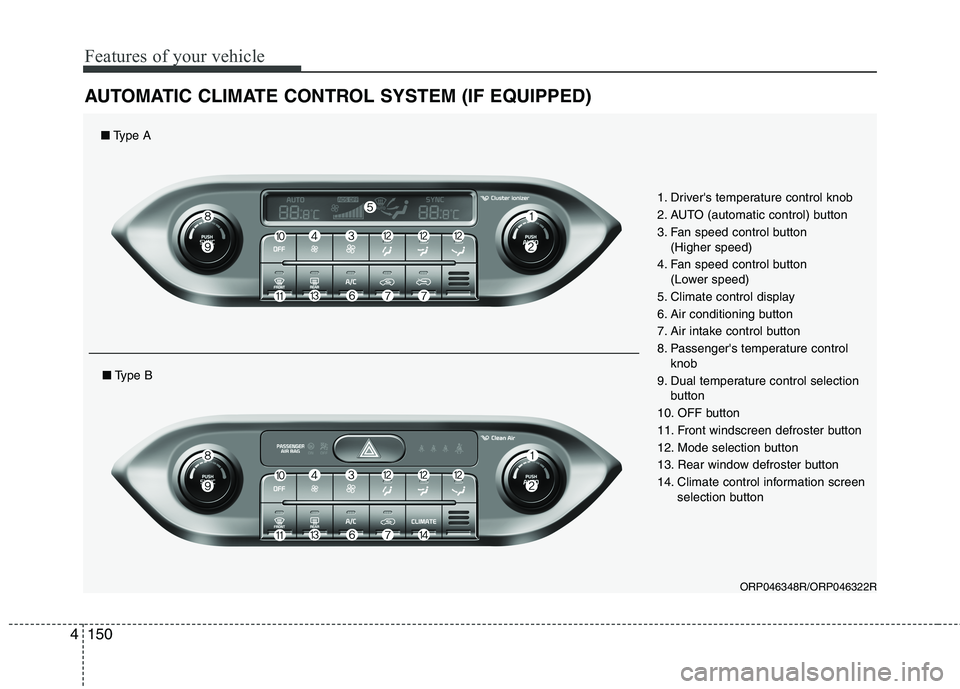
AUTOMATIC CLIMATE CONTROL SYSTEM (IF EQUIPPED)
ORP046348R/ORP046322R
1. Driver's temperature control knob
2. AUTO (automatic control) button
3. Fan speed control button
(Higher speed)
4. Fan speed control button (Lower speed)
5. Climate control display
6. Air conditioning button
7. Air intake control button
8. Passenger's temperature control knob
9. Dual temperature control selection button
10. OFF button
11. Front windscreen defroster button
12. Mode selection button
13. Rear window defroster button
14. Climate control information screen selection button
■Type A
■Type B
Page 248 of 723
Features of your vehicle
152
4
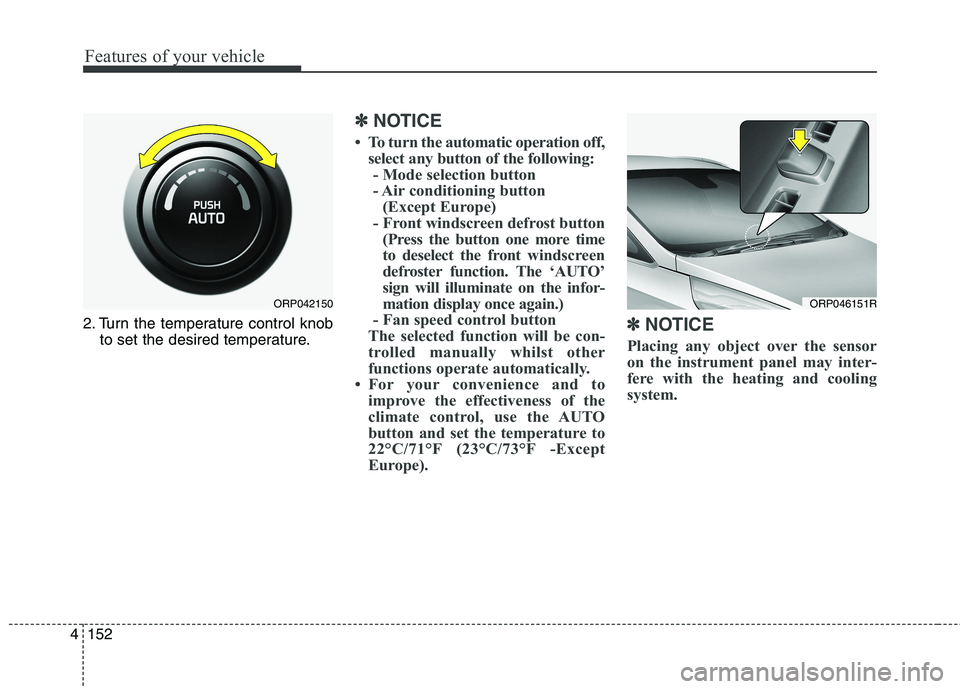
2. Turn the temperature control knob
to set the desired temperature.
✽✽ NOTICE
To turn the automatic operation off, select any button of the following:- Mode selection button
- Air conditioning button (Except Europe)
- Front windscreen defrost button (Press the button one more time
to deselect the front windscreen
defroster function. The ‘AUTO’
sign will illuminate on the infor-
mation display once again.)
- Fan speed control button
The selected function will be con-
trolled manually whilst other
functions operate automatically.
For your convenience and to improve the effectiveness of the
climate control, use the AUTO
button and set the temperature to
22°C/71°F (23°C/73°F -Except
Europe). ✽
✽
NOTICE
Placing any object over the sensor
on the instrument panel may inter-
fere with the heating and cooling
system.
ORP046151RORP042150
Page 252 of 723
Features of your vehicle
156
4
Adjusting the driver and passenger
side temperature individually
Press the "SYNC" button again to
adjust the driver and passenger
side temperature individually. The
illumination of button turns off.
Operate the driver side tempera- ture control knob to adjust the driv-
er side temperature.
Operate the passenger side tem- perature control knob to adjust the
passenger side temperature. Temperature conversion
You can switch the temperature
mode between Centigrade to
Fahrenheit as follows:
Whilst pressing the OFF button,
press the AUTO button for 3 seconds
or more.
The display will change from
Centigrade to Fahrenheit, or from
Fahrenheit to Centigrade.
✽✽
NOTICE
If the battery has been discharged or disconnected, the temperature
mode display will reset to
Centigrade.
If you re-connect the battery after it has been completely discharged
or after it has been disconnected
from the vehicle, the system will
be initiated and the display will
first show 22°C on the screen
which is the initial setting.
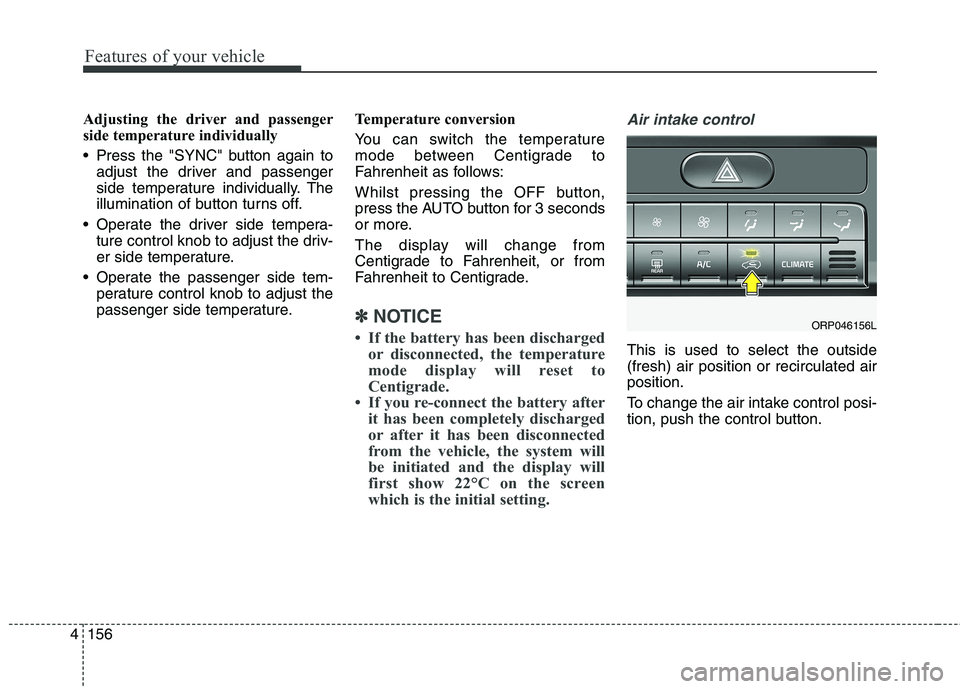
Air intake control
This is used to select the outside (fresh) air position or recirculated airposition.
To change the air intake control posi-
tion, push the control button.
ORP046156L
Page 255 of 723
4159
Features of your vehicle
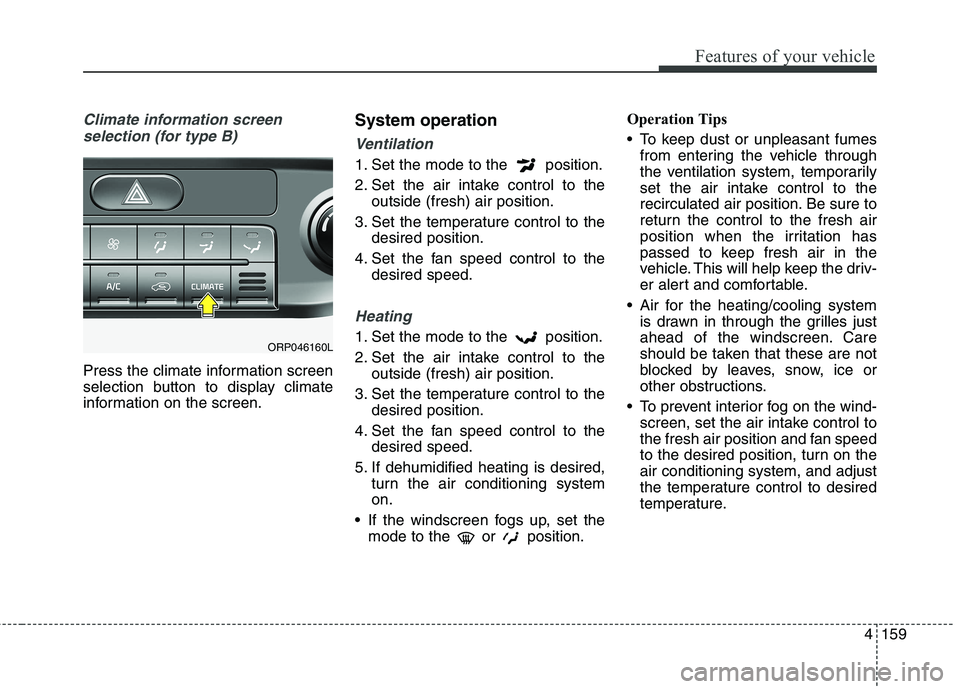
Climate information screen selection (for type B)
Press the climate information screen
selection button to display climate
information on the screen. System operation
Ventilation
1. Set the mode to the position.
2. Set the air intake control to the
outside (fresh) air position.
3. Set the temperature control to the desired position.
4. Set the fan speed control to the desired speed.
Heating
1. Set the mode to the position.
2. Set the air intake control to theoutside (fresh) air position.
3. Set the temperature control to the desired position.
4. Set the fan speed control to the desired speed.
5. If dehumidified heating is desired, turn the air conditioning system on.
If the windscreen fogs up, set the mode to the or position. Operation Tips
To keep dust or unpleasant fumes
from entering the vehicle through
the ventilation system, temporarily
set the air intake control to the
recirculated air position. Be sure to
return the control to the fresh air
position when the irritation has
passed to keep fresh air in the
vehicle. This will help keep the driv-
er alert and comfortable.
Air for the heating/cooling system is drawn in through the grilles just
ahead of the windscreen. Care
should be taken that these are not
blocked by leaves, snow, ice or
other obstructions.
To prevent interior fog on the wind- screen, set the air intake control to
the fresh air position and fan speed
to the desired position, turn on theair conditioning system, and adjust
the temperature control to desired
temperature.ORP046160L
Page 262 of 723
Features of your vehicle
166
4
This indicator illuminates
when the auto defoggingsystem senses the mois-ture of inside the wind-
screen and operates.
If more moisture is in the vehicle,
higher steps operate as follow.
Step 1 : Operating the air condition- ing
Step 2 : Blowing air flow toward the windscreen
Step 3 : Outside air position
Step 4 : Increasing air flow toward the windscreen If your vehicle is equipped with the
auto defogging system, it is automat-
ically activated when the conditions
are met. To cancel or reset the Auto
Defogging system, press the front
windscreen defroster button for 3
seconds when the ignition switch is in
the ON position. When the Auto
Defogging System is Cancelled, ADS
OFF symbol will blink 3 times and the
ADS OFF will be displayed on the cli-
mate control information screen.
When the Auto Defogging System is
reset, ADS OFF symbol will blink 6times without a signal. In case of automatic climate control
system with a climate button, it blinks
defroster button indicator. Blinking
time is same as above.
To use the auto defogging system
again, follow the procedures men-
tioned above.
If the battery has been disconnected or discharged, it resets to the auto
defogging status.✽✽
NOTICE
If the A/C off is manually selected
whilst the auto defogging system is
on, the auto defogging indicator will
blink 3 times to give notice that the
A/C off can not be selected.
CAUTION
Do not remove the sensor cover located on the upper end of thedriver side windscreen glass. Damage to the system partscould occur and may not be cov-ered by your vehicle warranty.
Page 298 of 723
515
Audio systemFeatures of your vehicle
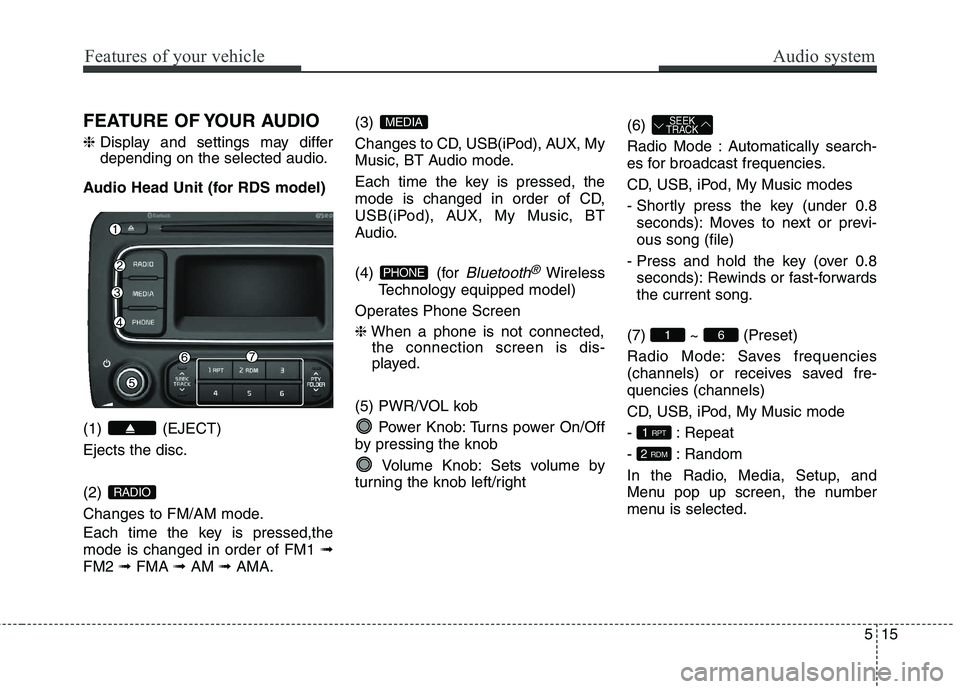
FEATURE OF YOUR AUDIO ❈Display and settings may differ
depending on the selected audio.
Audio Head Unit (for RDS model) (1) (EJECT) Ejects the disc. (2)
Changes to FM/AM mode.
Each time the key is pressed,the mode is changed in order of FM1 ➟
FM2 ➟FMA ➟AM ➟AMA. (3)
Changes to CD, USB(iPod), AUX, My
Music, BT Audio mode.
Each time the key is pressed, the
mode is changed in order of CD,
USB(iPod), AUX, My Music, BT
Audio.
(4) (for
Bluetooth®Wireless
Technology equipped model)
Operates Phone Screen ❈ When a phone is not connected,
the connection screen is dis-
played.
(5) PWR/VOL kob Power Knob: Turns power On/Off
by pressing the knob
Volume Knob: Sets volume by
turning the knob left/right (6)
Radio Mode : Automatically search-
es for broadcast frequencies.
CD, USB, iPod, My Music modes
- Shortly press the key (under 0.8
seconds): Moves to next or previ- ous song (file)
- Press and hold the key (over 0.8 seconds): Rewinds or fast-forwardsthe current song.
(7) ~ (Preset)
Radio Mode: Saves frequencies
(channels) or receives saved fre-quencies (channels)
CD, USB, iPod, My Music mode
- : Repeat
- : Random
In the Radio, Media, Setup, and
Menu pop up screen, the number
menu is selected.
2 RDM
1 RPT
61
SEEK
TRACK
PHONE
MEDIA
RADIO