ignition KIA CARENS RHD 2018 Manual PDF
[x] Cancel search | Manufacturer: KIA, Model Year: 2018, Model line: CARENS RHD, Model: KIA CARENS RHD 2018Pages: 723, PDF Size: 40.94 MB
Page 271 of 723
4175
Features of your vehicle
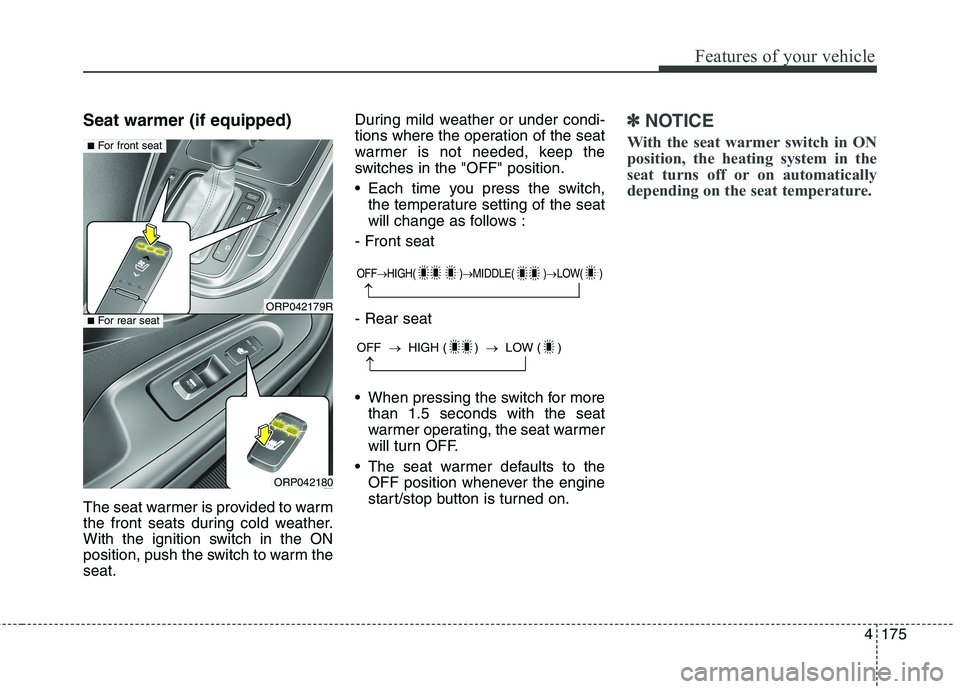
Seat warmer (if equipped)
The seat warmer is provided to warm
the front seats during cold weather.
With the ignition switch in the ON
position, push the switch to warm theseat.During mild weather or under condi-
tions where the operation of the seat
warmer is not needed, keep the
switches in the "OFF" position.
Each time you press the switch,
the temperature setting of the seat
will change as follows :
- Front seat - Rear seat
When pressing the switch for more than 1.5 seconds with the seat
warmer operating, the seat warmer
will turn OFF.
The seat warmer defaults to the OFF position whenever the engine
start/stop button is turned on.✽✽ NOTICE
With the seat warmer switch in ON
position, the heating system in the
seat turns off or on automatically
depending on the seat temperature.
OFF HIGH( ) MIDDLE( ) LOW( )
OFF HIGH ( ) LOW ( )
ORP042179R
ORP042180
■For front seat
■For rear seat
Page 273 of 723
4177
Features of your vehicle
When the operation of the air ventila-
tion is not needed, keep the switchesin the OFF position.
Each time you press the switch,the airflow will change as follows:
When pressing the switch for more than 1.5 seconds with the seat
cooler operating, the seat cooler
will turn OFF.
When the air ventilation seat is turned on, the seat may get cooler
after about 5 minutes.
Because the air ventilation uses the air in the vehicle, cooling effi-
ciency depends on the tempera-
ture of the air. In order to improve
cooling efficiency, use the air con-
ditioning system together.
The air ventilation seat defaults to the OFF position whenever the
ignition switch is turned to the ONposition. Sunvisor
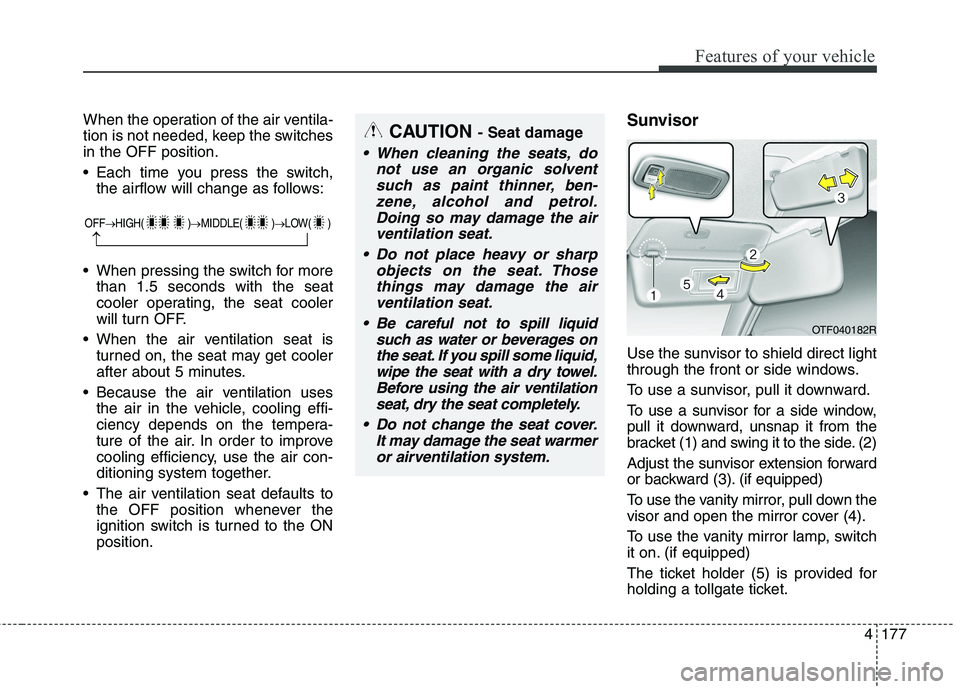
Use the sunvisor to shield direct light
through the front or side windows.
To use a sunvisor, pull it downward.
To use a sunvisor for a side window,
pull it downward, unsnap it from the
bracket (1) and swing it to the side. (2)
Adjust the sunvisor extension forward
or backward (3). (if equipped)
To use the vanity mirror, pull down the
visor and open the mirror cover (4).
To use the vanity mirror lamp, switch
it on. (if equipped)
The ticket holder (5) is provided for
holding a tollgate ticket.CAUTION
- Seat damage
When cleaning the seats, do
not use an organic solventsuch as paint thinner, ben-zene, alcohol and petrol.Doing so may damage the air ventilation seat.
Do not place heavy or sharp objects on the seat. Thosethings may damage the airventilation seat.
Be careful not to spill liquid such as water or beverages onthe seat. If you spill some liquid,wipe the seat with a dry towel.Before using the air ventilation seat, dry the seat completely.
Do not change the seat cover. It may damage the seat warmeror airventilation system.
OTF040182R
OFF HIGH( ) MIDDLE( ) LOW( )
Page 280 of 723
Features of your vehicle
184
4
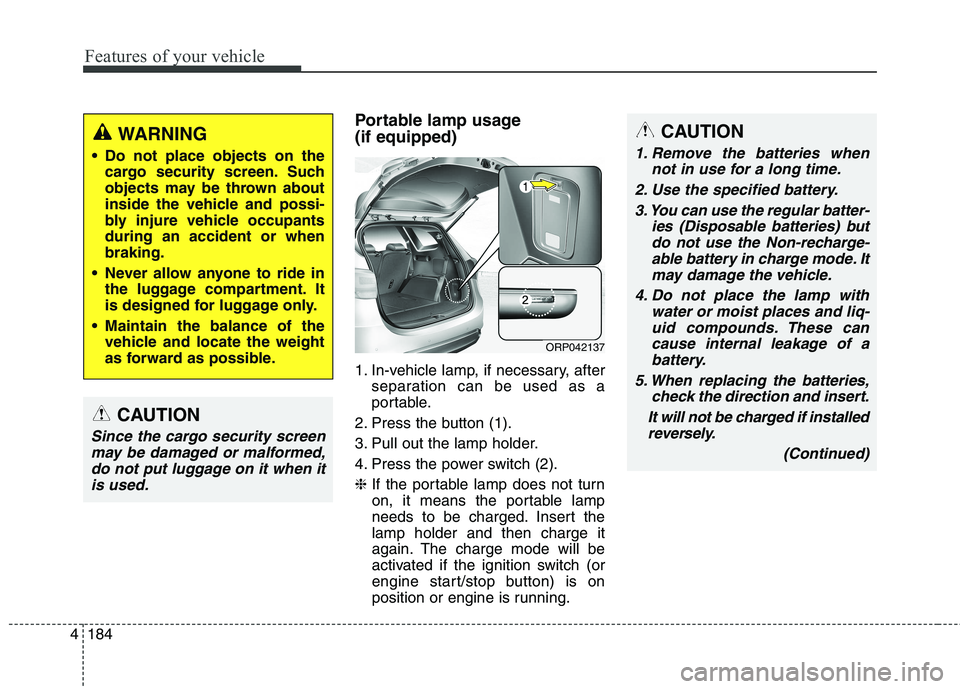
Portable lamp usage (if equipped)
1. In-vehicle lamp, if necessary, after
separation can be used as a
portable.
2. Press the button (1).
3. Pull out the lamp holder.
4. Press the power switch (2).❈ If the portable lamp does not turn
on, it means the portable lamp
needs to be charged. Insert thelamp holder and then charge it
again. The charge mode will be
activated if the ignition switch (or
engine start/stop button) is on
position or engine is running.CAUTION
1. Remove the batteries when
not in use for a long time.
2. Use the specified battery. 3. You can use the regular batter- ies (Disposable batteries) butdo not use the Non-recharge-able battery in charge mode. It may damage the vehicle.
4. Do not place the lamp with water or moist places and liq-uid compounds. These cancause internal leakage of a battery.
5. When replacing the batteries, check the direction and insert.
It will not be charged if installed reversely.
(Continued)
ORP042137
WARNING
Do not place objects on the cargo security screen. Such
objects may be thrown about
inside the vehicle and possi-
bly injure vehicle occupantsduring an accident or whenbraking.
Never allow anyone to ride in the luggage compartment. It
is designed for luggage only.
Maintain the balance of the vehicle and locate the weight
as forward as possible.
CAUTION
Since the cargo security screen
may be damaged or malformed,do not put luggage on it when it is used.
Page 291 of 723
Audio system
8
5
CAUTION
Operating the device whilst
driving could lead to acci-dents due to a lack of atten- tion to external surroundings.First park the vehicle beforeoperating the device.
Adjust the volume to levels that allow the driver to hearsounds from outside of thevehicle. Driving in a statewhere external sounds cannot be heard may lead to acci-dents.
Pay attention to the volume setting when turning thedevice on. A sudden output of extreme volume upon turningthe device on could lead tohearing impairment. (Adjust the volume to a suitable levelsbefore turning off the device.)
(Continued)
WARNING
Do not stare at the screen whilst driving. Staring at the
screen for prolonged periodsof time could lead to trafficaccidents.
Do not disassemble, assem- ble, or modify the audio sys-
tem. Such acts could result in
accidents, fire, or electric
shock.
Using the phone whilst driv- ing may lead to a lack of atten-tion of traffic conditions andincrease the likelihood of
accidents. Use the phone fea-
ture after parking the vehicle.
Heed caution not to spill water or introduce foreign objects
into the device. Such acts
could lead to smoke, fire, or
product malfunction.
(Continued)(Continued)
Please refrain from use if thescreen is blank or no sound
can be heard as these signs
may indicate product malfunc-
tion. Continued use in suchconditions could lead to acci-
dents(fires, electric shock) or
product malfunctions.
Do not touch the antenna dur- ing thunder or lightening as
such acts may lead to light-
ning induced electric shock.
Do not stop or park in park- ing-restricted areas to operate
the product. Such acts couldlead to traffic accidents.
Use the system with the vehi- cle ignition turned on.
Prolonged use with the igni-tion turned off could result in
battery discharge.
Page 292 of 723
59
Audio system
(Continued) If you want to change the posi- tion of device installation,please inquire with your place of purchase or service mainte-nance centre. Technicalexpertise is required to install or disassemble the device.
Turn on the car ignition before using this device. Do not oper-ate the audio system for longperiods of time with the igni- tion turned off as such opera-tions may lead to battery dis-charge.
Do not subject the device to severe shock or impact. Directpressure onto the front side ofthe monitor may cause damageto the LCD or touch screen.
(Continued)(Continued) When cleaning the device, make sure to turn off thedevice and use a dry and smooth cloth. Never usetough materials, chemicalcloths, or solvents (alcohol,benzene, thinners, etc.) as such materials may damagethe device panel or causecolour/quality deterioration
Do not place beverages close to the audio system. Spillingbeverages may lead to systemmalfunction.
In case of product malfunc- tion, please contact your placeof purchase or After Service centre.
Placing the audio system with- in an electromagnetic environ-ment may result in noise inter-ference.
Page 338 of 723
555
Audio system
(Continued)
When a Bluetooth®
Wireless
Technology mobile phone is con-
nected, a ( ) icon will appear at
the top of the screen. If a ( ) icon
is not displayed, this indicates thata Bluetooth ®
Wireless Technology
enabled device has not been con-
nected. You must connect the
device before use. For more infor-
mation on Bluetooth®
Wireless
Technology mobile phones, refer
to the “Phone Setup” section.
Pairing and connecting a Bluetooth ®
Wireless Technology
enabled mobile phone will work
only when the Bluetooth®
Wireless
Technology option within your
mobile phone has been turned on.
(Methods of turning on the
Bluetooth ®
Wireless Technology
enabled feature may differ
depending on the mobile phone.) (Continued)(Continued)
In some mobile phones, starting
the ignition whilst talking through
Bluetooth ®
Wireless Technology
enabled handsfree call will result
in the call becoming disconnected.
(Switch the call back to your
mobile phone when starting the
ignition.)
Some features may not be sup- ported in some Bluetooth®
Wireless Technology mobile phone
and devices.
Bluetooth ®
Wireless Technology
enabled operation may be unsta-
ble depending on the communica-
tion state.
Placing the audio system within an electromagnetic environment may
result in noise interference.
Page 370 of 723
587
Audio system
✽✽NOTICE - USING THE USB DEVICE
Connect the USB device after turning on the engine. The USB
device may become damaged if it
is already connected when the
ignition is turned on.The USB
device may not operate properly if
the car ignition is turned on or off
with the USB device connected.
Heed caution to static electricity when connecting/disconnecting
USB devices.
Encoded MP3 Players will not be recognized when connected as an
external device.
When connecting an external USB device, the device may not proper-
ly recognize the USB is in some
states.
Only products formatted with byte/sectors under 64Kbyte will be
recognized.
This device recognizes USB devices formatted in FAT 12/16/32
file formats. This device does not
recognize files in NTFS file for-mat. (Continued)(Continued)
Some USB devices may not be sup-
ported due to compatibility issues.
Avoid contact between the USB connector with bodily parts or for-
eign objects.
Repeated connecting/disconnect- ing of USB devices within short
periods of time may result in prod-
uct malfunction.
A strange noise may occur when disconnecting the USB.
Make sure to connect/disconnect external USB devices with the
audio power turned off.
The amount of time required to recognize the USB device may dif-
fer depending on the type, size or
file formats stored in the USB.
Such differences in time are not
indications of malfunctions.
The device only supports USB devices used to play music files.
USB images and videos are not supported. (Continued)(Continued)
Do not use the USB I/F to charge
batteries or USB accessories that
generate heat. Such acts may lead
to worsened performance or dam-
age to the device.
The device may not recognize the USB device if separately pur-
chased USB hubs and extension
cables are being used. Connect the
USB directly with the multimedia
terminal of the vehicle.
When using mass storage USB devices with separate logical
drives, only files saved to the root
drive can be played.
Files may not properly operate if application programs are installed
to the USBs.
The device may not operate nor- mally if MP3 Players, mobile
phones, digital cameras, or other
electronic devices (USB devices
not recognized as portable disk
drives) are connected with the
device. (Continued)
Page 433 of 723
![KIA CARENS RHD 2018 Manual PDF Audio system
150
5
System Setting
Memory Information
Press the key Select
[System] Select [Memory Information]
This feature displays information
related to system memory.
(1) Using : Displays cap](/img/2/57938/w960_57938-432.png "KIA CARENS RHD 2018 Manual PDF Audio system
150
5
System Setting
Memory Information
Press the key Select
[System] Select [Memory Information]
This feature displays information
related to system memory.
(1) Using : Displays cap")
Audio system
150
5
System Setting
Memory Information
Press the key Select
[System] Select [Memory Information]
This feature displays information
related to system memory.
(1) Using : Displays capacity currently
in use
(2) Capacity : Displays total capacity
Language
Press the key Select
[System] Select [Language]
This feature is used to change the
system and voice recognition lan-
guage. If the language is changed, the sys-
tem will restart and apply the select-
ed language. REAR VIEW CAMERA (if equipped)
The system has been equipped
with a rear view camera for user
safety by allowing a wider rear
range of vision.
The rear view camera will automat- ically operate when the ignition key
is turned ON and the transmission
lever is set to R.
The rear view camera will automat- ically stop operating when set to a
different lever.SETUP
SETUP
CAUTION
The rear view camera has been
equipped with an optical lens toprovide a wider range of visionand may appear different from the actual distance. For safety,directly check the rear andleft/right sides.
Page 439 of 723
Driving your vehicle
4
6
Before entering vehicle
• Be sure that all windows, outside
mirror(s), and outside lights are clean.
Check the condition of the tyres.
Check under the vehicle for any sign of leaks.
Be sure there are no obstacles behind you if you intend to back up. Necessary inspections
Fluid levels, such as engine oil,
engine coolant, brake fluid, and
washer fluid should be checked on a
regular basis, with the exact interval
depending on the fluid. Further
details are provided in chapter 8,“Maintenance”.
Before starting
Close and lock all doors.
Position the seat so that all con-
trols are easily reached.
Adjust the inside and outside rearview mirrors.
Be sure that all lights work.
Check all gauges.
Check the operation of warning lights when the ignition switch is
turned to the ON position.
Release the parking brake and make sure the brake warning lightgoes out.
For safe operation, be sure you are
familiar with your vehicle and itsequipment.
BEFORE DRIVING
WARNING
Driving whilst distracted can
result in a loss of vehicle con-
trol, that may lead to an acci-
dent, severe personal injury,
and death. The driver’s primary
responsibility is in the safe and
legal operation of a vehicle, and
use of any handheld devices,
other equipment, or vehicle sys-
tems which take the driver’s
eyes, attention and focus away
from the safe operation of a
vehicle or which are not permis-
sible by law should never beused during operation of the
vehicle.
Page 441 of 723
Driving your vehicle
6
6
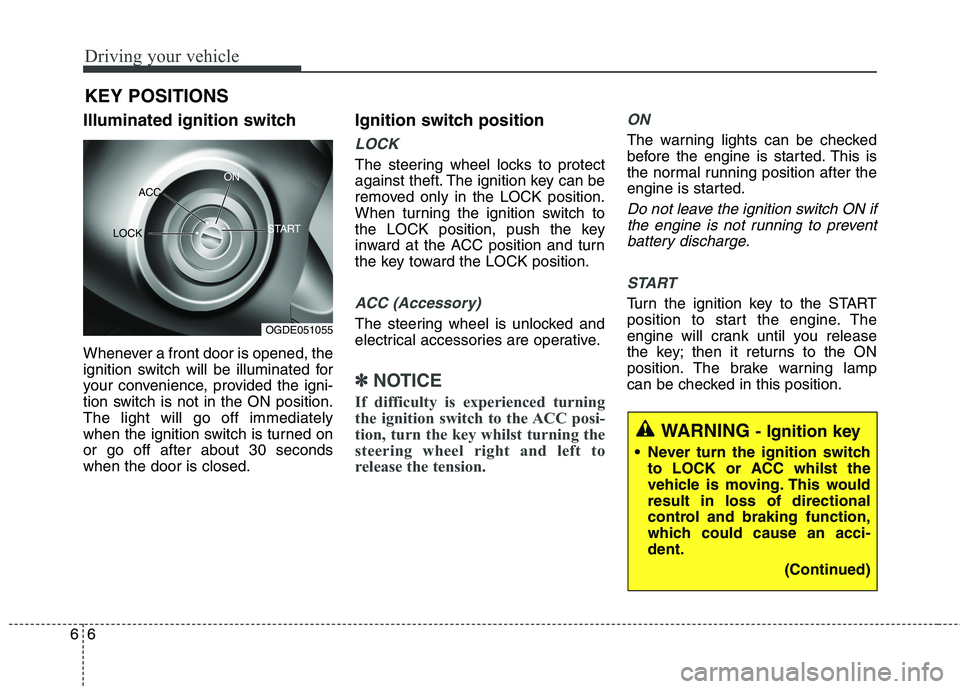
Illuminated ignition switch
Whenever a front door is opened, the
ignition switch will be illuminated for
your convenience, provided the igni-
tion switch is not in the ON position.The light will go off immediately
when the ignition switch is turned onor go off after about 30 secondswhen the door is closed. Ignition switch position
LOCK
The steering wheel locks to protect
against theft. The ignition key can be
removed only in the LOCK position.
When turning the ignition switch to
the LOCK position, push the key
inward at the ACC position and turn
the key toward the LOCK position.
ACC (Accessory)
The steering wheel is unlocked and
electrical accessories are operative.
✽✽
NOTICE
If difficulty is experienced turning
the ignition switch to the ACC posi-
tion, turn the key whilst turning the
steering wheel right and left to
release the tension.
ON
The warning lights can be checked
before the engine is started. This is
the normal running position after the
engine is started.
Do not leave the ignition switch ON if the engine is not running to preventbattery discharge.
START
Turn the ignition key to the START
position to start the engine. The
engine will crank until you release
the key; then it returns to the ON
position. The brake warning lamp
can be checked in this position.
KEY POSITIONS
WARNING
- Ignition key
Never turn the ignition switch to LOCK or ACC whilst the
vehicle is moving. This wouldresult in loss of directional
control and braking function,
which could cause an acci-dent.
(Continued)
OGDE051055
ACC
ON
START
LOCK