sliding door KIA CARNIVAL 2007 User Guide
[x] Cancel search | Manufacturer: KIA, Model Year: 2007, Model line: CARNIVAL, Model: KIA CARNIVAL 2007Pages: 1575, PDF Size: 44.86 MB
Page 1229 of 1575
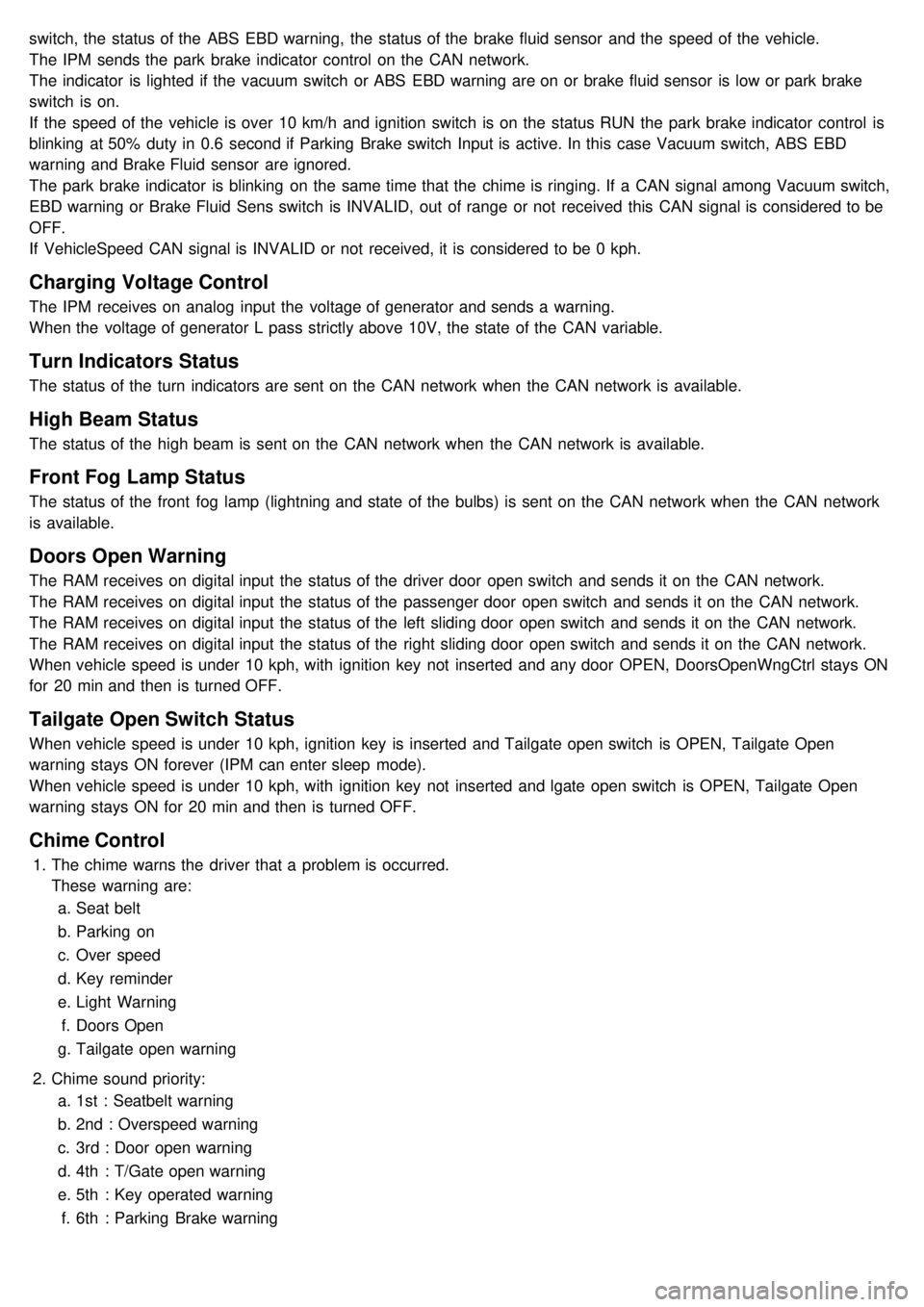
switch, the status of the ABS EBD warning, the status of the brake fluid sensor and the speed of the vehicle.
The IPM sends the park brake indicator control on the CAN network.
The indicator is lighted if the vacuum switch or ABS EBD warning are on or brake fluid sensor is low or park brake
switch is on.
If the speed of the vehicle is over 10 km/h and ignition switch is on the status RUN the park brake indicator control is
blinking at 50% duty in 0.6 second if Parking Brake switch Input is active. In this case Vacuum switch, ABS EBD
warning and Brake Fluid sensor are ignored.
The park brake indicator is blinking on the same time that the chime is ringing. If a CAN signal among Vacuum switch,
EBD warning or Brake Fluid Sens switch is INVALID, out of range or not received this CAN signal is considered to be
OFF.
If VehicleSpeed CAN signal is INVALID or not received, it is considered to be 0 kph.
Charging Voltage Control
The IPM receives on analog input the voltage of generator and sends a warning.
When the voltage of generator L pass strictly above 10V, the state of the CAN variable.
Turn Indicators Status
The status of the turn indicators are sent on the CAN network when the CAN network is available.
High Beam Status
The status of the high beam is sent on the CAN network when the CAN network is available.
Front Fog Lamp Status
The status of the front fog lamp (lightning and state of the bulbs) is sent on the CAN network when the CAN network
is available.
Doors Open Warning
The RAM receives on digital input the status of the driver door open switch and sends it on the CAN network.
The RAM receives on digital input the status of the passenger door open switch and sends it on the CAN network.
The RAM receives on digital input the status of the left sliding door open switch and sends it on the CAN network.
The RAM receives on digital input the status of the right sliding door open switch and sends it on the CAN network.
When vehicle speed is under 10 kph, with ignition key not inserted and any door OPEN, DoorsOpenWngCtrl stays ON
for 20 min and then is turned OFF.
Tailgate Open Switch Status
When vehicle speed is under 10 kph, ignition key is inserted and Tailgate open switch is OPEN, Tailgate Open
warning stays ON forever (IPM can enter sleep mode).
When vehicle speed is under 10 kph, with ignition key not inserted and lgate open switch is OPEN, Tailgate Open
warning stays ON for 20 min and then is turned OFF.
Chime Control
1.The chime warns the driver that a problem is occurred.
These warning are:
a. Seat belt
b. Parking on
c. Over speed
d. Key reminder
e. Light Warning
f. Doors Open
g. Tailgate open warning
2. Chime sound priority:
a. 1st : Seatbelt warning
b. 2nd : Overspeed warning
c. 3rd : Door open warning
d. 4th : T/Gate open warning
e. 5th : Key operated warning
f. 6th : Parking Brake warning
Page 1230 of 1575

g.7th : Light ON warning
h. 8th : Key learning sound
3. If two different warning condition happen at the same time, chime should work only for the highest warning
condition.
4. Cluster indicators should work for two warning behavior.
5. Behavior Description
Seat Belt Warning
The IPM receives on digital input the status of the seat belt switch.
The chime is activated during 6 second when the seat belt is not fastened.
The chime will stop immediately if the seat belt is fastened during the 6 seconds of the chime.
Park Brake Warning
The IPM receives on digital input the status of the parking brake switch.
The IPM receives the speed of the vehicle by the CAN network.
The chime is activated when the parking brake is on, ignition switch is on RUN and speed vehicle is over 10 km/h.
The park brake indicator is blinking at the same time that the chime is ringing.
Over Speed Warning
The IPM receives the overspeed warning by the CAN network.
The chime is actived when the overspeed speed warning is on the state Overspeed.
Key Reminder Warning
The IPM receives the status of the key on digital input.
The IPM receives the status of the driver door open switch by the CAN network.
The chime is activated when key is inserted and the driver door is open.
Light Warning
The IPM receives the status of the driver door open switch by the CAN network.
The light chime warning is activated when the driver door is open and the park and tail lamps are turned on.
Doors Open Warning
The RAM receives on digital input the status of the driver / passenger / left sliding / right sliding door open switch and
sends it on the CAn network.
The IPM receives by CAN network the speed of the vehicle.
The doors open warning chime is activated when one or several of the 4 doors is opened and the speed of vehicle is
over 10km/h.
Tailgate Open Warning
The RAM receives on digital input the status of the tailgate open switch and sends it on the CAN network.
The IPM receives by CAN network the speed of the vehicle.
The tailgate open warning chime is activated when the tailgate is opened and the speed of vehicle is over 10km/h.
Safety And Security Function
Remote Keyless Entry
Page 1231 of 1575

1.The aim of this function is to receive the key fob signal and decode it. There are 8 different data included in the
radio frequency frame sent by the RKE to the IPM module:
a. Central door lock
b. Central door unlock
c. Panic function
d. Driver door window close (long press on RKE lock button)
e. Driver door window open (long press on RKE unlock button)
f. Left sliding door open/close
g. Right sliding door open/close
h. Power tailgate open/close
2. Each vehicle can have at most 2 associated key fobs. The key fob is physically separated from the key itself
(separate device).
3. Input/Output Definition and Characteristics
Central Lock/unlock
1.Central locking/unlocking logic is controlled by IPM. Locking/Unlocking inputs are located in ADM, DDM
(Lock/Unlock switch, door knobs, door key cylinder) and in IPM (RKE receiver).
2. Locking/Unlocking actuators are located in ADM for passenger door, DDM for driver door and RAM for sliding doors
and tailgate.
There are 5 ways of operating central lock/unlock:
a. With Key RKE
b. With Door Lock/Unlock switches located on ADM/DDM
c. With Door Lock Monitoring switches located on the passenger/driver door
d. With Door/Tailgate Key Cylinder Lock/Unlock switches located on the tailgate or passenger/driver door.
3. Functional Diagram
Page 1243 of 1575
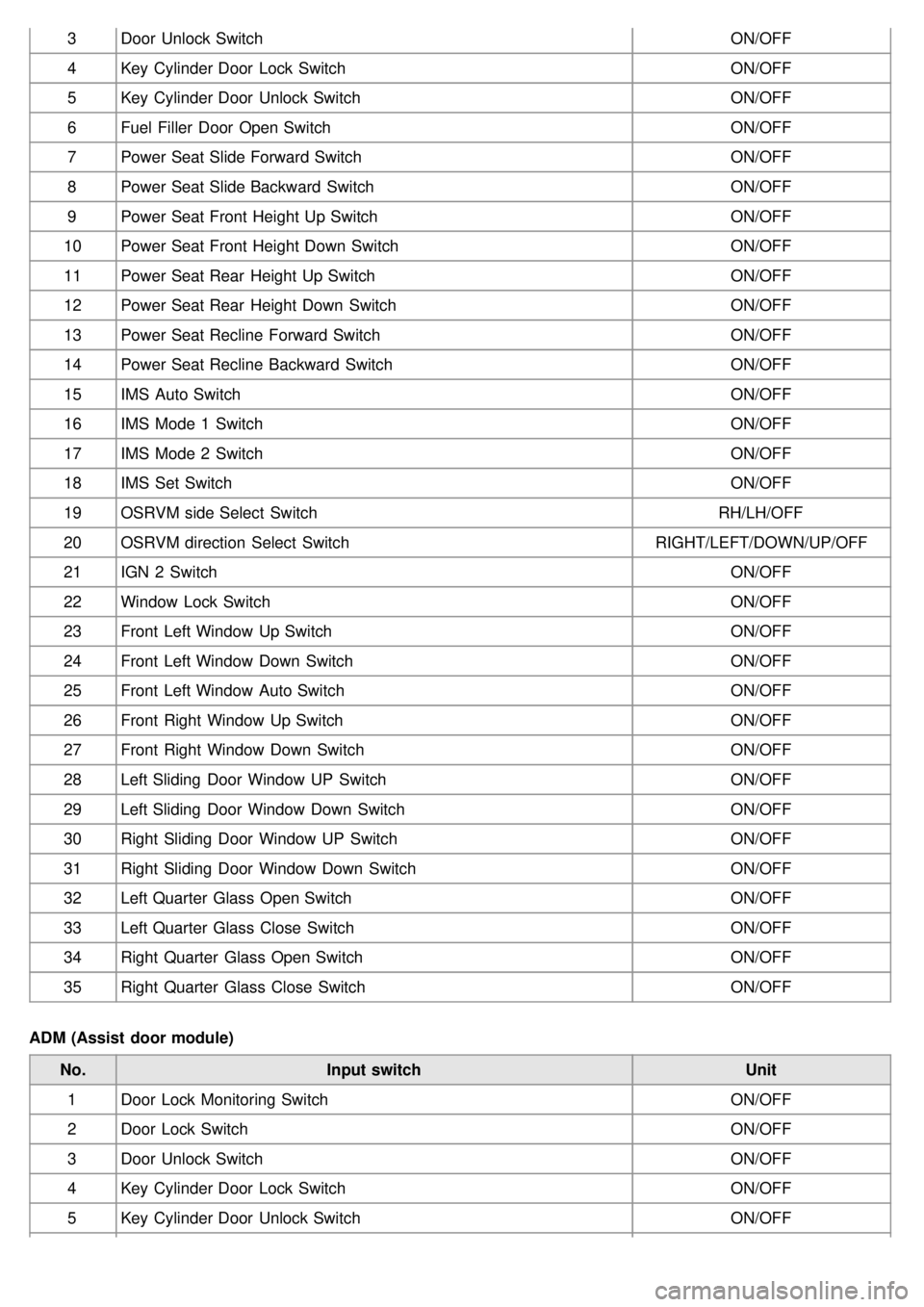
3Door Unlock Switch ON/OFF
4 Key Cylinder Door Lock Switch ON/OFF
5 Key Cylinder Door Unlock Switch ON/OFF
6 Fuel Filler Door Open Switch ON/OFF
7 Power Seat Slide Forward Switch ON/OFF
8 Power Seat Slide Backward Switch ON/OFF
9 Power Seat Front Height Up Switch ON/OFF
10 Power Seat Front Height Down Switch ON/OFF
11 Power Seat Rear Height Up Switch ON/OFF
12 Power Seat Rear Height Down Switch ON/OFF
13 Power Seat Recline Forward Switch ON/OFF
14 Power Seat Recline Backward Switch ON/OFF
15 IMS Auto Switch ON/OFF
16 IMS Mode 1 Switch ON/OFF
17 IMS Mode 2 Switch ON/OFF
18 IMS Set Switch ON/OFF
19 OSRVM side Select Switch RH/LH/OFF
20 OSRVM direction Select Switch RIGHT/LEFT/DOWN/UP/OFF
21 IGN 2 Switch ON/OFF
22 Window Lock Switch ON/OFF
23 Front Left Window Up Switch ON/OFF
24 Front Left Window Down Switch ON/OFF
25 Front Left Window Auto Switch ON/OFF
26 Front Right Window Up Switch ON/OFF
27 Front Right Window Down Switch ON/OFF
28 Left Sliding Door Window UP Switch ON/OFF
29 Left Sliding Door Window Down Switch ON/OFF
30 Right Sliding Door Window UP Switch ON/OFF
31 Right Sliding Door Window Down Switch ON/OFF
32 Left Quarter Glass Open Switch ON/OFF
33 Left Quarter Glass Close Switch ON/OFF
34 Right Quarter Glass Open Switch ON/OFF
35 Right Quarter Glass Close Switch ON/OFF
ADM (Assist door module) No. Input switch Unit
1 Door Lock Monitoring Switch ON/OFF
2 Door Lock Switch ON/OFF
3 Door Unlock Switch ON/OFF
4 Key Cylinder Door Lock Switch ON/OFF
5 Key Cylinder Door Unlock Switch ON/OFF
Page 1315 of 1575

2007 > 2.7L V6 GASOLINE >
INSPECTION
FRONT DOOR LOCK ACTUATOR
1. Remove the front door trim panel. (Refer to the Body group - front door)
2. Disconnect the 4P connector from the actuator.
3.Check actuator operation by connecting power and ground according to the table. To prevent damage to the
actuator, apply battery voltage only momentarily.
SLIDING DOOR LOCK ACTUATOR
1.Remove the sliding door trim panel. (Refer to the Body group - rear door)
2. Disconnect the 6P connector from the actuator.
3.Check actuator operation by connecting power and ground according to the table. To prevent damage to the
actuator, apply battery voltage only momentarily.
Page 1316 of 1575

TAILGATE LOCK ACTUATOR
1.Remove the tailgate trim panel. (Refer to the Body group - tailgate)
2. Disconnect the 6P connector from the actuator.
3.Check actuator operation by connecting power and ground according to the table. To prevent damage to the
actuator, apply battery voltage only momentarily.
FRONT DOOR LOCK SWITCH
1.Remove the front door trim panel. (Refer to the Body group - Front door)
2. Disconnect the 6P connector from the actuator.
3.Check for continuity between the terminals in each switch position according to the table.
SLIDING DOOR LOCK SWITCH
1.Remove the rear door trim panel. (Refer to the Body group - Rear door)
2. Disconnect the 6P connector from the actuator.
Page 1322 of 1575
Power Sliding Door System
Page 1323 of 1575

2007 > 2.7L V6 GASOLINE >
DESCRIPTION
Power Sliding Door is an electro - mechanical system designed to provide power opening and closing of a vehicle's
sliding door through the push of a button of the transmitter key or the main control buttons on the overhead console
or the sub control buttons on the center pillar trim or inside/outside door handle switch.
The power sliding door will reverse direction of travel if resistance to movement is detected while the door is being
closed. If resistance to movement is detected while the power sliding door is being opened, the door will stop moving.
1. DRIVE UNIT
Drive unit (A) consists of a DC motor, optical sensor, clutch, cables and pulleys and wire harness. The clutch and
motor portion of the assembly provides the power and torque required to open or close the sliding door. The clutch
assembly is used to connect or disconnect the motor so that the Sliding Door may be moved manually, if desired.
2.POWER SLIDING DOOR CONTROL MODULE (PSDM)
The PSD System uses a power sliding door control module (microprocessor controller) to operate the drive unit.
Signals are received from the vehicle and used to start or stop power open or close operations. The PSDM cannot
be adjusted or repaired and if found to be faulty, must be replaced.
3.SLIDING DOOR CHIME (C)
When the power sliding door detect the resistance or abnormal operation, the chime will sound.
4.ANTI- PINCH STRIP (D)
Page 1324 of 1575

Secondary Obstacle Detection is provided by means of a contact type strip. Strip is composed of two conductive
zones separated by an air gap. When strip is compressed, conductive zones make contact, activating the switch
signal.
Copper wire is extruded through conductive material to prevent resistive buildup. Terminating resistor is molded into
end of strip to detect failures of strip.
5.OVERHEAD CONSOLE AND REMOTE CONTROL SWITCH (A)
The power sliding doors can be opened and closed automatically with the RKE and the main control button on the
overhead console.
6.DOOR LATCH (B)
The door latch contains a detent switch [C] used to detect the latch state and report the latch state to the power
sliding door module.
7.KEYLESS ENTRY (A)
Power sliding doors can be opened and closed by pressing the button on the RKE more than 0.5 sec. Open
operation shall be reserved when an additional open/close signal is received during power opening.
Page 1325 of 1575
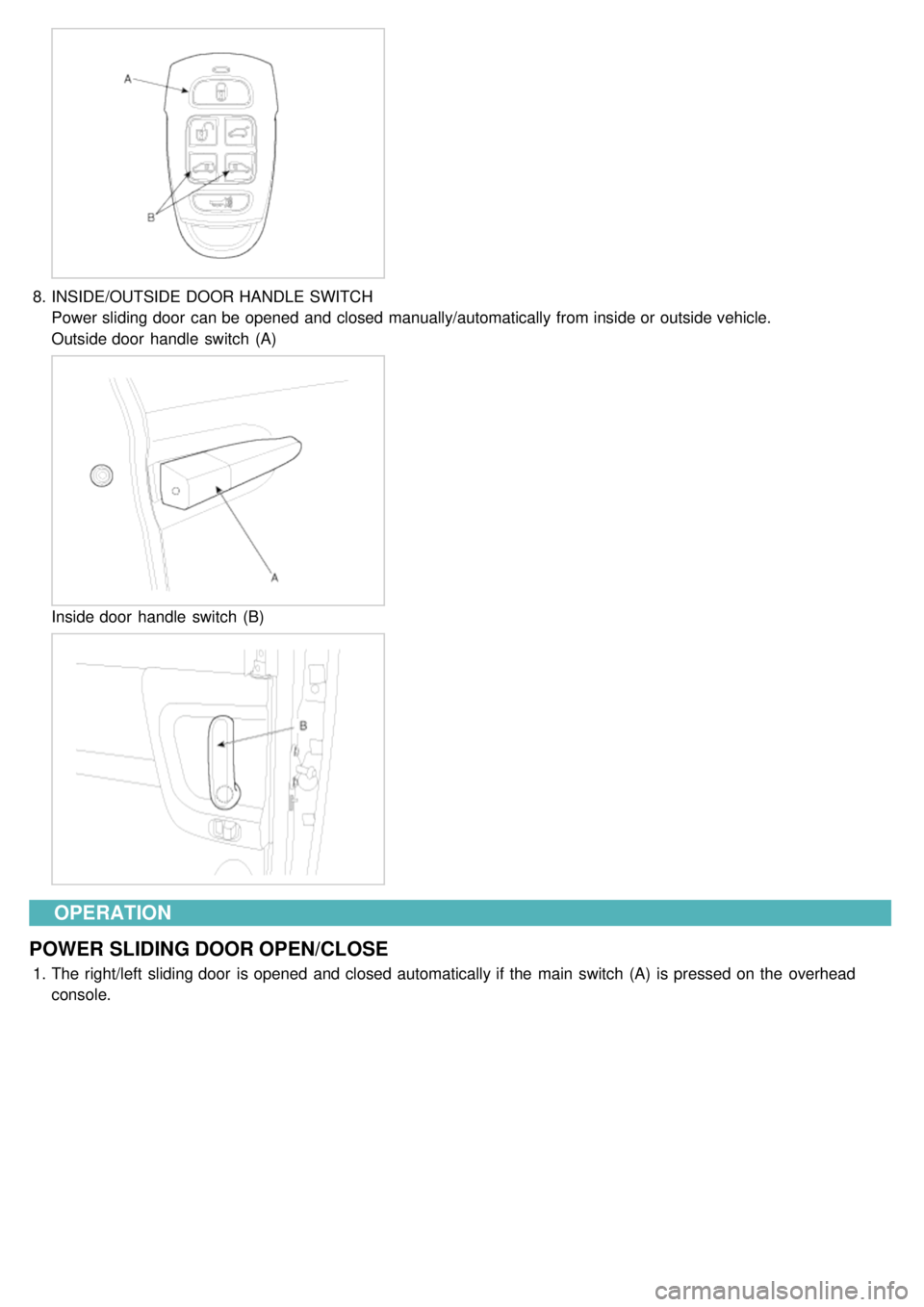
8.INSIDE/OUTSIDE DOOR HANDLE SWITCH
Power sliding door can be opened and closed manually/automatically from inside or outside vehicle.
Outside door handle switch (A)
Inside door handle switch (B)
OPERATION
POWER SLIDING DOOR OPEN/CLOSE
1. The right/left sliding door is opened and closed automatically if the main switch (A) is pressed on the overhead
console.