mirror KIA CEED 2016 User Guide
[x] Cancel search | Manufacturer: KIA, Model Year: 2016, Model line: CEED, Model: KIA CEED 2016Pages: 643, PDF Size: 38.19 MB
Page 128 of 643
445
Features of your vehicle
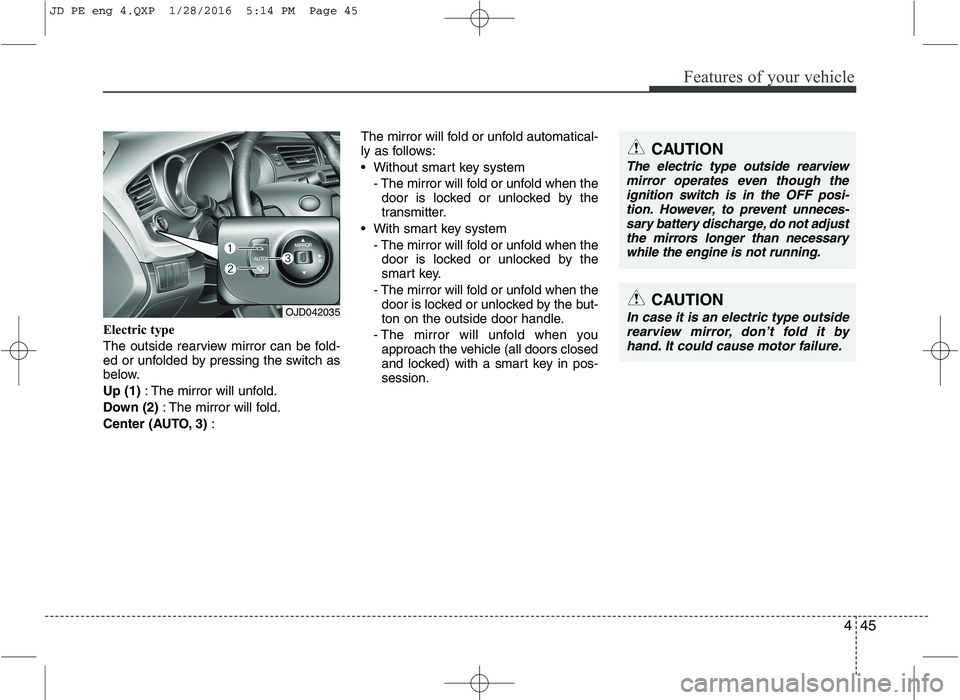
Electric type
The outside rearview mirror can be fold-
ed or unfolded by pressing the switch as
below. Up (1): The mirror will unfold.
Down (2) : The mirror will fold.
Center (AUTO, 3) : The mirror will fold or unfold automatical-
ly as follows:
Without smart key system
- The mirror will fold or unfold when thedoor is locked or unlocked by the
transmitter.
With smart key system - The mirror will fold or unfold when thedoor is locked or unlocked by the
smart key.
- The mirror will fold or unfold when the door is locked or unlocked by the but-
ton on the outside door handle.
- The mirror will unfold when you approach the vehicle (all doors closed
and locked) with a smart key in pos-session.
OJD042035CAUTION
In case it is an electric type outside
rearview mirror, don’t fold it byhand. It could cause motor failure.
CAUTION
The electric type outside rearview
mirror operates even though the ignition switch is in the OFF posi-tion. However, to prevent unneces-
sary battery discharge, do not adjustthe mirrors longer than necessary while the engine is not running.
JD PE eng 4.QXP 1/28/2016 5:14 PM Page 45
Page 201 of 643
Features of your vehicle
118
4
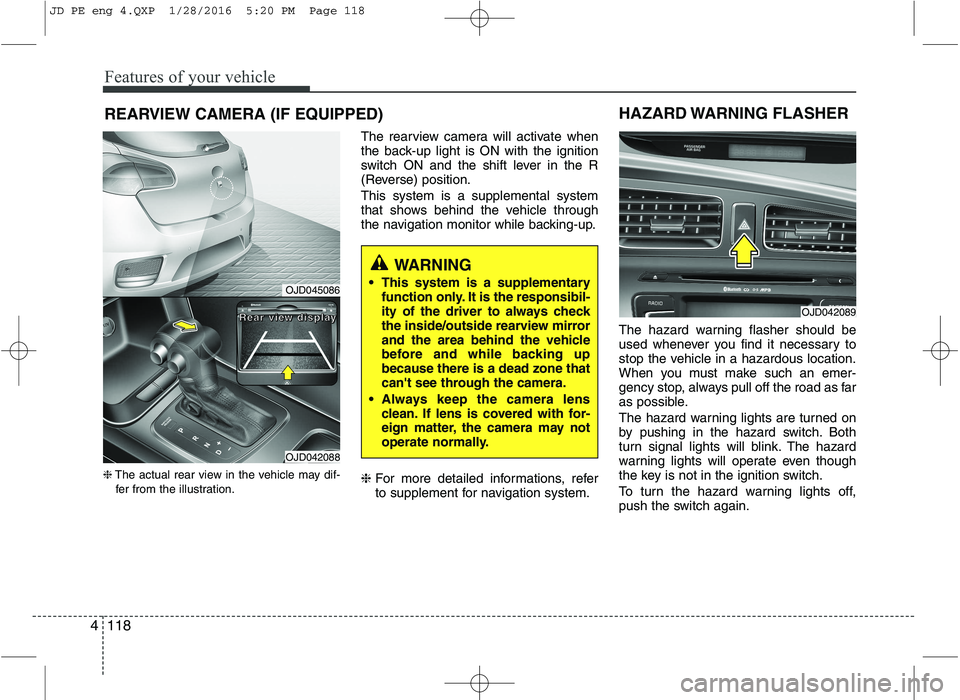
REARVIEW CAMERA (IF EQUIPPED)
❈ The actual rear view in the vehicle may dif-
fer from the illustration. The rearview camera will activate when
the back-up light is ON with the ignition
switch ON and the shift lever in the R
(Reverse) position. This system is a supplemental system
that shows behind the vehicle through
the navigation monitor while backing-up. ❈
For more detailed informations, refer
to supplement for navigation system. The hazard warning flasher should be
used whenever you find it necessary to
stop the vehicle in a hazardous location.
When you must make such an emer-
gency stop, always pull off the road as far
as possible.
The hazard warning lights are turned on
by pushing in the hazard switch. Both
turn signal lights will blink. The hazard
warning lights will operate even though
the key is not in the ignition switch.
To turn the hazard warning lights off,
push the switch again.
OJD042089
HAZARD WARNING FLASHER
WARNING
This system is a supplementary function only. It is the responsibil-
ity of the driver to always check
the inside/outside rearview mirror
and the area behind the vehicle
before and while backing upbecause there is a dead zone that
can't see through the camera.
Always keep the camera lens clean. If lens is covered with for-
eign matter, the camera may not
operate normally.
OJD045086
OJD042088
RRRReeeeaaaarrrr vvvviiiieeeewwww ddddiiiissssppppllllaaaayyyy
JD PE eng 4.QXP 1/28/2016 5:20 PM Page 118
Page 215 of 643
Features of your vehicle
132
4
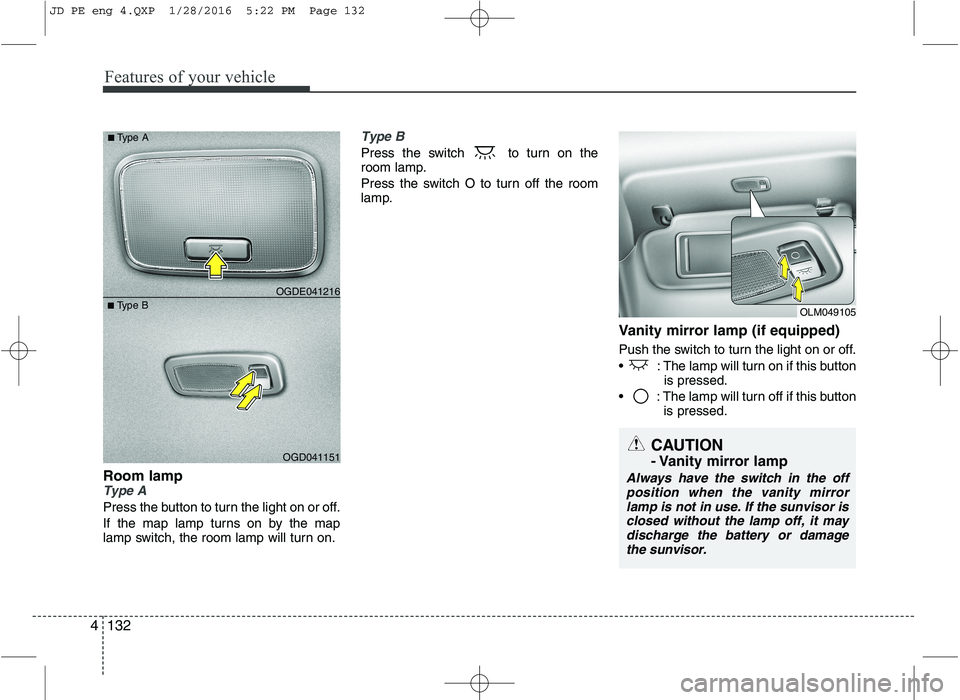
Room lampType A
Press the button to turn the light on or off.
If the map lamp turns on by the map
lamp switch, the room lamp will turn on.
Type B
Press the switch to turn on the
room lamp.
Press the switch O to turn off the room
lamp.
Vanity mirror lamp (if equipped)
Push the switch to turn the light on or off.
: The lamp will turn on if this buttonis pressed.
: The lamp will turn off if this button is pressed.
OGD041151
■
Type B OGDE041216
■
Type A
OLM049105
CAUTION
- Vanity mirror lamp
Always have the switch in the off
position when the vanity mirror
lamp is not in use. If the sunvisor is closed without the lamp off, it maydischarge the battery or damage the sunvisor.
JD PE eng 4.QXP 1/28/2016 5:22 PM Page 132
Page 218 of 643

4135
Features of your vehicle
✽✽NOTICE
If you want to defrost and defog the
front windshield, refer to “Windshield
Defrosting and Defogging” in this chap-
ter.
Rear window defroster
The defroster heats the window to
remove frost, fog and thin ice from the
interior and exterior of the rear window,
while engine is running. To activate the rear window defroster,
press the rear window defroster button
located in the center facia switch
panel. The indicator on the rear win-
dow defroster button illuminates whenthe defroster is ON.
To turn off the defroster, press the rear window defroster button again.
✽✽ NOTICE
If there is heavy accumulation of snow on the rear window, brush it off before
operating the rear defroster.
The rear window defroster automati- cally turns off after approximately 20
minutes or when the ignition switch is
turned off.
Outside mirror defroster
(if equipped)
The outside mirror defroster will operate
at the same time you turn on the rear
window defroster.
Front wiper deicer (if equipped)
The front wiper deicer will operate at the
same time you turn on the rear window
defroster.
DEFROSTER
CAUTION
To prevent damage to the conduc-
tors bonded to the inside surface ofthe rear window, never use sharp instruments or window cleaners
containing abrasives to clean thewindow.
OJD042094
OJD042095
■
Manual climate control
■Automatic climate control
JD PE eng 4.QXP 1/28/2016 5:22 PM Page 135
Page 240 of 643
4157
Features of your vehicle
For maximum defrosting, set the tem-perature control to the hottest position
and the fan speed control to the high-est speed.
If warm air to the floor is desired while defrosting or defogging, set the modeto the floor-defrost position.
Before driving, clear all snow and ice from the windshield, rear window, out-
side rear view mirrors, and all side win-
dows.
Clear all snow and ice from the hood and air inlet in the cowl grill to improveheater and defroster efficiency and to
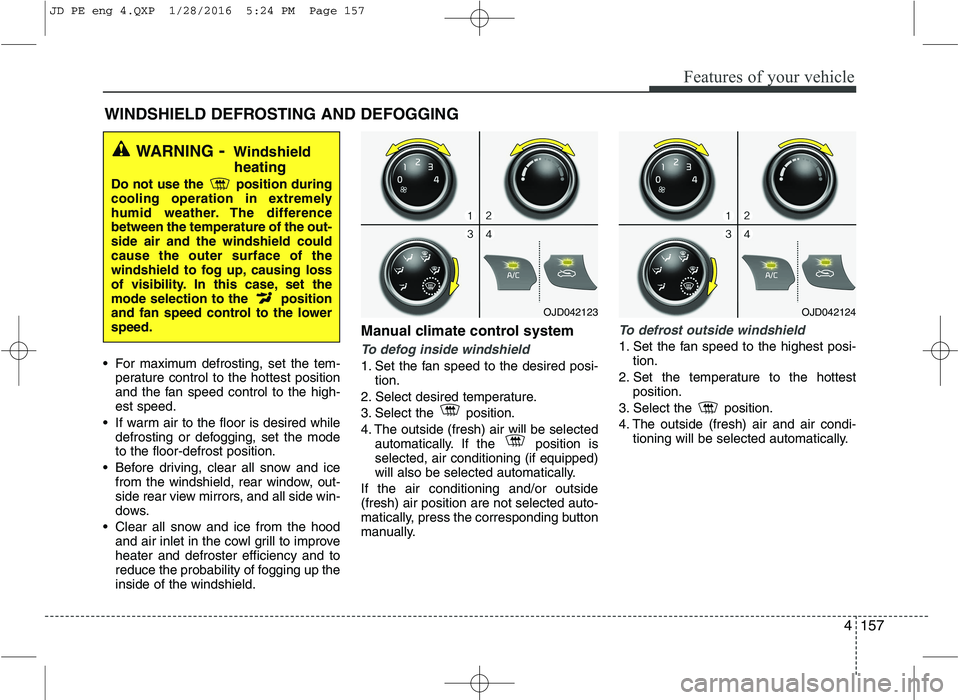
reduce the probability of fogging up theinside of the windshield. Manual climate control systemTo defog inside windshield
1. Set the fan speed to the desired posi-
tion.
2. Select desired temperature.
3. Select the position.
4. The outside (fresh) air will be selected automatically. If the position is selected, air conditioning (if equipped)
will also be selected automatically.
If the air conditioning and/or outside(fresh) air position are not selected auto-
matically, press the corresponding button
manually.
To defrost outside windshield
1. Set the fan speed to the highest posi- tion.
2. Set the temperature to the hottest position.
3. Select the position.
4. The outside (fresh) air and air condi- tioning will be selected automatically.
WINDSHIELD DEFROSTING AND DEFOGGING
WARNING - Windshield
heating
Do not use the position during
cooling operation in extremely
humid weather. The differencebetween the temperature of the out-side air and the windshield couldcause the outer surface of the
windshield to fog up, causing loss
of visibility. In this case, set the
mode selection to the position
and fan speed control to the lowerspeed.
OJD042123OJD042124
JD PE eng 4.QXP 1/28/2016 5:24 PM Page 157
Page 245 of 643
Features of your vehicle
162
4
Sunglass holder
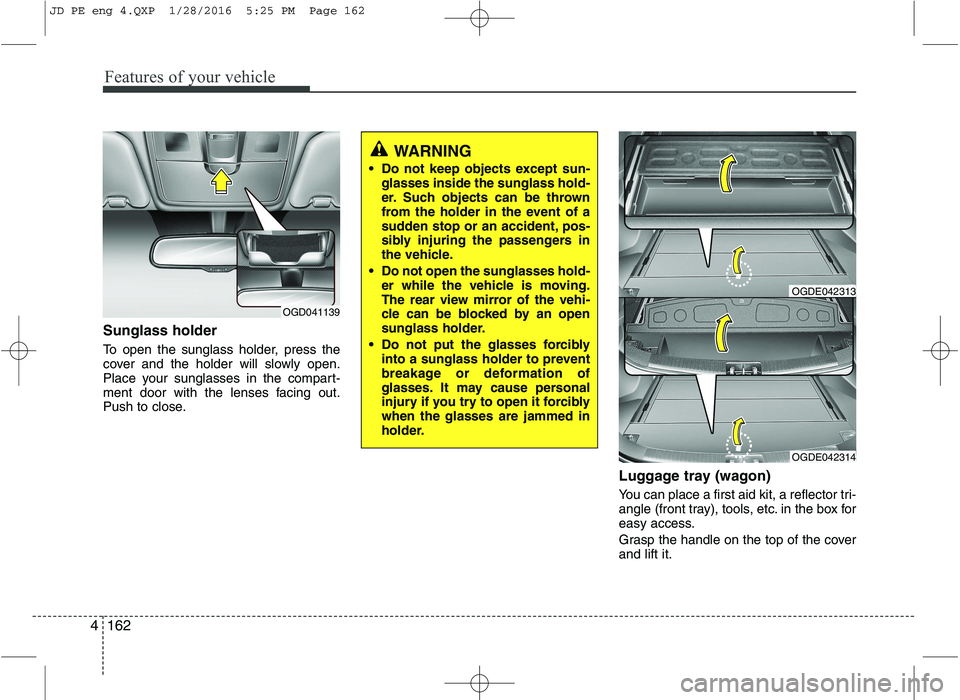
To open the sunglass holder, press the
cover and the holder will slowly open.
Place your sunglasses in the compart-
ment door with the lenses facing out.
Push to close.
Luggage tray (wagon)
You can place a first aid kit, a reflector tri-
angle (front tray), tools, etc. in the box for
easy access.
Grasp the handle on the top of the cover and lift it.
OGD041139
WARNING
Do not keep objects except sun- glasses inside the sunglass hold-
er. Such objects can be thrown
from the holder in the event of a
sudden stop or an accident, pos-
sibly injuring the passengers in
the vehicle.
Do not open the sunglasses hold- er while the vehicle is moving.
The rear view mirror of the vehi-
cle can be blocked by an open
sunglass holder.
Do not put the glasses forcibly into a sunglass holder to prevent
breakage or deformation of
glasses. It may cause personal
injury if you try to open it forciblywhen the glasses are jammed in
holder.
OGDE042314
OGDE042313
JD PE eng 4.QXP 1/28/2016 5:25 PM Page 162
Page 250 of 643
4167
Features of your vehicle
Sunvisor
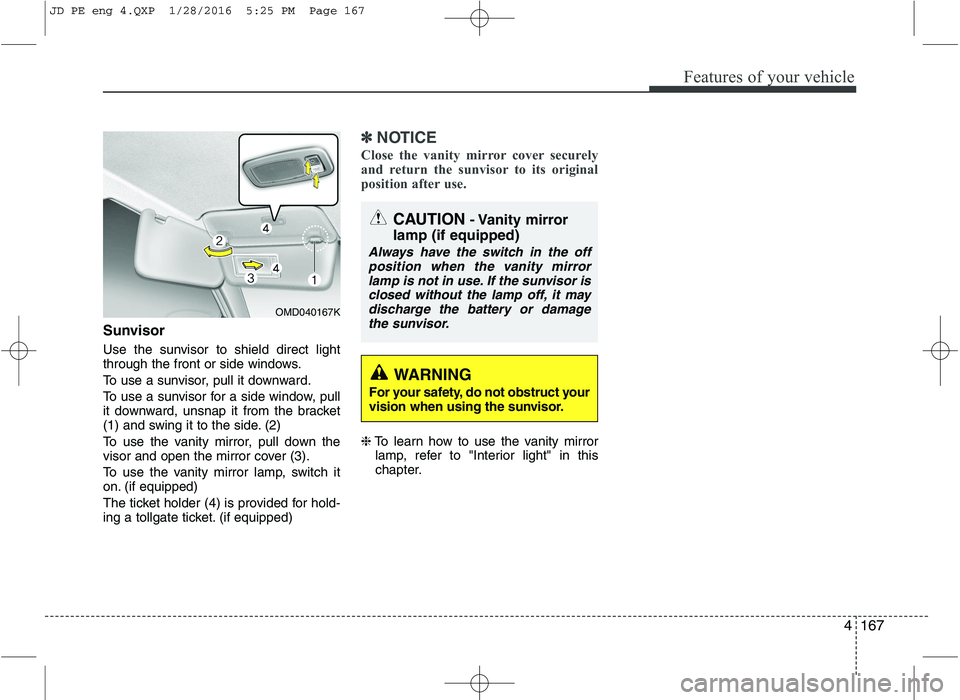
Use the sunvisor to shield direct light
through the front or side windows.
To use a sunvisor, pull it downward.
To use a sunvisor for a side window, pull
it downward, unsnap it from the bracket
(1) and swing it to the side. (2)
To use the vanity mirror, pull down the
visor and open the mirror cover (3).
To use the vanity mirror lamp, switch it
on. (if equipped)
The ticket holder (4) is provided for hold-
ing a tollgate ticket. (if equipped)
✽✽NOTICE
Close the vanity mirror cover securely
and return the sunvisor to its original
position after use.
❈ To learn how to use the vanity mirror
lamp, refer to "Interior light" in this
chapter.
OMD040167K
CAUTION - Vanity mirror
lamp (if equipped)
Always have the switch in the off position when the vanity mirror
lamp is not in use. If the sunvisor isclosed without the lamp off, it maydischarge the battery or damagethe sunvisor.
WARNING
For your safety, do not obstruct your
vision when using the sunvisor.
JD PE eng 4.QXP 1/28/2016 5:25 PM Page 167
Page 377 of 643
Driving your vehicle
4
5
Before entering vehicle
• Be sure that all windows, outside mir-
ror(s), and outside lights are clean.
Check the condition of the tires.
Check under the vehicle for any sign of leaks.
Be sure there are no obstacles behind you if you intend to back up. Necessary inspections
Fluid levels, such as engine oil, engine
coolant, brake fluid, and washer fluid
should be checked on a regular basis,
with the exact interval depending on the
fluid. Further details are provided in
chapter 7, “Maintenance”.
Before starting
Close and lock all doors.
Position the seat so that all controls are
easily reached.
Adjust the inside and outside rearview mirrors.
Be sure that all lights work.
Check all gauges.
Check the operation of warning lights when the ignition switch is turned to the ON position.
Release the parking brake and make sure the brake warning light goes out.
For safe operation, be sure you are famil-
iar with your vehicle and its equipment.
BEFORE DRIVING
WARNING
All passengers must be properly
belted whenever the vehicle is mov-
ing. Refer to “Seat belts” in chapter
3 for more information on their
proper use.
WARNING
Always check the surrounding areas
near your vehicle for people, espe-
cially children, before putting a vehi-
cle into “D (Drive)” or “R (Reverse)”.
WARNING
Driving while distracted can result
in a loss of vehicle control, that
may lead to an accident, severe
personal injury, and death. The dri-
ver’s primary responsibility is in
the safe and legal operation of a
vehicle, and use of any handheld
devices, other equipment, or vehi-
cle systems which take the driver’s
eyes, attention and focus away
from the safe operation of a vehicle
or which are not permissible by law
should never be used during oper-
ation of the vehicle.
JD PE eng 5.QXP 9/30/2015 5:22 PM Page 4
Page 441 of 643
Driving your vehicle
68
5
Warning indicator
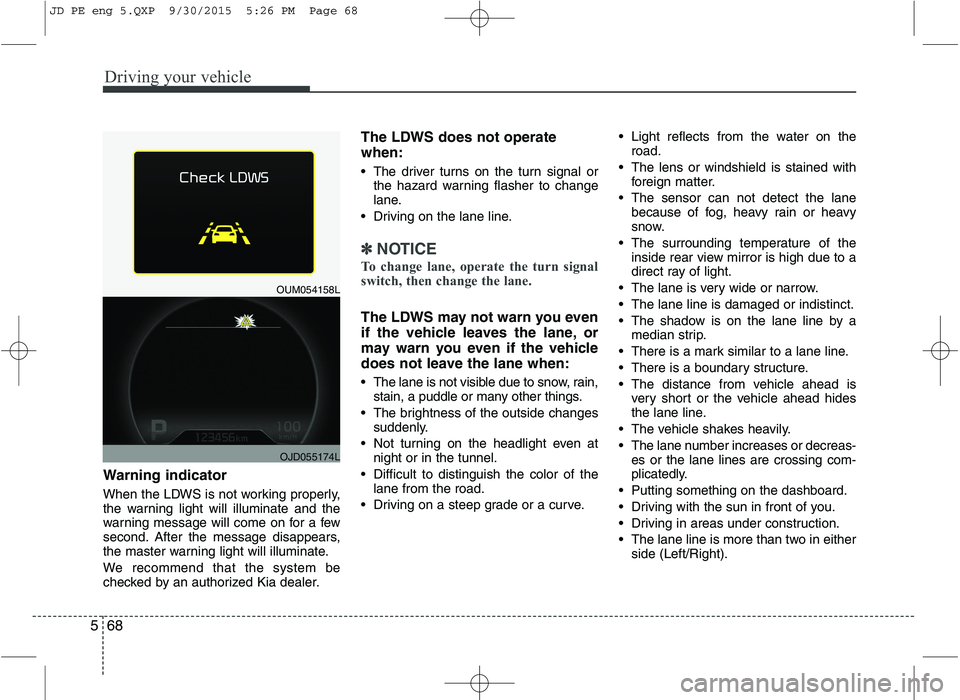
When the LDWS is not working properly,
the warning light will illuminate and the
warning message will come on for a few
second. After the message disappears,
the master warning light will illuminate.
We recommend that the system be
checked by an authorized Kia dealer. The LDWS does not operate when:
The driver turns on the turn signal or
the hazard warning flasher to change
lane.
Driving on the lane line.
✽✽ NOTICE
To change lane, operate the turn signal
switch, then change the lane.
The LDWS may not warn you even
if the vehicle leaves the lane, or
may warn you even if the vehicle
does not leave the lane when:
The lane is not visible due to snow, rain, stain, a puddle or many other things.
The brightness of the outside changes suddenly.
Not turning on the headlight even at night or in the tunnel.
Difficult to distinguish the color of the lane from the road.
Driving on a steep grade or a curve. Light reflects from the water on the
road.
The lens or windshield is stained with foreign matter.
The sensor can not detect the lane because of fog, heavy rain or heavy
snow.
The surrounding temperature of the inside rear view mirror is high due to a
direct ray of light.
The lane is very wide or narrow.
The lane line is damaged or indistinct.
The shadow is on the lane line by a median strip.
There is a mark similar to a lane line.
There is a boundary structure.
The distance from vehicle ahead is very short or the vehicle ahead hides
the lane line.
The vehicle shakes heavily.
The lane number increases or decreas- es or the lane lines are crossing com-
plicatedly.
Putting something on the dashboard.
Driving with the sun in front of you.
Driving in areas under construction.
The lane line is more than two in either side (Left/Right).
OUM054158L
OJD055174L
JD PE eng 5.QXP 9/30/2015 5:26 PM Page 68
Page 442 of 643
569
Driving your vehicle
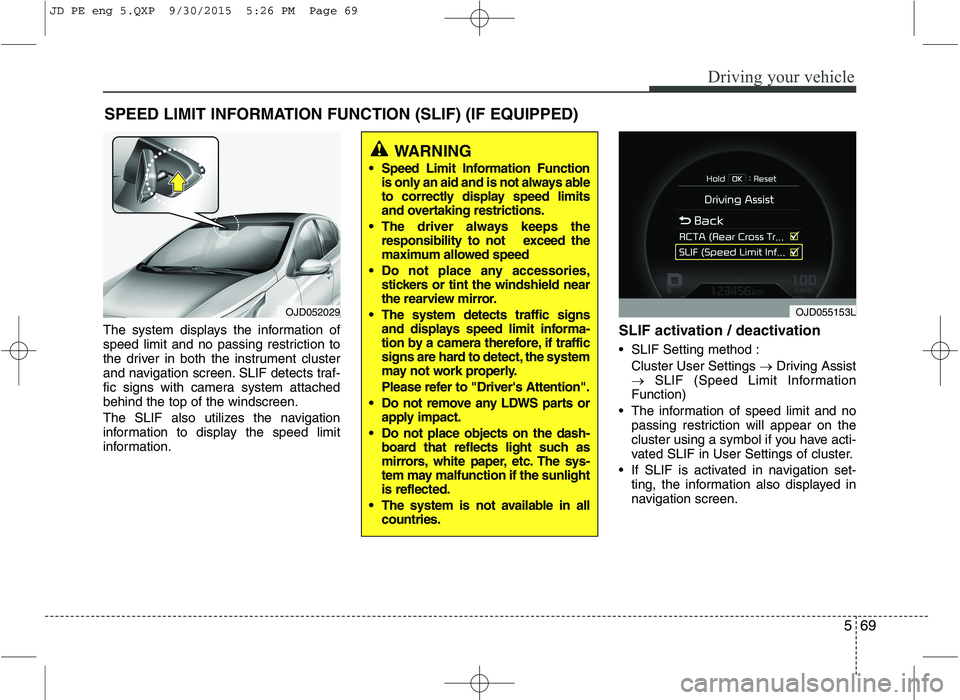
The system displays the information of
speed limit and no passing restriction to
the driver in both the instrument cluster
and navigation screen. SLIF detects traf-
fic signs with camera system attachedbehind the top of the windscreen.
The SLIF also utilizes the navigation
information to display the speed limit
information.SLIF activation / deactivation
SLIF Setting method :
Cluster User Settings Driving Assist
SLIF (Speed Limit Information
Function)
The information of speed limit and no passing restriction will appear on the
cluster using a symbol if you have acti-
vated SLIF in User Settings of cluster.
If SLIF is activated in navigation set- ting, the information also displayed in
navigation screen.
SPEED LIMIT INFORMATION FUNCTION (SLIF) (IF EQUIPPED)
OJD052029
WARNING
Speed Limit Information Function is only an aid and is not always able
to correctly display speed limits
and overtaking restrictions.
The driver always keeps the responsibility to not exceed the
maximum allowed speed
Do not place any accessories, stickers or tint the windshield near
the rearview mirror.
The system detects traffic signs and displays speed limit informa-
tion by a camera therefore, if traffic
signs are hard to detect, the system
may not work properly.
Please refer to "Driver's Attention".
Do not remove any LDWS parts or apply impact.
Do not place objects on the dash- board that reflects light such as
mirrors, white paper, etc. The sys-
tem may malfunction if the sunlightis reflected.
The system is not available in all countries.
OJD055153L
JD PE eng 5.QXP 9/30/2015 5:26 PM Page 69