mirror KIA CEED 2016 Owner's Manual
[x] Cancel search | Manufacturer: KIA, Model Year: 2016, Model line: CEED, Model: KIA CEED 2016Pages: 643, PDF Size: 38.19 MB
Page 446 of 643
573
Driving your vehicle
DRIVER'S ATTENTION
The driver must be cautious in the below
situations for the system may
not assist the driver and may not work
properly.
Do not stick or attach anything to thewindshield in front of the camera as
this may reduce effectiveness or causeone more of the systems dependent on
the camera to stop working.
Keep the windshield in the area behind the interior rear view mirror clean.
Do not place reflective materials, such as white paper or a mirror, on the
instrument panel.
Do not strike or damage the areas around the camera unit.
Do not touch the camera lens or remove the screw located on the cam-
era unit. The system does not work in all situa-
tions but is designed merely as a sup-
plementary aid.
The system assists the driver and does not replace the human eye.
The driver always bears ultimate responsibility for ensuring that the
vehicle is driven safely and that appli-
cable road traffic rules and regulations
are followed.
JD PE eng 5.QXP 9/30/2015 5:27 PM Page 73
Page 448 of 643
575
Driving your vehicle
When the system is not used turn the
system off by pressing the switch.
When the system is turned on the warn-
ing light will illuminate for 3 seconds on
the outside rearview mirror.Warning type
The system will activate when:
1. The system is on
2. Vehicle speed is above 30 km/h (18.6mph)
3. Other vehicles are detected in the rear side
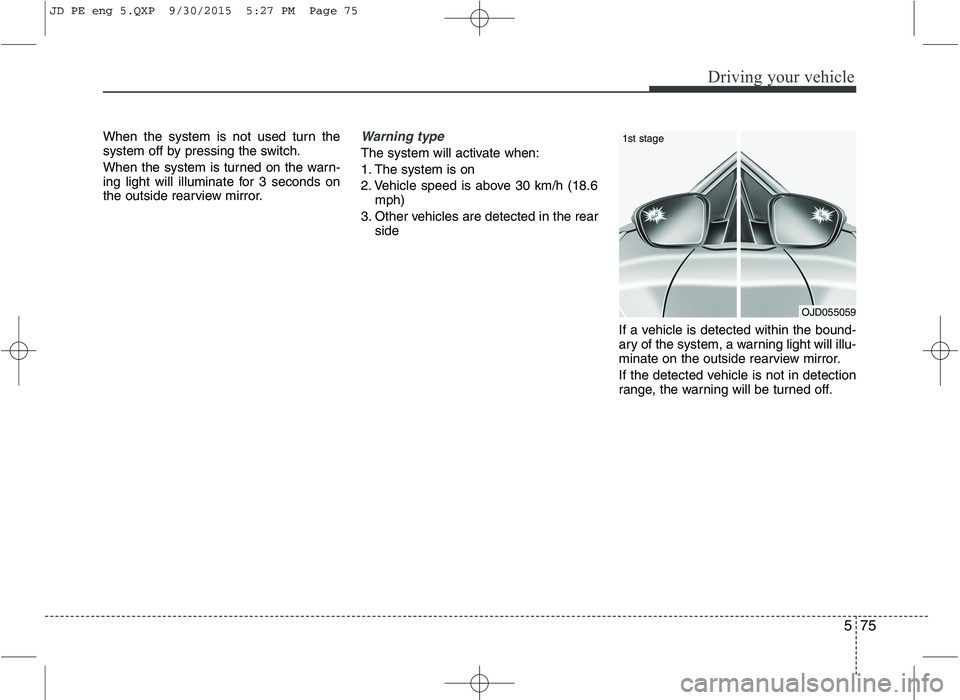
If a vehicle is detected within the bound-
ary of the system, a warning light will illu-
minate on the outside rearview mirror.
If the detected vehicle is not in detection
range, the warning will be turned off.
OJD055059
1st stage
JD PE eng 5.QXP 9/30/2015 5:27 PM Page 75
Page 449 of 643
Driving your vehicle
76
5
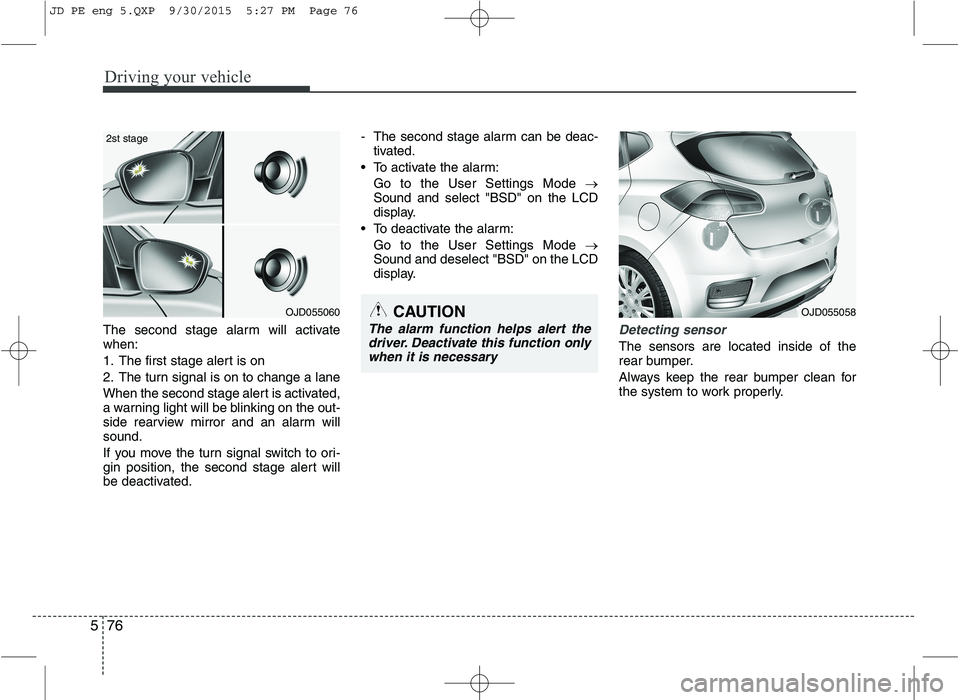
The second stage alarm will activate when:
1. The first stage alert is on
2. The turn signal is on to change a lane
When the second stage alert is activated,
a warning light will be blinking on the out-
side rearview mirror and an alarm willsound.
If you move the turn signal switch to ori-
gin position, the second stage alert will
be deactivated. - The second stage alarm can be deac-
tivated.
To activate the alarm: Go to the User Settings Mode
Sound and select "BSD" on the LCD
display.
To deactivate the alarm: Go to the User Settings Mode
Sound and deselect "BSD" on the LCD
display.Detecting sensor
The sensors are located inside of the
rear bumper.
Always keep the rear bumper clean for
the system to work properly.
OJD055060
2st stage
CAUTION
The alarm function helps alert the
driver. Deactivate this function only
when it is necessary
OJD055058
JD PE eng 5.QXP 9/30/2015 5:27 PM Page 76
Page 452 of 643
579
Driving your vehicle
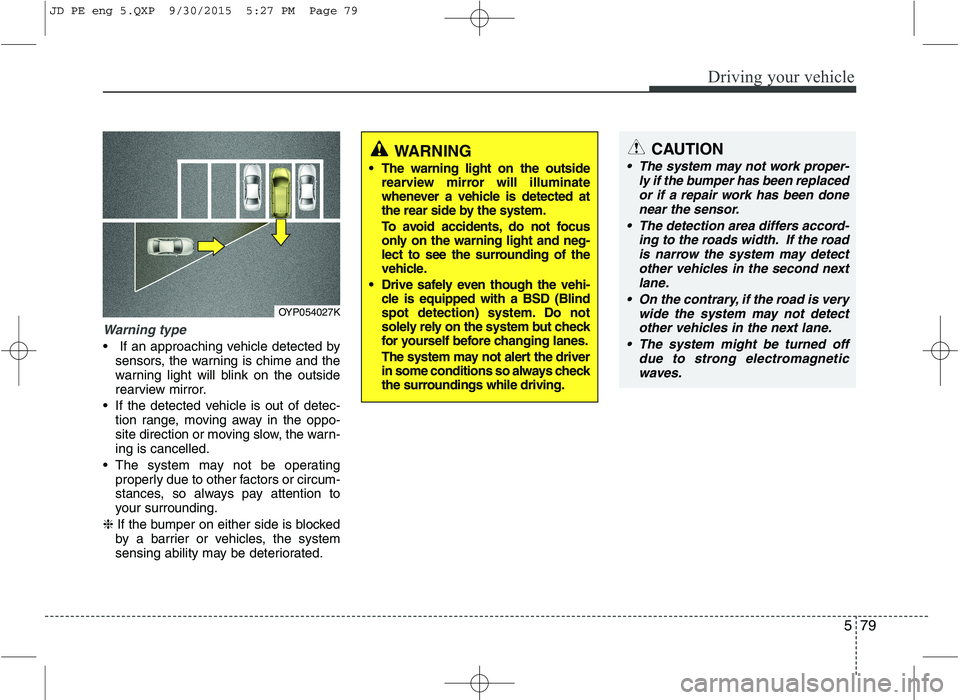
Warning type
If an approaching vehicle detected bysensors, the warning is chime and the
warning light will blink on the outside
rearview mirror.
If the detected vehicle is out of detec- tion range, moving away in the oppo-
site direction or moving slow, the warn-ing is cancelled.
The system may not be operating properly due to other factors or circum-
stances, so always pay attention to
your surrounding.
❈ If the bumper on either side is blocked
by a barrier or vehicles, the system
sensing ability may be deteriorated.
WARNING
The warning light on the outside rearview mirror will illuminate
whenever a vehicle is detected at
the rear side by the system.
To avoid accidents, do not focus
only on the warning light and neg-
lect to see the surrounding of the
vehicle.
Drive safely even though the vehi- cle is equipped with a BSD (Blind
spot detection) system. Do not
solely rely on the system but check
for yourself before changing lanes.
The system may not alert the driver
in some conditions so always check
the surroundings while driving.CAUTION
The system may not work proper-
ly if the bumper has been replacedor if a repair work has been donenear the sensor.
The detection area differs accord- ing to the roads width. If the roadis narrow the system may detectother vehicles in the second next lane.
On the contrary, if the road is very wide the system may not detectother vehicles in the next lane.
The system might be turned off due to strong electromagneticwaves.
OYP054027K
JD PE eng 5.QXP 9/30/2015 5:27 PM Page 79
Page 453 of 643
Driving your vehicle
80
5
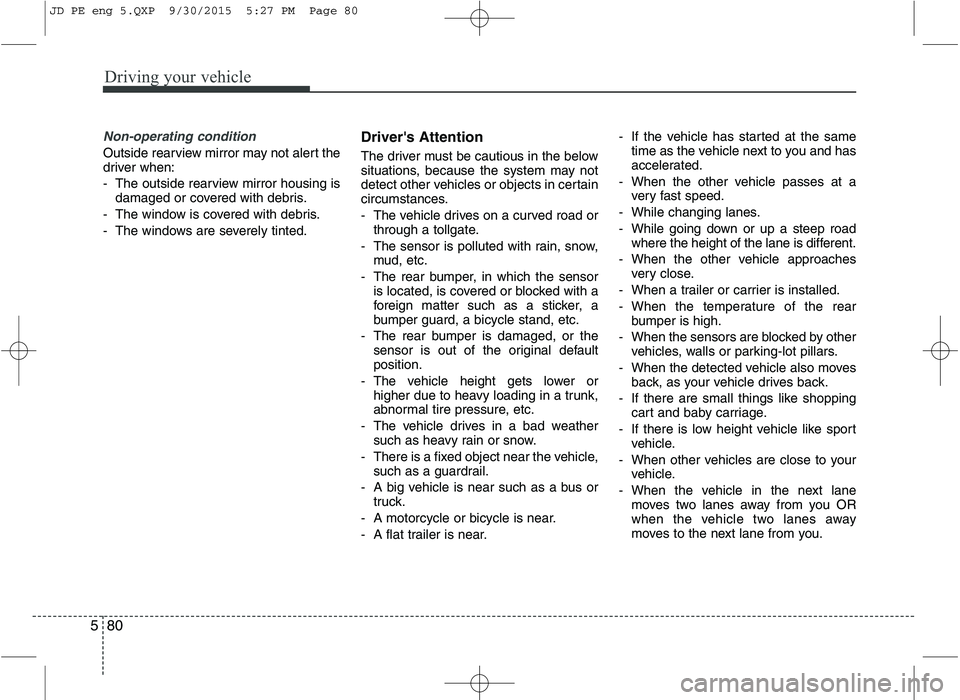
Non-operating condition
Outside rearview mirror may not alert the
driver when:
- The outside rearview mirror housing is
damaged or covered with debris.
- The window is covered with debris.
- The windows are severely tinted. Driver's Attention
The driver must be cautious in the below
situations, because the system may not
detect other vehicles or objects in certain
circumstances.
- The vehicle drives on a curved road or
through a tollgate.
- The sensor is polluted with rain, snow, mud, etc.
- The rear bumper, in which the sensor is located, is covered or blocked with a
foreign matter such as a sticker, a
bumper guard, a bicycle stand, etc.
- The rear bumper is damaged, or the sensor is out of the original defaultposition.
- The vehicle height gets lower or higher due to heavy loading in a trunk,
abnormal tire pressure, etc.
- The vehicle drives in a bad weather such as heavy rain or snow.
- There is a fixed object near the vehicle, such as a guardrail.
- A big vehicle is near such as a bus or truck.
- A motorcycle or bicycle is near.
- A flat trailer is near. - If the vehicle has started at the same
time as the vehicle next to you and has
accelerated.
- When the other vehicle passes at a very fast speed.
- While changing lanes.
- While going down or up a steep road where the height of the lane is different.
- When the other vehicle approaches very close.
- When a trailer or carrier is installed.
- When the temperature of the rear bumper is high.
- When the sensors are blocked by other vehicles, walls or parking-lot pillars.
- When the detected vehicle also moves back, as your vehicle drives back.
- If there are small things like shopping cart and baby carriage.
- If there is low height vehicle like sport vehicle.
- When other vehicles are close to your vehicle.
- When the vehicle in the next lane moves two lanes away from you OR
when the vehicle two lanes away
moves to the next lane from you.
JD PE eng 5.QXP 9/30/2015 5:27 PM Page 80
Page 457 of 643
Driving your vehicle
84
5
✽✽
NOTICE
The ESC system should be turned OFF
prior to rocking the vehicle.
Smooth cornering
Avoid braking or gear changing in cor-
ners, especially when roads are wet.
Ideally, corners should always be taken
under gentle acceleration. If you follow
these suggestions, tire wear will be held
to a minimum. Driving at night
Because night driving presents more
hazards than driving in the daylight, here
are some important tips to remember:
Slow down and keep more distance between you and other vehicles, as it
may be more difficult to see at night,
especially in areas where there may
not be any street lights.
Adjust your mirrors to reduce the glare from other driver's headlights.
Keep your headlights clean and prop- erly aimed on vehicles not equippedwith the automatic headlight aiming
feature. Dirty or improperly aimed
headlights will make it much more diffi-cult to see at night.
Avoid staring directly at the headlights of oncoming vehicles. You could be
temporarily blinded, and it will take
several seconds for your eyes to read-
just to the darkness. Driving in the rain
Rain and wet roads can make driving
dangerous, especially if you’re not pre-
pared for the slick pavement. Here are a
few things to consider when driving in the
rain:
A heavy rainfall will make it harder to
see and will increase the distance
needed to stop your vehicle, so slow
down.
Keep your windshield wiping equip- ment in good shape. Replace your
windshield wiper blades when they
show signs of streaking or missingareas on the windshield.
If your tires are not in good condition, making a quick stop on wet pavement
can cause a skid and possibly lead to
an accident. Be sure your tires are in
good shape.
Turn on your headlights to make it eas- ier for others to see you.
Driving too fast through large puddles can affect your brakes. If you must go
through puddles, try to drive through
them slowly.
If you believe you may have gotten your brakes wet, apply them lightly
while driving until normal braking oper-
ation returns.
WARNING - Spinning tires
Do not spin the wheels, especially at speeds more than 56 km/h (35
mph). Spinning the wheels at high
speeds when the vehicle is station-
ary could cause a tire to overheat
which could result in tire damage
that may injure bystanders.
WARNING
If your vehicle becomes stuck in
snow, mud, sand, etc., then you
may attempt to rock the vehicle free
by moving it forward and backward.
Do not attempt this procedure if
people or objects are anywhere
near the vehicle. During the rocking
operation the vehicle may suddenly
move forward or backward as it
becomes unstuck, causing injury
or damage to nearby people orobjects.
JD PE eng 5.QXP 9/30/2015 5:27 PM Page 84
Page 465 of 643
Driving your vehicle
92
5
Safety chains
You should always attach chains
between your vehicle and your trailer.
Cross the safety chains under the tongue
of the trailer so that the tongue will not
drop to the road if it becomes separatedfrom the hitch.
Instructions about safety chains may be
provided by the hitch manufacturer or by
the trailer manufacturer. Follow the man-
ufacturer’s recommendation for attaching
safety chains. Always leave just enough
slack so you can turn with your trailer.
And, never allow safety chains to drag on
the ground. Trailer brakes
If your trailer is equipped with a braking
system, make sure it conforms to your
country’s regulations and that it is prop-
erly installed and operating correctly.
If your trailer weight exceeds the maxi-
mum allowed weight without trailer
brakes, then the trailer will also require its
own brakes as well. Be sure to read and
follow the instructions for the trailer
brakes so you’ll be able to install, adjust
and maintain them properly.
Do not tap into or modify your vehicle's
brake system. Driving with a trailer
Towing a trailer requires a certain amount
of experience. Before setting out for the
open road, you must get to know your
trailer. Acquaint yourself with the feel of
handling and braking with the added
weight of the trailer. And always keep in
mind that the vehicle you are driving is
now a good deal longer and not nearly so
responsive as your vehicle is by itself.
Before you start, check the trailer hitch
and platform, safety chains, electrical
connector(s), lights, tires and mirror
adjustment. If the trailer has electric
brakes, start your vehicle and trailer mov-
ing and then apply the trailer brake con-
troller by hand to be sure the brakes are
working. This lets you check your electri-
cal connection at the same time.
During your trip, check occasionally to be
sure that the load is secure, and that the
lights and any trailer brakes are still work-ing.
WARNING
- Trailer brakes
Do not use a trailer with its own
brakes unless you are absolutely
certain that you have properly set
up the brake system. This is not a
task for amateurs. Use an experi-
enced, competent trailer shop for
this work.
JD PE eng 5.QXP 9/30/2015 5:28 PM Page 92
Page 568 of 643
Maintenance
62
7
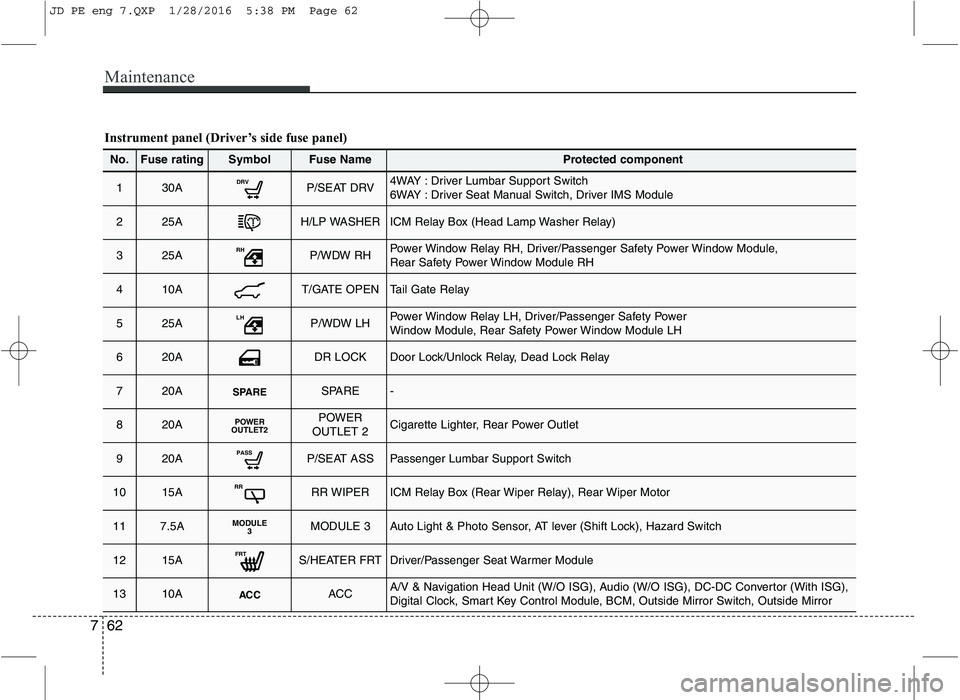
Instrument panel (Driver’s side fuse panel)
No.Fuse ratingSymbolFuse NameProtected component
130ADRVP/SEAT DRV4WAY : Driver Lumbar Support Switch
6WAY : Driver Seat Manual Switch, Driver IMS Module
225AH/LP WASHERICM Relay Box (Head Lamp Washer Relay)
325ARHP/WDW RHPower Window Relay RH, Driver/Passenger Safety Power Window Module,
Rear Safety Power Window Module RH
410AT/GATE OPENTail Gate Relay
525ALHP/WDW LHPower Window Relay LH, Driver/Passenger Safety Power
Window Module, Rear Safety Power Window Module LH
620ADR LOCKDoor Lock/Unlock Relay, Dead Lock Relay
720ASPARESPARE-
820APOWER
OUTLET2POWER
OUTLET 2Cigarette Lighter, Rear Power Outlet
920APASSP/SEAT ASSPassenger Lumbar Support Switch
1015ARRRR WIPERICM Relay Box (Rear Wiper Relay), Rear Wiper Motor
117.5AMODULE 3MODULE 3Auto Light & Photo Sensor, AT lever (Shift Lock), Hazard Switch
1215AFRTS/HEATER FRTDriver/Passenger Seat Warmer Module
1310AACCACCA/V & Navigation Head Unit (W/O ISG), Audio (W/O ISG), DC-DC Convertor (With ISG),
Digital Clock, Smart Key Control Module, BCM, Outside Mirror Switch, Outside Mirror
JD PE eng 7.QXP 1/28/2016 5:38 PM Page 62
Page 569 of 643
763
Maintenance
No.Fuse ratingSymbolFuse NameProtected component
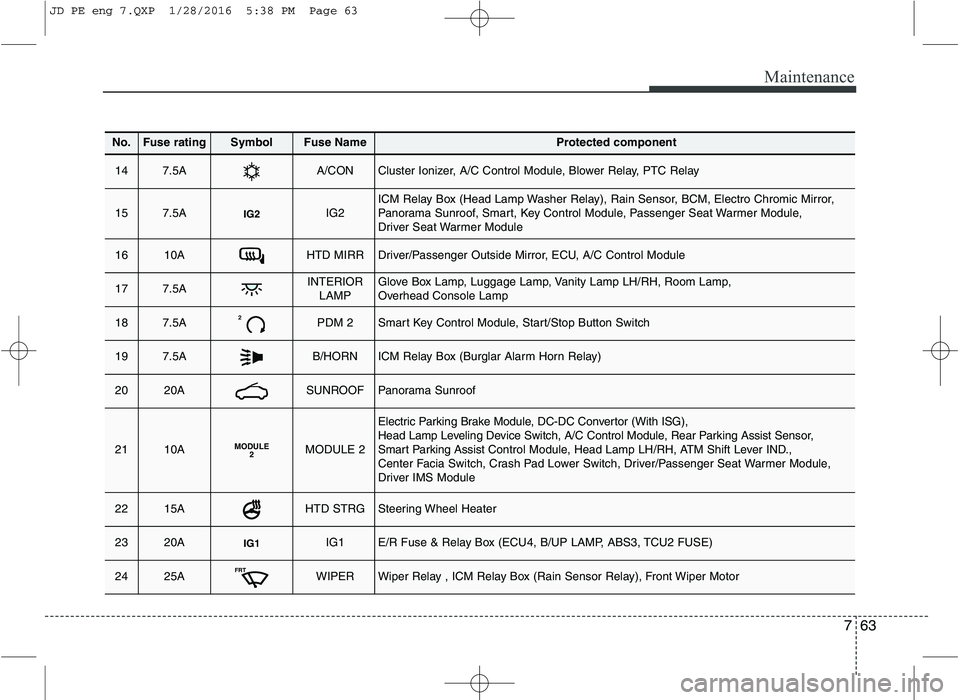
147.5AA/CONCluster Ionizer, A/C Control Module, Blower Relay, PTC Relay
157.5AIG2IG2ICM Relay Box (Head Lamp Washer Relay), Rain Sensor, BCM, Electro Chromic Mirror,
Panorama Sunroof, Smart, Key Control Module, Passenger Seat Warmer Module,
Driver Seat Warmer Module
1610AHTD MIRRDriver/Passenger Outside Mirror, ECU, A/C Control Module
177.5AINTERIORLAMPGlove Box Lamp, Luggage Lamp, Vanity Lamp LH/RH, Room Lamp,
Overhead Console Lamp
187.5A2PDM 2Smart Key Control Module, Start/Stop Button Switch
197.5AB/HORNICM Relay Box (Burglar Alarm Horn Relay)
2020ASUNROOFPanorama Sunroof
2110AMODULE 2MODULE 2
Electric Parking Brake Module, DC-DC Convertor (With ISG),
Head Lamp Leveling Device Switch, A/C Control Module, Rear Parking Assist Sensor,
Smart Parking Assist Control Module, Head Lamp LH/RH, ATM Shift Lever IND.,
Center Facia Switch, Crash Pad Lower Switch, Driver/Passenger Seat Warmer Module,
Driver IMS Module
2215AHTD STRGSteering Wheel Heater
2320AIG1IG1E/R Fuse & Relay Box (ECU4, B/UP LAMP, ABS3, TCU2 FUSE)
2425AFRTWIPERWiper Relay , ICM Relay Box (Rain Sensor Relay), Front Wiper Motor
JD PE eng 7.QXP 1/28/2016 5:38 PM Page 63
Page 570 of 643
Maintenance
64
7
No.Fuse ratingSymbolFuse NameProtected component
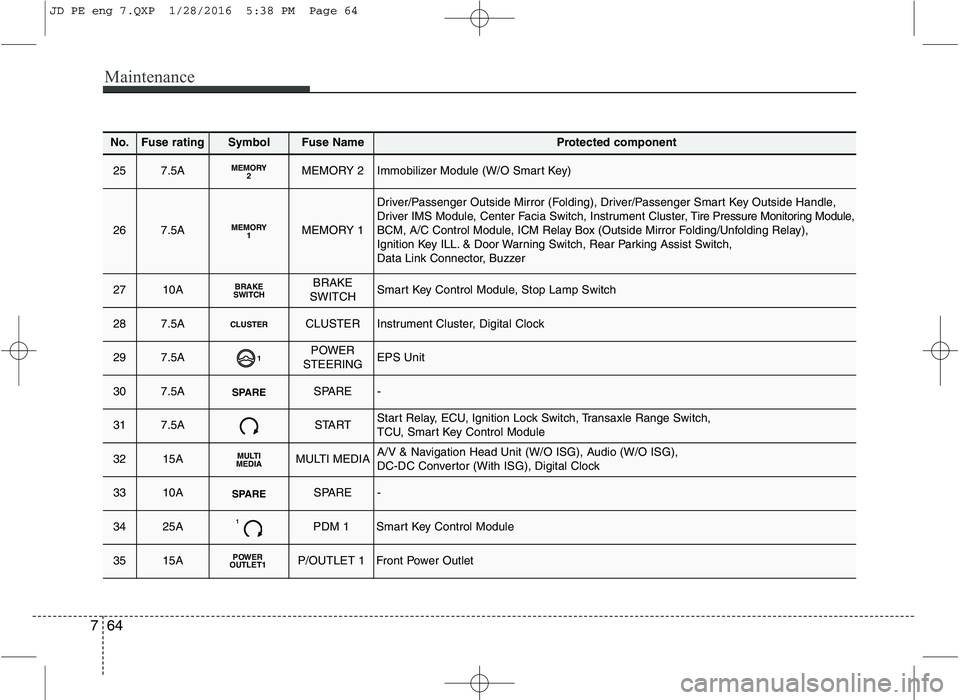
257.5AMEMORY2MEMORY 2Immobilizer Module (W/O Smart Key)
267.5AMEMORY1MEMORY 1
Driver/Passenger Outside Mirror (Folding), Driver/Passenger Smart Key Outside Handle, Driver IMS Module, Center Facia Switch, Instrument Cluster, Tire Pressure Monitoring Module,
BCM, A/C Control Module, ICM Relay Box (Outside Mirror Folding/Unfolding Relay),
Ignition Key ILL. & Door Warning Switch, Rear Parking Assist Switch,
Data Link Connector, Buzzer
2710ABRAKE
SWITCHBRAKE
SWITCHSmart Key Control Module, Stop Lamp Switch
287.5ACLUSTERCLUSTERInstrument Cluster, Digital Clock
297.5A1POWER
STEERINGEPS Unit
307.5ASPARESPARE-
317.5ASTARTStart Relay, ECU, Ignition Lock Switch, Transaxle Range Switch,
TCU, Smart Key Control Module
3215AMULTI
MEDIAMULTI MEDIAA/V & Navigation Head Unit (W/O ISG), Audio (W/O ISG),
DC-DC Convertor (With ISG), Digital Clock
3310ASPARESPARE-
3425A1PDM 1Smart Key Control Module
3515APOWER
OUTLET1P/OUTLET 1Front Power Outlet
JD PE eng 7.QXP 1/28/2016 5:38 PM Page 64