reset KIA CEED 2016 Owner's Guide
[x] Cancel search | Manufacturer: KIA, Model Year: 2016, Model line: CEED, Model: KIA CEED 2016Pages: 643, PDF Size: 38.19 MB
Page 363 of 643
![KIA CEED 2016 Owners Guide Features of your vehicle
280
4 SETUP
Starting Mode
Press the key to display the Setup screen.
You can select and control options
related to [Display], [Sound],[Phone] and [System].
Display Settin](/img/2/57945/w960_57945-362.png "KIA CEED 2016 Owners Guide Features of your vehicle
280
4 SETUP
Starting Mode
Press the key to display the Setup screen.
You can select and control options
related to [Display], [Sound],[Phone] and [System].
Display Settin")
Features of your vehicle
280
4 SETUP
Starting Mode
Press the key to display the Setup screen.
You can select and control options
related to [Display], [Sound],[Phone] and [System].
Display Settings
Adjusting the Brightness
Press the key Select
[Display] Select [Brightness]
Use the , buttons to adjust the
screen brightness or set the
Brightness on Automatic, Day, or
Night mode.
Press the button to reset.
(1) Automatic : Adjusts the bright-
ness automatically
(2) Day : Always maintains the bright- ness on high
(3) Night : Always maintains the brightness on low
Pop-up Mode
Press the key Select
[Display] Select [Pop-up Mode]
This feature is used to display the
Pop-up Mode screen when entering
radio and media modes.
When this feature is turned on, pressing the or key
will display the Pop-up Mode screen.
✽✽ NOTICE
The media Pop-up Mode screen can
be displayed only when two or more
media modes have been connected.
MEDIA RADIO
SETUP
Default
SETUP
SETUP
JD PE eng 4b (Audio).qxp 9/9/2015 5:12 PM Page 280
Page 365 of 643
Features of your vehicle
282
4 Use the , , , buttons to
adjust the Fader/Balance settings.
Use the , buttons to adjust the
Bass/Middle/Treble settings.
Press the button to reset.
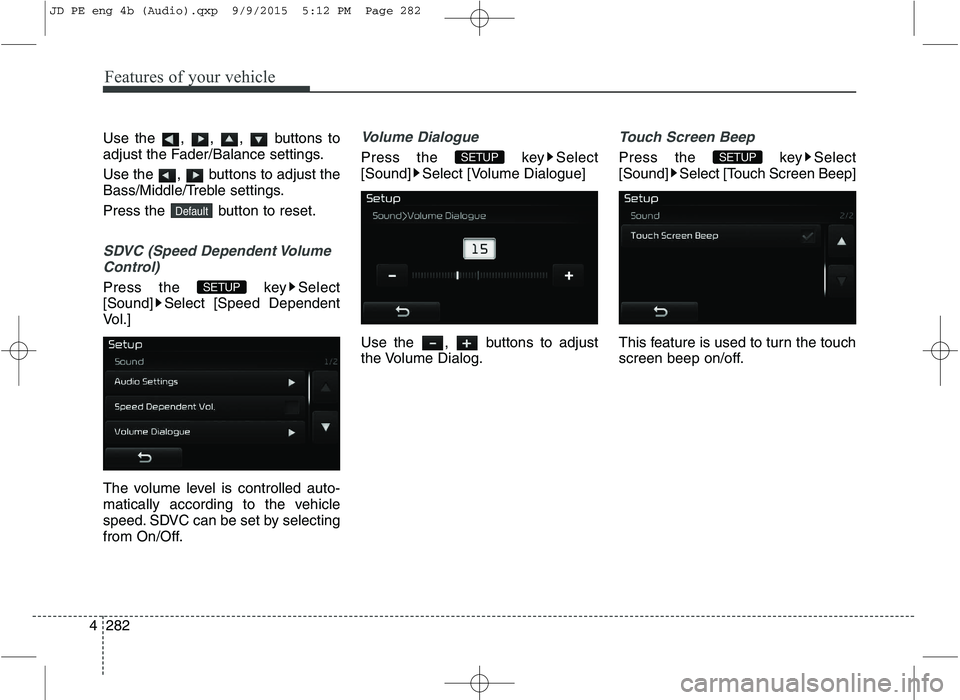
SDVC (Speed Dependent Volume
Control)
Press the key Select
[Sound] Select [Speed Dependent
Vol.]
The volume level is controlled auto-
matically according to the vehicle
speed. SDVC can be set by selecting
from On/Off.
Volume Dialogue
Press the key Select
[Sound] Select [Volume Dialogue]
Use the , buttons to adjust
the Volume Dialog.
Touch Screen Beep
Press the key Select
[Sound] Select [Touch Screen Beep]
This feature is used to turn the touch
screen beep on/off.SETUPSETUP
SETUP
Default
JD PE eng 4b (Audio).qxp 9/9/2015 5:12 PM Page 282
Page 434 of 643
561
Driving your vehicle
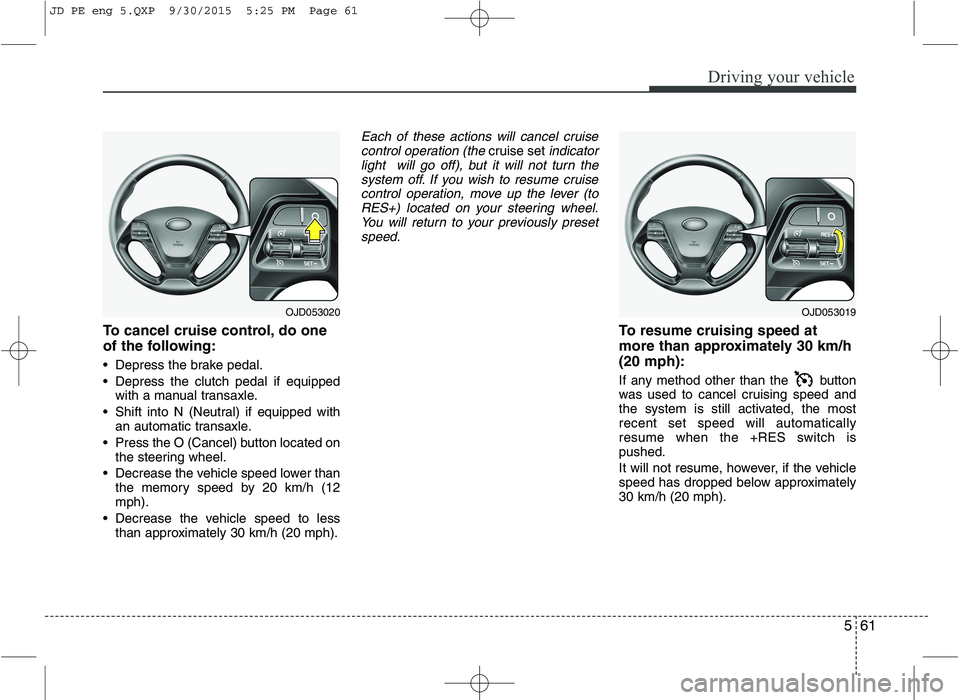
To cancel cruise control, do one
of the following:
Depress the brake pedal.
Depress the clutch pedal if equippedwith a manual transaxle.
Shift into N (Neutral) if equipped with an automatic transaxle.
Press the O (Cancel) button located on the steering wheel.
Decrease the vehicle speed lower than the memory speed by 20 km/h (12 mph).
Decrease the vehicle speed to less than approximately 30 km/h (20 mph).
Each of these actions will cancel cruise
control operation (the cruise setindicator
light will go off), but it will not turn the
system off. If you wish to resume cruisecontrol operation, move up the lever (toRES+) located on your steering wheel. You will return to your previously preset
speed.
To resume cruising speed at
more than approximately 30 km/h(20 mph):
If any method other than the button
was used to cancel cruising speed and
the system is still activated, the mostrecent set speed will automatically
resume when the +RES switch ispushed.
It will not resume, however, if the vehicle
speed has dropped below approximately30 km/h (20 mph).
OJD053020OJD053019
JD PE eng 5.QXP 9/30/2015 5:25 PM Page 61
Page 436 of 643
563
Driving your vehicle
You can set the speed limit when you do
not want to drive over a specific speed.
If you drive over the preset speed limit,
the warning system operates (set speed
limit will blink and chime will sound) until
the vehicle speed returns within thespeed limit.
✽✽NOTICE
While speed limit control is in opera-
tion, the cruise control system cannot be
activated.
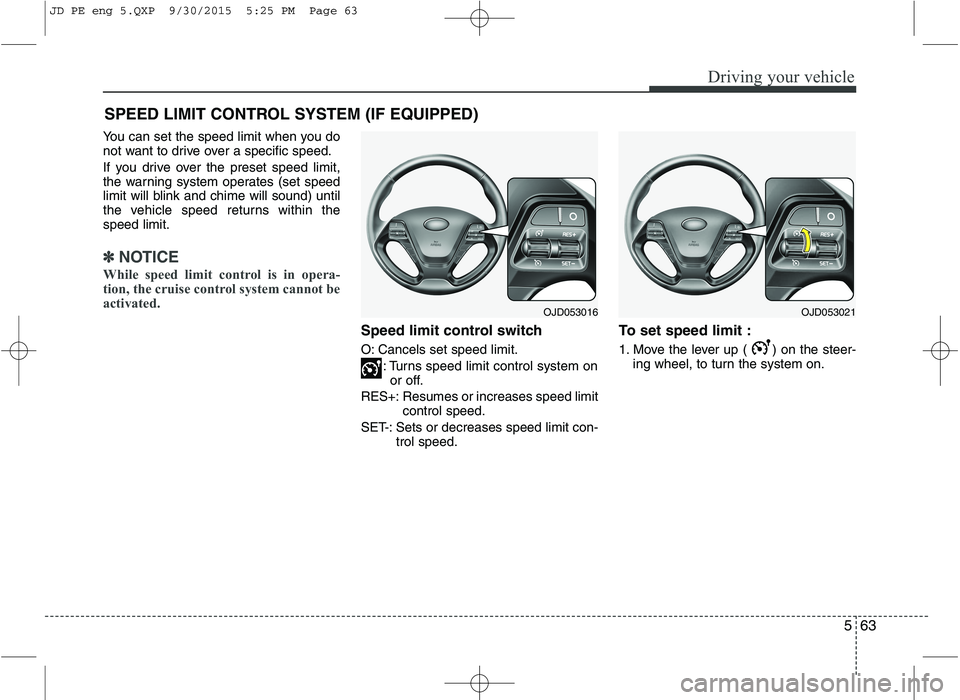
Speed limit control switch
O: Cancels set speed limit.
: Turns speed limit control system onor off.
RES+: Resumes or increases speed limit control speed.
SET-: Sets or decreases speed limit con- trol speed. To set speed limit :
1. Move the lever up ( ) on the steer-
ing wheel, to turn the system on.
SPEED LIMIT CONTROL SYSTEM (IF EQUIPPED)
OJD053021OJD053016
JD PE eng 5.QXP 9/30/2015 5:25 PM Page 63
Page 438 of 643
565
Driving your vehicle
To drive over the preset speed limit you
must depress hard on the accelerator
pedal (more than approximately 80%)
until the kick down mechanism works
with a clicking noise. Then the set speed
limit will blink and chime will sound until
you return the vehicle speed within thespeed limit.
✽✽NOTICE
Depressing the accelerator pedal less than approximately 50%, the vehicle
will not speed over the preset speed
limit but maintain the vehicle speed
within the speed limit.
A clicking noise heard from the kick down mechanism by depressing the
accelerator pedal fully is a normal
condition.
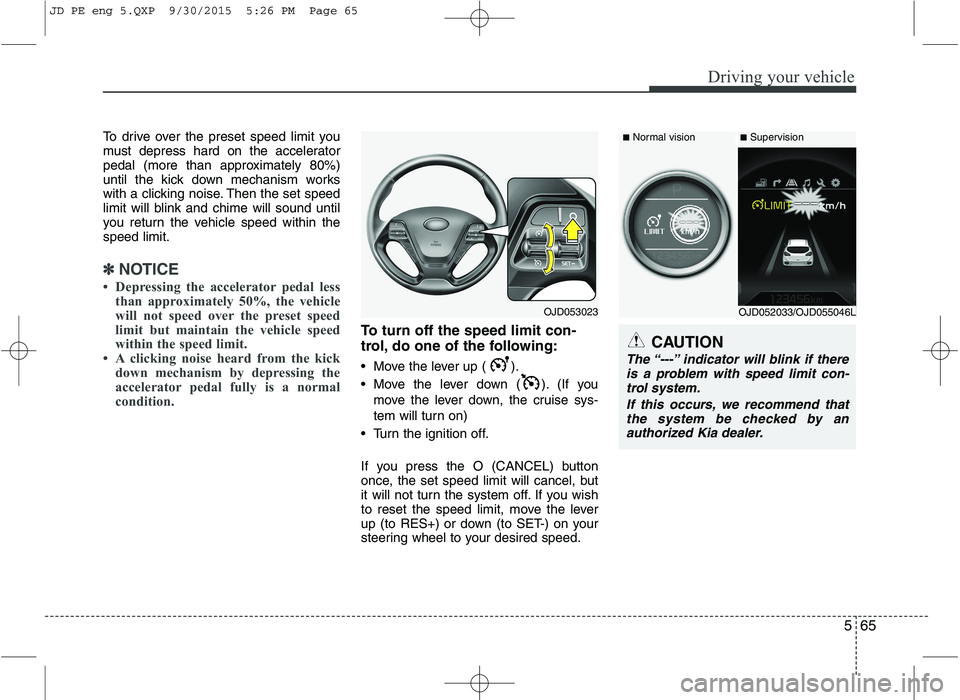
To turn off the speed limit con-
trol, do one of the following:
Move the lever up ( ).
Move the lever down ( ). (If you
move the lever down, the cruise sys-
tem will turn on)
Turn the ignition off.
If you press the O (CANCEL) button
once, the set speed limit will cancel, but
it will not turn the system off. If you wish
to reset the speed limit, move the lever
up (to RES+) or down (to SET-) on your
steering wheel to your desired speed.CAUTION
The “---” indicator will blink if there is a problem with speed limit con- trol system.
If this occurs, we recommend thatthe system be checked by an authorized Kia dealer.
OJD053023
■ Normal vision
■Supervision
OJD052033/OJD055046L
JD PE eng 5.QXP 9/30/2015 5:26 PM Page 65
Page 507 of 643
Maintenance
Engine compartment . . . . . . . . . . . . . . . . . . . . . . . . 7-3
Maintenance services . . . . . . . . . . . . . . . . . . . . . . . . 7-7 Owner’s responsibility . . . . . . . . . . . . . . . . . . . . . . . . . 7-7
Owner maintenance precautions . . . . . . . . . . . . . . . . 7-7
Engine compartment precautions (Diesel engine). . . 7-8
Owner maintenance . . . . . . . . . . . . . . . . . . . . . . . . . 7-9 Owner maintenance schedule . . . . . . . . . . . . . . . . . . . 7-9
Scheduled maintenance service . . . . . . . . . . . . . . . 7-11 For Europe, Except Russia . . . . . . . . . . . . . . . . . . . . . 7-12
Except Europe, For Russia . . . . . . . . . . . . . . . . . . . . . 7-28
Explanation of scheduled maintenance items . . . . 7-24
Engine oil . . . . . . . . . . . . . . . . . . . . . . . . . . . . . . . . . 7-27 Checking the engine oil level . . . . . . . . . . . . . . . . . . . . 7-27
Changing the engine oil and filter . . . . . . . . . . . . . . . 7-28
Engine coolant . . . . . . . . . . . . . . . . . . . . . . . . . . . . . 7-29 Checking the coolant level . . . . . . . . . . . . . . . . . . . . . . 7-29
Changing the coolant . . . . . . . . . . . . . . . . . . . . . . . . . . 7-31
Brake/clutch fluid . . . . . . . . . . . . . . . . . . . . . . . . . . 7-32 Checking the brake fluid level . . . . . . . . . . . . . . . . . . 7-32
Washer fluid . . . . . . . . . . . . . . . . . . . . . . . . . . . . . . . 7-33 Checking the washer fluid level . . . . . . . . . . . . . . . . . 7-33
Parking brake - hand type . . . . . . . . . . . . . . . . . . . 7-33 Checking the parking brake . . . . . . . . . . . . . . . . . . . . 7-33
Fuel filter (for Diesel) . . . . . . . . . . . . . . . . . . . . . . . 7-34 Draining water from fuel filter . . . . . . . . . . . . . . . . . . 7-34 Air cleaner . . . . . . . . . . . . . . . . . . . . . . . . . . . . . . . . 7-35
Filter replacement . . . . . . . . . . . . . . . . . . . . . . . . . . . . 7-35
Climate control air filter . . . . . . . . . . . . . . . . . . . . . 7-37 Filter inspection . . . . . . . . . . . . . . . . . . . . . . . . . . . . . . 7-37
Filter replacement . . . . . . . . . . . . . . . . . . . . . . . . . . . . 7-37
Wiper blades . . . . . . . . . . . . . . . . . . . . . . . . . . . . . . . 7-39 Blade inspection . . . . . . . . . . . . . . . . . . . . . . . . . . . . . . 7-39
Blade replacement . . . . . . . . . . . . . . . . . . . . . . . . . . . . 7-39
Battery. . . . . . . . . . . . . . . . . . . . . . . . . . . . . . . . . . . . 7-42 For best battery service . . . . . . . . . . . . . . . . . . . . . . . . 7-42
Battery capacity label . . . . . . . . . . . . . . . . . . . . . . . . . 7-43
Battery recharging . . . . . . . . . . . . . . . . . . . . . . . . . . . . 7-43
Reset items . . . . . . . . . . . . . . . . . . . . . . . . . . . . . . . . . . 7-44
Tires and wheels . . . . . . . . . . . . . . . . . . . . . . . . . . . . 7-45 Tire care. . . . . . . . . . . . . . . . . . . . . . . . . . . . . . . . . . . . . 7-45
Recommended cold tire inflation pressures. . . . . . . . 7-45
Checking tire inflation pressure . . . . . . . . . . . . . . . . . 7-47
Tire rotation . . . . . . . . . . . . . . . . . . . . . . . . . . . . . . . . . 7-48
Wheel alignment and tire balance . . . . . . . . . . . . . . . 7-49
Tire replacement . . . . . . . . . . . . . . . . . . . . . . . . . . . . . . 7-49
Wheel replacement . . . . . . . . . . . . . . . . . . . . . . . . . . . . 7-51
Tire traction . . . . . . . . . . . . . . . . . . . . . . . . . . . . . . . . . 7-51
Tire maintenance . . . . . . . . . . . . . . . . . . . . . . . . . . . . . 7-51
Tire sidewall labeling . . . . . . . . . . . . . . . . . . . . . . . . . . 7-51
Low aspect ratio tire . . . . . . . . . . . . . . . . . . . . . . . . . . 7-55
7
JD PE eng 7.QXP 1/28/2016 5:34 PM Page 1
Page 550 of 643

Maintenance
44
7
Reset items
Items should be reset after the battery
has been discharged or the battery hasbeen disconnected.
Auto up/down window (See chapter 4)
Sunroof (See chapter 4)
Trip computer (See chapter 4)
Climate control system
(See chapter 4)
Audio (See chapter 4)(Continued)
Wear eye protection when check- ing the battery during charging.
Disconnect the battery charger in the following order.
1. Turn off the battery charger main switch.
2. Unhook the negative clamp from the negative battery ter- minal.
3. Unhook the positive clamp from the positive battery termi-nal.
Before performing maintenance or recharging the battery, turn offall accessories and stop the
engine.
The negative battery cable must be removed first and installed
last when the battery is discon-nected.
JD PE eng 7.QXP 1/28/2016 5:37 PM Page 44
Page 555 of 643
749
Maintenance
Wheel alignment and tire balance
The wheels on your vehicle were aligned and balanced carefully at the
factory to give you the longest tire life
and best overall performance.
In most cases, you will not need to
have your wheels aligned again.
However, if you notice unusual tire
wear or your vehicle pulling one way
or the other, the alignment may needto be reset.
If you notice your vehicle vibrating
when driving on a smooth road, your
wheels may need to be rebalanced.Tire replacement
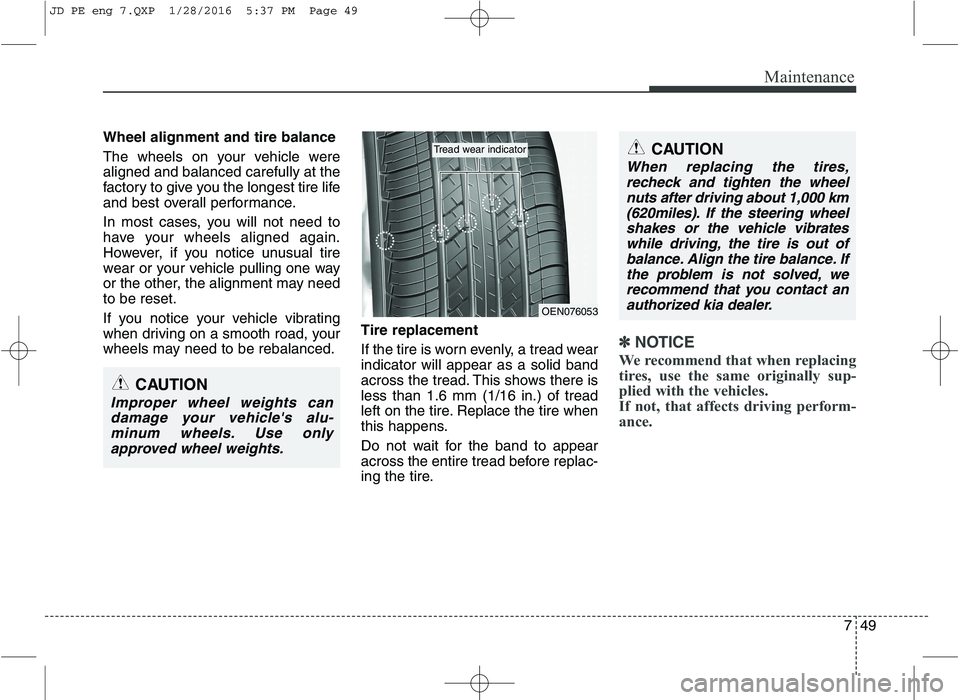
If the tire is worn evenly, a tread wear indicator will appear as a solid band
across the tread. This shows there isless than 1.6 mm (1/16 in.) of tread
left on the tire. Replace the tire when
this happens.
Do not wait for the band to appear
across the entire tread before replac-
ing the tire.
✽✽
NOTICE
We recommend that when replacing
tires, use the same originally sup-
plied with the vehicles.
If not, that affects driving perform-
ance.
CAUTION
Improper wheel weights can damage your vehicle's alu-minum wheels. Use only approved wheel weights.
CAUTION
When replacing the tires,recheck and tighten the wheelnuts after driving about 1,000 km (620miles). If the steering wheelshakes or the vehicle vibrateswhile driving, the tire is out ofbalance. Align the tire balance. If the problem is not solved, werecommend that you contact anauthorized kia dealer.
OEN076053
Tread wear indicator
JD PE eng 7.QXP 1/28/2016 5:37 PM Page 49
Page 564 of 643
Maintenance
58
7
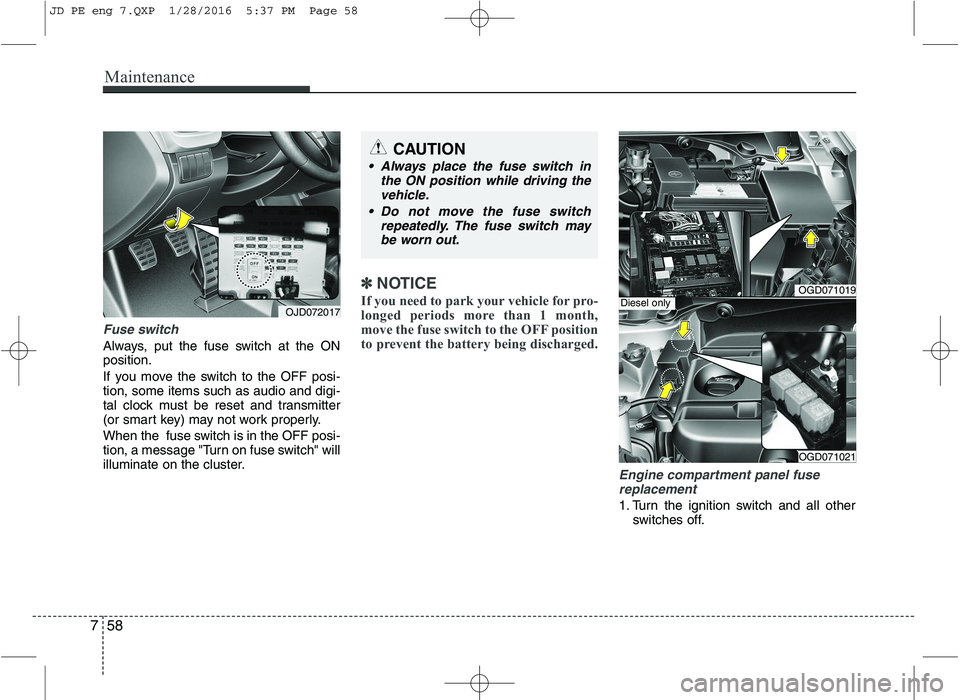
Fuse switch
Always, put the fuse switch at the ON position.
If you move the switch to the OFF posi- tion, some items such as audio and digi-
tal clock must be reset and transmitter
(or smart key) may not work properly.
When the fuse switch is in the OFF posi-
tion, a message "Turn on fuse switch" will
illuminate on the cluster.
✽✽
NOTICE
If you need to park your vehicle for pro-
longed periods more than 1 month,
move the fuse switch to the OFF position
to prevent the battery being discharged.
Engine compartment panel fuse replacement
1. Turn the ignition switch and all other switches off.
OGD071019
OGD071021
Diesel onlyOJD072017
CAUTION
Always place the fuse switch in
the ON position while driving thevehicle.
Do not move the fuse switch repeatedly. The fuse switch may
be worn out.
JD PE eng 7.QXP 1/28/2016 5:37 PM Page 58