instrument cluster KIA FORTE 2019 User Guide
[x] Cancel search | Manufacturer: KIA, Model Year: 2019, Model line: FORTE, Model: KIA FORTE 2019Pages: 550, PDF Size: 11.66 MB
Page 306 of 550
Driving your vehicle
60
5
The warning light illumi-
nates on the LCD display,
when you cancel the FCA
system. The driver can
monitor the FCA ON/OFF status on
the LCD display. Also, the warning
light illuminates when the ESC
(Electronic Stability Control) is
turned off. When the warning light
remains ON with the FCA activated,
have the system checked by a pro-
fessional workshop. Kia recom-
mends to visit an authorised Kia
dealer/service partner.
The driver can select the initial warn-
ing activation time in the User
Settings in the instrument cluster
LCD display. The options for the ini-
tial Forward Collision Warning
include the following:
selected, the initial
Forward Collision Warning
is activated earlier than
normal. This setting maxi-
mizes the amount of dis-
tance between the vehicle
or pedestrian ahead before
the initial warning occurs. If
the ‘EARLY’ condition feels
too sensitive, change it into
‘NORMAL’. When the vehi-
cle ahead suddenly stops,
the warning may seem to
activate later even if the
‘EARLY’ condition was
selected.
selected, the initial
Forward Collision
Warning is activated nor-
mally. Compared to
EARLY mode, this set-
ting allows for a shorter
amount of distance
between the vehicle or
pedestrian ahead before
the initial warning
occurs.
selected, the initial Forward
Collision Warning is activat-
ed later than normal. This
setting reduces the amount
of distance between the
vehicle or pedestrian ahead
before the initial warning
occurs. Select this condition
only when traffic is light,
and you are driving slowly.
BDm CAN (ENG) 5.QXP 7/4/2018 10:14 AM Page 60
Page 320 of 550
Driving your vehicle
74
5
To set cruise control speed:
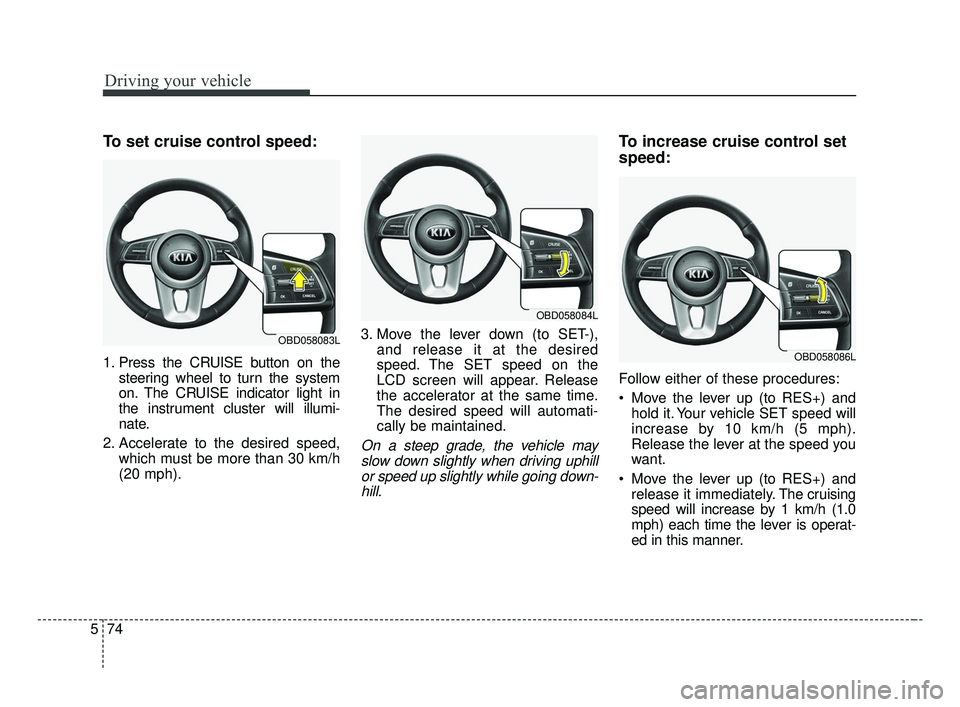
1. Press the CRUISE button on the
steering wheel to turn the system
on. The CRUISE indicator light in
the instrument cluster will illumi-
nate.
2. Accelerate to the desired speed, which must be more than 30 km/h
(20 mph). 3. Move the lever down (to SET-),
and release it at the desired
speed. The SET speed on the
LCD screen will appear. Release
the accelerator at the same time.
The desired speed will automati-
cally be maintained.
On a steep grade, the vehicle mayslow down slightly when driving uphillor speed up slightly while going down-hill.
To increase cruise control set
speed:
Follow either of these procedures:
Move the lever up (to RES+) and hold it. Your vehicle SET speed will
increase by 10 km/h (5 mph).
Release the lever at the speed you
want.
Move the lever up (to RES+) and release it immediately. The cruising
speed will increase by 1 km/h (1.0
mph) each time the lever is operat-
ed in this manner.
OBD058083L
OBD058084L
OBD058086L
BDm CAN (ENG) 5.QXP 7/4/2018 10:15 AM Page 74
Page 324 of 550
Driving your vehicle
78
5
(Continued)
- Parking lot
- Lanes beside guard rail on aroad
- Slippery road with rain, ice, or snow
- Abrupt curved road
- Steep hills
- Windy roads
- Off roads
- Rods under construction
- Rumble strip
- When driving near crash barriers
- When driving on a sharp curve
- When the vehicle sensing ability decreases due to
vehicle modification result-
ing level difference of the
vehicle's front and rear
- When driving in heavy traffic or when traffic conditions
make it difficult to drive at a
constant speed
(Continued)(Continued)- Limited visibility (rain, snow,smog, etc.)
Pay particular attention to the driving conditions whenever
using the smart cruise control
system.
Be careful when driving downhill using the SCC.
Cruise function should not be used when the vehicle is
being towed to prevent any
damage.
Always set the vehicle speed under the speed limit in your
country.
Always pay continuous atten- tion to road and driving condi-
tions even when the smart
cruise control system is being
operated.
The smart cruise control sys- tem cannot recognize a
stopped vehicle, pedestrians or
an oncoming vehicle. Always
look ahead cautiously to pre-
vent unexpected and sudden
situations from occurring.WARNING
If the smart cruise control sys-tem is left on, (cruise indicator
in the instrument cluster illumi-
nated) the smart cruise control
can be activated unintentional-
ly. Keep the smart cruise con-
trol system off (cruise indicator
off) when the smart cruise con-
trol system is not in use to
avoid setting a speed which
the driver is not aware of.
Use the smart cruise control system only when traveling
on open highways in good
weather.
Do not use the smart cruise control when it may not be
safe to keep the car at a con-
stant speed. For instance.
- Highway interchange andtollgate
- Road surrounded by multiple steel constructions (subway
construction, steel tunnel, etc)
(Continued)
BDm CAN (ENG) 5.QXP 7/4/2018 10:15 AM Page 78
Page 325 of 550
579
Driving your vehicle
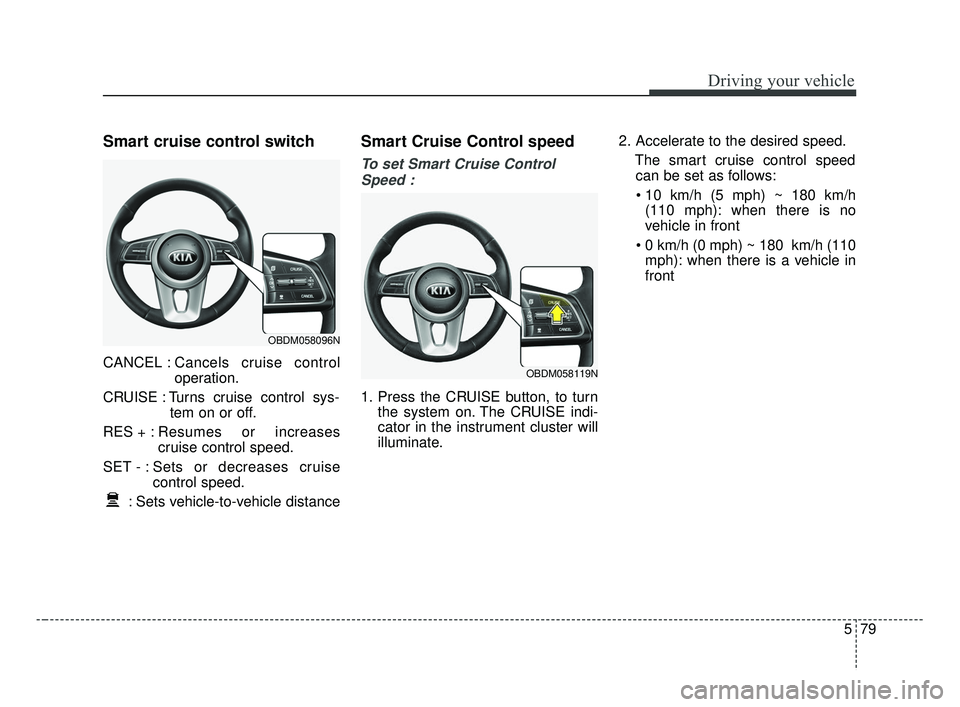
Smart cruise control switch
CANCEL :Cancels cruise control
operation.
CRUISE : Turns cruise control sys- tem on or off.
RES + : Resumes or increases
cruise control speed.
SET - : Sets or decreases cruise control speed.
: Sets vehicle-to-vehicle distance
Smart Cruise Control speed
To set Smart Cruise Control Speed :
1. Press the CRUISE button, to turn the system on. The CRUISE indi-
cator in the instrument cluster will
illuminate. 2. Accelerate to the desired speed.
The smart cruise control speedcan be set as follows:
(110 mph): when there is no
vehicle in front
mph): when there is a vehicle in
front
OBDM058119N
OBDM058096N
BDm CAN (ENG) 5.QXP 7/4/2018 10:15 AM Page 79
Page 330 of 550
Driving your vehicle
84
5
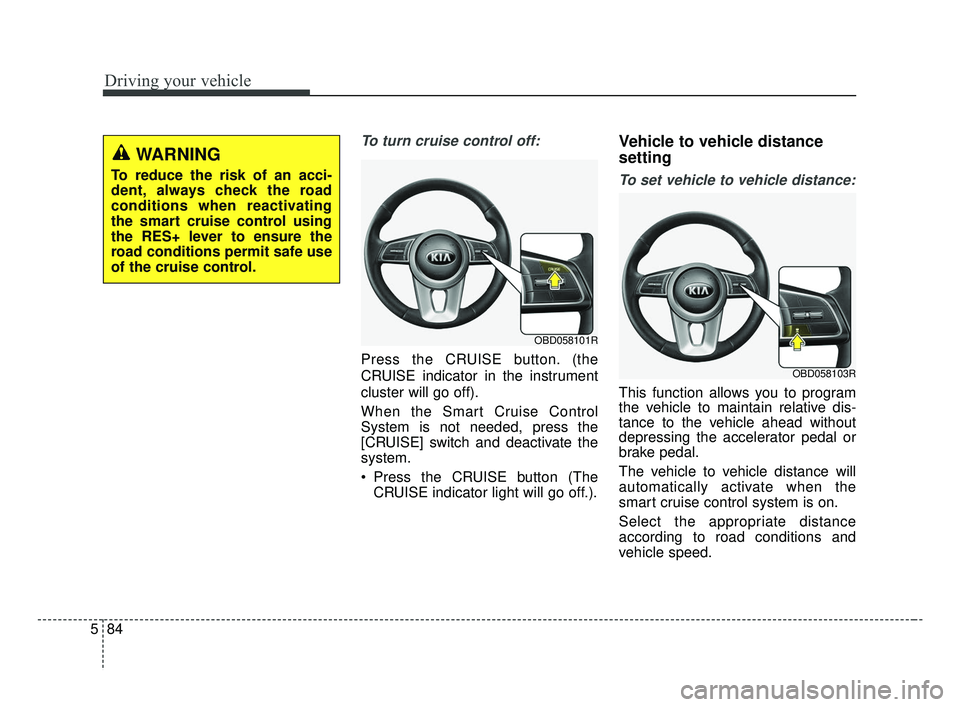
To turn cruise control off:
Press the CRUISE button. (the
CRUISE indicator in the instrument
cluster will go off).
When the Smart Cruise Control
System is not needed, press the
[CRUISE] switch and deactivate the
system.
Press the CRUISE button (The
CRUISE indicator light will go off.).
Vehicle to vehicle distance
setting
To set vehicle to vehicle distance:
This function allows you to program
the vehicle to maintain relative dis-
tance to the vehicle ahead without
depressing the accelerator pedal or
brake pedal.
The vehicle to vehicle distance will
automatically activate when the
smart cruise control system is on.
Select the appropriate distance
according to road conditions and
vehicle speed.
OBD058101R
OBD058103R
WARNING
To reduce the risk of an acci-
dent, always check the road
conditions when reactivating
the smart cruise control using
the RES+ lever to ensure the
road conditions permit safe use
of the cruise control.
BDm CAN (ENG) 5.QXP 7/4/2018 10:15 AM Page 84
Page 359 of 550
5113
Driving your vehicle
(Continued)
• When you replace the windshieldglass, front view camera or sys-
tem, take your vehicle to an
authorized Kia dealer and have
the system checked to need a cali-
bration.
• The system is designed to detect lane markers using a front view
camera. If the lane markers are
hard to detect, then the system
may be limited. Always be cau-
tious when using the system.
• When the lane markers are hard to detect, please refer to “Driver’s
Attention”.
• Do not remove or damage the related parts of LKA.
• Do not place objects on the dash- board that reflects light such as
mirrors, white paper, etc. This
may prevent the system from
functioning. (Continued)(Continued)
• You may not hear warning sound
of LKA because of the excessive
audio sound.
• If you continue to drive with your hands off the steering wheel, the
LKA system will stop controlling
the steering wheel after the hands
off alarm. Afterwards, if you drive
with your hands on the steering
wheel, the control will be activated
again.
• If the vehicle speed is high, steer- ing torque for assistance will not
be enough to keep your vehicle
within the lane. If so, the vehicle
may move out of its lane. Obey
speed limit when using LKA.
• If you attach objects to the steer- ing wheel, the system may not
assist steering.
• If you attach objects to the steer- ing wheel, hands off alarm may
not work properly.LKA operation
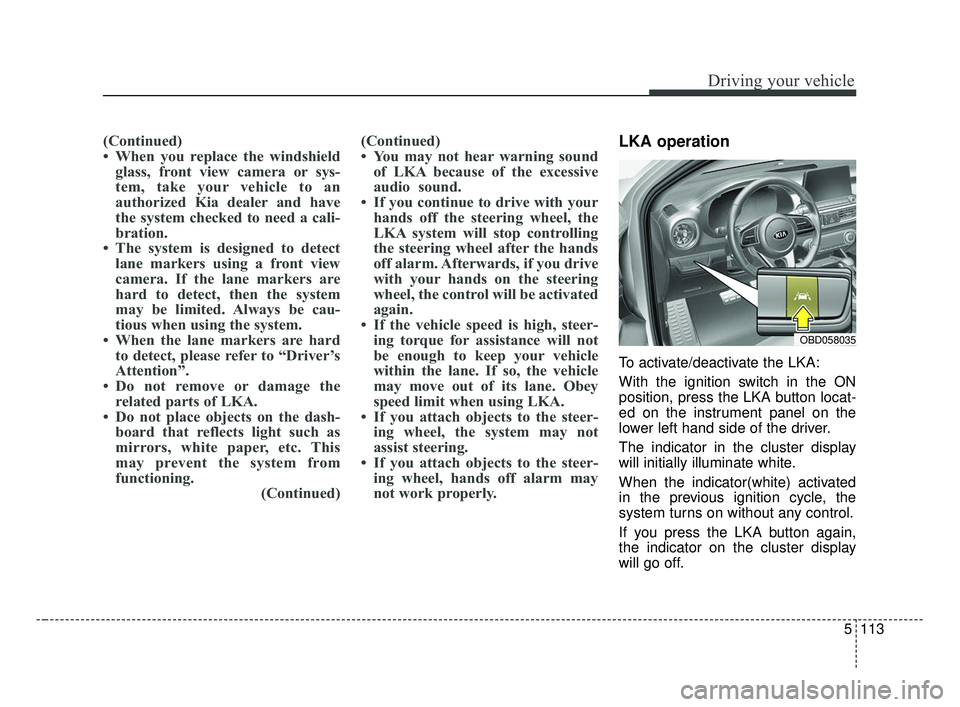
To activate/deactivate the LKA:
With the ignition switch in the ON
position, press the LKA button locat-
ed on the instrument panel on the
lower left hand side of the driver.
The indicator in the cluster display
will initially illuminate white.
When the indicator(white) activated
in the previous ignition cycle, the
system turns on without any control.
If you press the LKA button again,
the indicator on the cluster display
will go off.
OBD058035
BDm CAN (ENG) 5.QXP 7/4/2018 10:17 AM Page 113
Page 485 of 550
Maintenance
62
7
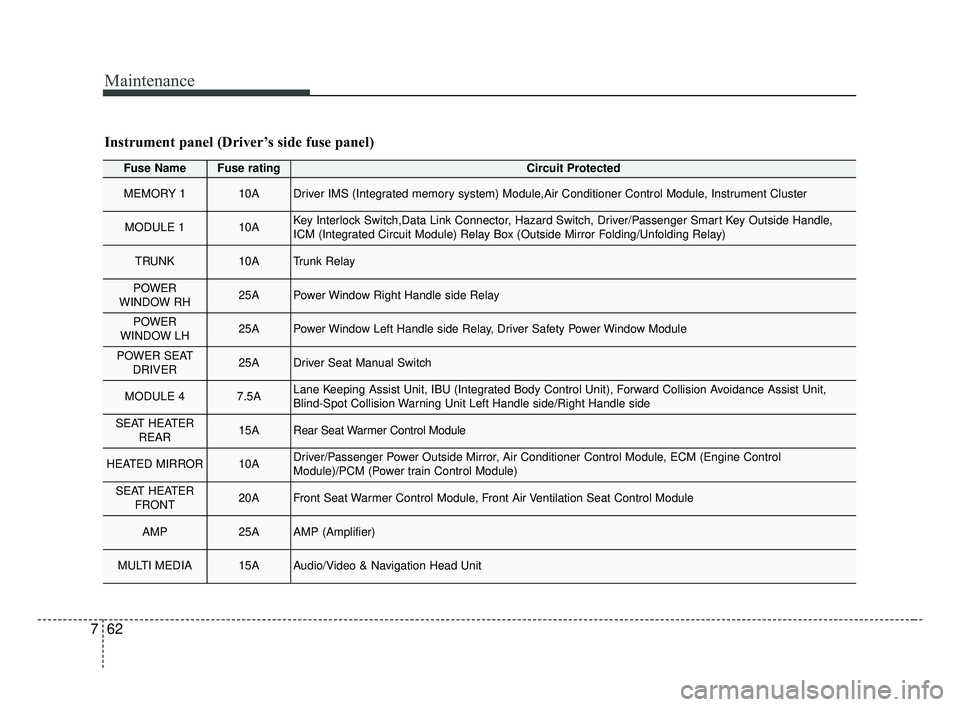
Fuse NameFuse ratingCircuit Protected
MEMORY 110ADriver IMS (Integrated memory system) Module,Air Conditioner Control Module, Instrument Cluster
MODULE 110AKey Interlock Switch,Data Link Connector, Hazard Switch, Driver/Passenger Smart Key Outside Handle,
ICM (Integrated Circuit Module) Relay Box (Outside Mirror Folding/Unfolding Relay)
TRUNK10ATrunk Relay
POWER
WINDOW RH25APower Window Right Handle side Relay
POWER
WINDOW LH25APower Window Left Handle side Relay, Driver Safety Power Window Module
POWER SEAT DRIVER25ADriver Seat Manual Switch
MODULE 47.5ALane Keeping Assist Unit, IBU (Integrated Body Control Unit), Forward Collision Avoidance Assist Unit,
Blind-Spot Collision Warning Unit Left Handle side/Right Handle side
SEAT HEATER REAR15ARear Seat Warmer Control Module
HEATED MIRROR10ADriver/Passenger Power Outside Mirror, Air Conditioner Control Module, ECM (Engine Control
Module)/PCM (Power train Control Module)
SEAT HEATERFRONT20AFront Seat Warmer Control Module, Front Air Ventilation Seat Control Module
AMP25AAMP (Amplifier)
MULTI MEDIA15AAudio/Video & Navigation Head Unit
Instrument panel (Driver’s side fuse panel)
BDm CAN (ENG) 7.qxp 7/4/2018 10:25 AM Page 62
Page 487 of 550
Maintenance
64
7
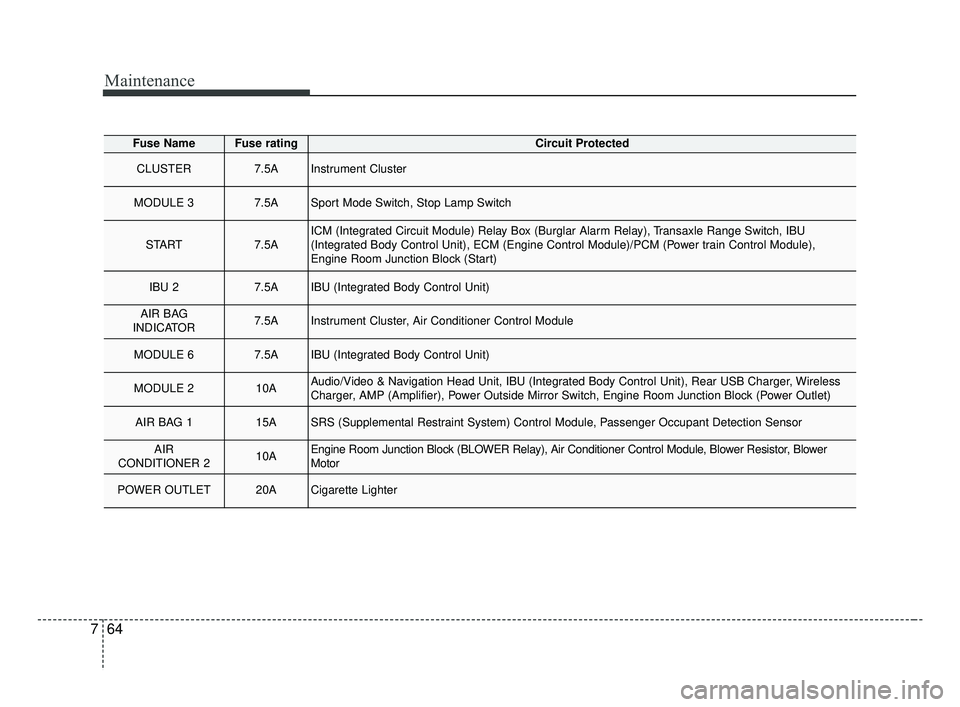
Fuse NameFuse ratingCircuit Protected
CLUSTER7.5AInstrument Cluster
MODULE 37.5ASport Mode Switch, Stop Lamp Switch
START7.5AICM (Integrated Circuit Module) Relay Box (Burglar Alarm Relay), Transaxle Range Switch, IBU
(Integrated Body Control Unit), ECM (Engine Control Module)/PCM (Power train Control Module),
Engine Room Junction Block (Start)
IBU 27.5AIBU (Integrated Body Control Unit)
AIR BAG
INDICATOR7.5AInstrument Cluster, Air Conditioner Control Module
MODULE 67.5AIBU (Integrated Body Control Unit)
MODULE 210AAudio/Video & Navigation Head Unit, IBU (Integrated Body Control Unit), Rear USB Charger, Wireless
Charger, AMP (Amplifier), Power Outside Mirror Switch, Engine Room Junction Block (Power Outlet)
AIR BAG 115ASRS (Supplemental Restraint System) Control Module, Passenger Occupant Detection Sensor
AIR
CONDITIONER 210AEngine Room Junction Block (BLOWER Relay), Air Conditioner Control Module, Blower Resistor, Blower
Motor
POWER OUTLET20ACigarette Lighter
BDm CAN (ENG) 7.qxp 7/4/2018 10:25 AM Page 64
Page 538 of 550
I3
Index
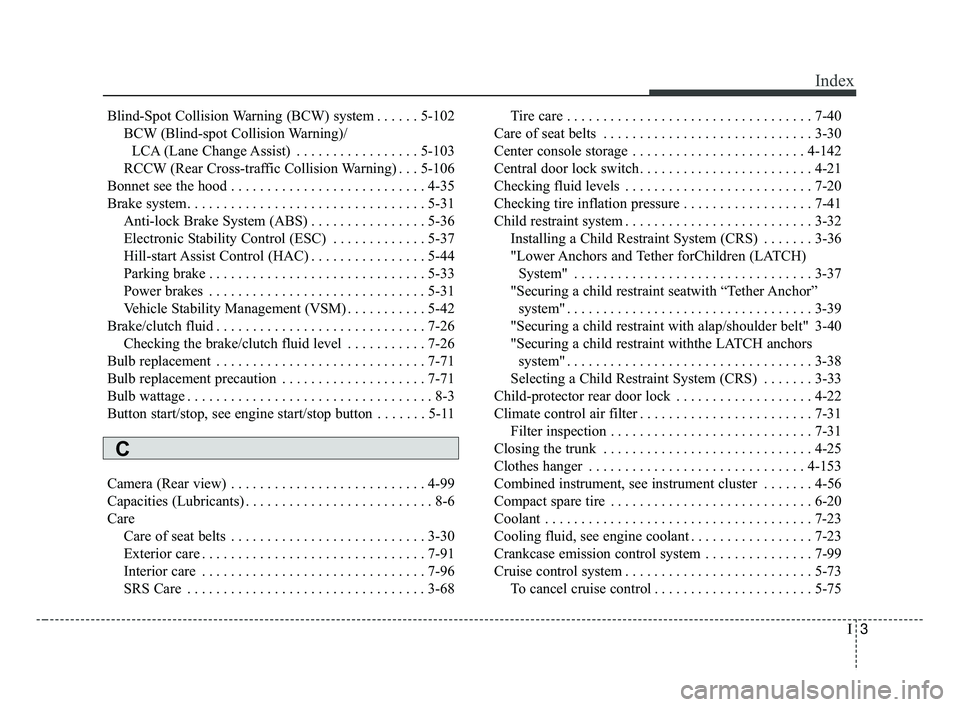
Blind-Spot Collision Warning (BCW) system . . . . . . 5-102BCW (Blind-spot Collision Warning)/LCA (Lane Change Assist) . . . . . . . . . . . . . . . . . 5-103
RCCW (Rear Cross-traffic Collision Warning) . . . 5-106
Bonnet see the hood . . . . . . . . . . . . . . . . . . . . . . . . . . . 4-35
Brake system. . . . . . . . . . . . . . . . . . . . . . . . . . . . . . . . . 5-31 Anti-lock Brake System (ABS) . . . . . . . . . . . . . . . . 5-36
Electronic Stability Control (ESC) . . . . . . . . . . . . . 5-37
Hill-start Assist Control (HAC) . . . . . . . . . . . . . . . . 5-44
Parking brake . . . . . . . . . . . . . . . . . . . . . . . . . . . . . . 5-33
Power brakes . . . . . . . . . . . . . . . . . . . . . . . . . . . . . . 5-31
Vehicle Stability Management (VSM) . . . . . . . . . . . 5-42
Brake/clutch fluid . . . . . . . . . . . . . . . . . . . . . . . . . . . . . 7-26 Checking the brake/clutch fluid level . . . . . . . . . . . 7-26
Bulb replacement . . . . . . . . . . . . . . . . . . . . . . . . . . . . . 7-71
Bulb replacement precaution . . . . . . . . . . . . . . . . . . . . 7-71
Bulb wattage . . . . . . . . . . . . . . . . . . . . . . . . . . . . . . . . . . 8-3
Button start/stop, see engine start/stop button . . . . . . . 5-11
Camera (Rear view) . . . . . . . . . . . . . . . . . . . . . . . . . . . 4-99
Capacities (Lubricants) . . . . . . . . . . . . . . . . . . . . . . . . . . 8-6
Care Care of seat belts . . . . . . . . . . . . . . . . . . . . . . . . . . . 3-30
Exterior care . . . . . . . . . . . . . . . . . . . . . . . . . . . . . . . 7-91
Interior care . . . . . . . . . . . . . . . . . . . . . . . . . . . . . . . 7-96
SRS Care . . . . . . . . . . . . . . . . . . . . . . . . . . . . . . . . . 3-68 Tire care . . . . . . . . . . . . . . . . . . . . . . . . . . . . . . . . . . 7-40\
Care of seat belts . . . . . . . . . . . . . . . . . . . . . . . . . . . . . 3-30
Center console storage . . . . . . . . . . . . . . . . . . . . . . . . 4-142
Central door lock switch. . . . . . . . . . . . . . . . . . . . . . . . 4-21
Checking fluid levels . . . . . . . . . . . . . . . . . . . . . . . . . . 7-20
Checking tire inflation pressure . . . . . . . . . . . . . . . . . . 7-41
Child restraint system . . . . . . . . . . . . . . . . . . . . . . . . . . 3-32 Installing a Child Restraint System (CRS) . . . . . . . 3-36
"Lower Anchors and Tether forChildren (LATCH) System" . . . . . . . . . . . . . . . . . . . . . . . . . . . . . . . . . 3-37
"Securing a child restraint seatwith “Tether Anchor” system" . . . . . . . . . . . . . . . . . . . . . . . . . . . . . . . . . . 3-39\
"Securing a child restraint with alap/shoulder belt" 3-40
"Securing a child restraint withthe LATCH anchors system" . . . . . . . . . . . . . . . . . . . . . . . . . . . . . . . . . . 3-38\
Selecting a Child Restraint System (CRS) . . . . . . . 3-33
Child-protector rear door lock . . . . . . . . . . . . . . . . . . . 4-22
Climate control air filter . . . . . . . . . . . . . . . . . . . . . . . . 7-31 Filter inspection . . . . . . . . . . . . . . . . . . . . . . . . . . . . 7-31
Closing the trunk . . . . . . . . . . . . . . . . . . . . . . . . . . . . . 4-25
Clothes hanger . . . . . . . . . . . . . . . . . . . . . . . . . . . . . . 4-153
Combined instrument, see instrument cluster . . . . . . . 4-56
Compact spare tire . . . . . . . . . . . . . . . . . . . . . . . . . . . . 6-20
Coolant . . . . . . . . . . . . . . . . . . . . . . . . . . . . . . . . . . . . \
. 7-23
Cooling fluid, see engine coolant . . . . . . . . . . . . . . . . . 7-23
Crankcase emission control system . . . . . . . . . . . . . . . 7-99
Cruise control system . . . . . . . . . . . . . . . . . . . . . . . . . . 5-73 To cancel cruise control . . . . . . . . . . . . . . . . . . . . . . 5-75
C
BDm CAN (ENG) Index.qxp 6/30/2018 2:03 PM Page 3
Page 539 of 550
Index
4I
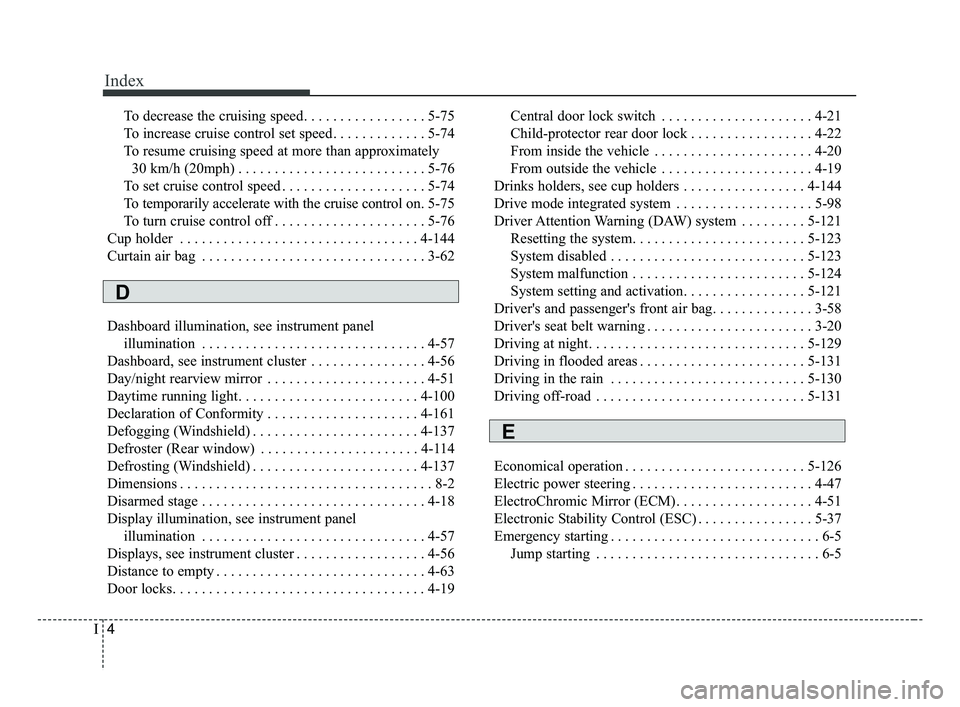
To decrease the cruising speed. . . . . . . . . . . . . . . . . 5-75
To increase cruise control set speed. . . . . . . . . . . . . 5-74
To resume cruising speed at more than approximately 30 km/h (20mph) . . . . . . . . . . . . . . . . . . . . . . . . . . 5-76
To set cruise control speed . . . . . . . . . . . . . . . . . . . . 5-74
To temporarily accelerate with the cruise control on . 5-75
To turn cruise control off . . . . . . . . . . . . . . . . . . . . . 5-76
Cup holder . . . . . . . . . . . . . . . . . . . . . . . . . . . . . . . . . 4-144
Curtain air bag . . . . . . . . . . . . . . . . . . . . . . . . . . . . . . . 3-62
Dashboard illumination, see instrument panel illumination . . . . . . . . . . . . . . . . . . . . . . . . . . . . . . . 4-57
Dashboard, see instrument cluster . . . . . . . . . . . . . . . . 4-56
Day/night rearview mirror . . . . . . . . . . . . . . . . . . . . . . 4-51
Daytime running light. . . . . . . . . . . . . . . . . . . . . . . . . 4-100
Declaration of Conformity . . . . . . . . . . . . . . . . . . . . . 4-161
Defogging (Windshield) . . . . . . . . . . . . . . . . . . . . . . . 4-137
Defroster (Rear window) . . . . . . . . . . . . . . . . . . . . . . 4-114
Defrosting (Windshield) . . . . . . . . . . . . . . . . . . . . . . . 4-137
Dimensions . . . . . . . . . . . . . . . . . . . . . . . . . . . . . . . . . . . 8-\
2
Disarmed stage . . . . . . . . . . . . . . . . . . . . . . . . . . . . . . . 4-18
Display illumination, see instrument panel illumination . . . . . . . . . . . . . . . . . . . . . . . . . . . . . . . 4-57
Displays, see instrument cluster . . . . . . . . . . . . . . . . . . 4-56
Distance to empty . . . . . . . . . . . . . . . . . . . . . . . . . . . . . 4-63
Door locks. . . . . . . . . . . . . . . . . . . . . . . . . . . . . . . . . . . 4-\
19 Central door lock switch . . . . . . . . . . . . . . . . . . . . . 4-21
Child-protector rear door lock . . . . . . . . . . . . . . . . . 4-22
From inside the vehicle . . . . . . . . . . . . . . . . . . . . . . 4-20
From outside the vehicle . . . . . . . . . . . . . . . . . . . . . 4-19
Drinks holders, see cup holders . . . . . . . . . . . . . . . . . 4-144
Drive mode integrated system . . . . . . . . . . . . . . . . . . . 5-98
Driver Attention Warning (DAW) system . . . . . . . . . 5-121 Resetting the system. . . . . . . . . . . . . . . . . . . . . . . . 5-123
System disabled . . . . . . . . . . . . . . . . . . . . . . . . . . . 5-123
System malfunction . . . . . . . . . . . . . . . . . . . . . . . . 5-124
System setting and activation. . . . . . . . . . . . . . . . . 5-121
Driver's and passenger's front air bag. . . . . . . . . . . . . . 3-58
Driver's seat belt warning . . . . . . . . . . . . . . . . . . . . . . . 3-20
Driving at night. . . . . . . . . . . . . . . . . . . . . . . . . . . . . . 5-129
Driving in flooded areas . . . . . . . . . . . . . . . . . . . . . . . 5-131
Driving in the rain . . . . . . . . . . . . . . . . . . . . . . . . . . . 5-130
Driving off-road . . . . . . . . . . . . . . . . . . . . . . . . . . . . . 5-131
Economical operation . . . . . . . . . . . . . . . . . . . . . . . . . 5-126
Electric power steering . . . . . . . . . . . . . . . . . . . . . . . . . 4-47
ElectroChromic Mirror (ECM). . . . . . . . . . . . . . . . . . . 4-51
Electronic Stability Control (ESC) . . . . . . . . . . . . . . . . 5-37
Emergency starting . . . . . . . . . . . . . . . . . . . . . . . . . . . . . 6-5 Jump starting . . . . . . . . . . . . . . . . . . . . . . . . . . . . . . . 6-5
D
E
BDm CAN (ENG) Index.qxp 6/30/2018 2:03 PM Page 4