turn KIA FORTE 2023 Navigation System Quick Reference Guide
[x] Cancel search | Manufacturer: KIA, Model Year: 2023, Model line: FORTE, Model: KIA FORTE 2023Pages: 324, PDF Size: 10.59 MB
Page 159 of 324
7-7
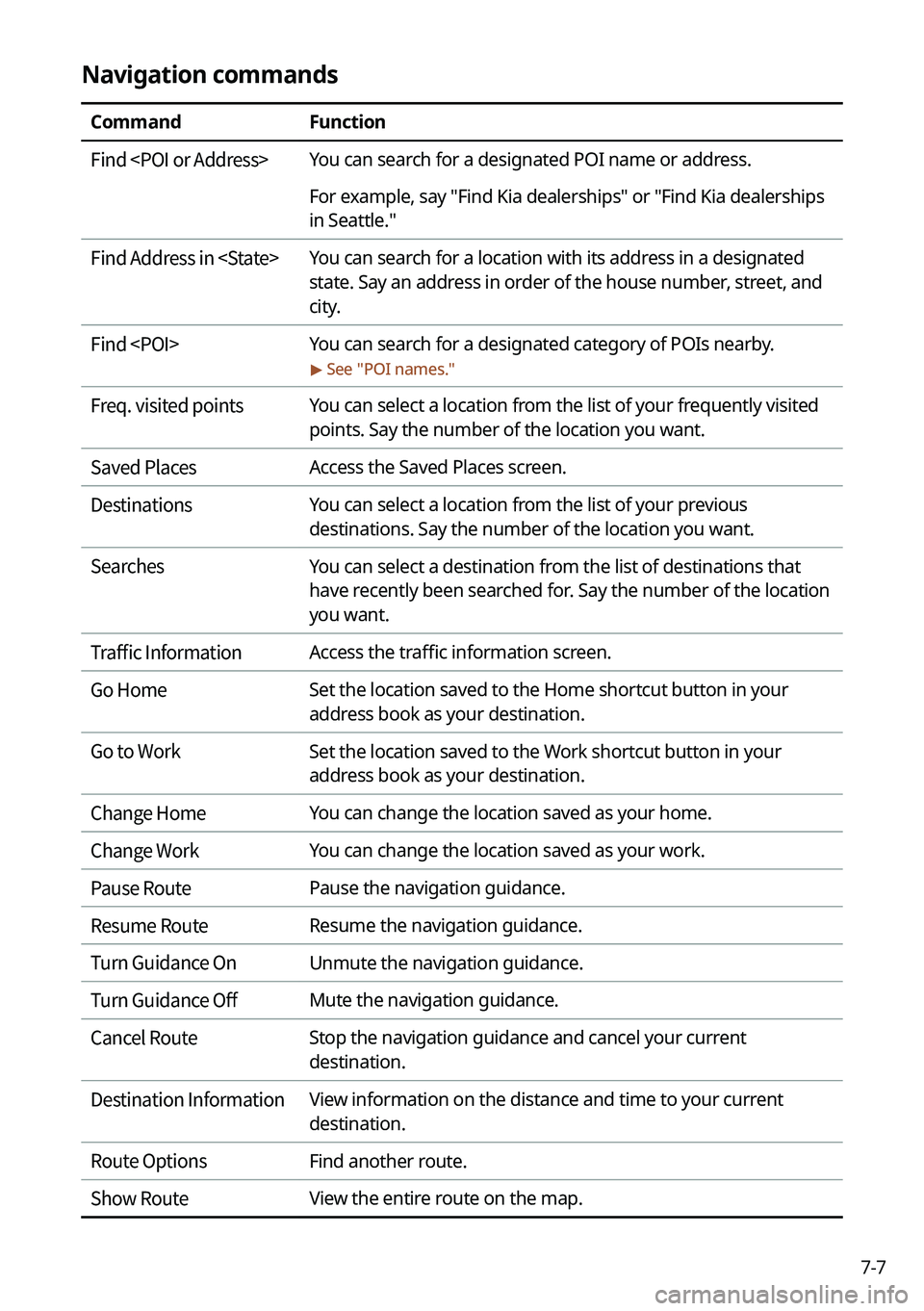
Navigation commands
CommandFunction
Find
For example, say "Find Kia dealerships" or "Find Kia dealerships
in Seattle."
Find Address in
state. Say an address in order of the house number, street, and
city.
Find
> See "
POI names."
Freq. visited points You can select a location from the list of your frequently visited
points. Say the number of the location you want.
Saved Places Access the Saved Places screen.
Destinations You can select a location from the list of your previous
destinations. Say the number of the location you want.
Searches You can select a destination from the list of destinations that
have recently been searched for. Say the number of the location
you want.
Traffic Information Access the traffic information screen.
Go Home Set the location saved to the Home shortcut button in your
address book as your destination.
Go to Work Set the location saved to the Work shortcut button in your
address book as your destination.
Change Home You can change the location saved as your home.
Change Work You can change the location saved as your work.
Pause Route Pause the navigation guidance.
Resume Route Resume the navigation guidance.
Turn Guidance On Unmute the navigation guidance.
Turn Guidance Off Mute the navigation guidance.
Cancel Route Stop the navigation guidance and cancel your current
destination.
Destination Information View information on the distance and time to your current
destination.
Route Options Find another route.
Show Route View the entire route on the map.
Page 160 of 324

7-8
A
When you use a command starting with "Find," the system searches for locations within
the state or province where your vehicle is currently located. To search for locations in
another state or province, say the state or province name first and then say the location
you want.
A
Some commands, such as "Cancel Route " or "Show Route," are available only when a
destination is set.
Radio commands
Command Function
FM <87.5 to 107.9> Turn on the FM radio with that frequency.
AM <530 to 1710> Turn on the AM radio with that frequency.
SiriusXM <0 to 999> Turn on the SiriusXM radio with that channel number.
Tune to SiriusXM
<0 to 999> Tune on the SiriusXM radio with that channel number.
Tune to
A
Some commands are recognizable in English only.
A
Some commands may not be supported, depending on the vehicle model and f\
unctions.
Vehicle control commands (if equipped)
Command Function
Climate On/Off Turn on or off the climate control.
Air Conditioner
On/Off Can turn on or off the air conditioner.
Heat On/Off Can turn on or off the heater.
Fan High/Low Used to set the fan level.
Set Fan to windshield/
Face/Feet Used to set the air direction.
Warmer/Cooler Set the climate control temperature.
Open/Close all windows Open or close all windows.
Open/Close the
windows Open or close the driver-side window.
Open/Close the
passenger's window Open or close the passenger-side window.
Page 161 of 324
7-9
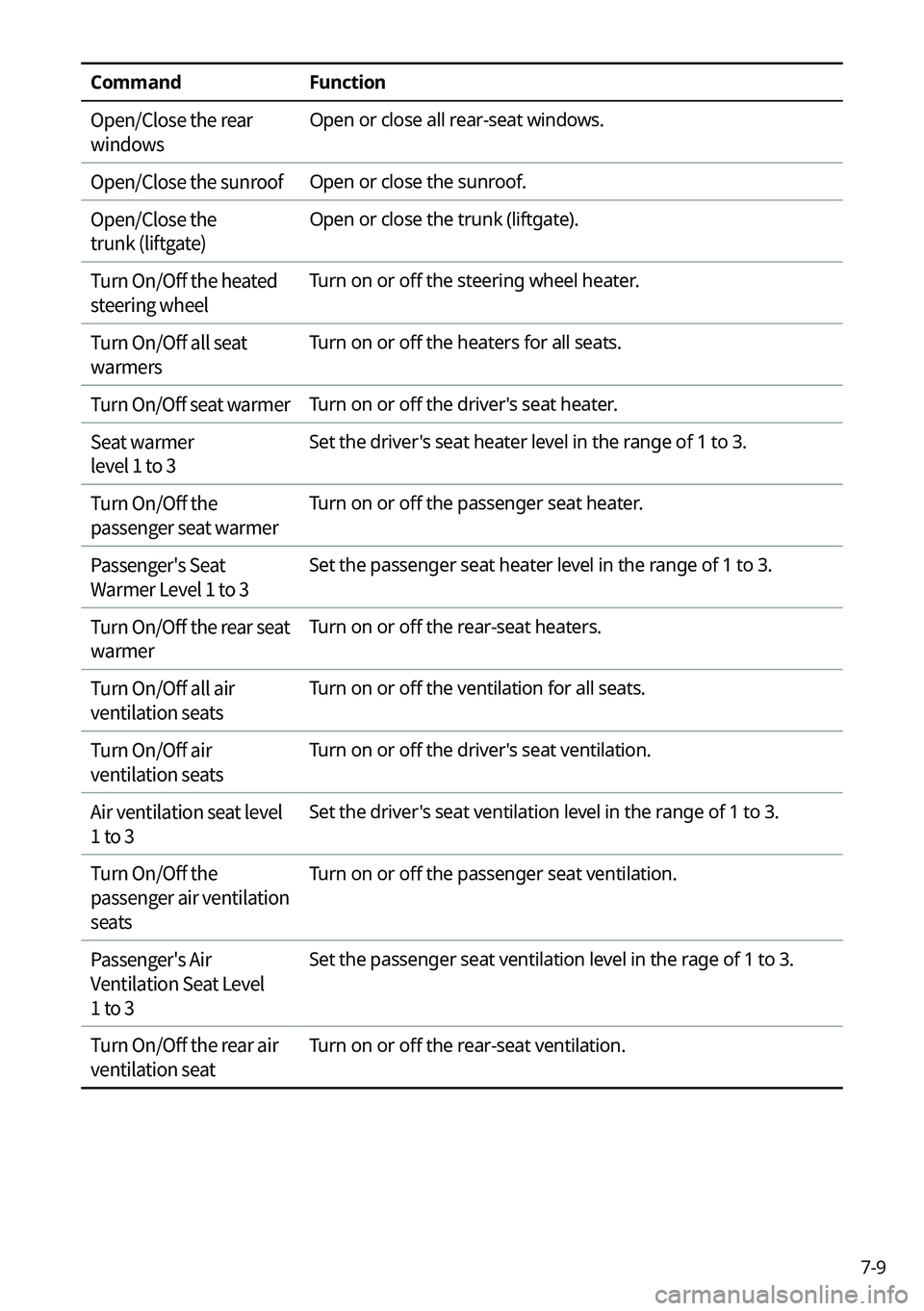
CommandFunction
Open/Close the rear
windows Open or close all rear-seat windows.
Open/Close the sunroof Open or close the sunroof.
Open/Close the
trunk (liftgate) Open or close the trunk (liftgate).
Turn On/Off the heated
steering wheel Turn on or off the steering wheel heater.
Turn On/Off all seat
warmers Turn on or off the heaters for all seats.
Turn On/Off seat warmer Turn on or off the driver's seat heater.
Seat warmer
level 1 to 3 Set the driver's seat heater level in the range of 1 to 3.
Turn On/Off the
passenger seat warmer Turn on or off the passenger seat heater.
Passenger's Seat
Warmer Level 1 to 3 Set the passenger seat heater level in the range of 1 to 3.
Turn On/Off the rear seat
warmer Turn on or off the rear-seat heaters.
Turn On/Off all air
ventilation seats Turn on or off the ventilation for all seats.
Turn On/Off air
ventilation seats Turn on or off the driver's seat ventilation.
Air ventilation seat level
1 to 3 Set the driver's seat ventilation level in the range of 1 to 3.
Turn On/Off the
passenger air ventilation
seats Turn on or off the passenger seat ventilation.
Passenger's Air
Ventilation Seat Level
1 to 3 Set the passenger seat ventilation level in the rage of 1 to 3.
Turn On/Off the rear air
ventilation seat Turn on or off the rear-seat ventilation.
Page 162 of 324

Com")
7-10
A
Vehicle control commands are recognizable in English only.
A
Some commands may not be supported, depending on the vehicle model and f\
unctions.
Rear-seat function commands (if equipped)
Command Function
Passenger Talk Turn on the Passenger Talk.
Quiet Mode
Turn off Quiet Mode Turn on or off the Quiet Mode.
A
Some commands may not be supported, depending on the vehicle model and f\
unctions.
Search commands
Command Function
Search settings for
For example, say "Search settings for Bluetooth" or "Search
settings for Display."
> See "Configuring system settings."
Other commands
Command
Function
Help Move to the help screen.
Line <1 to 4>* Select an item with the designated number on a list. Simple
numbers, such as "One" or "Two," can be recognized.
Yes * Accept a notification asking for your confirmation in an
exceptional situation.
No * Deny a notification asking for your confirmation in an
exceptional situation.
Next * If there are more than five items on a list, scroll to the next page.
Previous * If you scroll to the next page of a list, scroll back to the previous
page.
Manual Input* When using the Dial Number command, open the keypad to
enter a phone number manually.
Go Back * Returns to the previous step.
Exit End voice recognition.
* These commands are available only in certain situations.
Page 174 of 324
7-22
Voice Memo
You can use the microphone on the vehicle to record and play voice memos.
Running the voice memo
On the All Menus screen, press Voice Memo.
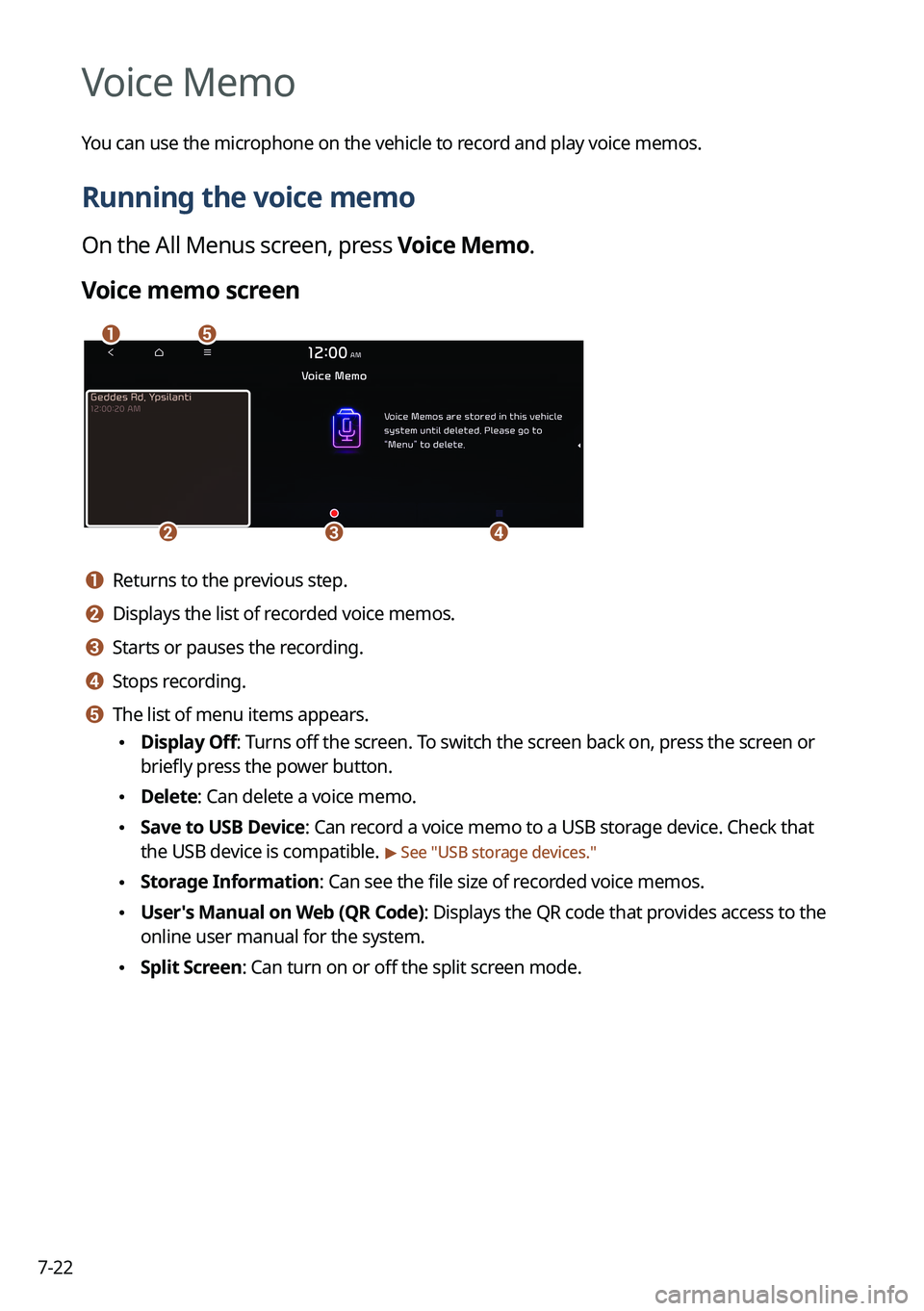
Voice memo screen
ae
cdb
a a Returns to the previous step.
b b Displays the list of recorded voice memos.
c c Starts or pauses the recording.
d d Stops recording.
e e The list of menu items appears.
•Display Off: Turns off the screen. To switch the screen back on, press the screen or
briefly press the power button.
•Delete: Can delete a voice memo.
•Save to USB Device: Can record a voice memo to a USB storage device. Check that
the USB device is compatible.
> See "USB storage devices."
•Storage Information: Can see the file size of recorded voice memos.
•User's Manual on Web (QR Code): Displays the QR code that provides access to the
online user manual for the system.
•Split Screen: Can turn on or off the split screen mode.
Page 180 of 324
8-4
Running the UVO menu
You can run the UVO in the system to use the service.
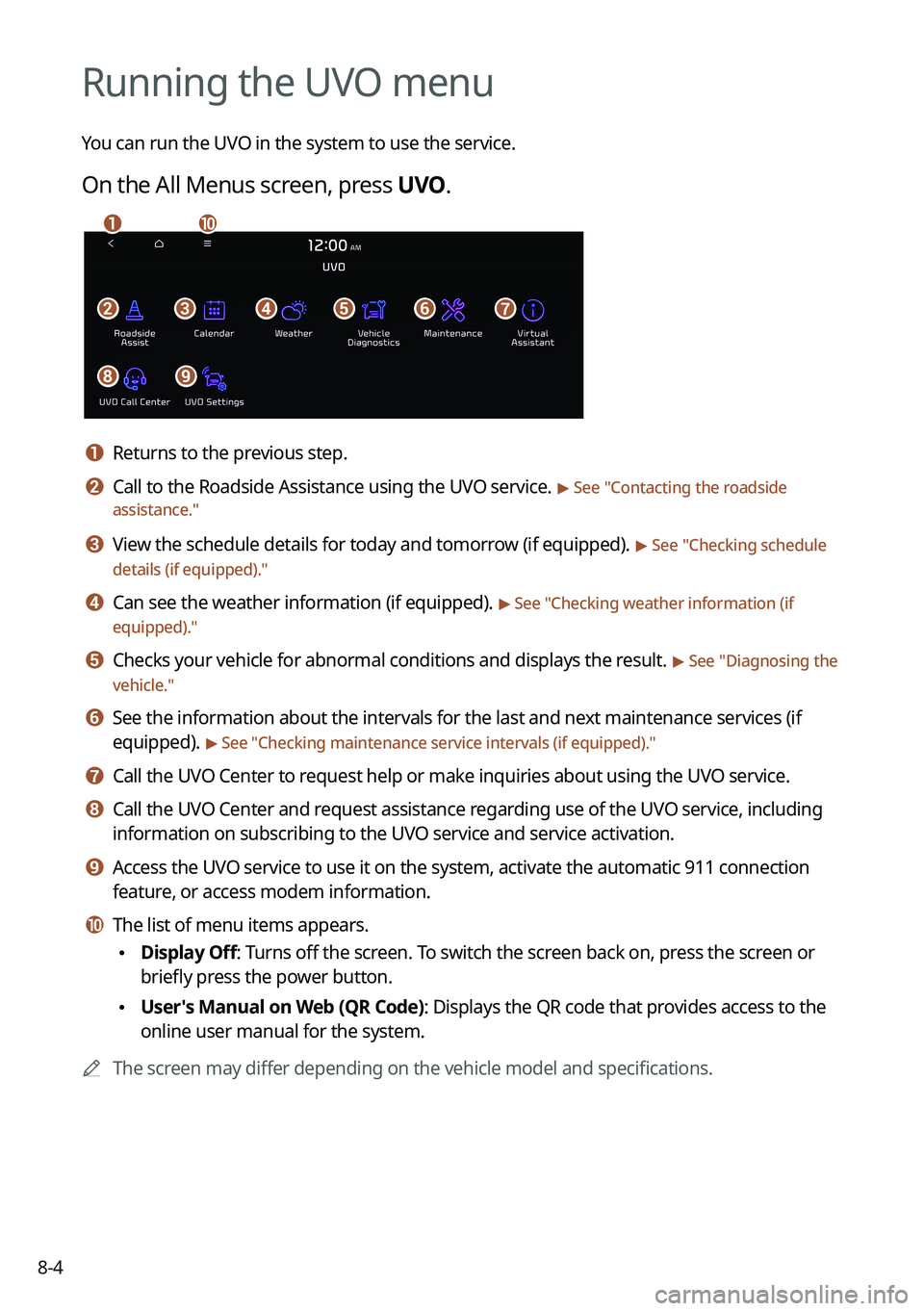
On the All Menus screen, press UVO.
bfgdec
aj
hi
a a Returns to the previous step.
b b Call to the Roadside Assistance using the UVO service. > See "Contacting the roadside
assistance."
c c View the schedule details for today and tomorrow (if equipped). > See " Checking schedule
details (if equipped)."
d d Can see the weather information (if equipped). > See "Checking weather information (if
equipped)."
e e Checks your vehicle for abnormal conditions and displays the result. > See " Diagnosing the
vehicle."
f f See the information about the intervals for the last and next maintenance services (if
equipped).
> See "Checking maintenance service intervals (if equipped) ."
g g Call the UVO Center to request help or make inquiries about using the UVO service.
h h Call the UVO Center and request assistance regarding use of the UVO service, including
information on subscribing to the UVO service and service activation.
i i Access the UVO service to use it on the system, activate the automatic 911 connection\
feature, or access modem information.
j j The list of menu items appears.
•Display Off: Turns off the screen. To switch the screen back on, press the screen or
briefly press the power button.
•User's Manual on Web (QR Code): Displays the QR code that provides access to the
online user manual for the system.
A
The screen may differ depending on the vehicle model and specifications.
Page 181 of 324
8-5
ÝWarning
Driving while distracted may cause a loss of vehicle control that may lead to an accident,
severe bodily injury, or death. The driver's primary responsibility is the safe and legal
operation of the vehicle, and the use of any vehicle systems, including the \
touch screen
and steering wheel controls that take the driver's eyes, attention, and focus away from safe
driving or that are not permissible by the law, should never be used while driving.
A
Use the UVO features on the system when the vehicle is stationary with the vehicle turned
on.
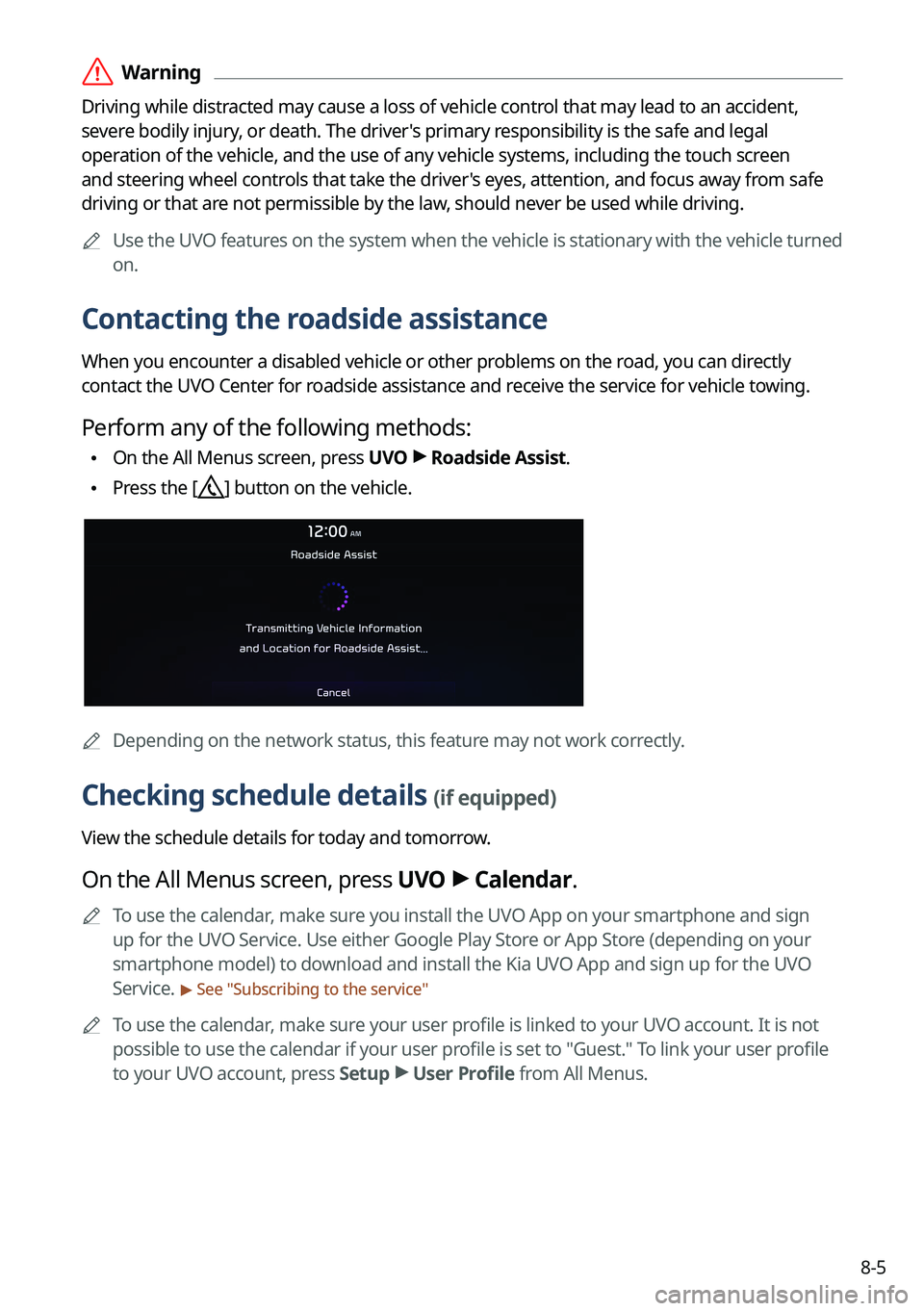
Contacting the roadside assistance
When you encounter a disabled vehicle or other problems on the road, you can directly
contact the UVO Center for roadside assistance and receive the service for vehicle towing.
Perform any of the following methods:
•On the All Menus screen, press UVO
>
Roadside Assist.
• Press the [] button on the vehicle.
A
Depending on the network status, this feature may not work correctly.
Checking schedule details (if equipped)
View the schedule details for today and tomorrow.
On the All Menus screen, press UVO >
Calendar.
A
To use the calendar, make sure you install the UVO App on your smartphone and sign
up for the UVO Service. Use either Google Play Store or App Store (depending on your
smartphone model) to download and install the Kia UVO App and sign up for the UVO
Service.
> See "Subscribing to the service "
A
To use the calendar, make sure your user profile is linked to your UVO account. It is not
possible to use the calendar if your user profile is set to "Guest." To link your user profile
to your UVO account, press Setup >
User Profile from All Menus.
Page 182 of 324
8-6
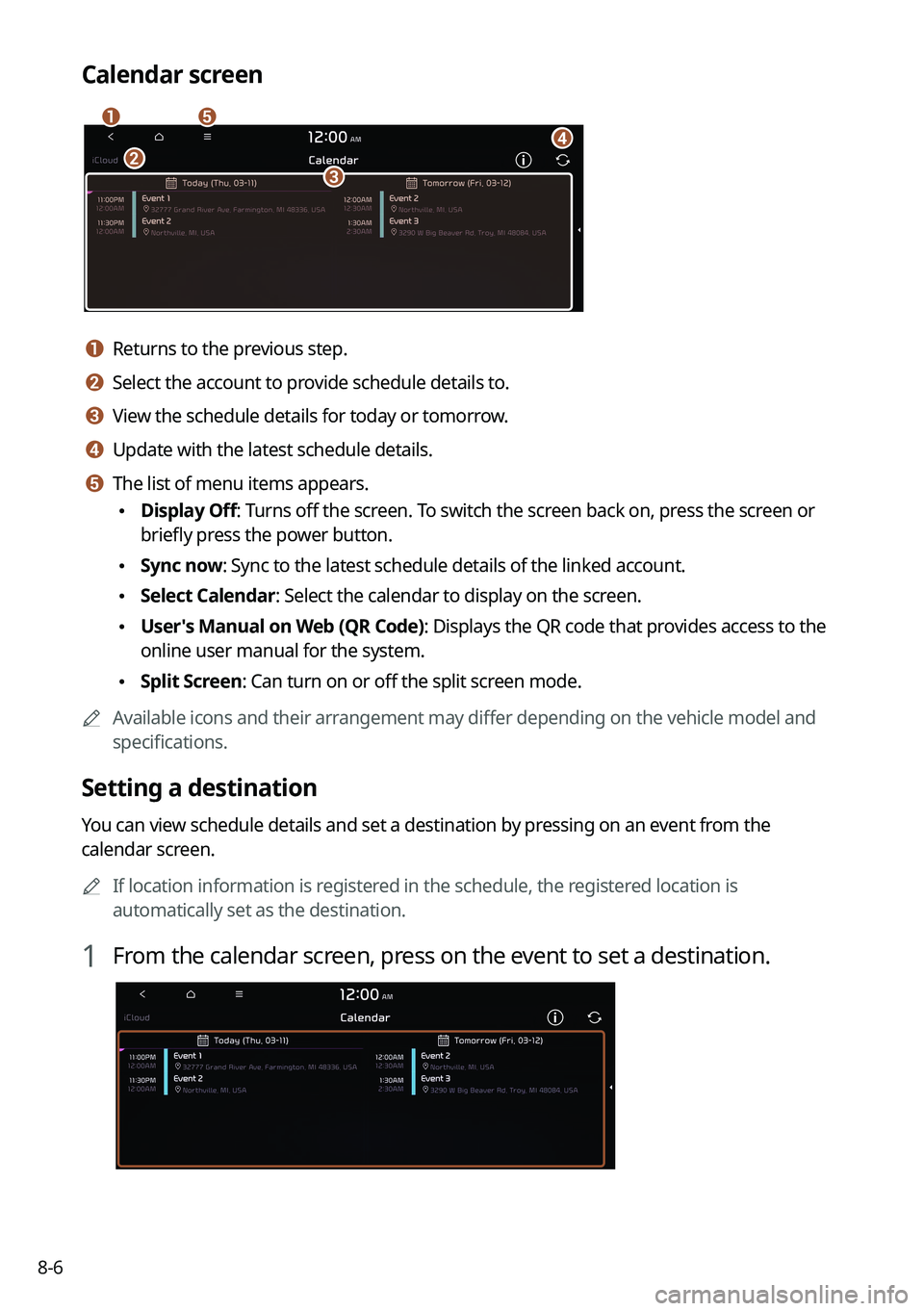
Calendar screen
eadbc
a a Returns to the previous step.
b b Select the account to provide schedule details to.
c c View the schedule details for today or tomorrow.
d d Update with the latest schedule details.
e e The list of menu items appears.
•Display Off: Turns off the screen. To switch the screen back on, press the screen or
briefly press the power button.
•Sync now: Sync to the latest schedule details of the linked account.
•Select Calendar: Select the calendar to display on the screen.
•User's Manual on Web (QR Code): Displays the QR code that provides access to the
online user manual for the system.
•Split Screen: Can turn on or off the split screen mode.
A
Available icons and their arrangement may differ depending on the vehicle model and
specifications.
Setting a destination
You can view schedule details and set a destination by pressing on an event from the
calendar screen.
A
If location information is registered in the schedule, the registered location is
automatically set as the destination.
1 From the calendar screen, press on the event to set a destination.
Page 184 of 324
8-8
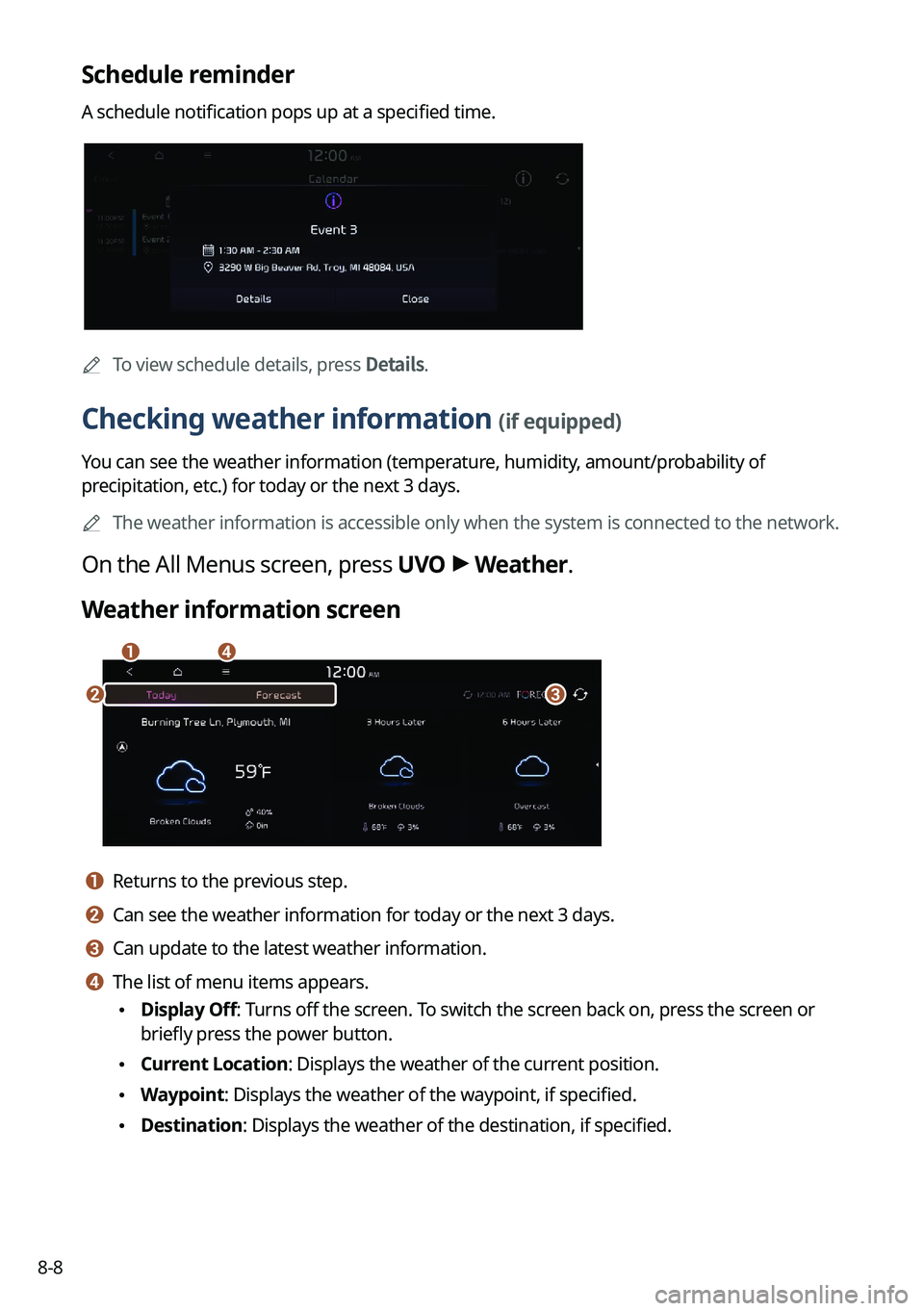
Schedule reminder
A schedule notification pops up at a specified time.
A
To view schedule details, press Details.
Checking weather information (if equipped)
You can see the weather information (temperature, humidity, amount/probability of
precipitation, etc.) for today or the next 3 days.
A
The weather information is accessible only when the system is connected \
to the network.
On the All Menus screen, press UVO >
Weather.
Weather information screen
da
cb
a a Returns to the previous step.
b b Can see the weather information for today or the next 3 days.
c c Can update to the latest weather information.
d d The list of menu items appears.
• Display Off: Turns off the screen. To switch the screen back on, press the screen or
briefly press the power button.
•Current Location: Displays the weather of the current position.
•Waypoint: Displays the weather of the waypoint, if specified.
•Destination: Displays the weather of the destination, if specified.
Page 185 of 324
8-9
•Search: Can see the weather information by searching for an address.
•Forecast: Can see the weather information for today or the next 3 days.
•User's Manual on Web (QR Code): Displays the QR code that provides access to the
online user manual for the system.
•Split Screen: Can turn on or off the split screen mode.
Diagnosing the vehicle
If you are curious about whether or not there is a problem with your vehicle, you can
diagnose your vehicle. With the diagnosis result, you can also reserve a maintenance service.
1 Park your vehicle in a safe location.
A
The vehicle must be stationary because some components cannot be diagnos\
ed
while driving.
2 On the All Menus screen, press UVO >
Vehicle Diagnostics.
Remote vehicle diagnosis starts.
A
Keep the screen on until the diagnosed result appears. When you switch to another
screen during diagnosis, the diagnosis service is canceled.
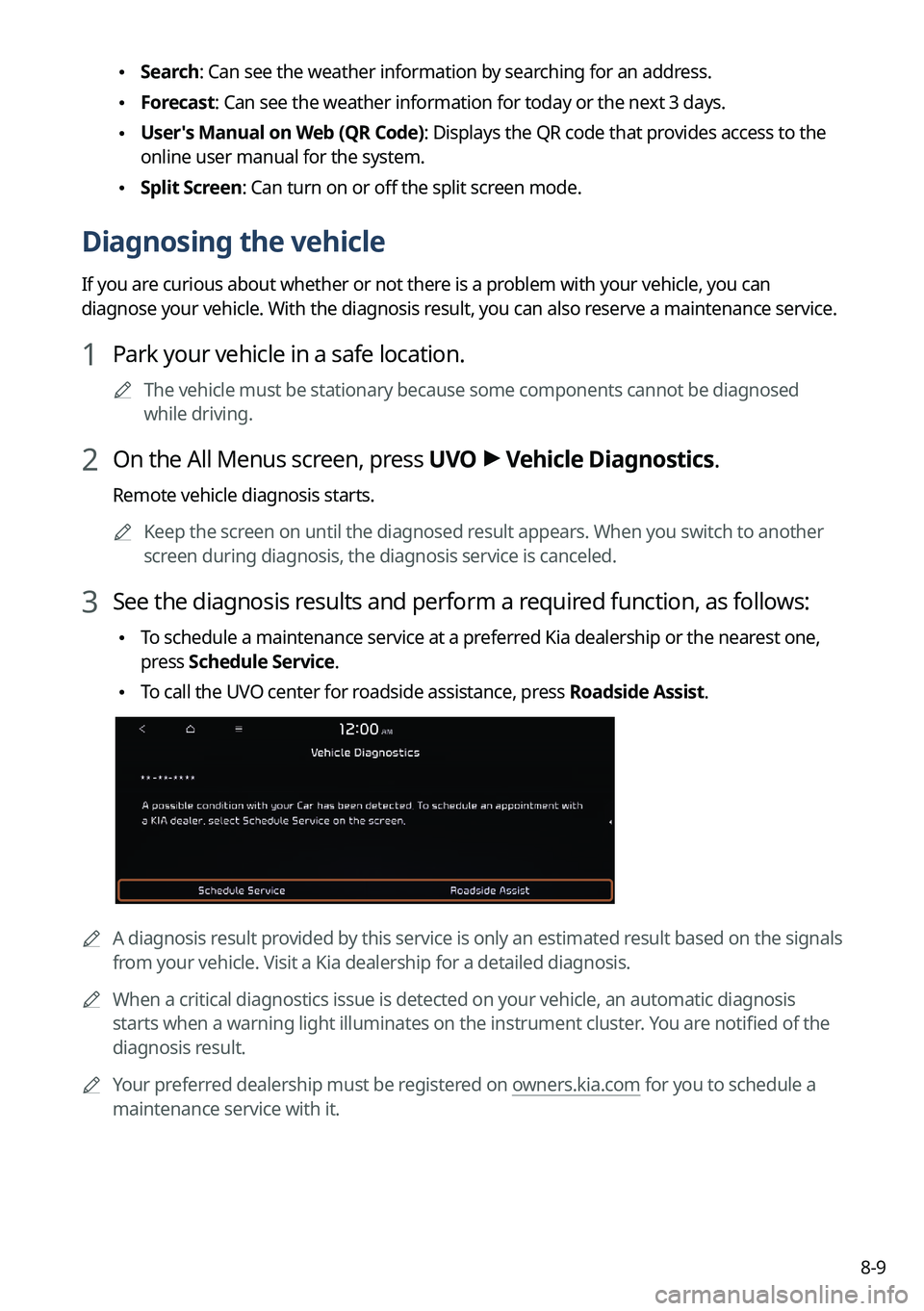
3 See the diagnosis results and perform a required function, as follows:
•To schedule a maintenance service at a preferred Kia dealership or the nearest one,
press
Schedule Service.
•To call the UVO center for roadside assistance, press Roadside Assist.
A
A diagnosis result provided by this service is only an estimated result based on the signals
from your vehicle. Visit a Kia dealership for a detailed diagnosis.
A
When a critical diagnostics issue is detected on your vehicle, an automa\
tic diagnosis
starts when a warning light illuminates on the instrument cluster. You are notified of the
diagnosis result.
A
Your preferred dealership must be registered on owners.kia.com for you to schedule a
maintenance service with it.