ECO mode KIA K900 2016 Owner's Manual
[x] Cancel search | Manufacturer: KIA, Model Year: 2016, Model line: K900, Model: KIA K900 2016Pages: 542, PDF Size: 38.35 MB
Page 231 of 542
Features of your vehicle
4
4-151
Temperature conversion
You can switch the temperature mode
from Centigrade and Fahrenheit as fol-
lows:
While pressing the OFF button,
press the AUTO button for 3 seconds
or more.
The display will change from
Centigrade to Fahrenheit, or from
Fahrenheit to Centigrade.
If the battery has been discharged or
disconnected, the temperature mode
display will reset to Fahrenheit.Air intake control
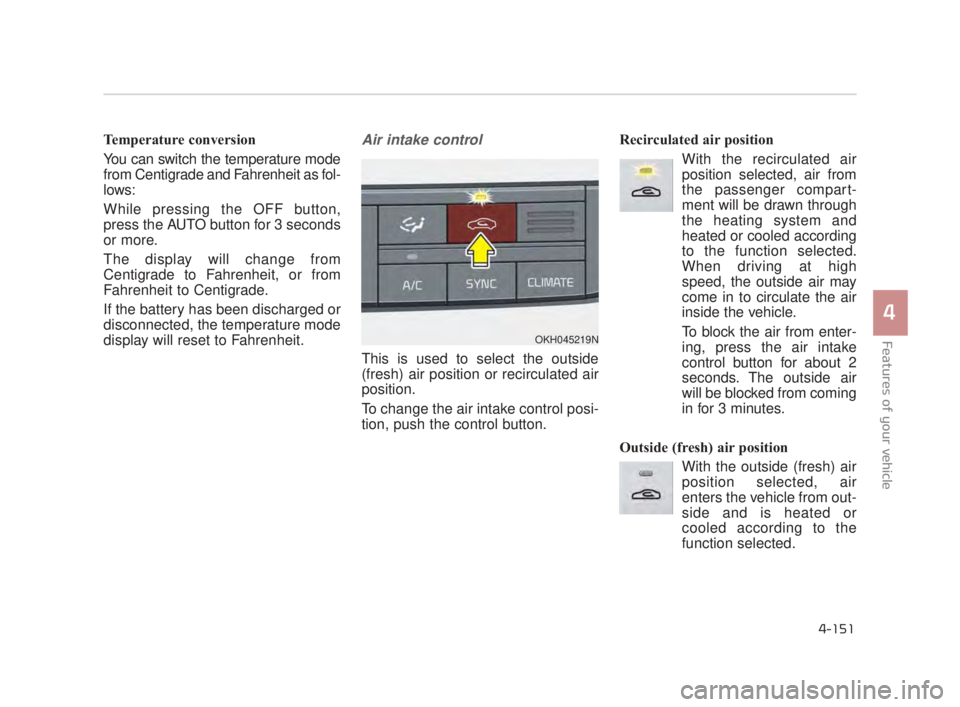
This is used to select the outside
(fresh) air position or recirculated air
position.
To change the air intake control posi-
tion, push the control button. Recirculated air position
With the recirculated airposition selected, air from
the passenger compart-
ment will be drawn through
the heating system and
heated or cooled according
to the function selected.
When driving at high
speed, the outside air may
come in to circulate the air
inside the vehicle.
To block the air from enter-
ing, press the air intake
control button for about 2
seconds. The outside air
will be blocked from coming
in for 3 minutes.
Outside (fresh) air position With the outside (fresh) airposition selected, air
enters the vehicle from out-
side and is heated or
cooled according to the
function selected.
OKH045219N
KH USA 4:2015 3/24/2015 4:43 PM Page 151
Page 236 of 542

Features of your vehicle
4-156
When using the air conditioningsystem, you may notice clear water
dripping (or even puddling) on the
ground under the passenger side
of the vehicle. This is a normal sys-
tem operation characteristic.
Operating the air conditioning sys- tem in the recirculated air position
provides maximum cooling, how-
ever, continual operation in this
mode may cause the air inside the
vehicle to become stale.
During cooling operation, you may occasionally notice a misty air flow
because of rapid cooling and
humid air intake. This is a normal
system operation characteristic.Climate control air filter
(if equipped)
The climate control air filter installed
behind the glove box filters the dust or
other pollutants that come into the
vehicle from the outside through the
heating and air conditioning system. If
dust or other pollutants accumulate in
the filter over a period of time, the air
flow from the air vents may decrease,
resulting in moisture accumulation on
the inside of the windshield even
when the outside (fresh) air position is
selected. If this happens, have the cli-
mate control air filter replaced by an
authorized K900 Kia dealer.
✽ NOTICE
• Replace the filter according to the
Maintenance Schedule.
If the vehicle is being driven in
severe conditions such as dusty or
rough roads, more frequent air
conditioner filter inspections and
changes are required.
• When the air flow rate suddenly decreases, the system should be
checked at an authorized K900
Kia dealer.
1LDA5047
Outside air
Recirculatedair
Climate control
air filter Blower
Evaporator
coreHeater core
KH USA 4:2015 3/24/2015 4:43 PM Page 156
Page 263 of 542
RADIO mode
It will function as the AUTO SEEK
select button.
CD/USB/iPod mode
It will function as the FF/REW button.
If the SEEK/PRESET button is
pressed for less than 0.8 seconds, it
will work as follows in each mode.
RADIO mode
It will function as the PRESET STA-
TION buttons.
CD/USB/iPod mode
It will function as TRACK UP/DOWN
button.MODE (3)
Press the MODE button to select
Radio, DISC, USB or AUX.
When the AV is OFF and the MODE
button is pressed for less than 0.8
second, the AV will turn on.
When the AV is ON and the MODE
button is press for more than 0.8 sec-
ond, the AV will turn off.
MUTE (4)
Move the MUTE lever up to cancelthe sound.
Move the MUTE lever up again to activate the sound.
Detailed information is described in a
separately supplied manual.
4-183
4
Features of your vehicle
4
KH USA 4:2015 3/24/2015 4:45 PM Page 183
Page 272 of 542
Driving your vehicle
5
5-9
Starting the engine with a
smart key
1.Carry the smart key or leave itinside the vehicle.
2.Make sure the parking brake is firmly applied
3.Place the transaxle shift lever in P (Park).
4.Press the ENGINE START/STOP button while depressing the brake
pedal.
5.Do not wait for the engine to warm up while the vehicle remains sta-
tionary. Start driving at moderate
engine speeds.(Steep accelerating
and decelerating should be avoid-
ed). Whether the engine is cold or warm,
it should be started without depress-
ing the accelerator.
Even if the smart key is in the vehi-
cle, but is far away from you, the
engine may not start.
When the ENGINE START/STOP button is in the ACC position or
above, if any door is opened, the
system checks for the smart key. If
the smart key is not in the vehi-
cle,the “ ” indicator will blink or
the warning "Key not in vehicle" will
illuminate on the LCD display. And
if all doors are closed, the chime
will sound for 5 seconds. The indi-
cator or warning will turn off while
the vehicle is moving. Always have
the smart key with you.
The engine will start only when the
smart key is in the vehicle.
STARTING THE ENGINE
Proper footwear
Always wear appropriate shoes
when operating your vehicle.
Unsuitable shoes (high heels, ski
boots, sandals, etc.) may inter-
fere with your ability to use the
brake and accelerator pedals.
WARNING
KH USA 5:2015 3/25/2015 9:14 AM Page 9
Page 276 of 542
Driving your vehicle
5
5-13
R (Reverse)
Use this position to drive the vehicle
backward.
N (Neutral)
The wheels and transmission are not
engaged. The vehicle will roll freely
even on the slightest incline unless
the parking brake or service brakes
are applied.D (Drive)
This is the normal forward driving
position. The transmission will auto-
matically shift through a 8-gear
sequence, providing the best fuel
economy and power.
For extra power when passing anoth-
er vehicle or climbing grades,
depress the accelerator fully, at
which time the transmission will
automatically downshift to the next
lower gear.
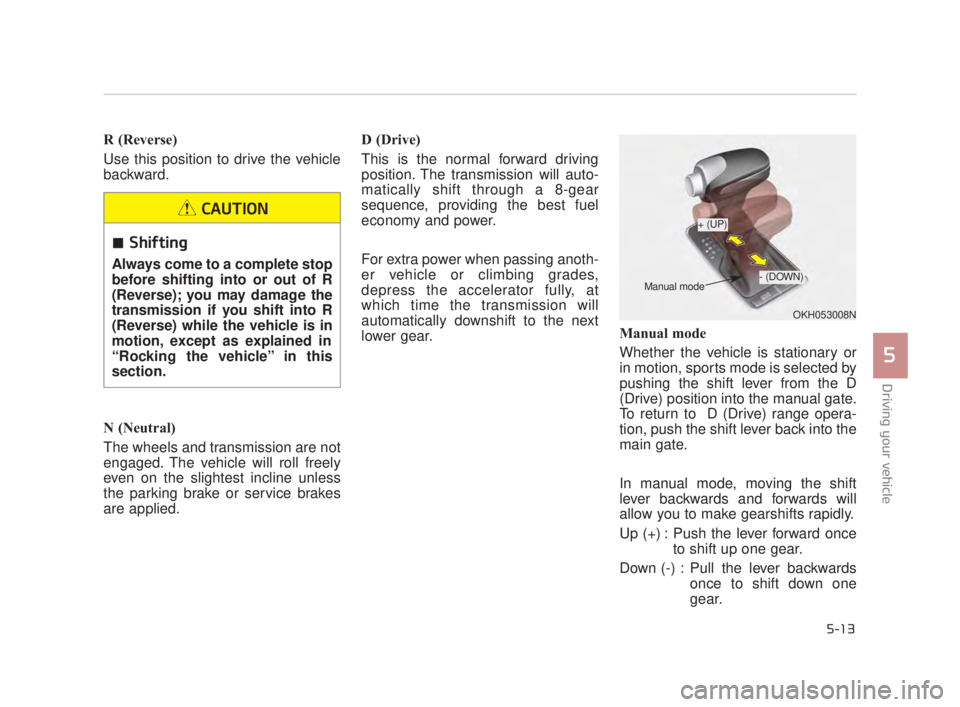
Manual mode
Whether the vehicle is stationary or
in motion, sports mode is selected by
pushing the shift lever from the D
(Drive) position into the manual gate.
To return to D (Drive) range opera-
tion, push the shift lever back into the
main gate.
In manual mode, moving the shift
lever backwards and forwards will
allow you to make gearshifts rapidly.
Up (+) : Push the lever forward once
to shift up one gear.
Down (-) : Pull the lever backwards once to shift down one
gear.
OKH053008N
+ (UP)
- (DOWN)
Manual mode
Shifting
Always come to a complete stop
before shifting into or out of R
(Reverse); you may damage the
transmission if you shift into R
(Reverse) while the vehicle is in
motion, except as explained in
“Rocking the vehicle” in this
section.
CAUTION
KH USA 5:2015 3/25/2015 9:14 AM Page 13
Page 283 of 542
5-20
Driving your vehicle
D (Drive)
This is the normal forward driving
position. The transmission will auto-
matically shift through a 8-gear
sequence, providing the best fuel
economy and power.
For extra power when passing anoth-
er vehicle or climbing grades,
depress the accelerator fully, at
which time the transmission will
automatically downshift to the next
lower gear.
To shift into [D], depress the brake
pedal and press the [UNLOCK] but-
ton of shift lever. And then move the
shift lever to backward.
To shift into [D], from [N] you must
depress the brake pedal.
✽NOTICE
Always come to a complete stop
before shifting into D (Drive).
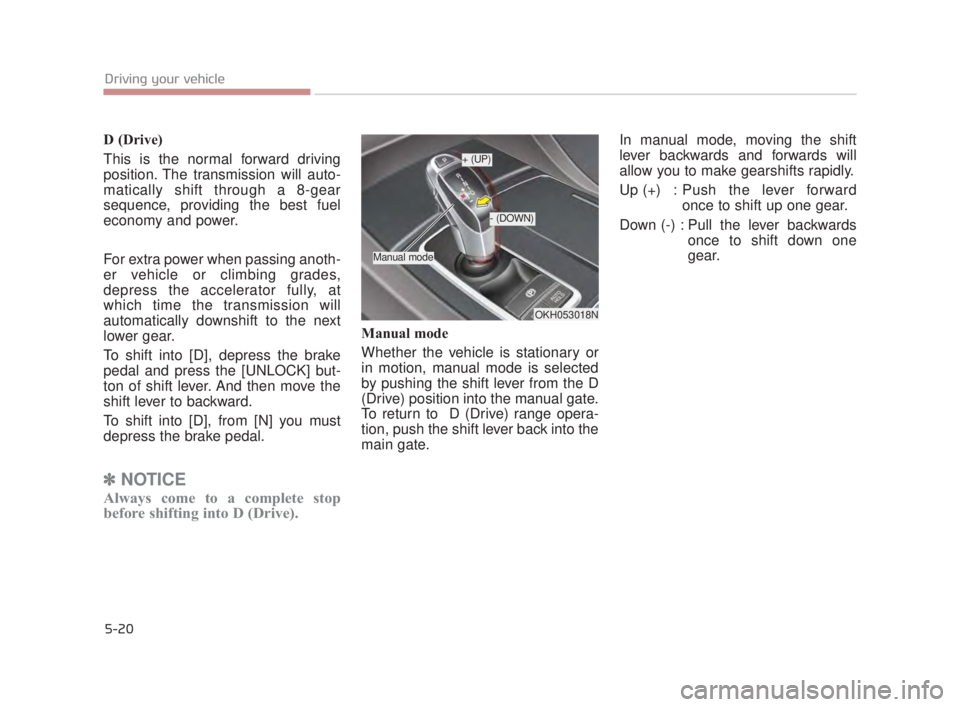
Manual mode
Whether the vehicle is stationary or
in motion, manual mode is selected
by pushing the shift lever from the D
(Drive) position into the manual gate.
To return to D (Drive) range opera-
tion, push the shift lever back into the
main gate. In manual mode, moving the shift
lever backwards and forwards will
allow you to make gearshifts rapidly.
Up (+) : Push the lever forward
once to shift up one gear.
Down (-) : Pull the lever backwards once to shift down one
gear.
OKH053018N
+ (UP)
- (DOWN)
Manual mode
KH USA 5:2015 3/25/2015 9:14 AM Page 20
Page 285 of 542
![KIA K900 2016 Owners Manual With the shift lever in the D position
The paddle shifter will operate when
the vehicle speed is more than 6
mph (10 km/h).
Pull the [+] or [-] paddle shifter once
to shift up or down one gear and the](/img/2/55064/w960_55064-284.png "KIA K900 2016 Owners Manual With the shift lever in the D position
The paddle shifter will operate when
the vehicle speed is more than 6
mph (10 km/h).
Pull the [+] or [-] paddle shifter once
to shift up or down one gear and the")
With the shift lever in the D position
The paddle shifter will operate when
the vehicle speed is more than 6
mph (10 km/h).
Pull the [+] or [-] paddle shifter once
to shift up or down one gear and the
system changes from automatic
mode to manual mode.
When the vehicle speed is lower
than 6 mph (10 km/h), if you depress
the accelerator pedal for more than 5
seconds or if you move the shift lever
from D (Drive) to Sports Mode and
move it from Sports Mode to D
(Drive) again, the system changes
from manual mode to automatic
mode.With the shift lever in the sports mode
Pull the [+] or [-] paddle shifter once
to shift up or down one gear.
✽
NOTICE
If the [+] and [-] paddle shifters are
pulled at the same time, gear change
may not occur.
Shift lock system (if equipped)
For your safety, the automatic trans-
mission has a shift lock system
which prevents shifting the transmis-
sion from P (Park) into R (Reverse)
unless the brake pedal is depressed.
To shift the transmission from P
(Park) into R (Reverse) or D (Drive) :
1. Depress and hold the brake pedal.
2. Start the engine or turn the Engine
Start / Stop Button to the ON posi-
tion.
3. Move the shift lever to R (Reverse) or D (Drive) with pressing [UNLOCK]
button.
If the brake pedal is repeatedly
depressed and released with the
shift lever in the P (Park) position, a
chattering noise near the shift lever
may be heard. This is a normal con-
dition.
5-22
Driving your vehicle
KH USA 5:2015 3/25/2015 9:14 AM Page 22
Page 290 of 542
Driving your vehicle
5
5-27
Good driving practices
Never move the shift lever from P(Park) or N (Neutral) to any other
position with the accelerator pedal
depressed.
Never move the shift lever into P (Park) when the vehicle is in
motion.
Be sure the car is completely stopped before you attempt to shift
into R (Reverse) or D (Drive).
Do not "ride" the brakes. This can cause them to overheat and mal-
function. Instead, when you are
driving down a long hill, slow down
and shift to a lower gear. When you
do this, engine braking will help
slow the car.
Slow down before shifting to a lower gear. Otherwise, the lower
gear may not be engaged. Always use the parking brake. Do
not depend on placing the trans-
mission in P (Park) to keep the car
from moving.
Optimum vehicle performance and economy is obtained by smoothly
depressing and releasing the
accelerator pedal.
Moving up a steep grade from a
standing start
To move up a steep grade from a
standing start, depress the brake
pedal, shift the shift lever to D (Drive)
or [1st] gear of [M] mode. Select the
appropriate gear depending on load
weight and steepness of the grade,
and release the parking brake.
Depress the accelerator gradually
while releasing the service brakes.
KH USA 5:2015 3/25/2015 9:14 AM Page 27
Page 317 of 542
5-54
Driving your vehicle
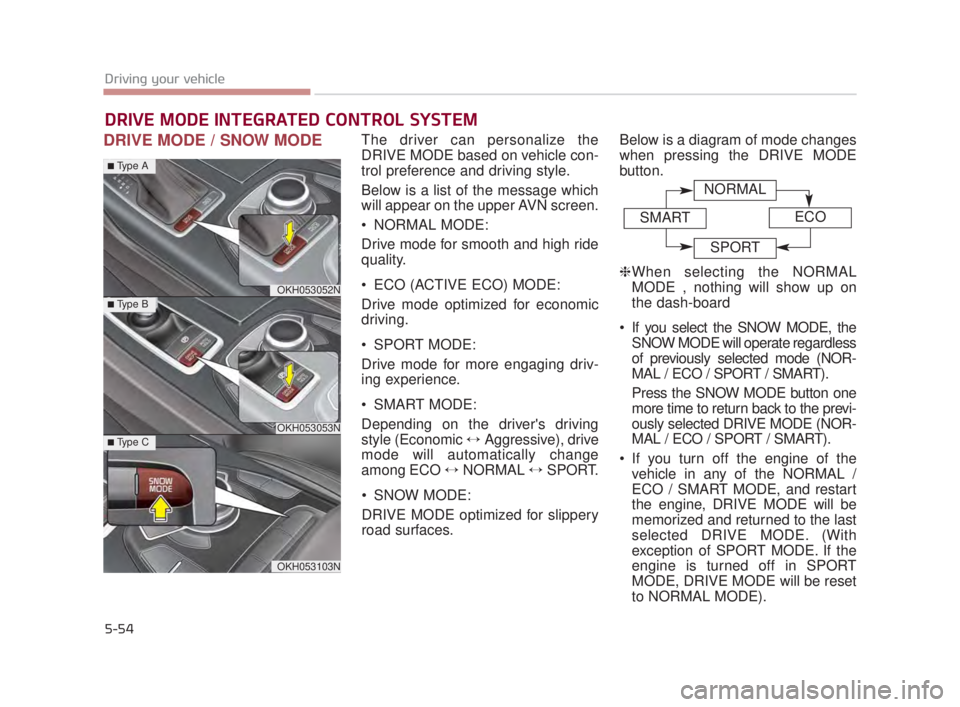
DRIVE MODE / SNOW MODEThe driver can personalize the
DRIVE MODE based on vehicle con-
trol preference and driving style.
Below is a list of the message which
will appear on the upper AVN screen.
NORMAL MODE:
Drive mode for smooth and high ride
quality.
ECO (ACTIVE ECO) MODE:
Drive mode optimized for economic
driving.
SPORT MODE:
Drive mode for more engaging driv-
ing experience.
SMART MODE:
Depending on the driver's driving
style (Economic ↔Aggressive), drive
mode will automatically change
among ECO ↔ NORMAL ↔SPORT.
SNOW MODE:
DRIVE MODE optimized for slippery
road surfaces. Below is a diagram of mode changes
when pressing the DRIVE MODE
button.
❈
When selecting the NORMAL
MODE , nothing will show up on
the dash-board
If you select the SNOW MODE, the SNOW MODE will operate regardless
of previously selected mode (NOR-
MAL / ECO / SPORT / SMART).
Press the SNOW MODE button one
more time to return back to the previ-
ously selected DRIVE MODE (NOR-
MAL / ECO / SPORT / SMART).
If you turn off the engine of the vehicle in any of the NORMAL /
ECO / SMART MODE, and restart
the engine, DRIVE MODE will be
memorized and returned to the last
selected DRIVE MODE. (With
exception of SPORT MODE. If the
engine is turned off in SPORT
MODE, DRIVE MODE will be reset
to NORMAL MODE).
DRIVE MODE INTEGRATED CONTROL SYSTEM
OKH053052N
OKH053053N
OKH053103N
■Type A
■Type B
■Type C
NORMAL
SMARTECO
SPORT
KH USA 5:2015 3/25/2015 9:15 AM Page 54
Page 318 of 542
Driving your vehicle
5
5-55
ECO (ACTIVE ECO) MODE
ACTIVE ECO systemenhances fuel efficiency
through eco control of
the engine and trans-
mission. The actual fuel
efficiency will depend on
personal driving style
and habits.
By pressing the DRIVE MODE button and
selecting ECO MODE,
green ECO indicator
light will illuminate.
ECO MODE Driving:
The vehicle engine and transmission
will operate in fuel economy oriented
mode.
ACTIVE ECO MODE system will
restrain fuel economy worsening
driving habits, such as sudden starts
and accelerations, compared to the
NORMAL MODE.
Conditions that limit Active
ECO MODE:
Below are a list of conditions in which
when in ACTIVE ECO MODE, the
indicator light will not change, but the
internal system may operate differ-
ently.
When engine coolant temperatureis low:
When temperature of the transaxle
oil is below the normal range, the
ACTIVE ECO MODE may become
temporarily unavailable until the
transaxle oil heats up after vehicle
ignition.
When in an uphill gradient: Since the ACTIVE ECO MODE
partially limits the engine torque,
ACTIVE ECO MODE may become
temporarily unavailable when more
torque is essential for going uphill.
When using the manual transmis- sion operation mode:
If transmission operation is
changed from automatic to manual,
vehicle will reflect it and automati-
cally stop the ACTIVE ECO MODE.
KH USA 5:2015 3/25/2015 9:15 AM Page 55