display KIA NIRO HYBRID EV 2022 Manual Online
[x] Cancel search | Manufacturer: KIA, Model Year: 2022, Model line: NIRO HYBRID EV, Model: KIA NIRO HYBRID EV 2022Pages: 684, PDF Size: 9.67 MB
Page 602 of 684
Maintenance
60 7
✽
✽
NOTICE
• When replacing fuse, turn the
ignition “OFF” and turn off
switches of all electrical devices
then remove battery (-) terminal.
• The actual fuse/relay panel label
may differ from equipped items.
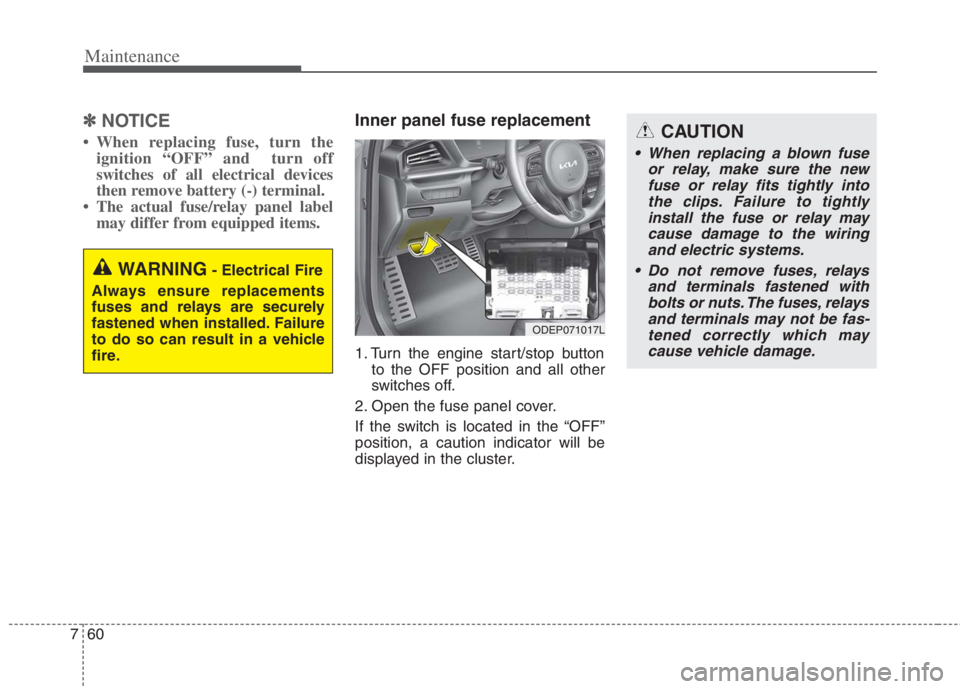
Inner panel fuse replacement
1. Turn the engine start/stop button
to the OFF position and all other
switches off.
2. Open the fuse panel cover.
If the switch is located in the “OFF”
position, a caution indicator will be
displayed in the cluster.
WARNING- Electrical Fire
Always ensure replacements
fuses and relays are securely
fastened when installed. Failure
to do so can result in a vehicle
fire.
CAUTION
When replacing a blown fuse
or relay, make sure the new
fuse or relay fits tightly into
the clips. Failure to tightly
install the fuse or relay may
cause damage to the wiring
and electric systems.
Do not remove fuses, relays
and terminals fastened with
bolts or nuts. The fuses, relays
and terminals may not be fas-
tened correctly which may
cause vehicle damage.
ODEP071017L
Page 604 of 684
Maintenance
62 7
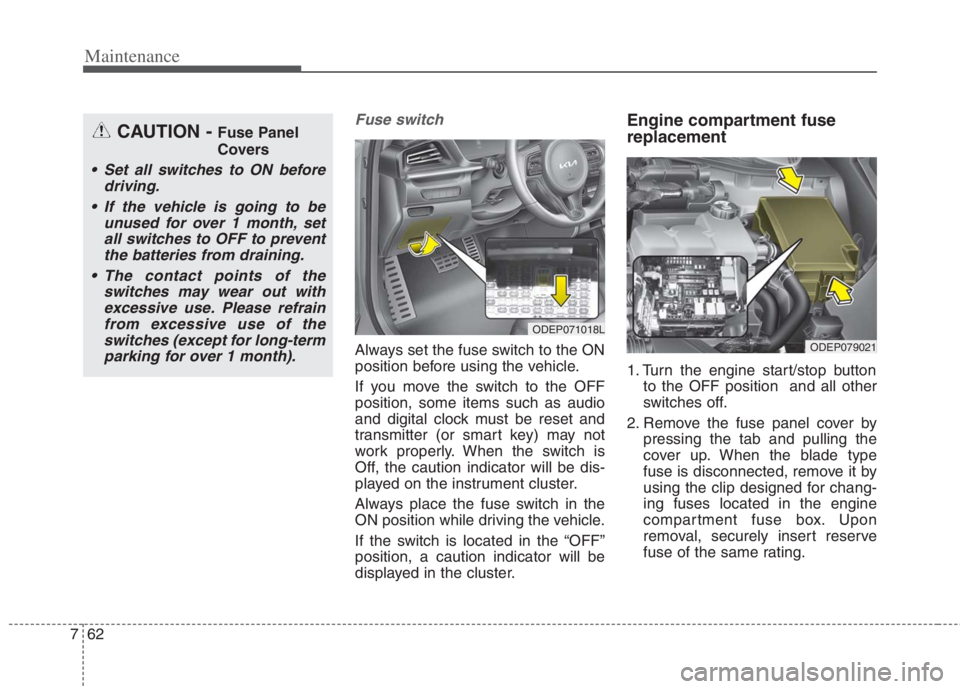
Fuse switch
Always set the fuse switch to the ON
position before using the vehicle.
If you move the switch to the OFF
position, some items such as audio
and digital clock must be reset and
transmitter (or smart key) may not
work properly. When the switch is
Off, the caution indicator will be dis-
played on the instrument cluster.
Always place the fuse switch in the
ON position while driving the vehicle.
If the switch is located in the “OFF”
position, a caution indicator will be
displayed in the cluster.
Engine compartment fuse
replacement
1. Turn the engine start/stop button
to the OFF position and all other
switches off.
2. Remove the fuse panel cover by
pressing the tab and pulling the
cover up. When the blade type
fuse is disconnected, remove it by
using the clip designed for chang-
ing fuses located in the engine
compartment fuse box. Upon
removal, securely insert reserve
fuse of the same rating.
ODEP071018L
ODEP079021
CAUTION - Fuse Panel
Covers
Set all switches to ON before
driving.
If the vehicle is going to be
unused for over 1 month, set
all switches to OFF to prevent
the batteries from draining.
The contact points of the
switches may wear out with
excessive use. Please refrain
from excessive use of the
switches (except for long-term
parking for over 1 month).
Page 669 of 684

89
Specifications, Consumer information and Reporting safety defects
Recommended SAE viscosity
number
Engine oil viscosity (thickness) has an
effect on fuel economy and cold
weather operating (engine start and
engine oil flowability). Lower viscosity
engine oils can provide better fuel
economy and cold weather perform-
ance; however, higher viscosity
engine oils are required for satisfacto-
ry lubrication in hot weather. Using
oils of any viscosity other than those
recommended could result in engine
damage. When choosing an oil, con-
sider the range of temperature your
vehicle will be operated in before the
next oil change. Proceed to select the
recommended oil viscosity from the
chart.
Temperature Range for SAE Viscosity Numbers
Temperature°C
(°F)-30 -20 -10 0 10 20 30 40 50
-10 0 20 40 60 80 100 120
(Gasoline) 1.6 GDi0W-20
An engine oil displaying this API Certification Mark conforms
to the international Lubricant Specification Advisory
Committee (ILSAC). It is recommended to only use engine oils
that uphold this API Certification Mark.
Page 679 of 684

Index
6I
If the engine stalls while driving. . . . . . . . . . . . . . . . 6-3
If you have a flat tire while driving . . . . . . . . . . . . . 6-3
Infotainment system . . . . . . . . . . . . . . . . . . . . . . . . . . 4-185
Antenna . . . . . . . . . . . . . . . . . . . . . . . . . . . . . . . . . 4-185
How vehicle radio works . . . . . . . . . . . . . . . . . . . . 4-186
USB port. . . . . . . . . . . . . . . . . . . . . . . . . . . . . . . . . 4-185
Instrument cluster . . . . . . . . . . . . . . . . . . . . . . . . . . . . . 4-68
Dual clutch transmission shift indicator . . . . . . . . . 4-76
Gauges . . . . . . . . . . . . . . . . . . . . . . . . . . . . . . . . . . . 4-70
Instrument Cluster Control. . . . . . . . . . . . . . . . . . . . 4-70
Instrument panel overview . . . . . . . . . . . . . . . . . . . . . . . 2-5
Interior features. . . . . . . . . . . . . . . . . . . . . . . . . . . . . . 4-170
AC inverter . . . . . . . . . . . . . . . . . . . . . . . . . . . . . . . 4-175
Air ventilation seat . . . . . . . . . . . . . . . . . . . . . . . . . 4-172
Cargo security screen . . . . . . . . . . . . . . . . . . . . . . . 4-182
Clothes hanger . . . . . . . . . . . . . . . . . . . . . . . . . . . . 4-180
Cup holder . . . . . . . . . . . . . . . . . . . . . . . . . . . . . . . 4-170
Floor mat anchor(s) . . . . . . . . . . . . . . . . . . . . . . . . 4-180
Luggage net holder. . . . . . . . . . . . . . . . . . . . . . . . . 4-181
Power outlet . . . . . . . . . . . . . . . . . . . . . . . . . . . . . . 4-173
Seat warmer . . . . . . . . . . . . . . . . . . . . . . . . . . . . . . 4-170
Sun visor. . . . . . . . . . . . . . . . . . . . . . . . . . . . . . . . . 4-173
USB charger . . . . . . . . . . . . . . . . . . . . . . . . . . . . . . 4-174
Wireless smart phone charging system . . . . . . . . . 4-176
Interior lights . . . . . . . . . . . . . . . . . . . . . . . . . . . . . . . 4-143
Automatic turn off function . . . . . . . . . . . . . . . . . . 4-143
Liftgate room lamp. . . . . . . . . . . . . . . . . . . . . . . . . 4-145
Map lamp . . . . . . . . . . . . . . . . . . . . . . . . . . . . . . . 4-143Room lamp . . . . . . . . . . . . . . . . . . . . . . . . . . . . . . . 4-144
Vanity mirror lamp . . . . . . . . . . . . . . . . . . . . . . . . . 4-145
Interior overview. . . . . . . . . . . . . . . . . . . . . . . . . . . . . . . 2-4
Key positions . . . . . . . . . . . . . . . . . . . . . . . . . . . . . . . . . 5-7
Ignition switch position . . . . . . . . . . . . . . . . . . . . . . . 5-7
Illuminated ignition switch . . . . . . . . . . . . . . . . . . . . 5-7
Starting the hybrid system . . . . . . . . . . . . . . . . . . . . . 5-9
Lane Following Assist (LFA) . . . . . . . . . . . . . . . . . . . 5-132
Lane Following Assist malfunction . . . . . . . . . . . . 5-136
Lane Following Assist operation . . . . . . . . . . . . . . 5-133
Limitation of Lane Following Assist . . . . . . . . . . . 5-136
Lane Keeping Assist (LKA) . . . . . . . . . . . . . . . . . . . . . 5-71
Lane Keeping Assist activation . . . . . . . . . . . . . . . . 5-74
Lane Keeping Assist malfunction . . . . . . . . . . . . . . 5-77
Lane Keeping Assist operation . . . . . . . . . . . . . . . . 5-72
Lane Keeping Assist setting . . . . . . . . . . . . . . . . . . . 5-73
LCD Display . . . . . . . . . . . . . . . . . . . . . . . . . . . . . . . . . 4-78
LCD Display Control . . . . . . . . . . . . . . . . . . . . . . . . 4-78
LCD Display Modes . . . . . . . . . . . . . . . . . . . . . . . . 4-79
Trip modes (Trip computer) . . . . . . . . . . . . . . . . . . . 4-91
Warning messages . . . . . . . . . . . . . . . . . . . . . . . . . . 4-96
K
L