low KIA OPTIMA 2020 Features and Functions Guide
[x] Cancel search | Manufacturer: KIA, Model Year: 2020, Model line: OPTIMA, Model: KIA OPTIMA 2020Pages: 591, PDF Size: 14.1 MB
Page 267 of 591

511
Driving your vehicle
ON
Press the engine start/stop button
while it is in the ACC position without
depressing the brake pedal.
The warning lights can be checked
before the engine is started. Do not
leave the engine start/stop button in
the ON position for a long time. The
battery may discharge, because the
engine is not running.
START/RUN
To start the engine, depress the
brake pedal and press the ENGINE
START/ STOP button with the shift
lever in the P (Park) or the N
(Neutral) position. For your safety,
start the engine with the shift lever in
the P (Park) position.
If you press the engine start/stop but-
ton without depressing the brake
pedal for automatic transmission/dual
clutch transmission vehicles, the
engine will not start and the engine
start/stop button changes as follow:
OFF ➔ACC ➔ON ➔OFF or ACC
✽ ✽
NOTICE
If you leave the ENGINE START/
STOP button in the ACC or ON
position for a long time, the battery
will discharge.
WARNING- Starting
vehicle
Never press the engine
start/stop button while the vehi-
cle is in motion except in an
emergency. This would result in
loss of directional control and
braking function, which could
cause an accident.
JFa PE USA 5.QXP 5/15/2019 3:21 PM Page 11
Page 269 of 591
513
Driving your vehicle
When the stop lamp fuse is blown,you can't start the engine normally.
Replace the fuse with a new one. If
it is not possible, you can start the
engine by pressing the engine
start/stop button for 10 seconds
while it is in the ACC position. The
engine can start without depress-
ing the brake pedal. But for your
safety always depress the brake
pedal before starting the engine.
Do not press the ENGINE START/
STOP button for more than 10 sec-
onds except when the stop lamp fuse
is blown.
JFa PE USA 5.QXP 5/15/2019 3:21 PM Page 13
Page 271 of 591

515
Driving your vehicle
When stopped on an incline, do not
hold the vehicle with the engine
power. Use the service brake or the
parking brake.
Transmission ranges
The indicator in the instrument clus-
ter displays the shift lever position
when the ignition switch is in the ON
position.
P (Park)
Always come to a complete stop
before shifting into P (Park). This
position locks the transmission and
prevents the drive wheels from rotat-
ing.
Shifting into P (Park) while the vehi-
cle is in motion will cause the drive
wheels to lock which will cause you
to lose control of the vehicle.
R (Reverse)
Use this position to drive the vehicle
backward.WARNING- LeavingVehicle
Before leaving the driver’s seat,
always make sure the shift lever
is in the P (Park) position; then
set the parking brake fully and
shut the engine off. Do not use
the P position in place of the
parking brake. Always make
sure the shift lever is locked in
the P position and set the park-
ing brake fully. Unexpected and
sudden vehicle movement can
occur if these precautions are
not followed.CAUTION- Transmission
To avoid damage to your trans- mission, do not accelerate theengine in R (Reverse) or any for-ward gear position with thebrakes on. The transmissionmay be damaged if you shiftinto P (Park) while the vehicle isin motion.
JFa PE USA 5.QXP 5/15/2019 3:21 PM Page 15
Page 272 of 591

Driving your vehicle
16
5
N (Neutral)
The wheels and transmission are not
engaged. The vehicle will roll freely
even on the slightest incline unless
the parking brake or service brakes
are applied. - Parking in N (Neutral) gear
Follow the steps below when parking
and you want the vehicle to move
when pushed.
1.After stopping your vehicle, depress
the brake pedal and move the trans-
mission shift lever to [P] with the
ignition button in [ON] or while the
engine is running.
2. If the parking brake is applied, release the parking brake.
- For EPB (Electronic Parking Brake) equipped vehicles,
depress the brake pedal with the
ignition button in [ON] or while
the engine is running to disen-
gage the parking brake. If [AUTO
HOLD] function is used while
driving (If [AUTO HOLD] indica-
tor is on in the cluster), press
[AUTO HOLD] switch and [AUTO
HOLD] function will be turned off.
3. While depressing the brake pedal, turn the ignition button [OFF].
- For smart key equipped vehicles, the ignition switch can be moved
to [OFF] only when the shift lever
is in [P]. 4. Change the gear shift lever to [N]
(Neutral) while depressing the
brake pedal and inserting a tool
(e.g. flathead screw-driver) into the
[SHIFT LOCK RELEASE] access
hole at the same time. Then, the
vehicle will move when external
force is applied.
CAUTION- Shifting
Always come to a complete stopbefore shifting into or out of R(Reverse); you may damage thetransmission if you shift into R(Reverse) while the vehicle is inmotion, except when “Rockingthe vehicle” explained in thischapter.
WARNING
With the exception of parking in neutral gear so that you can
push the vehicle, always park
the vehicle in [P] (Park) for
safety and apply the parking
brake.
Before parking in [N] (Neutral) gear, first make sure the park-
ing ground is level and flat. Do
not park in [N] gear on any
slopes or gradients.
If parked and left in [N], the
vehicle may move and cause
serious damage or injury.
JFa PE USA 5.QXP 5/17/2019 4:30 PM Page 16
Page 273 of 591

517
Driving your vehicle
✽ ✽NOTICE
After the ignition switch has been
turned off, the EPB (Electronic
Parking Brake) cannot be released.
For EPB (Electronic Parking Brake)
equipped vehicles with [AUTO
HOLD] function used while driving, if
the ignition button has been turned
[OFF], the EPB (Electronic Parking
Brake) will be engaged automatical-
ly. Therefore, [AUTO HOLD] function
should be turned off before the igni-
tion button is turned off. D (Drive)
This is the normal forward driving
position. The transmission will auto-
matically shift through a 6-gear
sequence, providing the best fuel
economy and power.
For extra power when passing anoth-
er vehicle or climbing grades,
depress the accelerator fully, at
which time the transmission will
automatically downshift to the next
lower gear.
CAUTION- Starter
If the engine stalls while the
vehicle is in motion, do notattempt to move the shift leverto the P (Park) position. If thetraffic and road conditions per-mit, you may put the shift leverin the N (Neutral) position whilethe vehicle is still moving andpress the engine start/stop but-ton in an attempt to restart theengine.
JFa PE USA 5.QXP 5/15/2019 3:21 PM Page 17
Page 274 of 591

Driving your vehicle
18
5
Manual mode
Whether the vehicle is stationary or
in motion, manual mode is selected
by pushing the shift lever left from the
D (Drive) position into the manual
gate. To return to D (Drive) range
operation, push the shift lever right
back into the main gate.
In manual mode, moving the shift
lever backwards and forwards will
allow you to make gearshifts rapidly.
In contrast to a manual transmission,
the manual mode allows gearshifts
with the accelerator pedal
depressed. Up (+) : Push the lever forward once
to shift up one gear.
Down (-) : Pull the lever backwards once to shift down one
gear.
• In manual mode, the driver must execute upshifts in accordance
with road conditions, taking care to
keep the engine speed below the
red zone.
In manual mode, only the 6 forward gears can be selected. To reverse
or park the vehicle, move the shift
lever to the main gate and then
select R (Reverse) or P (Park)
position as required.
In manual mode, downshifts are made automatically when the vehi-
cle slows down. When the vehicle
stops, 1st gear is automatically
selected.
In manual mode, when the engine rpm approaches the red zone, shift
points are varied to upshift auto-
matically. To maintain the required levels of
vehicle performance and safety,
the system may not execute cer-
tain gearshifts when the shift lever
is operated.
When driving on a slippery road, push the shift lever forward into the
+(up) position. This causes the
transmission to shift into the 2nd
gear which is better for smooth
driving on a slippery road. Push
the shift lever to the -(down) side to
shift back to the 1st gear.
OJFA055014
Manual
mode
+ +
+ +
( (
( (
U U
U U
P P
P P
) )
) )
- -
- -
( (
( (
D D
D D
O O
O O
W W
W W
N N
N N
) )
) )
JFa PE USA 5.QXP 5/15/2019 3:36 PM Page 18
Page 275 of 591
519
Driving your vehicle
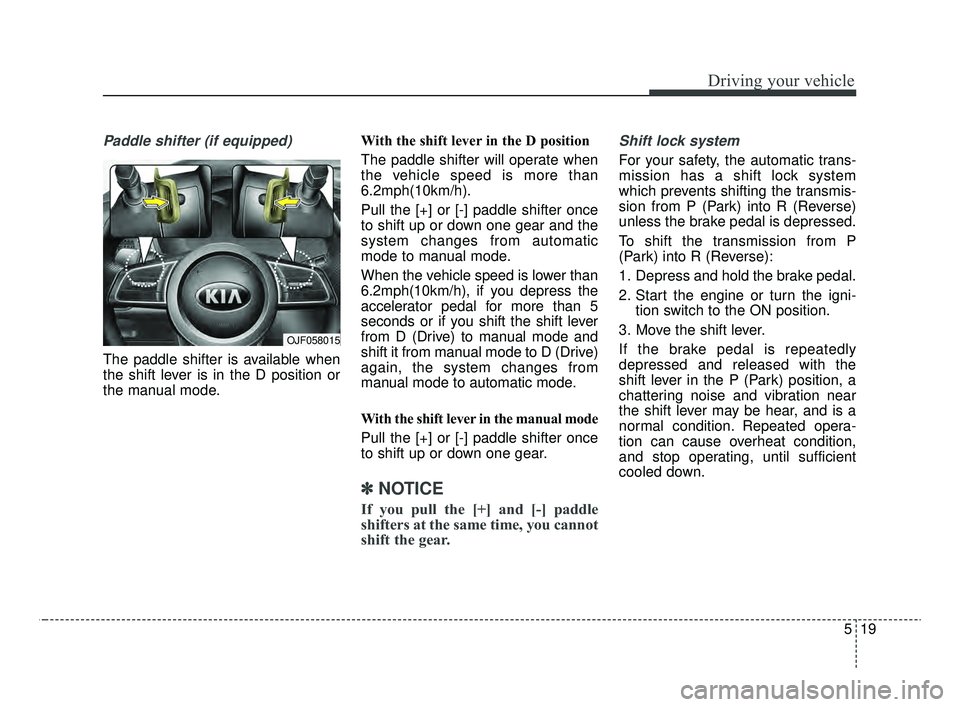
Paddle shifter (if equipped)
The paddle shifter is available when
the shift lever is in the D position or
the manual mode.With the shift lever in the D position
The paddle shifter will operate when
the vehicle speed is more than
6.2mph(10km/h).
Pull the [+] or [-] paddle shifter once
to shift up or down one gear and the
system changes from automatic
mode to manual mode.
When the vehicle speed is lower than
6.2mph(10km/h), if you depress the
accelerator pedal for more than 5
seconds or if you shift the shift lever
from D (Drive) to manual mode and
shift it from manual mode to D (Drive)
again, the system changes from
manual mode to automatic mode.
With the shift lever in the manual mode
Pull the [+] or [-] paddle shifter once
to shift up or down one gear.
✽ ✽
NOTICE
If you pull the [+] and [-] paddle
shifters at the same time, you cannot
shift the gear.
Shift lock system
For your safety, the automatic trans-
mission has a shift lock system
which prevents shifting the transmis-
sion from P (Park) into R (Reverse)
unless the brake pedal is depressed.
To shift the transmission from P
(Park) into R (Reverse):
1. Depress and hold the brake pedal.
2. Start the engine or turn the igni-
tion switch to the ON position.
3. Move the shift lever.
If the brake pedal is repeatedly
depressed and released with the
shift lever in the P (Park) position, a
chattering noise and vibration near
the shift lever may be hear, and is a
normal condition. Repeated opera-
tion can cause overheat condition,
and stop operating, until sufficient
cooled down.
OJF058015
JFa PE USA 5.QXP 5/17/2019 4:30 PM Page 19
Page 276 of 591

Driving your vehicle
20
5
Shift-lock override
If the shift lever cannot be moved
from the P (Park) position into R
(Reverse) position with the brake
pedal depressed, continue depress-
ing the brake, then do the following:
1. Place the ignition switch in the
LOCK/OFF position.
2. Apply the parking brake.
3. Carefully remove the cap (1) cov- ering the shift-lock release access
hole.
4. Insert a tool (e.g. flathead screw- driver) into the access hole and
press down on the tool. 5. Move the shift lever.
6. Remove the tool from the shiftlock
override access hole then install
the cap.
7. Have the system inspected by an authorized Kia dealer.
WARNING- Shifting from
park
Always fully depress the brake
pedal before and while shifting
out of the P (Park) position into
another position to avoid inad-
vertent motion of the vehicle
which could injure persons in
or around the vehicle.
OJFA055013
JFa PE USA 5.QXP 5/15/2019 3:21 PM Page 20
Page 277 of 591

521
Driving your vehicle
Ignition key interlock system
The ignition key cannot be removed
unless the shift lever is in the P
(Park) position. Even if the ignition
switch is in the LOCK position, the
key cannot be removed.
If your vehicle is equipped with
engine start/stop button, the button
will not change to the OFF position
unless the shift lever is in the P
(Park) position.
Good driving practices
Never move the gear shift leverfrom P (Park) to any other position
with the accelerator pedal
depressed.
Never move the gear shift lever into P (Park) when the vehicle is in
motion.
Slow down before shifting to a lower gear. Otherwise, the lower
gear may not be engaged.
Always use the parking brake. Do not depend on placing the trans-
mission in P (Park) to keep the
vehicle from moving.
Optimum vehicle performance and economy is obtained by smoothly
depressing and releasing the
accelerator pedal.
Moving up a steep grade from a
standing start
To move up a steep grade from a
standing start, depress the brake
pedal, shift the shift lever to D
(Drive). Select the appropriate gear
depending on load weight and steep-
ness of the grade, and release the
parking brake. Depress the accelera-
tor gradually while releasing the
service brakes.
When accelerating from a stop on
a steep hill, the vehicle may have a
tendency to roll backwards.
Shifting the shift lever into 2
(Second Gear) will help prevent
the vehicle from rolling back-
wards.
JFa PE USA 5.QXP 5/15/2019 3:21 PM Page 21
Page 279 of 591

523
Driving your vehicle
The dual clutch transmission canbe thought of as an automatically
shifting manual transmission. It
gives the driving feel of a manual
transmission, yet provides the
ease of a fully automatic transmis-
sion.
When D (Drive) is selected, the transmission will automatically shift
through the gears similar to a con-
ventional automatic transmission.
Unlike a traditional automatic
transmission, the gear shifting can
sometimes be felt and heard as the
actuators engage the clutches and
the gears are selected.
The dual clutch transmission adopts a dry-type dual clutch,
which is different from the torque
converter of the automatic trans-
mission. It shows better accelera-
tion performance and increased
fuel efficiency while driving but ini-
tial launch might be little bit slower
than the automatic transmission.(Continued)
Unexpected and sudden vehi-
cle movement can occur if
these precautions are not fol-
lowed.
Do not use engine braking (rapidly shifting from a high
gear to lower gear) on slip-
pery roads. The vehicle may
slip causing an accident.CAUTION
To avoid damage to your transmission, do not try toaccelerate with the shift leverin R (Reverse) or any forwardgear position with the brakeengaged.
When stopped on a slope, do not hold the vehicle with accel-erator pedal. Engage the serv-ice brake or the parking brake.
When in any gear than P, and on an incline, if you release thebrake pedal for more than 3seconds, the vehicle may rollforward or backwards (unlessvehicle hold is ON).
JFa PE USA 5.QXP 5/15/2019 3:21 PM Page 23