hybrid KIA OPTIMA 2020 User Guide
[x] Cancel search | Manufacturer: KIA, Model Year: 2020, Model line: OPTIMA, Model: KIA OPTIMA 2020Pages: 589, PDF Size: 11.37 MB
Page 18 of 589
H18
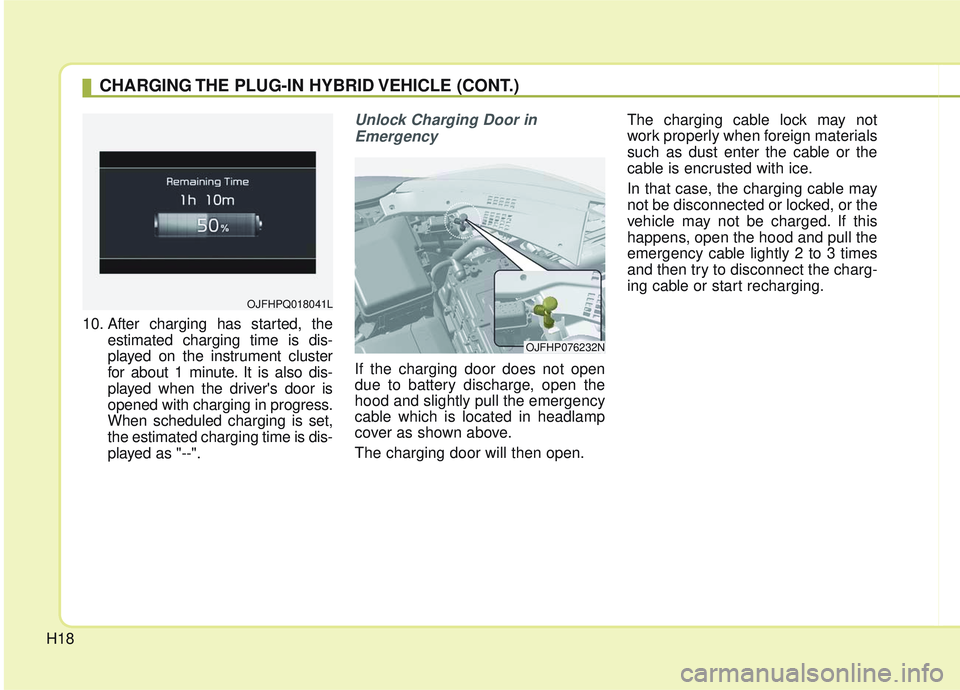
10. After charging has started, theestimated charging time is dis-
played on the instrument cluster
for about 1 minute. It is also dis-
played when the driver's door is
opened with charging in progress.
When scheduled charging is set,
the estimated charging time is dis-
played as "--".
Unlock Charging Door in
Emergency
If the charging door does not open
due to battery discharge, open the
hood and slightly pull the emergency
cable which is located in headlamp
cover as shown above.
The charging door will then open. The charging cable lock may not
work properly when foreign materials
such as dust enter the cable or the
cable is encrusted with ice.
In that case, the charging cable may
not be disconnected or locked, or the
vehicle may not be charged. If this
happens, open the hood and pull the
emergency cable lightly 2 to 3 times
and then try to disconnect the charg-
ing cable or start recharging.
CHARGING THE PLUG-IN HYBRID VEHICLE (CONT.)
OJFHPQ018041L
OJFHP076232N
Page 20 of 589
H20
CHARGING THE PLUG-IN HYBRID VEHICLE (CONT.)
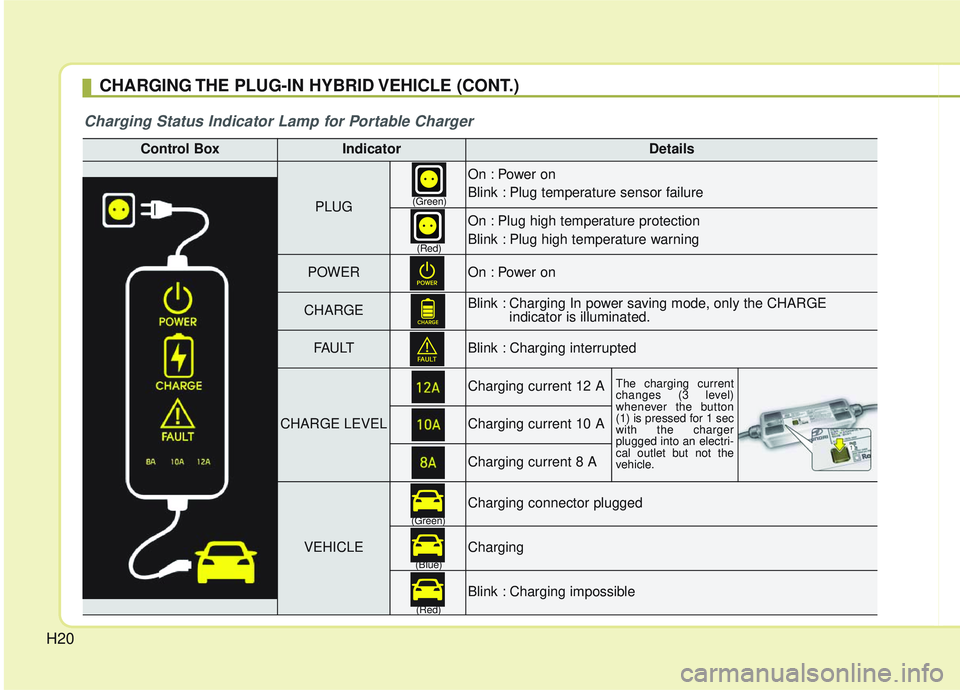
Control BoxIndicatorDetails
PLUG
On : Power on
Blink : Plug temperature sensor failure
On : Plug high temperature protection
Blink : Plug high temperature warning
POWEROn : Power on
CHARGEBlink : Charging In power saving mode, only the CHARGE indicator is illuminated.
FAU LTBlink : Charging interrupted
CHARGE LEVEL
Charging current 12 AThe charging current
changes (3 level)
whenever the button
(1) is pressed for 1 sec
with the charger
plugged into an electri-
cal outlet but not the
vehicle.
Charging current 10 A
Charging current 8 A
VEHICLE
Charging connector plugged
Charging
Blink : Charging impossible
(Green)
(Green) (Blue)
(Red)(Red)
Charging Status Indicator Lamp for Portable Charger
Page 22 of 589
H22
CHARGING THE PLUG-IN HYBRID VEHICLE (CONT.)
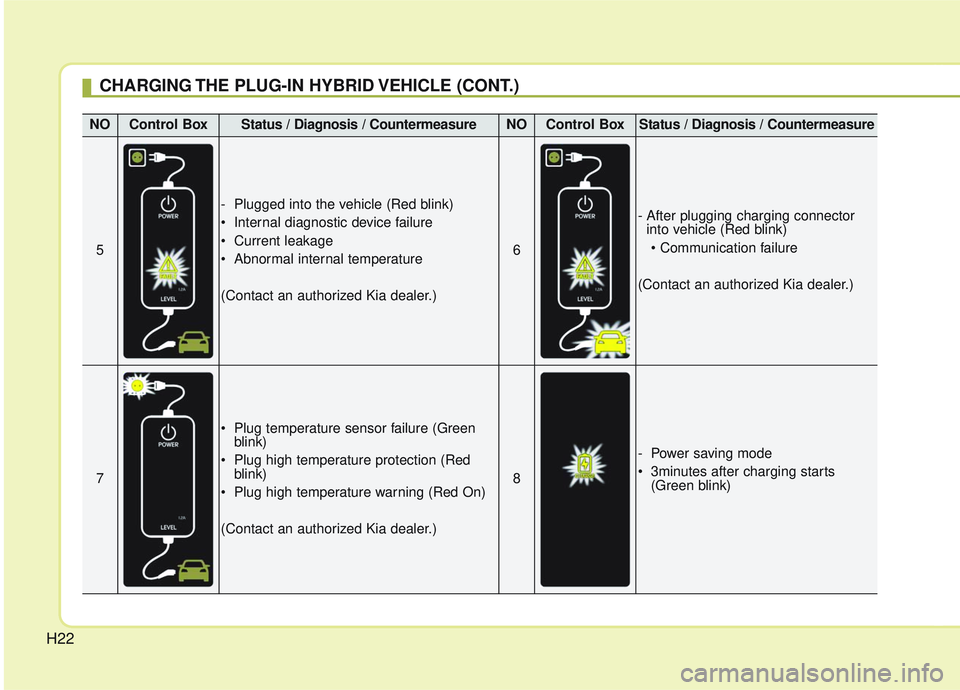
NOControl BoxStatus / Diagnosis / CountermeasureNOControl BoxStatus / Diagnosis / Countermeasure
5
- Plugged into the vehicle (Red blink)
Internal diagnostic device failure
Current leakage
Abnormal internal temperature
(Contact an authorized Kia dealer.)
6
- After plugging charging connectorinto vehicle (Red blink)
(Contact an authorized Kia dealer.)
7
Plug temperature sensor failure (Green blink)
Plug high temperature protection (Red blink)
Plug high temperature warning (Red On)
(Contact an authorized Kia dealer.)
8
- Power saving mode
3minutes after charging starts (Green blink)
Page 24 of 589
H24
Precautions for PortableCharging Cable (ICCB: In-Cable Control Box)
Use a portable charging cable that is certified by Kia.
Do not try to repair, disassemble, or adjust the portable charging cable.
Do not use an extension cord or adapter.
Stop using immediately if failure warning light occurs.
Do not touch the plug and charging connector with wet hands.
Do not touch the terminal part of the AC charging connector and the AC
charging inlet on the vehicle.
Do not connect the charging con- nector to voltage that does not
comply with regulations.
Do not use the portable charging cable if it is worn out, exposed, or
there exists any type of damage on
the portable charging cable. If the ICCB case and AC charging
connector is damaged, cracked, or
the wires are exposed in any way,
do not use the portable charging
cable.
Do not let children operate or touch the portable charging cable.
Keep the control box free of water.
Keep the AC charging connector or plug terminal free of foreign sub-
stances.
Do not step on the cable or cord. Do not pull the cable or cord and
do not twist or bend it.
Do not charge when there is light- ning.
Do not drop the control box or place a heavy object on the control
box.
Do not place an object that can generate high temperatures near
the charger when charging. Charging with a worn out or dam-
aged household electric outlet can
result in a risk of electric shock If
you have doubts about the house-
hold electric outlet condition, have
it checked by a licensed electri-
cian.
Stop using the portable charging cable immediately if the household
electric outlet or any components
are overheating or smell burning.
CHARGING THE PLUG-IN HYBRID VEHICLE
Page 25 of 589
H25
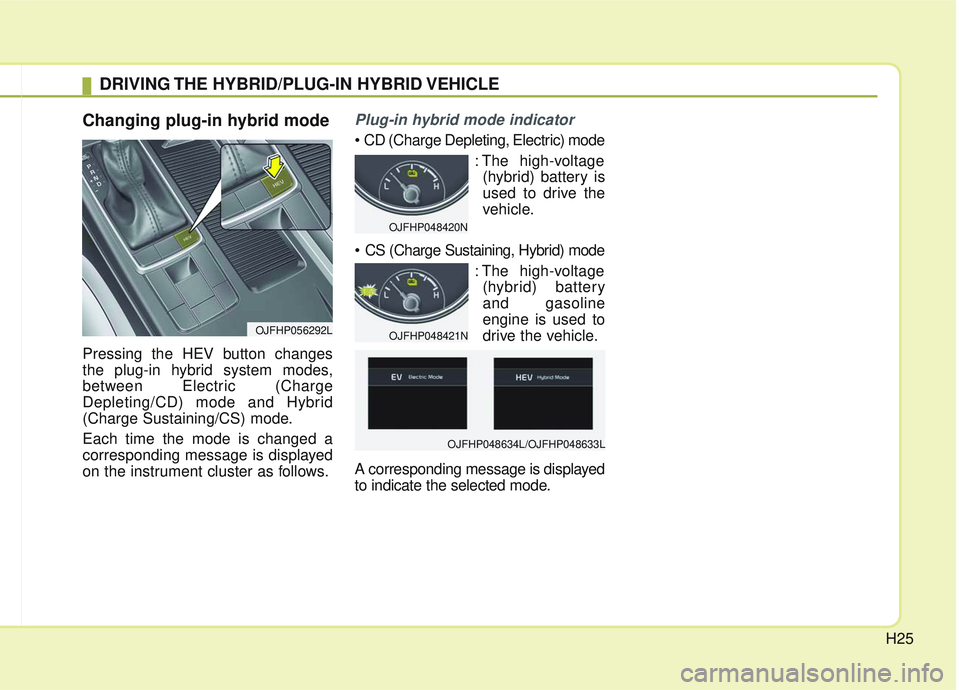
Changing plug-in hybrid mode
Pressing the HEV button changes
the plug-in hybrid system modes,
between Electric (Charge
Depleting/CD) mode and Hybrid
(Charge Sustaining/CS) mode.
Each time the mode is changed a
corresponding message is displayed
on the instrument cluster as follows.
Plug-in hybrid mode indicator
: The high-voltage(hybrid) battery is
used to drive the
vehicle.
: The high-voltage(hybrid) battery
and gasoline
engine is used to
drive the vehicle.
A corresponding message is displayed
to indicate the selected mode.
DRIVING THE HYBRID/PLUG-IN HYBRID VEHICLE
OJFHP056292L
OJFHP048420N
OJFHP048421N
OJFHP048634L/OJFHP048633L
Page 26 of 589
H26
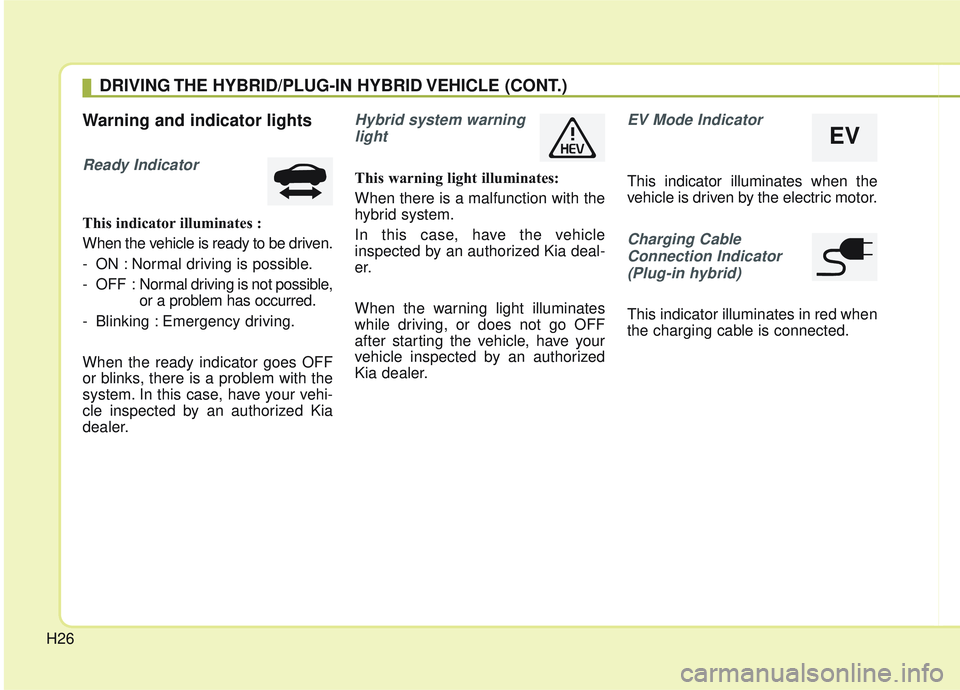
Warning and indicator lights
Ready Indicator
This indicator illuminates :
When the vehicle is ready to be driven.
- ON : Normal driving is possible.
- OFF : Normal driving is not possible,
or a problem has occurred.
- Blinking : Emergency driving.
When the ready indicator goes OFF
or blinks, there is a problem with the
system. In this case, have your vehi-
cle inspected by an authorized Kia
dealer.
Hybrid system warning light
This warning light illuminates:
When there is a malfunction with the
hybrid system.
In this case, have the vehicle
inspected by an authorized Kia deal-
er.
When the warning light illuminates
while driving, or does not go OFF
after starting the vehicle, have your
vehicle inspected by an authorized
Kia dealer.
EV Mode Indicator
This indicator illuminates when the
vehicle is driven by the electric motor.
Charging CableConnection Indicator(Plug-in hybrid)
This indicator illuminates in red when
the charging cable is connected.
DRIVING THE HYBRID/PLUG-IN HYBRID VEHICLE (CONT.)
EV
Page 28 of 589
H28
✽ ✽NOTICE
Coasting guide is only a supplemen-
tal system to assist with fuel-efficient
driving in certain situations. Thus,
the operating conditions may be dif-
ferent in accordance with
traffic/road conditions (i.e. driving
in a traffic jam, driving on a slope,
driving on a curve). Thus, take the
actual driving conditions into con-
sideration, such as distances from
the vehicles ahead/ behind, while
referring to the coasting guide sys-
tem as guidance.
Unplug vehicle to start
(Plug-in hybrid)
This message is displayed when you
start the engine without unplugging
the charging cable. Unplug the
charging cable, and then start the
vehicle.
Remaining time (Plug-in hybrid)
This message is displayed to notify
the remaining time to fully charge the
battery.
Shift to P to charge(Plug-in hybrid)
This message is displayed when the
charging connector is plugged with
the shift lever in R (Reverse), N
(Neutral) or D (Drive). Move the shift
lever to P (Park) and re-start the
charging process.
Electric/Hybrid modes (Plug-in hybrid)
A corresponding message is dis-
played when a mode is selected by
pressing the HEV button.
Low battery. Maintaining Hybridmode (Plug-in hybrid)
This message is displayed when the
vehicle is unable to convert to EV
mode even when pressing the HEV
button during HEV mode driving due
to insufficient high-voltage (hybrid)
battery level.
Low battery temp. Maintainingcurrent (Plug-in hybrid)
This message is displayed when the
vehicle is unable to convert to EV
mode even when pressing the HEV
button during HEV mode driving due
to low battery temperature.
DRIVING THE HYBRID/PLUG-IN HYBRID VEHICLE (CONT.)
Page 29 of 589

H29
Charger Error! (Plug-in hybrid)
This message is displayed when the
charging failed due to an external
charger error.
The purpose of this message is to let
you know the error has occurred in
the charger itself, not in the vehicle.
Low/High System temperatureMaintaining Hybrid mode (Plug-in hybrid)
This message is displayed when the
vehicle is unable to convert to EV
mode even when pressing the HEV
button during HEV mode driving due
to low/high system temperature.
Switching to Hybrid mode toallow heating or air conditioning(Plug-in hybrid)
When the coolant temperature is lower than -14 °C (57 °F), and you
turn the climate control On for
heating, this message will be dis-
played in the cluster. Then, the
vehicle will automatically switch to
HEV mode.
When the coolant temperature is higher than -14 °C (57 °F), or you
turn the climate control Off, the
vehicle will automatically return to
EV mode.
Wait until fuel door opens
(Plug-in hybrid)
This message is displayed when you
attempt to open the fuel filler lid with
the fuel tank pressurized. Wait until
the fuel tank is depressurized.
✽ ✽ NOTICE
• It may take up to 20 seconds to
open fuel filler lid.
• When the fuel filler lid is frozen and does not open after 20 seconds
at freezing temperature, slightly
tap the fuel filler lid and then
attempt to open it.
Page 30 of 589

H30
Fuel door open (Plug-in hybrid)
This message is displayed when the
fuel filler lid is opened.
Also means "Ready to refuel".
Check fuel door (Plug-in hybrid)
This message is displayed when the
fuel filler lid is open or an abnormal-
ity has occurred.
Refuel after stopping (Plug-in hybrid)
This message is displayed when the
fuel filler lid open button is pressed
when a vehicle equipped with a plug-
in hybrid seal-type fuel tank is in
motion (vehicle speed is greater than
mi/h (0 km/h)).
Disconnect charging cable beforeopening fuel door (Plug-in hybrid)
This message is displayed when you
press the fuel filler lid open button
while charging.
The fuel lid will not open when the
charging cable is connected to the
vehicle.
Charging Door Open (Plug-in hybrid)
This message indicates that the
charging door is open while in driv-
ing-ready state to encourage you to
inspect and close the door.
(Driving with the charging door open
may result in moisture inflow or dam-
age. This message is used to prevent
such occurrences.)
DRIVING THE HYBRID/PLUG-IN HYBRID VEHICLE (CONT.)
Page 31 of 589

H31
EV / HEV modes (Plug-in hybrid)
A corresponding message is dis-
played when a mode is selected by
pressing the HEV button.
OJFHP048634L
OJFHP048633L