ECO mode KIA OPTIMA 2020 Owners Manual
[x] Cancel search | Manufacturer: KIA, Model Year: 2020, Model line: OPTIMA, Model: KIA OPTIMA 2020Pages: 589, PDF Size: 11.37 MB
Page 3 of 589
H3
PHEV (PLUG-IN ELECTRIC VEHICLE) SYSTEM
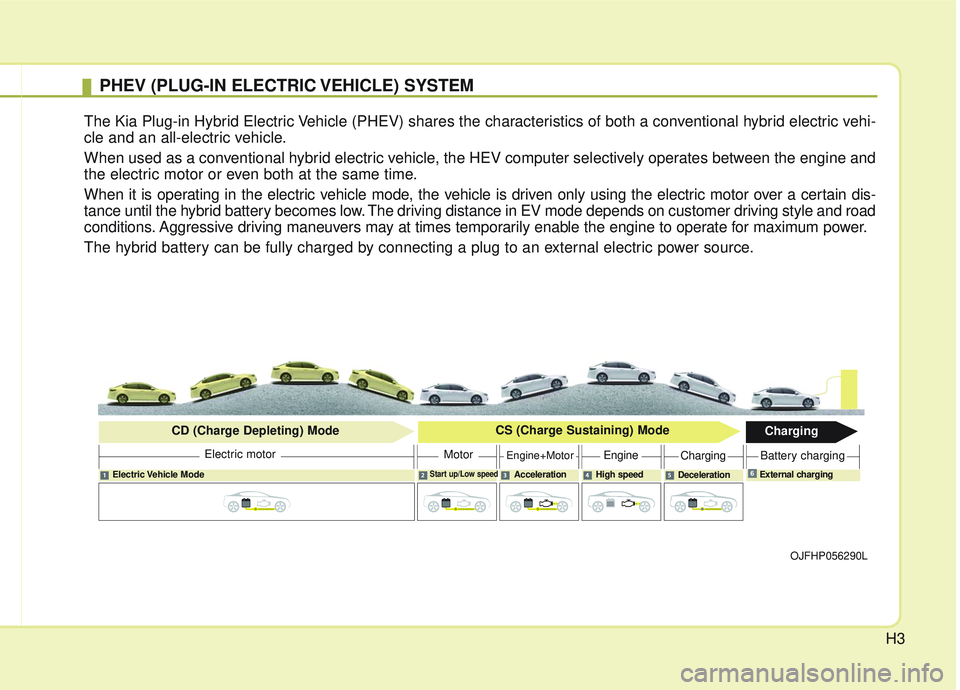
The Kia Plug-in Hybrid Electric Vehicle (PHEV) shares the characteristics of both a conventional hybrid electric vehi-
cle and an all-electric vehicle.
When used as a conventional hybrid electric vehicle, the HEV computer selectively operates between the engine and
the electric motor or even both at the same time.
When it is operating in the electric vehicle mode, the vehicle is driven only using the electric motor over a certain dis-
tance until the hybrid battery becomes low. The driving distance in EV mode depends on customer driving style and road
conditions. Aggressive driving maneuvers may at times temporarily enable the engine to operate for maximum power.
The hybrid battery can be fully charged by connecting a plug to an external electric power source.
OJFHP056290L
Electric Vehicle ModeStart up/Low speedAcceleration High speedDecelerationExternal charging
Electric motor
CD (Charge Depleting) Mode
CS (Charge Sustaining) Mode
Charging
MotorEngine+MotorEngineChargingBattery charging
6
Page 26 of 589
H26
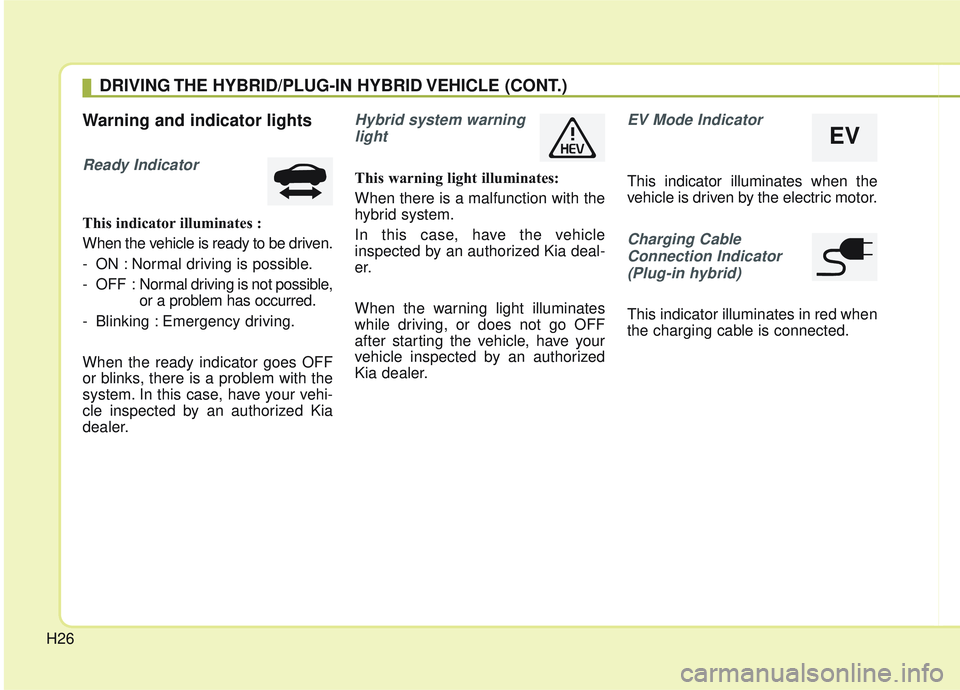
Warning and indicator lights
Ready Indicator
This indicator illuminates :
When the vehicle is ready to be driven.
- ON : Normal driving is possible.
- OFF : Normal driving is not possible,
or a problem has occurred.
- Blinking : Emergency driving.
When the ready indicator goes OFF
or blinks, there is a problem with the
system. In this case, have your vehi-
cle inspected by an authorized Kia
dealer.
Hybrid system warning light
This warning light illuminates:
When there is a malfunction with the
hybrid system.
In this case, have the vehicle
inspected by an authorized Kia deal-
er.
When the warning light illuminates
while driving, or does not go OFF
after starting the vehicle, have your
vehicle inspected by an authorized
Kia dealer.
EV Mode Indicator
This indicator illuminates when the
vehicle is driven by the electric motor.
Charging CableConnection Indicator(Plug-in hybrid)
This indicator illuminates in red when
the charging cable is connected.
DRIVING THE HYBRID/PLUG-IN HYBRID VEHICLE (CONT.)
EV
Page 27 of 589
H27
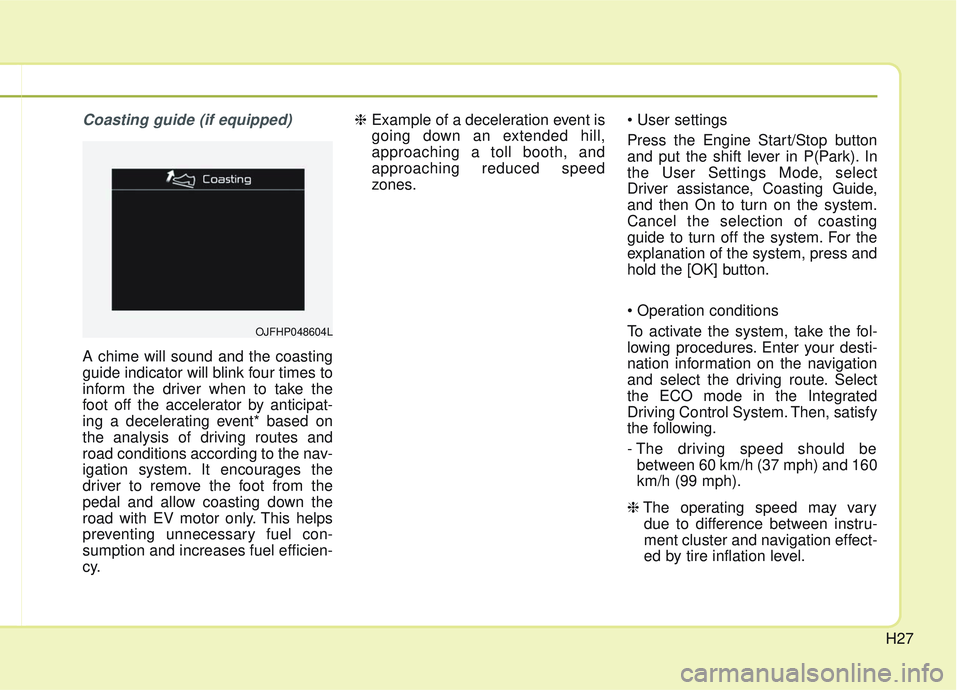
Coasting guide (if equipped)
A chime will sound and the coasting
guide indicator will blink four times to
inform the driver when to take the
foot off the accelerator by anticipat-
ing a decelerating event* based on
the analysis of driving routes and
road conditions according to the nav-
igation system. It encourages the
driver to remove the foot from the
pedal and allow coasting down the
road with EV motor only. This helps
preventing unnecessary fuel con-
sumption and increases fuel efficien-
cy.❈
Example of a deceleration event is
going down an extended hill,
approaching a toll booth, and
approaching reduced speed
zones.
Press the Engine Start/Stop button
and put the shift lever in P(Park). In
the User Settings Mode, select
Driver assistance, Coasting Guide,
and then On to turn on the system.
Cancel the selection of coasting
guide to turn off the system. For the
explanation of the system, press and
hold the [OK] button.
To activate the system, take the fol-
lowing procedures. Enter your desti-
nation information on the navigation
and select the driving route. Select
the ECO mode in the Integrated
Driving Control System. Then, satisfy
the following.
- The driving speed should be
between 60 km/h (37 mph) and 160
km/h (99 mph).
❈ The operating speed may vary
due to difference between instru-
ment cluster and navigation effect-
ed by tire inflation level.
OJFHP048604L
Page 29 of 589

H29
Charger Error! (Plug-in hybrid)
This message is displayed when the
charging failed due to an external
charger error.
The purpose of this message is to let
you know the error has occurred in
the charger itself, not in the vehicle.
Low/High System temperatureMaintaining Hybrid mode (Plug-in hybrid)
This message is displayed when the
vehicle is unable to convert to EV
mode even when pressing the HEV
button during HEV mode driving due
to low/high system temperature.
Switching to Hybrid mode toallow heating or air conditioning(Plug-in hybrid)
When the coolant temperature is lower than -14 °C (57 °F), and you
turn the climate control On for
heating, this message will be dis-
played in the cluster. Then, the
vehicle will automatically switch to
HEV mode.
When the coolant temperature is higher than -14 °C (57 °F), or you
turn the climate control Off, the
vehicle will automatically return to
EV mode.
Wait until fuel door opens
(Plug-in hybrid)
This message is displayed when you
attempt to open the fuel filler lid with
the fuel tank pressurized. Wait until
the fuel tank is depressurized.
✽ ✽ NOTICE
• It may take up to 20 seconds to
open fuel filler lid.
• When the fuel filler lid is frozen and does not open after 20 seconds
at freezing temperature, slightly
tap the fuel filler lid and then
attempt to open it.
Page 39 of 589

H39
ECONOMICAL and SAFE
OPERATION of Hybrid system
Drive smoothly. Accelerate at amoderate rate and maintain a
steady cruising speed. Don't make
“jack-rabbit” starts. Don't race
between stoplights.
Avoid heavy traffic whenever pos-
sible. Always maintain a safe dis-
tance from other vehicles so you
can avoid unnecessary braking.
This also reduces brake wear.
The regenerative brake generates energy when the vehicle deceler-
ates.
When the hybrid battery power is low, the hybrid system automatical-
ly recharges the hybrid battery.
When the engine runs in “N” posi- tion, the hybrid system cannot gen-
erate electricity. The hybrid battery
cannot recharge in “N” position.
Please refer to chapter 5.
✽ ✽ NOTICE
When the hybrid system is in
READY mode, the engine will auto-
matically start and stop as needed.
The “ ” symbol will illuminate in
the cluster when the system is oper-
ational.
CAUTION- Extended
cranking
Do not crank the engine for aprolonged period of time with-out the engine starting. Thiscould result in damage to theHEV battery and become totallydischarged.
Page 45 of 589

H45
Virtual Engine Sound System
(VESS)
The Virtual Engine Sound System
generates a simulated engine sound
for pedestrians to hear the vehicle
while at low speeds in EV mode.
High Voltage Battery Air Intake
Hybrid battery air intake
The hybrid battery air intake is locat-
ed at the bottom the rear seats.
The air intake cools down the hybrid
battery.
When the hybrid battery air intake is
blocked, the hybrid battery may over-
heat. Do not obstruct the air intake
with any other objects.
Plug-in Hybrid Vehicle
The high-voltage battery air intake is
located on the left side of the rear
seats. The air intake cools down the
high-voltage battery.
When the high-voltage battery air
intake is blocked, the high-voltage
battery may overheat and the vehicle
performance may become limited
and set a hybrid warning lamp. Do
not obstruct the air intake with any
other objects.OJFHQ015005
OJFHP036114L
WARNING- Interference
with electronic medical
devices
Electromagnetic waves that are
generated from the charger can
impact medical electric devices
such as an implantable cardiac
pacemaker. When using such
medical electric devices, ask
your medical professional and
the device manufacturer
whether charging your electric
vehicle will impact the operation
of the medical electric devices.
Page 50 of 589

i
Thank you for choosing a Kia vehicle.
When you require service, remember that your Kia dealer
knows your vehicle best. Your dealer has factory-trained tech-
nicians, recommended special tools and genuine Kia replace-
ment parts. It is dedicated to your complete customer satisfac-
tion.
Because subsequent owners require this important information
as well, this publication should remain with the vehicle if it is
sold.
This manual will familiarize you with operational, mainte-
nance and safety information about your new vehicle. It is sup-
plemented by a Warranty and Consumer Information manual
that provides important information on all warranties regarding
your vehicle.
We urge you to read these publications carefully and follow the
recommendations to help assure enjoyable and safe operation
of your new vehicle.
Kia offers a great variety of options, components and features
for its various models. Therefore, some of the equipment
described in this manual, along with the various illustrations,
may not be applicable to your particular vehicle.
The information and specifications provided in this manual
were accurate at the time of printing. Kia reserves the right to
discontinue or change specifications or design at any time
without notice and without incurring any obligation. If you
have questions, always check with your Kia dealer.
We assure you of our continuing interest in your motoring
pleasure and satisfaction in your Kia vehicle.
© 2019 Kia Canada Inc.
All rights reserved. May not be reproduced or translated in
whole or in part without the written consent of Kia Motors
America, Inc.
Printed in Korea
Foreword
Page 63 of 589
25
Your vehicle at a glance
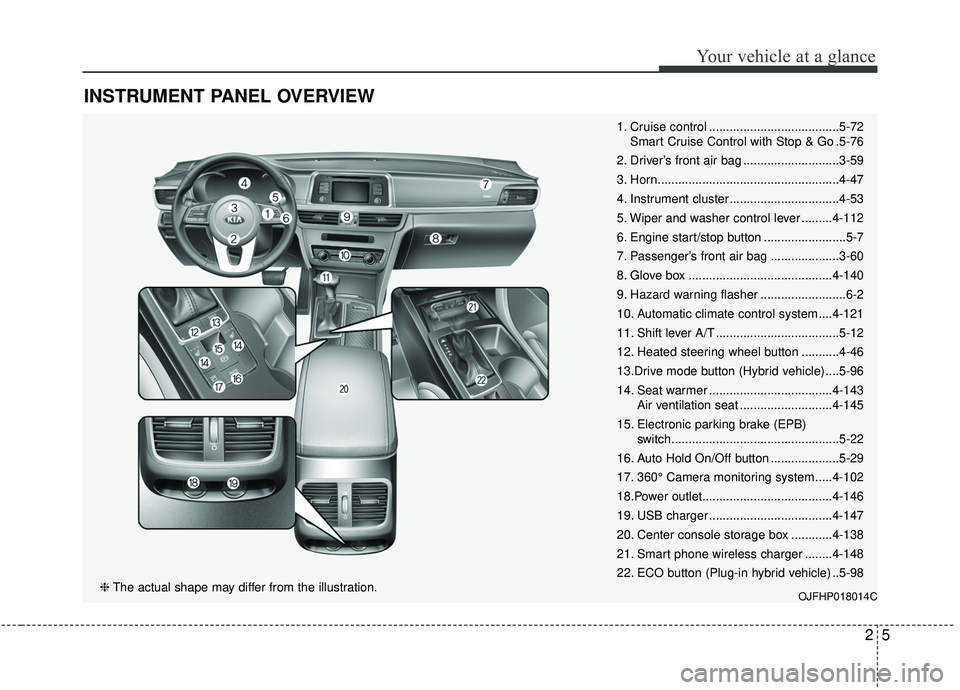
INSTRUMENT PANEL OVERVIEW
1. Cruise control ......................................5-72Smart Cruise Control with Stop & Go .5-76
2. Driver’s front air bag ............................3-59
3. Horn.....................................................4-47
4. Instrument cluster ................................4-53
5. Wiper and washer control lever .........4-112
6. Engine start/stop button ........................5-7
7. Passenger’s front air bag ....................3-60
8. Glove box ..........................................4-140
9. Hazard warning flasher .........................6-2
10. Automatic climate control system ....4-121
11. Shift lever A/T ....................................5-12
12. Heated steering wheel button ...........4-46
13.Drive mode button (Hybrid vehicle) ....5-96
14. Seat warmer ....................................4-143 Air ventilation seat ...........................4-145
15. Electronic parking brake (EPB) switch.................................................5-22
16. Auto Hold On/Off button ....................5-29
17. 360° Camera monitoring system .....4-102
18.Power outlet......................................4-146
19. USB charger ....................................4-147
20. Center console storage box ............4-138
21. Smart phone wireless charger ........4-148
22. ECO button (Plug-in hybrid vehicle) ..5-98
OJFHP018014C❈ The actual shape may differ from the illustration.
Page 89 of 589

325
Safety features of your vehicle
The seat belt automatically adjusts to
the proper length only after the lap
belt portion is adjusted manually so
that it fits snugly around your hips. If
you lean forward in a slow, easy
motion, the belt will extend and let
you move around. If there is a sud-
den stop or impact, however, the belt
will lock into position. It will also lock
if you try to lean forward too quickly.
✽ ✽NOTICE
If you are not able to pull out the
seat belt from the retractor, firmly
pull the belt out and release it. Then
you will be able to pull the belt out
smoothly.
Seat belts - Front passenger and
rear seat 3-point system withcombination locking retractor
To fasten your seat belt:
Combination retractor type seat belts
are installed in the rear seat posi-
tions to help accommodate the
installation of child restraint systems.
Although a combination retractor is
also installed in the front passenger
seat position, it is strongly recom-
mended that children always be
seated in the rear seat. NEVER
place any infant restraint system in
the front seat of the vehicle.
This type of seat belt combines the
features of both an emergency lock-
ing retractor seat belt and an auto-
matic locking retractor seat belt. To
fasten your seat belt, pull it out of the
retractor and insert the metal tab into
the buckle. There will be an audible
"click" when the tab locks into the
buckle. When not securing a child
restraint, the seat belt operates in the
same way as the driver's seat belt
(Emergency Locking Retractor Type). It automatically adjusts to the proper
length only after the lap belt portion
of the seat belt is adjusted manually
so that it fits snugly around your hips.
When the seat belt is fully extended
from the retractor to allow the instal-
lation of a child restraint system, the
seat belt operation changes to allow
the belt to retract, but not to extend
(Automatic Locking Retractor Type).
Refer to “Using a child restraint sys-
tem” in this section.
✽ ✽
NOTICE
Although the combination retractor
provides the same level of protection
for seated passengers in either emer-
gency or automatic locking modes,
have the seated passengers use the
emergency locking feature for improv-
ed convenience. The automatic locking
function is intended to facilitate child
restraint installation. To convert from
the automatic locking feature to the
emergency locking operation mode,
allow the unbuckled seat belt to fully
retract.
B200A02NF
Page 103 of 589

339
Safety features of your vehicle
Securing a child restraint withthe LATCH anchors system
To install a LATCH-compatible child
restraint in either of the rear outboard
seating positions:
1. Move the seat belt buckle away from the lower anchors.
2. Move any other objects away from the anchors that could prevent a
secure connection between the
child restraint and the lower
anchors.
3. Place the child restraint on the vehicle seat, then attach the seat
to the lower anchors according to
the instructions provided by the
child restraint manufacturer.
4. Follow the child restraint instruc- tions for properly adjusting and
tightening the lower attachments
on the child restraint to the lower
anchors.
WARNING
Take the following precautions
when using the LATCH system:
Read and follow all installationinstructions provided with
your child restraint system.
To prevent the child from reaching and taking hold of the
unused seat belts, buckle all
unused rear seat belts before
the child is placed into the
vehicle. Lock each unused
seatbelt following the instruc-
tions in the "Automatic locking
mode" subsection, and place
the webbing behind the child
seat or against an unused seat-
back. Children can be stran-
gled if a shoulder belt becomes
wrapped around their neck and
the seat belt tightens.
NEVER attach more than one child restraint to a single
anchor. This could cause the
anchor or attachment to come
loose or break.
(Continued)
(Continued)
Always have the LATCH sys-tem inspected by your author-
ized Kia dealer after an acci-
dent. An accident can damage
the LATCH system and may
not properly secure the child
restraint.