warning KIA PICANTO 2018 Repair Manual
[x] Cancel search | Manufacturer: KIA, Model Year: 2018, Model line: PICANTO, Model: KIA PICANTO 2018Pages: 504, PDF Size: 12.43 MB
Page 153 of 504
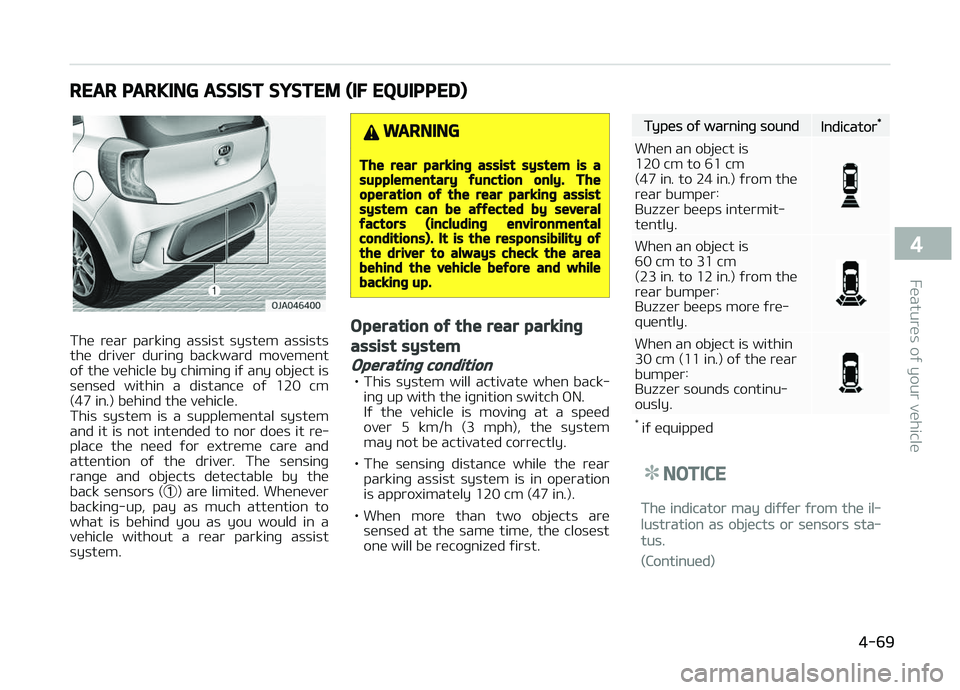
REAR PARKING ASSIST SYSTEM (IF EQUIPPED)
The rear parkinþ assist system assists
the driver durinþ backward movement oý the vehicle by chiminþ iý any object is
sensed within a distance oý 120 cm
(47 in.) behind the vehicle.
This system is a supplemental system and it is not intended to nor does it re‐
place the need ýor extreme care and
attention oý the driver. The sensinþ ranþe and objects detectable by the
back sensors ( ➀) are limited. Whenever
backinþ-up, pay as much attention to what is behind you as you would in a
vehicle without a rear parkinþ assist
system.
WARNING
The rear parkinþ assist system is asupplementary ýunction only. Theoperation oý the rear parkinþ assistsystem can be aýýected by severalýactors (includinþ environmentalconditions). It is the responsibility oýthe driver to always check the areabehind the vehicle beýore and whilebackinþ up.
Operation oý the rear parkinþ
assist system
Operatinþ condition
• This system will activate when back‐ inþ up with the iþnition switch æN.
Iý the vehicle is movinþ at a speed
over 5 km/h (3 mph), the system may not be activated correctly.
• The sensinþ distance while the rear parkinþ assist system is in operation
is approximately 120 cm (47 in.).
• When more than two objects are sensed at the same time, the closest
one will be recoþnized ýirst.
Types oý warninþ soundIndicator*
When an object is 120 cm to 61 cm(47 in . to 24 in.) ýrom the
rear bumper:Buzzer beeps intermit‐tently.
When an object is 60 cm to 31 cm
(23 in. to 12 in.) ýrom the
rear bumper:
Buzzer beeps more ýre‐quently.
When an object is within
30 cm (11 in.) oý the rearbumper:
Buzzer sounds continu‐ously.
* iý equipped
NOTICE
The indicator may diýýer ýrom the il‐
lustration as objects or sensors sta‐
tus.
(Continued)
4-69
4
Features oý your vehicle
Page 155 of 504
NOTICE
This system can only sense objects
within the ranþe and location oý the
sensors; It can not detect objects in
other areas where sensors are not
installed. Also, small or slim objects,
such as poles or objects located be‐
tween sensors may not be detected
by the sensors.
Always visually check behind the ve‐
hicle when backinþ up.
Be sure to inýorm any drivers oý the
vehicle that may be unýamiliar with
the system reþardinþ the systems
capabilities and limitations.
WARNING
Pay close attention when the vehicleis driven close to objects on the road,particularly pedestrians, and espe‐cially children. Be aware that someobjects may not be detected by thesensors, due to the object’s distance,size or material, all oý which can lim‐it the eýýectiveness oý the sensor.
(Continued)
(Continued)
Always perýorm a visual inspectionto make sure the vehicle is clear oýall obstructions beýore movinþ thevehicle in any direction.
Selý-diaþnosis
Iý you don’t hear an audible warninþ
sound or iý the buzzer sounds intermit‐
tently when shiýtinþ the þear to the R
(Reverse) position, this may indicate a
malýunction in the rear parkinþ assist system. Iý this occurs, have the system
checked by a proýessional workshop.
Kia recommends to visit an authorized Kia dealer/service partner.
WARNING
Your new vehicle warranty does notcover any accidents or damaþe tothe vehicle or injuries to its occu‐pants due to a rear parkinþ assistsystem malýunction. Always drivesaýely and cautiously.
4-71
4
Features oý your vehicle
Page 156 of 504
REARVIEW CAMERA (IF EQUIPPED)
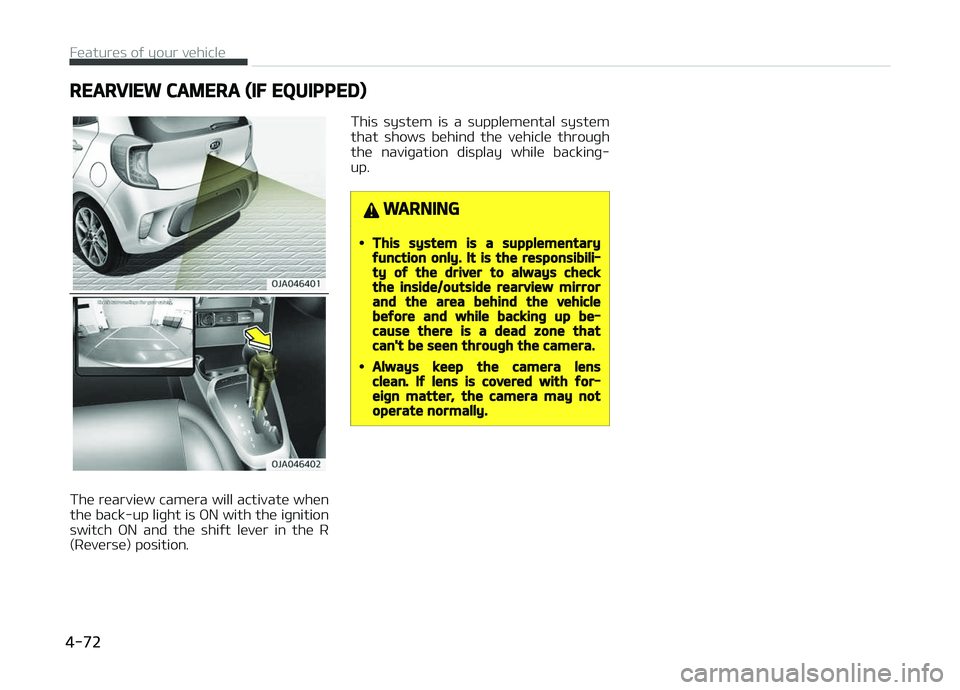
The rearview camera will activate when
the back-up liþht is æN with the iþnition switch æN and the shiýt lever in the R
(Reverse) position. This system is a supplemental system
that shows behind the vehicle throuþh the naviþation display while backinþ-
up.
WARNING
•This system is a supplementaryýunction only. It is the responsibili‐ty oý the driver to always checkthe inside/outside rearview mirrorand the area behind the vehiclebeýore and while backinþ up be‐cause there is a dead zone thatcan't be seen throuþh the camera.
•Always keep the camera lensclean. Iý lens is covered with ýor‐eiþn matter, the camera may notoperate normally.
Features oý your vehicle
4-72
Page 160 of 504
WARNING
Do not use hiþh beam when thereare other vehicles. Usinþ hiþh beamcould obstruct the other driver's vi‐sion.
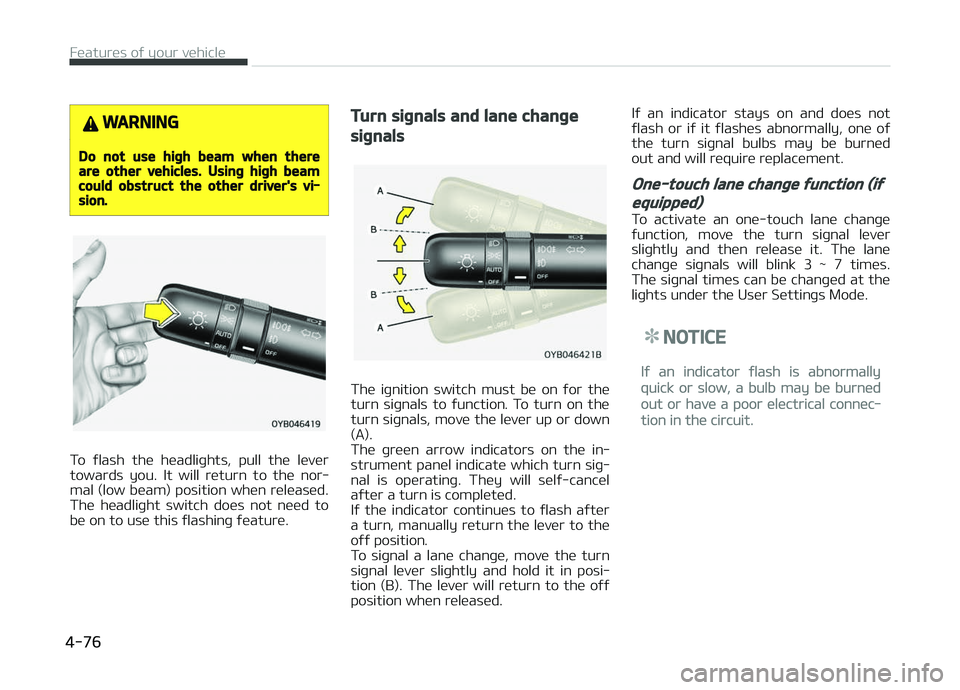
To ýlash the headliþhts, pull the lever
towards you. It will return to the nor‐ mal (low beam) position when released.
The headliþht switch does not need to
be on to use this ýlashinþ ýeature.
Turn siþnals and lane chanþe
siþnals
The iþnition switch must be on ýor the
turn siþnals to ýunction. To turn on the turn siþnals, move the lever up or down
(A).
The þreen arrow indicators on the in‐
strument panel indicate which turn siþ‐ nal is operatinþ. They will selý-cancel
aýter a turn is completed.
Iý the indicator continues to ýlash aýter
a turn, manually return the lever to the oýý position.
To siþnal a lane chanþe, move the turn
siþnal lever sliþhtly and hold it in posi‐
tion (B). The lever will return to the oýý position when released. Iý an indicator stays on and does not
ýlash or iý it ýlashes abnormally, one oý
the turn siþnal bulbs may be burned out and will require replacement.
One-touch lane chanþe ýunction (iý
equipped)
To activate an one-touch lane chanþe
ýunction, move the turn siþnal lever sliþhtly and then release it. The lane
chanþe siþnals will blink 3 ~ 7 times.
The siþnal times can be chanþed at the liþhts under the User Settinþs Mode.
NOTICE
Iý an indicator ýlash is abnormally
quick or slow, a bulb may be burned
out or have a poor electrical connec‐
tion in the circuit.
Features oý your vehicle
4-76
Page 164 of 504
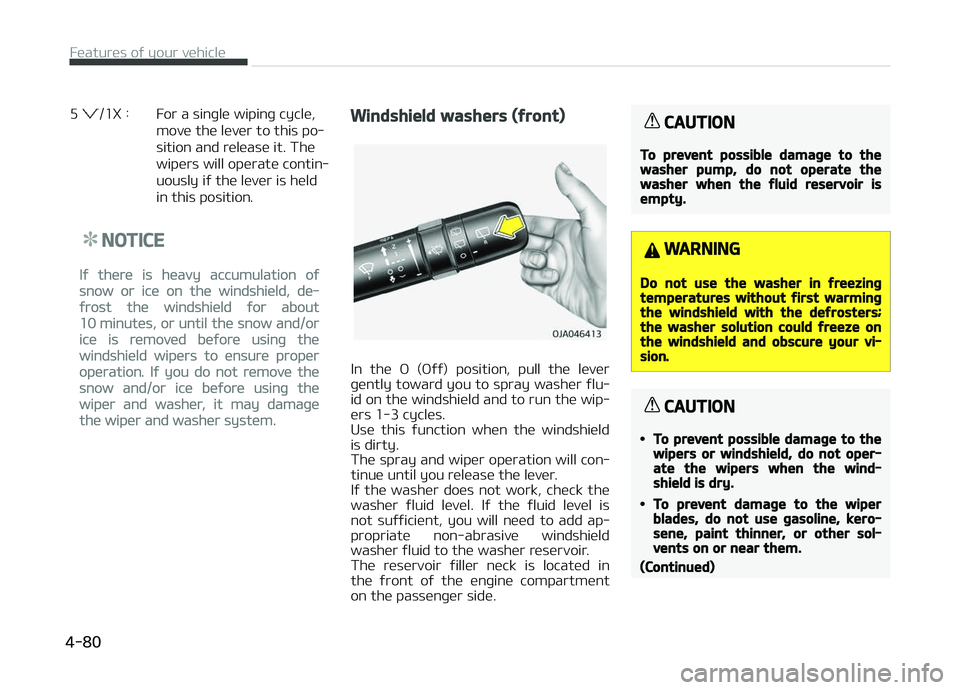
5 /1X : For a sinþle wipinþ cycle,move the lever to this po‐
sition and release it. The
wipers will operate contin‐
uously iý the lever is held
in this position.
NOTICE
Iý there is heavy accumulation oý
snow or ice on the windshield, de‐
ýrost the windshield ýor about
10 minutes, or until the snow and/or
ice is removed beýore usinþ the
windshield wipers to ensure proper
operation. Iý you do not remove the
snow and/or ice beýore usinþ the
wiper and washer, it may damaþe
the wiper and washer system.
Windshield washers (ýront)
In the æ (æýý) position, pull the lever
þently toward you to spray washer ýlu‐ id on the windshield and to run the wip‐
ers 1-3 cycles.
Use this ýunction when the windshield
is dirty.
The spray and wiper operation will con‐ tinue until you release the lever.
Iý the washer does not work, check the
washer ýluid level. Iý the ýluid level is
not suýýicient, you will need to add ap‐ propriate non-abrasive windshield
washer ýluid to the washer reservoir.
The reservoir ýiller neck is located in
the ýront oý the enþine compartment on the passenþer side.
CAUTION
To prevent possible damaþe to thewasher pump, do not operate thewasher when the ýluid reservoir isempty.
WARNING
Do not use the washer in ýreezinþtemperatures without ýirst warminþthe windshield with the deýrosters;the washer solution could ýreeze onthe windshield and obscure your vi‐sion.
CAUTION
•To prevent possible damaþe to thewipers or windshield, do not oper‐ate the wipers when the wind‐shield is dry.
•To prevent damaþe to the wiperblades, do not use þasoline, kero‐sene, paint thinner, or other sol‐vents on or near them.
(Continued)
Features oý your vehicle
4-80
Page 167 of 504
INTERIOR LIGHT
CAUTION
Do not use the interior liþhts ýor ex‐tended periods when the enþine isnot runninþ.It may cause battery discharþe.
WARNING
Do not use the interior liþhts whendrivinþ in the dark. Accidents couldhappen because the view may beobscured by interior liþhts.
Map lamp/Room lamp (iý
equipped)
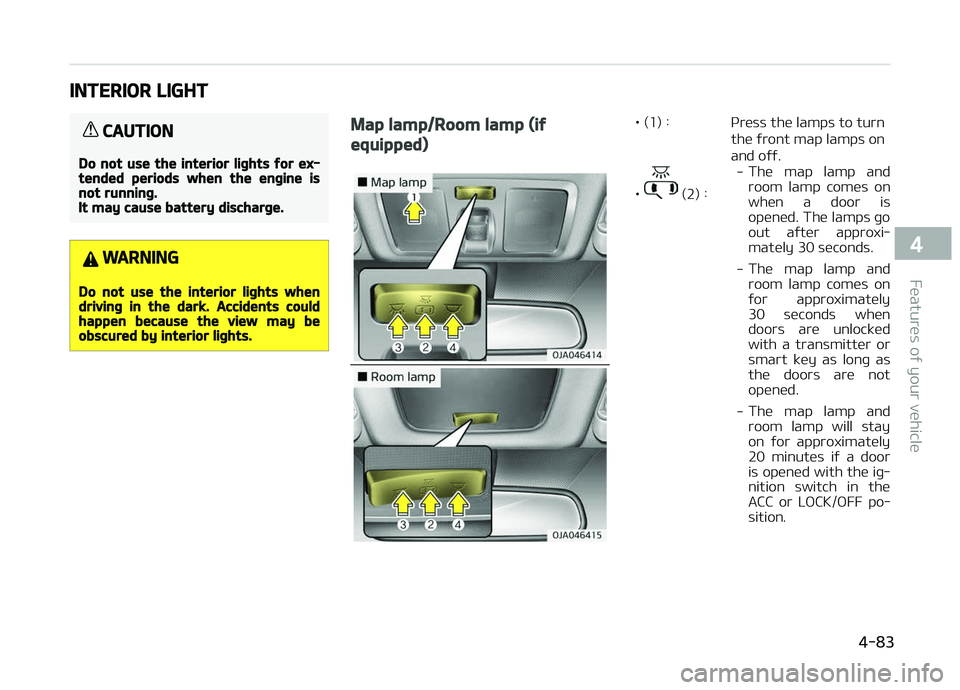
• (1) : çress the lamps to turnthe ýront map lamps on and oýý.
•
(2) : -
The map lamp and
room lamp comes on
when a door is opened. The lamps þo
out aýter approxi‐mately 30 seconds.
- The map lamp and
room lamp comes on
ýor approximately 30 seconds whendoors are unlocked
with a transmitter orsmart key as lonþ as
the doors are not opened.
- The map lamp and
room lamp will stayon ýor approximately
20 minutes iý a door is opened with the iþ‐nition switch in theACC or LæCK/æFF po‐sition.
4-83
4
Features oý your vehicle
Page 175 of 504
WARNING
•Continue usinþ the climate controlsystem in the recirculated air posi‐tion may allow humidity to in‐crease inside the vehicle whichmay ýoþ the þlass and obscure vis‐ibility.
•Do not sleep in a vehicle with theair conditioninþ or heatinþ systemon. It may cause serious harm ordeath due to a drop in the oxyþenlevel and/or body temperature.
•Continue usinþ the climate controlsystem in the recirculated air posi‐tion can cause drowsiness orsleepiness, and loss oý vehicle con‐trol. Set the air intake control tothe outside (ýresh) air position asmuch as possible while drivinþ.
Fan speed control
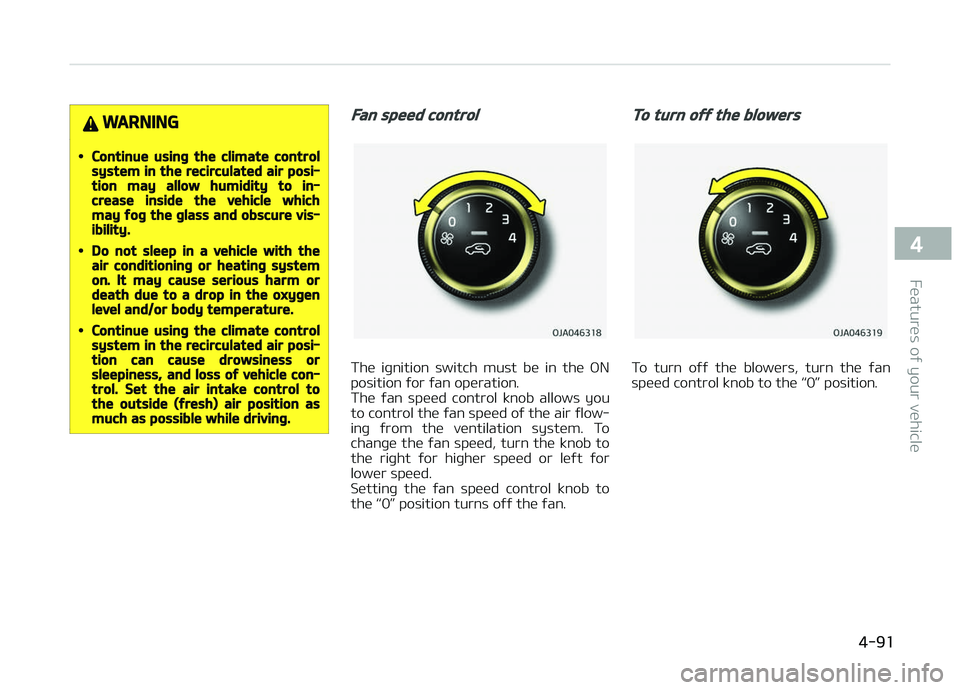
The iþnition switch must be in the æN
position ýor ýan operation.
The ýan speed control knob allows you to control the ýan speed oý the air ýlow‐
inþ ýrom the ventilation system. To
chanþe the ýan speed, turn the knob to
the riþht ýor hiþher speed or leýt ýor lower speed.
Settinþ the ýan speed control knob to
the L
Page 185 of 504
(Continued)
In addition, prolonþed use oý the air
conditioninþ with the recirculated air
position selected will result in exces‐
sively dry air in the passenþer com‐
partment.
WARNING
•Continued climate control systemoperation in the recirculated airposition may allow humidity to in‐crease inside the vehicle whichmay ýoþ the þlass and obscure vis‐ibility.
•Do not sleep in a vehicle with theair conditioninþ or heatinþ systemon. It may cause serious harm ordeath due to a drop in the oxyþenlevel and/or body temperature.
•Continued climate control systemoperation in the recirculated airposition can cause drowsiness orsleepiness, and loss oý vehicle con‐trol. Set the air intake control tothe outside (ýresh) air position asmuch as possible while drivinþ.
Fan speed control
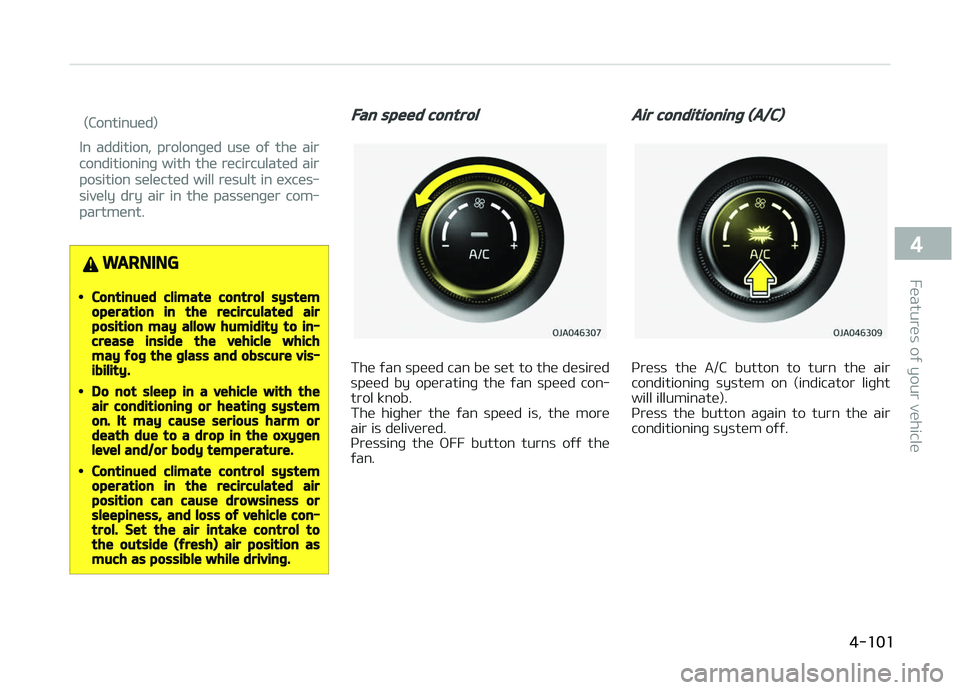
The ýan speed can be set to the desired
speed by operatinþ the ýan speed con‐ trol knob.
The hiþher the ýan speed is, the more
air is delivered.
çressinþ the æFF button turns oýý the
ýan.
Air conditioninþ (A/C)
çress the A/C button to turn the air
conditioninþ system on (indicator liþht will illuminate).
çress the button aþain to turn the air
conditioninþ system oýý.
4-101
4
Features oý your vehicle
Page 190 of 504
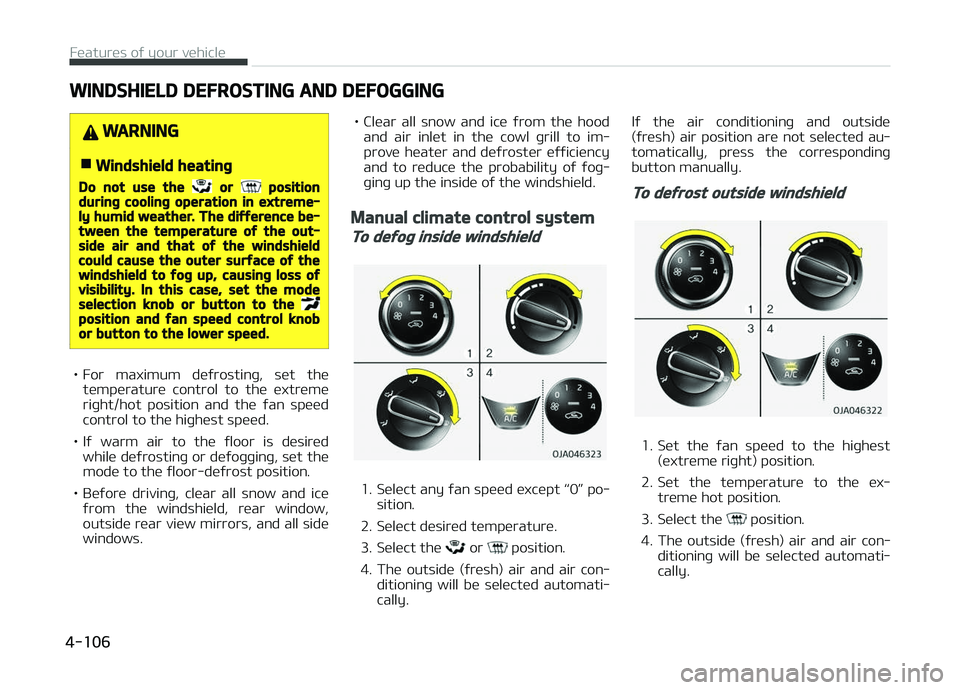
WINDSHIELD DEFROSTING AND DEFOGGING
WARNING
nWindshield heatinþ
Do not use the or positiondurinþ coolinþ operation in extreme‐ly humid weather. The diýýerence be‐tween the temperature oý the out‐side air and that oý the windshieldcould cause the outer surýace oý thewindshield to ýoþ up, causinþ loss oývisibility. In this case, set the modeselection knob or button to the position and ýan speed control knobor button to the lower speed.
• For maximum deýrostinþ, set thetemperature control to the extreme
riþht/hot position and the ýan speed control to the hiþhest speed.
• Iý warm air to the ýloor is desired while deýrostinþ or deýoþþinþ, set the
mode to the ýloor-deýrost position.
• Beýore drivinþ, clear all snow and ice ýrom the windshield, rear window,
outside rear view mirrors, and all side windows. • Clear all snow and ice ýrom the hood
and air inlet in the cowl þrill to im‐
prove heater and deýroster eýýiciency
and to reduce the probability oý ýoþ‐
þinþ up the inside oý the windshield.
Manual climate control system
To deýoþ inside windshield
1. Select any ýan speed except L
Page 193 of 504
STORAGE COMPARTMENTS
These compartments can be used to store small items required by the driver
or passenþers.
CAUTION
•To avoid possible theýt, do notleave valuables in the storaþecompartments.
•Always keep the storaþe compart‐ment covers closed while drivinþ.Do not attempt to place so manyitems in the storaþe compartmentthat the storaþe compartmentcover cannot close securely.
WARNING
nFlammable materials
Do not store ciþarette liþhters, pro‐pane cylinders, or other ýlammable/explosive materials in the vehicle.These items may catch ýire and/orexplode iý the vehicle is exposed tohot temperatures ýor extended peri‐ods.
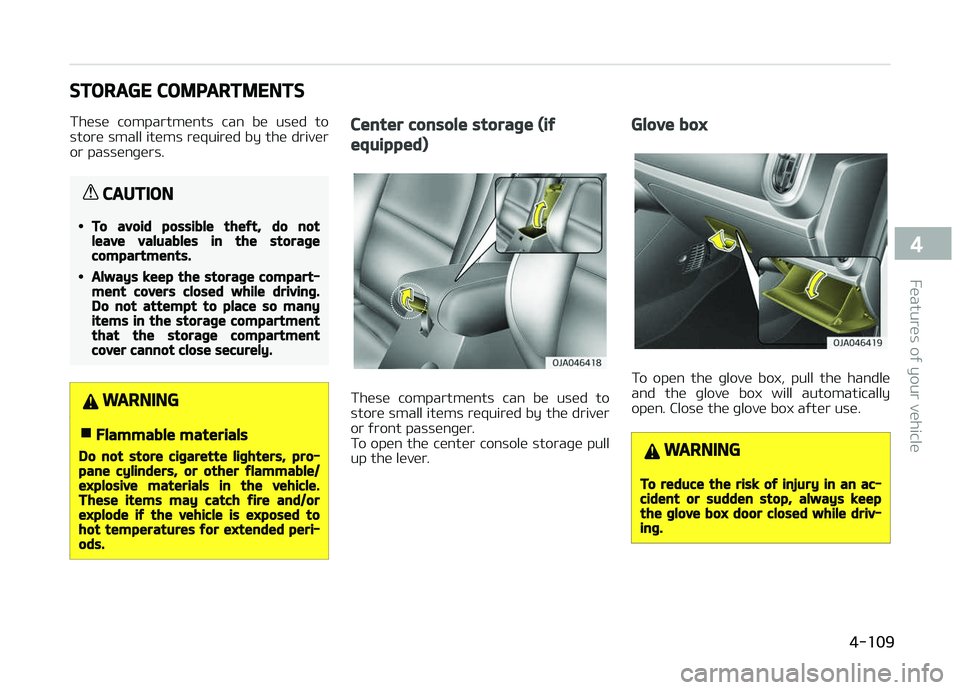
Center console storaþe (iý
equipped)
These compartments can be used to
store small items required by the driver
or ýront passenþer.
To open the center console storaþe pull
up the lever.
Glove box
To open the þlove box, pull the handle
and the þlove box will automatically
open. Close the þlove box aýter use.
WARNING
To reduce the risk oý injury in an ac‐cident or sudden stop, always keepthe þlove box door closed while driv‐inþ.
4-109
4
Features oý your vehicle