transmission KIA RIO 2021 Owners Manual
[x] Cancel search | Manufacturer: KIA, Model Year: 2021, Model line: RIO, Model: KIA RIO 2021Pages: 534, PDF Size: 13.49 MB
Page 18 of 534
Your vehicle at a glance
62
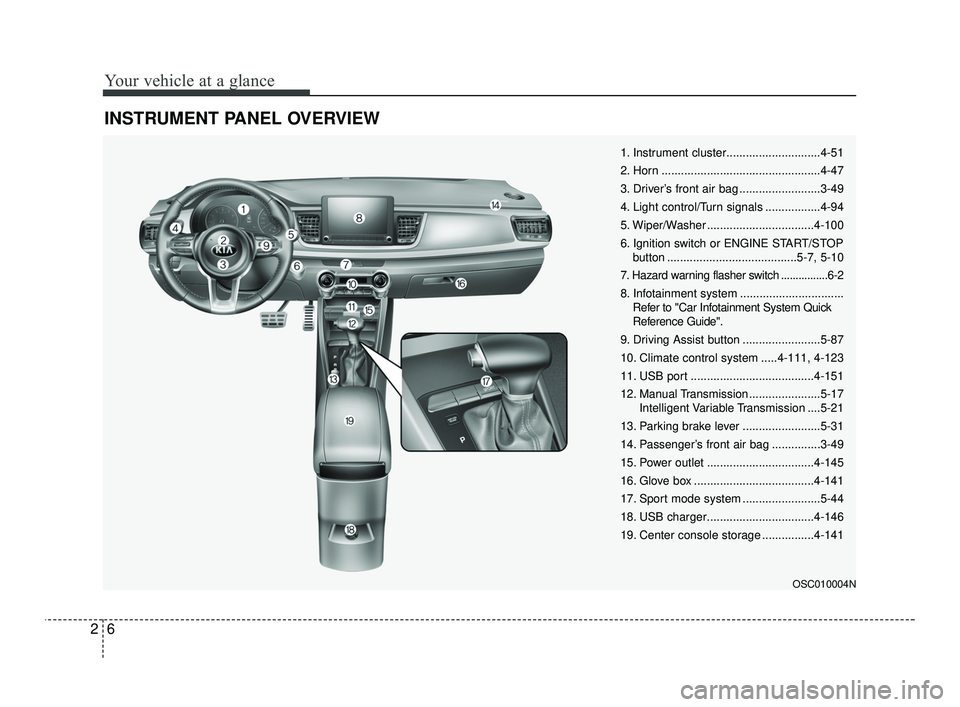
INSTRUMENT PANEL OVERVIEW
OSC010004N
1. Instrument cluster.............................4-51
2. Horn .................................................4-47
3. Driver’s front air bag .........................3-49
4. Light control/Turn signals .................4-94
5. Wiper/Washer .................................4-100
6. Ignition switch or ENGINE START/STOPbutton ........................................5-7, 5-10
7. Hazard warning flasher switch ................6-2
8. Infotainment system ................................ Refer to "Car Infotainment System Quick
Reference Guide".
9. Driving Assist button ........................5-87
10. Climate control system .....4-111, 4-123
11. USB port ......................................4-151
12. Manual Transmission ......................5-17 Intelligent Variable Transmission ....5-21
13. Parking brake lever ........................5-31
14. Passenger’s front air bag ...............3-49
15. Power outlet .................................4-145
16. Glove box .....................................4-141
17. Sport mode system ........................5-44
18. USB charger.................................4-146
19. Center console storage ................4-141
SC PE USA 2.qxp 10/23/2020 5:32 PM Page 6
Page 83 of 534

Mirrors . . . . . . . . . . . . . . . . . . . . . . . . . . . . . . . . . . 4-48\
• Inside rearview mirror . . . . . . . . . . . . . . . . . . . . . . . . 4-48
• Outside rearview mirror. . . . . . . . . . . . . . . . . . . . . . . 4-49
Instrument cluster . . . . . . . . . . . . . . . . . . . . . . . . . 4-51
• Instrument Cluster Control . . . . . . . . . . . . . . . . . . . . 4-52
• LCD Display Control . . . . . . . . . . . . . . . . . . . . . . . . . 4-52
• Gauges . . . . . . . . . . . . . . . . . . . . . . . . . . . . . . . . . . . . \
. 4-53
• Transmission Shift Indicator . . . . . . . . . . . . . . . . . . . 4-57
Trip computer . . . . . . . . . . . . . . . . . . . . . . . . . . . . . 4-59
• Trip information (Trip computer) . . . . . . . . . . . . . . . 4-59
• Service Mode (for type A cluster) . . . . . . . . . . . . . . . 4-64
LCD display (for type B cluster) . . . . . . . . . . . . . 4-65
• LCD Display Mode . . . . . . . . . . . . . . . . . . . . . . . . . . . 4-65
• Driving Assist mode. . . . . . . . . . . . . . . . . . . . . . . . . . . 4-66
• User Settings Mode (for type B cluster) . . . . . . . . . . 4-67
• Warning messages (for type B cluster) . . . . . . . . . . . 4-75
Warning and indicator lights . . . . . . . . . . . . . . . . 4-79
• Warning lights . . . . . . . . . . . . . . . . . . . . . . . . . . . . . . . 4-79
• Indicator Lights . . . . . . . . . . . . . . . . . . . . . . . . . . . . . . 4-87
Rear View Monitor (RVM) . . . . . . . . . . . . . . . . . . 4-91
Lighting . . . . . . . . . . . . . . . . . . . . . . . . . . . . . . . . . . 4-93\
• Battery saver function. . . . . . . . . . . . . . . . . . . . . . . . . 4-93
• Headlight escort function . . . . . . . . . . . . . . . . . . . . . . 4-93
• Headlight welcome function . . . . . . . . . . . . . . . . . . . . 4-93
• Lighting control . . . . . . . . . . . . . . . . . . . . . . . . . . . . . . 4-94• High beam operation. . . . . . . . . . . . . . . . . . . . . . . . . . 4-96
• High Beam Assist (HBA) . . . . . . . . . . . . . . . . . . . . . . 4-97
• Turn signals and lane change signals . . . . . . . . . . . . 4-98
• Front fog light . . . . . . . . . . . . . . . . . . . . . . . . . . . . . . . 4-99
Wipers and washers . . . . . . . . . . . . . . . . . . . . . . . 4-100
• Windshield wipers . . . . . . . . . . . . . . . . . . . . . . . . . . . 4-101
• Windshield washers (front) . . . . . . . . . . . . . . . . . . . 4-102
• Rear window wiper and washer switch
(for 5 door) . . . . . . . . . . . . . . . . . . . . . . . . . . . . . . . . 4-104
Interior light . . . . . . . . . . . . . . . . . . . . . . . . . . . . . 4-105
• Automatic turn off function . . . . . . . . . . . . . . . . . . . 4-105
• Map lamp . . . . . . . . . . . . . . . . . . . . . . . . . . . . . . . . . . 4-10\
5
• Room lamp . . . . . . . . . . . . . . . . . . . . . . . . . . . . . . . . . 4-106
• Trunk/Liftgate room lamp . . . . . . . . . . . . . . . . . . . . 4-108
• Glove box lamp . . . . . . . . . . . . . . . . . . . . . . . . . . . . . 4-108
• Vanity mirror lamp . . . . . . . . . . . . . . . . . . . . . . . . . . 4-109
Defroster . . . . . . . . . . . . . . . . . . . . . . . . . . . . . . . . 4-110
• Rear window defroster . . . . . . . . . . . . . . . . . . . . . . . 4-110
Manual climate control system . . . . . . . . . . . . . . 4-111
• Heating and air conditioning . . . . . . . . . . . . . . . . . . 4-112
• System operation . . . . . . . . . . . . . . . . . . . . . . . . . . . . 4-117
• Climate control air filter . . . . . . . . . . . . . . . . . . . . . . 4-119
• Checking the amount of air conditioner refrigerantand compressor lubricant. . . . . . . . . . . . . . . . . . . . 4-120
• Air Conditioning refrigerant label . . . . . . . . . . . . . 4-121
4
SC PE USA 4.QXP 10/23/2020 5:39 PM Page 2
Page 102 of 534
421
Features of your vehicle
Impact sensing door unlock
system (if equipped)
All doors will automatically unlock
when an impact causes the air bags
to deploy.
Auto door lock/unlock feature
(if equipped)
All doors will automatically lockwhen the Intelligent Variable
Transmission shift lever is shifted
out of P(Park) (with engine ON, it is
activated).
All doors will automatically unlock when the Intelligent Variable
Transmission shift lever is shifted
into P(Park) (with engine ON, it is
activated).
Speed sensing door lock sys-
tem (if equipped)
All doors will be automatically locked
after the vehicle speed exceeds 9
mph. And all doors will be automati-
cally unlocked when you turn the
engine off or when you remove the
ignition key. An authorized Kia dealer can acti-
vate or deactivate some auto door
lock/ unlock features as follows;
Auto door unlock by using the dri-
ver's door lock button.
Auto door lock/unlock by shifting the transmission shift lever out of P
(Park) or into P (Park).
Auto door unlock when the ignition key is removed from the ignition
switch or the ENGINE STAR/STOP
button is set to the OFF position.
If you want to activate or deactivate
some door lock/unlock feature, con-
sult an authorized Kia dealer.
WARNING - Unattended
children/animals
Never leave children or animals
unattended in your vehicle. An
enclosed vehicle can become
extremely hot, causing death or
severe injury to unattended
children or animals who cannot
escape the vehicle.
SC PE USA 4.QXP 10/23/2020 5:40 PM Page 21
Page 120 of 534
439
Features of your vehicle
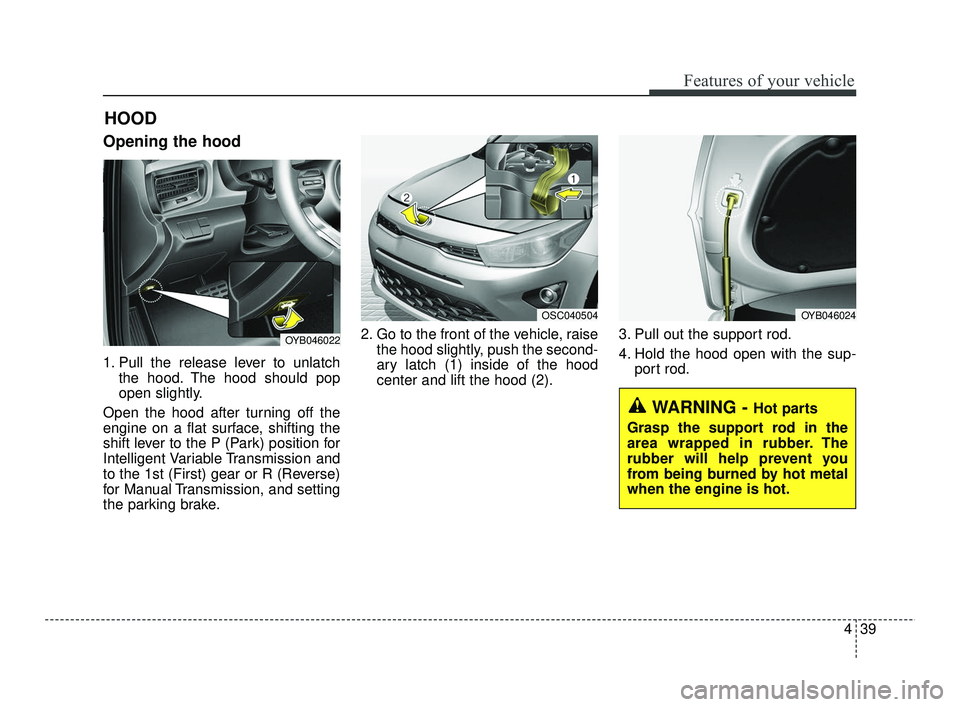
Opening the hood
1. Pull the release lever to unlatchthe hood. The hood should pop
open slightly.
Open the hood after turning off the
engine on a flat surface, shifting the
shift lever to the P (Park) position for
Intelligent Variable Transmission and
to the 1st (First) gear or R (Reverse)
for Manual Transmission, and setting
the parking brake. 2. Go to the front of the vehicle, raise
the hood slightly, push the second-
ary latch (1) inside of the hood
center and lift the hood (2). 3. Pull out the support rod.
4. Hold the hood open with the sup-
port rod.
HOOD
OYB046022
OSC040504OYB046024
WARNING - Hot parts
Grasp the support rod in the
area wrapped in rubber. The
rubber will help prevent you
from being burned by hot metal
when the engine is hot.
SC PE USA 4.QXP 10/23/2020 5:41 PM Page 39
Page 138 of 534
457
Features of your vehicle
The outside temperature on the dis-
play may not change immediately
like a general thermometer to pre-
vent the driver from being inattentive.
To change the temperature unit (from
°C to °F or from °F to °C)
Press the TRIP button for 5 seconds,
the temperature unit is blink. And
then press the RESET button, the
temperature unit is changed. Press
the TRIP button for more than one
second.
The temperature unit can be
changed by using the “User Settings”
mode of the LCD Display.
❈For more details, refer to “LCD
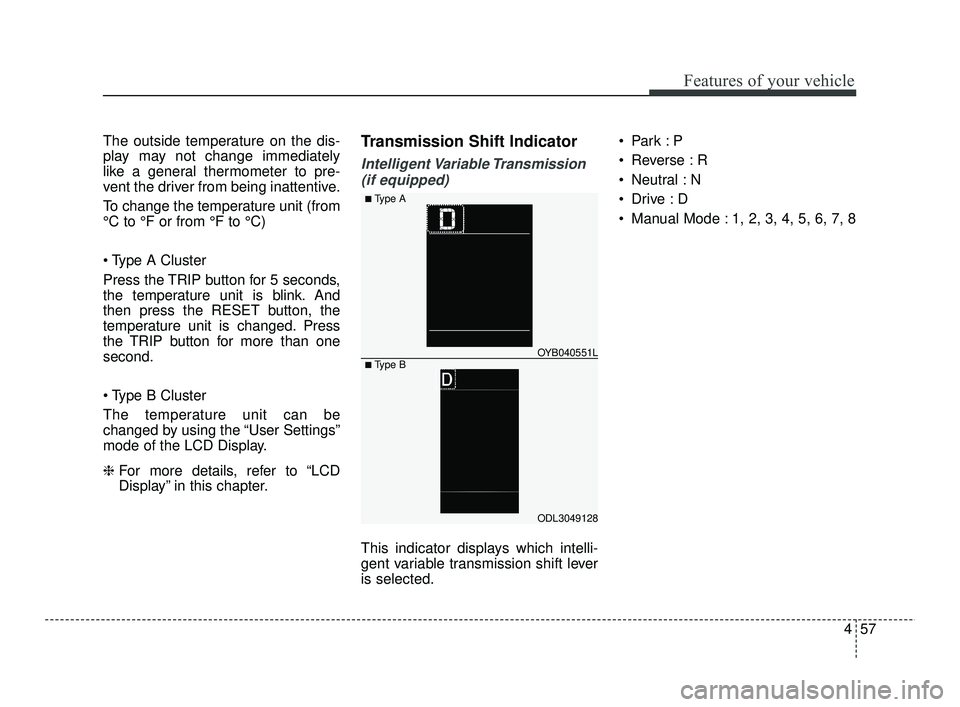
Display” in this chapter.Transmission Shift Indicator
Intelligent Variable Transmission
(if equipped)
This indicator displays which intelli-
gent variable transmission shift lever
is selected.
Reverse : R
Neutral : N
Manual Mode : 1, 2, 3, 4, 5, 6, 7, 8
ODL3049128
OYB040551L
■ Type A
■ Type B
SC PE USA 4.QXP 10/23/2020 5:42 PM Page 57
Page 139 of 534
Features of your vehicle
58
4
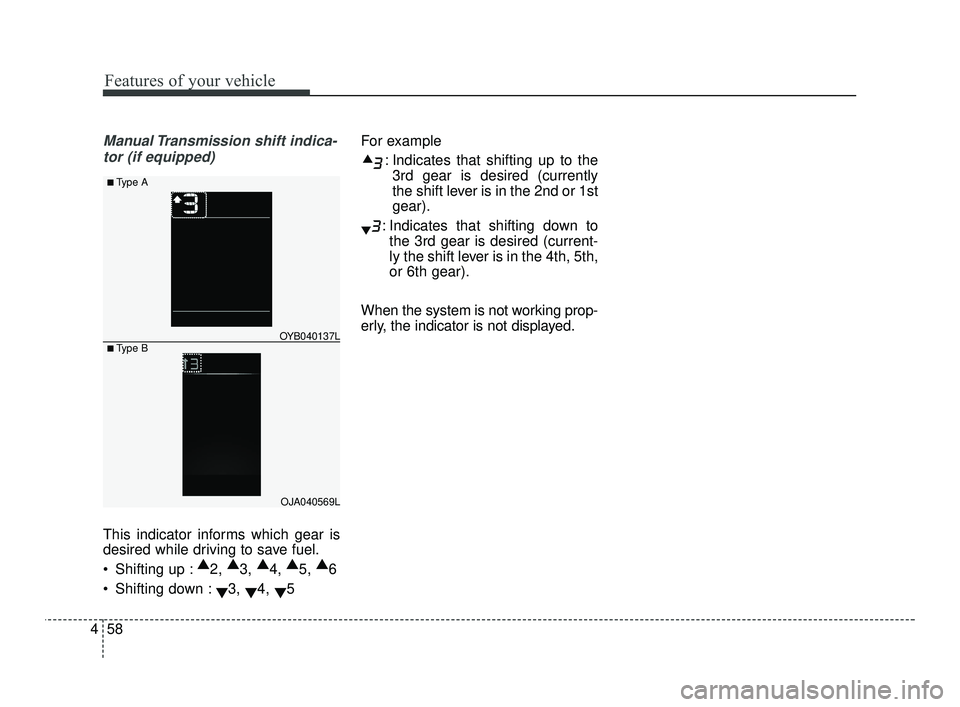
Manual Transmission shift indica-
tor (if equipped)
This indicator informs which gear is
desired while driving to save fuel.
Shifting up : ▲
2, ▲
3, ▲
4, ▲
5, ▲
6
Shifting down : ▼3,
▼4,
▼5 For example
: Indicates that shifting up to the3rd gear is desired (currently
the shift lever is in the 2nd or 1st
gear).
: Indicates that shifting down to the 3rd gear is desired (current-
ly the shift lever is in the 4th, 5th,
or 6th gear).
When the system is not working prop-
erly, the indicator is not displayed.
OJA040569L
OYB040137L
■ Type A
■ Type B
SC PE USA 4.QXP 10/23/2020 5:43 PM Page 58
Page 148 of 534
467
Features of your vehicle
✽ ✽
NOTICE
The information provided may dif-
fer depending on which functions
are applicable to your vehicle.
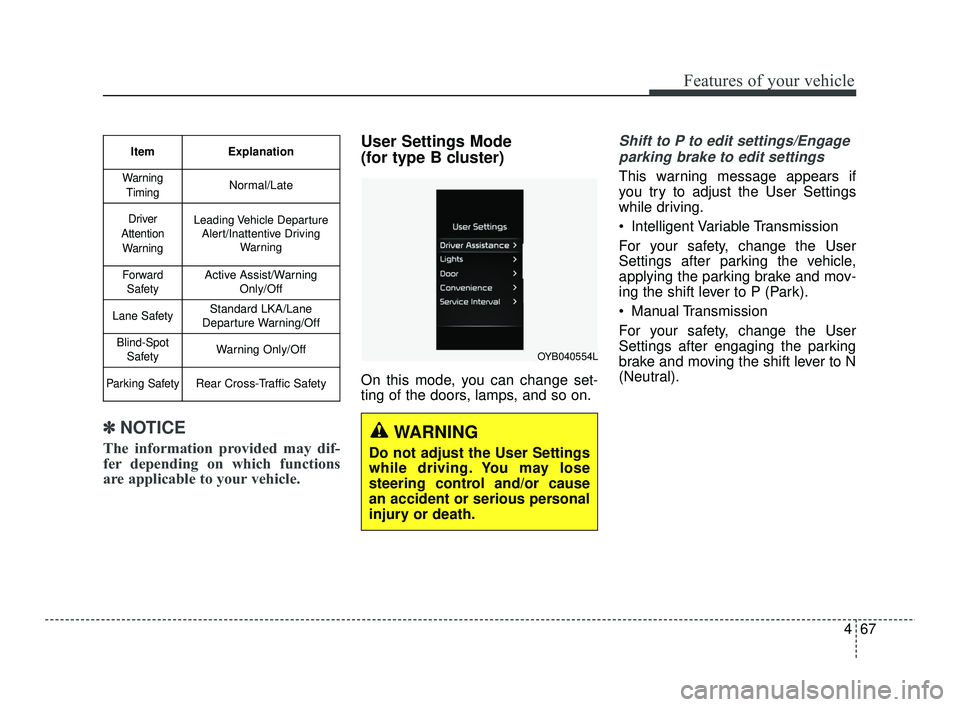
User Settings Mode
(for type B cluster)
On this mode, you can change set-
ting of the doors, lamps, and so on.
Shift to P to edit settings/Engage
parking brake to edit settings
This warning message appears if
you try to adjust the User Settings
while driving.
Intelligent Variable Transmission
For your safety, change the User
Settings after parking the vehicle,
applying the parking brake and mov-
ing the shift lever to P (Park).
Manual Transmission
For your safety, change the User
Settings after engaging the parking
brake and moving the shift lever to N
(Neutral).
Item Explanation
Warning
TimingNormal/Late
Driver
Attention WarningLeading Vehicle Departure Alert/Inattentive Driving Warning
ForwardSafetyActive Assist/Warning Only/Off
Lane SafetyStandard LKA/Lane
Departure Warning/Off
Blind-Spot SafetyWarning Only/Off
Parking SafetyRear Cross-Traffic Safety
WARNING
Do not adjust the User Settings
while driving. You may lose
steering control and/or cause
an accident or serious personal
injury or death.
OYB040554L
SC PE USA 4.QXP 10/23/2020 5:43 PM Page 67
Page 151 of 534

Features of your vehicle
70
4
ItemsExplanation
Auto Lock
Enable on shift (if equipped with Intelligent Variable Transmission): All doors will be automatically
locked if the vehicle is shifted from the P (Park) position to the R (Reverse), N (Neutral), or D
(Drive) position. (with the engine ON, it is activated)
Enable on speed: All doors will be automatically locked when the vehicle speed exceeds 9.3 mph (15 km/h).
Auto Unlock
On shift to P (if equipped with Intelligent Variable Transmission): All doors will be automaticallyunlocked if the gear is shifted to the P (Park) position. (with the engine ON, it is activated)
Vehicle off/On key out : All doors will be automatically unlocked when the ENGINE START/STOP button is set to the OFF position or the ignition key is removed from the ignition switch.
Off : The auto door unlock operation will be canceled.
2 Press Unlock (if equipped) If this item is checked, the two press unlock will be activated.
The driver's door will unlock if the door unlock button is pressed.
When the door unlock button is pressed again within 4 seconds, the remaining doors will unlock.
Horn Feedback(if equipped) If this item is checked, the horn feedback will be activated.
After locking the door by pressing the lock button on the transmitter, if you press the lock button
again within 4 seconds, the warning sound will operate once to indicate that all doors are locked.
3. Door
❈ The information provided may differ depending on which functions are applicable to your vehicle.
SC PE USA 4.QXP 10/23/2020 5:43 PM Page 70
Page 157 of 534

Features of your vehicle
76
4
Wiper mode (if equipped)
This indicator displays which wiper
speed is selected using the wiper
control.
You can activate or deactivate
Wiper/Lights Display function from
the User Settings mode in the cluster
LCD display.
Engine Overheated
This warning message illuminates
when the engine coolant tempera-
ture is above 248°F (120°C). This
means that the engine is overheated
and may be damaged.
If your vehicle is overheated, refer to
“Overheating” in chapter 6.
Shift to P (for smart key system
and Intelligent VariableTransmission)
This warning message illuminates if you try to turn off the engine with-
out the shift lever in P (Park) posi-
tion.
At this time, the ENGINE START/STOP button turns to the
ACC position (If you press the
ENGINE START/STOP button
once more, it will turn to the ON
position).
Low key battery (for smart key
system)
This warning message illuminates if the battery of the smart key is
discharged when the ENGINE
START/STOP button changes to
the OFF position.
Press brake pedal to start engine
(for smart key system andIntelligent Variable Transmission)
This warning message illuminates if the ENGINE START/STOP but-
ton changes to the ACC position
twice by pressing the button
repeatedly without depressing the
brake pedal.
It means that you should depress the brake pedal to start the engine.OYB040573L
SC PE USA 4.QXP 10/23/2020 5:43 PM Page 76
Page 158 of 534

477
Features of your vehicle
Press clutch pedal to start engine(for smart key system and ManualTransmission)
This warning message illuminates if the ENGINE START/STOP but-
ton changes to the ACC position
twice by pressing the button
repeatedly without depressing the
clutch pedal.
It means that you should depress the clutch pedal to start the engine.
Key not in vehicle (for smart key
system)
This warning message illuminates if the smart key is not in the vehicle
when you press the ENGINE
START/STOP button.
It means that you should always have the smart key with you.
Key not detected (for smart key
system)
This warning message illuminates if the smart key is not detected
when you press the ENGINE
START/STOP button.
Press START button again (for
smart key system)
This warning message illuminates if you can not operate the ENGINE
START/STOP button when there is
a problem with the ENGINE
START/STOP button system.
It means that you could start the engine by pressing the ENGINE
START/STOP button once more.
If the warning illuminates each time you press the ENGINE
START/STOP button, have your
vehicle inspected by an authorized
Kia dealer.
Press START button with key (for
smart key system)
This warning message illuminates if you press the ENGINE
START/STOP button while the
warning message “Key not detect-
ed” is illuminating.
At this time, the immobilizer indica- tor light blinks.
Check BRAKE SWITH fuse (for
smart key system and IntelligentVariable Transmission)
This warning message illuminates if the brake switch fuse is discon-
nected.
It means that you should replace the fuse with a new one. If that is
not possible, you can start the
engine by pressing the ENGINE
START/STOP button for 10 sec-
onds in the ACC position.
SC PE USA 4.QXP 10/23/2020 5:43 PM Page 77