battery KIA RIO 2022 Owner's Manual
[x] Cancel search | Manufacturer: KIA, Model Year: 2022, Model line: RIO, Model: KIA RIO 2022Pages: 528, PDF Size: 11.8 MB
Page 216 of 528
4137
Features of your vehicle
Defogging Logic
To reduce the probability of fogging
up inside of the windshield, the air
intake or air conditioning are con-
trolled automatically according to
certain conditions such as or
position. Logic can be disabled and
enabled by doing following :
Manual climate control system
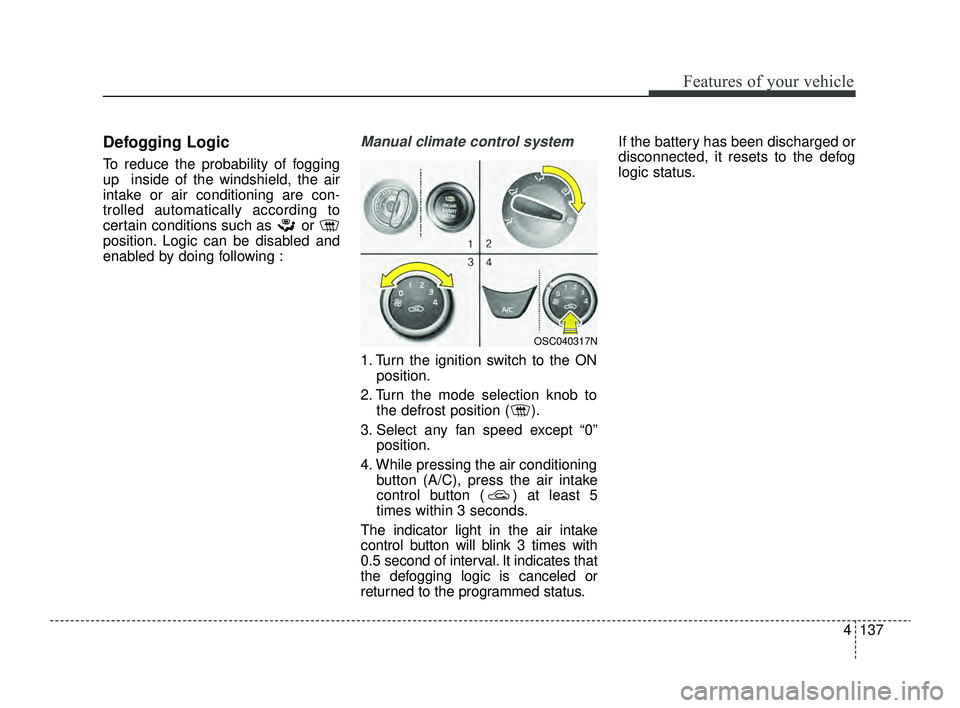
1. Turn the ignition switch to the ONposition.
2. Turn the mode selection knob to the defrost position ( ).
3. Select any fan speed except “0” position.
4. While pressing the air conditioning button (A/C), press the air intake
control button ( ) at least 5
times within 3 seconds.
The indicator light in the air intake
control button will blink 3 times with
0.5 second of interval. It indicates that
the defogging logic is canceled or
returned to the programmed status. If the battery has been discharged or
disconnected, it resets to the defog
logic status.
OSC040317N
SC PE USA 4.QXP 9/9/2021 6:08 PM Page 137
Page 217 of 528
Features of your vehicle
138
4
Automatic climate control system
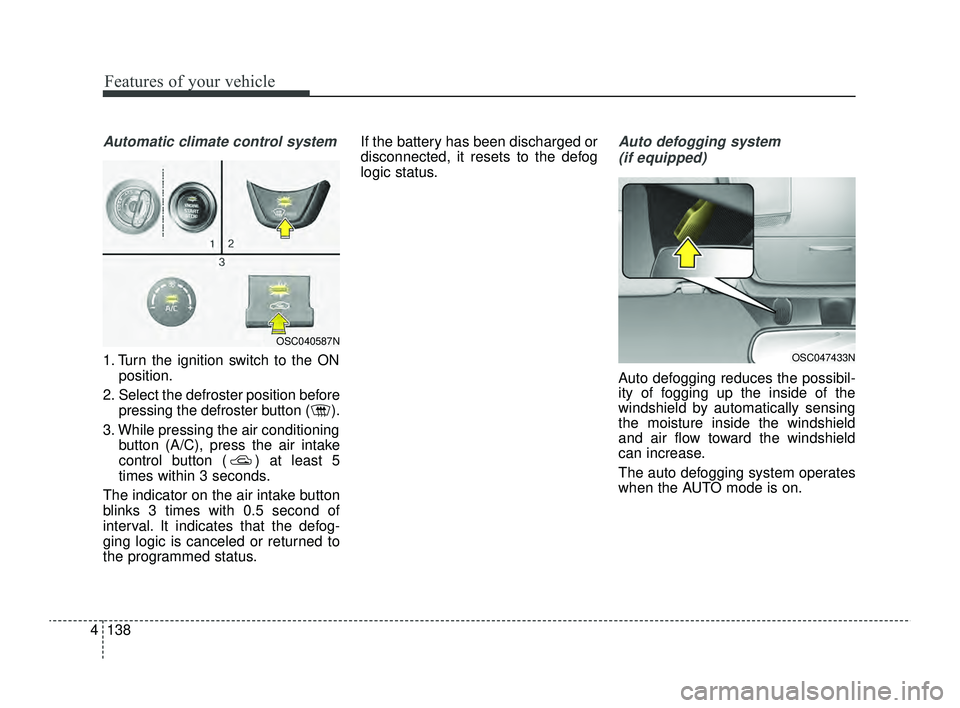
1. Turn the ignition switch to the ON
position.
2. Select the defroster position before pressing the defroster button ( ).
3. While pressing the air conditioning button (A/C), press the air intake
control button ( ) at least 5
times within 3 seconds.
The indicator on the air intake button
blinks 3 times with 0.5 second of
interval. It indicates that the defog-
ging logic is canceled or returned to
the programmed status. If the battery has been discharged or
disconnected, it resets to the defog
logic status.
Auto defogging system
(if equipped)
Auto defogging reduces the possibil-
ity of fogging up the inside of the
windshield by automatically sensing
the moisture inside the windshield
and air flow toward the windshield
can increase.
The auto defogging system operates
when the AUTO mode is on.
OSC047433N
OSC040587N
SC PE USA 4.QXP 9/9/2021 6:08 PM Page 138
Page 218 of 528
4139
Features of your vehicle
This indicator illuminates
when the auto defogging
system senses moisture
on the inside of the wind-
shield and is activated.
If more moisture is in the vehicle, the
auto defogging system addresses
excess moisture on the inside of the
windshield in stages as follows:
Step 1 : Operating the air condition- ing
Step 2 : Outside air position
Step 3 : Blowing air flow toward the windshield
Step 4 : Increasing air flow toward the windshield
If your vehicle is equipped with the
auto defogging system, it is automat-
ically activated when the conditions
are met.
However, if you would like to deacti-
vate the auto defogging system,
keep the front defroster button
pressed longer than 3 seconds. The “ADS OFF” symbol will be
shown in the climate display to
inform you that the system is deacti-
vated.
To re-activate the auto defogging
system again, follow the procedure
mentioned above and the “ADS
OFF” symbol will disappear.
If the battery has been disconnected
or discharged, it resets to the auto
defogging status.
✽ ✽
NOTICE
• When the air conditioning is
turned on by Auto defogging sys-
tem, if you try to turn off the air
conditioning, the indicator will
blink 3 times and the air condi-
tioning will not be turned off.
• For efficiency, do not select recir- culated air position while Auto
defogging system is operating.
CAUTION
Do not remove the sensor cover
located on the upper end of thedriver side windshield glass.Damage to the system partscould occur and may not be cov-ered by your vehicle warranty.
SC PE USA 4.QXP 9/9/2021 6:08 PM Page 139
Page 223 of 528
Features of your vehicle
144
4
Power outlet
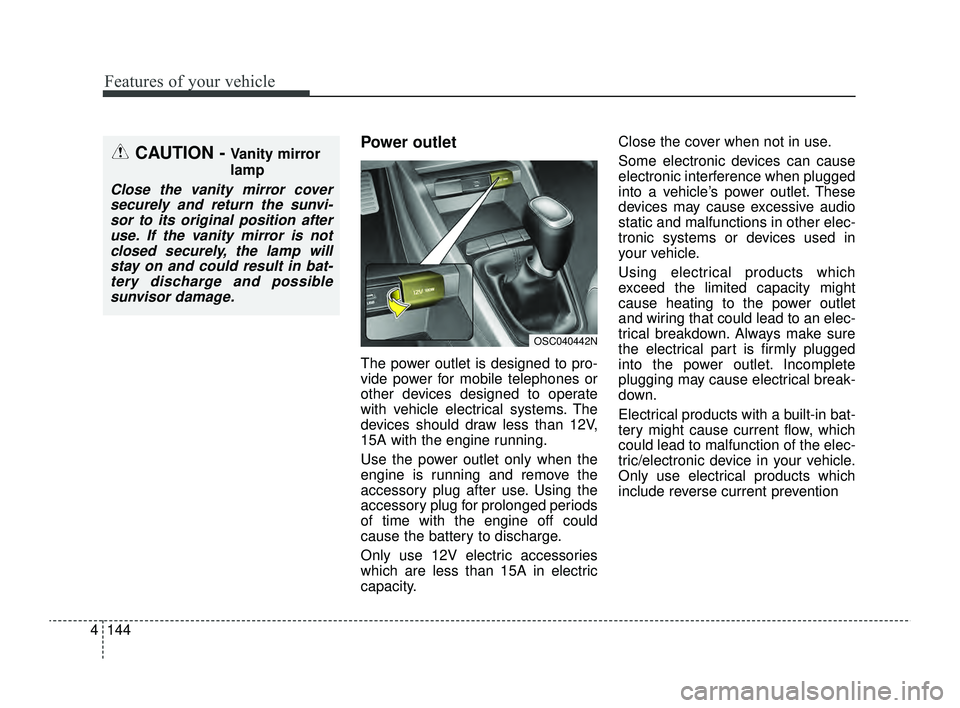
The power outlet is designed to pro-
vide power for mobile telephones or
other devices designed to operate
with vehicle electrical systems. The
devices should draw less than 12V,
15A with the engine running.
Use the power outlet only when the
engine is running and remove the
accessory plug after use. Using the
accessory plug for prolonged periods
of time with the engine off could
cause the battery to discharge.
Only use 12V electric accessories
which are less than 15A in electric
capacity. Close the cover when not in use.
Some electronic devices can cause
electronic interference when plugged
into a vehicle’s power outlet. These
devices may cause excessive audio
static and malfunctions in other elec-
tronic systems or devices used in
your vehicle.
Using electrical products which
exceed the limited capacity might
cause heating to the power outlet
and wiring that could lead to an elec-
trical breakdown. Always make sure
the electrical part is firmly plugged
into the power outlet. Incomplete
plugging may cause electrical break-
down.
Electrical products with a built-in bat-
tery might cause current flow, which
could lead to malfunction of the elec-
tric/electronic device in your vehicle.
Only use electrical products which
include reverse current prevention
CAUTION - Vanity mirror
lamp
Close the vanity mirror cover
securely and return the sunvi-sor to its original position afteruse. If the vanity mirror is notclosed securely, the lamp willstay on and could result in bat-tery discharge and possiblesunvisor damage.
OSC040442N
SC PE USA 4.QXP 9/9/2021 6:09 PM Page 144
Page 224 of 528
4145
Features of your vehicle
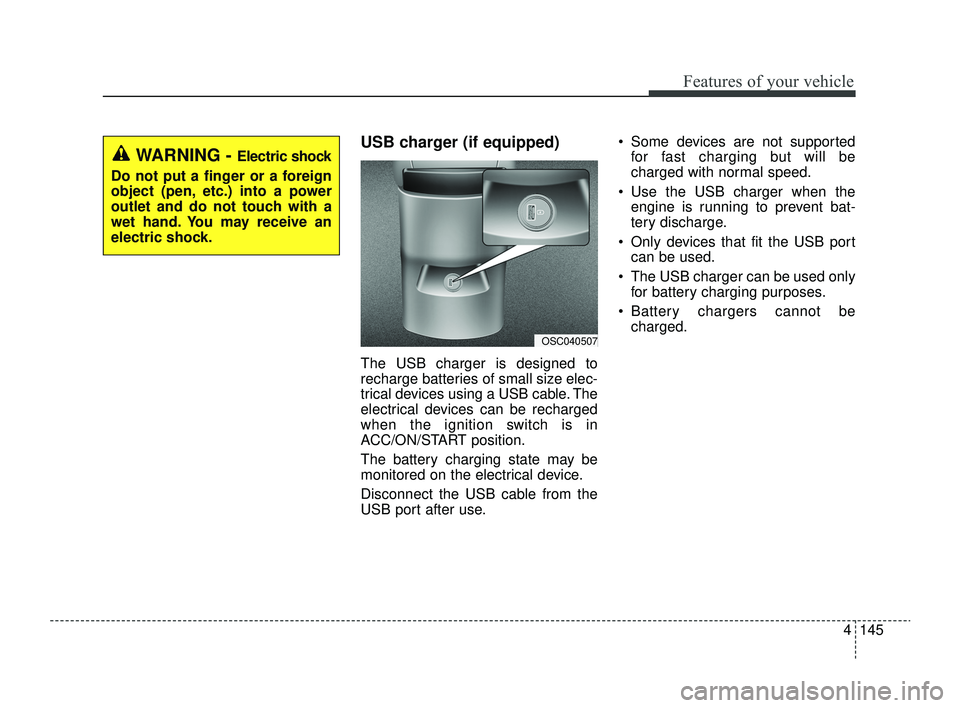
USB charger (if equipped)
The USB charger is designed to
recharge batteries of small size elec-
trical devices using a USB cable. The
electrical devices can be recharged
when the ignition switch is in
ACC/ON/START position.
The battery charging state may be
monitored on the electrical device.
Disconnect the USB cable from the
USB port after use. Some devices are not supported
for fast charging but will be
charged with normal speed.
Use the USB charger when the engine is running to prevent bat-
tery discharge.
Only devices that fit the USB port can be used.
The USB charger can be used only for battery charging purposes.
Battery chargers cannot be charged.
OSC040507
WARNING - Electric shock
Do not put a finger or a foreign
object (pen, etc.) into a power
outlet and do not touch with a
wet hand. You may receive an
electric shock.
SC PE USA 4.QXP 9/9/2021 6:09 PM Page 145
Page 236 of 528

• Driver Attention Warning operation . . . . . . . . . . . . 5-78
• Driver Attention Warning malfunction andlimitations. . . . . . . . . . . . . . . . . . . . . . . . . . . . . . . . . . 5-81\
Cruise Control (CC). . . . . . . . . . . . . . . . . . . . . . . . 5-84
• Cruise Control operation . . . . . . . . . . . . . . . . . . . . . . 5-84
• Increasing set speed. . . . . . . . . . . . . . . . . . . . . . . . . . . 5-85
• Decreasing set speed . . . . . . . . . . . . . . . . . . . . . . . . . . 5-85
• Accelerating temporarily . . . . . . . . . . . . . . . . . . . . . . 5-86
• Temporarily pausing Cruise Control . . . . . . . . . . . . 5-86
• Resuming Cruise Control . . . . . . . . . . . . . . . . . . . . . . 5-87
• Turning off Cruise Control. . . . . . . . . . . . . . . . . . . . . 5-87
Lane Following Assist (LFA) . . . . . . . . . . . . . . . . . 5-89
• Detecting sensor . . . . . . . . . . . . . . . . . . . . . . . . . . . . . . 5-89
• Lane Following Assist settings . . . . . . . . . . . . . . . . . 5-89
• Lane Following Assist operation . . . . . . . . . . . . . . . . 5-90
• Lane Following Assist malfunction and limitations . 5-93
Rear Cross-Traffic Collision Warning (RCCW) . 5-94
• Detecting sensor . . . . . . . . . . . . . . . . . . . . . . . . . . . . . . 5-94
• Rear Cross-Traffic Collision Warning settings . . . . 5-95
• Rear Cross-Traffic Collision Warning operation . . . 5-96
• Rear Cross-Traffic Collision Warning malfunction
and limitations . . . . . . . . . . . . . . . . . . . . . . . . . . . . . . 5-97
Declaration of conformity . . . . . . . . . . . . . . . . . . 5-102
• The radio frequency components (Rear Corner Radar)complies . . . . . . . . . . . . . . . . . . . . . . . . . . . . . . . . . . 5-10\
2
Economical operation . . . . . . . . . . . . . . . . . . . . . 5-103
Special driving conditions . . . . . . . . . . . . . . . . . . 5-105
• Hazardous driving conditions . . . . . . . . . . . . . . . . . 5-105
• Rocking the vehicle . . . . . . . . . . . . . . . . . . . . . . . . . . 5-105
• Smooth cornering . . . . . . . . . . . . . . . . . . . . . . . . . . . 5-106
• Driving at night . . . . . . . . . . . . . . . . . . . . . . . . . . . . 5-106
• Driving in the rain . . . . . . . . . . . . . . . . . . . . . . . . . . . 5-107
• Driving in flooded areas . . . . . . . . . . . . . . . . . . . . . . 5-108
• Driving off-road . . . . . . . . . . . . . . . . . . . . . . . . . . . . . 5-108
• Highway driving . . . . . . . . . . . . . . . . . . . . . . . . . . . . 5-108
Winter driving . . . . . . . . . . . . . . . . . . . . . . . . . . . 5-110
• Snowy or Icy conditions . . . . . . . . . . . . . . . . . . . . . . 5-110
• Use high quality ethylene glycol coolant . . . . . . . . . 5-112
• Check battery and cables . . . . . . . . . . . . . . . . . . . . . 5-112
• Change to "winter weight" oil if necessary . . . . . . 5-113
• Check spark plugs and ignition system . . . . . . . . . . 5-113
• To keep locks from freezing . . . . . . . . . . . . . . . . . . . 5-113
• Use approved window washer anti-freeze in system5-113
• Don't let your parking brake freeze . . . . . . . . . . . . 5-113
• Don't let ice and snow accumulate underneath . . . 5-113
• Carry emergency equipment . . . . . . . . . . . . . . . . . . 5-114
• Trailer Towing . . . . . . . . . . . . . . . . . . . . . . . . . . . . . . 5-114
5
SC PE USA 5.QXP 9/9/2021 6:17 PM Page 2
Page 241 of 528
57
Driving your vehicle
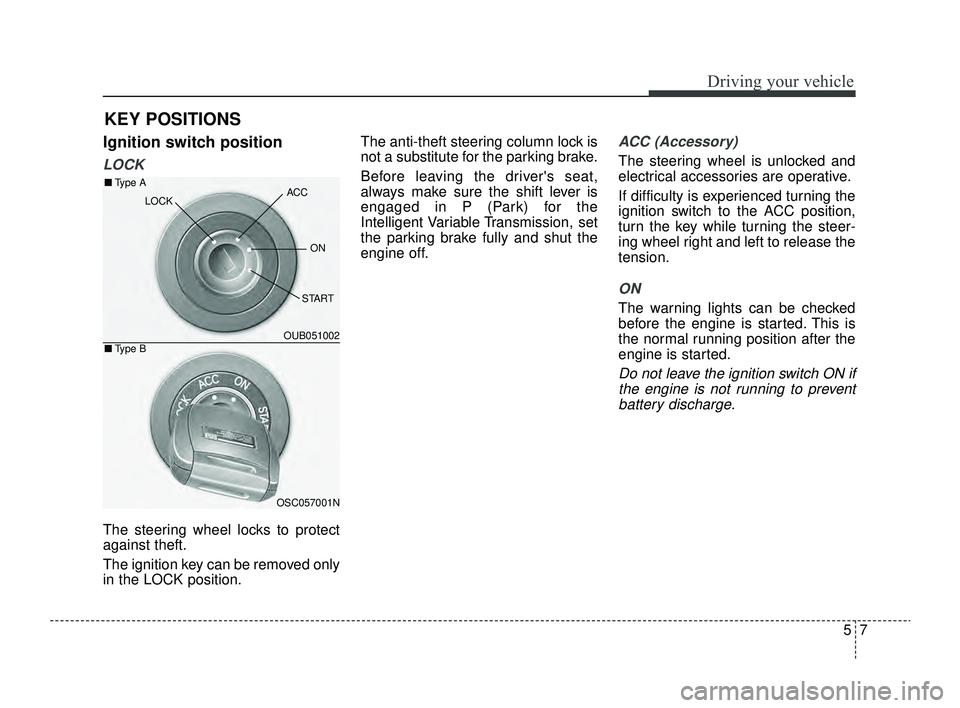
Ignition switch position
LOCK
The steering wheel locks to protect
against theft.
The ignition key can be removed only
in the LOCK position.The anti-theft steering column lock is
not a substitute for the parking brake.
Before leaving the driver's seat,
always make sure the shift lever is
engaged in P (Park) for the
Intelligent Variable Transmission, set
the parking brake fully and shut the
engine off.
ACC (Accessory)
The steering wheel is unlocked and
electrical accessories are operative.
If difficulty is experienced turning the
ignition switch to the ACC position,
turn the key while turning the steer-
ing wheel right and left to release the
tension.
ON
The warning lights can be checked
before the engine is started. This is
the normal running position after the
engine is started.
Do not leave the ignition switch ON if
the engine is not running to preventbattery discharge.
KEY POSITIONS
OUB051002
OSC057001N
■ Type A
■Type B
ACC
ON
START
LOCK
SC PE USA 5.QXP 9/9/2021 6:17 PM Page 7
Page 242 of 528
Driving your vehicle
85
START
Turn the ignition switch to the START
position to start the engine. The
engine will crank until you release
the key; then it returns to the ON
position. The brake warning light can
be checked in this position.
✽ ✽
NOTICE
If you leave the ignition switch to the
ACC or ON position for a long time,
the battery may discharge.
WARNING- Ignition
switch
Never turn the ignition switch to
LOCK or ACC while the vehicle
is moving. This would result in
loss of directional control and
braking function, which could
cause an accident.
WARNING- Steering wheel
Never reach for any controls
through the steering wheel
while the vehicle is in motion.
The presence of your hand or
arm in this area could cause a
loss of vehicle control.
WARNING- Key holder
Do not attach small purses,
multiple keys, or any other
heavy accessories to the dri-
ver's key chain used to start the
vehicle. This may cause the
inserted key to inadvertently
change the ignition position to
the ACC position while the vehi-
cle is moving, thereby increas-
ing the risk of an accident and
deactivating several safety fea-
tures.
WARNING- Leaving the vehicle
To avoid unexpected or sudden
vehicle movement, never leave
your vehicle if the transmission
is not locked in the P (Park)
position and the parking brake
is not fully engaged. Before
leaving the driver's seat, always
make sure the shift lever is
engaged in P (Park), set the
parking brake fully and shut the
engine off.
SC PE USA 5.QXP 9/9/2021 6:17 PM Page 8
Page 245 of 528
511
Driving your vehicle
✽ ✽
NOTICE
If the steering wheel doesn't unlock
properly, the ENGINE
START/STOP button will not work.
Press the ENGINE START/STOP
button while turning the steering
wheel right and left to release the
tension.
✽ ✽
NOTICE
You are able to turn off the engine
(START/RUN) or vehicle power
(ON), only when the vehicle is not in
motion.
✽ ✽
NOTICE
In an emergency situation while the
vehicle is in motion, you are able to
turn the engine off and to the ACC
position by pressing the ENGINE
START/STOP button for more than
2 seconds or 3 times successively
within 3 seconds.
If the vehicle is still moving, to
restart the vehicle:
• Intelligent Variable Transmission
- Press the ENGINESTART/STOP button when vehi-
cle speed is 3 mph (5 km/h) or
over.
ACC(Accessory)
With Intelligent Variable Transmission
Press the ENGINE START/STOP
button while it is in the OFF position
without depressing the brake pedal.
The steering wheel unlocks and elec-
trical accessories are operational.
If the ENGINE START/STOP button
is in the ACC position for more than 1
hour, the button is turned off auto-
matically to prevent battery dis-
charge.
SC PE USA 5.QXP 9/9/2021 6:17 PM Page 11
Page 246 of 528
Driving your vehicle
12
5
ON
With Intelligent Variable Transmission
Press the ENGINE START/STOP
button while it is in the ACC position
without depressing the brake pedal.
The warning lights can be checked
before the engine is started. Do not
leave the ENGINE START/STOP
button in the ON position for a long
time. The battery may discharge,
because the engine is not running.
START/RUN
With Intelligent Variable Transmission
To start the engine, depress the brake
pedal and press the ENGINE
START/STOP button with the shift
lever in the P (Park) or the N (Neutral)
position. For your safety, start the
engine with the shift lever in the P
(Park) position.
✽ ✽
NOTICE
If you press the ENGINE
START/STOP button without
depressing the brake pedal for
Intelligent Variable Transmission
vehicles, the engine will not start
and the ENGINE START/STOP
button changes as follow:
OFF ➔ ➔
ACC ➔ ➔
ON ➔ ➔
OFF or ACC
SC PE USA 5.QXP 9/9/2021 6:17 PM Page 12