lock KIA RIO 2022 Workshop Manual
[x] Cancel search | Manufacturer: KIA, Model Year: 2022, Model line: RIO, Model: KIA RIO 2022Pages: 528, PDF Size: 11.8 MB
Page 124 of 528
445
Features of your vehicle
Electric power steering (EPS)
Power steering uses a motor to
assist you in steering the vehicle. If
the engine is off or if the power steer-
ing system becomes inoperative, the
vehicle may still be steered, but it will
require increased steering effort.
The electric power steering is con-
trolled by the power steering control
unit which senses the steering wheel
torque and vehicle speed to com-
mand the motor.
The steering wheel becomes heavier
as the vehicle’s speed increases and
becomes lighter as the vehicle’s
speed decreases for better control of
the steering wheel.
Should you notice any change in the
effort required to steer during normal
vehicle operation, have the power
steering checked by an authorized
Kia dealer.
✽ ✽NOTICE
The following symptoms may occur
during normal vehicle operation:
• The EPS warning light does not
illuminate.
• The steering effort is increased immediately after turning the igni-
tion switch or ENGINE
START/STOP button to the ON
position. This happens as the sys-
tem performs the EPS system
diagnostics. When the diagnostics
are completed, the steering wheel
will return to its normal condition
• A click noise may be heard from the EPS relay after the ignition
switch is turned to the ON or
LOCK position or ENGINE
START/STOP button to the ON or
OFF position.
• Motor noise may be heard when the vehicle is at a stop or at a low
driving speed. (Continued)(Continued)
• When abnormality is detected in
the electric power steering system,
to prevent a deadly accident, the
steering assist function will stop.
At this time, the warning light
turns on or blinks on the cluster.
The steering wheel may become
difficult to control or operate.
Have your vehicle checked imme-
diately, after moving the vehicle to
a safe zone.
• The steering effort increases if the steering wheel is rotated continu-
ously when the vehicle is not in
motion. However, after a few min-
utes, it will return to its normal
condition.
• When you operate the steering wheel in low temperature, noise
may occur. If the temperature
rises, the noise will likely disap-
pear. This is a normal condition.
• When the charging system warn- ing light comes on or the battery
voltage is low (when the alternator
or battery does not operate nor-
mally), the steering wheel may get
heavy and become difficult to con-
trol or operate abnormally.
STEERING WHEEL
SC PE USA 4.QXP 9/9/2021 6:03 PM Page 45
Page 125 of 528
Features of your vehicle
46
4
If the Electric Power Steering System
does not operate normally, the warn-
ing light will illuminate on the instru-
ment cluster. The steering wheel may
require increased steering effort.
Take your vehicle to an authorized
Kia dealer and have the vehicle
checked as soon as possible.Tilt steering (if equipped)
Tilt steering allows you to adjust the
steering wheel before you drive. You
can also raise it to give your legs
more room when you exit and enter
the vehicle.
The steering wheel should be posi-
tioned so that it is comfortable for
you to drive, while permitting you to
see the instrument panel warning
lights and gauges.
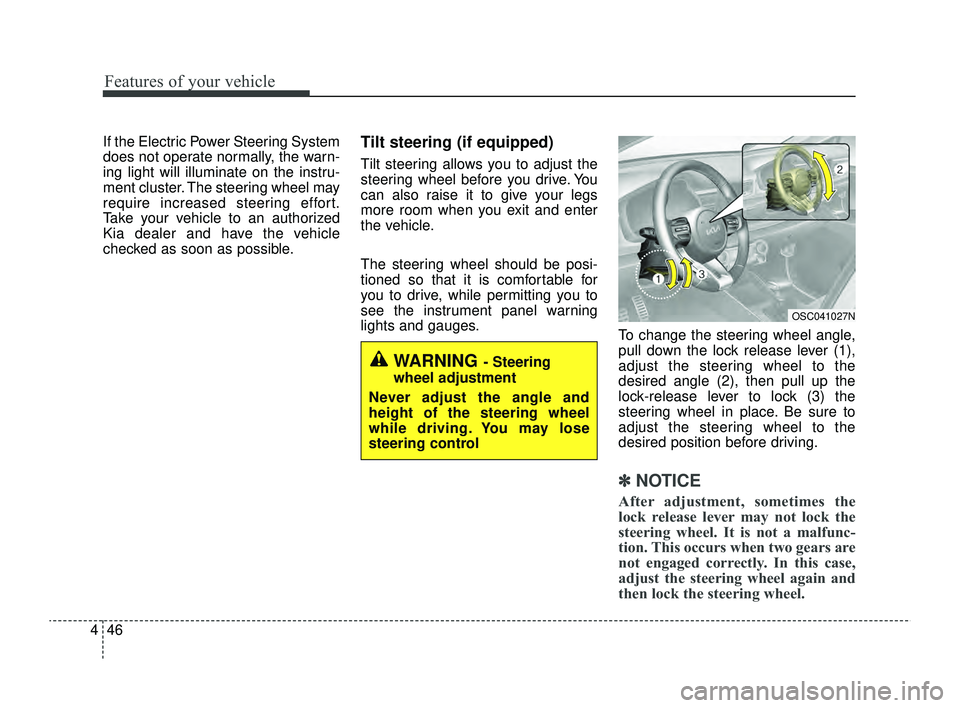
To change the steering wheel angle,
pull down the lock release lever (1),
adjust the steering wheel to the
desired angle (2), then pull up the
lock-release lever to lock (3) the
steering wheel in place. Be sure to
adjust the steering wheel to the
desired position before driving.
✽ ✽NOTICE
After adjustment, sometimes the
lock release lever may not lock the
steering wheel. It is not a malfunc-
tion. This occurs when two gears are
not engaged correctly. In this case,
adjust the steering wheel again and
then lock the steering wheel.
WARNING - Steering
wheel adjustment
Never adjust the angle and
height of the steering wheel
while driving. You may lose
steering control
OSC041027N
SC PE USA 4.QXP 9/9/2021 6:03 PM Page 46
Page 143 of 528
Features of your vehicle
64
4
LCD DISPLAY (FOR TYPE B CLUSTER)
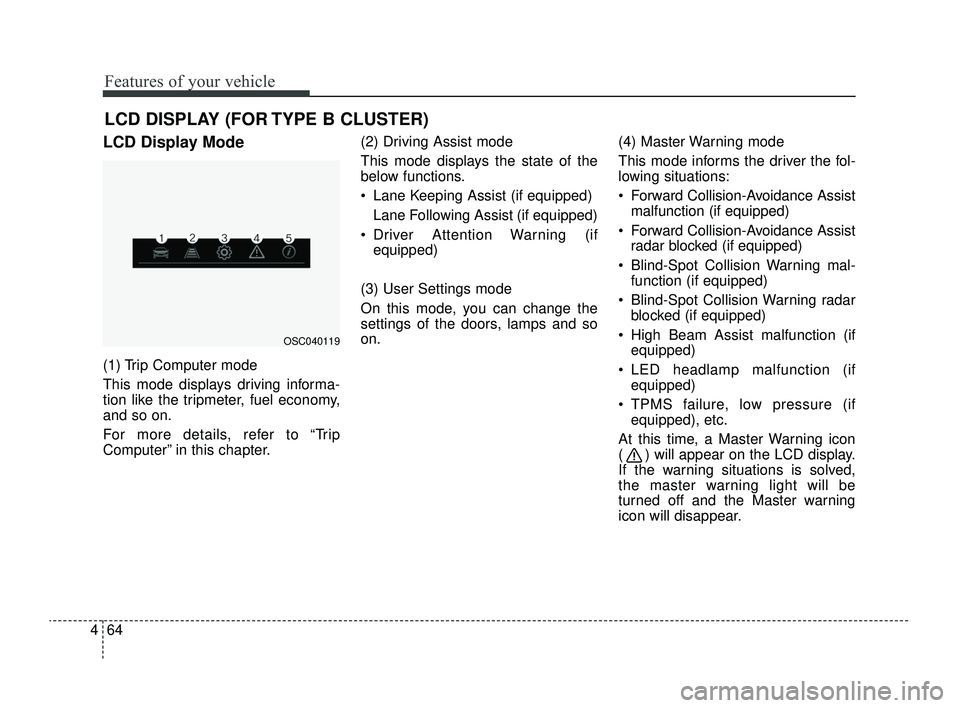
LCD Display Mode
(1) Trip Computer mode
This mode displays driving informa-
tion like the tripmeter, fuel economy,
and so on.
For more details, refer to “Trip
Computer” in this chapter. (2) Driving Assist mode
This mode displays the state of the
below functions.
Lane Keeping Assist (if equipped)
Lane Following Assist (if equipped)
Driver Attention Warning (if equipped)
(3) User Settings mode
On this mode, you can change the
settings of the doors, lamps and so
on. (4) Master Warning mode
This mode informs the driver the fol-
lowing situations:
Forward Collision-Avoidance Assist
malfunction (if equipped)
Forward Collision-Avoidance Assist radar blocked (if equipped)
Blind-Spot Collision Warning mal- function (if equipped)
Blind-Spot Collision Warning radar blocked (if equipped)
High Beam Assist malfunction (if equipped)
LED headlamp malfunction (if equipped)
TPMS failure, low pressure (if equipped), etc.
At this time, a Master Warning icon
( ) will appear on the LCD display.
If the warning situations is solved,
the master warning light will be
turned off and the Master warning
icon will disappear.
OSC040119
SC PE USA 4.QXP 9/9/2021 6:04 PM Page 64
Page 148 of 528
469
Features of your vehicle
ItemsExplanation
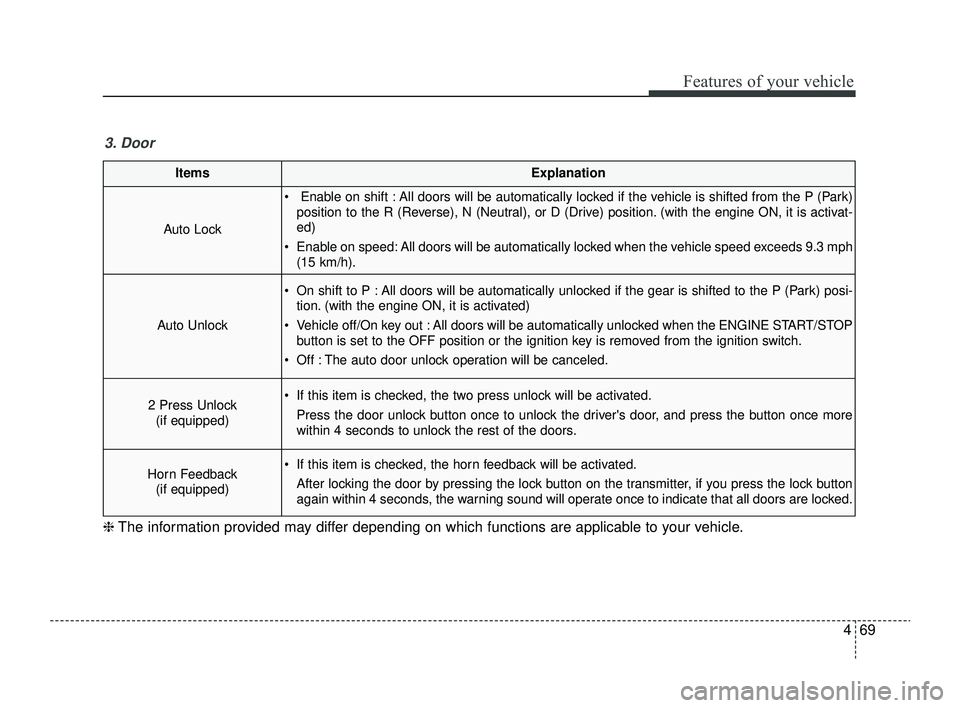
Auto Lock
Enable on shift : All doors will be automatically locked if the vehicle is shifted from the P (Park)position to the R (Reverse), N (Neutral), or D (Drive) position. (with the engine ON, it is activat-
ed)
Enable on speed: All doors will be automatically locked when the vehicle speed exceeds 9.3 mph (15 km/h).
Auto Unlock
On shift to P : All doors will be automatically unlocked if the gear is shifted to the P (Park) posi-tion. (with the engine ON, it is activated)
Vehicle off/On key out : All doors will be automatically unlocked when the ENGINE START/STOP button is set to the OFF position or the ignition key is removed from the ignition switch.
Off : The auto door unlock operation will be canceled.
2 Press Unlock (if equipped) If this item is checked, the two press unlock will be activated.
Press the door unlock button once to unlock the driver's door, and press the button once more
within 4 seconds to unlock the rest of the doors.
Horn Feedback(if equipped) If this item is checked, the horn feedback will be activated.
After locking the door by pressing the lock button on the transmitter, if you press the lock button
again within 4 seconds, the warning sound will operate once to indicate that all doors are locked.
3. Door
❈ The information provided may differ depending on which functions are applicable to your vehicle.
SC PE USA 4.QXP 9/9/2021 6:05 PM Page 69
Page 159 of 528
Features of your vehicle
80
4
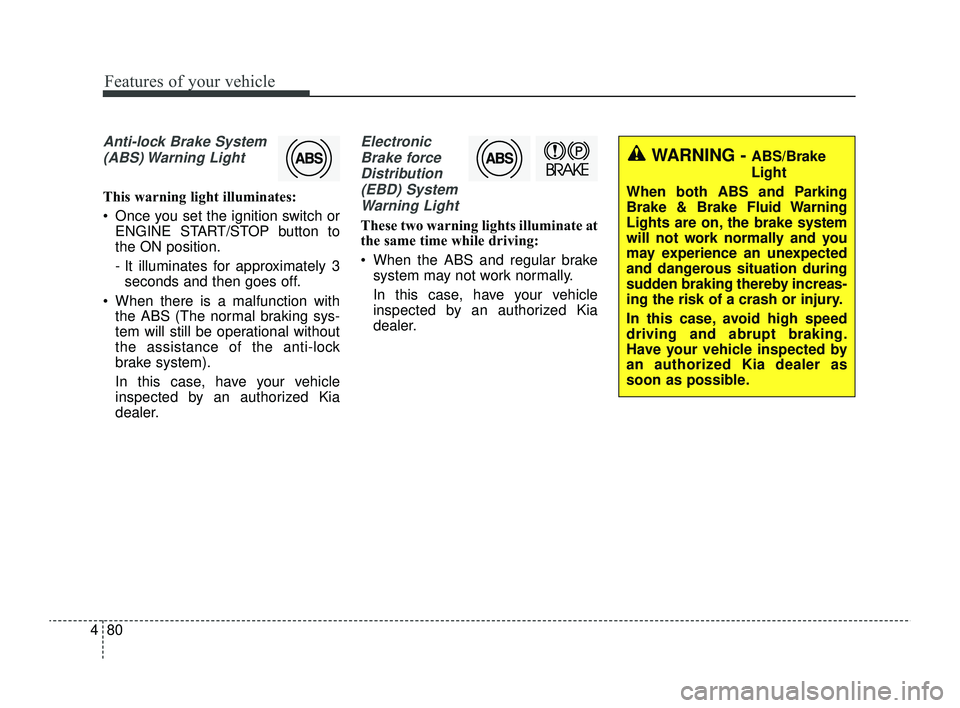
Anti-lock Brake System
(ABS) Warning Light
This warning light illuminates:
Once you set the ignition switch or ENGINE START/STOP button to
the ON position.
- It illuminates for approximately 3seconds and then goes off.
When there is a malfunction with the ABS (The normal braking sys-
tem will still be operational without
the assistance of the anti-lock
brake system).
In this case, have your vehicle
inspected by an authorized Kia
dealer.
Electronic
Brake forceDistribution(EBD) SystemWarning Light
These two warning lights illuminate at
the same time while driving:
When the ABS and regular brake system may not work normally.
In this case, have your vehicle
inspected by an authorized Kia
dealer.
WARNING - ABS/Brake
Light
When both ABS and Parking
Brake & Brake Fluid Warning
Lights are on, the brake system
will not work normally and you
may experience an unexpected
and dangerous situation during
sudden braking thereby increas-
ing the risk of a crash or injury.
In this case, avoid high speed
driving and abrupt braking.
Have your vehicle inspected by
an authorized Kia dealer as
soon as possible.
SC PE USA 4.QXP 9/9/2021 6:05 PM Page 80
Page 164 of 528
485
Features of your vehicle
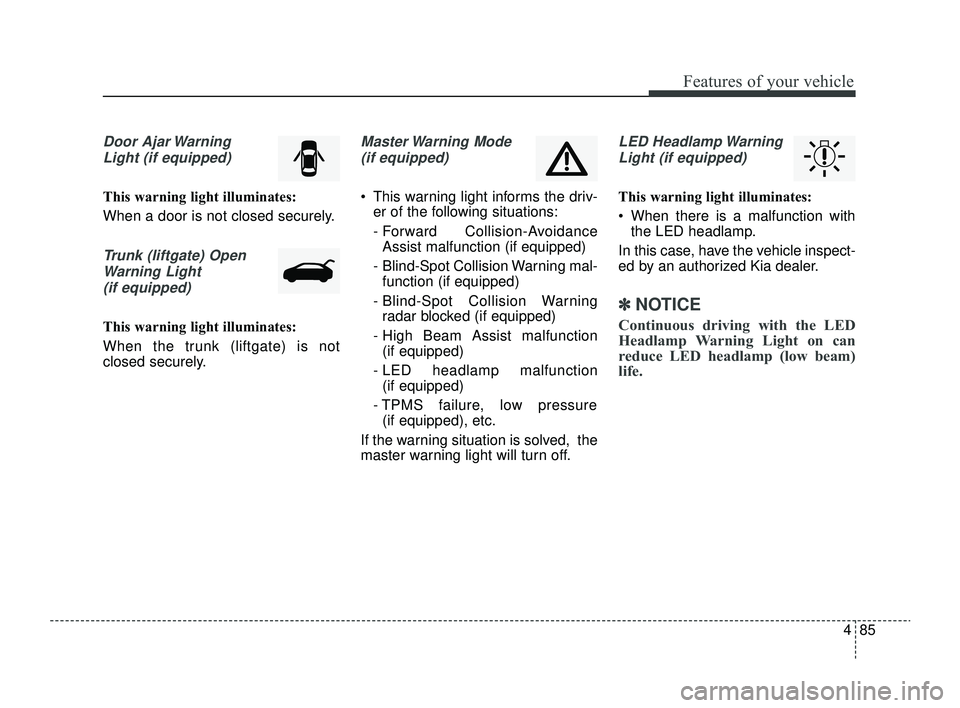
Door Ajar WarningLight (if equipped)
This warning light illuminates:
When a door is not closed securely.
Trunk (liftgate) OpenWarning Light(if equipped)
This warning light illuminates:
When the trunk (liftgate) is not
closed securely.
Master Warning Mode (if equipped)
This warning light informs the driv- er of the following situations:
- Forward Collision-AvoidanceAssist malfunction (if equipped)
- Blind-Spot Collision Warning mal- function (if equipped)
- Blind-Spot Collision Warning radar blocked (if equipped)
- High Beam Assist malfunction (if equipped)
- LED headlamp malfunction (if equipped)
- TPMS failure, low pressure (if equipped), etc.
If the warning situation is solved, the
master warning light will turn off.
LED Headlamp Warning Light (if equipped)
This warning light illuminates:
When there is a malfunction with the LED headlamp.
In this case, have the vehicle inspect-
ed by an authorized Kia dealer.
✽ ✽ NOTICE
Continuous driving with the LED
Headlamp Warning Light on can
reduce LED headlamp (low beam)
life.
SC PE USA 4.QXP 9/9/2021 6:05 PM Page 85
Page 171 of 528

Features of your vehicle
92
4
Battery saver function
The purpose of this feature is to pre-
vent the battery from being dis-
charged if the lights are left in the ON
position.
The system automatically shuts off
the parking lights after the engine is
off and the driver's door is opened.
However, the position lamps stay ON
even when the driver-side door is
opened if the light switch is operated
after the engine is turned off.
If necessary, to keep the lamps on
turn the position lamps OFF and ON
again using the headlamp switch on
the steering column after the engine
is turned off.
Headlight escort function
(if equipped)
The headlights (and/or taillights) will
remain on for approximately 5 min-
utes after the ignition key is removed
or turned to the ACC or LOCK posi-
tion. However, if the driver’s door is
opened and closed, the headlights
are turned off after 15 seconds.
The headlights can be turned off by
pressing the lock button on the trans-
mitter twice or turning off the light
switch from the headlight or Auto
light position.
If the driver gets out of the vehicle
through other doors (except driver's
door), the battery saver function
does not operate and the headlight
escort function does not turn off
automatically. Therefore, causing the
battery to be discharged. In this
case, make sure to turn off the lamp
before getting out of the vehicle.
If the headlights are not working
properly have your vehicle inspected
by an authorized Kia dealer.
Don't attempt to inspect or replace
the wiring yourself to prevent mal-
function.
Headlight welcome function
(if equipped)
When the headlight switch is in the
ON or AUTO position and all doors
(and liftgate) are closed and locked,
if you press the door unlock button
on the transmitter, the headlights will
come on for about 15 seconds.
If the headlight switch is in the AUTO
position, the function can only oper-
ate at night.
At this time, if you press the door
unlock button again or door lock but-
ton on the transmitter, the headlights
will turn off immediately.
LIGHTING
SC PE USA 4.QXP 9/9/2021 6:05 PM Page 92
Page 184 of 528
4105
Features of your vehicle
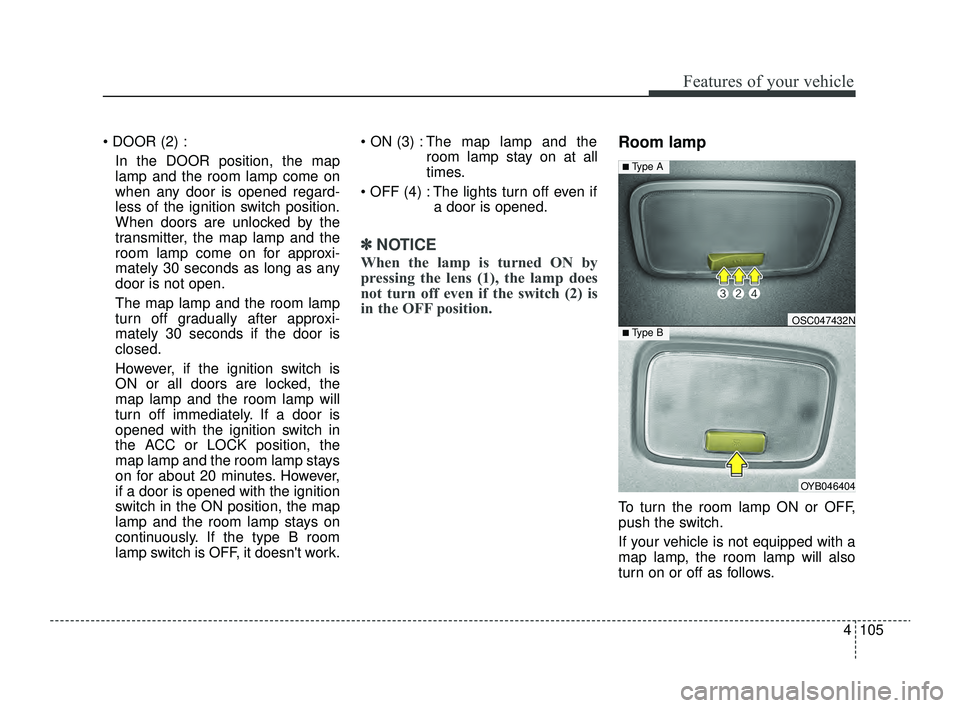
DOOR (2) :In the DOOR position, the map
lamp and the room lamp come on
when any door is opened regard-
less of the ignition switch position.
When doors are unlocked by the
transmitter, the map lamp and the
room lamp come on for approxi-
mately 30 seconds as long as any
door is not open.
The map lamp and the room lamp
turn off gradually after approxi-
mately 30 seconds if the door is
closed.
However, if the ignition switch is
ON or all doors are locked, the
map lamp and the room lamp will
turn off immediately. If a door is
opened with the ignition switch in
the ACC or LOCK position, the
map lamp and the room lamp stays
on for about 20 minutes. However,
if a door is opened with the ignition
switch in the ON position, the map
lamp and the room lamp stays on
continuously. If the type B room
lamp switch is OFF, it doesn't work. ON (3) : The map lamp and the
room lamp stay on at all
times.
OFF (4) : The lights turn off even if a door is opened.
✽ ✽NOTICE
When the lamp is turned ON by
pressing the lens (1), the lamp does
not turn off even if the switch (2) is
in the OFF position.
Room lamp
To turn the room lamp ON or OFF,
push the switch.
If your vehicle is not equipped with a
map lamp, the room lamp will also
turn on or off as follows.
OYB046404
OSC047432N
■ Type A
■ Type B
SC PE USA 4.QXP 9/9/2021 6:06 PM Page 105
Page 185 of 528
Features of your vehicle
106
4
- The room lamp comes on when a
door is opened. The lamps go out
after approximately 30 seconds.
- The room lamp comes on for approximately 30 seconds when
doors are unlocked with a trans-
mitter as long as the doors are
not opened.
- The room lamp will stay on for approximately 20 minutes if a
door is opened with the ignition
switch in the ACC or LOCK/OFF
position.
- The room lamp will stay on con- tinuously if the door is opened
with the ignition switch in the ON
position.
- The room lamp will go out imme- diately if the ignition switch is
changed to the ON position or all
doors are locked. DOOR (2) :
In the DOOR position, the map
lamp and the room lamp come on
when any door is opened regard-
less of the ignition switch position.
When doors are unlocked by the
transmitter, the map lamp and the
room lamp come on for approxi-
mately 30 seconds as long as any
door is not open.
The map lamp and the room lamp
turn off gradually after approxi-
mately 30 seconds if the door is
closed.
However, if the ignition switch is
ON or all doors are locked, the
map lamp and the room lamp will
turn off immediately. If a door is
opened with the ignition switch in
the ACC or LOCK position, the
map lamp and the room lamp stays
on for about 20 minutes. However,
if a door is opened with the ignition
switch in the ON position, the map
lamp and the room lamp stays on
continuously. If the type B room
lamp switch is OFF, it doesn't work. ON (3) : The map lamp and the
room lamp stay on at all
times.
OFF (4) : The lights turn off even if a door is opened.
✽ ✽NOTICE
When the lamp is turned ON by
pressing the lens (1), the lamp does
not turn off even if the switch (2) is
in the OFF position.
SC PE USA 4.QXP 9/9/2021 6:06 PM Page 106
Page 195 of 528
Features of your vehicle
116
4
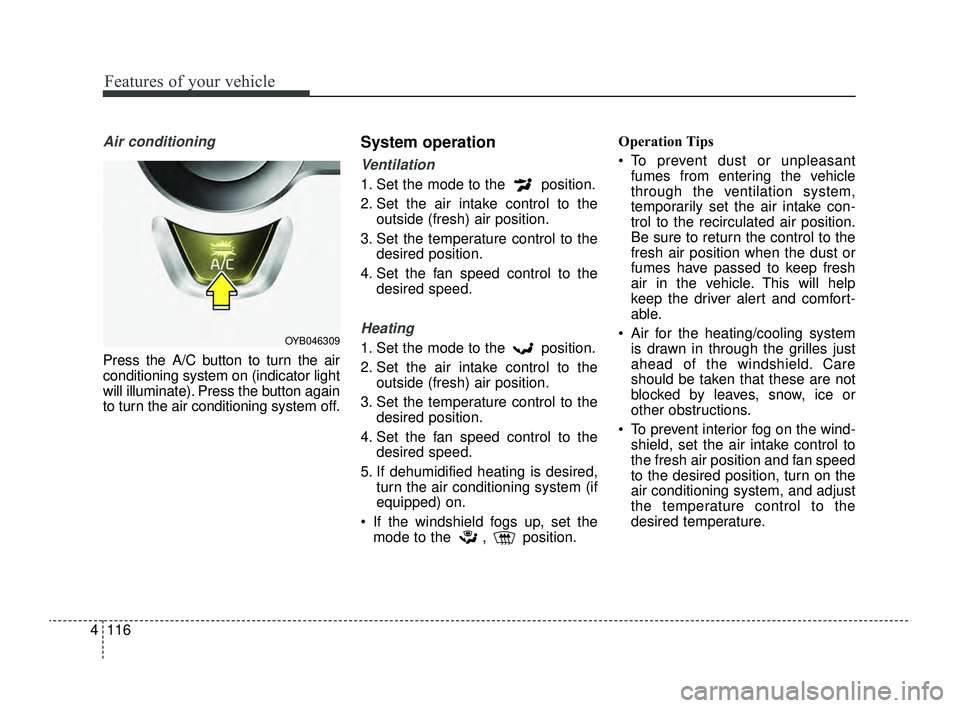
Air conditioning
Press the A/C button to turn the air
conditioning system on (indicator light
will illuminate). Press the button again
to turn the air conditioning system off.
System operation
Ventilation
1. Set the mode to the position.
2. Set the air intake control to the
outside (fresh) air position.
3. Set the temperature control to the desired position.
4. Set the fan speed control to the desired speed.
Heating
1. Set the mode to the position.
2. Set the air intake control to theoutside (fresh) air position.
3. Set the temperature control to the desired position.
4. Set the fan speed control to the desired speed.
5. If dehumidified heating is desired, turn the air conditioning system (if
equipped) on.
If the windshield fogs up, set the mode to the , position. Operation Tips
To prevent dust or unpleasant
fumes from entering the vehicle
through the ventilation system,
temporarily set the air intake con-
trol to the recirculated air position.
Be sure to return the control to the
fresh air position when the dust or
fumes have passed to keep fresh
air in the vehicle. This will help
keep the driver alert and comfort-
able.
Air for the heating/cooling system is drawn in through the grilles just
ahead of the windshield. Care
should be taken that these are not
blocked by leaves, snow, ice or
other obstructions.
To prevent interior fog on the wind- shield, set the air intake control to
the fresh air position and fan speed
to the desired position, turn on the
air conditioning system, and adjust
the temperature control to the
desired temperature.OYB046309
SC PE USA 4.QXP 9/9/2021 6:07 PM Page 116