Eco KIA SOUL 2019 Owners Manual
[x] Cancel search | Manufacturer: KIA, Model Year: 2019, Model line: SOUL, Model: KIA SOUL 2019Pages: 564, PDF Size: 14.2 MB
Page 281 of 564
![KIA SOUL 2019 Owners Manual Audio system
43
5
Skip voice prompt
While the voice prompt is playing,
press the [VOICE] button on the
steering wheel remote control to
skip the voice prompt and place
the system in standby for your](/img/2/40387/w960_40387-280.png "KIA SOUL 2019 Owners Manual Audio system
43
5
Skip voice prompt
While the voice prompt is playing,
press the [VOICE] button on the
steering wheel remote control to
skip the voice prompt and place
the system in standby for your")
Audio system
43
5
Skip voice prompt
While the voice prompt is playing,
press the [VOICE] button on the
steering wheel remote control to
skip the voice prompt and place
the system in standby for your
voice commands.
This feature is useful if the voice prompt takes too long or you
already know the voice command
for the desired function. Extending voice recognition standby
time
After voice recognition is started
and the voice prompt and beep
sound (‘Beep~’) are played, the
system enters standby for user
voice commands for five seconds.
During this five-second standby,
press the button again to play the
beep sound (‘Beep~’), and extend
voice command standby time by
five seconds.
If you do not say a command for five seconds, you are prompted by
voice to repeat your command.
Page 282 of 564
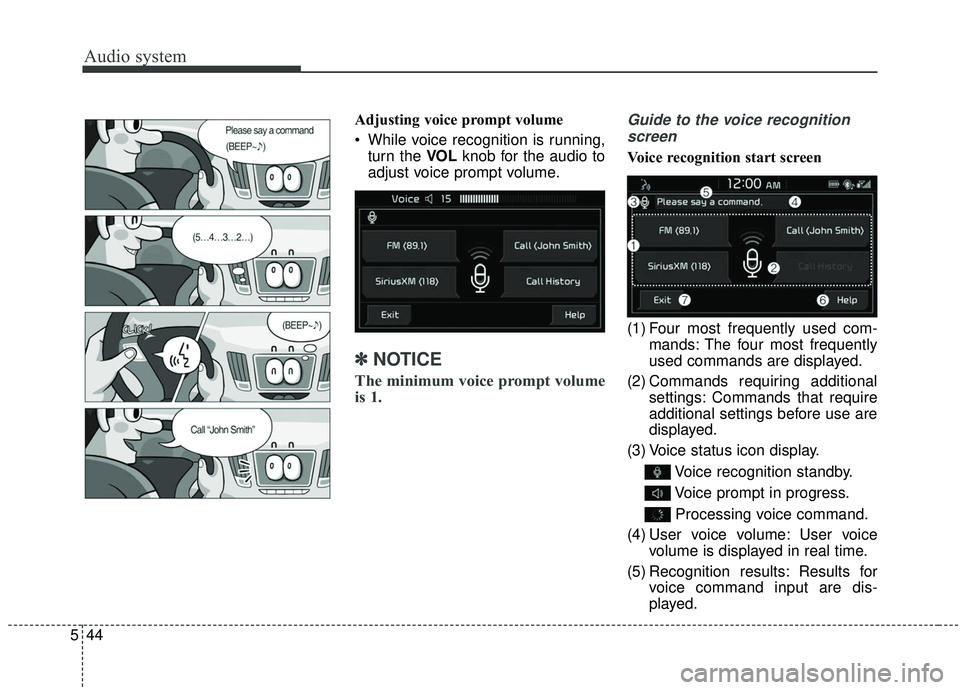
Audio system
544Adjusting voice prompt volume
While voice recognition is running,
turn the VOL knob for the audio to
adjust voice prompt volume.
✽ ✽ NOTICE
The minimum voice prompt volume
is 1.
Guide to the voice recognition
screen
Voice recognition start screen
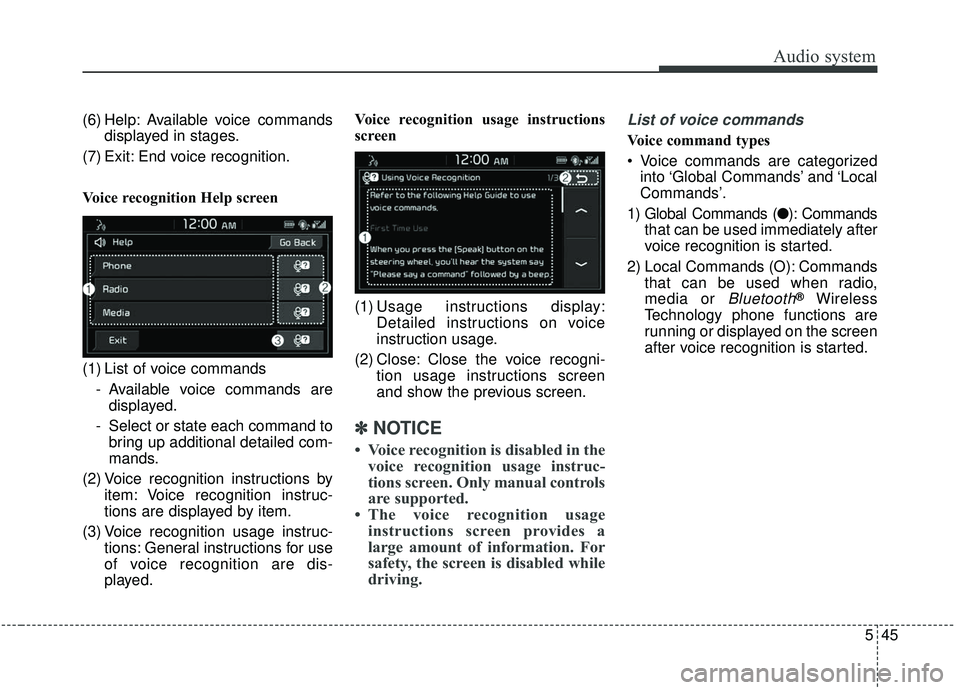
(1) Four most frequently used com- mands: The four most frequently
used commands are displayed.
(2) Commands requiring additional settings: Commands that require
additional settings before use are
displayed.
(3) Voice status icon display.
Voice recognition standby.
Voice prompt in progress.Processing voice command.
(4) User voice volume: User voice volume is displayed in real time.
(5) Recognition results: Results for voice command input are dis-
played.
Page 283 of 564
Audio system
45
5
(6) Help: Available voice commands
displayed in stages.
(7) Exit: End voice recognition.
Voice recognition Help screen
(1) List of voice commands - Available voice commands aredisplayed.
- Select or state each command to bring up additional detailed com-
mands.
(2) Voice recognition instructions by item: Voice recognition instruc-
tions are displayed by item.
(3) Voice recognition usage instruc- tions: General instructions for use
of voice recognition are dis-
played. Voice recognition usage instructions
screen
(1) Usage instructions display:
Detailed instructions on voice
instruction usage.
(2) Close: Close the voice recogni- tion usage instructions screen
and show the previous screen.
✽ ✽NOTICE
• Voice recognition is disabled in the
voice recognition usage instruc-
tions screen. Only manual controls
are supported.
• The voice recognition usage instructions screen provides a
large amount of information. For
safety, the screen is disabled while
driving.
List of voice commands
Voice command types
Voice commands are categorized
into ‘Global Commands’ and ‘Local
Commands’.
1) Global Commands (● ): Commands
that can be used immediately after
voice recognition is started.
2) Local Commands (O): Commands that can be used when radio,
media or
Bluetooth®Wireless
Technology phone functions are
running or displayed on the screen
after voice recognition is started.
Page 284 of 564
Audio system
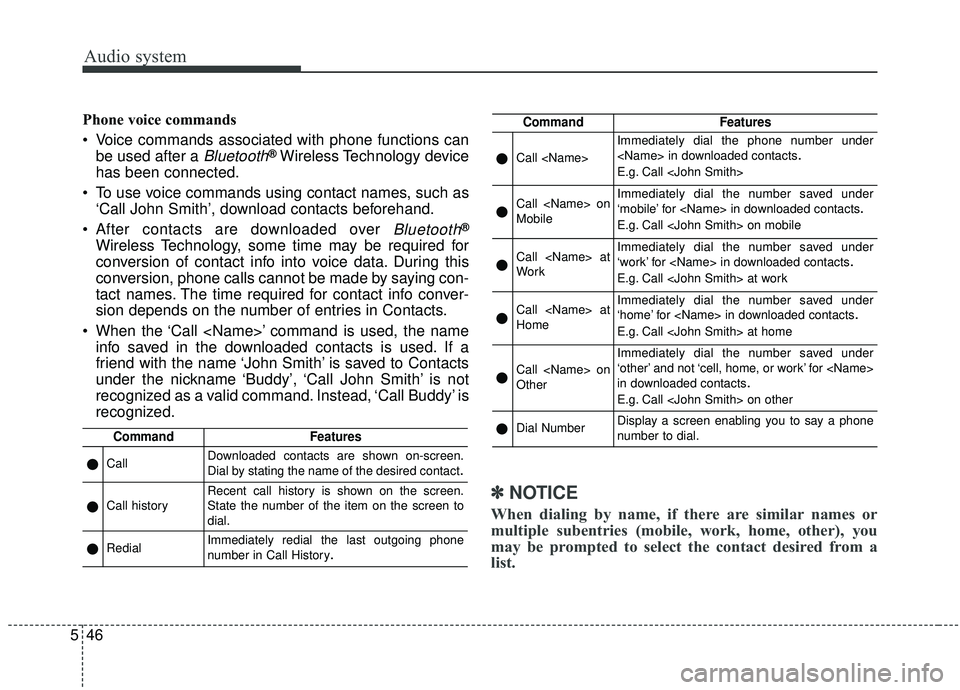
546Phone voice commands
Voice commands associated with phone functions can
be used after a
Bluetooth®Wireless Technology device
has been connected.
To use voice commands using contact names, such as ‘Call John Smith’, download contacts beforehand.
After contacts are downloaded over
Bluetooth®
Wireless Technology, some time may be required for
conversion of contact info into voice data. During this
conversion, phone calls cannot be made by saying con-
tact names. The time required for contact info conver-
sion depends on the number of entries in Contacts.
When the ‘Call
friend with the name ‘John Smith’ is saved to Contacts
under the nickname ‘Buddy’, ‘Call John Smith’ is not
recognized as a valid command. Instead, ‘Call Buddy’ is
recognized.
✽ ✽ NOTICE
When dialing by name, if there are similar names or
multiple subentries (mobile, work, home, other), you
may be prompted to select the contact desired from a
list.
CommandFeatures
●CallDownloaded contacts are shown on-screen.
Dial by stating the name of the desired contact.
●Call historyRecent call history is shown on the screen.
State the number of the item on the screen to
dial.
●RedialImmediately redial the last outgoing phone
number in Call History.
CommandFeatures
●Call
Immediately dial the phone number under
E.g. Call
●Call
MobileImmediately dial the number saved under
‘mobile’ for
E.g. Call
●Call
WorkImmediately dial the number saved under
‘work’ for
E.g. Call
●Call
HomeImmediately dial the number saved under
‘home’ for
E.g. Call
●Call
Other
Immediately dial the number saved under
‘other’ and not ‘cell, home, or work’ for
in downloaded contacts
.
E.g. Call
●Dial NumberDisplay a screen enabling you to say a phone
number to dial.
Page 286 of 564
Audio system
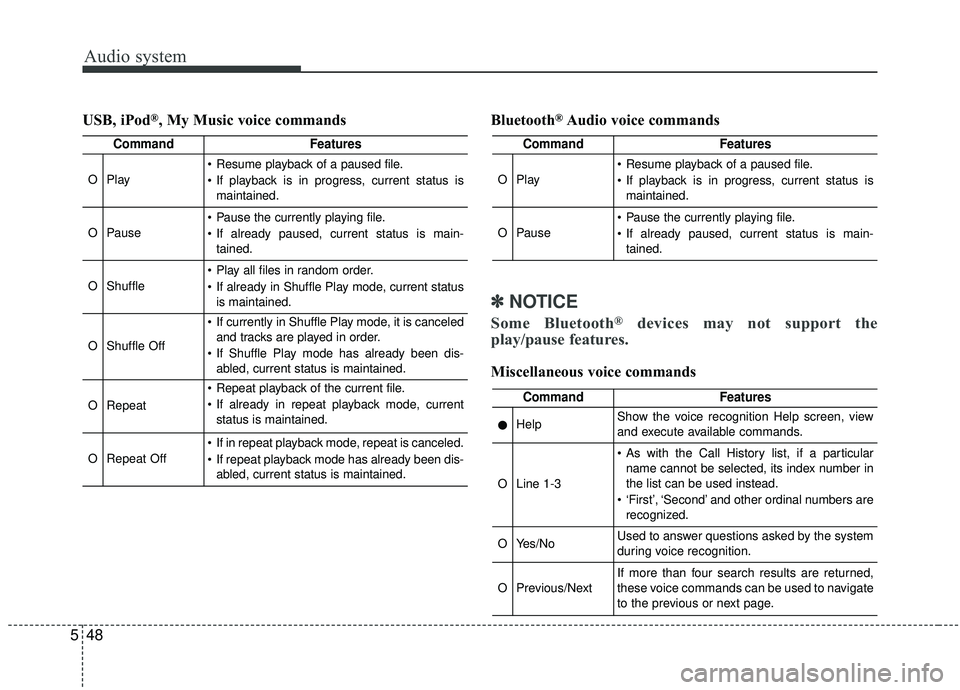
548USB, iPod
®, My Music voice commands
Bluetooth®Audio voice commands
✽ ✽
NOTICE
Some Bluetooth®devices may not support the
play/pause features.
Miscellaneous voice commands
CommandFeatures
OPlay
Resume playback of a paused file.
If playback is in progress, current status is
maintained.
OPause
Pause the currently playing file.
If already paused, current status is main-tained.
OShuffle
Play all files in random order.
If already in Shuffle Play mode, current statusis maintained.
OShuffle Off
If currently in Shuffle Play mode, it is canceledand tracks are played in order.
If Shuffle Play mode has already been dis- abled, current status is maintained.
ORepeat
Repeat playback of the current file.
If already in repeat playback mode, currentstatus is maintained.
ORepeat Off
If in repeat playback mode, repeat is canceled.
If repeat playback mode has already been dis-abled, current status is maintained.
CommandFeatures
OPlay
Resume playback of a paused file.
If playback is in progress, current status ismaintained.
OPause
Pause the currently playing file.
If already paused, current status is main-tained.
CommandFeatures
●HelpShow the voice recognition Help screen, view
and execute available commands.
OLine 1-3
As with the Call History list, if a particularname cannot be selected, its index number in
the list can be used instead.
‘First’, ‘Second’ and other ordinal numbers are recognized.
OYes/NoUsed to answer questions asked by the system
during voice recognition.
OPrevious/NextIf more than four search results are returned,
these voice commands can be used to navigate
to the previous or next page.
Page 289 of 564
Audio system
51
5
✽ ✽
NOTICE
• When paired devices are deleted,
the call history and contacts of the
device saved to the audio system
are deleted.
• For Bluetooth
®Wireless Technology
connections with low connection pri-
ority, some time may be required for
the connection to be established.
• Contacts can be downloaded only from the currently connected
Bluetooth
®Wireless Technology
device.
• If no Bluetooth
®Wireless Technology
device is connected, the Download
Contacts button is disabled.
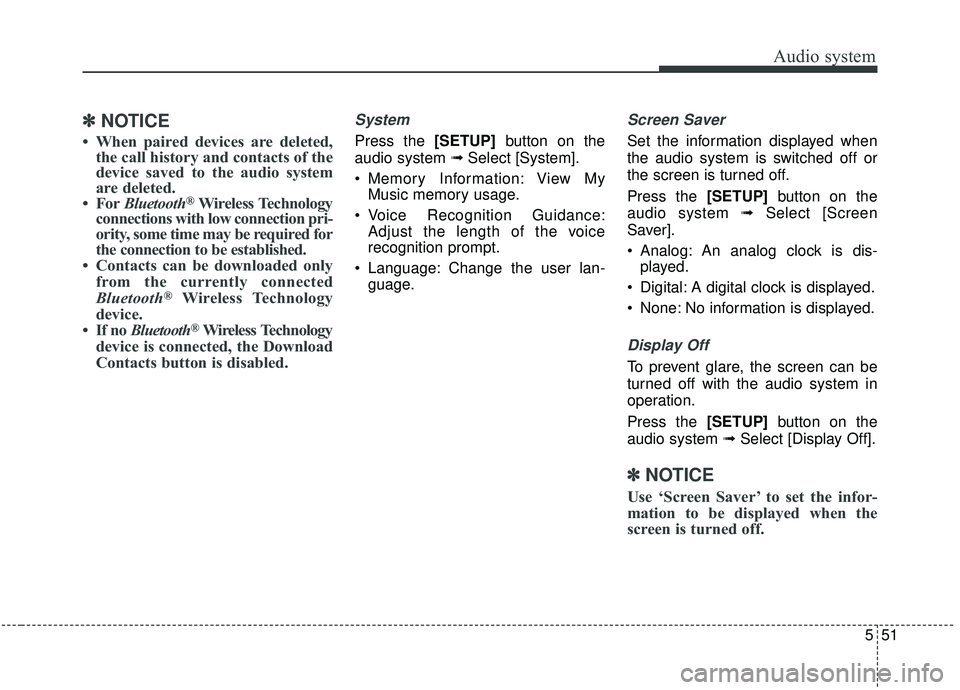
System
Press the [SETUP] button on the
audio system ➟ Select [System].
Memory Information: View My Music memory usage.
Voice Recognition Guidance: Adjust the length of the voice
recognition prompt.
Language: Change the user lan- guage.
Screen Saver
Set the information displayed when
the audio system is switched off or
the screen is turned off.
Press the [SETUP] button on the
audio system ➟ Select [Screen
Saver].
Analog: An analog clock is dis- played.
Digital: A digital clock is displayed.
None: No information is displayed.
Display Off
To prevent glare, the screen can be
turned off with the audio system in
operation.
Press the [SETUP] button on the
audio system ➟ Select [Display Off].
✽ ✽
NOTICE
Use ‘Screen Saver’ to set the infor-
mation to be displayed when the
screen is turned off.
Page 292 of 564
. . . 6-79
. . . . . . . . . . . . . . . 6-79
. . . . . . . . . . . . . . . . . . . . . . 6-80
Drive mode integrated control system . . . . . . . . . 6-86
Lane Departure Warning System (LDWS) . . . . . 6-88
. . . . . . . . . . . . . . . . . . . . . . . . . . . . 6-90
. . . . . . . . . . . . . . 6-91
vehicle leaves the lane, or may warn you even if the
vehicle does not leave the lane when; . . . . . . . . . . . 6-91
Blind Spot Detection system (BSD) . . . . . . . . . . . 6-93
LCA (Lane Change Assist) . . . . . . . . . . . . . . . . . . . . 6-94
. . . . . . . . . . . . . . . . . . . . . . . . . . . . 6-99
Economical operation . . . . . . . . . . . . . . . . . . . . . 6-101
Special driving conditions . . . . . . . . . . . . . . . . . . 6-103
. . . . . . . . . . . . . . . . . 6-103
. . . . . . . . . . . . . . . . 6-103
. . . . . . . . . . . . . . . . . . . . . . . . . . 6-104
. . . . . . . . . . . . . . . . . . . . . . . . . . . 6-105
. . . . . . . . . . . . . . . . . . . . . . . . . . . . . 6-105
. . . . . . . . . . . . . . . . . . . . . . . . . . . 6-106
. . . . . . . . . . . . . . . . . . . . . . 6-107
. . . . . . . . . . . . . . . . . . . . . . . . . . . . . 6-107 . . . . . . . . . . . . . . . . . . . . . . . . . . . . 6-107
Winter driving . . . . . . . . . . . . . . . . . . . . . . . . . . . 6-109
. . . . . . . . . . . . . . . . . . . . . . 6-109
. . . . . . . . . 6-110
. . . . . . . . . . . . . . . . . . . . . 6-110
. . . . . . 6-110
. . . . . . . . . . . . . . . . . . . 6-110
. 6
-110
. . . . . . . . . . . . 6-111
. . . 6-111
. . . . . . . . . . . . . . . . . . 6-111
Trailer towing . . . . . . . . . . . . . . . . . . . . . . . . . . . . 6-111
Vehicle load limit . . . . . . . . . . . . . . . . . . . . . . . . . 6-112
. . . . . . . . . . . . . 6-112
. . . . . . . . . . . . . . . . . . . . . . . . . . . 6-116
Vehicle weight glossary . . . . . . . . . . . . . . . . . . . . 6-118
. . . . . . . . . . . . . . . . . . . . . . . . . . . 6-118
. . . . . . . . . . . . . . . . . . . . . . . . . . 6-118
. . . . . . . . . . . . . . . . . . . . . . . . . . . . . . . 6-118
. . . . . . . . . . . . . . . . . . . . 6-118
. . . . . . . . . . . . . 6-118
. . . . . . . . . . . . . . . . . . 6-118
. . . . . . . . . . 6-118
6
Page 296 of 564
Driving your vehicle
66
Illuminated ignition switch
Whenever a front door is opened, the
ignition switch will illuminate for your
convenience, provided the ignition
switch is not in the ON position. The
light will go off immediately when the
ignition switch is turned on. It will
also go off after about 30 seconds
when the door is closed.
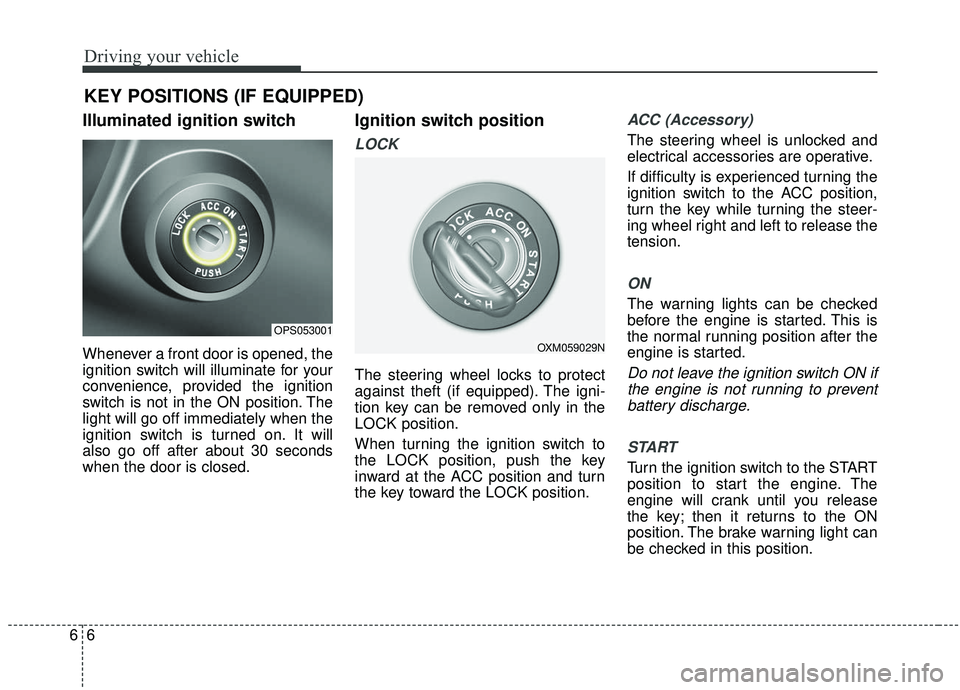
Ignition switch position
LOCK
The steering wheel locks to protect
against theft (if equipped). The igni-
tion key can be removed only in the
LOCK position.
When turning the ignition switch to
the LOCK position, push the key
inward at the ACC position and turn
the key toward the LOCK position.
ACC (Accessory)
The steering wheel is unlocked and
electrical accessories are operative.
If difficulty is experienced turning the
ignition switch to the ACC position,
turn the key while turning the steer-
ing wheel right and left to release the
tension.
ON
The warning lights can be checked
before the engine is started. This is
the normal running position after the
engine is started.
Do not leave the ignition switch ON ifthe engine is not running to preventbattery discharge.
START
Turn the ignition switch to the START
position to start the engine. The
engine will crank until you release
the key; then it returns to the ON
position. The brake warning light can
be checked in this position.
KEY POSITIONS (IF EQUIPPED)
OPS053001
OXM059029N
Page 297 of 564
67
Driving your vehicle
The anti-theft steering column lock (if
equipped) is not a substitute for the
parking brake. Before leaving the dri-
ver’s seat, always make sure the shift
lever is engaged in 1st gear for the
manual transaxle or P (Park) for
automatic transaxle, set the parking
brake fully and shut the engine off.
Unexpected and sudden vehicle
movement may occur if these pre-
cautions are not taken.Starting the engine1.Make sure the parking brake isapplied.
2. Manual Transaxle - Depress the
clutch pedal fully and shift the
transaxle into Neutral. Keep the
clutch pedal and brake pedal
depressed while turning the igni-
tion switch to the start position.
Automatic Transaxle / Dual clutch
transmission - Place the transaxle
shift lever in P (Park). Depress the
brake pedal fully.
You can also start the engine when
the shift lever is in the N (Neutral)
position.
3.Turn the ignition switch to START and hold it there until the engine
starts (a maximum of 10 seconds),
then release the key.
It should be started withoutdepressing the accelerator.
WARNING- Ignition
switch
Never turn the ignition switch to
LOCK or ACC while the vehicle
is moving. This would result in
loss of directional control and
braking function, which could
cause an accident.
WARNING- Proper footwear
Always wear appropriate shoes
when operating your vehicle.
Unsuitable shoes (high heels, ski
boots, sandals, etc.) may inter-
fere with your ability to use the
brake and accelerator pedals.
Page 298 of 564
Driving your vehicle
86
Manual Transaxle
To start the vehicle, keep the clutch
pedal and brake pedal depressed, and
make sure the engine RPM is within
normal range (under 1000 rpm). After
checking, shift the transaxle shift lever
to the desired position.
Unlock the parking brake, and take
your foot off the clutch pedal. Then,
lightly depress the accelerator pedal
and slowly start the vehicle.
4.Do not wait for the engine to warmup while the vehicle remains sta-
tionary.
Start driving at moderate engine
speeds. (Steep accelerating and
decelerating should be avoided.) Do not engage the starter for more
than 10 seconds. If the engine stalls
or fails to start, wait 5 to 10 seconds
before re-engaging the starter.
Improper use of the starter may
damage it. Stopping manual transaxle vehicles
1. After safely parking the vehicle,
press the clutch pedal and brake
pedal at the same time.
2. While depressing the clutch pedal and brake pedal at the same time,
shift the transaxle lever to ‘N’.CAUTION- Starter
If the engine stalls while you arein motion, do not attempt tomove the shift lever to the P(Park) position. If traffic androad conditions permit, you mayput the shift lever in the N(Neutral) position while thevehicle is still moving and turnthe ignition switch to the STARTposition in an attempt to restartthe engine.
WARNING- Steering
wheel
Never reach for any controls
through the steering wheel
while the vehicle is in motion.
The presence of your hand or
arm in this area could cause a
loss of vehicle control.