audio KIA SOUL 2019 Workshop Manual
[x] Cancel search | Manufacturer: KIA, Model Year: 2019, Model line: SOUL, Model: KIA SOUL 2019Pages: 564, PDF Size: 14.2 MB
Page 285 of 564
Audio system
47
5
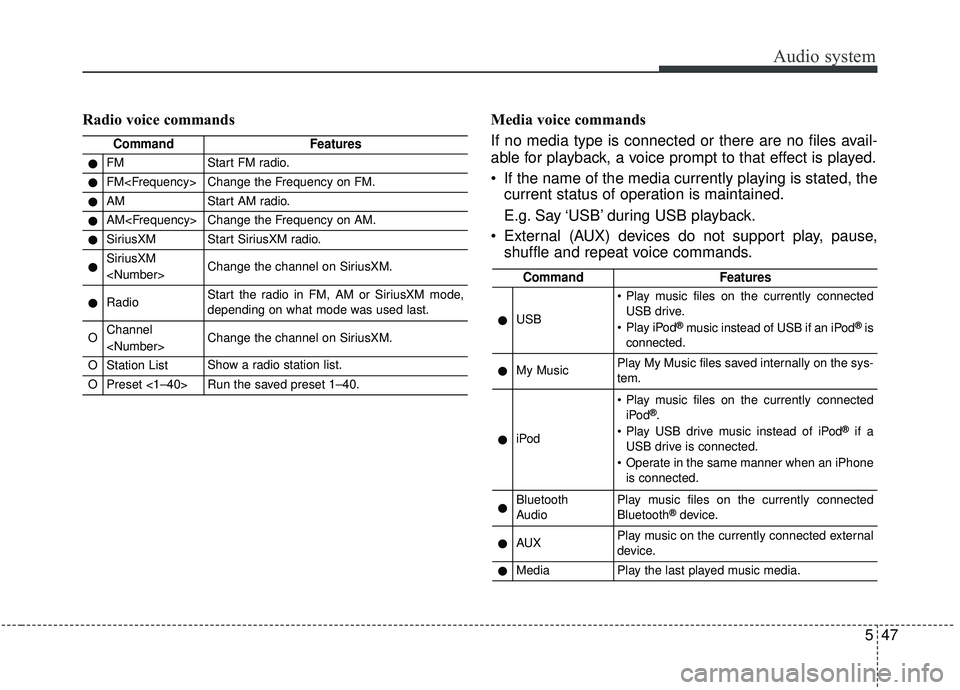
Radio voice commands Media voice commands
If no media type is connected or there are no files avail-
able for playback, a voice prompt to that effect is played.
If the name of the media currently playing is stated, the current status of operation is maintained.
E.g. Say ‘USB’ during USB playback.
External (AUX) devices do not support play, pause, shuffle and repeat voice commands.
CommandFeatures
●FMStart FM radio.
●FM
●AMStart AM radio.
●AM
●SiriusXMStart SiriusXM radio.
●SiriusXM
●RadioStart the radio in FM, AM or SiriusXM mode,
depending on what mode was used last.
OChannel
OStation ListShow a radio station list.
OPreset <1–40>Run the saved preset 1–40.
CommandFeatures
●USB
Play music files on the currently connected
USB drive.
Play iPod
®music instead of USB if an iPod®is
connected.
●My MusicPlay My Music files saved internally on the sys-
tem.
●iPod
Play music files on the currently connected iPod®.
Play USB drive music instead of iPod®if a
USB drive is connected.
Operate in the same manner when an iPhone is connected.
●Bluetooth
AudioPlay music files on the currently connected
Bluetooth®device.
●AUXPlay music on the currently connected external
device.
●MediaPlay the last played music media.
Page 286 of 564
Audio system
548USB, iPod
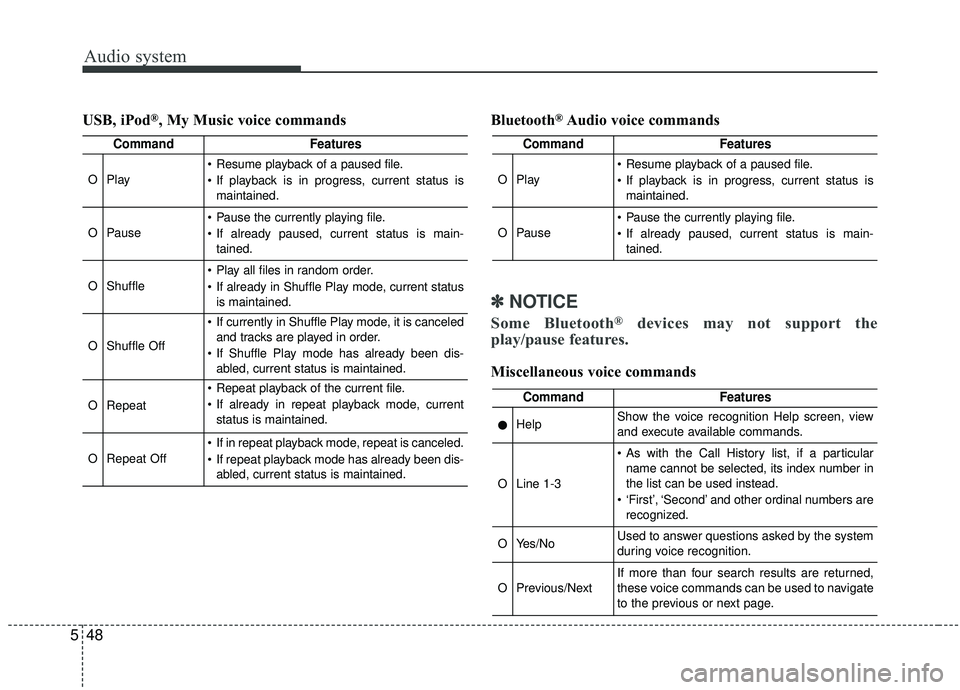
®, My Music voice commands
Bluetooth®Audio voice commands
✽ ✽
NOTICE
Some Bluetooth®devices may not support the
play/pause features.
Miscellaneous voice commands
CommandFeatures
OPlay
Resume playback of a paused file.
If playback is in progress, current status is
maintained.
OPause
Pause the currently playing file.
If already paused, current status is main-tained.
OShuffle
Play all files in random order.
If already in Shuffle Play mode, current statusis maintained.
OShuffle Off
If currently in Shuffle Play mode, it is canceledand tracks are played in order.
If Shuffle Play mode has already been dis- abled, current status is maintained.
ORepeat
Repeat playback of the current file.
If already in repeat playback mode, currentstatus is maintained.
ORepeat Off
If in repeat playback mode, repeat is canceled.
If repeat playback mode has already been dis-abled, current status is maintained.
CommandFeatures
OPlay
Resume playback of a paused file.
If playback is in progress, current status ismaintained.
OPause
Pause the currently playing file.
If already paused, current status is main-tained.
CommandFeatures
●HelpShow the voice recognition Help screen, view
and execute available commands.
OLine 1-3
As with the Call History list, if a particularname cannot be selected, its index number in
the list can be used instead.
‘First’, ‘Second’ and other ordinal numbers are recognized.
OYes/NoUsed to answer questions asked by the system
during voice recognition.
OPrevious/NextIf more than four search results are returned,
these voice commands can be used to navigate
to the previous or next page.
Page 287 of 564
Audio system
49
5
Siri
✽ ✽
NOTICE - Using Siri
• Android device is not supported to
use Siri.
• If you want to use Siri, you have to connect your iOS device to the
multimedia system through
Bluetooth
®Wireless Technology.
(Please check whether your iOS
device supports Siri and turning
Siri On)
• If the iOS version is changed, the functions and response may be dif-
ferent according to the iOS device
and the latest version.
• Siri automatically stops in the fol- lowing events.
1) Outgoing and incoming phone calls.
2) Media (USB, etc.) is connected. (Siri mode is maintained when
iPod
®s are connected)
3) Rear camera is activated
(if
equipped).
4) Vehicle is started or engine is
turned off. (Continued)(Continued)
5) Screen transition buttons, such as RADIO or MEDIA, are
selected.
6) When a pop-up message is dis- played on the screen due to
accidental execution of Siri.
• The microphone is located above the driver’s seat. To ensure proper
Siri, state your voice while main-
taining proper driving posture.
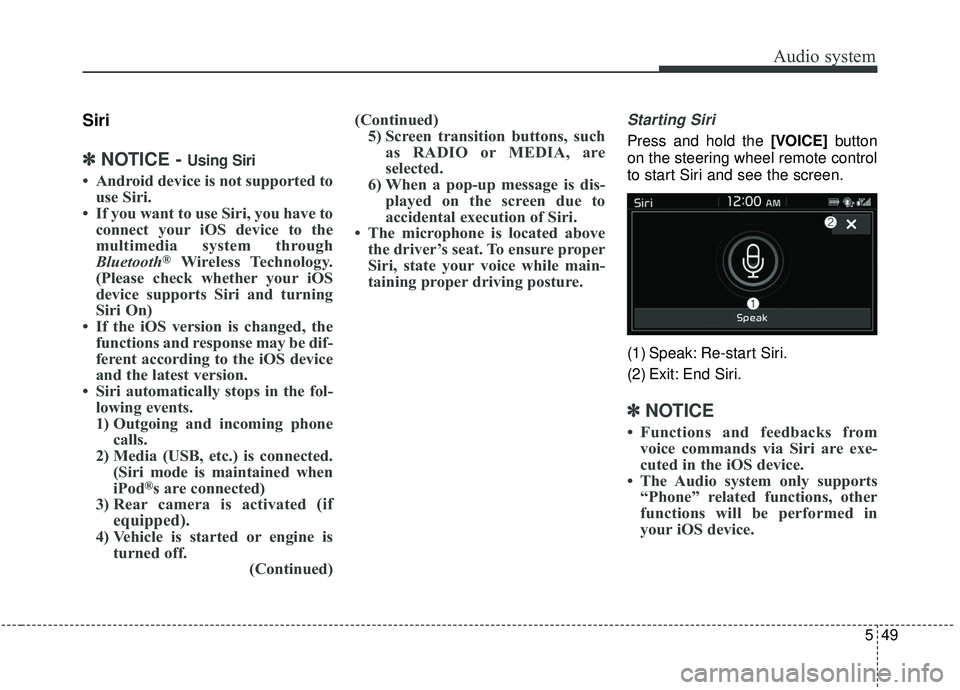
Starting Siri
Press and hold the [VOICE] button
on the steering wheel remote control
to start Siri and see the screen.
(1) Speak: Re-start Siri.
(2) Exit: End Siri.
✽ ✽ NOTICE
• Functions and feedbacks from
voice commands via Siri are exe-
cuted in the iOS device.
• The Audio system only supports “Phone” related functions, other
functions will be performed in
your iOS device.
Page 288 of 564
![KIA SOUL 2019 Workshop Manual Audio system
550
Setup
Setup is the screen to control Audio
system settings.
Press the [SETUP]button on the
audio system.
Display
Press the [SETUP] button on the
audio system ➟ Select [Display].
M](/img/2/40387/w960_40387-287.png "KIA SOUL 2019 Workshop Manual Audio system
550
Setup
Setup is the screen to control Audio
system settings.
Press the [SETUP]button on the
audio system.
Display
Press the [SETUP] button on the
audio system ➟ Select [Display].
M")
Audio system
550
Setup
Setup is the screen to control Audio
system settings.
Press the [SETUP]button on the
audio system.
Display
Press the [SETUP] button on the
audio system ➟ Select [Display].
Mode: Set the screen brightness to be adjusted automatically accord-
ing to ambient lighting conditions
or set the screen to stay bright or
dark continuously.
Illumination: The brightness of the audio screen can be changed.
Sound
Press the [SETUP] button on the
audio system ➟ Select [Sound].
Position: Sound balance and fader can be adjusted.
Tone: Sound tone color can be adjusted.
Speed Dependent Volume: Automatically adjust volume based
on vehicle speed.
Beep: Select whether to play a beep sound when the screen is
touched.
Date/Time
Press the [SETUP] button on the
audio system ➟ Select [Date/Time].
Set Time: Set the time displayed on the audio screen.
Time Format: Choose between 12- hour and 24-hour time formats.
Set Date: Set the date displayed on the audio screen.
Bluetooth
Press the [SETUP] button on the
audio system ➟ Select [Bluetooth].
Connections: Control pairing, dele- tion, connection and disconnection
of
Bluetooth®Wireless Technology
devices.
Auto Connection Priority: Set the connection priority of
Bluetooth®
Wireless Technology devices when
the vehicle is started.
Download Contacts: Contacts can be downloaded from connected
Bluetooth®Wireless Technology
devices.
Bluetooth Voice Prompts: Play or mute voice prompts for
Bluetooth®
Wireless Technology device pair-
ing, connection and errors.
WARNING
- Date/Time Setting Distraction
Adjusting the date/time setting
while driving can result in a loss
of vehicle control that may lead
to an accident, severe personal
injury, and death.
Page 289 of 564
Audio system
51
5
✽ ✽
NOTICE
• When paired devices are deleted,
the call history and contacts of the
device saved to the audio system
are deleted.
• For Bluetooth
®Wireless Technology
connections with low connection pri-
ority, some time may be required for
the connection to be established.
• Contacts can be downloaded only from the currently connected
Bluetooth
®Wireless Technology
device.
• If no Bluetooth
®Wireless Technology
device is connected, the Download
Contacts button is disabled.
System
Press the [SETUP] button on the
audio system ➟ Select [System].
Memory Information: View My Music memory usage.
Voice Recognition Guidance: Adjust the length of the voice
recognition prompt.
Language: Change the user lan- guage.
Screen Saver
Set the information displayed when
the audio system is switched off or
the screen is turned off.
Press the [SETUP] button on the
audio system ➟ Select [Screen
Saver].
Analog: An analog clock is dis- played.
Digital: A digital clock is displayed.
None: No information is displayed.
Display Off
To prevent glare, the screen can be
turned off with the audio system in
operation.
Press the [SETUP] button on the
audio system ➟ Select [Display Off].
✽ ✽
NOTICE
Use ‘Screen Saver’ to set the infor-
mation to be displayed when the
screen is turned off.
Page 290 of 564
Audio system
552
IC
This device complies with Industry Canada license-exempt RSS standard(s). Operation is subject to the following two
conditions: (1) This device may not cause interference; and (2) This device must accept any interference, including
interference that may cause undesired operation of the device.
Le présent appareil est conforme aux CNR d'Industrie Canada applicables aux appareils radio exempts de licence.
L'exploitation est autorisée aux deux conditions suivantes : (1) l'appareil ne doit pas produire de brouillage, et (2) l'u-
tilisateur de l'appareil doit accepter tout brouillage radioélectrique subi, même si le brouillage est susceptible d'en
compromettre le fonctionnement.
RF Exposure
The antenna (or antennas) must be installed so as to maintain at all times a distance minimum of at least 20 cm
between the radiation source (antenna) and any individual. This device may not be installed or used in conjunction
with any other antenna or transmitter.
l'exposition aux RF
L’antenne (ou les antennes) doit tre install e de fa on maintenir tout instant une distance minimum de au moins 20 cm
entre la source de radiation (l’antenne) et toute personne physique.
Declaration of Conformity
Page 345 of 564
655
Driving your vehicle
Sensor to detect the distance
from the vehicle in front
(front radar)
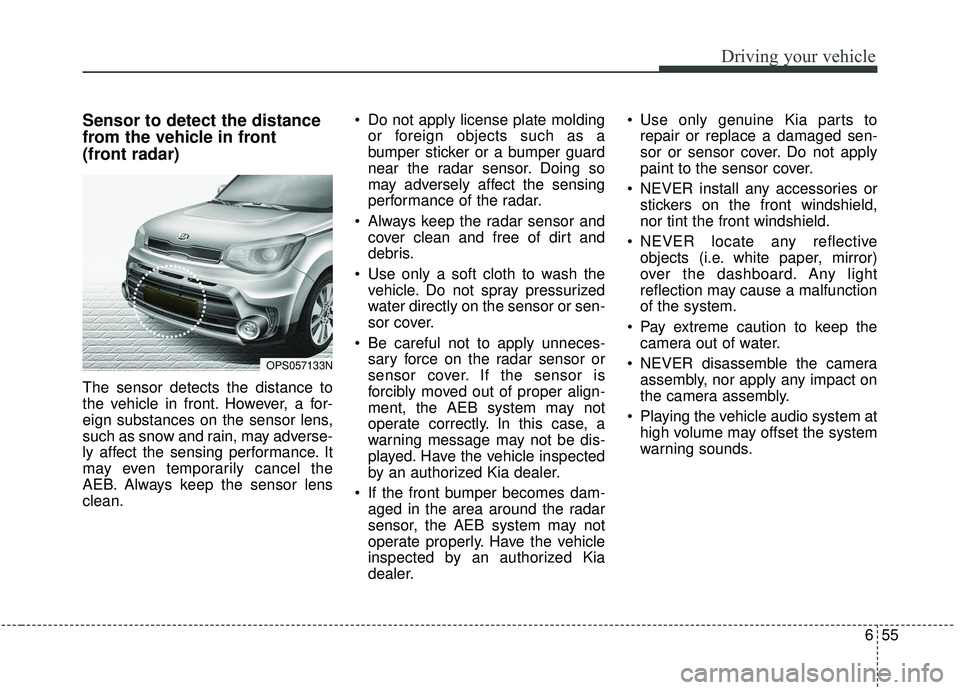
The sensor detects the distance to
the vehicle in front. However, a for-
eign substances on the sensor lens,
such as snow and rain, may adverse-
ly affect the sensing performance. It
may even temporarily cancel the
AEB. Always keep the sensor lens
clean. Do not apply license plate molding
or foreign objects such as a
bumper sticker or a bumper guard
near the radar sensor. Doing so
may adversely affect the sensing
performance of the radar.
Always keep the radar sensor and cover clean and free of dirt and
debris.
Use only a soft cloth to wash the vehicle. Do not spray pressurized
water directly on the sensor or sen-
sor cover.
Be careful not to apply unneces- sary force on the radar sensor or
sensor cover. If the sensor is
forcibly moved out of proper align-
ment, the AEB system may not
operate correctly. In this case, a
warning message may not be dis-
played. Have the vehicle inspected
by an authorized Kia dealer.
If the front bumper becomes dam- aged in the area around the radar
sensor, the AEB system may not
operate properly. Have the vehicle
inspected by an authorized Kia
dealer. Use only genuine Kia parts to
repair or replace a damaged sen-
sor or sensor cover. Do not apply
paint to the sensor cover.
NEVER install any accessories or stickers on the front windshield,
nor tint the front windshield.
NEVER locate any reflective objects (i.e. white paper, mirror)
over the dashboard. Any light
reflection may cause a malfunction
of the system.
Pay extreme caution to keep the camera out of water.
NEVER disassemble the camera assembly, nor apply any impact on
the camera assembly.
Playing the vehicle audio system at high volume may offset the system
warning sounds.
OPS057133N
Page 484 of 564
Maintenance
46
8
When recharging the battery,
observe the following precautions:
The battery must be removed from
the vehicle and placed in an area
with good ventilation.
Do not allow cigarettes, sparks, or flame near the battery.
Watch the battery during charging, and stop or reduce the charging
rate if the battery cells begin
gassing (boiling) violently or if the
temperature of the electrolyte of
any cell exceeds 49°C (120°F).
Wear eye protection when check- ing the battery during charging.
Disconnect the battery charger in the following order. 1.Turn off the battery charger main
switch.
2.Unhook the negative clamp from the negative battery terminal.
3.Unhook the positive clamp from the positive battery terminal.
Before performing maintenance or recharging the battery, turn off all
accessories and stop the engine.
The negative battery cable must be removed first and installed last
when the battery is disconnected.Reset items
Items should be reset after the bat-
tery has been discharged or the bat-
tery has been disconnected.
Auto up/down window (See chapter 4)
Sunroof (See chapter 4)
Trip computer (See chapter 4)
Climate control system (See chapter 4)
Clock (See chapter 4)
Audio (See chapter 5)
Page 503 of 564
865
Maintenance
Fuse switch
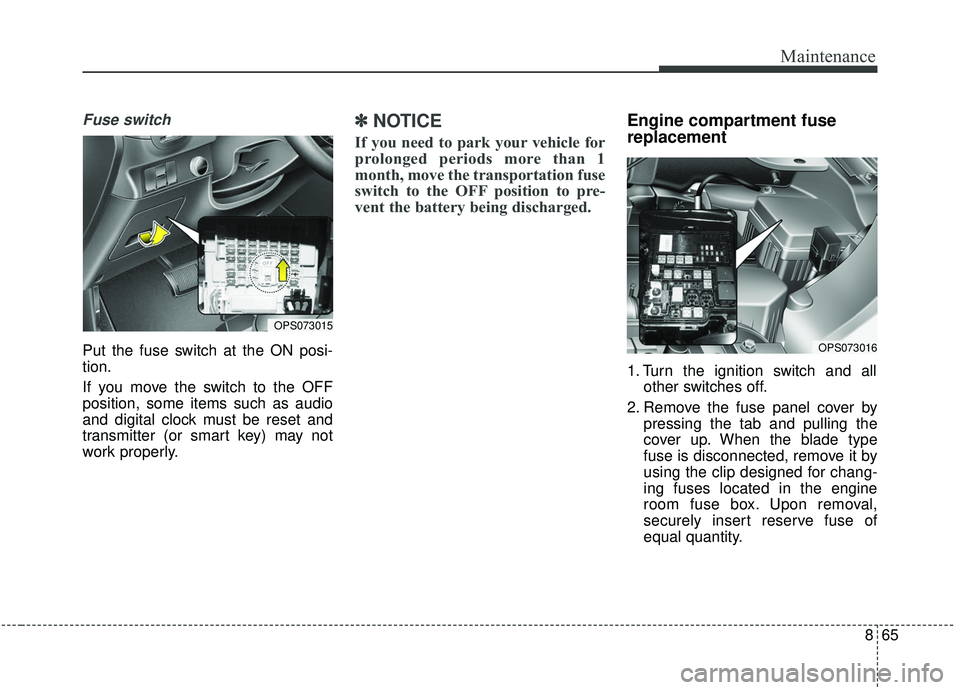
Put the fuse switch at the ON posi-
tion.
If you move the switch to the OFF
position, some items such as audio
and digital clock must be reset and
transmitter (or smart key) may not
work properly.
✽ ✽NOTICE
If you need to park your vehicle for
prolonged periods more than 1
month, move the transportation fuse
switch to the OFF position to pre-
vent the battery being discharged.
Engine compartment fuse
replacement
1. Turn the ignition switch and all
other switches off.
2. Remove the fuse panel cover by pressing the tab and pulling the
cover up. When the blade type
fuse is disconnected, remove it by
using the clip designed for chang-
ing fuses located in the engine
room fuse box. Upon removal,
securely insert reserve fuse of
equal quantity.
OPS073016
OPS073015
Page 506 of 564
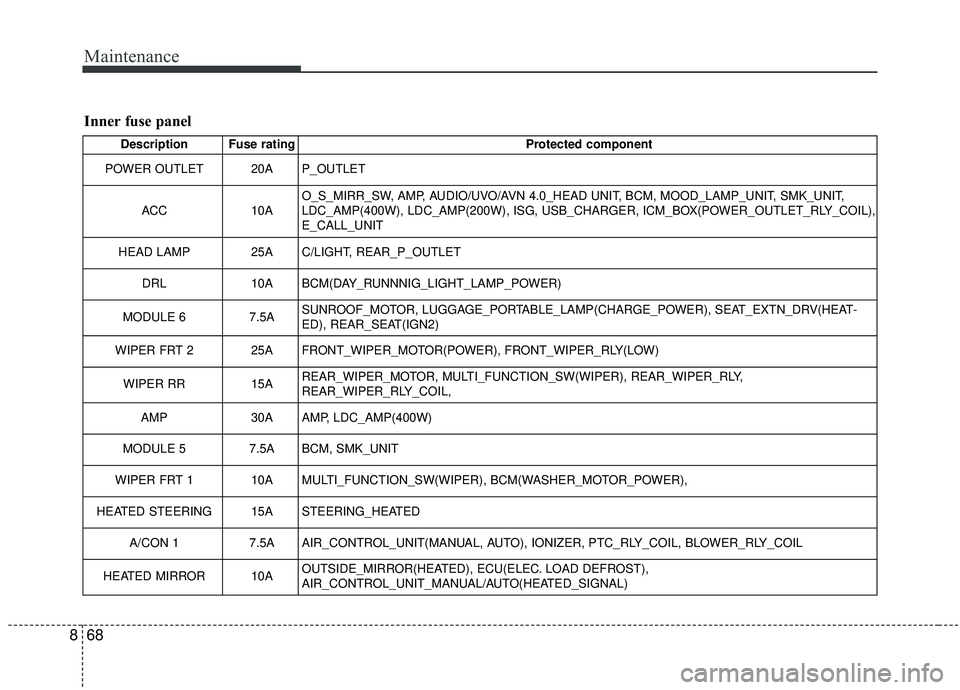
Maintenance
68
8
Inner fuse panel
Description Fuse rating Protected component
POWER OUTLET 20A P_OUTLET
ACC 10AO_S_MIRR_SW, AMP, AUDIO/UVO/AVN 4.0_HEAD UNIT, BCM, MOOD_LAMP_UNIT, SMK_UNIT,
LDC_AMP(400W), LDC_AMP(200W), ISG, USB_CHARGER, ICM_BOX(POWER_OUTLET_RLY_COIL),
E_CALL_UNIT
HEAD LAMP 25A C/LIGHT, REAR_P_OUTLET
DRL 10A BCM(DAY_RUNNNIG_LIGHT_LAMP_POWER)
MODULE 6 7.5ASUNROOF_MOTOR, LUGGAGE_PORTABLE_LAMP(CHARGE_POWER), SEAT_EXTN_DRV(HEAT-
ED), REAR_SEAT(IGN2)
WIPER FRT 2 25A FRONT_WIPER_MOTOR(POWER), FRONT_WIPER_RLY(LOW)
WIPER RR 15AREAR_WIPER_MOTOR, MULTI_FUNCTION_SW(WIPER), REAR_WIPER_RLY,
REAR_WIPER_RLY_COIL,
AMP 30A AMP, LDC_AMP(400W)
MODULE 5 7.5A BCM, SMK_UNIT
WIPER FRT 1 10A MULTI_FUNCTION_SW(WIPER), BCM(WASHER_MOTOR_POWER),
HEATED STEERING 15A STEERING_HEATED A/CON 1 7.5A AIR_CONTROL_UNIT(MANUAL, AUTO), IONIZER, PTC_RLY_COIL, BLOWER_RLY_COIL
HEATED MIRROR 10A OUTSIDE_MIRROR(HEATED), ECU(ELEC. LOAD DEFROST),
AIR_CONTROL_UNIT_MANUAL/AUTO(HEATED_SIGNAL)