fog light KIA SOUL 2019 Owners Manual
[x] Cancel search | Manufacturer: KIA, Model Year: 2019, Model line: SOUL, Model: KIA SOUL 2019Pages: 564, PDF Size: 14.2 MB
Page 174 of 564
Features of your vehicle
88
4
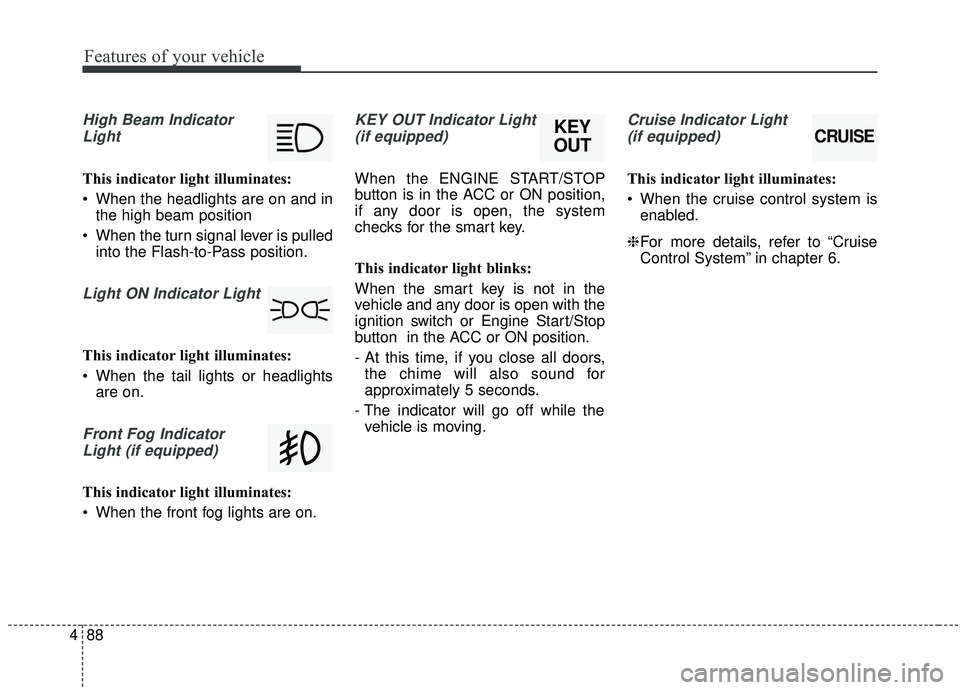
High Beam Indicator
Light
This indicator light illuminates:
When the headlights are on and in the high beam position
When the turn signal lever is pulled into the Flash-to-Pass position.
Light ON Indicator Light
This indicator light illuminates:
When the tail lights or headlightsare on.
Front Fog Indicator
Light (if equipped)
This indicator light illuminates:
When the front fog lights are on.
KEY OUT Indicator Light(if equipped)
When the ENGINE START/STOP
button is in the ACC or ON position,
if any door is open, the system
checks for the smart key.
This indicator light blinks:
When the smart key is not in the
vehicle and any door is open with the
ignition switch or Engine Start/Stop
button in the ACC or ON position.
- At this time, if you close all doors, the chime will also sound for
approximately 5 seconds.
- The indicator will go off while the vehicle is moving.
Cruise Indicator Light
(if equipped)
This indicator light illuminates:
When the cruise control system is enabled.
❈ For more details, refer to “Cruise
Control System” in chapter 6.
CRUISEKEY
OUT
Page 177 of 564
491
Features of your vehicle
Headlamp escort (if equipped)
If you turn the ignition switch to the
ACC or OFF position with the head-
lights ON, the headlights remain on
for about 5 minutes. However, if the
driver’s door is opened and closed,
the headlights are turned off after 15
seconds.
The headlights can be turned off by
pressing the lock button on the trans-
mitter (or smart key) twice or turning
the light switch to the OFF or Auto
position. However, if you turn the light
switch to the Auto position when it is
dark outside, the headlights will not
be turned off immediately.
Battery saver function
The purpose of this feature is toprevent the battery from being dis-
charged. The system automatically
turns off the parking lights when
the driver removes the ignition key
and opens the driver-side door (in
that order).
With this feature, the parking lights will turn off automatically if the driv-
er parks on the side of the road at
night.
If necessary, to keep the lights on
when the ignition key is removed,
perform the following:
1) Open the driver-side door.
2) Turn the parking lights OFF and ON again using the light switch
on the steering column.
Daytime running light
(if equipped)
The Daytime Running Lights (DRL)
can make it easier for others to see
the front of your vehicle during the
day. DRL can be helpful in many dif-
ferent driving conditions, and it is
especially helpful after dawn and
before sunset.
The DRL system turns OFF when:
1. The headlight switch is ON.
2. The engine is OFF.
3. The front fog light is ON.
4. Engaging the Parking Brake
LIGHTING
Page 181 of 564
495
Features of your vehicle
One-touch lane change function
To activate an one-touch lane
change function, move the turn sig-
nal lever slightly and then release it.
The lane change signals will blink 3,
5 or 7 times.
You can choose one-touch lane
change blinking function in “One
touch turn lamp” of “User setting”.
Refer to “User setting” in chapter 4.
✽ ✽NOTICE
If an indicator flash is abnormally
quick or slow, the bulb may be
burned out or have a poor electrical
connection in the circuit.
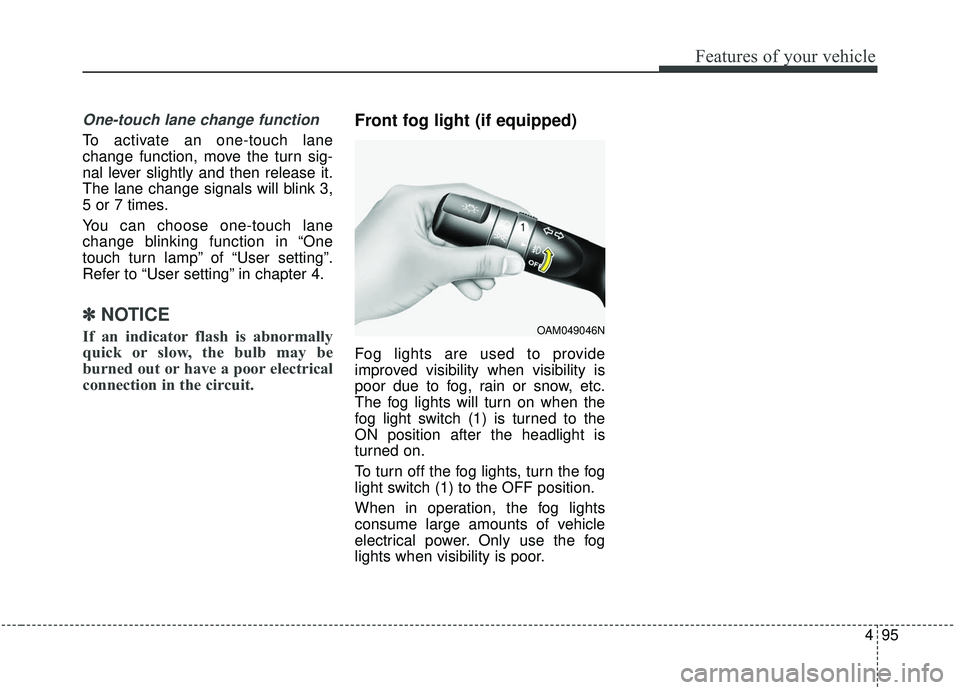
Front fog light (if equipped)
Fog lights are used to provide
improved visibility when visibility is
poor due to fog, rain or snow, etc.
The fog lights will turn on when the
fog light switch (1) is turned to the
ON position after the headlight is
turned on.
To turn off the fog lights, turn the fog
light switch (1) to the OFF position.
When in operation, the fog lights
consume large amounts of vehicle
electrical power. Only use the fog
lights when visibility is poor.
OAM049046N
Page 199 of 564
4113
Features of your vehicle
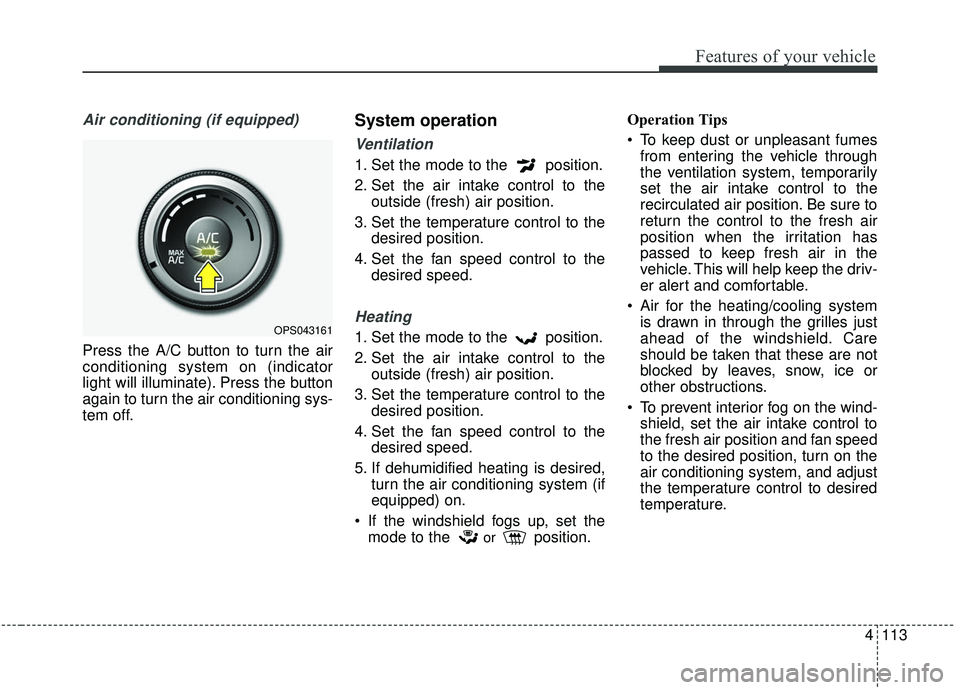
Air conditioning (if equipped)
Press the A/C button to turn the air
conditioning system on (indicator
light will illuminate). Press the button
again to turn the air conditioning sys-
tem off.
System operation
Ventilation
1. Set the mode to the position.
2. Set the air intake control to theoutside (fresh) air position.
3. Set the temperature control to the desired position.
4. Set the fan speed control to the desired speed.
Heating
1. Set the mode to the position.
2. Set the air intake control to theoutside (fresh) air position.
3. Set the temperature control to the desired position.
4. Set the fan speed control to the desired speed.
5. If dehumidified heating is desired, turn the air conditioning system (if
equipped) on.
If the windshield fogs up, set the mode to the
orposition. Operation Tips
To keep dust or unpleasant fumes
from entering the vehicle through
the ventilation system, temporarily
set the air intake control to the
recirculated air position. Be sure to
return the control to the fresh air
position when the irritation has
passed to keep fresh air in the
vehicle. This will help keep the driv-
er alert and comfortable.
Air for the heating/cooling system is drawn in through the grilles just
ahead of the windshield. Care
should be taken that these are not
blocked by leaves, snow, ice or
other obstructions.
To prevent interior fog on the wind- shield, set the air intake control to
the fresh air position and fan speed
to the desired position, turn on the
air conditioning system, and adjust
the temperature control to desired
temperature.
OPS043161
Page 210 of 564
Features of your vehicle
124
4
Outside (fresh) air position
The indicator light on the
button does not illumi-
nate when the outside
(fresh) air position is
selected.
With the outside (fresh)
air position selected, air
enters the vehicle from
outside and is heated or
cooled according to the
function selected.
Prolonged operation of the heater in
the recirculated air position (without
air conditioning selected) may cause
fogging of the windshield and side
windows and the air within the pas-
senger compartment may become
stale.
In addition, prolonged use of the air
conditioning with the recirculated air
position selected will result in exces-
sively dry air in the passenger com-
partment.WARNING- Recirculated air
Continuous use of the climate
control system in the recirculat-
ed air position can cause
drowsiness or sleepiness, and
loss of vehicle control. Set the
air intake control to the outside
(fresh) air position as much as
possible while driving.WARNING- Reduced visi- bility
Continued climate control sys-
tem operation in the recirculat-
ed air position may allow
humidity to increase inside
vehicle which may fog the glass
and obscure visibility.
WARNING- Sleeping with
AC on
Do not sleep in a vehicle with
the air conditioning or heating
system on as this may cause
serious harm or death due to a
drop in the oxygen level and/or
body temperature.
Page 349 of 564
659
Driving your vehicle
The driver's field of view is not wellilluminated (either too dark or too
much reflection or too much back-
light that obscures the field of view)
The vehicle in front does not have their rear lights properly turned ON
The outside brightness changes suddenly, for example when enter-
ing or exiting a tunnel
Light coming from a street light or an oncoming vehicle is reflected on
a wet road surface such as a pud-
dle in the road
The field of view in front is obstructed by sun glare
The windshield glass is fogged up; a clear view of the road is obstruct-
ed
The vehicle in front is driving errat- ically
The vehicle drives through a con- struction area, on an unpaved
road, or above metal materials,
such as a railway
The vehicle drives inside a build- ing, such as a basement parking
lot The adverse road conditions cause
excessive vehicle vibrations while
driving
The vehicle in front is moving verti- cally to the driving direction
The vehicle in front is stopped ver- tically
The vehicle in front is driving towards your vehicle or reversing
Sensor recognition changes rapid- ly when driving over a bump
When the vehicle vibrates heavily
When the vehicle in front drives in circles, such as on a roundabout
Window tint on the front wind- shield, film, water repellent coat-
ing, damaged glass, camera lens
contaminated with foreign objects
(e.g. a sticker, insect, etc.)
When the radar or camera/camera lens is damaged
When the headlights are off or weak at night or in a tunnel
Light such as street light, sunlight or oncoming vehicle light reflects
from water on the road Driving with the sun in front of you
(including headlights of a vehicle
coming from the opposite direc-
tion)
Signs, shadow on the road, tunnel entrance, toll gate, partially paved
roads
The windshield is fogged by humid air in the vehicle or frosted over
In foggy weather
The radar/camera sensor recogni- tion is limited
Page 381 of 564
691
Driving your vehicle
The LDWS does not operate
when:
The driver turns on the turn signalor the hazard warning flasher to
change lane.
Driving on the lane line.
✽ ✽ NOTICE
To change lanes, operate the turn
signal switch then change the lane.
The LDWS may not warn you
even if the vehicle leaves the
lane, or may warn you even if
the vehicle does not leave the
lane when;
The lane is not visible due to snow,
rain, stain, a puddle or other envi-
ronmental conditions.
The brightness of the outside changes suddenly such as tunnel
enter/exit.
The headlights are off at night or in a tunnel.
The color of the lane marking from the road is difficult to distinguish.
Driving on a steep grade or a curve.
Light such as street light, sunlight or oncoming vehicle light reflects
from water on the road.
The lens or windshield is stained with foreign matter.
The sensor cannot detect the lane because of fog, heavy rain or
heavy snow. The surrounding of the inside rear
view mirror temperature is high
due to a direct ray of light.
The lane is very wide or narrow.
The lane line is damaged or indis- tinct.
The windshield is fogged by humid air in the vehicle.
The shadow is on the lane line by a median strip.
The sensor cannot distinguish the lane from the road due to the
dust/dirt.
There is a mark similar to a lane line.
There is a boundary structure.
The distance from vehicle ahead is very short or the vehicle ahead
drives hiding the lane line.
The vehicle vibrates heavily due to road conditions.
The lane number increases or decreases or the lane lines are
crossing.
WARNING - LDWS
Limitations
The Lane Departure Warning
System is a supplemental sys-
tem. Do not solely rely on the
system but always pay attention
and drive safely.
Page 515 of 564
877
Maintenance
If you don’t have the necessary tools,
the correct bulbs and the expertise,
consult an authorized Kia dealer. In
many cases, it is difficult to replace
vehicle light bulbs because other
parts of the vehicle must be removed
before you can get to the bulb. This is
especially true if you have to remove
the headlamp assembly to get to the
bulb(s).
Removing/installing the headlamp
assembly can result in damage to
the vehicle.
If non-genuine parts or substandard
bulbs are used, it may lead to blow-
ing a fuse or other wiring damages.
Do not install extra lamps or LEDs to
the vehicle. If additional lights are
installed, it may lead to lamp mal-
functions and flickering. Additionally,
the fuse box and other writing may
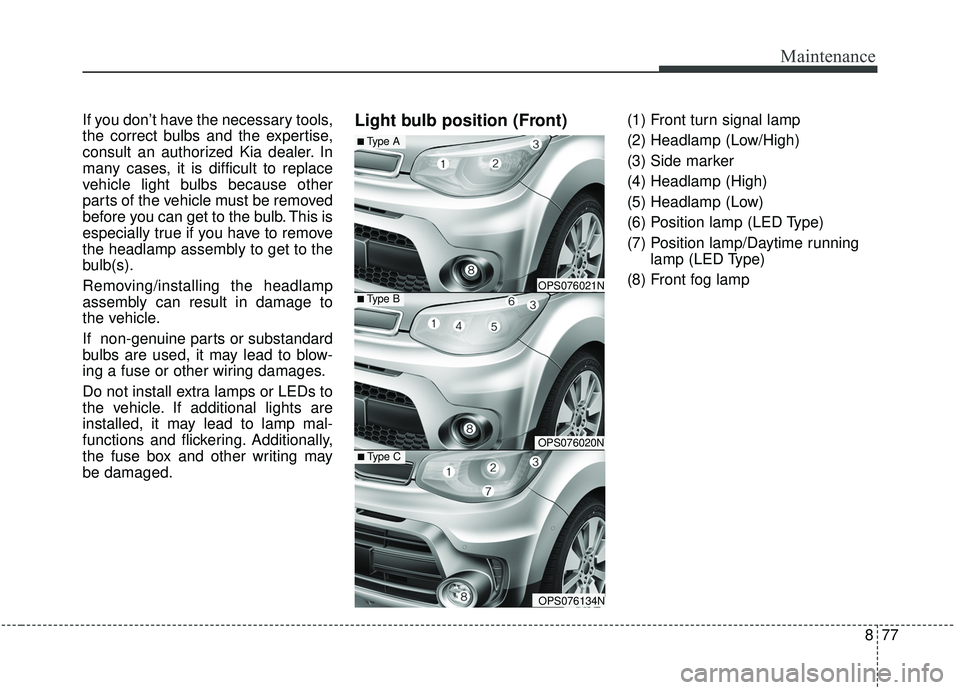
be damaged.Light bulb position (Front)(1) Front turn signal lamp
(2) Headlamp (Low/High)
(3) Side marker
(4) Headlamp (High)
(5) Headlamp (Low)
(6) Position lamp (LED Type)
(7) Position lamp/Daytime runninglamp (LED Type)
(8) Front fog lamp
■Type B
■Type A
OPS076021N
OPS076020N■Type C
OPS076134N
Page 547 of 564
49
Specifications & Consumer information
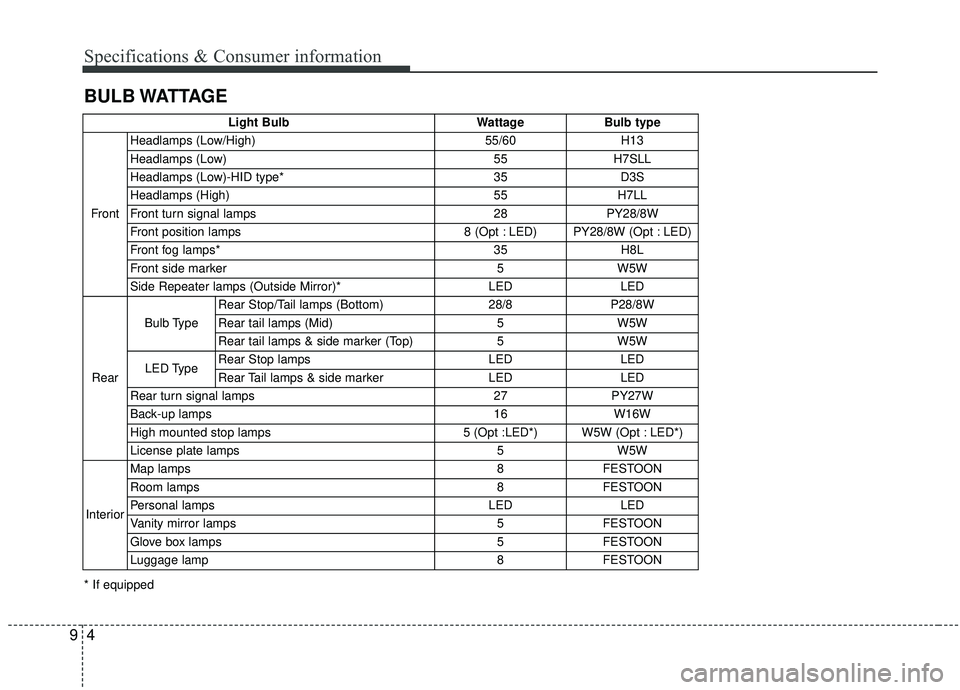
BULB WATTAGE
* If equippedLight Bulb Wattage Bulb type
Front Headlamps (Low/High) 55/60 H13
Headlamps (Low) 55 H7SLL
Headlamps (Low)-HID type* 35 D3S
Headlamps (High) 55 H7LL
Front turn signal lamps 28 PY28/8W
Front position lamps 8 (Opt : LED) PY28/8W (Opt : LED)
Front fog lamps* 35 H8L
Front side marker 5 W5W
Side Repeater lamps (Outside Mirror)* LED LED
Rear Bulb Type
Rear Stop/Tail lamps (Bottom) 28/8 P28/8W
Rear tail lamps (Mid) 5 W5W
Rear tail lamps & side marker (Top) 5 W5W
LED Type Rear Stop lamps LED LED
Rear Tail lamps & side marker LED LED
Rear turn signal lamps 27 PY27W
Back-up lamps 16 W16W
High mounted stop lamps 5 (Opt :LED*) W5W (Opt : LED*)
License plate lamps 5 W5W
Interior Map lamps 8 FESTOON
Room lamps 8 FESTOON
Personal lamps LED LED
Vanity mirror lamps 5 FESTOON
Glove box lamps 5 FESTOON
Luggage lamp 8 FESTOON
Page 560 of 564
Index
6I
Seat warmer . . . . . . . . . . . . . . . . . . . . . . . . . . . . . . 4-140
Sunvisor . . . . . . . . . . . . . . . . . . . . . . . . . . . . . . . . . 4-140
Interior light . . . . . . . . . . . . . . . . . . . . . . . . . . . . . . . . . 4-99 Glove box lamp . . . . . . . . . . . . . . . . . . . . . . . . . . . 4-103
Interior lamp AUTO cut . . . . . . . . . . . . . . . . . . . . . . 4-99
Luggage room lamp . . . . . . . . . . . . . . . . . . . . . . . . 4-101
Map lamp . . . . . . . . . . . . . . . . . . . . . . . . . . . . . . . . 4-99
Portable lamp usage . . . . . . . . . . . . . . . . . . . . . . . . 4-101
Room lamp . . . . . . . . . . . . . . . . . . . . . . . . . . . . . . . 4-100
Vanity mirror lamp . . . . . . . . . . . . . . . . . . . . . . . . . 4-103
Interior overview. . . . . . . . . . . . . . . . . . . . . . . . . . . . . . . 2-4
Key . . . . . . . . . . . . . . . . . . . . . . . . . . . . . . . . . . . . \
. . . . . 4-4 Battery replacement . . . . . . . . . . . . . . . . . . . . . . . . . . 4-6
Immobilizer system . . . . . . . . . . . . . . . . . . . . . . . . . . 4-7
Key operations . . . . . . . . . . . . . . . . . . . . . . . . . . . . . . 4-4
Record your key number . . . . . . . . . . . . . . . . . . . . . . 4-4
Transmitter precautions . . . . . . . . . . . . . . . . . . . . . . . 4-6
Key positions . . . . . . . . . . . . . . . . . . . . . . . . . . . . . . . . . 6-6 Ignition switch position . . . . . . . . . . . . . . . . . . . . . . . 6-6
Illuminated ignition switch . . . . . . . . . . . . . . . . . . . . 6-6
Starting the engine . . . . . . . . . . . . . . . . . . . . . . . . . . . 6-7 Lane departure warning system (LDWS) . . . . . . . . . . . 6-88
The LDWS does not operate when . . . . . . . . . . . . . 6-91
The LDWS may not warn you even if the vehicle leaves the lane, or may warn you even if the vehicle does not
leave the lane when; . . . . . . . . . . . . . . . . . . . . . . . . 6-91
Warning indicator . . . . . . . . . . . . . . . . . . . . . . . . . . . 6-90
LCD display . . . . . . . . . . . . . . . . . . . . . . . . . . . . . . . . . 4-59 LCD modes (for Type B cluster) . . . . . . . . . . . . . . . 4-59
Service mode . . . . . . . . . . . . . . . . . . . . . . . . . . . . . . 4-60
Turn by turn mode . . . . . . . . . . . . . . . . . . . . . . . . . . 4-67
User settings mode . . . . . . . . . . . . . . . . . . . . . . . . . . 4-61
Warning messages . . . . . . . . . . . . . . . . . . . . . . . . . . 4-67
Liftgate . . . . . . . . . . . . . . . . . . . . . . . . . . . . . . . . . . . . \
. 4-23 Closing the liftgate . . . . . . . . . . . . . . . . . . . . . . . . . . 4-23
Emergency liftgate safety release. . . . . . . . . . . . . . . 4-24
Opening the liftgate . . . . . . . . . . . . . . . . . . . . . . . . . 4-23
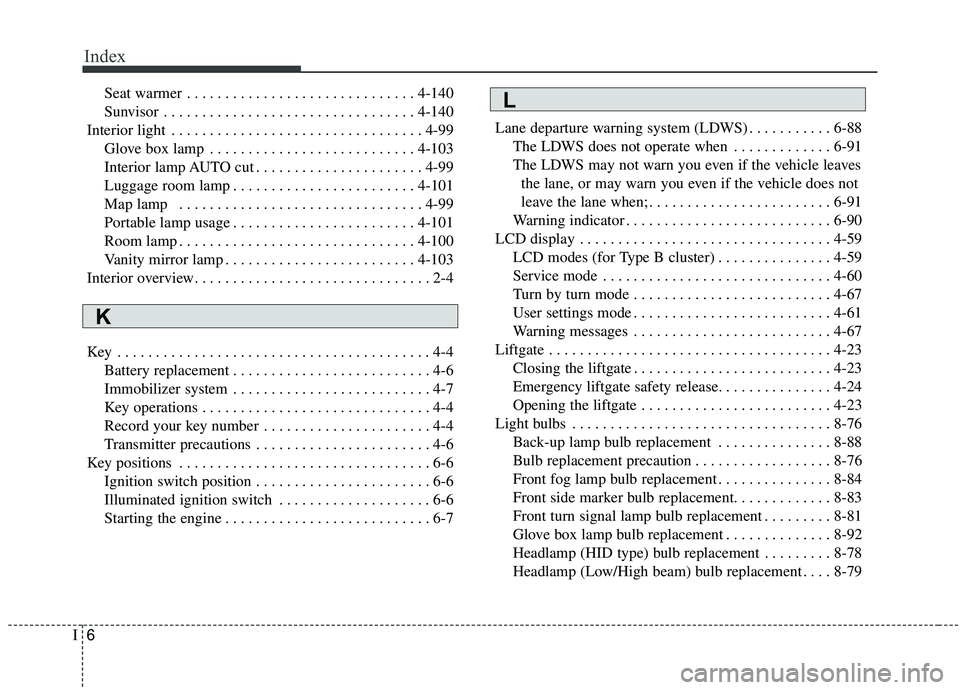
Light bulbs . . . . . . . . . . . . . . . . . . . . . . . . . . . . . . . . . . 8-76\
Back-up lamp bulb replacement . . . . . . . . . . . . . . . 8-88
Bulb replacement precaution . . . . . . . . . . . . . . . . . . 8-76
Front fog lamp bulb replacement . . . . . . . . . . . . . . . 8-84
Front side marker bulb replacement. . . . . . . . . . . . . 8-83
Front turn signal lamp bulb replacement . . . . . . . . . 8-81
Glove box lamp bulb replacement . . . . . . . . . . . . . . 8-92
Headlamp (HID type) bulb replacement . . . . . . . . . 8-78
Headlamp (Low/High beam) bulb replacement . . . . 8-79L
K