set KIA SOUL 2021 Navigation System Quick Reference Guide
[x] Cancel search | Manufacturer: KIA, Model Year: 2021, Model line: SOUL, Model: KIA SOUL 2021Pages: 211, PDF Size: 6.67 MB
Page 173 of 211
9-19
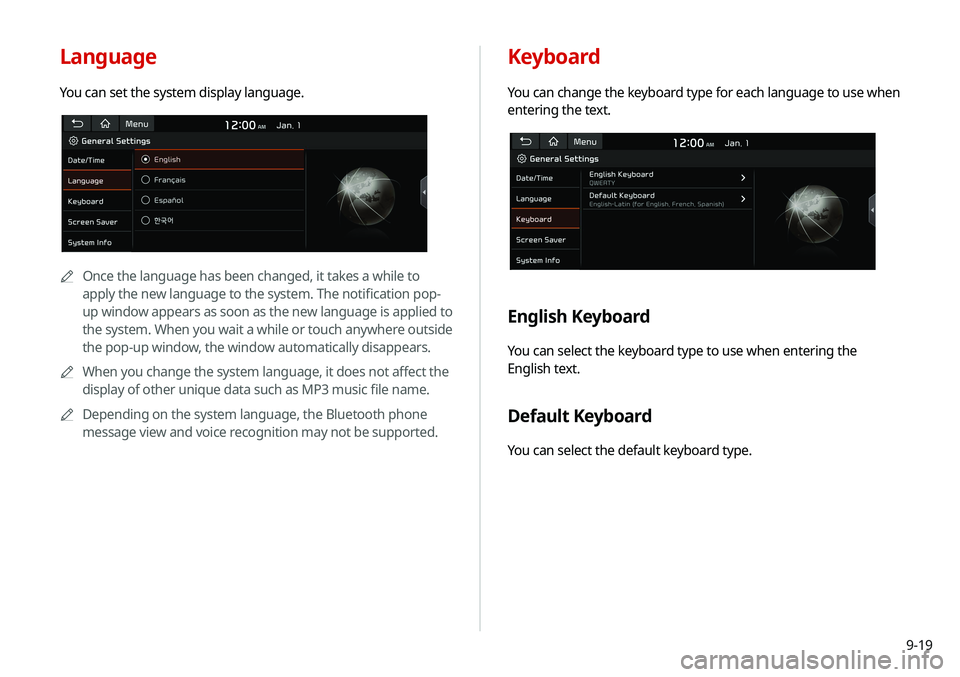
Keyboard
You can change the keyboard type for each language to use when
entering the text.
English Keyboard
You can select the keyboard type to use when entering the
English text.
Default Keyboard
You can select the default keyboard type.
Language
You can set the system display language.
0000
A
Once the language has been changed, it takes a while to
apply the new language to the system. The notification pop-
up window appears as soon as the new language is applied to
the system. When you wait a while or touch anywhere outside
the pop-up window, the window automatically disappears.
0000
A
When you change the system language, it does not affect the
display of other unique data such as MP3 music file name.
0000
A
Depending on the system language, the Bluetooth phone
message view and voice recognition may not be supported.
Page 174 of 211
9-20
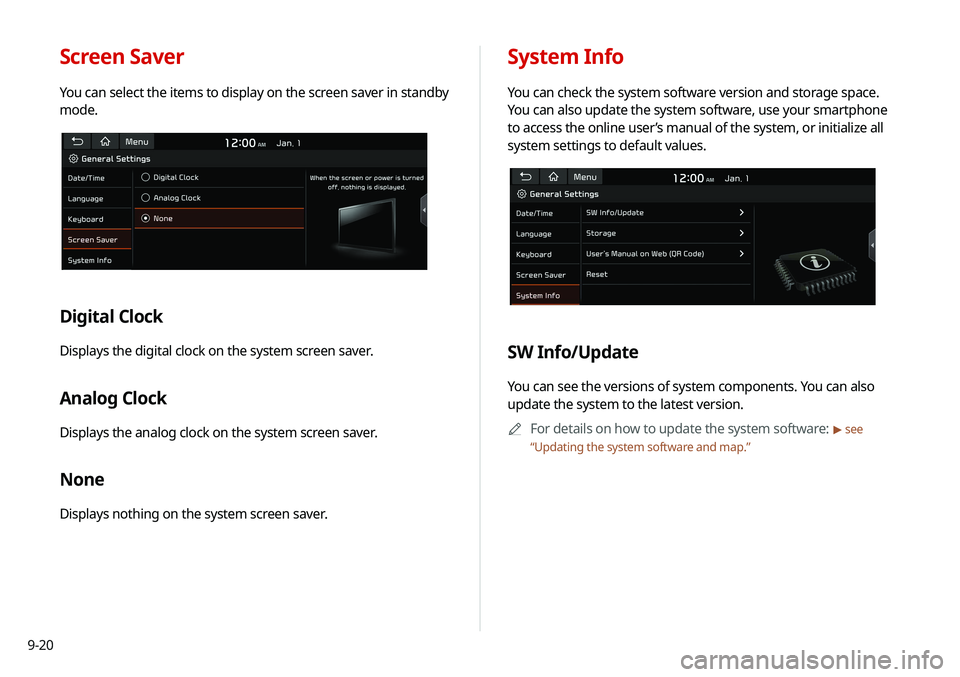
System Info
You can check the system software version and storage space.
You can also update the system software, use your smartphone
to access the online user’s manual of the system, or initialize all
system settings to default values.
SW Info/Update
You can see the versions of system components. You can also
update the system to the latest version.0000
A
For details on how to update the system software:
> see
“ Updating the system software and map.”
Screen Saver
You can select the items to display on the screen saver in standby
mode.
Digital Clock
Displays the digital clock on the system screen saver.
Analog Clock
Displays the analog clock on the system screen saver.
None
Displays nothing on the system screen saver.
Page 175 of 211
9-21
Storage
You can check the storage space of the system memory where
voice memos can be saved.
User's Manual on Web (QR Code)
You can access the online user’s manual of the system by
scanning the QR code with your smartphone.
Reset
You can initialize all system settings including general settings
and navigation settings.
\334Caution
\225 When initialization is performed, all user data in the system
including the location data is deleted.
\225 When phone projection is active, you cannot reset the system
settings. To reset the settings, remove the USB cable from
your system.
Configuring the display
settings
You can change the system display settings such as display
brightness.
1 On the All Menus screen, touch Setup >
Display.
The display settings screen appears.
2 Configure the settings required:
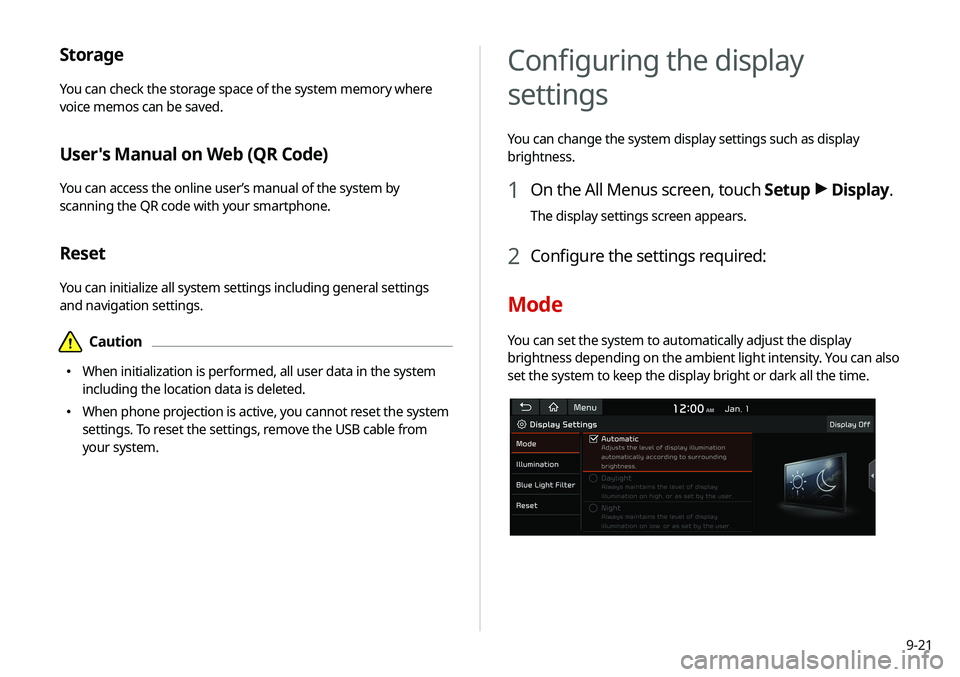
Mode
You can set the system to automatically adjust the display
brightness depending on the ambient light intensity. You can also
set the system to keep the display bright or dark all the time.
Page 176 of 211
9-22
Link to Cluster Illumination Control
The display brightness is automatically adjusted based on the
cluster illumination.
Daylight
You can set the display brightness when Daylight is selected
under Mode. Uncheck Link to Cluster Illustration Control and
then set to the desired brightness.
Night
You can set the display brightness when Night is selected under
Mode. Uncheck Link to Cluster Illustration Control and then
set to the desired brightness.
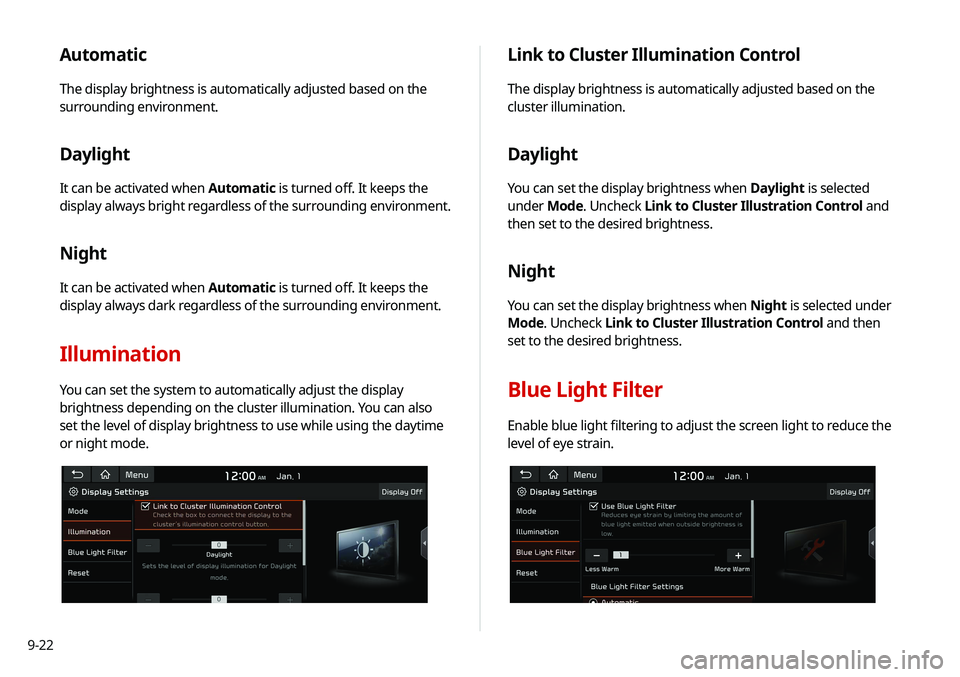
Blue Light Filter
Enable blue light filtering to adjust the screen light to reduce the
level of eye strain.
Automatic
The display brightness is automatically adjusted based on the
surrounding environment.
Daylight
It can be activated when Automatic is turned off. It keeps the
display always bright regardless of the surrounding environment.
Night
It can be activated when Automatic is turned off. It keeps the
display always dark regardless of the surrounding environment.
Illumination
You can set the system to automatically adjust the display
brightness depending on the cluster illumination. You can also
set the level of display brightness to use while using the daytime
or night mode.
Page 177 of 211
9-23
Configuring the media settings
Set to receive a notification when the information changes during
playback or to include sub-folders when playing a folder on
repeat.
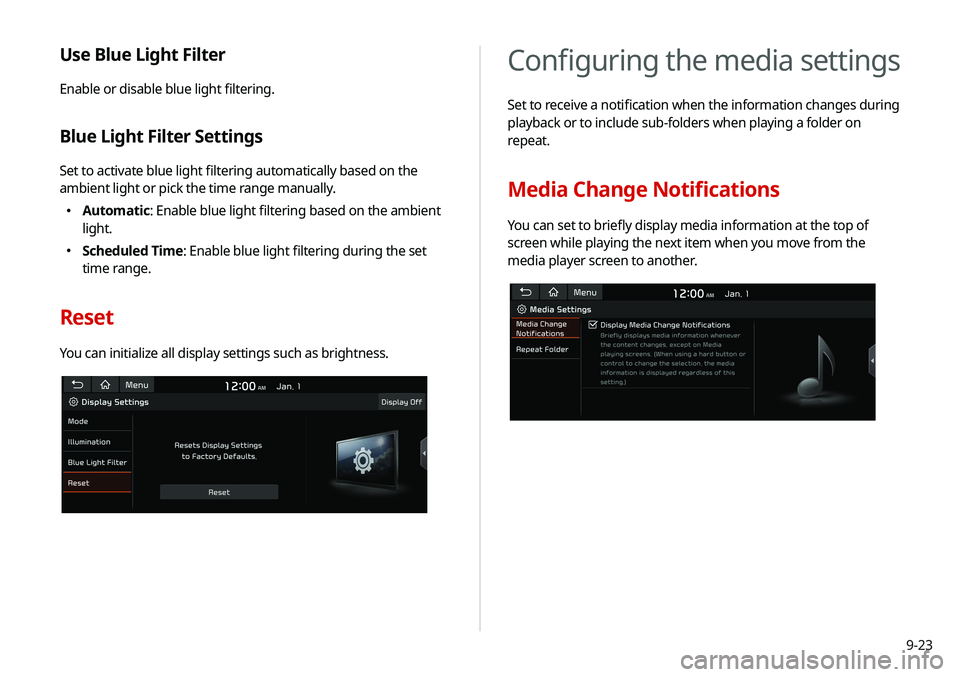
Media Change Notifications
You can set to briefly display media information at the top of
screen while playing the next item when you move from the
media player screen to another.
Use Blue Light Filter
Enable or disable blue light filtering.
Blue Light Filter Settings
Set to activate blue light filtering automatically based on the
ambient light or pick the time range manually.
\225Automatic: Enable blue light filtering based on the ambient
light.
\225Scheduled Time: Enable blue light filtering during the set
time range.
Reset
You can initialize all display settings such as brightness.
Page 178 of 211

9-24
Updating the system software
and map
You can update the navigation map and infotainment system.
Please visit your local dealership to update your system.0000
A
Any changes made after the update file is created are not
reflected in the map. As a result, certain roads, buildings, and
speed limits on the map may not be up to date.
0000
A
Depending on the total data amount, an update may take
several minutes.
0000
A
Do not turn off the system or remove the storage device while
the update is in progress. When power supply is cut off or the
storage device is removed from the system, it may damage
the data or cause a system malfunction.
Repeat Folder
Set to include sub-folders when playing a folder on repeat.
Page 180 of 211
10-2
Solutions
Before reporting a malfunctioning system, refer to the following table and see if you can identify and fix the problem. If the problem persists
or you are unable to locate your specific need, contact your place of purchase or dealer.
Sound and display
SymptomPossible cause Solution
A blank screen appears and
sound is not audible. The system is turned off.
\225
Check that the start switch is in “ACC” or “ON.”
\225Press the [ POWER] button to turn on the system.
Sound volume is too low. On the control panel, turn the [VOLUME] knob to adjust the volume.
Sound is muted. On the steering wheel, press the [
] button to make the sound
audible.
Sound is audible from only one
side of the speakers. Sound is imbalanced.
On the All Menus screen, touch Setup >
Sound >
Position and
adjust the sound outputs for the left and right speakers.
> See
“ Position.”
The sound is cut off or noise is
heard. Vibration occurs in the system.
When the system vibrates, the sound may be cut off or noise may
occur. This is not a system failure. The system is restored as soon as
the vibration stops.
Page 181 of 211
10-3
SymptomPossible cause Solution
The image quality is poor. Screen adjustment is required. On the All Menus screen, touch Setup >
Display >
Illumination,
and then adjust the brightness.
> See “Illumination.”
Vibration occurs in the system. The images may get distorted when vibration occurs in the system.
This is not a system failure. The system is restored as soon as the
vibration stops.
The display is aged or the system
performance is degraded. If the problem persists, contact your place of purchase or dealer.
Small red, blue, and green dots
are shown on the screen. LCD has very high-density pixels. For this reason, there may be dead
pixels (that are always off) or lit pixels (that are always on) within 0.01
percent of the total pixels.
Page 183 of 211
10-5
Bluetooth connection
SymptomPossible cause Solution
The system is not detected by a
Bluetooth device. Registration mode needs to be
run. On the All Menus screen, touch Setup
>
Device Connections
> Bluetooth >
Bluetooth Connections >
Add New to run the
registration mode and perform search again from the Bluetooth
device.
> See “Connecting a Bluetooth device.”
The Bluetooth device is not
connected. The Bluetooth function should
be activated. Activate the Bluetooth function on the Bluetooth device to connect.
Any error occurs while using the
Bluetooth function.
\225 Turn the Bluetooth function OFF / ON on the Bluetooth device
and then connect the device again.
\225Turn the Bluetooth device off and on and then connect the device
again.
\225Remove the battery from the Bluetooth device and attach it back,
turn on the device, and then connect the device again.
\225Delete the system and Bluetooth device from the registration lists
respectively, and then connect the device again.
Page 184 of 211
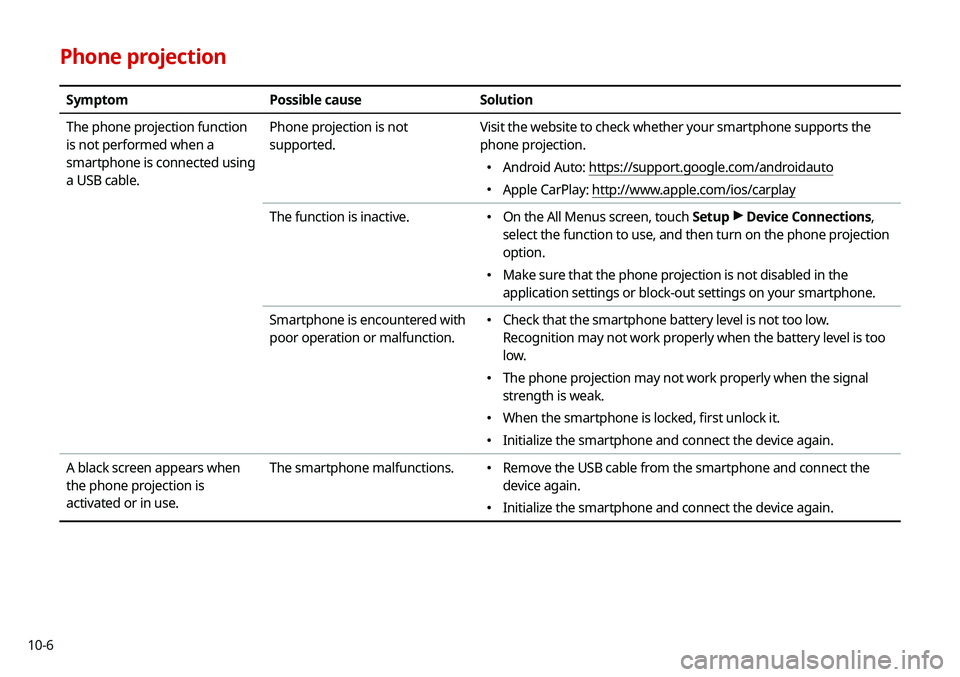
10-6
Phone projection
SymptomPossible cause Solution
The phone projection function
is not performed when a
smartphone is connected using
a USB cable. Phone projection is not
supported.
Visit the website to check whether your smartphone supports the
phone projection.
\225
Android Auto: https://support.google.com/androidauto
\225Apple CarPlay: http://www.apple.com/ios/carplay
The function is inactive.
\225 On the All Menus screen, touch Setup >
Device Connections,
select the function to use, and then turn on the phone projection
option.
\225 Make sure that the phone projection is not disabled in the
application settings or block-out settings on your smartphone.
Smartphone is encountered with
poor operation or malfunction.
\225 Check that the smartphone battery level is not too low.
Recognition may not work properly when the battery level is too
low.
\225The phone projection may not work properly when the signal
strength is weak.
\225When the smartphone is locked, first unlock it.
\225Initialize the smartphone and connect the device again.
A black screen appears when
the phone projection is
activated or in use. The smartphone malfunctions.
\225
Remove the USB cable from the smartphone and connect the
device again.
\225Initialize the smartphone and connect the device again.