set KIA SOUL 2021 Navigation System Quick Reference Guide
[x] Cancel search | Manufacturer: KIA, Model Year: 2021, Model line: SOUL, Model: KIA SOUL 2021Pages: 211, PDF Size: 6.67 MB
Page 95 of 211
5-27
COPYING OR USE OF THE PRODUCT EXCEPT AS PERMITTED
BY THIS EULA IS UNAUTHORIZED AND IS COPYRIGHT
INFRINGEMENT UNDER THE LAWS OF YOUR COUNTRY. IF
YOU COPY OR USE THE PRODUCT WITHOUT COMPANY'S
PERMISSION, EXCEPT AS PERMITTED BY THIS EULA, YOU ARE
VIOLATING THE LAW AND LIABLE TO COMPANY AND ITS
LICENSORS FOR DAMAGES, AND YOU MAY BE SUBJECT TO
CRIMINAL PENALTIES.
THE PRODUCT MAY INCLUDE ENFORCEMENT TECHNOLOGY
DESIGNED TO PREVENT (i) UNAUTHORIZED COPYING OF THE
PRODUCT ONTO PHYSICAL STORAGE MEDIA OR VIA TRANSFER
OVER THE INTERNET OR OTHER ELECTRONIC COMMUNICATION
MEANS AND/OR (ii) ILLEGAL USAGE OF THE PRODUCT OTHER
THAN BY A SPECIFICALLY AHTORIZED DEVICE. YOU AGREE THAT
COMPANY MAY USE THESE MEASURES TO PROTECT COMPANY
AND THE LICENSORS AGAINST COPYRIGHT INFRINGEMENT.
Uploads. The Product may provide functionality through which
you are able to upload certain information about your use of the
Product (collectively, "Uploads") to COMPANY's servers or receive
other services from COMPANY (collectively, the "Services"). If
you use such functionality, you authorize COMPANY to retain
your Uploads on its servers. COMPANY will have no obligation
to provide any Services, may change the form and nature of
any Services at any time with or without notice to you, will have
no liability whatsoever to you for any failure of the Product or
Services to transmit your Uploads to or from COMPANY's servers,
may cease providing any Services at any time with or without
notice to you, and will have no obligation to retain your Uploads (or
any other materials you may provide to COMPANY) on its servers
or return your Uploads (or any other materials you may provide
to COMPANY) to you before deleting them from its servers.
Terms and Conditions
Personal Use Only. You agree to use this Product together
with COMPANY's authorized application for the solely personal,
non-commercial purposes for which you were licensed, and
not for service bureau, time-sharing or other similar purposes.
Accordingly, but subject to the restrictions set forth in the
following paragraphs, you agree not to otherwise reproduce,
copy, modify, decompile, disassemble, create any derivative
works of, or reverse engineer any portion of this Data, and may
not transfer or distribute it in any form, for any purpose, except
to the extent permitted by mandatory laws. You may not assign
this EULA or any of the rights or licenses granted under this EULA,
except when installed in the system for which it was created.
Restrictions. Except where you have been specifically licensed
to do so by COMPANY, and without limiting the preceding
paragraph, you may not use the Product (i) with any products,
systems, or applications installed or otherwise connected to or
in communication with vehicles, capable of vehicle navigation,
positioning, dispatch, real time route guidance, fleet management
or similar applications; or (ii) with or in communication with any
positioning devices or any mobile or wireless-connected electronic
or computer devices, including without limitation cellular phones,
palmtop and handheld computers, pagers, and personal digital
assistants or PDAs.
Page 97 of 211
5-29
Limitation of Liability: TO THE MAXIMUM EXTENT PERMITTED
UNDER THE APPLICABLE LAWS, COMPANY AND THE LICENSORS
SHALL NOT BE LIABLE TO YOU: IN RESPECT OF ANY CLAIM,
DEMAND OR ACTION, IRRESPECTIVE OF THE NATURE OF THE
CAUSE OF THE CLAIM, DEMAND OR ACTION ALLEGING ANY LOSS,
INJURY OR DAMAGES, DIRECT OR INDIRECT, INCURRED BY YOU
OR ANY THIRD PARTY WHICH MAY ARISE IN CONNECTION WITH
OR RESULT FROM THE USE OR POSSESSION OF THE PRODUCT;
OR FOR ANY LOSS OF DATA, PROFIT, REVENUE, CONTRACTS OR
SAVINGS, OR OTHER DIRECT, INDIRECT, INCIDENTAL, SPECIAL OR
CONSEQUENTIAL DAMAGES ARISING OUT OF YOUR USE OF OR
INABILITY TO USE THE PRODUCT, ANY DEFECT IN THE PRODUCT,
OR THE BREACH OF THESE TERMS OR CONDITIONS, WHETHER IN
AN ACTION IN CONTRACT OR TORT OR BASED ON A WARRANTY,
EVEN IF COMPANY OR THE LICENSORS HAVE BEEN ADVISED OF
THE POSSIBILITY OF SUCH DAMAGES AND NOTWITHSTANDING
THE FAILURE OF ANY LIMITED REMEDY PROVIDED HEREIN.
Exclusions. Some jurisdictions do not allow certain warranty
exclusions or the limitation or exclusion of liability, so to that
extent the above exclusion may not apply to you. To the extent
that COMPANY may not, as a matter of applicable law, disclaim
any implied warranty or limit its liabilities, the scope and duration
of such warranty and the extent of COMPANY's liability shall
be the minimum permitted under such applicable law. The
disclaimer of warranty and limitation of liability set forth in this
EULA does not affect or prejudice your statutory rights where
you have acquired the Product otherwise than in the course of
business.
Disclaimer of Warranty. The Product is provided to you "as
is," and you agree to use it at your own risk. SUBJECT TO THE
APPLICABLE LAWS, COMPANY AND THE LICENSORS MAKE NO
GUARANTEES, REPRESENTATIONS OR WARRANTIES OF ANY
KIND, EXPRESS OR IMPLIED, ARISING BY LAW OR OTHERWISE,
INCLUDING BUT NOT LIMITED TO, CONTENT, QUALITY,
ACCURACY, COMPLETENESS, EFFECTIVENESS, RELIABILITY,
PERFORMANCE, MERCHANTABILITY, FITNESS FOR A PARTICULAR
PURPOSE, NON-INFRINGEMENT, USEFULNESS, USE OR RESULTS
TO BE OBTAINED FROM THE PRODUCT, OR THAT THE PRODUCT
OR SERVER WILL BE UNINTERRUPTED OR ERROR-FREE, OR
THAT ERRORS IN THE PRODUCT OR NONCONFORMITY TO
ITS DOCUMENTATION CAN OR WILL BE CORRECTED. YOU
ACKNOWLEDGE THAT THE PROVISIONS OF THIS SECTION ARE
A MATERIAL INDUCEMENT AND CONSIDERATION TO COMPANY
AND THE LICENSORS TO GRANT THE LICENSE CONTAINED
IN THIS EULA AND TO PROVIDE YOU WITH ACCESS TO THE
SERVICES.
Page 98 of 211

5-30Third-Party Copyright Notices. The third-party sourced data
has been incorporated into or made a part of the Product and is
being sublicensed to you subject to the terms and conditions of
this EULA. In this regard, you shall not remove or tamper with any
intellectual property rights notice attached or used in relation to
data supplied by the Licensors.
Entire Agreement. This EULA is the entire agreement between
COMPANY (and the Licensors) and you pertaining to the subject
matter hereof, and supersedes in their entirety any and all
previous written or oral communications or documents (including,
if you are obtaining an update, any agreement that may have
been included with an earlier version of the Product) with respect
to such subject matter.
Governing Law. This EULA shall be governed by the laws of
the jurisdiction in which you reside at the date of acquisition
of the Product. Should you at that moment reside outside the
European Union or Switzerland, the law of the jurisdiction within
the European Union or Switzerland where you acquired the
Product shall apply. In all other cases, or if the jurisdiction where
you acquired the Product cannot be defined, the laws of the
Republic of Korea shall apply. This EULA will not be governed by
the U.N. Convention on Contracts for the International Sale of
Goods. The courts competent at your place of residence at the
time you acquired the Product shall have jurisdiction over any
dispute arising out of, or relating to this EULA, without prejudice
to COMPANY's right to bring claims at your then current place of
residence.
Export Control. You agree not to export or re-export from
anywhere any part of the Product in any form except in
compliance with applicable export laws, rules and regulations,
including but not limited to the laws, rules and regulations
administered by the Office of Foreign Assets Control of the
U.S. Department of Commerce and the Bureau of Industry and
Security of the U.S. Department of Commerce.
Miscellaneous. If any provision of this EULA is found to be invalid
or unenforceable, it will be enforced to the extent permissible
and the remainder of this EULA will remain in full force and
effect. Failure by COMPANY to prosecute any right with respect
to a default hereunder will not constitute a waiver by COMPANY
of the right to enforce rights with respect to the same or any
other breach. No refunds or replacements will be permitted on
damaged Product.
U.S. Government End Users. If the Product is being acquired by
or on behalf of the United States Government or any other entity
seeking or applying rights similar to those customarily claimed
by the United States Government, this Product and related
documentation are "Commercial Items" as that term is defined at
48 C.F.R. ("FAR") 2.101. This Product and related documentation
are licensed to the United States Government end users (a) only
as "Commercial Items" and (b) with only those rights as are
granted to all other end users in accordance with this EULA, and
each copy of Product delivered or otherwise furnished shall be
marked and embedded as appropriate with the following "Notice
of Use," and shall be treated in accordance with such Notice:
Page 105 of 211
6-3
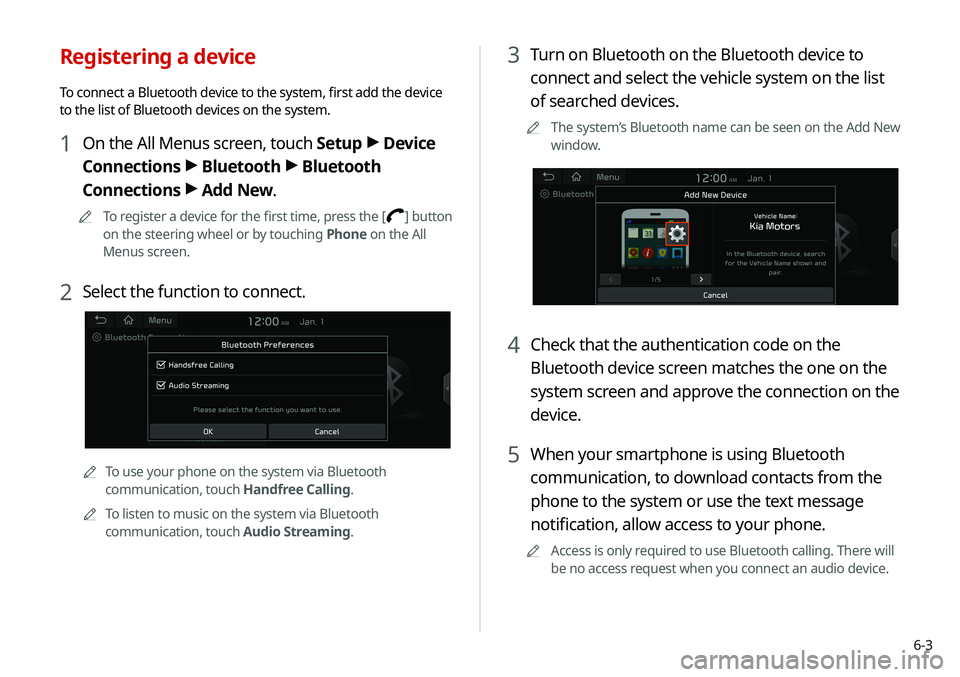
3 Turn on Bluetooth on the Bluetooth device to
connect and select the vehicle system on the list
of searched devices.
0000
A
The system’s Bluetooth name can be seen on the Add New
window.
4 Check that the authentication code on the
Bluetooth device screen matches the one on the
system screen and approve the connection on the
device.
5 When your smartphone is using Bluetooth
communication, to download contacts from the
phone to the system or use the text message
notification, allow access to your phone.
0000
A
Access is only required to use Bluetooth calling. There will
be no access request when you connect an audio device.
Registering a device
To connect a Bluetooth device to the system, first add the device
to the list of Bluetooth devices on the system.
1 On the All Menus screen, touch Setup >
Device
Connections >
Bluetooth >
Bluetooth
Connections >
Add New.
0000
A
To register a device for the first time, press the [] button
on the steering wheel or by touching Phone on the All
Menus screen.
2 Select the function to connect.
0000
A
To use your phone on the system via Bluetooth
communication, touch Handfree Calling.
0000
A
To listen to music on the system via Bluetooth
communication, touch Audio Streaming.
Page 106 of 211
6-4
Connecting a registered device
To use a Bluetooth device, first connect a registered Bluetooth
device to the system.0000
A
You can add one Bluetooth hands-free kit or up to two
Bluetooth audio devices.
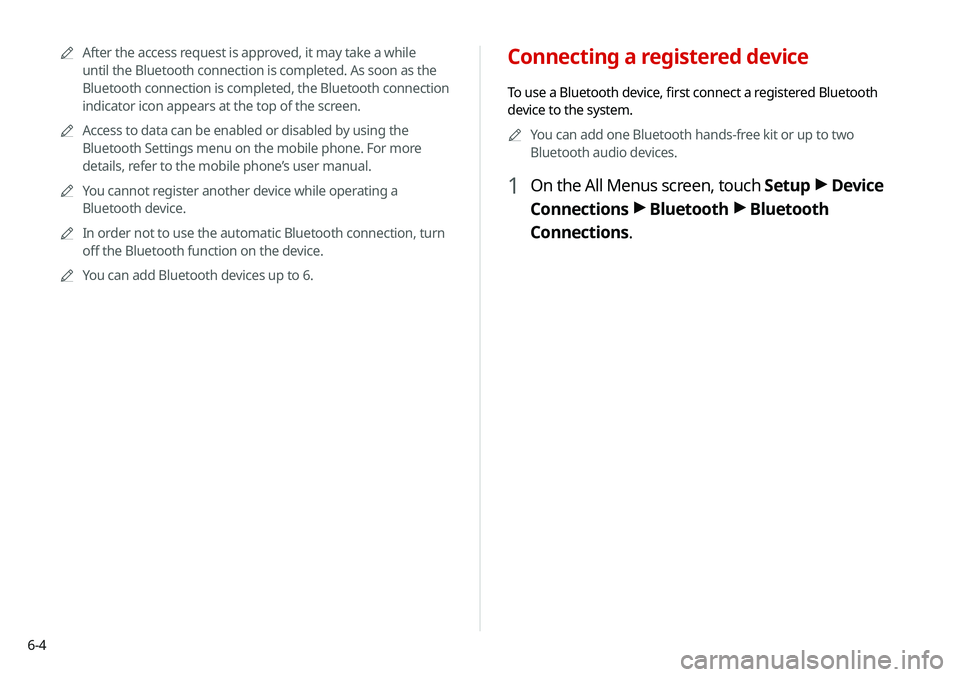
1 On the All Menus screen, touch Setup >
Device
Connections >
Bluetooth >
Bluetooth
Connections.
0000
A
After the access request is approved, it may take a while
until the Bluetooth connection is completed. As soon as the
Bluetooth connection is completed, the Bluetooth connection
indicator icon appears at the top of the screen.
0000
A
Access to data can be enabled or disabled by using the
Bluetooth Settings menu on the mobile phone. For more
details, refer to the mobile phone’s user manual.
0000
A
You cannot register another device while operating a
Bluetooth device.
0000
A
In order not to use the automatic Bluetooth connection, turn
off the Bluetooth function on the device.
0000
A
You can add Bluetooth devices up to 6.
Page 107 of 211
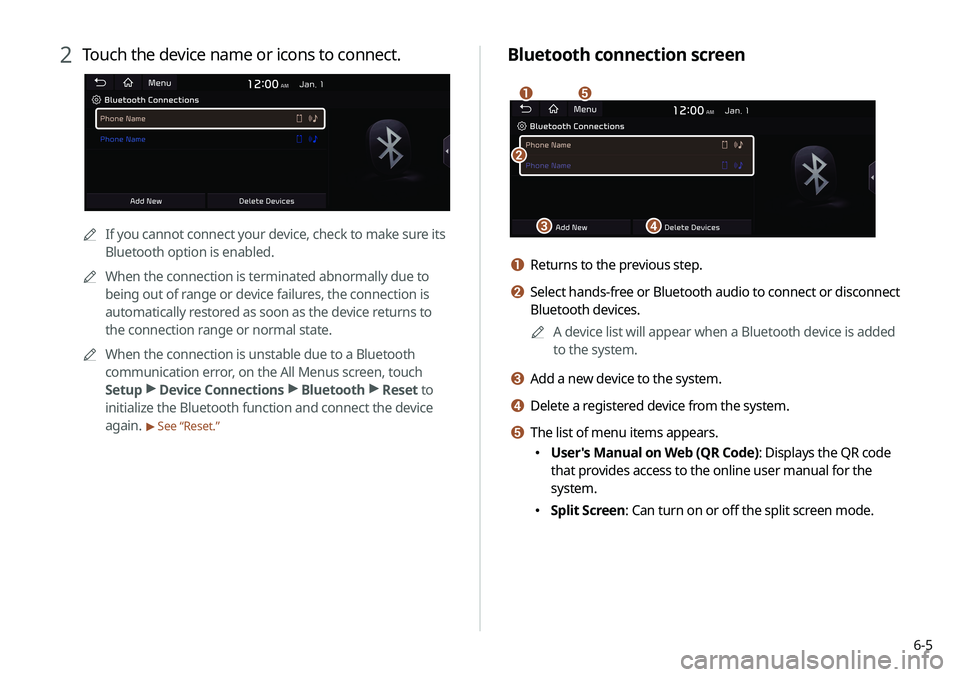
6-5
Bluetooth connection screen
\037
\036
\035
\034
\033
a Returns to the previous step.
b Select hands-free or Bluetooth audio to connect or disconnect
Bluetooth devices.0000
A
A device list will appear when a Bluetooth device is added
to the system.
c Add a new device to the system.
d Delete a registered device from the system.
e The list of menu items appears.
\225User's Manual on Web (QR Code): Displays the QR code
that provides access to the online user manual for the
system.
\225Split Screen: Can turn on or off the split screen mode.
2 Touch the device name or icons to connect.
0000A If you cannot connect your device, check to make sure its
Bluetooth option is enabled.
0000
A
When the connection is terminated abnormally due to
being out of range or device failures, the connection is
automatically restored as soon as the device returns to
the connection range or normal state.
0000
A
When the connection is unstable due to a Bluetooth
communication error, on the All Menus screen, touch
Setup >
Device Connections >
Bluetooth >
Reset to
initialize the Bluetooth function and connect the device
again.
> See “Reset.”
Page 108 of 211
6-6
Making a call via Bluetooth
You can connect a Bluetooth device with the hands-free function
to use a Bluetooth phone. The Bluetooth connection allows you
to view call details directly from the system screen, and to make
calls safely and easily use the system microphone and speaker.
\335Warning
\225 Pull over the vehicle at a safe place before connecting your
mobile phone. It may take the driver attention off the road
and cause a traffic accident which can result in damages,
injuries, and/or death.
\225 While driving, do not make a call by dialing a phone number
or do not pick up your phone to talk. Distraction by the use
of a mobile phone may cause you not to recognize traffic
flow around and not to cope with unexpected situations. As
a result, a traffic accident may occur. If necessary, use the
Bluetooth hands-free function and make the call as short as
possible.
Disconnecting a registered device
1 On the All Menus screen, touch Setup >
Device
Connections >
Bluetooth >
Bluetooth
Connections.
2 Touch the connected device name or touch
Disconnect.
Deleting a registered device
If you will no longer use a Bluetooth device or you want to add
a new device when 6 devices are already registered, delete an
existing registered device.
1 On the All Menus screen, touch Setup >
Device
Connections >
Bluetooth >
Bluetooth
Connections >
Delete Devices.
2 Select a device to delete and touch Delete.
To delete all registered devices, touch Mark All >
Delete.
3 Touch Yes.
0000
A
When you delete a registered device, all related contacts, call
logs, and text messages are removed from the system.
Page 109 of 211
6-7
0000
A
The download may not work in some phone models.
0000
A
You can download up to 50 call records for each list.
0000
A
Call durations do not appear on the system screen.
0000
A
You cannot download call records when the download is
prohibited by the phone. Some phone models may require
approval for a download. When a successful download is not
made, check the phone screen or its settings.
0000
A
When call records are newly downloaded, the previous
records are removed.
0000
A
Learn more about receiving calls while using a Bluetooth
connection.
> See “ Accepting an incoming call over Bluetooth.”
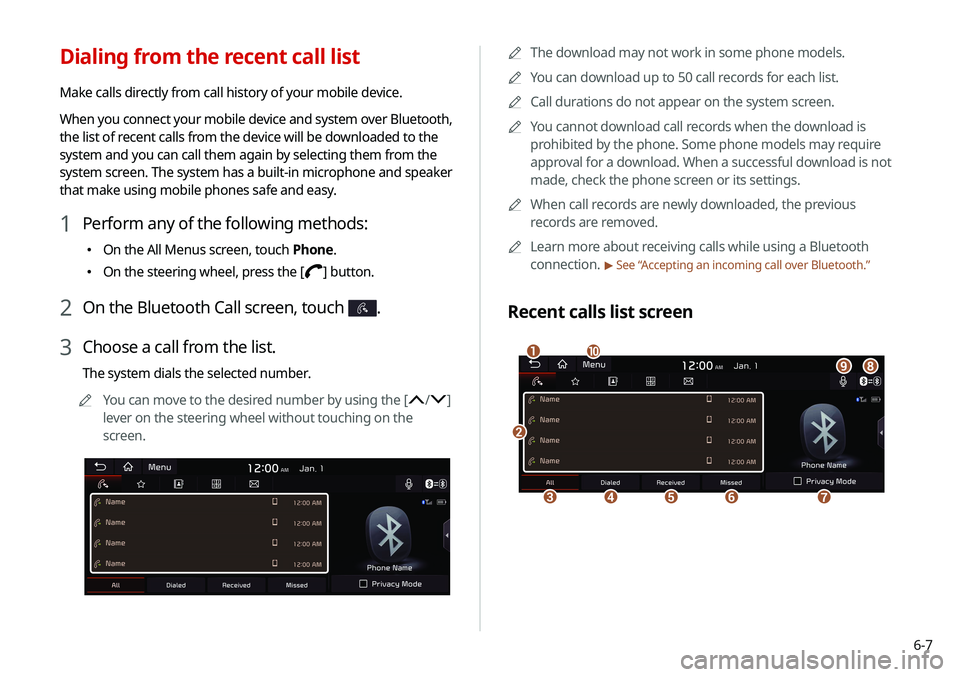
Recent calls list screen
\037
\036\035\034\033
\032\031\030\027
\026
Dialing from the recent call list
Make calls directly from call history of your mobile device.
When you connect your mobile device and system over Bluetooth,
the list of recent calls from the device will be downloaded to the
system and you can call them again by selecting them from the
system screen. The system has a built-in microphone and speaker
that make using mobile phones safe and easy.
1 Perform any of the following methods:
\225
On the All Menus screen, touch Phone.
\225On the steering wheel, press the [] button.
2 On the Bluetooth Call screen, touch .
3 Choose a call from the list.
The system dials the selected number.
0000
A
You can move to the desired number by using the [
/]
lever on the steering wheel without touching on the
screen.
Page 110 of 211
6-8
Dialing from the favorites list
Make a list of frequently used phone numbers to call them quickly
in the future.
When you connect your mobile device and system over
Bluetooth, your contacts stored on the device will be downloaded
to the system, and you can add frequently used phone numbers
to the favorites list. Call your favorite contacts quickly and easily
by selecting them from the list.
1 Perform any of the following methods:
\225On the All Menus screen, touch Phone.
\225On the steering wheel, press the [] button.
2 On the Bluetooth Call screen, touch .
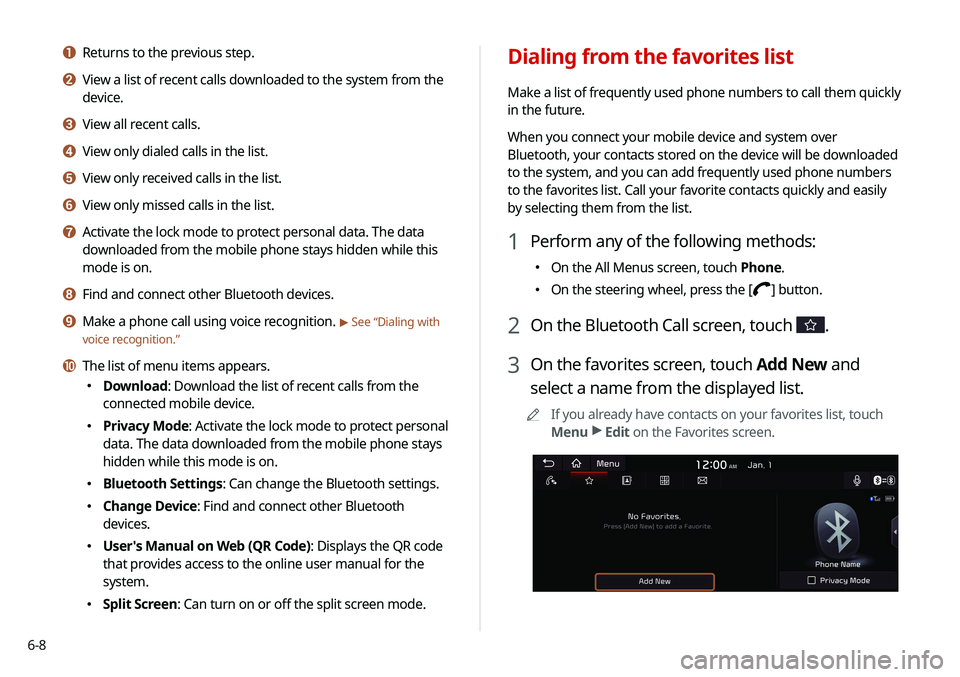
3 On the favorites screen, touch Add New and
select a name from the displayed list.
0000
A
If you already have contacts on your favorites list, touch
Menu >
Edit on the Favorites screen.
a Returns to the previous step.
b View a list of recent calls downloaded to the system from the
device.
c View all recent calls.
d View only dialed calls in the list.
e View only received calls in the list.
f View only missed calls in the list.
g Activate the lock mode to protect personal data. The data
downloaded from the mobile phone stays hidden while this
mode is on.
h Find and connect other Bluetooth devices.
i Make a phone call using voice recognition. > See “Dialing with
voice recognition.”
j The list of menu items appears.
\225 Download: Download the list of recent calls from the
connected mobile device.
\225Privacy Mode: Activate the lock mode to protect personal
data. The data downloaded from the mobile phone stays
hidden while this mode is on.
\225Bluetooth Settings: Can change the Bluetooth settings.
\225Change Device: Find and connect other Bluetooth
devices.
\225User's Manual on Web (QR Code): Displays the QR code
that provides access to the online user manual for the
system.
\225Split Screen: Can turn on or off the split screen mode.
Page 111 of 211
6-9
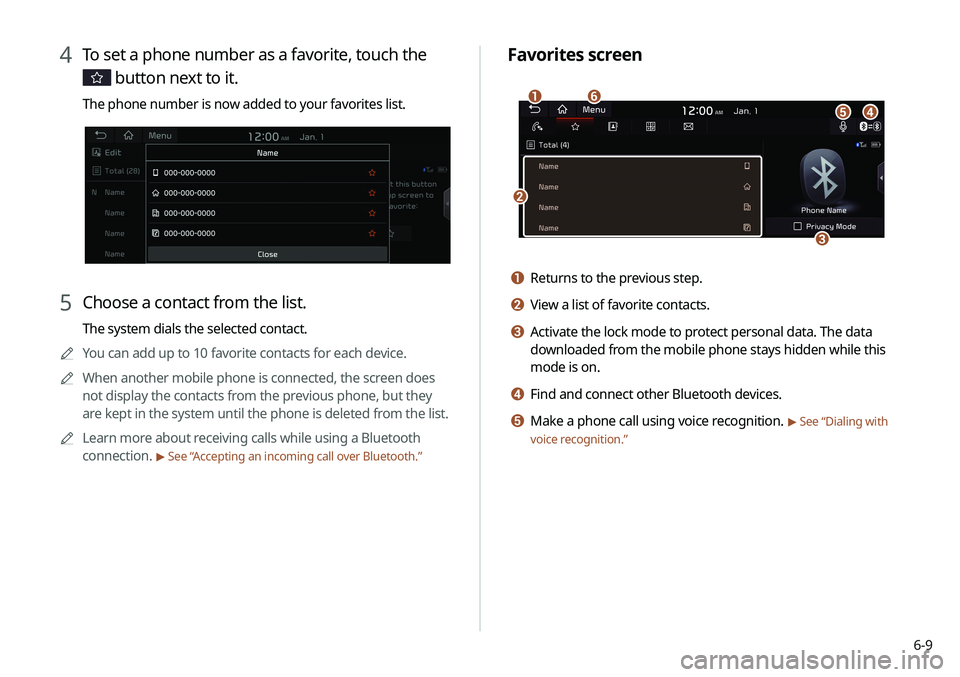
Favorites screen
\037
\036
\035\034\033
\032
a Returns to the previous step.
b View a list of favorite contacts.
c Activate the lock mode to protect personal data. The data
downloaded from the mobile phone stays hidden while this
mode is on.
d Find and connect other Bluetooth devices.
e Make a phone call using voice recognition. > See “Dialing with
voice recognition.”
4 To set a phone number as a favorite, touch the
button next to it.
The phone number is now added to your favorites list.
5 Choose a contact from the list.
The system dials the selected contact.
0000
A
You can add up to 10 favorite contacts for each device.
0000
A
When another mobile phone is connected, the screen does
not display the contacts from the previous phone, but they
are kept in the system until the phone is deleted from the list.
0000
A
Learn more about receiving calls while using a Bluetooth
connection.
> See “ Accepting an incoming call over Bluetooth.”