phone KIA SPORTAGE 2020 Owners Manual
[x] Cancel search | Manufacturer: KIA, Model Year: 2020, Model line: SPORTAGE, Model: KIA SPORTAGE 2020Pages: 624, PDF Size: 15.41 MB
Page 17 of 624
25
Your vehicle at a glance
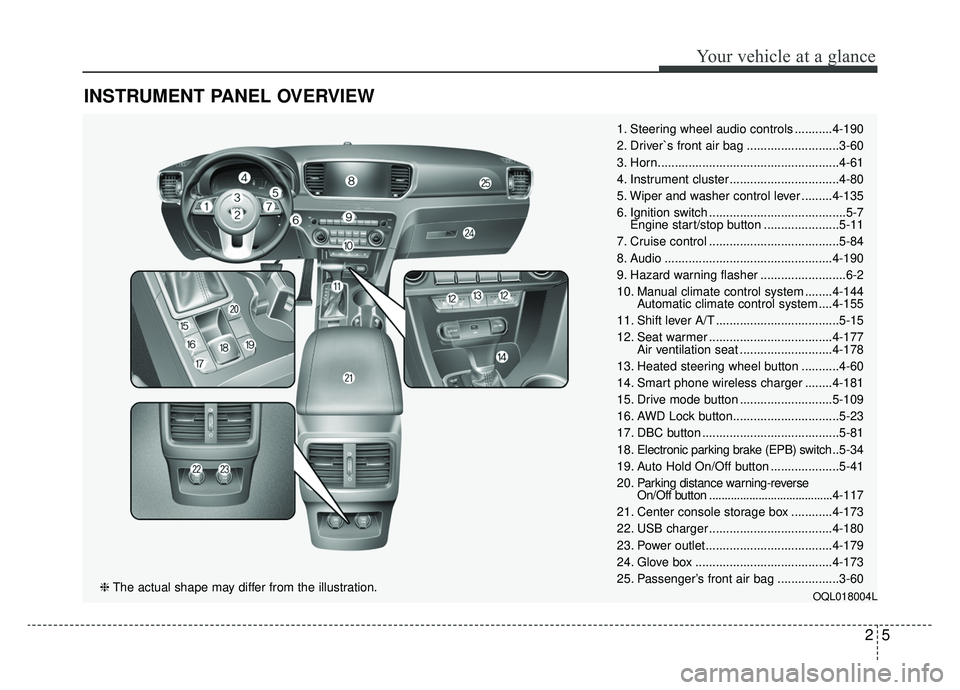
INSTRUMENT PANEL OVERVIEW
1. Steering wheel audio controls ...........4-190
2. Driver`s front air bag ...........................3-60
3. Horn.....................................................4-61
4. Instrument cluster ................................4-80
5. Wiper and washer control lever .........4-135
6. Ignition switch ........................................5-7Engine start/stop button ......................5-11
7. Cruise control ......................................5-84
8. Audio .................................................4-190
9. Hazard warning flasher .........................6-2
10. Manual climate control system ........4-144 Automatic climate control system ....4-155
11. Shift lever A/T ....................................5-15
12. Seat warmer ....................................4-177 Air ventilation seat ...........................4-178
13. Heated steering wheel button ...........4-60
14. Smart phone wireless charger ........4-181
15. Drive mode button ...........................5-109
16. AWD Lock button...............................5-23
17. DBC button ........................................5-81
18. Electronic parking brake (EPB) switch .. 5-34
19. Auto Hold On/Off button ....................5-41
20. Parking distance warning-reverse On/Off button ........................................4-117
21. Center console storage box ............4-173
22. USB charger ....................................4-180
23. Power outlet.....................................4-179
24. Glove box ........................................4-173
25. Passenger’s front air bag ..................3-60
OQL018004L❈ The actual shape may differ from the illustration.
Page 20 of 624
Safety features of your vehicle
23
You will find many safety precautions
and recommendations throughout
this section, and throughout this man-
ual. The safety precautions in this sec-
tion are among the most important.
Always wear your seat belt
A seat belt is your best protection in
all types of accidents. Air bags are
designed to supplement seat belts,
not replace them. So even though
your vehicle is equipped with air
bags, ALWAYS make sure you and
your passengers wear your seat
belts, and wear them properly.
Restrain all children
All children under age 13 should ride
in your vehicle properly restrained in
a rear seat, not the front seat. Infants
and small children should be
restrained in an appropriate child
restraint. Larger children should use
a booster seat with the lap/shoulder
belt until they can use the seat belt
properly without a booster seat.
Air bag hazards
While air bags can save lives, they
can also cause serious or fatal
injuries to occupants who sit too
close to them, or who are not prop-
erly restrained. Infants, young chil-
dren, and shorter adults are at the
greatest risk of being injured by an
inflating air bag. Follow all instruc-
tions and warnings in this manual.
Driver distraction
Driver distraction presents a serious
and potentially deadly danger.
Safety should be the first concern
when behind the wheel and drivers
need to be aware of the wide array of
potential distractions, such as drowsi-
ness, reaching for objects, eating,
personal grooming, other passen-
gers, and using cellular phones.
Drivers can become distracted when
they take their eyes and attention off
the road or their hands off the wheel
to focus on activities other than driv-
ing. To reduce your risk of distraction
or getting into an accident:
• ALWAYS set up your mobiledevices (i.e., MP3 players, phones,
navigation units, etc.) when your
vehicle is parked or safely stopped.
IMPORTANT SAFETY PRECAUTIONS
Page 21 of 624
33
Safety features of your vehicle
ONLY use your mobile devicewhen allowed by laws and when
conditions permit safe use. NEVER
text or email while driving. Most
states have laws prohibiting drivers
from texting. Some states and
cities also prohibit drivers from
using handheld phones.
NEVER let the use of a mobile device distract you from driving.
You have a responsibility to your
passengers and others on the road
to always drive safely, with your
hands on the wheel as well as your
eyes and attention on the road.Control your speed
Excessive speed is a major factor in
crash injuries and deaths. Generally,
the higher the speed, the greater the
risk, but serious injuries can also
occur at lower speeds. Never drive
faster than is safe for current condi-
tions, regardless of the maximum
speed posted.
Keep your vehicle in safe con-
dition
Having a tire blowout or a mechani-
cal failure can be extremely haz-
ardous. To reduce the possibility of
such problems, check your tire pres-
sures and condition frequently, and
perform all regularly scheduled
maintenance.
Page 80 of 624
Safety features of your vehicle
62
3
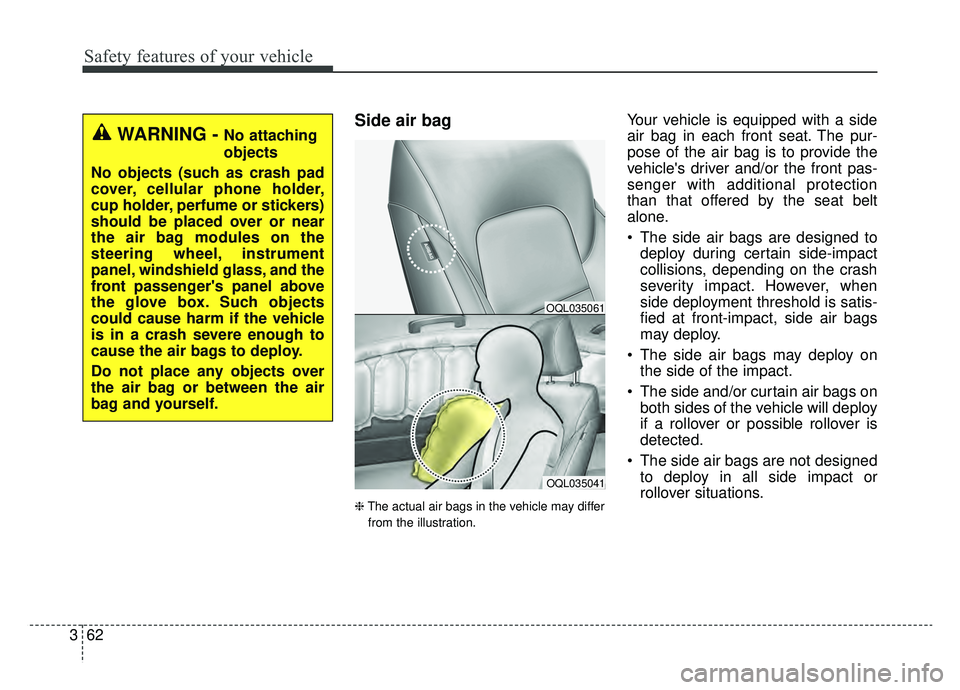
Side air bag
❈ The actual air bags in the vehicle may differ
from the illustration.
Your vehicle is equipped with a side
air bag in each front seat. The pur-
pose of the air bag is to provide the
vehicle's driver and/or the front pas-
senger with additional protection
than that offered by the seat belt
alone.
The side air bags are designed to deploy during certain side-impact
collisions, depending on the crash
severity impact. However, when
side deployment threshold is satis-
fied at front-impact, side air bags
may deploy.
The side air bags may deploy on the side of the impact.
The side and/or curtain air bags on both sides of the vehicle will deploy
if a rollover or possible rollover is
detected.
The side air bags are not designed to deploy in all side impact or
rollover situations.
OQL035041
OQL035061
WARNING - No attaching
objects
No objects (such as crash pad
cover, cellular phone holder,
cup holder, perfume or stickers)
should be placed over or near
the air bag modules on the
steering wheel, instrument
panel, windshield glass, and the
front passenger's panel above
the glove box. Such objects
could cause harm if the vehicle
is in a crash severe enough to
cause the air bags to deploy.
Do not place any objects over
the air bag or between the air
bag and yourself.
Page 94 of 624
• Power outlet . . . . . . . . . . . . . . . . . . . . . . . . . . . . . . . . 4-179
• USB charger . . . . . . . . . . . . . . . . . . . . . . . . . . . . . . . . 4-180
• Wireless smart phone charging system . . . . . . . . . . 4-181
• Coat hook . . . . . . . . . . . . . . . . . . . . . . . . . . . . . . . . . . 4-18\
4
• Floor mat anchor (s) . . . . . . . . . . . . . . . . . . . . . . . . . 4-185
• Luggage net holder . . . . . . . . . . . . . . . . . . . . . . . . . . 4-185
• Cargo security screen . . . . . . . . . . . . . . . . . . . . . . . . 4-186
Exterior features . . . . . . . . . . . . . . . . . . . . . . . . . . 4-188
• Roof rack . . . . . . . . . . . . . . . . . . . . . . . . . . . . . . . . . . 4-18\
8
Audio system . . . . . . . . . . . . . . . . . . . . . . . . . . . . . 4-190
• Antenna. . . . . . . . . . . . . . . . . . . . . . . . . . . . . . . . .\
. . . 4-190
• Steering wheel audio controls. . . . . . . . . . . . . . . . . . 4-190
• Aux, USB port . . . . . . . . . . . . . . . . . . . . . . . . . . . . . . 4-192
• How vehicle radio works . . . . . . . . . . . . . . . . . . . . . 4-192
Declaration of Conformity . . . . . . . . . . . . . . . . . 4-195
• FCC . . . . . . . . . . . . . . . . . . . . . . . . . . . . . . . . . . . . \
. . . 4-195
4
Page 98 of 624
Features of your vehicle
84
When the transmitter does not workcorrectly, open and close the door
with the ignition key. If you have a
problem with the transmitter, con-
tact an authorized Kia dealer.
If the transmitter is in close proxim- ity to your mobile phone, the signal
could be blocked by your mobile
phones normal operational signals.
This is especially important when
the phone is active such as making
and receiving calls, text messag-
ing, and/or sending/receiving
emails. Avoid placing the transmit-
ter and your mobile phone in the
same pants or jacket pocket and
always try to maintain an adequate
distance between the two devices.
✽ ✽ NOTICE
If the keyless entry system is inoper-
ative due to exposure to water or liq-
uids, it will not be covered by your
manufacturer’s vehicle warranty.
Battery replacement
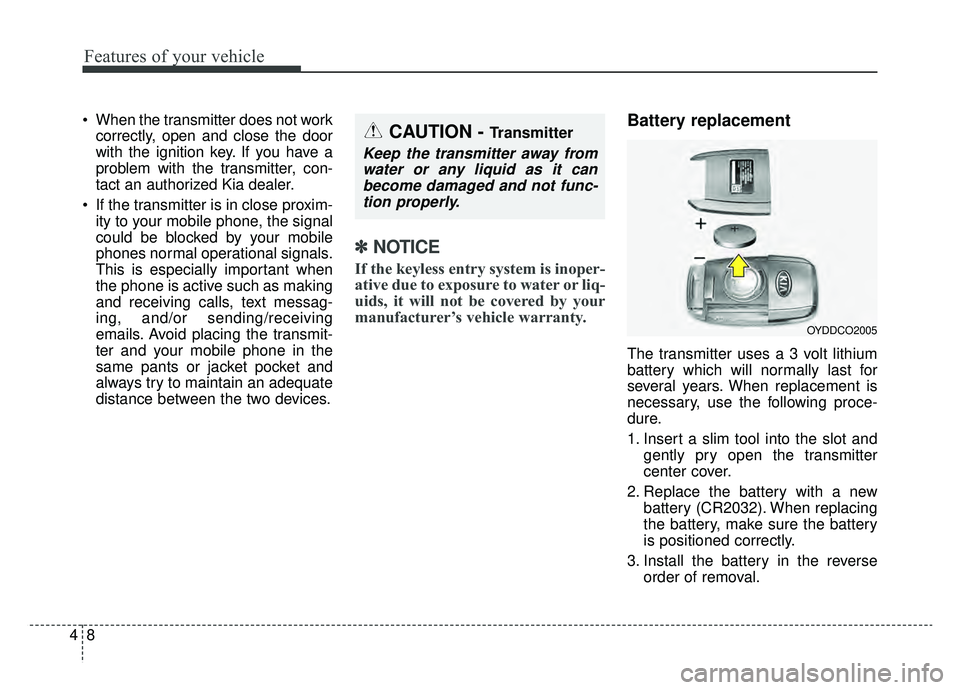
The transmitter uses a 3 volt lithium
battery which will normally last for
several years. When replacement is
necessary, use the following proce-
dure.
1. Insert a slim tool into the slot and
gently pry open the transmitter
center cover.
2. Replace the battery with a new battery (CR2032). When replacing
the battery, make sure the battery
is positioned correctly.
3. Install the battery in the reverse order of removal.
OYDDCO2005
CAUTION - Transmitter
Keep the transmitter away fromwater or any liquid as it canbecome damaged and not func-tion properly.
Page 106 of 624
Features of your vehicle
16
4
Loss of the smart key
A maximum of 2 smart keys can be
registered to a single vehicle.
If you happen to lose your smart key,
you will not be able to start the
engine. You should immediately take
the vehicle and remaining key to your
authorized Kia dealer(tow the vehi-
cle, if necessary) to protect it from
potential theft.
Smart key precautions
The smart key will not work if any
of the following occur:
- The smart key is close to a radio transmitter such as a radio sta-
tion or an airport which can inter-
fere with normal operation of the
smart key.
- The smart key is near a mobile two way radio system or a cellu-
lar phone.
- Another vehicle’s smart key is being operated close to your
vehicle.
When the smart key does not work correctly, open and close the door
with the mechanical key and contact
an authorized Kia dealer. If the smart key is in close proximity
to your cellular phone or smart
phone, the signal from the smart
key could be blocked by normal
operation of your cellular phone or
smart phone. This is especially
important when the phone is active
such as making a call, receiving
calls, text messaging, and/or send-
ing/receiving emails. Avoid placing
the smart key and your cellular
phone or smart phone in the same
pants or jacket pocket and maintain
adequate distance between the two
devices.
Do not leave the smart key near metallic objects such as golf bags,
metal cases and so on.
Door Lock/Unlock failure or poor starting can occur when the smart
key is placed near metallic objects.
Always carry your smart key when you leave the car. An unattended
smart key close to the vehicle can
cause the vehicle battery to be dis-
charged.
Page 130 of 624
Features of your vehicle
40
4
Detecting area
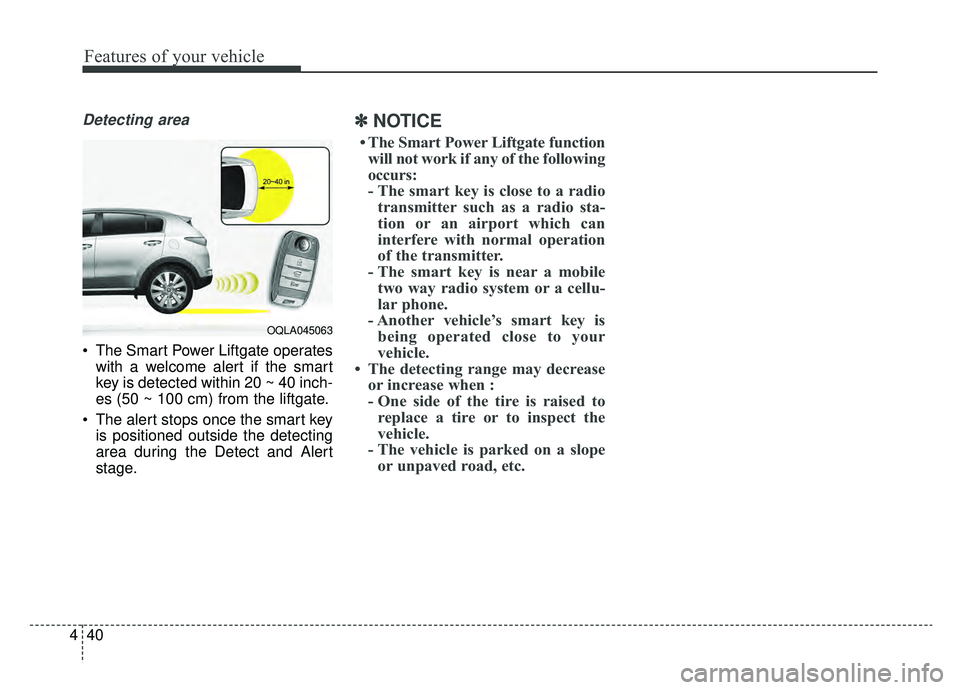
The Smart Power Liftgate operates
with a welcome alert if the smart
key is detected within 20 ~ 40 inch-
es (50 ~ 100 cm) from the liftgate.
The alert stops once the smart key is positioned outside the detecting
area during the Detect and Alert
stage.
✽ ✽ NOTICE
• The Smart Power Liftgate function
will not work if any of the following
occurs:
- The smart key is close to a radio transmitter such as a radio sta-
tion or an airport which can
interfere with normal operation
of the transmitter.
- The smart key is near a mobile two way radio system or a cellu-
lar phone.
- Another vehicle’s smart key is being operated close to your
vehicle.
• The detecting range may decrease or increase when :
- One side of the tire is raised toreplace a tire or to inspect the
vehicle.
- The vehicle is parked on a slope or unpaved road, etc.
OQLA045063
Page 140 of 624
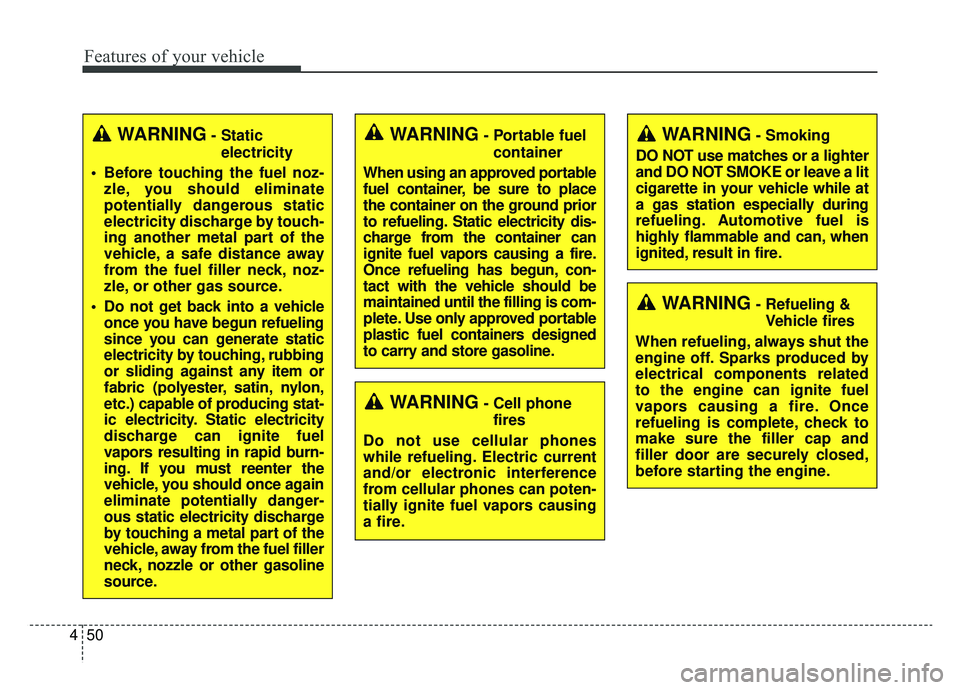
Features of your vehicle
50
4
WARNING- Cell phone
fires
Do not use cellular phones
while refueling. Electric current
and/or electronic interference
from cellular phones can poten-
tially ignite fuel vapors causing
a fire.
WARNING- Smoking
DO NOT use matches or a lighter
and DO NOT SMOKE or leave a lit
cigarette in your vehicle while at
a gas station especially during
refueling. Automotive fuel is
highly flammable and can, when
ignited, result in fire.
WARNING- Refueling & Vehicle fires
When refueling, always shut the
engine off. Sparks produced by
electrical components related
to the engine can ignite fuel
vapors causing a fire. Once
refueling is complete, check to
make sure the filler cap and
filler door are securely closed,
before starting the engine.
WARNING- Portable fuel container
When using an approved portable
fuel container, be sure to place
the container on the ground prior
to refueling. Static electricity dis-
charge from the container can
ignite fuel vapors causing a fire.
Once refueling has begun, con-
tact with the vehicle should be
maintained until the filling is com-
plete. Use only approved portable
plastic fuel containers designed
to carry and store gasoline.WARNING- Static electricity
Before touching the fuel noz- zle, you should eliminate
potentially dangerous static
electricity discharge by touch-
ing another metal part of the
vehicle, a safe distance away
from the fuel filler neck, noz-
zle, or other gas source.
Do not get back into a vehicle once you have begun refueling
since you can generate static
electricity by touching, rubbing
or sliding against any item or
fabric (polyester, satin, nylon,
etc.) capable of producing stat-
ic electricity. Static electricity
discharge can ignite fuel
vapors resulting in rapid burn-
ing. If you must reenter the
vehicle, you should once again
eliminate potentially danger-
ous static electricity discharge
by touching a metal part of the
vehicle, away from the fuel filler
neck, nozzle or other gasoline
source.
Page 192 of 624
Features of your vehicle
102
4
Check high beam assist system
This warning message illuminates
if the high beam assist system has
a malfunction.
In this case, have the vehicle inspect-
ed by a professional workshop. Have
your vehicle inspected by an author-
ized Kia dealer.
Device in wireless charger (if equipped)
If a smart phone is still left on the
wireless charging pad unattended,
even when the ignition is in ACC
OFF and the instrument panel's one
time driving information mode has
finished, a warning message will lit
up on the instrument panel.
❈ For more details, refer to “Smart
Phone Wireless Charger” in this
chapter.
Low Fuel
This warning message illuminates
if the fuel tank is nearly empty.
- When the low fuel level warninglight is illuminates.
Add fuel as soon as possible.
Icy Road Warning (if equipped)
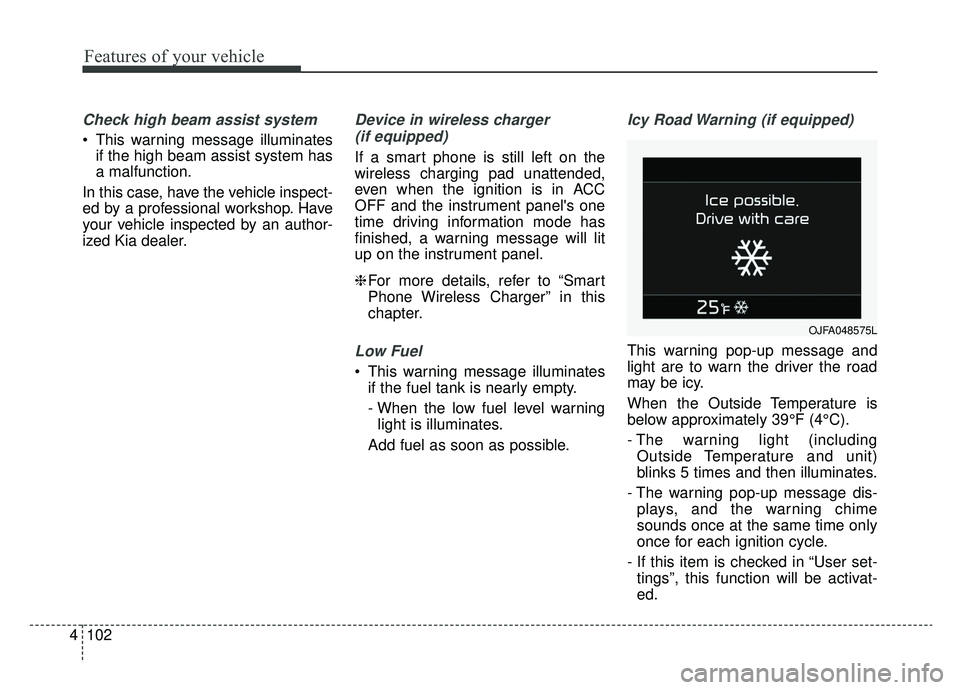
This warning pop-up message and
light are to warn the driver the road
may be icy.
When the Outside Temperature is
below approximately 39°F (4°C).
- The warning light (including Outside Temperature and unit)
blinks 5 times and then illuminates.
- The warning pop-up message dis- plays, and the warning chime
sounds once at the same time only
once for each ignition cycle.
- If this item is checked in “User set- tings”, this function will be activat-
ed.
OJFA048575L