radio KIA SPORTAGE 2020 User Guide
[x] Cancel search | Manufacturer: KIA, Model Year: 2020, Model line: SPORTAGE, Model: KIA SPORTAGE 2020Pages: 611, PDF Size: 15.85 MB
Page 279 of 611
4191
Features of your vehicle
This can be due to factors, such as
the distance from the radio station,
closeness of other strong radio sta-
tions or the presence of buildings,
bridges or other large obstructions in
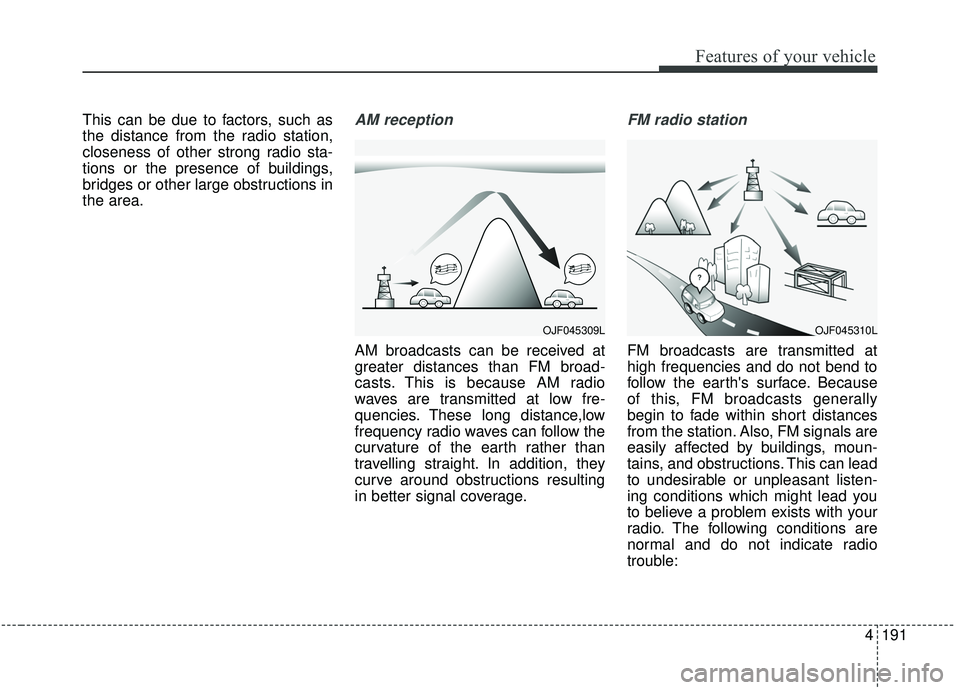
the area.AM reception
AM broadcasts can be received at
greater distances than FM broad-
casts. This is because AM radio
waves are transmitted at low fre-
quencies. These long distance,low
frequency radio waves can follow the
curvature of the earth rather than
travelling straight. In addition, they
curve around obstructions resulting
in better signal coverage.
FM radio station
FM broadcasts are transmitted at
high frequencies and do not bend to
follow the earth's surface. Because
of this, FM broadcasts generally
begin to fade within short distances
from the station. Also, FM signals are
easily affected by buildings, moun-
tains, and obstructions. This can lead
to undesirable or unpleasant listen-
ing conditions which might lead you
to believe a problem exists with your
radio. The following conditions are
normal and do not indicate radio
trouble:
OJF045309LOJF045310L
Page 280 of 611
Features of your vehicle
192
4
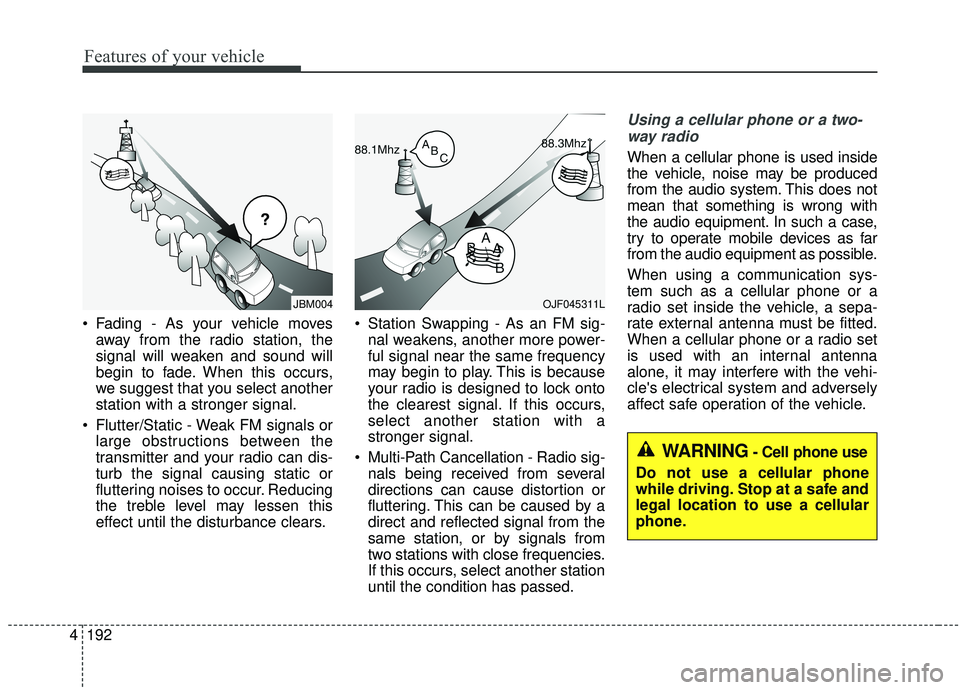
Fading - As your vehicle moves
away from the radio station, the
signal will weaken and sound will
begin to fade. When this occurs,
we suggest that you select another
station with a stronger signal.
Flutter/Static - Weak FM signals or large obstructions between the
transmitter and your radio can dis-
turb the signal causing static or
fluttering noises to occur. Reducing
the treble level may lessen this
effect until the disturbance clears. Station Swapping - As an FM sig-
nal weakens, another more power-
ful signal near the same frequency
may begin to play. This is because
your radio is designed to lock onto
the clearest signal. If this occurs,
select another station with a
stronger signal.
Multi-Path Cancellation - Radio sig- nals being received from several
directions can cause distortion or
fluttering. This can be caused by a
direct and reflected signal from the
same station, or by signals from
two stations with close frequencies.
If this occurs, select another station
until the condition has passed.
Using a cellular phone or a two-
way radio
When a cellular phone is used inside
the vehicle, noise may be produced
from the audio system. This does not
mean that something is wrong with
the audio equipment. In such a case,
try to operate mobile devices as far
from the audio equipment as possible.
When using a communication sys-
tem such as a cellular phone or a
radio set inside the vehicle, a sepa-
rate external antenna must be fitted.
When a cellular phone or a radio set
is used with an internal antenna
alone, it may interfere with the vehi-
cle's electrical system and adversely
affect safe operation of the vehicle.
JBM004OJF045311L
WARNING- Cell phone use
Do not use a cellular phone
while driving. Stop at a safe and
legal location to use a cellular
phone.
Page 281 of 611
4193
Features of your vehicle
Declaration of Conformity
IC
This device complies with Industry Canada’s licence-exempt RSSs.
Operation is subject to the following two conditions :
(1) This device may not cause interference; and
(2) This device must accept any interference, including interference that may cause undesired operation of the device.
Le présent appareil est conforme aux CNR d'Industrie Canada applicables aux appareils radio exempts de licence.
L'exploitation est autorisée aux deux conditions suivantes : (1) l'appareil ne doit pas produire de brouillage, et
(2) l'utilisateur de l'appareil doit accepter tout brouillage radioélectrique subi, même si le brouillage est susceptible
d'en compromettre le fonctionnement.
Page 457 of 611
611
What to do in an emergency
When you drive your vehicle from a
warm area to a cold area or from a
cold area to a warm area, or the out-
side temperature is greatly higher or
lower, you should check the tire infla-
tion pressure and adjust the tires to
the recommended tire inflation pres-
sure.
When filling tires with more air, con-
ditions to turn off the low tire pres-
sure telltale may not be met. This is
because a tire inflator has a margin
of error in performance. The low tire
pressure telltale will be turned off if
the tire pressure is above the recom-
mended tire inflation pressure.TPMS (Tire PressureMonitoring System)malfunction indicator
The low tire pressure telltale will illu-
minate after it blinks for approximate-
ly one minute when there is a prob-
lem with the Tire Pressure
Monitoring System. If the system is
able to correctly detect an underinfla-
tion warning at the same time as sys-
tem failure then it will illuminate both
the TPMS malfunction and low tire
pressure position telltales e.g. if
Front Left sensor fails, the TPMS
malfunction indicator illuminates, but
if the Front Right, Rear Left, or Rear
Right tire is under-inflated, the low
tire pressure position telltales may
illuminate together with the TPMS
malfunction indicator.
Have the system checked by an
authorized Kia dealer as soon as
possible to determine the cause of
the problem. The TPMS malfunction indicator
may be illuminated if the vehicle is
moving around electric power sup-
ply cables or radios transmitters
such as at police stations, govern-
ment and public offices, broadcast-
ing stations, military installations,
airports, or transmitting towers,
etc. This can interfere with normal
operation of the Tire Pressure
Monitoring System (TPMS).
The TPMS malfunction indicator may be illuminated if snow chains
are used or some separate elec-
tronic devices such as notebook
computer, mobile charger, remote
starter or navigation etc., are used
in the vehicle. This can interfere
with normal operation of the Tire
Pressure Monitoring System
(TPMS).
WARNING- Low pressure
damage
Do not drive on low pressure
tires. Significantly low tire pres-
sure can cause the tires to over-
heat and fail making the vehicle
unstable resulting in increased
braking distances and a loss of
vehicle control.
Page 546 of 611
763
Maintenance
✽ ✽NOTICE- Remodeling
Prohibited
Do not rewire your vehicle in any
way as doing so may affect the per-
formance of several safety features
in your vehicle. Rewiring your vehi-
cle may also void your warranty and
cause you to be responsible for any
subsequent vehicle damage which
may result.
✽ ✽ NOTICE- Window tinting
precaution
Window tint(especially metallic
film) might cause communication
disorder or poor radio reception,
and malfunction of the automatic
lighting system due to excessive
change of illumination inside the
vehicle. The solution used might also
flow into electric, electronic devices
causing disorder and failure.
Inner panel fuse replacement
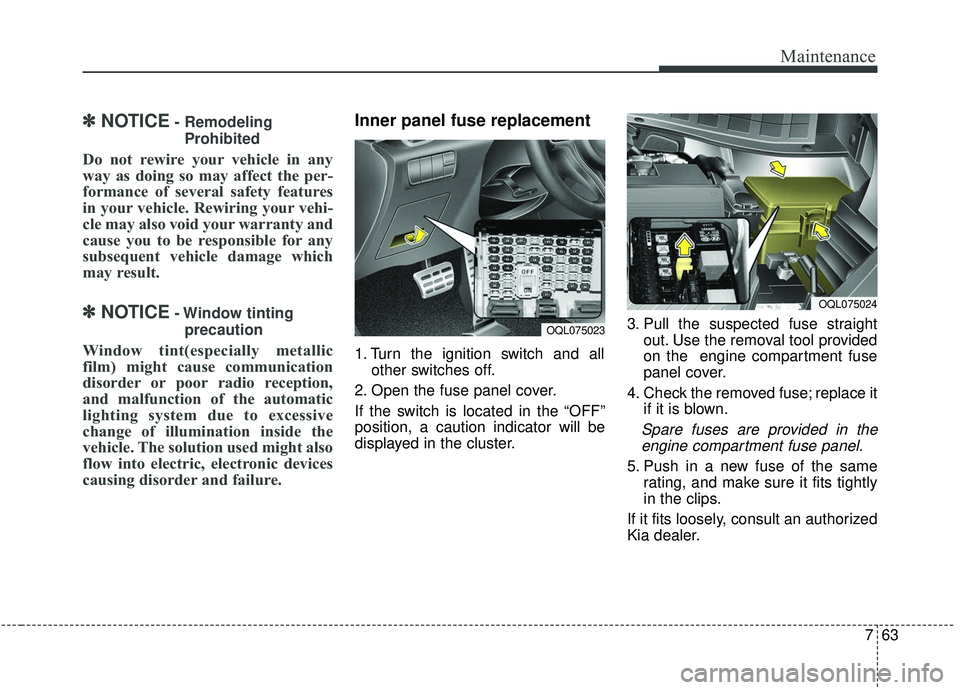
1. Turn the ignition switch and all other switches off.
2. Open the fuse panel cover.
If the switch is located in the “OFF”
position, a caution indicator will be
displayed in the cluster. 3. Pull the suspected fuse straight
out. Use the removal tool provided
on the engine compartment fuse
panel cover.
4. Check the removed fuse; replace it if it is blown.
Spare fuses are provided in theengine compartment fuse panel.
5. Push in a new fuse of the same rating, and make sure it fits tightly
in the clips.
If it fits loosely, consult an authorized
Kia dealer.
OQL075023
OQL075024
Page 602 of 611
Index
2I
Air bag - advanced supplemental restraint system ........3-45Adding equipment to or modifying your air bag-equipped vehicle ..........................................3-72
Air bag warning label ................................................3-72
Air bag warning light ..................................................3-48
Curtain air bag ............................................................3-64
Driver's and passenger's front air bag ........................3-60
How does the air bag system operate? ......................3-46
Occupant Detection System (ODS) ............................3-52
Side air bag ................................................................3-62
SRS Care ....................................................................3-71\
SRS components and functions ..................................3-49
Air cleaner ....................................................................7-36\
Filter replacement ......................................................7-36
Air conditioning system ..................................................8-7
All Wheel Drive (AWD) ................................................5-23 All Wheel Drive (AWD) transfer mode selection ......5-25
For safe all wheel drive operation ..............................5-26
Reducing the risk of a rollover ..................................5-29
Tight corner brake effect ............................................5-24
Appearance care ............................................................7-94 Exterior care ................................................................7-94
Interior care ................................................................7-99
Audio system ..............................................................4-188 Antenna ....................................................................4-18\
8
How vehicle radio works ..........................................4-190 Steering wheel audio controls ..................................4-188
USB port ..................................................................4-190
Automatic climate control system ..............................4-154 Automatic heating and air conditioning ..................4-155
Checking the amount of air conditioner refrigerant and compressor lubricant ......................4-165
Climate control air filter ..........................................4-164
Manual heating and air conditioning ........................4-156
System operation ......................................................4-162
Automatic transmission ................................................5-15 Automatic transmission operation ..............................5-15
Good driving practices ................................................5-22
Battery........................................................................\
....7-43 For best battery service ..............................................7-43
Recharging the battery ................................................7-44
Reset items ..................................................................7-45
Before driving ..................................................................5-5 Before entering vehicle ................................................5-5
Before starting ..............................................................5-5
Necessary inspections ..................................................5-5
Blind spot Collision Warning (BCW)/Rear Cross-traffic Collision Warning (RCCW) ......................................5-120Blind-spot Collision Warning (BCW) ......................5-120
Limitations of the system..........................................5-129\
Rear Cross-traffic Collision Warning (RCCW) ........5-124
A
B