side view mirror KIA SPORTAGE 2020 User Guide
[x] Cancel search | Manufacturer: KIA, Model Year: 2020, Model line: SPORTAGE, Model: KIA SPORTAGE 2020Pages: 611, PDF Size: 15.85 MB
Page 254 of 611
Features of your vehicle
166
4
For maximum defrosting, set the
temperature control to the extreme
right/hot position and the fan speed
control to the highest speed.
If warm air to the floor is desired while defrosting or defogging, set
the mode to the floor-defrost posi-
tion.
Before driving, clear all snow and ice from the windshield, rear win-
dow, outside rear view mirrors, and
all side windows.
Clear all snow and ice from the hood and air inlet in the cowl grill to
improve heater and defroster effi-
ciency and to reduce the probabili-
ty of fogging up the inside of the
windshield.Manual climate control system
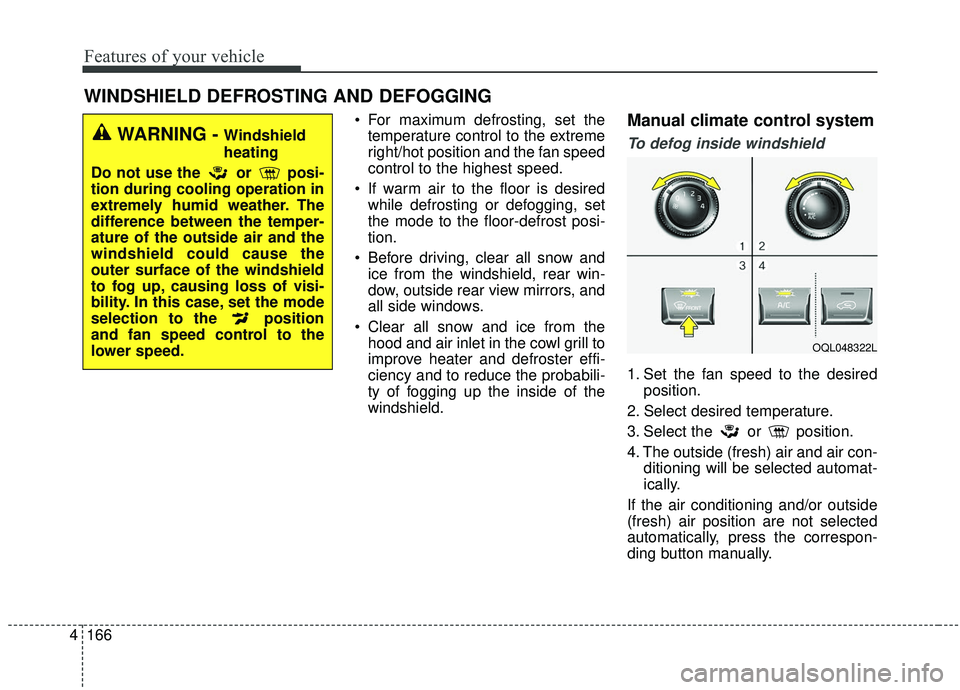
To defog inside windshield
1. Set the fan speed to the desired position.
2. Select desired temperature.
3. Select the or position.
4. The outside (fresh) air and air con- ditioning will be selected automat-
ically.
If the air conditioning and/or outside
(fresh) air position are not selected
automatically, press the correspon-
ding button manually.
WINDSHIELD DEFROSTING AND DEFOGGING
WARNING - Windshield
heating
Do not use the or posi-
tion during cooling operation in
extremely humid weather. The
difference between the temper-
ature of the outside air and the
windshield could cause the
outer surface of the windshield
to fog up, causing loss of visi-
bility. In this case, set the mode
selection to the position
and fan speed control to the
lower speed.
OQL048322L
Page 286 of 611
55
Driving your vehicle
Before entering vehicle
• Be sure that all windows, outsidemirror(s), and outside lights are
clean.
Check the condition of the tires.
Check under the vehicle for any sign of leaks.
Be sure there are no obstacles behind you if you intend to back up.
Necessary inspections
Fluid levels, such as engine oil,
engine coolant, brake fluid, and
washer fluid should be checked on a
regular basis, at the exact interval
depending on the fluid. Further
details are provided in chapter 8,
“Maintenance”.
Before starting
Close and lock all doors.
Position the seat so that all con-trols are easily reached.
Buckle your seat belt.
Adjust the inside and outside rearview mirrors.
Be sure that all lights work.
Check all gauges.
Check the operation of warning lights when the ignition switch is
turned to the ON position.
Release the parking brake and make sure the brake warning light
goes out.
For safe operation, be sure you are
familiar with your vehicle and its
equipment.
BEFORE DRIVING
WARNING - Distracted driving
Focus on the road while driving.
The driver's primary responsi-
bility is in the safe and legal
operation of the vehicle. Use of
any handled devices, other
equipment or vehicle systems
that distract the drive should
not be used during vehicle
operation.
Page 402 of 611
5121
Driving your vehicle
System setting and activation
System setting
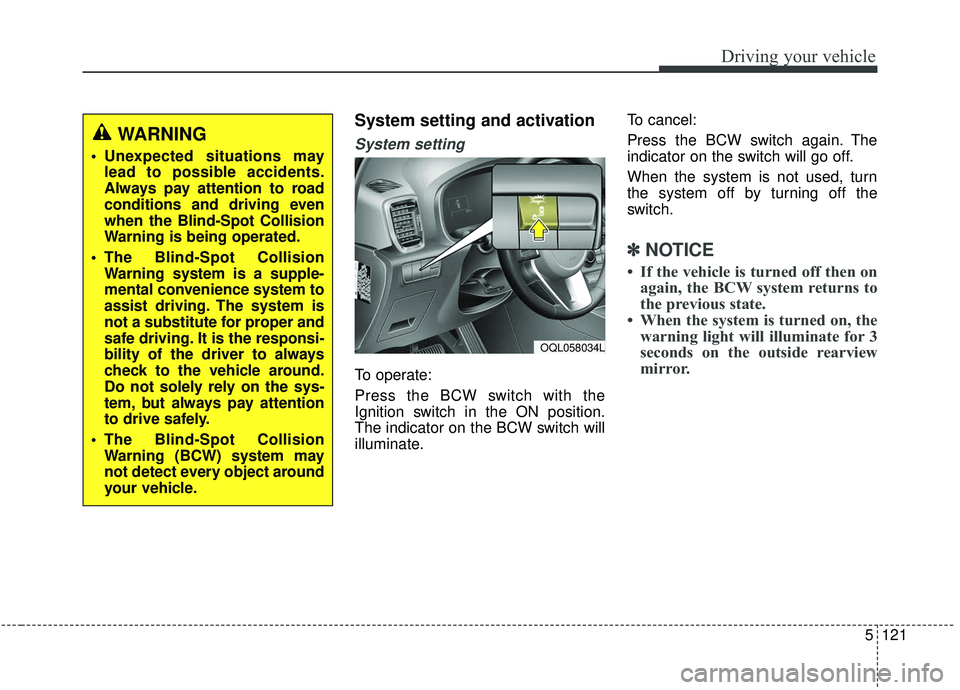
To operate:
Press the BCW switch with the
Ignition switch in the ON position.
The indicator on the BCW switch will
illuminate.To cancel:
Press the BCW switch again. The
indicator on the switch will go off.
When the system is not used, turn
the system off by turning off the
switch.
✽ ✽
NOTICE
• If the vehicle is turned off then on
again, the BCW system returns to
the previous state.
• When the system is turned on, the warning light will illuminate for 3
seconds on the outside rearview
mirror.
WARNING
Unexpected situations may
lead to possible accidents.
Always pay attention to road
conditions and driving even
when the Blind-Spot Collision
Warning is being operated.
The Blind-Spot Collision Warning system is a supple-
mental convenience system to
assist driving. The system is
not a substitute for proper and
safe driving. It is the responsi-
bility of the driver to always
check to the vehicle around.
Do not solely rely on the sys-
tem, but always pay attention
to drive safely.
The Blind-Spot Collision Warning (BCW) system may
not detect every object around
your vehicle.
OQL058034L
Page 403 of 611
Driving your vehicle
122
5
The system will activate when:
1. The BCW system is on.
2. The vehicle speed is above about
30 km/h (20 mph).
3. Other vehicles are detected in blind spot.Warning indicator and sound
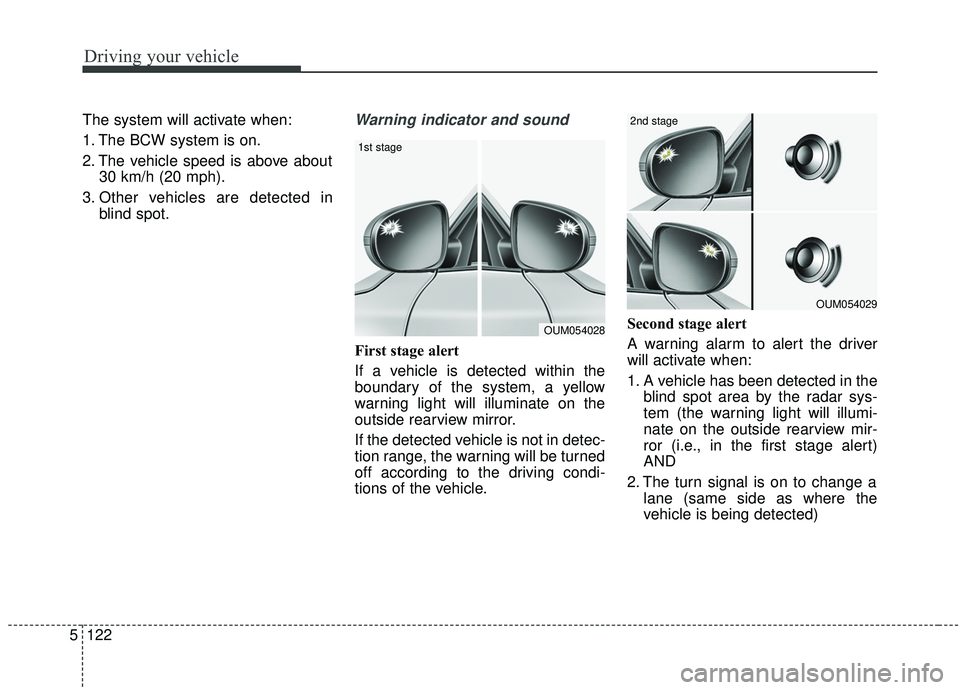
First stage alert
If a vehicle is detected within the
boundary of the system, a yellow
warning light will illuminate on the
outside rearview mirror.
If the detected vehicle is not in detec-
tion range, the warning will be turned
off according to the driving condi-
tions of the vehicle. Second stage alert
A warning alarm to alert the driver
will activate when:
1. A vehicle has been detected in the
blind spot area by the radar sys-
tem (the warning light will illumi-
nate on the outside rearview mir-
ror (i.e., in the first stage alert)
AND
2. The turn signal is on to change a lane (same side as where the
vehicle is being detected)
OUM054028
1st stage
OUM054029
2nd stage
Page 404 of 611
5123
Driving your vehicle
When the second stage alert is acti-
vated, the warning light on the out-
side rearview mirror will also blink.
If you turn off the turn signal switch,
the second stage alert (the warning
chime and the blinking warning light
on the outside rearview mirror) will
be deactivated.
If the detected vehicle is not in detec-
tion range, the warning will be turned
off according to the driving condi-
tions of the vehicle.CAUTION
The driver should always useextreme caution while operat-ing the vehicle, whether or notthe warning light on the out-side rearview mirror illumi-nates or there is a warningalarm.
Playing the vehicle audio sys- tem at high volume may pre-vent occupants from hearingthe Blind-Spot CollisionWarning System warningsounds.
The warning of the Blind-Spot Collision Warning System maynot sound if warning soundsfrom other systems are acti-vated.
WARNING
The warning light on the out-
side rearview mirror will illu-
minate whenever a vehicle is
detected at the rear side by
the system. To avoid acci-
dents, do not focus only on
the warning light and neglect
to see the surrounding of the
vehicle.
Drive safely even though the
vehicle is equipped with a
Blind-Spot Collision Warning
System (BCW). Do not solely
rely on the system but check
your surroundings before
changing lanes or backing the
vehicle up. The Blind-Spot
Collision Warning system
(BCW) may not detect every
object alongside the vehicle.
The system may not alert the
driver in some situations due
to system limitations so
always check your surround-
ings while driving.
Page 406 of 611
5125
Driving your vehicle
✽ ✽NOTICE
• If the vehicle is turned off then on
again, the RCCW system returns
to the previous state.
• When the system is turned on, the warning light will illuminate for 3
seconds on the outside rearview
mirror.
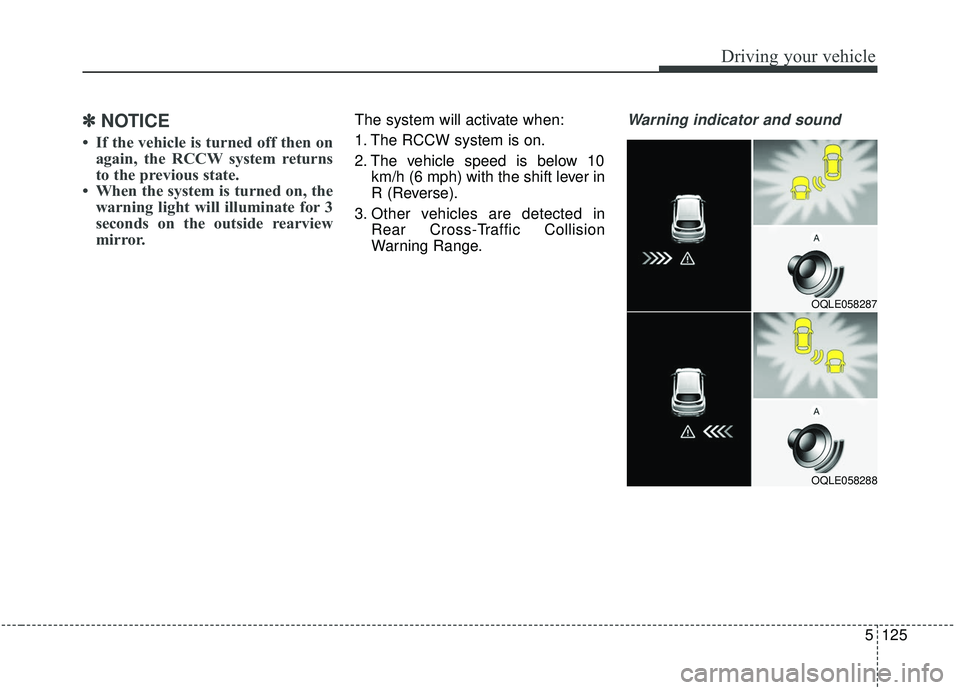
The system will activate when:
1. The RCCW system is on.
2. The vehicle speed is below 10
km/h (6 mph) with the shift lever in
R (Reverse).
3. Other vehicles are detected in Rear Cross-Traffic Collision
Warning Range.Warning indicator and sound
OQLE058287
OQLE058288
Page 407 of 611
Driving your vehicle
126
5
If the vehicle detected by the sensors
approaches from the rear left/right
side of your vehicle, the warning
chime will sound, the warning light
on the outside rearview mirror will
blink and a message will appear on
the LCD display.
The warning will stop when:
- The vehicle moving at the rear
left/right side of your vehicle is not
in the detection range.
- The vehicle is right behind your vehicle.
- The vehicle is not driving towards your vehicle.
- The vehicle’s approaching speed is decreased.
WARNING
Drive safely even though thevehicle is equipped with a
Rear Cross-Traffic Collision
Warning (RCCW) System. Do
not solely rely on the system
but check your surrounding
when backing the vehicle up.
The RCCW system may not
detect every object alongside
the vehicle.
The driver is responsible for accurate brake control.
Always pay extreme caution while driving. The Rear Cross-
Traffic Collision Warning
System may not operate prop-
erly or unnecessarily operate
in accordance with your driv-
ing situations.
CAUTION
If the operating conditions of RCCW are satisfied, a warningis issued every time a vehiclecomes to the rear side, even ifyour vehicle is stopped (vehi-cle speed 0 km/h (0 mph)).
The system's warning may not operate properly if theleft/right of your vehicle's rearbumper is blocked by a vehi-cle or obstacle.
The driver should always use extreme caution while operat-ing the vehicle, whether or notthe warning light on the out-side rearview mirror illumi-nates or there is a warningalarm.
Playing the vehicle audio sys- tem at high volume may pre-vent occupants from hearingthe system's warning sounds.
The warning of the Rear Cross- Traffic Collision WarningSystem may not sound if warn-ing sounds from other systemsare activated.
Page 411 of 611
Driving your vehicle
130
5
A big vehicle is near such as a bus
or truck.
When the other vehicle approach- es very close.
When the other vehicle passes at a very fast speed.
While changing lanes.
If the vehicle has started at the same time as the vehicle next to
you and has accelerated.
When the vehicle in the next lane moves two lanes away from you OR
when the vehicle two lanes away
moves to the next lane from you.
A motorcycle or bicycle is near.
A flat trailer is near.
If there are small objects in the detecting area such as a shopping
cart or a baby stroller.
If there is a low height vehicle such as a sports car.
The vehicle abruptly changes driv- ing direction. The vehicle makes sharp lane
changes.
The vehicle sharply stops.
Temperature is extremely low around the vehicle.
The vehicle severely vibrates while driving over a an uneven/bumpy
road, or concrete patch.
The vehicle drives on a slippery surface due to snow, water puddle,
or ice.
The vehicle is driven near areas containing metal substances such
as a construction zone, railroad, etc.
When the surrounding vehicle or structure is driving in a wide area
(desert, field, suburb etc.) The BCW indicator on the outer side
view mirror may not illuminate prop-
erly when:
The outside rearview mirror hous-
ing is damaged
The mirror is covered with dirt, snow, or debris.
The window is covered with dirt, snow, or debris.
The window is tinted.
Page 608 of 611

Index
8I
Mirrors ........................................................................\
..4-62Inside rearview mirror ................................................4-62
Outside rearview mirror ..............................................4-76
Owner maintenance ........................................................7-7 Owner maintenance schedule ......................................7-7
Panoramic sunroof ........................................................4-52 Closing the sunroof ....................................................4-56
Resetting the sunroof ..................................................4-56
Sliding the sunroof ......................................................4-54
Sunroof open warning ................................................4-53
Sunshade ....................................................................4-53\
Tilting the sunroof ......................................................4-56
Parking brake ................................................................7-35 Checking the parking brake ........................................7-35
Parking distance warning ............................................4-121 Non-operational conditions of parking distance warning ..................................................................4-123
Operation of the parking distance warning ..............4-121
Self-diagnosis............................................................4-125 Parking distance warning-reverse ................................4-117
Non-operational conditions of parking distance warning-reverse ......................................................4-118
Operation of the parking distance warning-reverse ..4-117
Parking distance warning-reverse precautions..........4-119
Self-diagnosis............................................................4-120
Power liftgate ................................................................4-31 Closing the liftgate ......................................................4-33
Opening the liftgate ....................................................4-32
Smart Power Liftgate ..................................................4-36
Rear view monitor ......................................................4-126
Recommended lubricants and capacities ........................8-8 Recommended SAE viscosity number ......................8-10
Road warning ..................................................................6-2 Hazard warning flasher ................................................6-2
Scheduled maintenance service ......................................7-9
Seat ........................................................................\
..........3-4 Front seat adjustment - manual ....................................3-8
Front seat adjustment - power ....................................3-10
Headrest (for front seat) ..............................................3-12
Rear seat adjustment ..................................................3-15
Seatback pocket ..........................................................3-15
P
O
R
S