ESP KIA SPORTAGE 2020 Owner's Guide
[x] Cancel search | Manufacturer: KIA, Model Year: 2020, Model line: SPORTAGE, Model: KIA SPORTAGE 2020Pages: 611, PDF Size: 15.85 MB
Page 306 of 611
525
Driving your vehicle
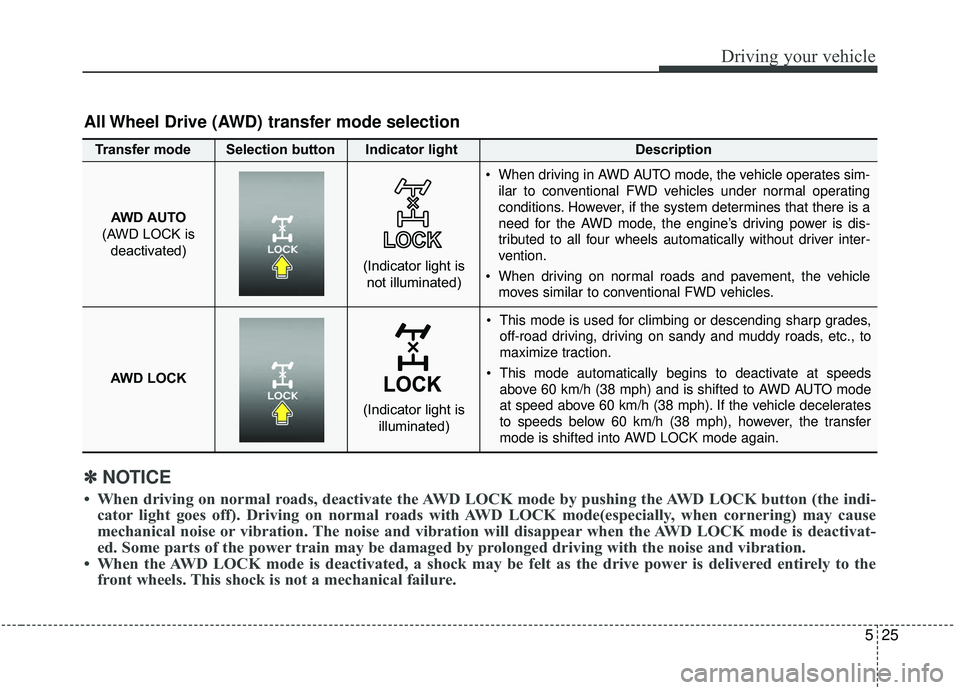
This mode is used for climbing or descending sharp grades,off-road driving, driving on sandy and muddy roads, etc., to
maximize traction.
This mode automatically begins to deactivate at speeds above 60 km/h (38 mph) and is shifted to AWD AUTO mode
at speed above 60 km/h (38 mph). If the vehicle decelerates
to speeds below 60 km/h (38 mph), however, the transfer
mode is shifted into AWD LOCK mode again.
AWD AUTO
(AWD LOCK is deactivated)
(Indicator light isnot illuminated)
✽ ✽ NOTICE
• When driving on normal roads, deactivate the AWD LOCK mode by pushing the AWD LOCK button (the indi-
cator light goes off). Driving on normal roads with AWD LOCK mode(especially, when cornering) may cause
mechanical noise or vibration. The noise and vibration will disappear when the AWD LOCK mode is deactivat-
ed. Some parts of the power train may be damaged by prolonged driving with the noise and vibration.
• When the AWD LOCK mode is deactivated, a shock may be felt as the drive power is delivered entirely to the front wheels. This shock is not a mechanical failure.
All Wheel Drive (AWD) transfer mode selection
Transfer mode Selection button Indicator light Description
When driving in AWD AUTO mode, the vehicle operates sim-
ilar to conventional FWD vehicles under normal operating
conditions. However, if the system determines that there is a
need for the AWD mode, the engine’s driving power is dis-
tributed to all four wheels automatically without driver inter-
vention.
When driving on normal roads and pavement, the vehicle moves similar to conventional FWD vehicles.
AWD LOCK
(Indicator light is illuminated)
Page 309 of 611
Driving your vehicle
28
5
If you need to drive in the water,
stop your vehicle, set your transfer
to the AWD LOCK mode and drive
at less than 8 km/h (5 mph).✽ ✽ NOTICE
• Do not drive in water if the level is
higher than the bottom of the vehi-
cle.
• Check your brake condition once you are out of mud or water. Press
the brake pedal several times as
you move slowly until you feel nor-
mal braking forces return.
• Shorten your scheduled mainte- nance interval if you drive in off-
road conditions such as sand, mud
or water (see “Maintenance under
severe usage conditions” in section
8). Always wash your vehicle thor-
oughly after off-road use, especially
cleaning the bottom of the vehicle.
• Since the driving torque is always applied to the 4 wheels the per-
formance of the AWD vehicle is
greatly affected by the condition of
the tires. Be sure to equip the vehi-
cle with four tires of the same size
and type.
• A full time all wheel drive vehicle cannot be towed by an ordinary
tow truck. Make sure that the
vehicle is placed on a flat bed
truck for moving.
WARNING - Driving
through water
Drive slowly. If you are driving
too fast in water, the water can
get into the engine compart-
ment and wet the ignition sys-
tem, causing your vehicle to
suddenly stop. If this happens
and your vehicle is in a tilted
position, your vehicle may roll
over.
WARNING - AWD driving
Avoid high cornering speed.
Do not make quick steering wheel movements, such as
sharp lane changes or fast,
sharp turns.
The risk of rollover is greatly increased if you lose control
of your vehicle at high speed.
Loss of control often occurs if two or more wheels drop off
the roadway and the driver
over-steers to re-enter the
roadway. In the event your
vehicle leaves the roadway, do
not steer sharply. Instead,
slow down before pulling
back into the travel lanes.
Page 326 of 611
![KIA SPORTAGE 2020 Owners Guide 545
Driving your vehicle
AUTO HOLD conditions not met.
Close door, hood, and liftgate
When you press the [AUTO HOLD]
switch, if the driver’s door, engine
hood are not closed or the driver’s
seat b](/img/2/40479/w960_40479-325.png "KIA SPORTAGE 2020 Owners Guide 545
Driving your vehicle
AUTO HOLD conditions not met.
Close door, hood, and liftgate
When you press the [AUTO HOLD]
switch, if the driver’s door, engine
hood are not closed or the driver’s
seat b")
545
Driving your vehicle
AUTO HOLD conditions not met.
Close door, hood, and liftgate
When you press the [AUTO HOLD]
switch, if the driver’s door, engine
hood are not closed or the driver’s
seat belt is unfastened, a warning
will sound and a message will
appear on the LCD display. At this
moment, press the [AUTO HOLD]
button after closing the driver’s door,
engine hood and liftgate.
Anti-lock brake system (ABS)
ABS (or ESC) will not prevent acci-
dents due to improper or dangerous
driving maneuvers. Even though
vehicle control is improved during
emergency braking, always maintain
a safe distance between you and
objects ahead. Vehicle speeds
should always be reduced during
extreme road conditions. The vehicle
should be driven at reduced speeds
in the following circumstances:
When driving on rough, gravel orsnow-covered roads
When driving on roads where the road surface is pitted or has differ-
ent surface heights.
Driving in these conditions increases
the stopping distance for your vehicle.
The ABS continuously senses the
speed of the wheels. If the wheels
are going to lock, the ABS system
repeatedly modulates the hydraulic
brake pressure to the wheels. When you apply your brakes under
conditions which may lock the
wheels, you may hear a “tik-tik’’
sound from the brakes, or feel a cor-
responding sensation in the brake
pedal. This is normal and it means
your ABS is active.
In order to obtain the maximum benefit
from your ABS in an emergency situa-
tion, do not attempt to modulate your
brake pressure and do not try to pump
your brakes. Press your brake pedal as
hard as possible or as hard as the sit-
uation allows the ABS to control the
force being delivered to the brakes.
✽ ✽
NOTICE
A click/clunk type sound may be
heard once per ignition cycle in the
engine compartment when the vehi-
cle begins to move after the engine is
started. These conditions are normal
and indicate that the anti-lock brake
system is functioning properly.
OQL058371N
Page 328 of 611
547
Driving your vehicle
Electronic stability control
(ESC)
The Electronic Stability Control
(ESC) system is designed to stabi-
lize the vehicle during cornering
maneuvers. ESC checks where you
are steering and where the vehicle is
actually going. ESC applies the
brakes at individual wheels and inter-
venes with engine management sys-
tem to stabilize the vehicle.The Electronic stability control (ESC)
system is an electronic system
designed to help the driver maintain
vehicle control under adverse condi-
tions. It is not a substitute for safe
driving practices. Factors including
speed, road conditions and driver
steering input can all affect whether
ESC will be effective in preventing a
loss of control. It is still your respon-
sibility to drive and corner at reason-
able speeds and to leave a sufficient
margin of safety.
When you apply your brakes under
conditions which may lock the
wheels, you may hear a “tik-tik’’
sound from the brakes, or feel a cor-
responding sensation in the brake
pedal. This is normal and it means
your ESC is active.
✽ ✽
NOTICE
A click/clunk type sound may be
heard once per ignition cycle in the
engine compartment when the vehi-
cle begins to move after the engine is
started. These conditions are normal
and indicate that Electronic stabili-
ty control (ESC) System is function-
ing properly.
WARNING
Never drive too fast for the road
conditions or too quickly when
cornering. Electronic stability
control (ESC) will not prevent
accidents. Excessive speed in
turns, abrupt maneuvers and
hydroplaning on wet surfaces
can still result in serious acci-
dents. Only a safe and attentive
driver can prevent accidents by
avoiding maneuvers that cause
the vehicle to lose traction.
Even with ESC installed, always
follow all the normal precautions
for driving - including driving at
safe speeds for the conditions.
Page 332 of 611
551
Driving your vehicle
Vehicle stability management
(VSM)
This system provides further
enhancements to vehicle stability
and steering responses when a vehi-
cle is driving on a slippery road or a
vehicle detects changes in coeffi-
cient of friction between right wheels
and left wheels when braking.
VSM operation
When the VSM is in operation, ESC
indicator light ( ) blinks.
When the vehicle stability manage-
ment is operating properly, you can
feel a slight pulsation in the vehicle
and/or abnormal steering responses
(EPS- Electronic Power Steering).
This is only the effect of brake and
EPS control and indicates nothing
unusual.
The VSM does not operate when:
Driving on a sloping road such as agradient or incline
Driving in reverse
ESC OFF indicator light ( ) remains on the instrument cluster
EPS indicator light remains on the instrument cluster
VSM operation off
If you select the LCD display → ESC
→ ESC OFF/ESC OFF (TCS OFF)
the VSM will also cancel and the
ESC OFF indicator light ( ) illumi-
nates.
To turn on the VSM, select the ESC
OFF/ESC OFF (TCS OFF). The ESC
OFF indicator light goes out.
WARNING- Tire/
Wheel size
When replacing tires and wheels,
make sure they are the same size
as the original tires and wheels
installed. Driving with varying
tire or wheel sizes may diminish
any supplemental safety benefits
of the VSM system.WARNING
- Vehicle stability manage- ment
Drive carefully even though your
vehicle has Vehicle stability man-
agement. It can only assist you in
maintaining control under cer-
tain circumstances.
Page 333 of 611
Driving your vehicle
52
5
Malfunction indicator
The VSM can be deactivated even if
you don’t cancel the VSM operation
by select the ESC OFF/ESC OFF
(TCS OFF). It indicates that a mal-
function has been detected some-
where in the Electric Power Steering
system or VSM system. If the ESC
indicator light ( ) or EPS warning
light remains on, take your vehicle to
an authorized Kia dealer and have
the system checked.
✽ ✽
NOTICE
• The VSM is designed to function
above approximately 22 km/h (13
mph) on curves.
• The VSM is designed to function above approximately 10 km/h (6
mph) when a vehicle is braking on
a split-mu surface. A split-mu sur-
face is made of two surfaces which
have different friction forces.
The Vehicle Stability Management
system is not a substitute for safe
driving practices but a supplemen-
tary function only. It is the respon-
sibility of the driver to always check
the speed and the distance to the
vehicle ahead. Always hold the
steering wheel firmly while driving.
Your vehicle is designed to activate according to the driver’s intention,
even with installed VSM. Always fol-
low all the normal precautions for
driving at safe speeds for the condi-
tions – including driving in clement
weather and on a slippery road.Hill-start assist control (HAC)
A vehicle has the tendency to roll
back on a steep hill when it starts to
go after stopping. The Hill-start
Assist Control (HAC) prevents the
vehicle from rolling back by applying
the brakes automatically for about 2
seconds. The brakes are released
when the accelerator pedal is
depressed or after about 2 seconds.
The HAC is activated only for about 2
seconds, so when the vehicle is
starting off always depress the accel-
erator pedal.
WARNING- Maintaining
Brake Pressure on Incline
HAC does not replace the need
to apply brakes while stopped on
an incline. While stopped, make
sure you maintain brake pres-
sure sufficient to prevent your
vehicle from rolling backward
and causing an accident. Don’t
release the brake pedal until you
are ready to accelerate forward.WARNING
For maximum protection,
always wear your seat belt. No
system, no matter how
advanced, can compensate for
all driver error and/or driving
conditions. Always drive
responsibly.
Page 339 of 611
Driving your vehicle
58
5
Brake operation
In an urgent situation, the braking
system enters into the ready status
for prompt reaction against the dri-
ver’s depressing the brake pedal.
The FCA provides additional brak- ing power for optimum braking per-
formance, when the driver
depresses the brake pedal.
The braking control is automatical- ly deactivated, when the driver
sharply depresses the accelerator
pedal, or when the driver abruptly
operates the steering wheel.
The FCA brake control is automat- ically canceled, when risk factors
disappear.
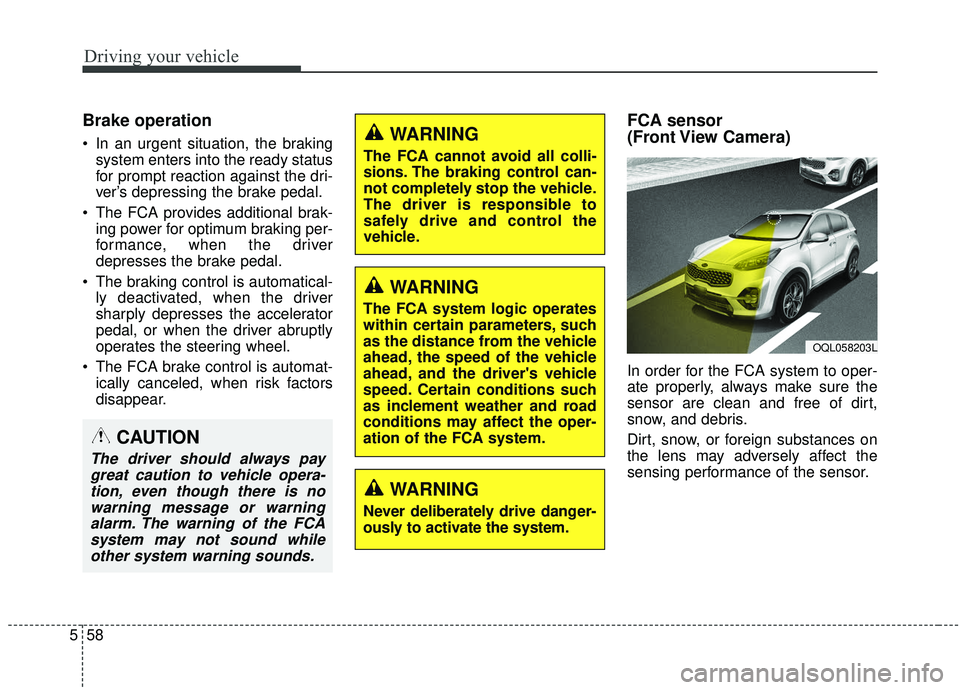
FCA sensor
(Front View Camera)
In order for the FCA system to oper-
ate properly, always make sure the
sensor are clean and free of dirt,
snow, and debris.
Dirt, snow, or foreign substances on
the lens may adversely affect the
sensing performance of the sensor.
CAUTION
The driver should always paygreat caution to vehicle opera-tion, even though there is nowarning message or warningalarm. The warning of the FCAsystem may not sound whileother system warning sounds.
WARNING
The FCA cannot avoid all colli-
sions. The braking control can-
not completely stop the vehicle.
The driver is responsible to
safely drive and control the
vehicle.
WARNING
The FCA system logic operates
within certain parameters, such
as the distance from the vehicle
ahead, the speed of the vehicle
ahead, and the driver's vehicle
speed. Certain conditions such
as inclement weather and road
conditions may affect the oper-
ation of the FCA system.
WARNING
Never deliberately drive danger-
ously to activate the system.
OQL058203L
Page 341 of 611
Driving your vehicle
60
5
However, the FCA system may not
properly operate in an area (e.g.
open terrain), where any objects are
not detected after turning ON the
engine.
Although a warning message will not
appear on the LCD display, the FCA
may not properly operate.System malfunction
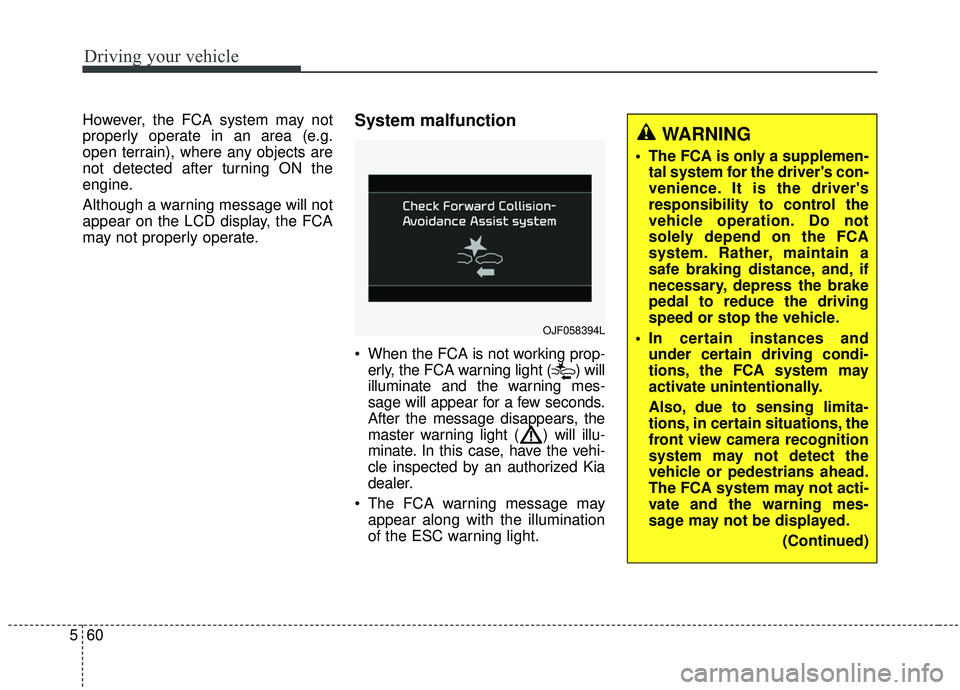
When the FCA is not working prop-
erly, the FCA warning light ( ) will
illuminate and the warning mes-
sage will appear for a few seconds.
After the message disappears, the
master warning light ( ) will illu-
minate. In this case, have the vehi-
cle inspected by an authorized Kia
dealer.
The FCA warning message may appear along with the illumination
of the ESC warning light.
OJF058394L
WARNING
The FCA is only a supplemen-tal system for the driver's con-
venience. It is the driver's
responsibility to control the
vehicle operation. Do not
solely depend on the FCA
system. Rather, maintain a
safe braking distance, and, if
necessary, depress the brake
pedal to reduce the driving
speed or stop the vehicle.
In certain instances and under certain driving condi-
tions, the FCA system may
activate unintentionally.
Also, due to sensing limita-
tions, in certain situations, the
front view camera recognition
system may not detect the
vehicle or pedestrians ahead.
The FCA system may not acti-
vate and the warning mes-
sage may not be displayed.
(Continued)
Page 345 of 611
Driving your vehicle
64
5
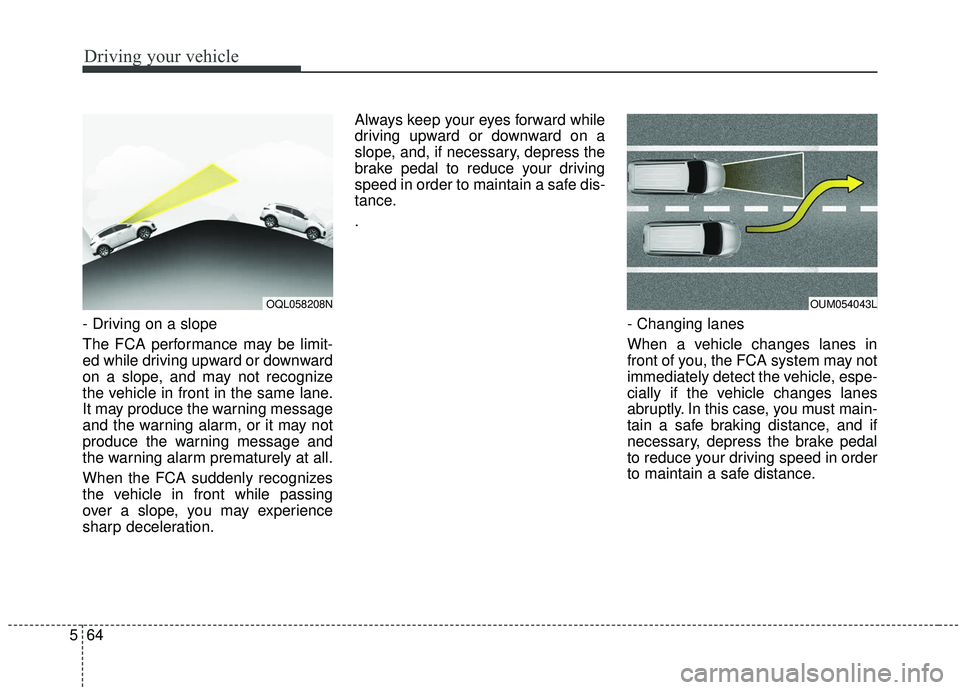
- Driving on a slope
The FCA performance may be limit-
ed while driving upward or downward
on a slope, and may not recognize
the vehicle in front in the same lane.
It may produce the warning message
and the warning alarm, or it may not
produce the warning message and
the warning alarm prematurely at all.
When the FCA suddenly recognizes
the vehicle in front while passing
over a slope, you may experience
sharp deceleration. Always keep your eyes forward while
driving upward or downward on a
slope, and, if necessary, depress the
brake pedal to reduce your driving
speed in order to maintain a safe dis-
tance.
.
- Changing lanes
When a vehicle changes lanes in
front of you, the FCA system may not
immediately detect the vehicle, espe-
cially if the vehicle changes lanes
abruptly. In this case, you must main-
tain a safe braking distance, and if
necessary, depress the brake pedal
to reduce your driving speed in order
to maintain a safe distance.
OQL058208NOUM054043L
Page 352 of 611

571
Driving your vehicle
Brake operation
In an urgent situation, the brakingsystem enters into the ready status
for prompt reaction against the dri-
ver’s depressing the brake pedal.
The FCA provides additional brak- ing power for optimum braking per-
formance, when the driver
depresses the brake pedal.
The braking control is automatical- ly deactivated, when the driver
sharply depresses the accelerator
pedal, or when the driver abruptly
operates the steering wheel.
The FCA brake control is automat- ically canceled, when risk factors
disappear.
FCA sensor (Front Radar +
Front View Camera)
In order for the FCA system to oper-
ate properly, always make sure the
sensor or sensor cover are clean and
free of dirt, snow, and debris.
CAUTION
The driver should always paygreat caution to vehicle opera-tion, even though there is nowarning message or warningalarm. The warning of the FCAsystem may not sound if otherwarning sounds are activated.
WARNING
The FCA cannot avoid all colli-
sions. The braking control can-
not completely stop the vehicle.
The driver is responsible to
safely drive and control the
vehicle.
WARNING
The FCA system logic operates
within certain parameters, such
as the distance from the vehicle
or pedestrians ahead, the speed
of the vehicle ahead, and the
driver's vehicle speed. Certain
conditions such as inclement
weather and road conditions
may affect the operation of the
FCA system.
WARNING
Never deliberately drive danger-
ously to activate the system.
OQL058202L
OQL058203L