steering wheel KIA SPORTAGE 2020 Quick Reference Guide
[x] Cancel search | Manufacturer: KIA, Model Year: 2020, Model line: SPORTAGE, Model: KIA SPORTAGE 2020Pages: 50, PDF Size: 2.73 MB
Page 8 of 50
6
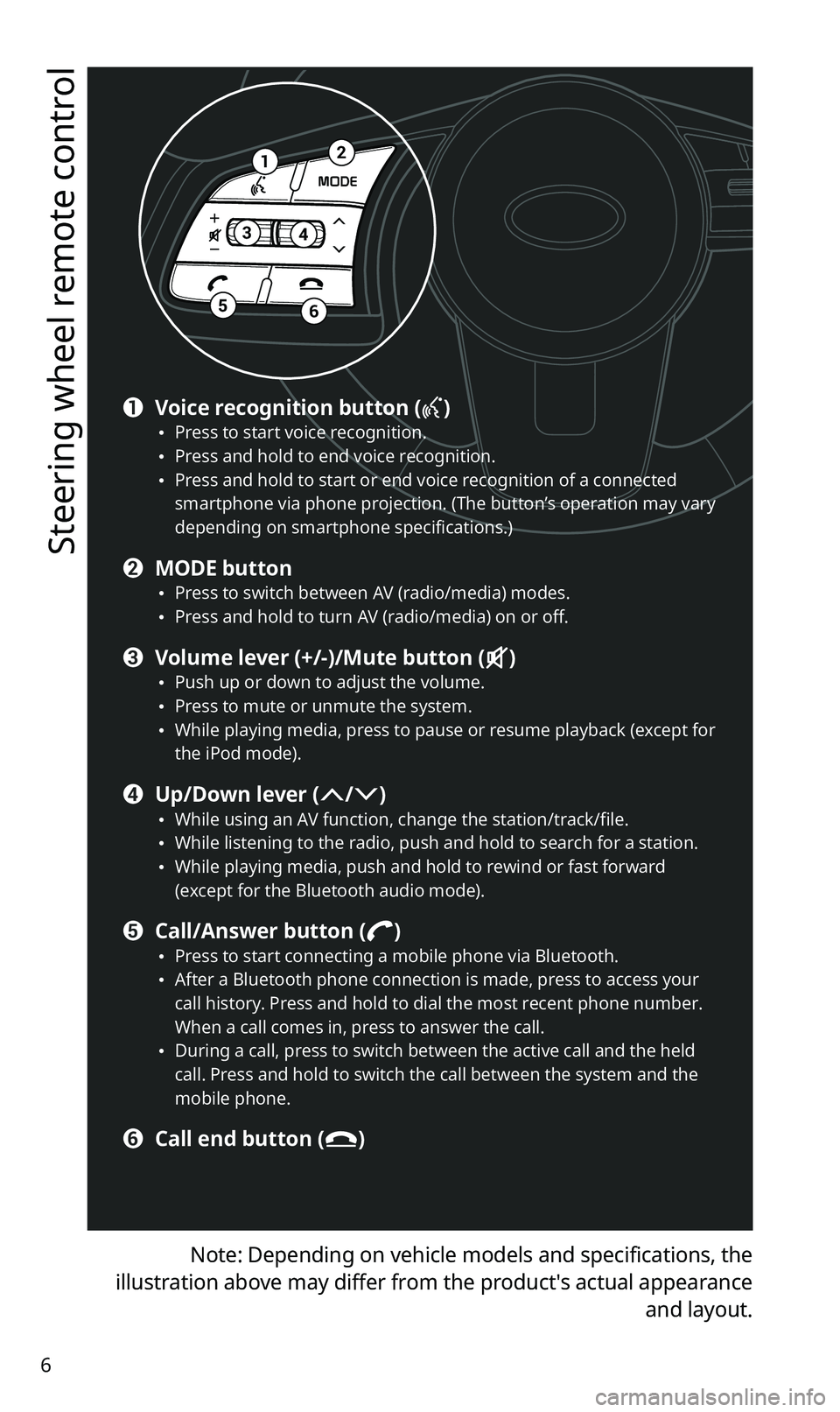
Steering wheel remote control
Note: Depending on vehicle models and specifications, the
illustration above may differ from the product′s actual appearance
and layout.
12
34
56
a Voice recognition button () •Press to start voice recognition. •Press and hold to end voice recognition. •Press and hold to start or end voice recognition of a connected smartphone via phone projection. (The button’s operation may vary depending on smartphone specifications.)
b MODE button •Press to switch between AV (radio/media) modes. •Press and hold to turn AV (radio/media) on or off.
c Volume lever (+/-)/Mute button () •Push up or down to adjust the volume. •Press to mute or unmute the system. •While playing media, press to pause or resume playback (except for the iPod mode).
d Up/Down lever (/) •While using an AV function, change the station/track/file. •While listening to the radio, push and hold to search for a station. •While playing media, push and hold to rewind or fast forward (except for the Bluetooth audio mode).
e Call/Answer button () •Press to start connecting a mobile phone via Bluetooth. •After a Bluetooth phone connection is made, press to access your call history. Press and hold to dial the most recent phone number. When a call comes in, press to answer the call. •During a call, press to switch between the active call and the held call. Press and hold to switch the call between the system and the mobile phone.
f Call end button ()
Page 10 of 50
8
ÜWarning
•Driving while distracted can result in a loss of vehicle control that
may lead to an accident, severe bodily injury, or death. The driver’s
primary responsibility is the safe and legal operation of the vehicle,
and the use of any vehicle systems, including the touch screen and
steering wheel controls, which take the driver’s eyes, attention, and
focus away from the safe operation of the vehicle, or which are not
permissible by law, should never be used during the operation of the
vehicle.
•Some functions may be disabled for safety reasons while the vehicle
is moving. They work only when the vehicle stops. Park your vehicle
in a safe location before using any of them.
•Stop using the system if it malfunctions, such as no audio output or
display. If you continue using the system when it is malfunctioning, it
may lead to a fire, electric shock, or system failure.
ÝCaution
•You can turn on the system when the key ignition switch is placed in
the ″ACC″ or ″ON″ position. Using the system for an extended period
without the engine running drains the battery. If you plan on using
the system for a long time, start the engine.
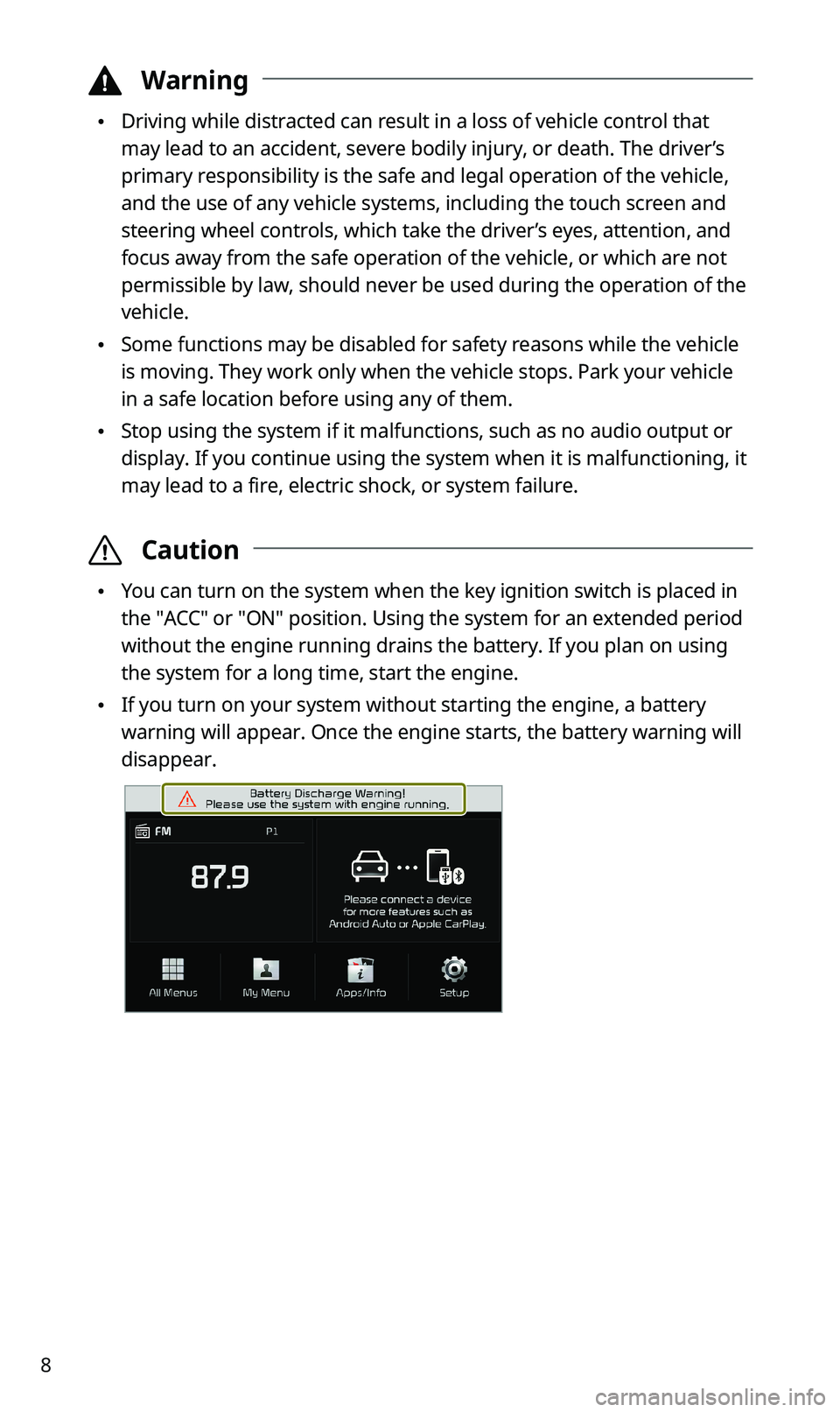
•If you turn on your system without starting the engine, a battery
warning will appear. Once the engine starts, the battery warning will
disappear.
Page 14 of 50
12
Using phone projection
Phone projection enables you to connect your Android smartphone or
iPhone to your system and use their functions via the system. You can
perform and control your smartphone applications by using the larger
screen and enhance your use of the system.
ÜWarning
•Driving while distracted can result in a loss of vehicle control that
may lead to an accident, severe bodily injury, or death. The driver’s
primary responsibility is the safe and legal operation of the vehicle,
and the use of any vehicle systems, including the touch screen and
steering wheel controls, which take the driver’s eyes, attention, and
focus away from the safe operation of the vehicle, or which are not
permissible by law, should never be used during the operation of the
vehicle.
•Do not adjust or set up any phone settings while driving. You may
lose your steering control which could cause an accident and severe
bodily injuries.
ÝCaution
•Use only applications that are compatible with phone projection.
Using incompatible applications may cause problems for your system
or smartphone.
•Only compatible applications will be displayed on the phone
projection screen. You can also check compatible applications by
visiting the following websites:
-Apple CarPlay: https://www.apple.com/ios/carplay
-Android Auto: https://www.android.com/auto
Page 16 of 50
14
3 If your iPhone is locked, unlock it and agree to use
phone projection.
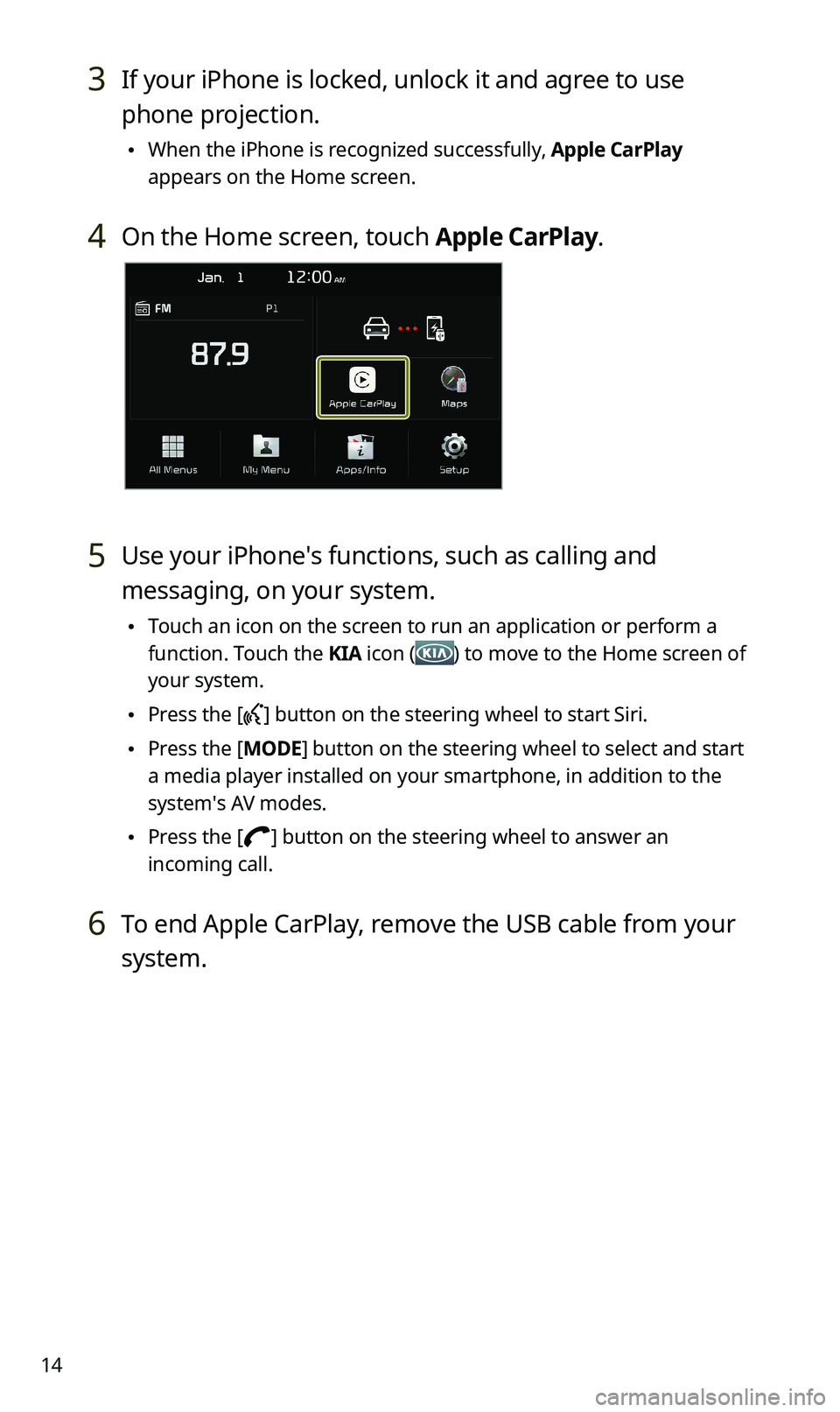
•When the iPhone is recognized successfully, Apple CarPlay
appears on the Home screen.
4 On the Home screen, touch Apple CarPlay.
5 Use your iPhone′s functions, such as calling and
messaging, on your system.
•Touch an icon on the screen to run an application or perform a
function. Touch the KIA icon () to move to the Home screen of
your system.
•Press the [] button on the steering wheel to start Siri.
•Press the [MODE] button on the steering wheel to select and start
a media player installed on your smartphone, in addition to the
system′s AV modes.
•Press the [] button on the steering wheel to answer an
incoming call.
6 To end Apple CarPlay, remove the USB cable from your
system.
Page 18 of 50
16
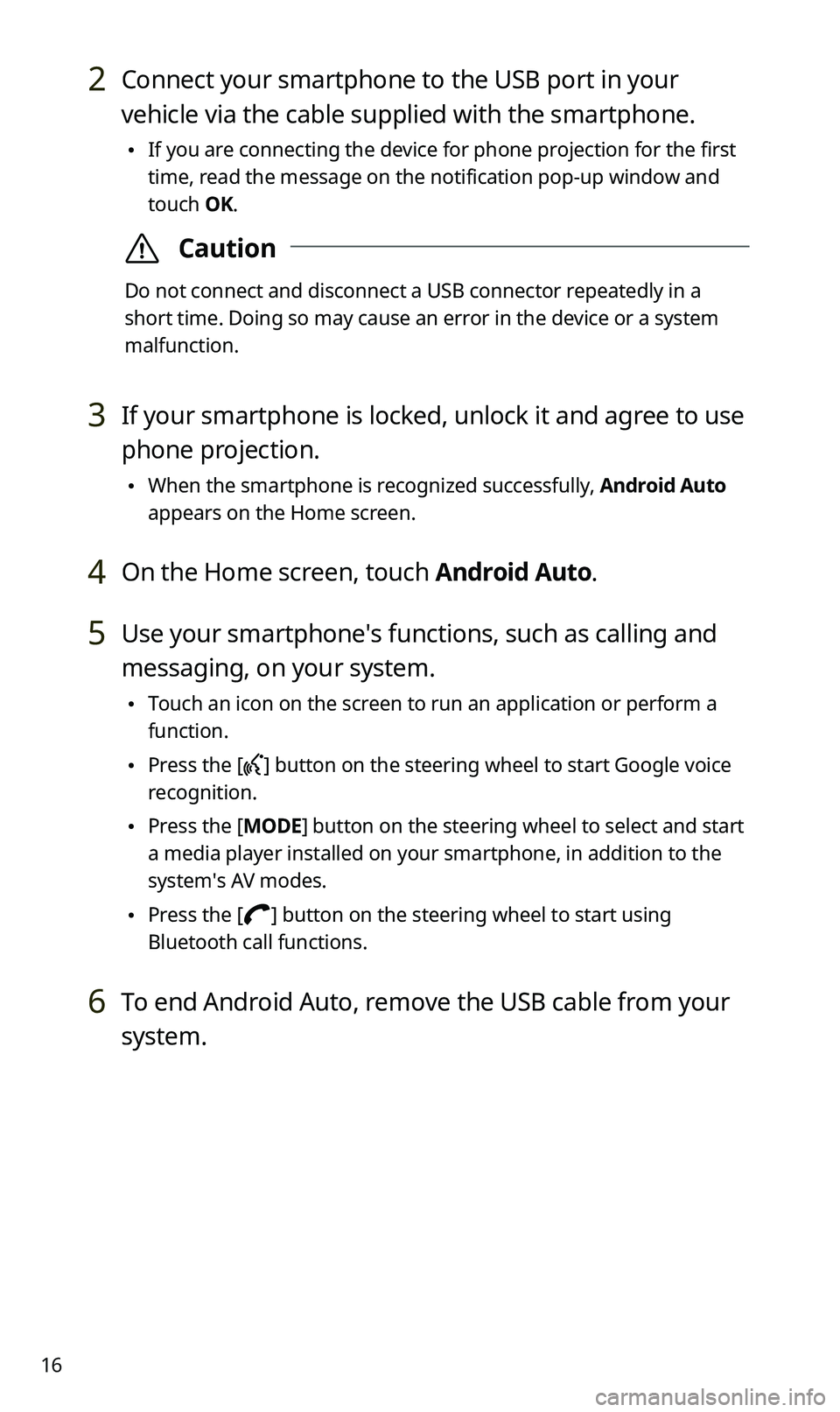
2 Connect your smartphone to the USB port in your
vehicle via the cable supplied with the smartphone.
•If you are connecting the device for phone projection for the first
time, read the message on the notification pop-up window and
touch OK.
ÝCaution
Do not connect and disconnect a USB connector repeatedly in a
short time. Doing so may cause an error in the device or a system
malfunction.
3 If your smartphone is locked, unlock it and agree to use
phone projection.
•When the smartphone is recognized successfully, Android Auto
appears on the Home screen.
4 On the Home screen, touch Android Auto.
5 Use your smartphone′s functions, such as calling and
messaging, on your system.
•Touch an icon on the screen to run an application or perform a
function.
•Press the [] button on the steering wheel to start Google voice
recognition.
•Press the [MODE] button on the steering wheel to select and start
a media player installed on your smartphone, in addition to the
system′s AV modes.
•Press the [] button on the steering wheel to start using
Bluetooth call functions.
6 To end Android Auto, remove the USB cable from your
system.
Page 19 of 50
17
Using the radio
Turning on the radio
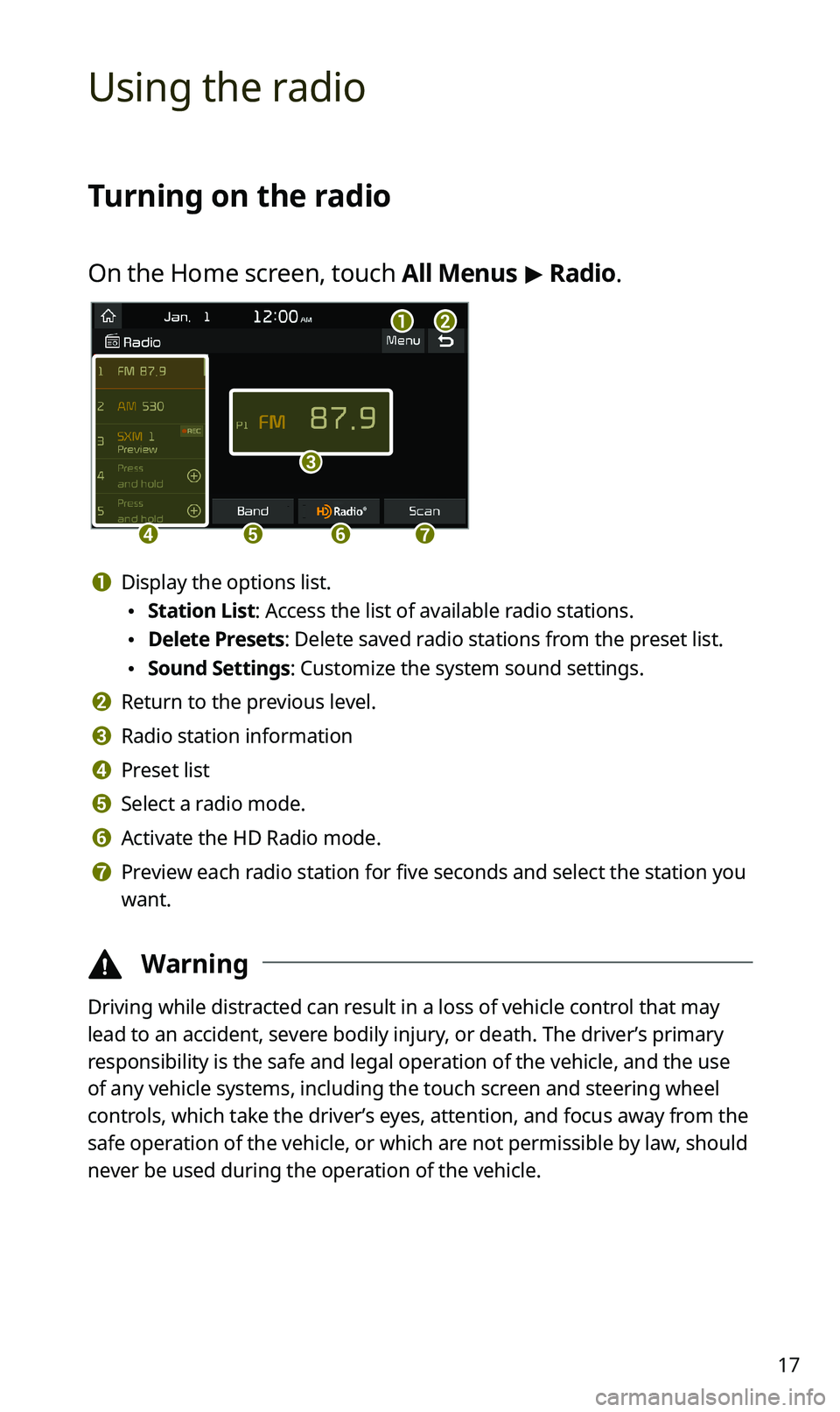
On the Home screen, touch All Menus > Radio.
ab
c
defg
a Display the options list.
•Station List: Access the list of available radio stations.
•Delete Presets: Delete saved radio stations from the preset list.
•Sound Settings: Customize the system sound settings.
b Return to the previous level.
c Radio station information
d Preset list
e Select a radio mode.
f Activate the HD Radio mode.
g Preview each radio station for five seconds and select the station you
want.
ÜWarning
Driving while distracted can result in a loss of vehicle control that may
lead to an accident, severe bodily injury, or death. The driver’s primary
responsibility is the safe and legal operation of the vehicle, and the use
of any vehicle systems, including the touch screen and steering wheel
controls, which take the driver’s eyes, attention, and focus away from the
safe operation of the vehicle, or which are not permissible by law, should
never be used during the operation of the vehicle.
Page 24 of 50
22
ÜWarning
Driving while distracted can result in a loss of vehicle control that may
lead to an accident, severe bodily injury, or death. The driver’s primary
responsibility is the safe and legal operation of the vehicle, and the use
of any vehicle systems, including the touch screen and steering wheel
controls, which take the driver’s eyes, attention, and focus away from the
safe operation of the vehicle, or which are not permissible by law, should
never be used during the operation of the vehicle.
ÛNote
•When you connect an Apple device, playback does not start
automatically and the AV information area remains in the previous
mode. You cannot touch the AV information area to start playback. To
start the media player in the iPod mode, press the [MEDIA] button on
the control panel.
•You can also change the mode by pressing the [MODE] button
repeatedly on the steering wheel.
•Depending on vehicle models and specifications, available buttons or
the appearance and layout of the USB port in your vehicle may vary.
Page 25 of 50
23
Controlling the media player
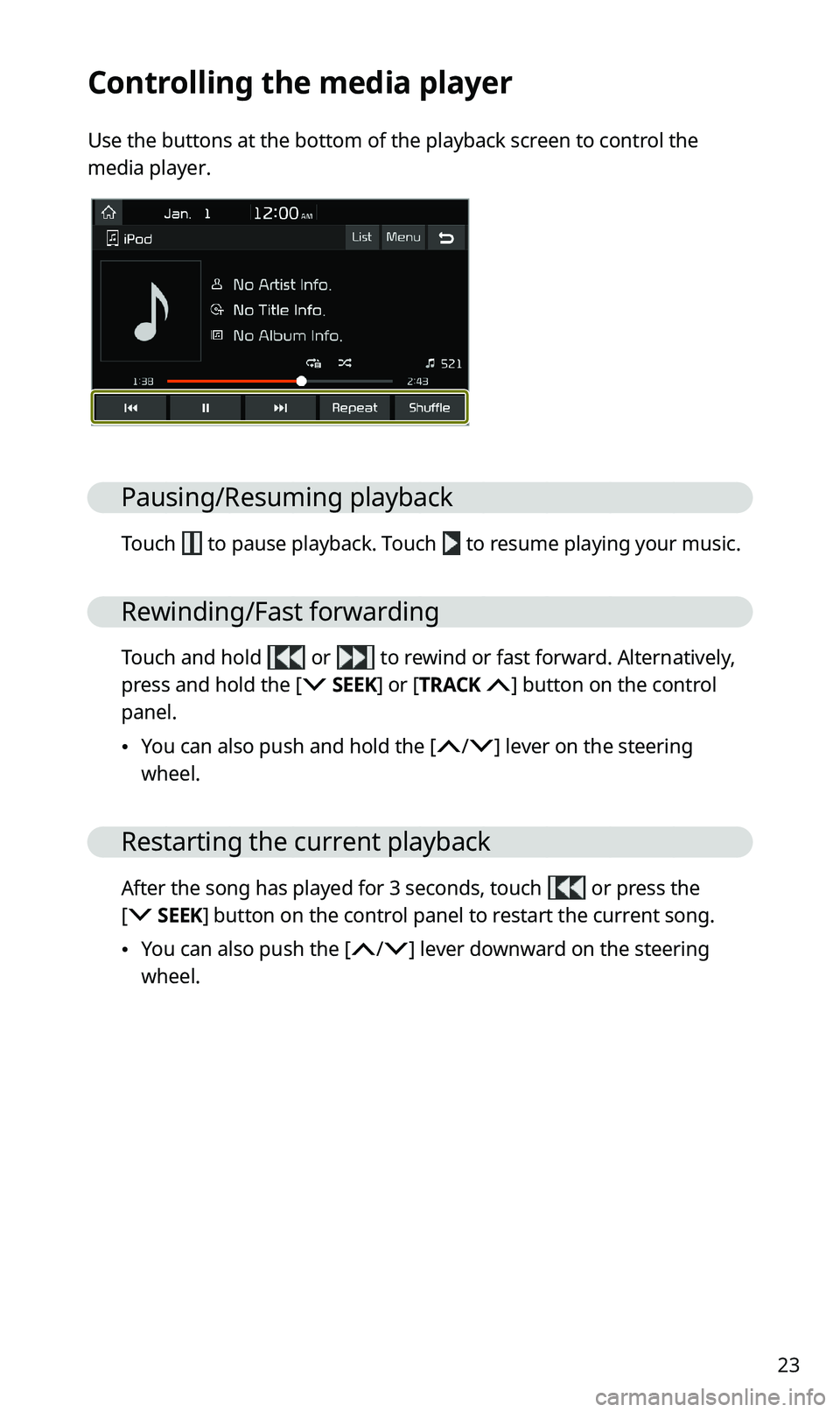
Use the buttons at the bottom of the playback screen to control the
media player.
Pausing/Resuming playback
Touch to pause playback. Touch to resume playing your music.
Rewinding/Fast forwarding
Touch and hold or to rewind or fast forward. Alternatively,
press and hold the [ SEEK] or [TRACK ] button on the control
panel.
•You can also push and hold the [/] lever on the steering
wheel.
Restarting the current playback
After the song has played for 3 seconds, touch or press the
[ SEEK] button on the control panel to restart the current song.
•You can also push the [/] lever downward on the steering
wheel.
Page 26 of 50
![KIA SPORTAGE 2020 Quick Reference Guide 24
Playing the previous or next song
To play the previous song, touch or press the [ SEEK] button
on the control panel within the first 3 seconds of the current song. To
play the next song, touch](/img/2/54564/w960_54564-25.png "KIA SPORTAGE 2020 Quick Reference Guide 24
Playing the previous or next song
To play the previous song, touch or press the [ SEEK] button
on the control panel within the first 3 seconds of the current song. To
play the next song, touch")
24
Playing the previous or next song
To play the previous song, touch or press the [ SEEK] button
on the control panel within the first 3 seconds of the current song. To
play the next song, touch or press the [TRACK ] button on the
control panel.
•You can also use the [/] lever on the steering wheel.
ÛNote
•If more than 3 seconds of playback have elapsed, touch
twice or press the [ SEEK] button on the control panel twice to
play the previous song.
•On the control panel, turn the [FILE] knob to find the desired
song and press the knob within five seconds to play the file.
•If no control is detected within five seconds, the search is
canceled and the screen displays information about the song
currently playing.
Playing repeatedly
Touch Repeat to play a file on repeat. The repeat play mode changes
each time you touch it. The corresponding mode icon will be
displayed on the screen. Depending on the current media or playlist,
available repeat play modes may vary.
Playing in random order
Touch Shuffle to shuffle an album or playlist. The shuffle play mode
is activated or deactivated each time you touch it. When you activate
the shuffle mode, the corresponding mode icon will be displayed
on the screen. Depending on the current media or playlist, available
shuffle play modes may vary.
Page 27 of 50
25
Using Bluetooth
Connecting Bluetooth devices
Bluetooth is a short-range wireless networking technology. Via
Bluetooth, you can connect nearby mobile devices wirelessly to send and
receive data between connected devices. This enables you to use your
devices effectively.
To use Bluetooth, you must first connect a Bluetooth-enabled device to
your system, such as a mobile phone or an MP3 player. Ensure that the
device you want to connect supports Bluetooth.
ÜWarning
Park your vehicle in a safe location before connecting Bluetooth devices.
Distracted driving can cause a traffic accident and lead to personal injury
or death.
ÛNote
•On your system, you can use only Bluetooth Handsfree and Audio
features. Connect a mobile device that supports the Bluetooth
Handsfree or Audio feature.
•For more information on Bluetooth-enabled devices and their
functional compatibility, visit the KIA Motors America website (https://
www.kia.com).
[Pairing devices with your system
For Bluetooth connections, first pair your device with your system to add
it to the system′s list of Bluetooth devices. You can register up to five
devices.
1 On the Home screen, touch All Menus > Setup >
Bluetooth > Bluetooth Connection > Add New.
•If you are pairing a device with your system for the first time, you
can also press the [] button on the steering wheel. Alternatively,
on the Home screen, touch All Menus > Phone.