check KIA TELLURIDE 2020 Navigation System Quick Reference Guide
[x] Cancel search | Manufacturer: KIA, Model Year: 2020, Model line: TELLURIDE, Model: KIA TELLURIDE 2020Pages: 219, PDF Size: 9.16 MB
Page 4 of 219
2
For emergency services (e.g. hospital, fire station), do not rely
solely on the navigation system.
\225Some emergency services may not be included in the navigation map.
Obtain information in advance for emergency situations.
\335System handling
Do NOT arbitrarily disassemble or modify the system.
\225It may cause accident, fire, or electric shock.
Exercise caution to make sure that no liquid or foreign
materials enter the system.
\225It may cause smoke generation, fire ignition, or system failure.
When the screen is not displayed, the volume is muted, or
other system failures occur, immediately stop using the
system.
\225Otherwise, it may cause fire, electric shock, or fatal system failure.
0000
A
If you experience any problems with the system, contact your
place of purchase or dealer.
Safety Warnings
Be sure to keep the following instructions. Otherwise, it may
cause serious injury or accident.
\335Driving
Keep traffic regulations while driving.
\225Relying solely on the navigation system may cause violation of traffic rules
and regulations, resulting in an accident.
In order to check the vehicle speed, see the speedometer first,
not the speed on the navigation system.
\225The speed on the navigation system may differ from actual vehicle speed.
While driving, refrain from watching the screen.
\225An accident may occur by negligence in keeping your eyes forward.
\225To manipulate the screen or buttons requiring multiple steps, be sure to
stop your vehicle.
To use your mobile phone, first stop your vehicle.
\225If you use your mobile phone while driving, it may disperse your attenti\
on,
resulting in an accident.
\225When making a call while driving, use the Bluetooth Hands-free function
and if possible, minimize the call time.
Make sure that the volume of the phone is sufficiently low so
that the external sound is audible.
\225When you drive with no external sound present may cause a traffic accident.
\225When you drive for a long time with a loud audio volume, it may affect your
hearing.
Page 14 of 219
4
Be sure to keep the following instructions. Otherwise, it may
cause serious injury or accident.
\335Driving
Keep traffic regulations while driving.
\225 Relying solely on the navigation system may cause violation of traffic rules
and regulations, resulting in an accident.
In order to check the vehicle speed, see the speedometer first,
not the speed on the navigation system.
\225The speed on the navigation system may differ from actual vehicle speed.
While driving, refrain from watching the screen.
\225An accident may occur by negligence in keeping your eyes forward.
\225To manipulate the screen or buttons requiring multiple steps, be sure to
stop your vehicle.
To use your mobile phone, first stop your vehicle.
\225If you use your mobile phone while driving, it may disperse your attenti\
on,
resulting in an accident.
Make sure that the volume of the phone is sufficiently low so
that the external sound is audible.
\225When you drive with no external sound present may cause a traffic accident.
\225When you drive for a long time with a loud audio volume, it may affect your
hearing.
For emergency services (e.g. hospital, fire station), do not rely
solely on the navigation system.
\225Some emergency services may not be included in the navigation map.
Obtain information in advance for emergency situations.
\335System handling
Do NOT arbitrarily disassemble or modify the system.
\225 It may cause accident, fire, or electric shock.
Exercise caution to make sure that no liquid or foreign
materials enter the system.
\225It may cause smoke generation, fire ignition, or system failure.
When the screen is not displayed, the volume is muted, or
other system failures occur, immediately stop using the
system.
\225Otherwise, it may cause fire, electric shock, or fatal system failure.
0000
A
If you experience any problems with the system, contact your
place of purchase or dealer.
Safety Warnings
Page 17 of 219
7
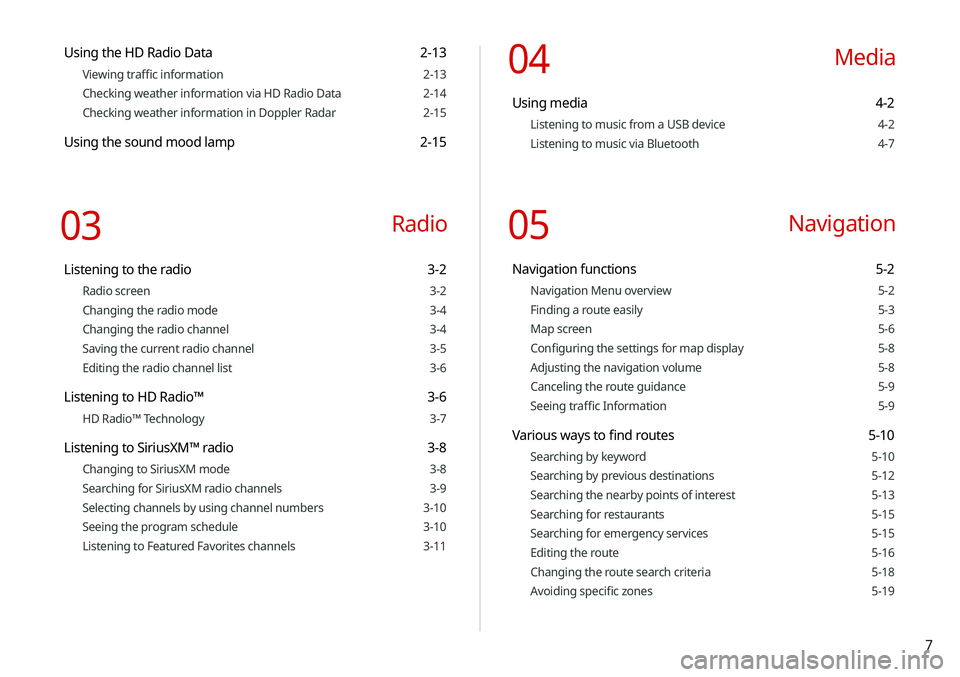
Using the HD Radio Data 2-13
Viewing traffic information 2-13
Checking weather information via HD Radio Data 2-14
Checking weather information in Doppler Radar 2-15
Using the sound mood lamp 2-15
03 Radio
Listening to the radio 3-2
Radio screen 3-2
Changing the radio mode 3-4
Changing the radio channel 3-4
Saving the current radio channel 3-5
Editing the radio channel list 3-6
Listening to HD Radio™ 3-6
HD Radio™ Technology 3-7
Listening to SiriusXM™ radio 3-8
Changing to SiriusXM mode 3-8
Searching for SiriusXM radio channels 3-9
Selecting channels by using channel numbers 3-10
Seeing the program schedule 3-10
Listening to Featured Favorites channels 3-11
04 Media
Using media 4-2
Listening to music from a USB device 4-2
Listening to music via Bluetooth 4-7
05 Navigation
Navigation functions 5-2
Navigation Menu overview 5-2
Finding a route easily 5-3
Map screen 5-6
Configuring the settings for map display 5-8
Adjusting the navigation volume 5-8
Canceling the route guidance 5-9
Seeing traffic Information 5-9
Various ways to find routes 5-10
Searching by keyword 5-10
Searching by previous destinations 5-12
Searching the nearby points of interest 5-13
Searching for restaurants 5-15
Searching for emergency services 5-15
Editing the route 5-16
Changing the route search criteria 5-18
Avoiding specific zones 5-19
Page 18 of 219
8
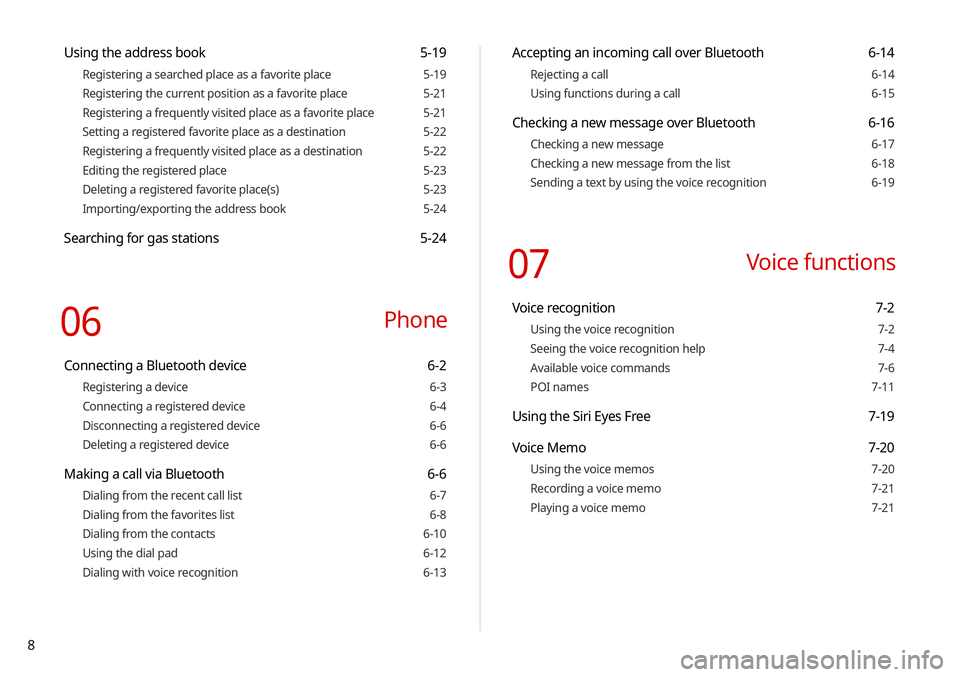
Accepting an incoming call over Bluetooth 6-14
Rejecting a call 6-14
Using functions during a call 6-15
Checking a new message over Bluetooth 6-16
Checking a new message 6-17
Checking a new message from the list 6-18
Sending a text by using the voice recognition 6-19
07 Voice functions
Voice recognition 7-2
Using the voice recognition 7-2
Seeing the voice recognition help 7-4
Available voice commands 7-6
POI names 7-11
Using the Siri Eyes Free 7-19
Voice Memo 7-20
Using the voice memos 7-20
Recording a voice memo 7-21
Playing a voice memo 7-21
Using the address book 5-19
Registering a searched place as a favorite place 5-19
Registering the current position as a favorite place 5-21
Registering a frequently visited place as a favorite place 5-21
Setting a registered favorite place as a destination 5-22
Registering a frequently visited place as a destination 5-22
Editing the registered place 5-23
Deleting a registered favorite place(s) 5-23
Importing/exporting the address book 5-24
Searching for gas stations 5-24
06 Phone
Connecting a Bluetooth device 6-2
Registering a device 6-3
Connecting a registered device 6-4
Disconnecting a registered device 6-6
Deleting a registered device 6-6
Making a call via Bluetooth 6-6
Dialing from the recent call list 6-7
Dialing from the favorites list 6-8
Dialing from the contacts 6-10
Using the dial pad 6-12
Dialing with voice recognition 6-13
Page 40 of 219
2-2
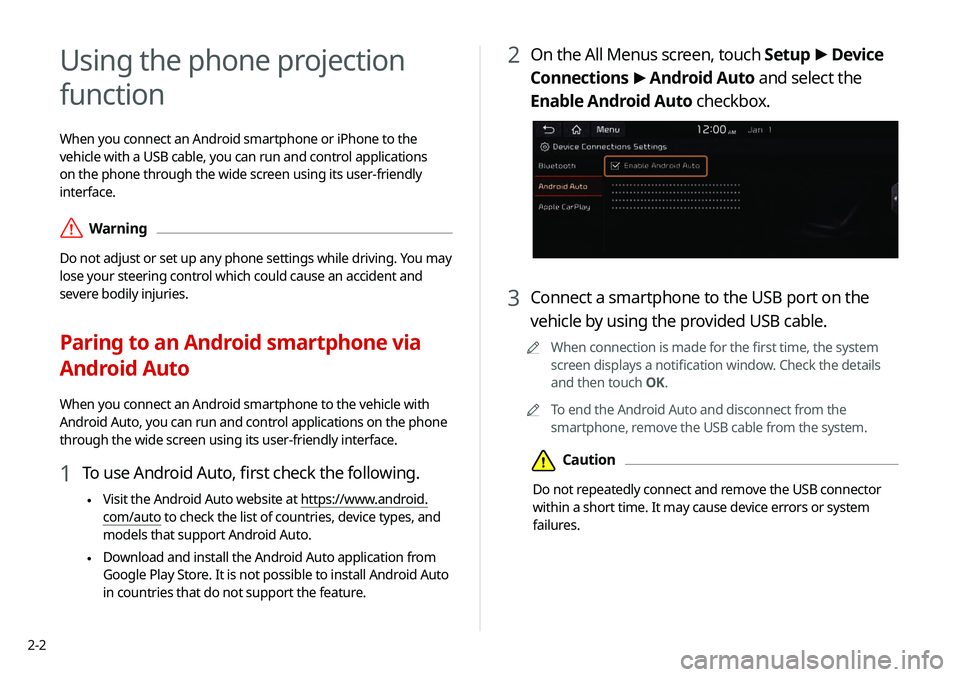
2 On the All Menus screen, touch Setup >
Device
Connections >
Android Auto and select the
Enable Android Auto checkbox.
3 Connect a smartphone to the USB port on the
vehicle by using the provided USB cable.
0000
A
When connection is made for the first time, the system
screen displays a notification window. Check the details
and then touch OK.
0000
A
To end the Android Auto and disconnect from the
smartphone, remove the USB cable from the system.
\334Caution
Do not repeatedly connect and remove the USB connector
within a short time. It may cause device errors or system
failures.
Using the phone projection
function
When you connect an Android smartphone or iPhone to the
vehicle with a USB cable, you can run and control applications
on the phone through the wide screen using its user-friendly
interface.
\335Warning
Do not adjust or set up any phone settings while driving. You may
lose your steering control which could cause an accident and
severe bodily injuries.
Paring to an Android smartphone via
Android Auto
When you connect an Android smartphone to the vehicle with
Android Auto, you can run and control applications on the phone
through the wide screen using its user-friendly interface.
1 To use Android Auto, first check the following.
\225Visit the Android Auto website at https://www.android.
com/auto to check the list of countries, device types, and
models that support Android Auto.
\225Download and install the Android Auto application from
Google Play Store. It is not possible to install Android Auto
in countries that do not support the feature.
Page 42 of 219
2-4
3 Connect an iPhone to the USB port on the vehicle
by using the provided USB cable.
0000
A
When connection is made for the first time, the system
screen displays a notification window. Check the details
and then touch OK.
0000
A
To end the Apple CarPlay and disconnect from the iPhone,
remove the USB cable from the system.
\334Caution
Do not repeatedly connect and remove the USB connector
within a short time. It may cause device errors or system
failures.
4 When the iPhone is locked, unlock it first and then
consent to the use of Apple CarPlay.
After the iPhone is recognized, the All Menus screen displays
the Apple CarPlay menu.
Paring to an iPhone via Apple CarPlay
After you connect an iPhone to the vehicle with Apple CarPlay,
you can run and control applications on the phone through the
system screen.
1 To use Apple CarPlay, first check the following:
\225For iPhone models that support Apple CarPlay, visit the
Apple website at https://www.apple.com/ios/carplay
.
\225Make sure that the Apple CarPlay is activated in the iPhone
settings. When Apple CarPlay is not available, update to
the latest version of iOS.
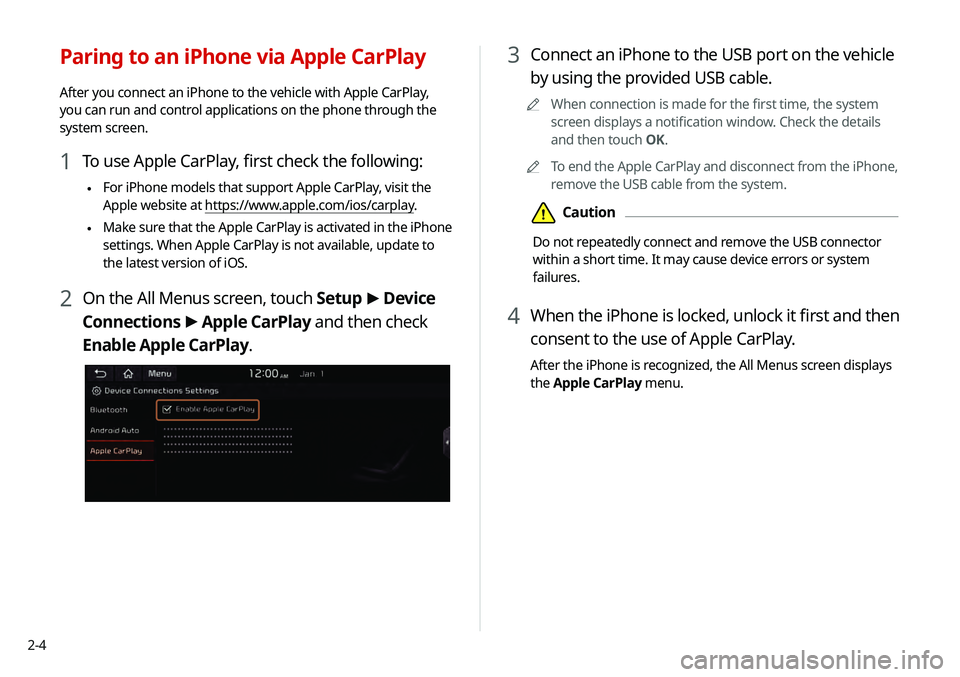
2 On the All Menus screen, touch Setup
>
Device
Connections >
Apple CarPlay and then check
Enable Apple CarPlay.
Page 44 of 219
2-6
Using the rear-view display
1 Press the “R” (Reverse) button shifter (or move the
shift lever to “R” in a previous vehicle model) with
the vehicle turned on.
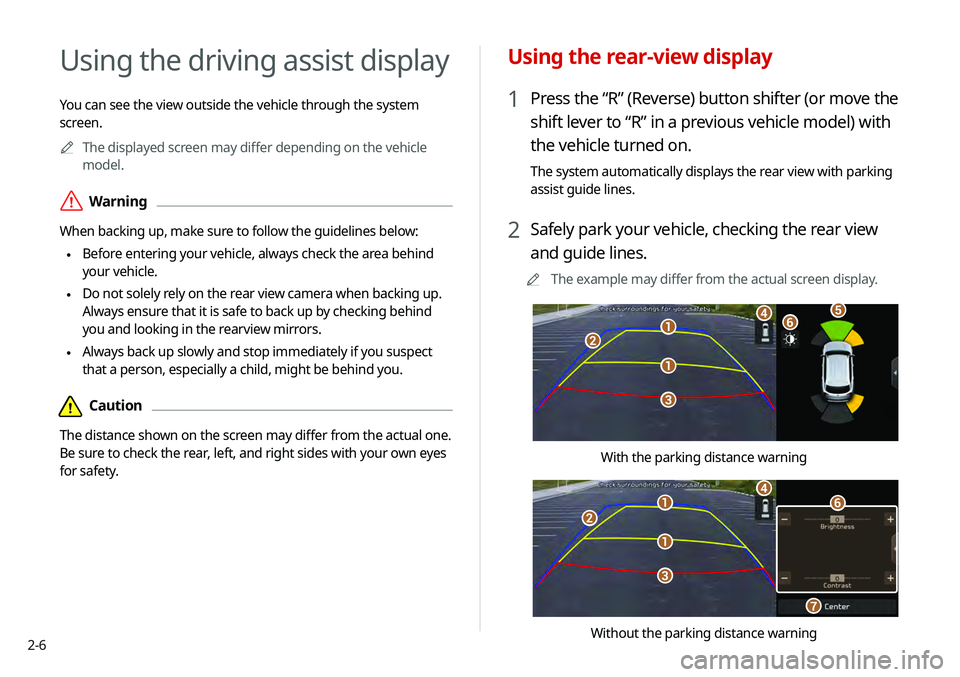
The system automatically displays the rear view with parking
assist guide lines.
2 Safely park your vehicle, checking the rear view
and guide lines.
0000
A
The example may differ from the actual screen display.
\037
\037
\036
\035
\034\033\032
With the parking distance warning
\037
\037
\036
\035
\034
\033
\032
Without the parking distance warning
Using the driving assist display
You can see the view outside the vehicle through the system
screen.
0000
A
The displayed screen may differ depending on the vehicle
model.
\335Warning
When backing up, make sure to follow the guidelines below:
\225 Before entering your vehicle, always check the area behind
your vehicle.
\225 Do not solely rely on the rear view camera when backing up.
Always ensure that it is safe to back up by checking behind
you and looking in the rearview mirrors.
\225 Always back up slowly and stop immediately if you suspect
that a person, especially a child, might be behind you.
\334Caution
The distance shown on the screen may differ from the actual one.
Be sure to check the rear, left, and right sides with your own eyes
for safety.
Page 45 of 219
2-7
0000
A
Available settings may differ depending on the vehicle model
and specifications.
0000
A
You can change the motion settings of the rear camera. On
the All Menus screen, touch Setup >
Advanced >
Extend
Rear Camera Use and then check Extend Rear Camera Use to
turn on the function. The rear view appears continuously even
when you change the shift position other than “R” (Reverse)
after reversing (if equipped).
> See “Extend Rear Camera Use (if
equipped).”
0000
A
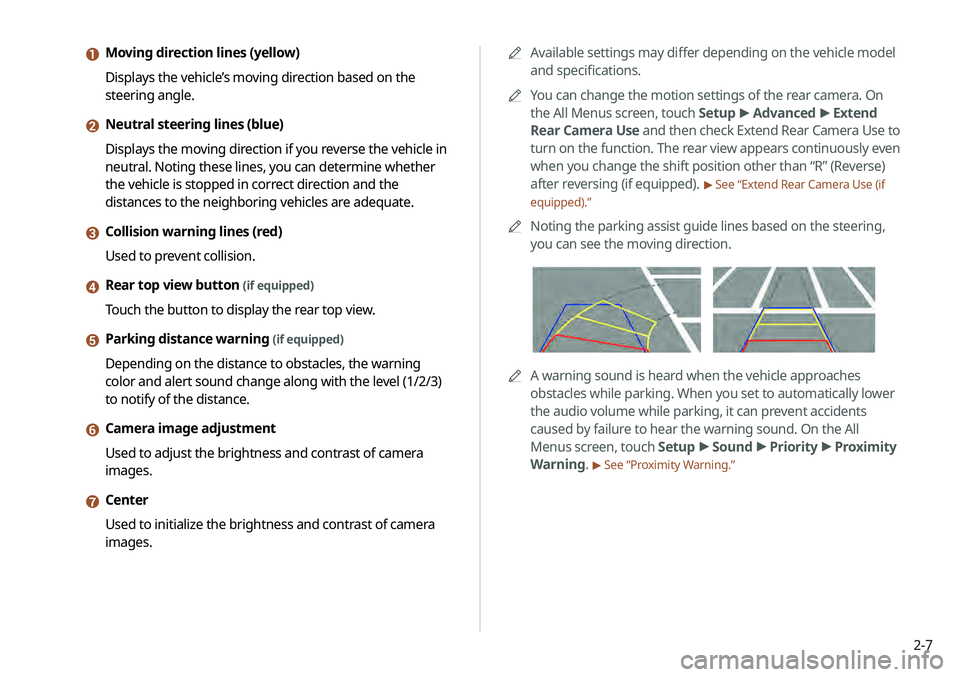
Noting the parking assist guide lines based on the steering,
you can see the moving direction.
0000AA warning sound is heard when the vehicle approaches
obstacles while parking. When you set to automatically lower
the audio volume while parking, it can prevent accidents
caused by failure to hear the warning sound. On the All
Menus screen, touch Setup >
Sound >
Priority >
Proximity
Warning.
> See “Proximity Warning.”
a Moving direction lines (yellow)
Displays the vehicle’s moving direction based on the
steering angle.
b Neutral steering lines (blue)
Displays the moving direction if you reverse the vehicle in
neutral. Noting these lines, you can determine whether
the vehicle is stopped in correct direction and the
distances to the neighboring vehicles are adequate.
c Collision warning lines (red)
Used to prevent collision.
d Rear top view button (if equipped)
Touch the button to display the rear top view.
e Parking distance warning (if equipped)
Depending on the distance to obstacles, the warning
color and alert sound change along with the level (1/2/3)
to notify of the distance.
f Camera image adjustment
Used to adjust the brightness and contrast of camera
images.
g Center
Used to initialize the brightness and contrast of camera
images.
Page 46 of 219
![KIA TELLURIDE 2020 Navigation System Quick Reference Guide 2-8
Viewing the surround view while driving
1 In order to see the surround view, press the []
button.
The system displays both the front view and surround view.
0000
A
The surround view monitor funct](/img/2/54882/w960_54882-45.png "KIA TELLURIDE 2020 Navigation System Quick Reference Guide 2-8
Viewing the surround view while driving
1 In order to see the surround view, press the []
button.
The system displays both the front view and surround view.
0000
A
The surround view monitor funct")
2-8
Viewing the surround view while driving
1 In order to see the surround view, press the []
button.
The system displays both the front view and surround view.
0000
A
The surround view monitor function operates only when
any of the following conditions is met.
-The driving speed is below 9mph with the shift position
in “D” (Drive).
-The vehicle is statinoary and the shift position is in “D”
(Drive) or “N” (Neutral).
Viewing the rear top view display (if equipped)
You can look down the rear view from the top through the rear-
view display.
1 On the rear-view screen, touch .
2 Check the top view display and assist guide lines.
0000
A
The guide lines appear on the rear top view.
-Displays the space required to open the trunk (tailgate).
After a parking, check whether the space is sufficient to
open the trunk and there is no obstacle.
-Displays the extension line from the center of the
vehicle. According to the steering direction, the moving
direction of the center is displayed on the screen.
Surround View Monitor (if equipped)
You can check the surroundings by using multiple cameras on the
vehicle.
0000
A
Use the +/- button on the right of the screen to zoom in or
out.
Page 48 of 219
![KIA TELLURIDE 2020 Navigation System Quick Reference Guide 2-10
Using the rear-seat climate
control system
(if equipped)
You can check or set the rear-seat climate status on the system
screen.
1 Perform any of the following methods:
\225Press the [
REAR]](/img/2/54882/w960_54882-47.png "KIA TELLURIDE 2020 Navigation System Quick Reference Guide 2-10
Using the rear-seat climate
control system
(if equipped)
You can check or set the rear-seat climate status on the system
screen.
1 Perform any of the following methods:
\225Press the [
REAR]")
2-10
Using the rear-seat climate
control system
(if equipped)
You can check or set the rear-seat climate status on the system
screen.
1 Perform any of the following methods:
\225Press the [
REAR] button on the climate control system.
\225On the All Menus screen, touch Rear Climate Controls.
2 Select and then change the settings.
\037\036\035
\034\033
\032
\031
For automatic temperature control
Configuring the surround view monitor
settings
1 On the surround view screen, touch .
2 Select and then change the settings.
\225To select the information to appear on the video, touch
Display Contents. (e.g. Top view parking guidance, rear
view parking guidance, parking distance warning).
\225To select the default view for top view monitoring, touch
Top View Default Mode.
\225To select the default view for using the surround view
monitor function while driving, touch
Front View Default
Mode.